
Message every time I open a program

arrow

New member
Local time
7:00 PM
Messages
8
Every time I open most programs I am getting the "Do you want to allow the following program to make changes to this computer?"

This is happening with most programs I run.

I am sure that I was not getting this a few weeks ago.

I have had to turn off User Account Control to stop this.

Any idea what might have caused this change.
 

Attachments
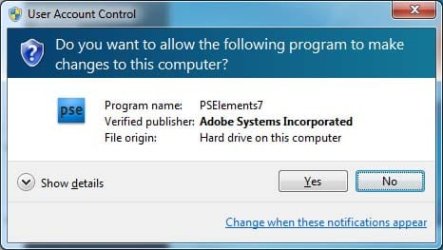
  • screen.jpg
    screen.jpg
    41.1 KB · Views: 20

My Computer My Computer

At a glance

Windows 7 64bit
OS
Windows 7 64bit
Every time I open most programs I am getting the "Do you want to allow the following program to make changes to this computer?"

This is happening with most programs I run.

I am sure that I was not getting this a few weeks ago.

I have had to turn off User Account Control to stop this.

Any idea what might have caused this change.

Arrow hi and welcome

It is UAC. many of us find it onerous. I always turn it off.

Ken J+
 

My Computer My Computer

At a glance

Win 8 Release candidate 8400[email protected]4 gigsNvidia 9600M
Computer Manufacturer/Model Number
HP Pavillion dv-7 1005 Tx
OS
Win 8 Release candidate 8400
CPU
[email protected]
Memory
4 gigs
Graphics Card(s)
Nvidia 9600M
Sound Card
HD built-in
Monitor(s) Displays
17" Wxga
Screen Resolution
1440x900
Cooling
none
Internet Speed
45Mb down 5Mb up
It looks like UAC got turned back on from that message, so you should check your settings again. I cannot tell you to turn it off because it is not recommended, but I turn it off because it is a nuisance to me.
 

My Computer My Computer

At a glance

Windows 7 Ultimate X64Q6600 @3.62X2 MushkinXFX 4870X2
OS
Windows 7 Ultimate X64
CPU
Q6600 @3.6
Motherboard
DFI X38-T2R
Memory
2X2 Mushkin
Graphics Card(s)
XFX 4870X2
Monitor(s) Displays
Philips 240PW
Hard Drives
Intel X25-M 80GB
PSU
PCP&C 750W
Case
Antec 900
Cooling
TRUE 120
I would turn it back on, but just leave it to the minimum setting.
 

My Computer My Computer

At a glance

Vista Ult64, Win7600Intel Core 2 Quad Q6600 @ 2400 MHz 64bit OS4096 MB DDR3-SDRAMATI Radeon HD 3870 Series x2 Crossfired
Computer Manufacturer/Model Number
Self Build 64bit
OS
Vista Ult64, Win7600
CPU
Intel Core 2 Quad Q6600 @ 2400 MHz 64bit OS
Motherboard
Asus P5E3 Deluxe WiFi @p 64 bit OS
Memory
4096 MB DDR3-SDRAM
Graphics Card(s)
ATI Radeon HD 3870 Series x2 Crossfired
Sound Card
Realtek on board
Monitor(s) Displays
Samsung SyncMaster - 23 inches
Screen Resolution
1680x1050 pixels at 60 Hz in True Colors
Hard Drives
Hitachi (250 GB)/Samsung 750 GB. /Barracuda 160 GB.
My Book 1 TB external..
PSU
Cooler Master 1000w
Case
Cooler Master Cosmos 1000.
Cooling
Fans and fresh air,
Keyboard
Wireless
Mouse
Wireless
Internet Speed
Never fast enough
Other Info
I use a Magnum.
OK I have changed it to "Never Notify" and it has stopped bugging me.....
 

My Computer My Computer

At a glance

Windows 7 64bit
OS
Windows 7 64bit
OK I have changed it to "Never Notify" and it has stopped bugging me.....

Just remember now when something installs you won't be notified and that can be a bad thing. From your first post it shows you are a beginer and you need all the help you can get. I advise you to turn uac on so you will atleast be advised something is trying to install on your comp, it's just a click and your done.

Smitty
 

My Computer My Computer

At a glance

Windows 7 Home Premium 64 bitIntel Core 2 quad Extreme Q9770 @ 3.2 GHz4x2 GB Muskin 1600 MHz ramNVidia GTX 250
Computer Manufacturer/Model Number
Dell XPS 730
OS
Windows 7 Home Premium 64 bit
CPU
Intel Core 2 quad Extreme Q9770 @ 3.2 GHz
Memory
4x2 GB Muskin 1600 MHz ram
Graphics Card(s)
NVidia GTX 250
Sound Card
Soundblaster X-Fi Fatality Champion
Monitor(s) Displays
2 Dell 2007WFP Ultrascans
Screen Resolution
3360 x 1050
Hard Drives
WD Black 1TB sata, 2-WD Black 500 sata, 2-Seagate 500 Go external
PSU
1000 Watt
Cooling
air
Keyboard
MS Natrual Keyboard Pro
Mouse
Logitech Wireless Trackball
Internet Speed
DSL Elite
You could just press the left arrow then enter very quickly. That's what I do.
 

My Computer My Computer

At a glance

Windows Seven UltimateAMD Piledriver FX 8320 @ 3.5GHzCrucial Ballistix 8GB 1600 MHz DDR3ASUS GeForce GTX 970 Strix Edition @ 1.114 GHz
Computer type
PC/Desktop
Computer Manufacturer/Model Number
The Dominator?
OS
Windows Seven Ultimate
CPU
AMD Piledriver FX 8320 @ 3.5GHz
Motherboard
ASUS M5A97 EVO R2.0
Memory
Crucial Ballistix 8GB 1600 MHz DDR3
Graphics Card(s)
ASUS GeForce GTX 970 Strix Edition @ 1.114 GHz
Sound Card
Integrated
Monitor(s) Displays
LG 23EA63V 23" IPS 1080p Monitor
Screen Resolution
1920x1080
Hard Drives
Samsung SSD 840 EVO 120 GB
1x WD GreenPower 500GB 7200RPM
1 External HDD 1TB
PSU
Corsair CX500
Case
Zalman Z9 Plus
Cooling
CPU - Corsair Hydro H80i, Case - 3x Aerocool Shark Edition
Keyboard
Xenta Backlit Keyboard (Not very good!)
Mouse
Logitech G400
Internet Speed
Download: 7 mb/s Upload: 0.76 mb/s
Antivirus
Microsoft Security Essentials
Browser
Google Chrome
Other Info
Overclockers UK Desk Pad 89 x 45 cm
1200x730x600mm Desk
Using Virtual Audio Cable to split stereo sound into Audio Technica ATH-M50 headphones and Logitech X-530 speakers.
From your first post it shows you are a beginer
Actually my first computer was a Commodore Pet on which I taught myself Basic. So not really a beginner. Just someone who does not understand why Windows 7 needs to warn me every time Word, Excel, Money, Photoshop etc starts.

Surely that can't be right. Vista didn't do that.
 

My Computer My Computer

At a glance

Windows 7 64bit
OS
Windows 7 64bit
UAC was probably at the maximum settings. At minimum setting it warns a lot less. There have actually been tests that show that UAC is almost useless. It was an antivirus company that ran the test to prove that antivirus is still needed with Windows 7. Sophos exposed Windows 7 with no antivirus and no UAC to 10 virus's that were circulating at the time and 8 of 10 installed. With UAC enabled it blocked 1 more. So UAC is not as effective as Microsoft would allow you to believe. I always shut mine off, and most users would be fine with the minimum setting if they feel more secure with it on. The best antivirus is to know what you are downloading and installing on your computer. Know what websites you go to and what websites your kids go to. Monitor your kids computer usage and use Windows 7 built in parental controls to help minimize potential unwanted use and harm to your computer, especially if you have important documents and files you don't want to lose.
 

My Computer My Computer

At a glance

Windows 7 Ultimate x64Intel Pentium Dual Core T42004gb PC-6400Integrated Intel GMA 4500
Computer Manufacturer/Model Number
Asus K60IJ
OS
Windows 7 Ultimate x64
CPU
Intel Pentium Dual Core T4200
Motherboard
HP Laptop
Memory
4gb PC-6400
Graphics Card(s)
Integrated Intel GMA 4500
Sound Card
onboard(laptop)
Monitor(s) Displays
16"
Screen Resolution
1300 X 766 with true 720p HD support
Hard Drives
320GB 5400RPM
Mouse
Microsoft 3000 laptop mouse
Internet Speed
15mbit+ down and 768kbit up
Other Info
1TB external Western Digital Essentials HDD
From your first post it shows you are a beginer
Actually my first computer was a Commodore Pet on which I taught myself Basic. So not really a beginner. Just someone who does not understand why Windows 7 needs to warn me every time Word, Excel, Money, Photoshop etc starts.

Surely that can't be right. Vista didn't do that.

Also make sure that you did not try to install the programs in compatibility mode, and make sure they are not running in compatibility mode and/or are not granted administrative privileges. Both of these would set UAC off; for example, I have to run Sim City 3000 with administrative priveleges so I can save my games. But every time the program starts, I have to give a yes/no answer to the UAC prompt. To check, go to the program files folder and go into the properties. Should be hidden somewhere in there.
 

My Computer My Computer

At a glance

Windows 7 x86, Mac OS 8.6Intel Core2Duo P9500 2.53 GHz3.00 GBATI Mobility Radeon HD3470 / Intel GMA X4500 ...
Computer Manufacturer/Model Number
Lenovo Thinkpad T400; old skool system: beige Power Macintosh G3
OS
Windows 7 x86, Mac OS 8.6
CPU
Intel Core2Duo P9500 2.53 GHz
Motherboard
uhhh... Lenovo?
Memory
3.00 GB
Graphics Card(s)
ATI Mobility Radeon HD3470 / Intel GMA X4500 (switchable)
Monitor(s) Displays
HN LED
Screen Resolution
1280x800
Hard Drives
160 GB 7200 RPM
Mouse
LASER!!!
Internet Speed
Unreasonably slow, especially considering what I pay.
One other thing to confirm before one has to resort to turning down UAC settings: Do look to see where the program file you are having trouble with is located on your drive!! That was my problem.

Background: three years ago I upgraded to Windows 7 64bit Professional from an XP computer. I liked the idea of being able to run legacy programs in compatibility mode but had never had a 64bit computer before and I didn't understand why there were both Program Files and Program Files (x86) folders on my c:/ drive. Being used to the old computer and not knowing which to use I did neither and just moved some programs directly into c:/ from an external hard drive using the tried and true cut and paste approach. So for e.g. I had a program file path that looked like this for my Family Tree Maker 16 program: C:/FTW . When I opened that program the first time I got error messages saying that the program was not designed for Windows 7 but pushed thru this till my program finally opened. I assumed that it was just a matter of playing with the compatibility settings (right click icon, click properties, select compatibility tab) to make it run OK and I did that. I still got the annoying "do you want the following program to make changes to this computer?" prompt every time I opened the program but it at least it would open and run so I was satisfied that what I had done was more or less working. I just resigned myself to living with the annoying prompt. It stayed that way for three years. Yesterday, I got fed up and went on line to find a solution and saw this post and others. First I tried playing with the permissions box to make it go away -- no joy.

Then on a whim I decided to clean up my program file lists and recalled that this and other program files were just sitting directly under the C:/ in the path. So I moving them into my Program Files (x86) folder, created a new shortcut icon and went to open the Family Tree Maker to make sure the shortcut was working. Wonder of wonders -- the annoying prompt had finally vanished. All while leaving the User Account Control settings at the recommended level.

For experts I suspect the proper location for the installation of programs is such a 'no brainer" that no one seems to have thought it worth mentioning on any of the forum pages related to this subject -- none I could find anyway. So, at the risk of stating the bleeding obvious I thought I would post my tip in the hopes of helping others who may have done things wrong when they were still learning the ropes of Windows 7 and are getting the annoying prompt.
 

My Computer My Computer

At a glance

Windows 7 Professional 64bit8.00GB
Computer type
PC/Desktop
Computer Manufacturer/Model Number
HPE-541f
OS
Windows 7 Professional 64bit
Memory
8.00GB
Back
Top