Firefox - Enable Aero Glass Transparency

How to Have Firefox with Glass Transparency in Windows 7

   Information
In this tutorial I will show you how to make your Firefox have the Aero Glass Transparency look.
   Note
I do not take credit for any of the scripts uploaded within this tutorial, apparently I don't even have any knowledge about CSS scripts before but learning it bit by bit was fun. I am not that good with CSS so I borrowed the scripts used in this tutorial. The scripts were made by YupYup and 12eason from this thread, you can view the thread for reference and questions. What I did in this tutorial is I merged their methods to achieve a much more flexible solution in glassing Mozilla Firefox. Slight modifications were made by me from their script for my own personal liking but you can tweak the style to your own liking as well :).

• Okay then, let's begin.... :)
   Warning
Remember to always backup your files before proceeding
•This method only works for the latest version of Firefox (Mozilla Firefox 3.5.1)

•This method only works with Glasser and NOT with All-Glass


Here's How:

Step 1: Install Nightly Tester Tools to get Glasser Extension to work (in case you don't have it yet), if you already have Nightly Tester Tools then proceed to Step 2.

Step 2: Download Glasser 1.1.1 here - Glasser 1.1.1 and use force install to make it work with Firefox.

Step 3: On your windows explorer type %appdata%\Mozilla and browse inside your Firefox Profile then go through the following folders: extensions > [email protected] > chrome > content

Replace the 'dwm-overlay.js' in your Firefox Profile with this one -View attachment dwm-overlay.js.txt

   Tip
» Copy the content of the text document and save it as "dwm-overlay.js" without quotations.
   Information

You could add more websites onto the whitelist if you would like to apply your own 'Glass Style' on that certain website..


Step 4: On your windows explorer type %appdata%\Mozilla and browse inside your Firefox Profile then go through the following folders: extensions > [email protected] > chrome > skin > classic

Replace the 'overlay.css' in your Firefox Profile with this one - View attachment overlay.css.txt

   Tip
» Copy the content of the text document and save it as "overlay.css" without quotations.


Step 5: Install Stylish (in case you don't have it yet- then restart firefox if needed), if you already have Stylish then proceed to Step 6.

Step 6: Choose and download the appropriate updated style for you from the files I attached below:

View attachment Aero Fox 7 - Glassed for Default Sidebar.txt

View attachment Aero Fox 7 - Glassed for All-in-One Sidebar.txt

   Information
I managed to somehow make the styles work with other themes but I'm not sure if it works on all themes


Step 7:

  • Open the style you just downloaded with notepad or word pad or whichever you prefer, and copy the entire contents.
  • Now in Firefox click on Tools > Add-ons > User styles and click the write new style button at the top right corner.
  • At the top of new style window give it a name and paste what you just copied in step into the main area and click save. The style will automatically be enabled.
Step 8: Restart Firefox.


   Information
There are still bugs and some fixes that needs to be done.. like the scroll bars appearing black on websites and some tooltips
   Tip
Just switch tabs to gain normal view when the page seems illegible, this usually happens after switching from a Glassed tab to a non-Glassed tab


   Information
Here's the glass theme for "Windows 7 v2 b" for sevenforums made by 12eason
-View attachment Seven Forums - Aero Effect Win v2 b theme.css.txt


For the Google and about:blank page you could use YupYup's code here in this thread.

The Google and about:blank page on the screenshots below are what I'm currently using, if you like them I'll upload them for you :)

Screenshots:
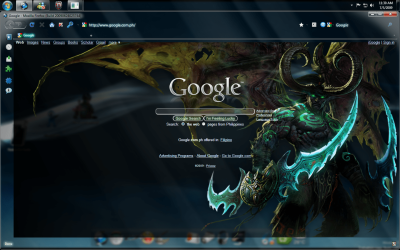
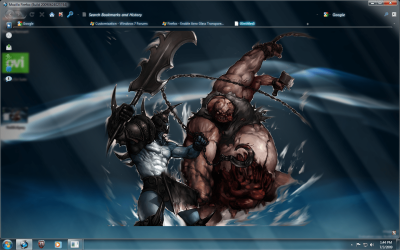
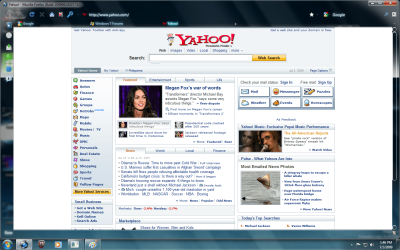
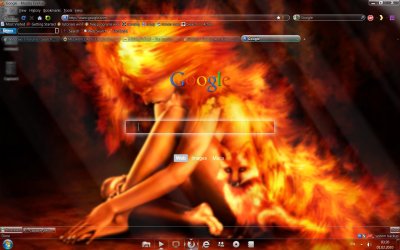
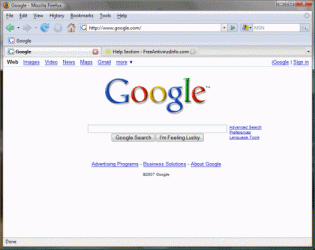
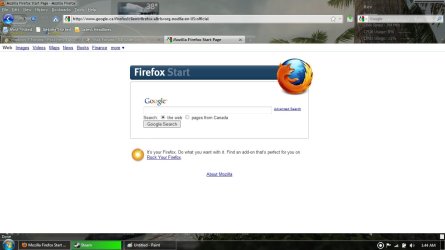
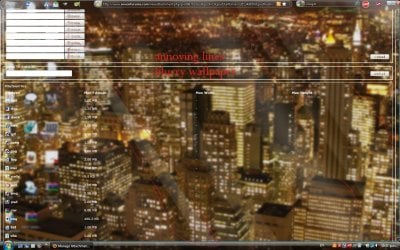
Untitle2d.pngUntitled.pngUntitled3.pngUntitled4.png

   Information
The Screenshots above show that "google.com" and "sevenforums.com" are glassed. Those webpages were glassed because i have a Stylish code for those websites to make them look glass, but in order to achieve the full glass effect, you would still have to put the domain of those websites on your whitelist. On the other hand "yahoo.com" is not glassed since i don't have a Stylish code for that website and it looks normal because I did not put its domain on my white list. Even though the webpage looks normal as it should, I still have the transparency on my browser.


Last edited by a moderator:
nice work lads.....:D


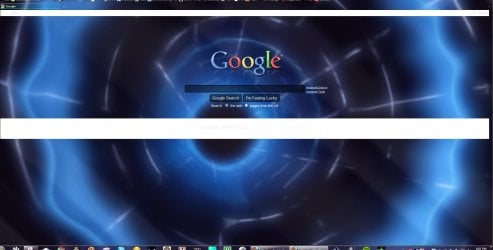
i need a little guidance with getting a clear glassed homepage..

glasser.jpg

as you can see i have two huge white bars where the text runs across the screen..... ive missed something but not sure what :p
 

My Computer My Computer

Computer Manufacturer/Model Number
myself
OS
SEVEN x64
CPU
Q9450 @ 3.6GHZ 1.34v
Motherboard
ASUS P5K PREMIUM P35
Memory
8GB 1066 buffalo firestix @ 1152mhz CL5
Graphics Card(s)
Sapphire HD 5970 + GTX260 (physX)
Sound Card
Creative X-FI Xtreme Gamer
Monitor(s) Displays
SAMSUNG 20'' & SAMSUNG 23'' (dual screens)
Screen Resolution
2048x1152 & 1680x1050
Hard Drives
1x seagate 160gb IDE & 1x seagate 160gb SATA
PSU
XCILIO 850w (78A)
Case
CM590 1x 120x38mm & 2x92x38mm / 4x 120x25mm
Cooling
AC7 PRO @ 92x38mm blower, Lamptron military bus bay controll
Keyboard
LOGITECH E110
Mouse
logitech NX5
Internet Speed
2MB
Other Info
its a continual ''work in progress''....
nice work lads.....:D


i need a little guidance with getting a clear glassed homepage..

View attachment 51258

as you can see i have two huge white bars where the text runs across the screen..... ive missed something but not sure what :p

Please note the changes i have made to fix this issue, i have not copied the whole text file just the changes i made.
Code:
@namespace url([url=http://www.w3.org/1999/xhtml]XHTML namespace[/url]);


@-moz-document url-prefix([URL="http://www.google/"]http://www.google[/URL]),

               url-prefix([URL="https://www.google/"]https://www.google[/URL]),

               url-prefix([URL="http://maps.google.com/"]http://maps.google.com[/URL]),

               url-prefix([URL="http://images.google.com/"]http://images.google.com[/URL]),

               url-prefix([URL="http://blogsearch.google.com/"]http://blogsearch.google.com[/URL]),

               url-prefix([URL="http://video.google.com/"]http://video.google.com[/URL]),

               url-prefix([URL="http://news.google.com/"]http://news.google.com[/URL]),

               url-prefix([URL="http://books.google.com/"]http://books.google.com[/URL]),

               url-prefix([URL="http://scholar.google.com/"]http://scholar.google.com[/URL]),

               url-prefix([URL="http://picasaweb.google.com/"]http://picasaweb.google.com[/URL]),

               url-prefix([URL="http://sites.google.com/"]http://sites.google.com[/URL]),

               url-prefix([URL="http://code.google.com/"]http://code.google.com[/URL]),
               
               url-prefix([URL="http://groups.google.com/"]http://groups.google.com[/URL]),

               url-prefix([URL="http://reader.google.com/"]http://reader.google.com[/URL])


{


FORM*:not([name="q"]):not([type="submit"]):not([type="button"]):not([class="gac_m"]):not(img) 
{ 
 background: transparent !important; 
}

.gac_m, #fade, #sbl, #fctr, #ghead 

{

padding-top: 20px!important;

background-color: rgba(0,0,0,0.0) !important;

opacity: 0.99 !important;

Code:
Also note i had to make a change to the color code just under new command from 0,0,0,0.5 to 0,0,0,0.0

Hope this helps

cheers
xxrazor
 

My Computer My Computer

OS
Dual Boot 7600 RTM x64
Motherboard
Asus P5B
Memory
6GB
Graphics Card(s)
NVIDIA GeForce 9600GT
Monitor(s) Displays
Benq 24" x 2
Screen Resolution
1600 x 1024
Hard Drives
Seagate 160 GB Sata
Western Digital 1.5 TB Sata
Seagate 400 GB External
Case
Antec

My Computer My Computer

Computer Manufacturer/Model Number
Micro-Star International/MS-7529
OS
Windows 7 Ultimate x32
CPU
DualCore Intel Pentium E2200, 2218 MHz (11 x 202)
Motherboard
MSI G31M3 V2 (MS-7529) (2 PCI, 1 PCI-E x16,2 DDR2 DIMM)
Memory
2 GB DDR2-800 DDR2 SDRAM
Graphics Card(s)
nVIDIA GeForce 9500GT 1GB
Sound Card
Realtek ALC888/1200 @ Intel 82801GB ICH7
Monitor(s) Displays
Samsung SyncMaster 2253BW (Digital) 22'' LCD
Screen Resolution
1680x1050
Hard Drives
SAMSUNG HD322IJ ATA Device (298 GB , IDE)
cheers.......:)

but TBH after 24hrs of running the glass Google screens i had to remove it again, its very pretty but just too much for general everyday use....
 

My Computer My Computer

Computer Manufacturer/Model Number
myself
OS
SEVEN x64
CPU
Q9450 @ 3.6GHZ 1.34v
Motherboard
ASUS P5K PREMIUM P35
Memory
8GB 1066 buffalo firestix @ 1152mhz CL5
Graphics Card(s)
Sapphire HD 5970 + GTX260 (physX)
Sound Card
Creative X-FI Xtreme Gamer
Monitor(s) Displays
SAMSUNG 20'' & SAMSUNG 23'' (dual screens)
Screen Resolution
2048x1152 & 1680x1050
Hard Drives
1x seagate 160gb IDE & 1x seagate 160gb SATA
PSU
XCILIO 850w (78A)
Case
CM590 1x 120x38mm & 2x92x38mm / 4x 120x25mm
Cooling
AC7 PRO @ 92x38mm blower, Lamptron military bus bay controll
Keyboard
LOGITECH E110
Mouse
logitech NX5
Internet Speed
2MB
Other Info
its a continual ''work in progress''....
Hi,

What are the requirements? I using firefox 3.6.8 and already have a glasser 2.2.0.3.7 installed on it. Should I downgrade to firefox 3.5 and glasser 1.1 or are there any other codes working for my current setup? Thanks in advance.
 

My Computer My Computer

OS
Windows 7
How to get Full Aero Mozilla Firefox (Win 7/Vista)

   Tip
This Tutorial might not work if you do not have the latest Firefox (Version 3.6.8).
To get the latest version, in FireFox, click Help, and then in the context menu select About Mozilla Firefox. The version of your Firefox will be displayed there.


   Note
Here are screenshots displaying Firefox before and after the Aero interface was applied.


Before: firefox.gif
After:
scren.jpg

STEP 1: First, open Firefox. After that, click this Download Link:
Download

<--- This will download an Addon which will enable Aero in Firefox.

STEP 2:Click allow on the top when Firefox says it blocked the download. Then, Click install when the option comes. After that it will ask you to restart FireFox, accept it or manually close and open FireFox.

STEP 3: Look at your new Aero Firefox and stare at its new found beauty :).

Thanks for reading this short tutorial!
 

My Computer My Computer

Computer Manufacturer/Model Number
HP Pavilion DV6-6090
OS
Windows 7 Ultimate 64-Bit
CPU
Intel Core i7-2630QM 2.0 - 2.9 GHZ
Motherboard
Unknown
Memory
8GB Ram
Graphics Card(s)
AMD Radeon 6770M + Switchable Intel Graphics
Sound Card
Beats Audio
Screen Resolution
1366 x 768
Hard Drives
Laptop Hard Drive: 1TB
FreeAgent Go: 250GB
FreeAgent 2: 1TB
PSU
Stock
Case
Stock
Cooling
Stock
Keyboard
Stock
Mouse
Some generic HP mouse XD
Internet Speed
Download:125Kbps
Other Info
USB 3.0, LED Screen, Fingerprint Reader, Beats Audio 4 Speakers, Blu-Ray Drive.

My Computer My Computer

Computer Manufacturer/Model Number
Acer Aspire 4530
OS
windows 7 Ultimate x86
CPU
AMD Athlon x2 QL60 1900Mhz 1 MB L2 cache
Motherboard
Acer Grasmoor
Memory
2GB DDR2
Graphics Card(s)
nVidia GeForce 9100M G
Sound Card
Onboard
Monitor(s) Displays
14.1"
Screen Resolution
1280*800
Hard Drives
160 GB
PSU
Onboard
Case
Onboard
Cooling
Onboard
Keyboard
Standard laptop keyboard
Mouse
Touchpad & external iball usb mouse
Internet Speed
its slower then SNAIL
Hi, Im using Vista, "glass every single part of firefox", however, my firefox isnt completely see through, it's opaque. and has faint diagonal white lines running all over it. my question is, is there any way to make my FF see through? so i can get a view of a clear background, and how do you get rid of the lines? thanks. View attachment 51318
link is glassed with no lines? how do i get this? mine is opaque with annoying stripes
also attached is my situation, been at this for the past 8 hours, any thoughts?
 

Attachments

  • Untitled.jpg
    Untitled.jpg
    181.8 KB · Views: 656

My Computer My Computer

OS
vista
dosent work with firefox 4 beta
 

My Computer My Computer

Computer Manufacturer/Model Number
gigabyte
OS
windows 7 64bit
CPU
intel core 2 duo E8600 @3.33ghz
Motherboard
gigabyte ep45-ds5 (socket 775)
Memory
8.0gb dual-channel DDR2 @400mhz (6-6-6-18
Graphics Card(s)
2X ATI Radeon HD 4800 series (sapphire) crossfire
Sound Card
realtek high definition audio
Monitor(s) Displays
benq E2200w (digital)
Screen Resolution
1680 x 1050
Hard Drives
1 313GB Western digital WDC

My Computer My Computer

Computer Manufacturer/Model Number
gigabyte
OS
windows 7 64bit
CPU
intel core 2 duo E8600 @3.33ghz
Motherboard
gigabyte ep45-ds5 (socket 775)
Memory
8.0gb dual-channel DDR2 @400mhz (6-6-6-18
Graphics Card(s)
2X ATI Radeon HD 4800 series (sapphire) crossfire
Sound Card
realtek high definition audio
Monitor(s) Displays
benq E2200w (digital)
Screen Resolution
1680 x 1050
Hard Drives
1 313GB Western digital WDC

My Computer My Computer

Computer type
PC/Desktop
Computer Manufacturer/Model Number
Medion Erazer (note to self: insert model number) - with custom additions
OS
Windows 10 Pro x64
CPU
Intel Core i5 7400 @ 3.00GHz
Motherboard
OEM supllied with PC
Memory
8GB 2133Mhz DDR4 (OEM supplied)
Graphics Card(s)
Gygabyte Windforce GTX 1050Ti (Factory Overclocked)
Sound Card
Realtek
Monitor(s) Displays
Acer Al1980 + HKC
Screen Resolution
1360*768(HKC) / 1280*1024(Acer)
Hard Drives
1TB Toshiba
1TB WD Caviar Green
120GB Samsung Evo 840
PSU
OEM supplied (no power rating on case)
Case
OEM Supplied
Cooling
Stock
Keyboard
Logitech Wireless
Mouse
Logitect Wireless
Internet Speed
40Mb/s Down 10Mb/s Up
Antivirus
Defender
Browser
Firefox
try this....with stylish

@namespace url(http://www.w3.org/1999/xhtml);

@-moz-document url("about:blank") {

body{ background-color:#000000 !important }
}
@-moz-document url-prefix(http://), url-prefix(ftp://), url-prefix(file://), url-prefix(https://) {

* {
background-color: #000000 !important;
background-image: none !important;
border-color: #222222 !important;
color: #bbbbbb !important;
/*font-family: Segoe UI !important;*/
}
a:link {
color: #FFD700 !important;
}
a:visited {
color: #228b22 !important;
font-weight: bold;
}
a:hover,
a:active {
color: #db6c4c !important;
}

select,
textarea,
input[name=q],
input[type=text],
input[type=password],
input[type=file] {
background-color: #000000 !important;
-moz-appearance: none !important;
color: #eeeeee !important;
border: 1px dotted #606060 !important;
}
input[type=button],
input[type=submit],
input[type=reset] {
background-color: #252525 !important;
color: #aaaaaa !important;
-moz-appearance: none !important;
border-color: #202020 !important;
}
img {
opacity: 0.75 !important;
-moz-opacity: 0.75 !important;
}

}
 

My Computer My Computer

OS
Windows 7 home Premium x64
try this....using stylish

@namespace url(http://www.w3.org/1999/xhtml);

@-moz-document url("about:blank") {

body{ background-color:#000000 !important }
}
@-moz-document url-prefix(http://), url-prefix(ftp://), url-prefix(file://), url-prefix(https://) {

* {
background-color: #000000 !important;
background-image: none !important;
border-color: #222222 !important;
color: #bbbbbb !important;
/*font-family: Segoe UI !important;*/
}
a:link {
color: #FFD700 !important;
}
a:visited {
color: #228b22 !important;
font-weight: bold;
}
a:hover,
a:active {
color: #db6c4c !important;
}

select,
textarea,
input[name=q],
input[type=text],
input[type=password],
input[type=file] {
background-color: #000000 !important;
-moz-appearance: none !important;
color: #eeeeee !important;
border: 1px dotted #606060 !important;
}
input[type=button],
input[type=submit],
input[type=reset] {
background-color: #252525 !important;
color: #aaaaaa !important;
-moz-appearance: none !important;
border-color: #202020 !important;
}
img {
opacity: 0.75 !important;
-moz-opacity: 0.75 !important;
}

}
 

My Computer My Computer

OS
Windows 7 home Premium x64
Firefox 4.0 Beta already has Aero effects built into it!

It does? All I see is an Aero border. I want to remove excess white space everywhere. No hits on 'aero' or 'glass' in addon search and couldn't find anything about it in the options pages.

Did I just 'upgrade' to something that doesn't even support older addons like Stylish?
 

My Computer My Computer

Computer type
PC/Desktop
OS
Windows 7 Ultimate 64-bit
Ooops got this post posted twice.......:o.......:cool:
 

My Computer My Computer

Computer type
Laptop
OS
Windows 7 Ultimate
Hey Guyss, I've been trying to get a 100% or FULL-TRANSPARENCY effect on FF for quite sometime but no LUCK with that so far...
FF version i tried so far 3.5.11,3.5.15 (4.0 Beta1 was a disappointment for me so i didn't even tried on that)...now trying to get this on 3.6.13 & the older version 3.5.1
What add-ons & styles i have used:

Stylish 1.0.11, Glasser 3.5.2, New Glasser 2.2.0.3.7 (got this today but haven't tried yet)
Styles used:
Black Background
Every Webpage
Firefox Aero
Glass About Pages
Glass every single part of FF 3.5
Googles International Style
Google search Glass style
Sevenforums Black RC
Firefox-Glass

But to my disappointment after all the hardwork & brain racking all i get is Dialogs box or Menu Dropbox glassed but not the main FF or even Google webpage (as per this thread or other threads by Yup-Yup):mad:...:cry:...:(...:confused:

So can some tell me what are the do's & don'ts as this seems to be still yet to be over for me!!! :o..................:confused:


My Computer My Computer

Computer type
Laptop
OS
Windows 7 Ultimate
Back
Top