Setup a Dual Boot Window 7 (main), XP Pro secondary

starhowle

New member
Local time
12:41 PM
Messages
12
Location
Southaven MS
Have three HD's (1=W&, 2=storage & 3=want XP Pro)

This is what I did to try and have a dual boot system (Windows 7 & XP Pro). I unplugged one HD with Windows 7 & and the other for storage only. I left the 3rd HD plugged up and installed XP pro (updated and working properly independently).

I shut the PC off and plugged in the SATA cables as before (NOTE: had the master SATA cable in the 3rd HD). When I booted up, it the Boot mgr is missing. After a couple of restarts, Windows 7 booted up and the 3rd HD was showing in My Computer. I installed EasyBCD (1.7.2) in Windows 7 and tried to configure dual boot, but it wouldn't boot to XP, just Windows 7. I uninstalled EasyBCD and Windows 7 still boots up OK.

I am not that familiar with setting the SATA in the BIOS. I have attached my Mother Board layout and SATA settings.
Can someone look at it and tell me what to do in the BIOS to have a dual boot system?
 

Attachments

My Computer My Computer

Computer Manufacturer/Model Number
Built myself
OS
Windows 7 Ultimate
CPU
Intel Core 2 Extreme QX9650 Processor
Motherboard
EVGA nForce 790i SLI FTW w/ Digital PWM Socket 775
Memory
Patriot EP 4096MB PC14400 DDR3 1800MHz (2x2048MB)
Graphics Card(s)
XFX GeForce GTX 280 Video Card 1GB DDR3,PCI Express 2.0 (2)
Sound Card
Creative Labs SB X-FI Titanium Fatal1ty Champ PCIe Sound Car
Monitor(s) Displays
LG L227WTG 22" Widescreen LCD Monitor - 2ms, 1680x1050 (WSXG
Hard Drives
WD VelociRaptor 300GB Hard Drive WD3000HLFS - 10K RPM, 16MB Cache, SATA 300MB/s (2 drives)
PSU
Cooler Master Real Power Pro 1250-Watt Power Supply
Case
Thermaltake VH6001BWS Armor+ Full-Tower ATX Case
Cooling
4 - 5 fans everywhere
You might want to post a snipping tool picture of your Disk Management window. Attach it using the paperclip.

Do you have the 100 mb System Reserved Partition? It can cause problems with XP, but if you download the latest beta EasyBCD 2, build 79, it deals better with Win7. You will have to join the forum to be able to download.

The basic process involves adding the XP entry to the BCD store, so it will be on the boot menu and then putting the XP boot files on the Win 7 System partition.

There will be some more folks along soon to help. But one note, the SATA cables do determine the disk number, but not the primary drive for booting purposes. That has to be set in the bios under Drive order, or whatever you show.
 

My Computer My Computer

Computer Manufacturer/Model Number
Homebuilt
OS
Windows 7 x64
CPU
i7-2600K
Motherboard
Asus P8Z77-v Pro
Memory
8 G
Graphics Card(s)
GTX 480
Sound Card
Onboard
Monitor(s) Displays
LG W2753V
Screen Resolution
1920x1080
Hard Drives
Crucial M4 128 G SSD
You may want to review the guide for seeing XP added in after 7. http://www.sevenforums.com/tutorials/8057-dual-boot-installation-windows-7-xp.html

If all 3 HDs are sata with the 7 drive seen as HD0 you set that as the default boot device in the boot section in the bios itself. You will need to unhide the XP boot files(ntldr, NTDETECT.COM, boot.ini) over to the root of the 7 drive. The menu bar>Tools>Folder Options>View is the place to go to uncheck the hide protected OS files and files with known extensions items.

Once those are copied over the boot.ini file copy will need to be edited from the default "rdisk(0)partiion 1" to "rdisk(3)partition 1" in order to use the EasyBCD to see XP added into the 7 BCD store and seen as the "previous version of Windows" option at startup.

The 1.7.2 will replace the 7 boot screen with that for Vista and Saltgrass pointed to the 2.0 beta for that. Pay attention to Method Two in the guide however dealing with XP after 7.
 

My Computers My Computers

System One System Two

  • Computer type
    PC/Desktop
    Computer Manufacturer/Model Number
    Custom builds = 2
    OS
    W7 Ultimate x64/W10 Pro x64/W11 Pro Triple Boot - Main PC W7 Remote PC Micro ATX W7 Pro x64/W11 Pro
    CPU
    AMD Phenom II X4 975 Deneb 3.6ghz - 965 2nd remote pc
    Motherboard
    Gigabyte GA-790XTA-UD4-Gigabyte GA-880GM-D2H remote pc
    Memory
    Kingston Hyper X DDR3 1600 1.5v 16gb - Hyper X Fury 8gb 2nd
    Graphics Card(s)
    MSI HD Radeon 5750 1gb - MSI HD Radeon 6450 on mini tower
    Sound Card
    Creative Labs X-Fi Xtreme Audio P - Realtek onooard 2nd case
    Monitor(s) Displays
    ASUS VW199T-P 19" HP 2082a Main-HP 2082a 20" remote pc
    Screen Resolution
    Asus 1440x900 - HP 1600x900
    Hard Drives
    WD Black 1TB HD per OS W7, W10, and pending W11 presently on 500gb OS Drive - Pending Triple 1TB HDs for Spanned Storage/backup volume
    Single 2TB external USB enclosure, single 1TB System 7 Host/Boot drive, Pending 8TB external HD for system image b
    PSU
    Corsair 750TX - primary / Corsair CX600 - second
    Case
    Antec 900-2 - SSD compatible / NZXT Vulcan mini tower
    Cooling
    Zalman CNPS9900A
    Keyboard
    AZIO L70 Backlit Letters Gaming - ONN Cordless/USB
    Mouse
    MSI DS200 Programmable, Logitech Cordless
    Internet Speed
    30mbps upgrade - primary hard wired - mini tower usb WiFi
    Antivirus
    GFI VIPRE Internet Security 2014 on W7 2016 beta on W10,
    Browser
    Cyberfox, WaterFox 64bit FF variants, FireFox x64, Pale Moon
    Other Info
    Accomdata fan cooled usb 2.0 PIDE/Sata II, III external enclosure.
    Sambient usb/eSata PATA/Sata II, III external enclosure.
  • Computer type
    PC/Desktop
    System Manufacturer/Model Number
    CUSTOM ASSEMBLY
    OS
    W7 Pro x64/W11 Pro
    CPU
    AMD Deneb 3.6ghz - 965
    Motherboard
    Gigabyte GA-880GM-D2H remote pc
    Memory
    Kingston Hyper X Fury 8gb
    Graphics Card(s)
    MSI HD Radeon 6450 DVI Output
    Sound Card
    Realtek onooard Creative or Other separate PENDING
    Monitor(s) Displays
    VIZIO 32" LCD TV Separate LCD Pending
    Screen Resolution
    1600x1080
    Hard Drives
    WD 500GB OS Host/Boot WD Green 1TB Storage/Backup
    PSU
    Corsair 600W - THERMALTAKE 600W spare case
    Case
    NZXT Vulcan mini tower
    Cooling
    Twin 120mm Top Fans - 240mm Side Cover
    Keyboard
    ONN Cordless/USB Logitech Cordless
    Mouse
    ONN USB/Cordless - Logitech Cordless
    Internet Speed
    DSL 5G
    Browser
    MS Edge, FireFox, WaterFox x64, FireFox Nightly
    Other Info
    OS Testing-Remote Access to Main TeamViewer
Thanks for the ideas and I will give it a shot. I will give an update soon.
 

My Computer My Computer

Computer Manufacturer/Model Number
Built myself
OS
Windows 7 Ultimate
CPU
Intel Core 2 Extreme QX9650 Processor
Motherboard
EVGA nForce 790i SLI FTW w/ Digital PWM Socket 775
Memory
Patriot EP 4096MB PC14400 DDR3 1800MHz (2x2048MB)
Graphics Card(s)
XFX GeForce GTX 280 Video Card 1GB DDR3,PCI Express 2.0 (2)
Sound Card
Creative Labs SB X-FI Titanium Fatal1ty Champ PCIe Sound Car
Monitor(s) Displays
LG L227WTG 22" Widescreen LCD Monitor - 2ms, 1680x1050 (WSXG
Hard Drives
WD VelociRaptor 300GB Hard Drive WD3000HLFS - 10K RPM, 16MB Cache, SATA 300MB/s (2 drives)
PSU
Cooler Master Real Power Pro 1250-Watt Power Supply
Case
Thermaltake VH6001BWS Armor+ Full-Tower ATX Case
Cooling
4 - 5 fans everywhere
If any further probs, post back a screenshot of your full Disk management drive map using Snipping Tool in Start menu, attach file using paper clip in reply box.
 
Thanks for the ideas and I will give it a shot. I will give an update soon.

Check out your other post:

http://www.sevenforums.com/hardware...tion-hd-not-showing-up-during-os-install.html

Looked it over there as well. The problem with the installation with the XP installer was likely the lack of a sata driver disk at first. Unlike the Vista and 7 installers the XP installer won't see sata drives on it's own.

The drive theme of XP on HD1 instead of HD2 with 7 on HD0. As for installing after 7 the need to unplug any drives was unnecessary while you would have had to repair the 7 mbr afterwards simply custom installing XP to one of the other drives.

With the 7 mbr corrected you then have the XP boot files already present at the root of the 7 drive to then add XP in with the EasyBCD tool. The other option to simply have XP as a stand alone would be bringing up the boot device menu to select the XP drive whenever the older version was going to be booted into leaving 7 set as the default in the bios boot order.
 

My Computers My Computers

System One System Two

  • Computer type
    PC/Desktop
    Computer Manufacturer/Model Number
    Custom builds = 2
    OS
    W7 Ultimate x64/W10 Pro x64/W11 Pro Triple Boot - Main PC W7 Remote PC Micro ATX W7 Pro x64/W11 Pro
    CPU
    AMD Phenom II X4 975 Deneb 3.6ghz - 965 2nd remote pc
    Motherboard
    Gigabyte GA-790XTA-UD4-Gigabyte GA-880GM-D2H remote pc
    Memory
    Kingston Hyper X DDR3 1600 1.5v 16gb - Hyper X Fury 8gb 2nd
    Graphics Card(s)
    MSI HD Radeon 5750 1gb - MSI HD Radeon 6450 on mini tower
    Sound Card
    Creative Labs X-Fi Xtreme Audio P - Realtek onooard 2nd case
    Monitor(s) Displays
    ASUS VW199T-P 19" HP 2082a Main-HP 2082a 20" remote pc
    Screen Resolution
    Asus 1440x900 - HP 1600x900
    Hard Drives
    WD Black 1TB HD per OS W7, W10, and pending W11 presently on 500gb OS Drive - Pending Triple 1TB HDs for Spanned Storage/backup volume
    Single 2TB external USB enclosure, single 1TB System 7 Host/Boot drive, Pending 8TB external HD for system image b
    PSU
    Corsair 750TX - primary / Corsair CX600 - second
    Case
    Antec 900-2 - SSD compatible / NZXT Vulcan mini tower
    Cooling
    Zalman CNPS9900A
    Keyboard
    AZIO L70 Backlit Letters Gaming - ONN Cordless/USB
    Mouse
    MSI DS200 Programmable, Logitech Cordless
    Internet Speed
    30mbps upgrade - primary hard wired - mini tower usb WiFi
    Antivirus
    GFI VIPRE Internet Security 2014 on W7 2016 beta on W10,
    Browser
    Cyberfox, WaterFox 64bit FF variants, FireFox x64, Pale Moon
    Other Info
    Accomdata fan cooled usb 2.0 PIDE/Sata II, III external enclosure.
    Sambient usb/eSata PATA/Sata II, III external enclosure.
  • Computer type
    PC/Desktop
    System Manufacturer/Model Number
    CUSTOM ASSEMBLY
    OS
    W7 Pro x64/W11 Pro
    CPU
    AMD Deneb 3.6ghz - 965
    Motherboard
    Gigabyte GA-880GM-D2H remote pc
    Memory
    Kingston Hyper X Fury 8gb
    Graphics Card(s)
    MSI HD Radeon 6450 DVI Output
    Sound Card
    Realtek onooard Creative or Other separate PENDING
    Monitor(s) Displays
    VIZIO 32" LCD TV Separate LCD Pending
    Screen Resolution
    1600x1080
    Hard Drives
    WD 500GB OS Host/Boot WD Green 1TB Storage/Backup
    PSU
    Corsair 600W - THERMALTAKE 600W spare case
    Case
    NZXT Vulcan mini tower
    Cooling
    Twin 120mm Top Fans - 240mm Side Cover
    Keyboard
    ONN Cordless/USB Logitech Cordless
    Mouse
    ONN USB/Cordless - Logitech Cordless
    Internet Speed
    DSL 5G
    Browser
    MS Edge, FireFox, WaterFox x64, FireFox Nightly
    Other Info
    OS Testing-Remote Access to Main TeamViewer
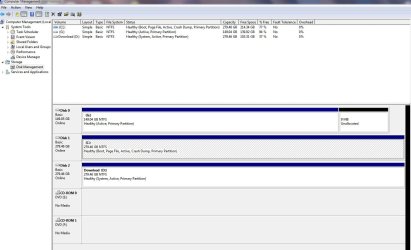
Thanks to Knight Hawk for your input, but I have not had a chance to try anything yet. Could someone look at my dick magagement snap shot as gregrocker suggested? I think the drives are set wrong.
 

Attachments

  • Disk Managment.JPG
    Disk Managment.JPG
    114.6 KB · Views: 119

My Computer My Computer

Computer Manufacturer/Model Number
Built myself
OS
Windows 7 Ultimate
CPU
Intel Core 2 Extreme QX9650 Processor
Motherboard
EVGA nForce 790i SLI FTW w/ Digital PWM Socket 775
Memory
Patriot EP 4096MB PC14400 DDR3 1800MHz (2x2048MB)
Graphics Card(s)
XFX GeForce GTX 280 Video Card 1GB DDR3,PCI Express 2.0 (2)
Sound Card
Creative Labs SB X-FI Titanium Fatal1ty Champ PCIe Sound Car
Monitor(s) Displays
LG L227WTG 22" Widescreen LCD Monitor - 2ms, 1680x1050 (WSXG
Hard Drives
WD VelociRaptor 300GB Hard Drive WD3000HLFS - 10K RPM, 16MB Cache, SATA 300MB/s (2 drives)
PSU
Cooler Master Real Power Pro 1250-Watt Power Supply
Case
Thermaltake VH6001BWS Armor+ Full-Tower ATX Case
Cooling
4 - 5 fans everywhere
Thanks to Knight Hawk for your input, but I have not had a chance to try anything yet. Could someone look at my dick magagement snap shot as gregrocker suggested? I think the drives are set wrong.


As you will see, G: drive has XP loaded on it.
 

My Computer My Computer

Computer Manufacturer/Model Number
Built myself
OS
Windows 7 Ultimate
CPU
Intel Core 2 Extreme QX9650 Processor
Motherboard
EVGA nForce 790i SLI FTW w/ Digital PWM Socket 775
Memory
Patriot EP 4096MB PC14400 DDR3 1800MHz (2x2048MB)
Graphics Card(s)
XFX GeForce GTX 280 Video Card 1GB DDR3,PCI Express 2.0 (2)
Sound Card
Creative Labs SB X-FI Titanium Fatal1ty Champ PCIe Sound Car
Monitor(s) Displays
LG L227WTG 22" Widescreen LCD Monitor - 2ms, 1680x1050 (WSXG
Hard Drives
WD VelociRaptor 300GB Hard Drive WD3000HLFS - 10K RPM, 16MB Cache, SATA 300MB/s (2 drives)
PSU
Cooler Master Real Power Pro 1250-Watt Power Supply
Case
Thermaltake VH6001BWS Armor+ Full-Tower ATX Case
Cooling
4 - 5 fans everywhere
Assuming C is Win7 and D is XP, since you don't say. Why is G data drive marked active? It should not be.

Install EasyBCD 2.0 beta after doing quick registration to use beta. Remove any XP listing and then Add XP on Add/Remove tab by Name, Type. It will prompt you to add boot files, then autocomplete.

If this fails, what I would do is mark G data drive inactive or move XP drive into DISK0 slot, since the Win7 installer looks for first Active drive to place MBR.

Then run a Win7 http://www.sevenforums.com/tutorials/3413-repair-install.html?ltr=R to correctly configure the Dual Boot as Win7 does when installed last.
 
Sorry, C: = W7, D: = storage & G: = XP Pro
 

My Computer My Computer

Computer Manufacturer/Model Number
Built myself
OS
Windows 7 Ultimate
CPU
Intel Core 2 Extreme QX9650 Processor
Motherboard
EVGA nForce 790i SLI FTW w/ Digital PWM Socket 775
Memory
Patriot EP 4096MB PC14400 DDR3 1800MHz (2x2048MB)
Graphics Card(s)
XFX GeForce GTX 280 Video Card 1GB DDR3,PCI Express 2.0 (2)
Sound Card
Creative Labs SB X-FI Titanium Fatal1ty Champ PCIe Sound Car
Monitor(s) Displays
LG L227WTG 22" Widescreen LCD Monitor - 2ms, 1680x1050 (WSXG
Hard Drives
WD VelociRaptor 300GB Hard Drive WD3000HLFS - 10K RPM, 16MB Cache, SATA 300MB/s (2 drives)
PSU
Cooler Master Real Power Pro 1250-Watt Power Supply
Case
Thermaltake VH6001BWS Armor+ Full-Tower ATX Case
Cooling
4 - 5 fans everywhere
It depends on which drive you want as the host/boot drive. If you swap data cables around between drives you can have the 7 drive seen as "Disk 0" with XP as "Disk 1" with G as the one plugged into the 3rd sata port if all are sata drives.

If you have an ide drive in the mix by chance the Windows installer will always look there first! For seeing the 7 drive as default/host/boot you would either have that plugged into the first port or unplug the G "Disk 0" drive and run the startup repair tool to recover the boot information. From there you then simply need to copy the XP boot files mentioned before over to the root.

For editing the boot.ini you first right click on the copy at the 7 root and uncheck the "read only" box followed by clicking on apply. then simply double click on the file itself to see that opened up with Notepad to make the needed change to the "rdisk()partition(1)" information there.

That will depend on how the drives are arranged however to see work. Once the edit is done you save as "all files" not "txt" to see that overwrite the copy of the boot.ini made on the 7 drive.

When you have decided which will be the default that then is set as default in the bios boot order. Presently then XP is seen as HD0 and using the startup repair tool when booting from the 7 dvd should see 7 mbr entries and boot files placed there being sata 1 on the system.
 

My Computers My Computers

System One System Two

  • Computer type
    PC/Desktop
    Computer Manufacturer/Model Number
    Custom builds = 2
    OS
    W7 Ultimate x64/W10 Pro x64/W11 Pro Triple Boot - Main PC W7 Remote PC Micro ATX W7 Pro x64/W11 Pro
    CPU
    AMD Phenom II X4 975 Deneb 3.6ghz - 965 2nd remote pc
    Motherboard
    Gigabyte GA-790XTA-UD4-Gigabyte GA-880GM-D2H remote pc
    Memory
    Kingston Hyper X DDR3 1600 1.5v 16gb - Hyper X Fury 8gb 2nd
    Graphics Card(s)
    MSI HD Radeon 5750 1gb - MSI HD Radeon 6450 on mini tower
    Sound Card
    Creative Labs X-Fi Xtreme Audio P - Realtek onooard 2nd case
    Monitor(s) Displays
    ASUS VW199T-P 19" HP 2082a Main-HP 2082a 20" remote pc
    Screen Resolution
    Asus 1440x900 - HP 1600x900
    Hard Drives
    WD Black 1TB HD per OS W7, W10, and pending W11 presently on 500gb OS Drive - Pending Triple 1TB HDs for Spanned Storage/backup volume
    Single 2TB external USB enclosure, single 1TB System 7 Host/Boot drive, Pending 8TB external HD for system image b
    PSU
    Corsair 750TX - primary / Corsair CX600 - second
    Case
    Antec 900-2 - SSD compatible / NZXT Vulcan mini tower
    Cooling
    Zalman CNPS9900A
    Keyboard
    AZIO L70 Backlit Letters Gaming - ONN Cordless/USB
    Mouse
    MSI DS200 Programmable, Logitech Cordless
    Internet Speed
    30mbps upgrade - primary hard wired - mini tower usb WiFi
    Antivirus
    GFI VIPRE Internet Security 2014 on W7 2016 beta on W10,
    Browser
    Cyberfox, WaterFox 64bit FF variants, FireFox x64, Pale Moon
    Other Info
    Accomdata fan cooled usb 2.0 PIDE/Sata II, III external enclosure.
    Sambient usb/eSata PATA/Sata II, III external enclosure.
  • Computer type
    PC/Desktop
    System Manufacturer/Model Number
    CUSTOM ASSEMBLY
    OS
    W7 Pro x64/W11 Pro
    CPU
    AMD Deneb 3.6ghz - 965
    Motherboard
    Gigabyte GA-880GM-D2H remote pc
    Memory
    Kingston Hyper X Fury 8gb
    Graphics Card(s)
    MSI HD Radeon 6450 DVI Output
    Sound Card
    Realtek onooard Creative or Other separate PENDING
    Monitor(s) Displays
    VIZIO 32" LCD TV Separate LCD Pending
    Screen Resolution
    1600x1080
    Hard Drives
    WD 500GB OS Host/Boot WD Green 1TB Storage/Backup
    PSU
    Corsair 600W - THERMALTAKE 600W spare case
    Case
    NZXT Vulcan mini tower
    Cooling
    Twin 120mm Top Fans - 240mm Side Cover
    Keyboard
    ONN Cordless/USB Logitech Cordless
    Mouse
    ONN USB/Cordless - Logitech Cordless
    Internet Speed
    DSL 5G
    Browser
    MS Edge, FireFox, WaterFox x64, FireFox Nightly
    Other Info
    OS Testing-Remote Access to Main TeamViewer
Something caused the System Active MBR to be placed on D:Storage which is way wrong.

I suggest setting D: inactive, then running a Repair install from Win7 to configure the Dual Boot as Win7 does when it is correctly installed last.

Open an elevated Command line in Win7, type:

DISKPART
LIST DISK
SELECT DISK # (replace # with D HD #)
LIST PARTITION
SELECT PARTITION # (replace # with D part #)
INACTIVE
EXIT

Now run Win7 DVD from Win7 desktop to do a http://www.sevenforums.com/tutorials/3413-repair-install.html?ltr=R with all drives plugged.
 
With the G drive XP was installed onto that replaced the original 7 mbr entries and why the "missing bootmgr" message was seen. Now it will depend mainly on which drive you will want as the default boot device. If you want the 7 C drive as default you would need to swap cables with the XP drive making that HD0 instead the present G first configuration before making any corrections.

With the present layout the startup repair tool as well as the "Fixboot" and "Fixmbr" commands entered at the command prompt while booted live with the 7 dvd would see the boot information rewritten. You will then see the "recovered" for 7 once the dual boot is configured leaving the XP drive as host/boot. That avoids the need for a repair install of 7.

The ideal option if the 7 install was recent and not loaded up and wanting 7 as the host.boot drive instead would be seeing that plugged in sata port #1 and made the default drive. If needed in the event the boot repair items mentioned should fail to work you see a clean install of 7 later to add XP in as a boot option with the EasyBCD tool.

The Disk Management tool would then show "Disk 0 (C) 7", "Disk 1 (G) XP Pro", "Disk 2 (D) Storage". This would leave the XP drive as a secondary OS drive rather then the host/boot drive for the system.
 

My Computers My Computers

System One System Two

  • Computer type
    PC/Desktop
    Computer Manufacturer/Model Number
    Custom builds = 2
    OS
    W7 Ultimate x64/W10 Pro x64/W11 Pro Triple Boot - Main PC W7 Remote PC Micro ATX W7 Pro x64/W11 Pro
    CPU
    AMD Phenom II X4 975 Deneb 3.6ghz - 965 2nd remote pc
    Motherboard
    Gigabyte GA-790XTA-UD4-Gigabyte GA-880GM-D2H remote pc
    Memory
    Kingston Hyper X DDR3 1600 1.5v 16gb - Hyper X Fury 8gb 2nd
    Graphics Card(s)
    MSI HD Radeon 5750 1gb - MSI HD Radeon 6450 on mini tower
    Sound Card
    Creative Labs X-Fi Xtreme Audio P - Realtek onooard 2nd case
    Monitor(s) Displays
    ASUS VW199T-P 19" HP 2082a Main-HP 2082a 20" remote pc
    Screen Resolution
    Asus 1440x900 - HP 1600x900
    Hard Drives
    WD Black 1TB HD per OS W7, W10, and pending W11 presently on 500gb OS Drive - Pending Triple 1TB HDs for Spanned Storage/backup volume
    Single 2TB external USB enclosure, single 1TB System 7 Host/Boot drive, Pending 8TB external HD for system image b
    PSU
    Corsair 750TX - primary / Corsair CX600 - second
    Case
    Antec 900-2 - SSD compatible / NZXT Vulcan mini tower
    Cooling
    Zalman CNPS9900A
    Keyboard
    AZIO L70 Backlit Letters Gaming - ONN Cordless/USB
    Mouse
    MSI DS200 Programmable, Logitech Cordless
    Internet Speed
    30mbps upgrade - primary hard wired - mini tower usb WiFi
    Antivirus
    GFI VIPRE Internet Security 2014 on W7 2016 beta on W10,
    Browser
    Cyberfox, WaterFox 64bit FF variants, FireFox x64, Pale Moon
    Other Info
    Accomdata fan cooled usb 2.0 PIDE/Sata II, III external enclosure.
    Sambient usb/eSata PATA/Sata II, III external enclosure.
  • Computer type
    PC/Desktop
    System Manufacturer/Model Number
    CUSTOM ASSEMBLY
    OS
    W7 Pro x64/W11 Pro
    CPU
    AMD Deneb 3.6ghz - 965
    Motherboard
    Gigabyte GA-880GM-D2H remote pc
    Memory
    Kingston Hyper X Fury 8gb
    Graphics Card(s)
    MSI HD Radeon 6450 DVI Output
    Sound Card
    Realtek onooard Creative or Other separate PENDING
    Monitor(s) Displays
    VIZIO 32" LCD TV Separate LCD Pending
    Screen Resolution
    1600x1080
    Hard Drives
    WD 500GB OS Host/Boot WD Green 1TB Storage/Backup
    PSU
    Corsair 600W - THERMALTAKE 600W spare case
    Case
    NZXT Vulcan mini tower
    Cooling
    Twin 120mm Top Fans - 240mm Side Cover
    Keyboard
    ONN Cordless/USB Logitech Cordless
    Mouse
    ONN USB/Cordless - Logitech Cordless
    Internet Speed
    DSL 5G
    Browser
    MS Edge, FireFox, WaterFox x64, FireFox Nightly
    Other Info
    OS Testing-Remote Access to Main TeamViewer
Back
Top