MBR - Restore Windows 7 Master Boot Record

How to Restore the Windows 7 MBR (Master Boot Record)

   Information
If you have been dual booting with Linux, then you probably know one of the Linux boot managers like Grub or LILO has been installed in the MBR of your hard drive. What can you do when you no longer want Linux on that hard drive? This tutorial will show you how to use your 7 DVD and BOOTSECT.EXE to restore the "bootsector code" of the MBR and allow you to begin booting to Windows 7 again.
   Tip
You can use this method to update the bootsector code for Windows 7, Vista, XP, 2000 or switch between Bootmgr and NTLDR. Just check the Microsoft TechNet site for the correct command.


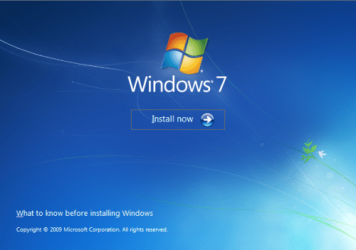
Here's How:1. Boot your computer to the Windows 7 DVD (or to a "Repair CD"). At this screen choose to install now.
25672d1251414873-mbr-restore-windows-7-master-boot-record-mbr_02.png


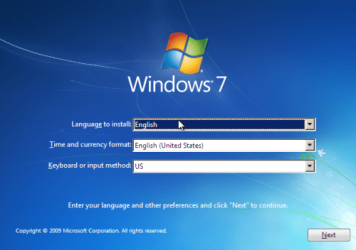
2. Select your language and click next.
25673d1251414836-mbr-restore-windows-7-master-boot-record-mbr_03.png


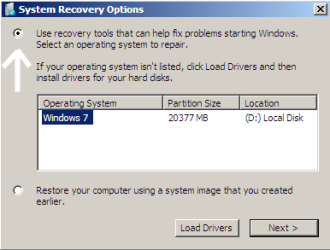
3. Click the button for "Use recovery tools".
25674d1251414836-mbr-restore-windows-7-master-boot-record-mbr_04.png


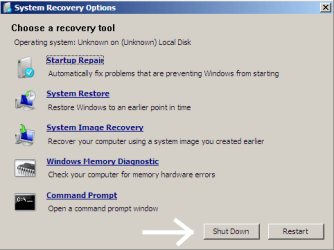
4. Then select "Command Prompt".
25675d1251414836-mbr-restore-windows-7-master-boot-record-mbr_05.png


5. When open, the command prompt will look like this:
53598d1251414836-mbr-restore-windows-7-master-boot-record-mbr_16.png


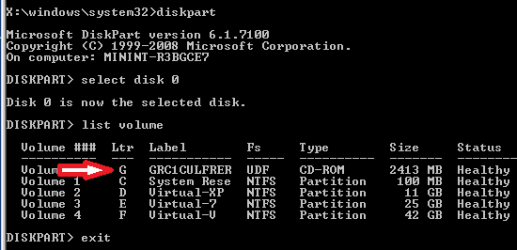
6. The command we will use, bootsect.exe, is in a folder (named boot) on the DVD.We need to know what drive letter has been assigned the DVD drive to access the folder.

Code:
Type: [B]diskpart[/B]
and press [B]Enter[/B]
 
Type: [B]select disk 0[/B] (zero)
and press [B]Enter[/B]
 
type: [B]list volume[/B]
and press [B]Enter[/B]
In this screen shot, the 7 DVD is letter: G
53599d1251414836-mbr-restore-windows-7-master-boot-record-mbr_17a.png


7. Use your DVD drive letter and

Code:
Type: [B]exit[/B]
and press [B]Enter[/B]
 
to close Diskpart
 
Type: [B]G:[/B] (use the letter of your DVD drive)
and press [B]Enter[/B]
 
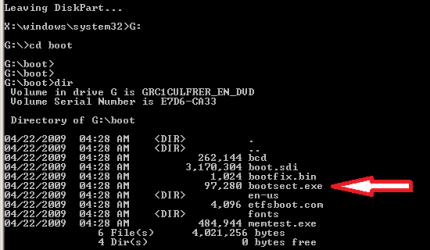
Type: [B]cd boot[/B]
and press [B]Enter[/B]
 
Type: [B]dir[/B]
and press [B]Enter[/B]
to verify that bootcect.exe is there (if you really need to)
53600d1251414836-mbr-restore-windows-7-master-boot-record-mbr_18a.png


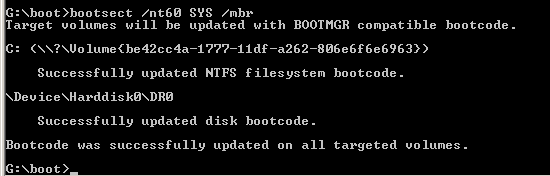
8. To restore the "bootsector code":

Code:
TYPE: [B]bootsect /nt60 SYS /mbr[/B]
and press [B]Enter[/B]
53601d1251414836-mbr-restore-windows-7-master-boot-record-mbr_19.png


NOTE: If this method fails to restore the MBR, you can try the bootrec command as it is also a tool for repairing the MBR.


9. When completed successfully,

Code:
Type: [B]exit[/B]
and press [B]Enter[/B]
This will close the command prompt window.

10. Now select Shut Down or Restart
25680d1251414836-mbr-restore-windows-7-master-boot-record-mbr_10.png


11. Then you can reboot your computer into Windows.
25681d1251414836-mbr-restore-windows-7-master-boot-record-mbr_12.png


Attachments

  • mbr_02.png
    mbr_02.png
    53.7 KB · Views: 1,640,315
  • mbr_03.png
    mbr_03.png
    54.3 KB · Views: 1,635,478
  • mbr_04.png
    mbr_04.png
    6.9 KB · Views: 1,633,763
  • mbr_05.png
    mbr_05.png
    10.5 KB · Views: 1,579,666
  • mbr_10.png
    mbr_10.png
    10.4 KB · Views: 1,576,678
  • mbr_12.png
    mbr_12.png
    5.3 KB · Views: 1,552,307
  • mbr_19.png
    mbr_19.png
    2.4 KB · Views: 1,569,958
  • mbr_18a.png
    mbr_18a.png
    3.7 KB · Views: 1,620,585
  • mbr_17a.png
    mbr_17a.png
    3.8 KB · Views: 1,565,873
  • mbr_16.png
    mbr_16.png
    3.3 KB · Views: 1,554,623
Last edited by a moderator:
No, nothing else.
Now I cannot even open the desktop gadget dialogue by right-clicking the desktop and going to 'Gadgets'.
 

My Computer My Computer

Computer Manufacturer/Model Number
Sony
OS
Windows 7 Professional x64
CPU
Intel Pentium Dual-Core
Screen Resolution
1366 x 768
Other Info
Splashtop
Robert,

The problem is that I want to remove fedora 12 and the grub that the fedora installation has installed.
I want to came back to the previous state, when no grub nor fedora was installed on my pc, just windows 7.
And as I told you when I perform the procedure I get "Missing operating system message".
I have reinstalled fedora only to recover the capacity of booting windows 7.
Could you help me?.

Thanks a lot,

Enrique
 

My Computer My Computer

OS
Windows 7
Robert,

The problem is that I want to remove fedora 12 and the grub that the fedora installation has installed. I want to came back to the previous state, when no grub nor fedora was installed on my pc, just windows 7. And as I told you when I perform the procedure I get "Missing operating system message". I have reinstalled fedora only to recover the capacity of booting windows 7.
Could you help me?.

Thanks a lot,

Enrique
Enrique;

I would be very happy to try. I have done this several times on my test computer with complete success. It would help me if you would capture a picture of the Disk Management window from Windows 7, and attach it to a post. If you need help doing that, here are two links to show how:

http://www.sevenforums.com/tutorials/9717-screenshot-paint.html

http://www.sevenforums.com/tutorials/9733-how-post-screenshot-seven-forums.html

Cheers!
Robert
 

My Computer My Computer

OS
...
No, nothing else.
Now I cannot even open the desktop gadget dialogue by right-clicking the desktop and going to 'Gadgets'.
OK, I would suggest you start a new thread and describe your symptoms so the Forum can assist you (as this is no longer a MBR issue).

Cheers!
Robert
 

My Computer My Computer

OS
...
Hi ewsarocco,

Should be able to sort it out.

Need a screenshot of Disk Management window , as Iseeu just suggested.
 

My Computers My Computers

System One System Two

  • Computer type
    PC/Desktop
    OS
    7 X64
    CPU
    i5 8400
    Motherboard
    gigabyte b365m ds3h
    Memory
    2x8gb 3200mhz
    Hard Drives
    various
    PSU
    pure power 11 400w cm
    Case
    Coolermaster
    Cooling
    cryorig m9i
  • Computer type
    PC/Desktop
    OS
    7x64
    CPU
    g5400
    Motherboard
    ga b365m ds3h
    Memory
    8gb ddr4 2400
    PSU
    xfx pro 450w
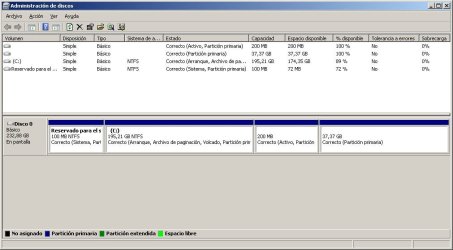
Diskmanager

Robert,

Here you have the screen shot.

Thanks !

Enrique
 

Attachments

  • diskmanager.jpg
    diskmanager.jpg
    59.4 KB · Views: 384

My Computer My Computer

OS
Windows 7
Robert,

The problem is that I want to remove fedora 12 and the grub that the fedora installation has installed.
I want to came back to the previous state, when no grub nor fedora was installed on my pc, just windows 7.
And as I told you when I perform the procedure I get "Missing operating system message".
I have reinstalled fedora only to recover the capacity of booting windows 7.
Could you help me?.

Thanks a lot,

Enrique
Thanks for the screen shot!

If the last two partitions (volumes) are for Fedora (you must confirm this so you do not delete anything you want to keep!), I would suggest to you to delete them.

diskmanager.jpg

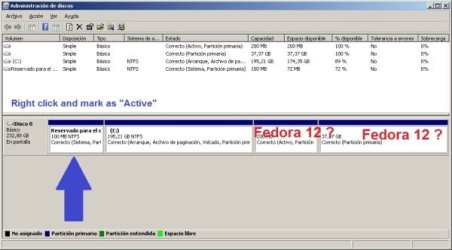
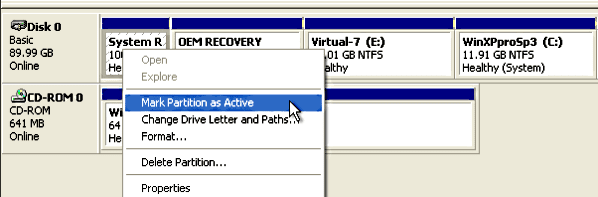
Then, right click on the first partition (the 100MB Reserved) and mark it "Active."

XP_in_SysRes_03.PNG

Then boot to your Windows 7 install DVD and follow the MBR tutorial to restore booting to Windows.

Here is another link where the Linux OS is Ubuntu, but the procedure is the same:

http://www.sevenforums.com/installation-setup/62209-remove-grub-restore-windows-7-a.html

Please let us know if you have any problems with this.

Cheers!
Robert
 

My Computer My Computer

OS
...
Robert,

GREAT !!!!!!

It worked!!!!

Now I have a question.

I have 2 partitions, one is 207MB "not assigned" and the other is 37.37GB "free space".

Is there any way to change the state of 207MB partition to "free space"?.

Thanks a lot and best regards,

Enrique
 

My Computer My Computer

OS
Windows 7
Robert,

GREAT !!!!!! It worked!!!! Now I have a question.

I have 2 partitions, one is 207MB "not assigned" and the other is 37.37GB "free space". Is there any way to change the state of 207MB partition to "free space"?. Thanks a lot and best regards,

Enrique
Yes, there is a way. If you would please, make another screen shot of your Disk Management drive map? I would like to see it before I suggest any changes.

Cheers!
Robert
 

My Computer My Computer

OS
...
Okay, my problem still exists! I tried Tune-Up again, but the way I had it mind to fix it did not work. It only messed up everything until System Restore saved me. Any other suggestions?

PS:
I want to use Tune-Up to change a theme setting, but then I want to wait out the last 8 days of my free trial.
 

My Computer My Computer

Computer Manufacturer/Model Number
Sony
OS
Windows 7 Professional x64
CPU
Intel Pentium Dual-Core
Screen Resolution
1366 x 768
Other Info
Splashtop
Okay, my problem still exists! I tried Tune-Up again, but the way I had it mind to fix it did not work. It only messed up everything until System Restore saved me. Any other suggestions?

PS:
I want to use Tune-Up to change a theme setting, but then I want to wait out the last 8 days of my free trial.
Hi Andy;

I would suggest you start a new thread and describe your symptoms so the Forum can assist you (as this is no longer a MBR issue).

Cheers!
Robert
 

My Computer My Computer

OS
...
New diskmanager screen shot

Robert,

GREAT !!!!!! It worked!!!! Now I have a question.

I have 2 partitions, one is 207MB "not assigned" and the other is 37.37GB "free space". Is there any way to change the state of 207MB partition to "free space"?. Thanks a lot and best regards,

Enrique
Yes, there is a way. If you would please, make another screen shot of your Disk Management drive map? I would like to see it before I suggest any changes.

Cheers!
Robert


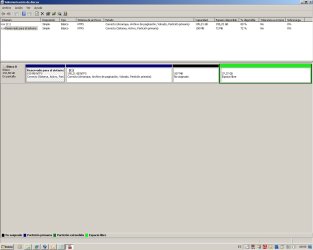
Robert,

Attached is what you asked for.

Thanks and regards,

Enrique
 

Attachments

  • Diskmanager_2.jpg
    Diskmanager_2.jpg
    60.9 KB · Views: 688

My Computer My Computer

OS
Windows 7
I have 2 partitions, one is 207MB "not assigned" and the other is 37.37GB "free space". Is there any way to change the state of 207MB partition to "free space"?.
Enrique;

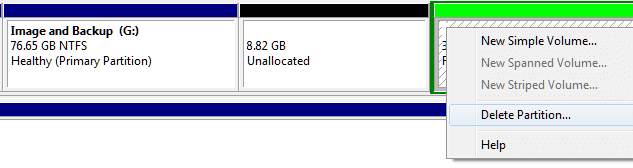
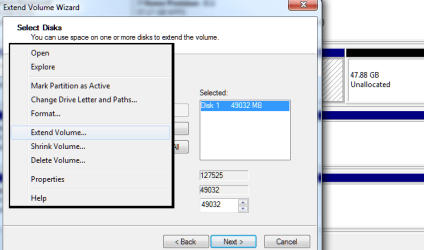
Thank you for the screen shot. The Windows 7 Disk Management utility has some limitations, but you can still use it. You will need to right click on the last partition, the green one, and select "Delete partition." There should not be any data on that partition or it will also be deleted. It was the Fedora partition, and I assume you have not put anything there. When you delete the partition, all of the space will become "not allocated" and will be colored black.

ewsaracco_01.png

Now you have some choices. You can make a partition out of all of the "not allocated" space. You can extend the partition C into the "not allocated" space. Or you can extend the C partition into some of the "not allocated" space and make a new partition from the rest.

ewsaracco_02.png

Please let us know if we may help in any way.

Cheers!
Robert
 

My Computer My Computer

OS
...
Help please

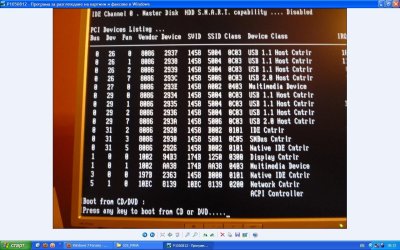
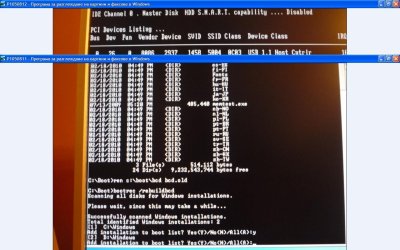
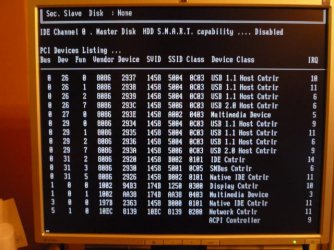
I installed XP (first), and Windows 7. I wanted to stay only with Windows 7 and remove XP. Then the nightmare began. The system could not boot with Windows 7. I followed this tutorial, but I could not fix MBR. I Install fresh copy of Windows 7 on another partition. However, still can not run a newly installed Windows 7. BIOS loads and nothing happens, as I pictured. First Piture

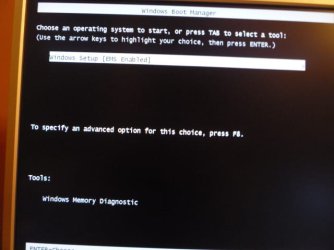
I tried again to do Repair and in the windows that's apear after choose repair has two installations of Windows 7. Successfully pass the tutorial for fix MBR for both c: and d:. But again does not load either of the two Windows 7. Bootrec.exe used and added the two Windows 7 to bootlist, but again can't boot.
 

Attachments

  • can't boot.JPG
    can't boot.JPG
    121.9 KB · Views: 667
  • P1050814.JPG
    P1050814.JPG
    53.8 KB · Views: 2,276
  • P1050815.JPG
    P1050815.JPG
    51.2 KB · Views: 2,545
  • rebuild bcd.JPG
    rebuild bcd.JPG
    112.8 KB · Views: 502
Last edited:

My Computer My Computer

OS
Windows 7 Ultimate x64
I installed XP (first), and Windows 7. I wanted to stay only with Windows 7 and remove XP. Then the nightmare began. The system could not boot with Windows 7. I followed this tutorial, but I could not fix MBR. Instlarih new Windows 7 on another partition. However, still can not run a newly installed Windows 7. BIOS loads and nothing happens, as I pictured.
Hello caribiner5qz, and welcome to Windows Seven Forums!

Thank you for your snap shot, it tells me that your computer is waiting for you to put a bootable CD or DVD into the drive tray and press any key to boot. Please open the computer BIOS menu (as I do not know what computer you are using I cannot tell you what key to press to do that) and check to see if your hard drive is being recogniazed OK, then what boot order you have set: is the CDROM set as first in boot order, is the hard drive set as first in boot order?

The most likely explanation is that the Windows 7 installer put the boot code in the XP partition when you installed it. When you removed XP you also removed the boot code ... so no booting.

This tutorial should have restored the boot code to the mbr. Can not say why it did not work for you. Then installing a second Windows 7 should have given you a boot menu. Again without more info can not say why it did not work for you either.

At this point I would suggest to you to use the 7 DVD, boot to the DVD and do the "Startup Repair" two or three times to restore your boot menu. If this doesn't help, let us know as there are other options to try.

http://www.sevenforums.com/tutorials/681-startup-repair.html

Cheers!
Robert
 

My Computer My Computer

OS
...
Hello caribiner5qz, and welcome to Windows Seven Forums!

Thank you for your snap shot, it tells me that your computer is waiting for you to put a bootable CD or DVD into the drive tray and press any key to boot. Please open the computer BIOS menu (as I do not know what computer you are using I cannot tell you what key to press to do that) and check to see if your hard drive is being recogniazed OK, then what boot order you have set: is the CDROM set as first in boot order, is the hard drive set as first in boot order?


Cheers!
Robert
I have Windows 7 DVD in the DVD-Rom and First Boot device is the cd-rom.
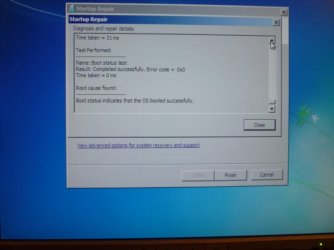
I also had try Startup Repair, and it tells me "Boot status indicates that the OS booted successfully". And Still can't boot.
 

Attachments

  • P1050816.JPG
    P1050816.JPG
    51.9 KB · Views: 2,299

My Computer My Computer

OS
Windows 7 Ultimate x64
Hello caribiner5qz, and welcome to Windows Seven Forums!

Thank you for your snap shot, it tells me that your computer is waiting for you to put a bootable CD or DVD into the drive tray and press any key to boot. Please open the computer BIOS menu (as I do not know what computer you are using I cannot tell you what key to press to do that) and check to see if your hard drive is being recogniazed OK, then what boot order you have set: is the CDROM set as first in boot order, is the hard drive set as first in boot order?


Cheers!
Robert
I have Windows 7 DVD in the DVD-Rom and First Boot device is the cd-rom.
I also had try Startup Repair many times without luck.
Normal behavior for the BIOS is to wait a few seconds for any key to be pressed, then boot to the first hard drive if no key is pressed. You could try to set the hard drive as first boot device to see if it will boot?

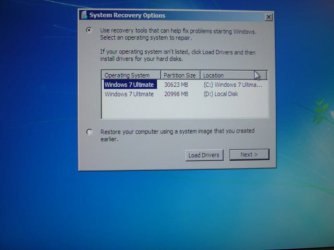
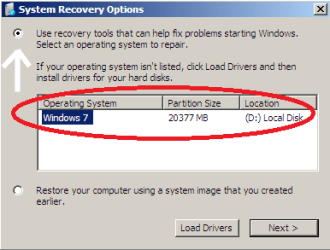
When you get to this screen:

mbr_04_a.png

are either of your 7 installations showing?

.
 

My Computer My Computer

OS
...
[/QUOTE]Normal behavior for the BIOS is to wait a few seconds for any key to be pressed, then boot to the first hard drive if no key is pressed. You could try to set the hard drive as first boot device to see if it will boot?

When you get to this screen:

View attachment 55000

are either of your 7 installations showing?

.[/QUOTE]

Yes, i made hdd first boot device, but can't boot. And yes in the repair window both instalations of window 7 are showing.
 

My Computer My Computer

OS
Windows 7 Ultimate x64
Normal behavior for the BIOS is to wait a few seconds for any key to be pressed, then boot to the first hard drive if no key is pressed. You could try to set the hard drive as first boot device to see if it will boot?

When you get to this screen:
are either of your 7 installations showing?

Yes, i made hdd first boot device, but can't boot. And yes in the repair window both instalations of window 7 are showing.
What message do you see at the boot screen when the hard drive is the first boot device and will not boot?
 

My Computer My Computer

OS
...
What message do you see at the boot screen when the hard drive is the first boot device and will not boot?
There is no message, just after bios load it seems like the screen is freeze.
 

Attachments

  • P1050817.JPG
    P1050817.JPG
    87.3 KB · Views: 2,410
Last edited:

My Computer My Computer

OS
Windows 7 Ultimate x64
Back
Top