MBR - Restore Windows 7 Master Boot Record

How to Restore the Windows 7 MBR (Master Boot Record)

   Information
If you have been dual booting with Linux, then you probably know one of the Linux boot managers like Grub or LILO has been installed in the MBR of your hard drive. What can you do when you no longer want Linux on that hard drive? This tutorial will show you how to use your 7 DVD and BOOTSECT.EXE to restore the "bootsector code" of the MBR and allow you to begin booting to Windows 7 again.
   Tip
You can use this method to update the bootsector code for Windows 7, Vista, XP, 2000 or switch between Bootmgr and NTLDR. Just check the Microsoft TechNet site for the correct command.


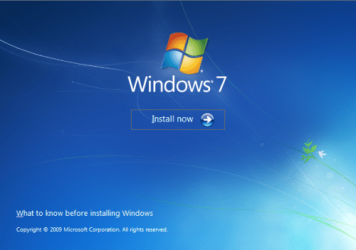
Here's How:1. Boot your computer to the Windows 7 DVD (or to a "Repair CD"). At this screen choose to install now.
25672d1251414873-mbr-restore-windows-7-master-boot-record-mbr_02.png


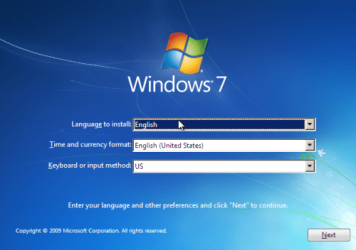
2. Select your language and click next.
25673d1251414836-mbr-restore-windows-7-master-boot-record-mbr_03.png


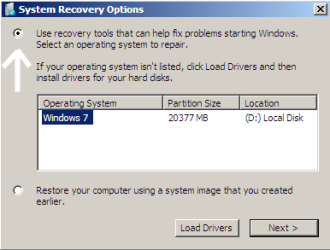
3. Click the button for "Use recovery tools".
25674d1251414836-mbr-restore-windows-7-master-boot-record-mbr_04.png


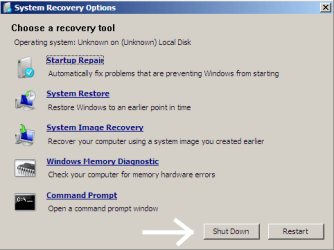
4. Then select "Command Prompt".
25675d1251414836-mbr-restore-windows-7-master-boot-record-mbr_05.png


5. When open, the command prompt will look like this:
53598d1251414836-mbr-restore-windows-7-master-boot-record-mbr_16.png


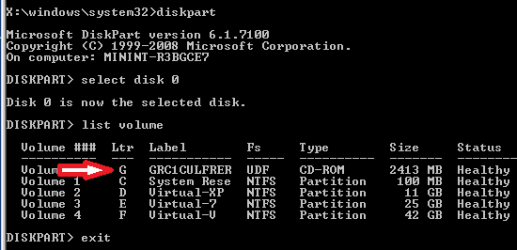
6. The command we will use, bootsect.exe, is in a folder (named boot) on the DVD.We need to know what drive letter has been assigned the DVD drive to access the folder.

Code:
Type: [B]diskpart[/B]
and press [B]Enter[/B]
 
Type: [B]select disk 0[/B] (zero)
and press [B]Enter[/B]
 
type: [B]list volume[/B]
and press [B]Enter[/B]
In this screen shot, the 7 DVD is letter: G
53599d1251414836-mbr-restore-windows-7-master-boot-record-mbr_17a.png


7. Use your DVD drive letter and

Code:
Type: [B]exit[/B]
and press [B]Enter[/B]
 
to close Diskpart
 
Type: [B]G:[/B] (use the letter of your DVD drive)
and press [B]Enter[/B]
 
Type: [B]cd boot[/B]
and press [B]Enter[/B]
 
Type: [B]dir[/B]
and press [B]Enter[/B]
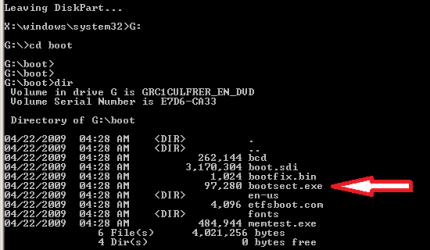
to verify that bootcect.exe is there (if you really need to)
53600d1251414836-mbr-restore-windows-7-master-boot-record-mbr_18a.png


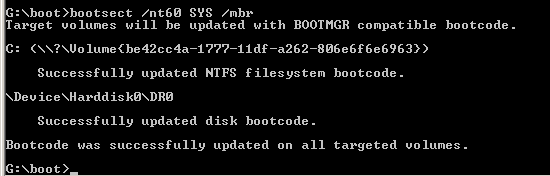
8. To restore the "bootsector code":

Code:
TYPE: [B]bootsect /nt60 SYS /mbr[/B]
and press [B]Enter[/B]
53601d1251414836-mbr-restore-windows-7-master-boot-record-mbr_19.png


NOTE: If this method fails to restore the MBR, you can try the bootrec command as it is also a tool for repairing the MBR.


9. When completed successfully,

Code:
Type: [B]exit[/B]
and press [B]Enter[/B]
This will close the command prompt window.

10. Now select Shut Down or Restart
25680d1251414836-mbr-restore-windows-7-master-boot-record-mbr_10.png


11. Then you can reboot your computer into Windows.
25681d1251414836-mbr-restore-windows-7-master-boot-record-mbr_12.png


Attachments

  • mbr_02.png
    mbr_02.png
    53.7 KB · Views: 1,640,315
  • mbr_12.png
    mbr_12.png
    5.3 KB · Views: 1,552,307
  • mbr_10.png
    mbr_10.png
    10.4 KB · Views: 1,576,678
  • mbr_05.png
    mbr_05.png
    10.5 KB · Views: 1,579,666
  • mbr_04.png
    mbr_04.png
    6.9 KB · Views: 1,633,763
  • mbr_03.png
    mbr_03.png
    54.3 KB · Views: 1,635,478
  • mbr_16.png
    mbr_16.png
    3.3 KB · Views: 1,554,623
  • mbr_17a.png
    mbr_17a.png
    3.8 KB · Views: 1,565,873
  • mbr_18a.png
    mbr_18a.png
    3.7 KB · Views: 1,620,585
  • mbr_19.png
    mbr_19.png
    2.4 KB · Views: 1,569,958
Last edited by a moderator:

My Computer My Computer

Computer Manufacturer/Model Number
Sony
OS
Windows 7 Professional x64
CPU
Intel Pentium Dual-Core
Screen Resolution
1366 x 768
Other Info
Splashtop
So I can delete the last two in Windows?
Yes. Windows doesn't recognize anthing but NTFS and Fat32 and the last two partitions are not recognized by Windows so ...

But you can verify this before you delete them ...

HOW?
By booting to your Ubuntu Live CD, opening GParted, and looking to see if the last two partitions are labeled at "ext4" and "swap." If they are labeled "ext4" and "swap" then they are Ubuntu and not Windows.
 

My Computer My Computer

OS
...
GParted

Ok, lemme try. I will have to reboot, as I am using the same laptop.
 

My Computer My Computer

Computer Manufacturer/Model Number
Sony
OS
Windows 7 Professional x64
CPU
Intel Pentium Dual-Core
Screen Resolution
1366 x 768
Other Info
Splashtop
DONE

OK, it was the same as Windows.

So now I remove them from Disk Management?

EDIT:
There were less items in the list than yours. Why is this?
 

My Computer My Computer

Computer Manufacturer/Model Number
Sony
OS
Windows 7 Professional x64
CPU
Intel Pentium Dual-Core
Screen Resolution
1366 x 768
Other Info
Splashtop
OK, it was the same as Windows.

So now I remove them from Disk Management?
Yes, delete those two "Partitions" or "Volumes" and Ubuntu is gone ...
 

My Computer My Computer

OS
...
:)

YAY! I'm all done! NOW:

Tell me how to take the screenshots during boot. I know in Windows, you use the Snipping Tool or the Print Screen button, but in boot before Windows... You said you would tell me.
 

My Computer My Computer

Computer Manufacturer/Model Number
Sony
OS
Windows 7 Professional x64
CPU
Intel Pentium Dual-Core
Screen Resolution
1366 x 768
Other Info
Splashtop
YAY! I'm all done! NOW:

Tell me how to take the screenshots during boot. I know in Windows, you use the Snipping Tool or the Print Screen button, but in boot before Windows... You said you would tell me.
Ctrl + Prt Scr (keyboard keys Control and Print Screen) will capture the desktop image to the clipboard. Open Paint and paste, and you can edit the image and save it as you wish.

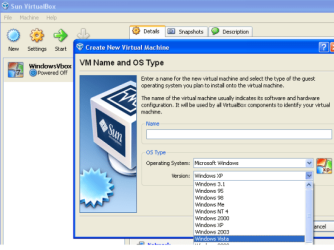
This software Sun's VirtualBox allow you to install an OS like a program. The OS boots up in a window on the desktop and Ctrl + Prt Scr will capture the boot screens.

v_box_01.PNG

Cheers!
Robert
 

My Computer My Computer

OS
...
:(

Nevermind. I don't want to reinstall. I will keep that link incase someone wants it before they put on their OS. My website is at: www.computersrule.net and some people ask me in person, so I can tell them about it.
 

My Computer My Computer

Computer Manufacturer/Model Number
Sony
OS
Windows 7 Professional x64
CPU
Intel Pentium Dual-Core
Screen Resolution
1366 x 768
Other Info
Splashtop
Thanks!

I just want to thank you for aall your help! I mean, I have been on Google for 2 days trying to find an answer to this, and I came here after Ubuntu Forums told me to. You have been a big help to me.

--Acc1999 :D
 

My Computer My Computer

Computer Manufacturer/Model Number
Sony
OS
Windows 7 Professional x64
CPU
Intel Pentium Dual-Core
Screen Resolution
1366 x 768
Other Info
Splashtop
Nevermind. I don't want to reinstall. I will keep that link incase someone wants it before they put on their OS. My website is at: www.computersrule.net and some people ask me in person, so I can tell them about it.

I just want to thank you for aall your help! I mean, I have been on Google for 2 days trying to find an answer to this, and I came here after Ubuntu Forums told me to. You have been a big help to me.

--Acc1999 :D
You are most welcome, Andy! I think you will find all the folks here at Windows Seven Forums very helpful and very friendly. You are welcome here any time.

Might I suggest you go back to Ubuntu Forums and thank Michy99 for posting that link for you? I bet it would be appreciated!!

Cheers!
Robert
 

My Computer My Computer

OS
...
?

How did you know my name?

And I asked to be on your friends list. Please add me!

And yes I will thank them.

:D
 

My Computer My Computer

Computer Manufacturer/Model Number
Sony
OS
Windows 7 Professional x64
CPU
Intel Pentium Dual-Core
Screen Resolution
1366 x 768
Other Info
Splashtop
How did you know my name?

And I asked to be on your friends list. Please add me!

And yes I will thank them.

:D
You posted on the Ubuntu Forum, right?
 

My Computer My Computer

OS
...
Oh

Oh, yeah, right. How do you like my new profile picture?
 

My Computer My Computer

Computer Manufacturer/Model Number
Sony
OS
Windows 7 Professional x64
CPU
Intel Pentium Dual-Core
Screen Resolution
1366 x 768
Other Info
Splashtop
I am Back for More

I was just helped by you, and another problem came back!
Instead of the "Starting Windows" boot screen, I get a "Loading Files" screen like when you start Safe Mode, even when booting into normal mode. After that, it gives hardware information and then after that it goes to the login screen. What is my SECOND problem and what is the fix?

--Acc1999
 

My Computer My Computer

Computer Manufacturer/Model Number
Sony
OS
Windows 7 Professional x64
CPU
Intel Pentium Dual-Core
Screen Resolution
1366 x 768
Other Info
Splashtop
I was just helped by you, and another problem came back!
Instead of the "Starting Windows" boot screen, I get a "Loading Files" screen like when you start Safe Mode, even when booting into normal mode. After that, it gives hardware information and then after that it goes to the login screen. What is my SECOND problem and what is the fix?

--Acc1999
Hello Andy!

It has been a week ... when did this start? What changes have you made to to your computer?
 

My Computer My Computer

OS
...
Re: Boot

Well, it started three days ago. I have made these changes:
Install:
Tune-up Utilities
Google Apps
Google Chrome
RocketDock
 

My Computer My Computer

Computer Manufacturer/Model Number
Sony
OS
Windows 7 Professional x64
CPU
Intel Pentium Dual-Core
Screen Resolution
1366 x 768
Other Info
Splashtop
Well, it started three days ago. I have made these changes:
Install:
Tune-up Utilities
Google Apps
Google Chrome
RocketDock
Well ... in my opinion ... you definitely don't need Tune-up Utilities ... so I would recommend you start by uninstalling it?
 

My Computer My Computer

OS
...
TuneUp

Actually, I do need it. It helps make my laptop faster. Without it, it as a very low stability.
 

My Computer My Computer

Computer Manufacturer/Model Number
Sony
OS
Windows 7 Professional x64
CPU
Intel Pentium Dual-Core
Screen Resolution
1366 x 768
Other Info
Splashtop
Actually, I do need it. It helps make my laptop faster. Without it, it as a very low stability.
Go ahead and follow iseeuu's suggestion to remove Tuneup Utilities. Regardless of whether or not it is helpful or necessary, if it is causing the problem, it needs to go.
 

My Computer My Computer

Computer Manufacturer/Model Number
Custom
OS
Windows 7 Professional x64
CPU
Intel i7 2600K OC'd @ 4620 MHz
Motherboard
Asus P8Z68-V Pro
Memory
16GB GSkill Sniper 2133 Mhz (4x4GB)
Graphics Card(s)
EVGA GeForce GTX 480 SuperClocked+
Sound Card
Realtek High Definition Audio
Monitor(s) Displays
2x Acer S273HLbmii 27"
Screen Resolution
2 x 1920x1080
Hard Drives
64GB Crucial M4 SSD

Storage: Hitachi 1TB 5400RPM, Samsung 1.5TB 5400RPM
PSU
Corsair HW Series 750w (modular)
Case
Cooler Master HAF 932 Advanced Blue Edition
Cooling
CM Hyper 212+ CPU cooler, 3x 230mm + 1x 140mm case fans
Keyboard
Logitech MK320 (wireless)
Mouse
Logitech MK320 (wireless)
Internet Speed
30 Mb/s : 2 Mb/s
Back
Top