SATA Drivers - Load in Windows XP Setup on Dual Boot

How to Load SATA Drivers in Windows XP Setup on your Dual Boot PC with Vista or Windows 7

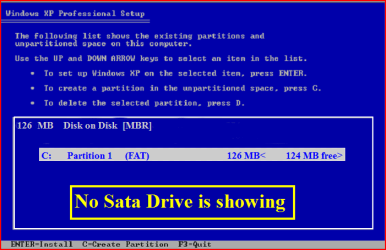
When you install Win XP, setup can not find your Hard Drive.
1.PNG

2.PNG
1) Copy your SATA drivers to a floppy disk.
NOTE: Keep this disk in a safe place, as it will be need to use in the Recovery Console.
NOTE: You cannot use a USB flash drive for this.

2) Press F6 at the first screen.
3.PNG
3) When you get to the load drive screen, Press S
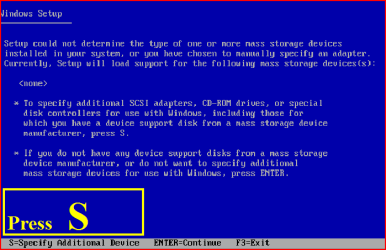
4.PNG
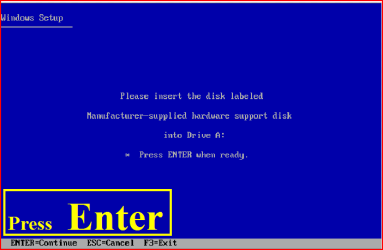
4) Next screen, Press Enter
5.PNG
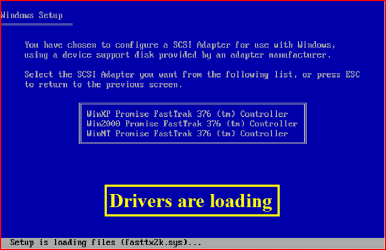
5) Choose your Sata Controller. Press Enter
NOTE: For this example, I am using Promise Fastrak 376.
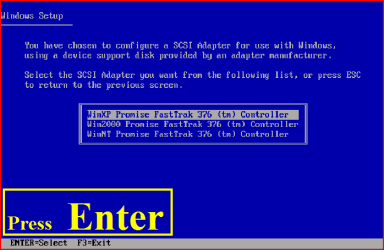
6.PNG
7.PNG
6) When drivers have load, press Enter
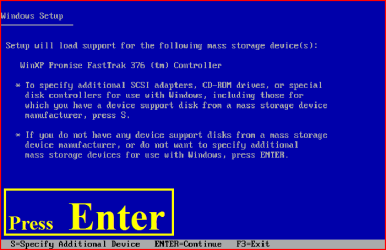
8.PNG
9.PNG
7) Continue with setup here:

A connected USB floppy disk drive does not work when you press F6 to install mass storage drivers during the Windows XP installation process
Dual Boot Installation with Windows 7 and XP

OR

Dual Boot Installation with Windows Vista and XP - Vista Forums

 
Last edited:
Good Tutorial Ray ...
 

My Computer

Computer Manufacturer/Model Number
Samsung NP550P5C-S02IN
OS
Windows 7 Ultimate - 64-bit | Windows 8 Pro - 64-bit
CPU
Intel® Core™ i7 Processor 3,610QM (2.30Hz, 6MB L3 Cach
Memory
8 GB
Graphics Card(s)
NVIDIA® GeForce® GT 650M 2GB Graphics, Optimus™ techno
Sound Card
SoundAlive™ JBL 3 Speakers (With sub-Woofer)
Monitor(s) Displays
39.62cm (15.6) SuperBright 300nit HD+ LED Display
Screen Resolution
1,600 x 900, Anti-Reflective
Hard Drives
1TB S-ATA II Hard Drive (5,400RPM)
selecting the right driver?

I had bought a new laptop almost 3 months ago. It is hp pavilion and its specifications are Win 7 home premium 64 bit, 4 gb ram, amd dual core processor, 2 hardisk (320 gb x2).so i decided to install wix xp sp3 to the second hardisk. I had problems about the installation like acpi.sys error and i come to your tutorial. So which driver and where can i find the right driver for my need? Thanks for help
 

My Computer

OS
Windows 7 Home Premium 64 bit
I had bought a new laptop almost 3 months ago. It is hp pavilion and its specifications are Win 7 home premium 64 bit, 4 gb ram, amd dual core processor, 2 hardisk (320 gb x2).so i decided to install wix xp sp3 to the second hardisk. I had problems about the installation like acpi.sys error and i come to your tutorial. So which driver and where can i find the right driver for my need? Thanks for help

Have look at Support & Drivers here:

HP United States - Computers, Laptops, Servers, Printers and more
 

My Computer

OS
ME/XP/Vista/Win7
I think you misunderstand me. I am trying to make dual boot with win xp and win7 is preinstalled.
New to site,very nice!


I am running into a problem trying to add WindowsXP. I get through the partioning OK. But when I try to install WinXP after the intial setup by windows I get a Blue-Screen with the following message:
Stop: 0X0000007E (0X0000005, 0XF78D1EA0, 0XF78D1B9C)
acpi.sys-Address F73B9D66 base at F73AE000, Date Stamp 480252b1
I never get to the actual windows setup.

I have problem like above. So do I have to choose sata driver for xp or win 7? There is no data drivers in hp websites.Sorry but I am a new bee,May be its very stupid questions but thanks a lot.
 

My Computer

OS
Windows 7 Home Premium 64 bit
I think you misunderstand me. I am trying to make dual boot with win xp and win7 is preinstalled.
New to site,very nice!


I am running into a problem trying to add WindowsXP. I get through the partioning OK. But when I try to install WinXP after the intial setup by windows I get a Blue-Screen with the following message:
Stop: 0X0000007E (0X0000005, 0XF78D1EA0, 0XF78D1B9C)
acpi.sys-Address F73B9D66 base at F73AE000, Date Stamp 480252b1
I never get to the actual windows setup.

I have problem like above. So do I have to choose sata driver for xp or win 7? There is no data drivers in hp websites.Sorry but I am a new bee,May be its very stupid questions but thanks a lot.

Yes, you will need to download the SATA drivers for Win XP.

Which Sata controller do you have?
 

My Computer

OS
ME/XP/Vista/Win7
I think you misunderstand me. I am trying to make dual boot with win xp and win7 is preinstalled.
New to site,very nice!


I am running into a problem trying to add WindowsXP. I get through the partioning OK. But when I try to install WinXP after the intial setup by windows I get a Blue-Screen with the following message:
Stop: 0X0000007E (0X0000005, 0XF78D1EA0, 0XF78D1B9C)
acpi.sys-Address F73B9D66 base at F73AE000, Date Stamp 480252b1
I never get to the actual windows setup.

I have problem like above. So do I have to choose sata driver for xp or win 7? There is no data drivers in hp websites.Sorry but I am a new bee,May be its very stupid questions but thanks a lot.

Yes, you will need to download the SATA drivers for Win XP.

Which Sata controller do you have?

I have no idea which sata controller I have? how can I know that and there is no sata driver even nothing driver for xp for my laptop (hp Pavilion dv 7 3013 eo ) only vista and win7.
 

My Computer

OS
Windows 7 Home Premium 64 bit
I had bought a new laptop almost 3 months ago. It is hp pavilion and its specifications are Win 7 home premium 64 bit, 4 gb ram, amd dual core processor, 2 hardisk (320 gb x2).so i decided to install wix xp sp3 to the second hardisk. I had problems about the installation like acpi.sys error and i come to your tutorial. So which driver and where can i find the right driver for my need? Thanks for help

Have search here:

HP Pavilion dv7-3000 Entertainment Notebook PC series- Download drivers and software - HP Business Support Center
 

My Computer

OS
ME/XP/Vista/Win7
I had bought a new laptop almost 3 months ago. It is hp pavilion and its specifications are Win 7 home premium 64 bit, 4 gb ram, amd dual core processor, 2 hardisk (320 gb x2).so i decided to install wix xp sp3 to the second hardisk. I had problems about the installation like acpi.sys error and i come to your tutorial. So which driver and where can i find the right driver for my need? Thanks for help

Have search here:

HP Pavilion dv7-3000 Entertainment Notebook PC series- Download drivers and software - HP Business Support Center

I searched it before there is only hp quick launch buttons driver for xp for my laptop. What i have to do then if there is no driver ?
 

My Computer

OS
Windows 7 Home Premium 64 bit
I had bought a new laptop almost 3 months ago. It is hp pavilion and its specifications are Win 7 home premium 64 bit, 4 gb ram, amd dual core processor, 2 hardisk (320 gb x2).so i decided to install wix xp sp3 to the second hardisk. I had problems about the installation like acpi.sys error and i come to your tutorial. So which driver and where can i find the right driver for my need? Thanks for help

Have search here:

HP Pavilion dv7-3000 Entertainment Notebook PC series- Download drivers and software - HP Business Support Center

I searched it before there is only hp quick launch buttons driver for xp for my laptop. What i have to do then if there is no driver ?

If you have the Intel one you can use this one here:

64-bit Floppy Configuration Utility


32-bit Floppy Configuration Utilityhttp://downloadcenter.intel.com/Detail_Desc.aspx?agr=Y&ProdId=2101&DwnldID=17883&lang=eng
 

My Computer

OS
ME/XP/Vista/Win7

I searched it before there is only hp quick launch buttons driver for xp for my laptop. What i have to do then if there is no driver ?

If you have the Intel one you can use this one here:

64-bit Floppy Configuration Utility


32-bit Floppy Configuration Utility

sorry typo.
Intel Sata controller.
 

My Computer

OS
ME/XP/Vista/Win7
I searched it before there is only hp quick launch buttons driver for xp for my laptop. What i have to do then if there is no driver ?

If you have the Intel one you can use this one here:

64-bit Floppy Configuration Utility


32-bit Floppy Configuration Utility

sorry typo.
Intel Sata controller.

In the system information it says
Manufacturer standard disk drives
Model WDC WD3200BEKT-60F3T1 ATA DEVICE
So I visited the internet page of the manufacturer but there is only drivers for Win Vista and win 7 so there is no xp driver.Do u have any ideas for the next?What should I do now?
 
Last edited:

My Computer

OS
Windows 7 Home Premium 64 bit

sorry typo.
Intel Sata controller.

In the system information it says
Manufacturer standard disk drives
Model WDC WD3200BEKT-60F3T1 ATA DEVICE
So I visited the internet page of the manufacturer but there is only drivers for Win Vista and win 7 so there is no xp driver.Do u have any ideas for the next?What should I do now?

My search of HP web site:

General XP Downgrade Guide for HP Laptops - HP Support Forum
 

Attachments

  • Capture.PNG
    Capture.PNG
    10.4 KB · Views: 949

My Computer

OS
ME/XP/Vista/Win7
sorry typo.
Intel Sata controller.

In the system information it says
Manufacturer standard disk drives
Model WDC WD3200BEKT-60F3T1 ATA DEVICE
So I visited the internet page of the manufacturer but there is only drivers for Win Vista and win 7 so there is no xp driver.Do u have any ideas for the next?What should I do now?

My search of HP web site:

General XP Downgrade Guide for HP Laptops - HP Support Forum

THANK YOU VERY MUCH!!!!!! I managed to install it and now I am writing this msg from XP side. Thanks for your advice, I really mean it. I made another bootable xp cd (added the sata drivers) with Nlite and first it gives acpi.sys error again then I started and I press F7 to disable ACPI setting and after that everthing did as normal xp installation. I managed the dual boot with bricks tutorial.
So Thank you very much , I really appericiated your help:D:D:D
 

My Computer

OS
Windows 7 Home Premium 64 bit
Hi fatih

Good job done:)

You are welcome.
 

My Computer

OS
ME/XP/Vista/Win7
I seem to be getting no where fast on this SATA floppy. Maybe this is all over my head but just dosen't seem like it should be this difficult ecspecially with these exceptional tutorials. I have looked at the chipset files on my Dell drivers and downloads CD, but I'm not sure what files to put on the floppy. Even if I knew which files I needed, whereas. they came with a windows7 computer would they work with a windowsXP install? I have tried to find WindowsXP chipset drivers for my system at Dell but am only able find same drivers that came om my drivers and download CD.

Dell Studio 15 Laptop
Intel(R) i3 Processors M330 @ 2.13 GHz
Intel(R) 5 Series/ 3400 Series
Disk Drive: ST9500420AS ATA Device

Thanks again for all help.
 

My Computer

Computer Manufacturer/Model Number
Dell Studio Laptop
OS
windows7
CPU
I3
Graphics Card(s)
Radeon 4500 series
Hi larrym29

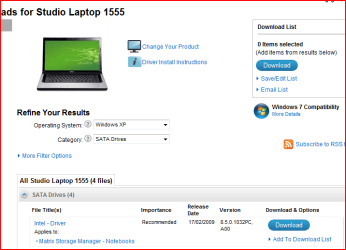
Download from Dell.

Unzip download file.

Open folder,copy files to floppy disk.
 

Attachments

  • Capture2.PNG
    Capture2.PNG
    22.2 KB · Views: 1,111
Last edited:

My Computer

OS
ME/XP/Vista/Win7
Hi larrym29

Download from Dell.

Unzip download file.

Open folder,copy files to floppy disk.

Thank you very much. This helped me find some XP drivers. My Dell laptop is a Studo 1558, but hardware listed in the 1555 is the same.
So I went and downloaded the SATA drivers installer (Matrix Storage Manager). Extracted files to floppy, then ran windowsXP setup. After F6 I was actually shown 4 different contollers I started at the top and worked my way through all 4. Each time I ended with same BSOD acpi.sys.
During my search for Studio15 XP drivers I did run across a thread in Dell forum, where a person was trying to setup a WIn7/XP dual boot on a Studio 1558. There was a response from another MEMBER stating that the 1558 Bios would not allow WindowsXP install.
So now I'm not sure where to go from here. I am debating flashing my Studio 1558 with the 1555 bios if that is even possible. As I stated the 1555 has the exact same hardware options as my 1558, but I have never messed with bios before and am a little leary!
 

My Computer

Computer Manufacturer/Model Number
Dell Studio Laptop
OS
windows7
CPU
I3
Graphics Card(s)
Radeon 4500 series
Hi larrym29

Download from Dell.

Unzip download file.

Open folder,copy files to floppy disk.

Thank you very much. This helped me find some XP drivers. My Dell laptop is a Studo 1558, but hardware listed in the 1555 is the same.
So I went and downloaded the SATA drivers installer (Matrix Storage Manager). Extracted files to floppy, then ran windowsXP setup. After F6 I was actually shown 4 different contollers I started at the top and worked my way through all 4. Each time I ended with same BSOD acpi.sys.
During my search for Studio15 XP drivers I did run across a thread in Dell forum, where a person was trying to setup a WIn7/XP dual boot on a Studio 1558. There was a response from another MEMBER stating that the 1558 Bios would not allow WindowsXP install.
So now I'm not sure where to go from here. I am debating flashing my Studio 1558 with the 1555 bios if that is even possible. As I stated the 1555 has the exact same hardware options as my 1558, but I have never messed with bios before and am a little leary!

Do not use the BIOS update for 1555 in a 1558.
 

My Computer

OS
ME/XP/Vista/Win7
Back
Top