Hello All,
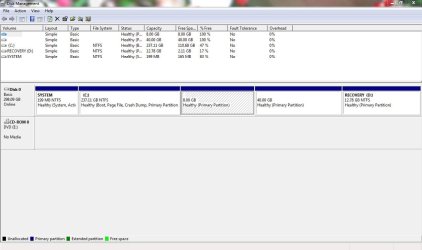
I currently have Win 7 HP installed on my HP dv4 laptop with T6600 processor, 300GB HDD & 4GB RAM. My objective is to install ubuntu 9.10 with Windows 7 in the dual-boot mode. I searched previous posts regarding the same but could not quite find the exact answer. I am writing down the steps I suppose I have to follow. Please correct/advise me wherever you feel I have gone wrong or could go better.
1. Create a separate partition for Ubuntu (install and usage) by shrinking my C drive.
2. Create another partition double the size of my RAM for using it as swap.
3. Restart the machine with the Live CD inserted and select 'Try ubuntu without any change to your computer' to see if things are running fine with the CD.
4. After the Booting is done, click on Install.
5. Fill in sequentially the language, Timezone and keyboard layout.
6. After reaching the prepare disk space screen, choose 'Specify Partitions manually'.
7.On the prepare partition screen, I will be able to figure out the partition for Ubuntu and Swap with their size.
8.Select the partition created for Ubuntu configure it as 'ext4' with mount point '/', also click format partition.
9.Select the partition created for Swap, and configure it as 'linux swap'.
10. Clicking on forward should take me to the screen which asks to fill name and password details.
11. Clicking on forward and install should start the installation process.
Thanks in advance
I currently have Win 7 HP installed on my HP dv4 laptop with T6600 processor, 300GB HDD & 4GB RAM. My objective is to install ubuntu 9.10 with Windows 7 in the dual-boot mode. I searched previous posts regarding the same but could not quite find the exact answer. I am writing down the steps I suppose I have to follow. Please correct/advise me wherever you feel I have gone wrong or could go better.
1. Create a separate partition for Ubuntu (install and usage) by shrinking my C drive.
2. Create another partition double the size of my RAM for using it as swap.
3. Restart the machine with the Live CD inserted and select 'Try ubuntu without any change to your computer' to see if things are running fine with the CD.
4. After the Booting is done, click on Install.
5. Fill in sequentially the language, Timezone and keyboard layout.
6. After reaching the prepare disk space screen, choose 'Specify Partitions manually'.
7.On the prepare partition screen, I will be able to figure out the partition for Ubuntu and Swap with their size.
8.Select the partition created for Ubuntu configure it as 'ext4' with mount point '/', also click format partition.
9.Select the partition created for Swap, and configure it as 'linux swap'.
10. Clicking on forward should take me to the screen which asks to fill name and password details.
11. Clicking on forward and install should start the installation process.
Thanks in advance
My Computer
At a glance
Windows 7T 66004GB
- Computer Manufacturer/Model Number
- HP
- OS
- Windows 7
- CPU
- T 6600
- Memory
- 4GB


 . More than half of the times I have tried, choosing the default kernel option from the grub menu leads me to a blank black screen with a white cursor blinking at the top left which would not stop blinking till eternity. Finally, it forces me to force shutdown my laptop and the no. of times I have done this could already have done some damage to my HDD. Similarly, choosing the kernel - recovery mode option from the grub menu most of the times shows on screen some stuff(libraries/services) being loaded onto the system but soon the dreadful cursor reappears this time though at the bottom left.