
Help required in Win7 - Ubuntu dual boot install

pranab

New member
Local time
10:50 PM
Messages
7
Hello All,
I currently have Win 7 HP installed on my HP dv4 laptop with T6600 processor, 300GB HDD & 4GB RAM. My objective is to install ubuntu 9.10 with Windows 7 in the dual-boot mode. I searched previous posts regarding the same but could not quite find the exact answer. I am writing down the steps I suppose I have to follow. Please correct/advise me wherever you feel I have gone wrong or could go better.


1. Create a separate partition for Ubuntu (install and usage) by shrinking my C drive.
2. Create another partition double the size of my RAM for using it as swap.
3. Restart the machine with the Live CD inserted and select 'Try ubuntu without any change to your computer' to see if things are running fine with the CD.
4. After the Booting is done, click on Install.
5. Fill in sequentially the language, Timezone and keyboard layout.
6. After reaching the prepare disk space screen, choose 'Specify Partitions manually'.
7.On the prepare partition screen, I will be able to figure out the partition for Ubuntu and Swap with their size.
8.Select the partition created for Ubuntu configure it as 'ext4' with mount point '/', also click format partition.
9.Select the partition created for Swap, and configure it as 'linux swap'.
10. Clicking on forward should take me to the screen which asks to fill name and password details.
11. Clicking on forward and install should start the installation process.

Thanks in advance :)
 

My Computer My Computer

At a glance

Windows 7T 66004GB
Computer Manufacturer/Model Number
HP
OS
Windows 7
CPU
T 6600
Memory
4GB
Hello All,
I currently have Win 7 HP installed on my HP dv4 laptop with T6600 processor, 300GB HDD & 4GB RAM. My objective is to install ubuntu 9.10 with Windows 7 in the dual-boot mode. I searched previous posts regarding the same but could not quite find the exact answer. I am writing down the steps I suppose I have to follow. Please correct/advise me wherever you feel I have gone wrong or could go better.


1. Create a separate partition for Ubuntu (install and usage) by shrinking my C drive.
2. Create another partition double the size of my RAM for using it as swap.
3. Restart the machine with the Live CD inserted and select 'Try ubuntu without any change to your computer' to see if things are running fine with the CD.
4. After the Booting is done, click on Install.
5. Fill in sequentially the language, Timezone and keyboard layout.
6. After reaching the prepare disk space screen, choose 'Specify Partitions manually'.
7.On the prepare partition screen, I will be able to figure out the partition for Ubuntu and Swap with their size.
8.Select the partition created for Ubuntu configure it as 'ext4' with mount point '/', also click format partition.
9.Select the partition created for Swap, and configure it as 'linux swap'.
10. Clicking on forward should take me to the screen which asks to fill name and password details.
11. Clicking on forward and install should start the installation process.

Thanks in advance :)
Hello prenab;

You have though things out pretty well! Did some homework to. Good for you! I was happy with the default settings Ubuntu 9.10 used for the install and did not need all the manual steps you have listed. I just created the empty space, say 10 to 12GB at the end of my hard drive and told Ubuntu to install to the empty space. It did everything else, no problem.

Cheers!
Robert
 

My Computer My Computer

At a glance

...
OS
...
Have you tried WUBI
 

My Computer My Computer

At a glance

Windows 10 Pro x64i7-4770K16Gig DDR3-2400Gigabyte GT740
Computer type
PC/Desktop
Computer Manufacturer/Model Number
Self Built Custom Computer.
OS
Windows 10 Pro x64
CPU
i7-4770K
Motherboard
Asus Z87 Sabertooth
Memory
16Gig DDR3-2400
Graphics Card(s)
Gigabyte GT740
Sound Card
Onboard
Monitor(s) Displays
Benq 27" - Dell 23' - Benq 22"
Screen Resolution
1680x1050
Hard Drives
Samsung 840 Pro 128g SSD
1xWestern Digital Caviar Green 1tb
2xWestern Digital Caviar Green 2 tb
PSU
Seasonic 760 watt Platinum
Case
Coolermaster Haf - X
Cooling
Noctua NH-C12P CPU Cooler
Keyboard
Logitech illuminated keyboard
Mouse
Logitech Perfomance MX
Internet Speed
Cable = speeds to 20Mbps downsteam and 512kbps upsteam
Antivirus
Avast Internet Security
Browser
Firefox
Have you tried WUBI

I was going to ask that. WUBI is an easy installer for Ubuntu. All you do is insert the DVD into your drive while on Windows 7 and choose the WUBI install option. When I installed Kubuntu on my laptop I used WUBI because I knew sooner or later I would want more disk space. When you use WUBI you can easily uninstall Ubuntu from the Control Panel
 

My Computer My Computer

At a glance

Windows 7 Ultimate 32-Bit (x86)Intel Pentium Dual Core T34003GB DDR2nVidia 9200M GE and Mobile Intel 4 Series Exp...
Computer Manufacturer/Model Number
Compaq
OS
Windows 7 Ultimate 32-Bit (x86)
CPU
Intel Pentium Dual Core T3400
Motherboard
Wistron 3612
Memory
3GB DDR2
Graphics Card(s)
nVidia 9200M GE and Mobile Intel 4 Series Express Chipset
Sound Card
Conexant High Defininition SmartAudio 221
Screen Resolution
1366x768
Hard Drives
SAMSUNG HM251JI ATA 250GB
Internet Speed
160KBps
Robert,
I will see if could go the way you have mentioned.

kodi,isaaclopez,
I did go through the option of using wubi. But the reason I am staying away is that after I have two operating systems with me I do not want to lose both of them if something goes wrong with one i.e losing Ubuntu if Win 7 goes mad.

Thanks for your suggestions anyways :)
 

My Computer My Computer

At a glance

Windows 7T 66004GB
Computer Manufacturer/Model Number
HP
OS
Windows 7
CPU
T 6600
Memory
4GB
You did not mention how you wanted the boot handled. If you want to leave Win 7 in control, check out the link. Notice especially the part about the advanced button and loading Grub onto the Linux partition and not the MBR. There are some differences, like ext3 is no longer the only option.

Ubuntu - NeoSmart Technologies Wiki
 

My Computer My Computer

At a glance

Windows 7 x64i7-2600K8 GGTX 480
Computer Manufacturer/Model Number
Homebuilt
OS
Windows 7 x64
CPU
i7-2600K
Motherboard
Asus P8Z77-v Pro
Memory
8 G
Graphics Card(s)
GTX 480
Sound Card
Onboard
Monitor(s) Displays
LG W2753V
Screen Resolution
1920x1080
Hard Drives
Crucial M4 128 G SSD
saltgrass, thx for the suggestion. I installed ubuntu and installed GRUB on the same partition as the Ubuntu leaving the MBR untouched. Used EasyBCD to add a new entry for linux but choosing the added option at startup does not lead to anywhere..seems I have to start a new thread now with proper title
 

My Computer My Computer

At a glance

Windows 7T 66004GB
Computer Manufacturer/Model Number
HP
OS
Windows 7
CPU
T 6600
Memory
4GB
Can you attach a snipping tool picture of your disk management. I have done the procedure twice in the last few days and it works for me. There was someone on another forum that it did not work for but don't know why.

And you are using the EasyBCD beta 2.0....?
 

My Computer My Computer

At a glance

Windows 7 x64i7-2600K8 GGTX 480
Computer Manufacturer/Model Number
Homebuilt
OS
Windows 7 x64
CPU
i7-2600K
Motherboard
Asus P8Z77-v Pro
Memory
8 G
Graphics Card(s)
GTX 480
Sound Card
Onboard
Monitor(s) Displays
LG W2753V
Screen Resolution
1920x1080
Hard Drives
Crucial M4 128 G SSD
saltgrass, thx for the suggestion. I installed ubuntu and installed GRUB on the same partition as the Ubuntu leaving the MBR untouched. Used EasyBCD to add a new entry for linux but choosing the added option at startup does not lead to anywhere..seems I have to start a new thread now with proper title
pranab;
You do not need to start a new thread unless you just want to ...

Ubuntu 9.10 installs Grub2, all of the tutorials and instructions for previous versions are limited in how much they apply now. For example, we used to edit the file menu.lst to arrange the boot order or priority. This no longer applies to Grub2 so if you decide to make Windows the default boot OS instead of Ubuntu please let me know.

Also versions of EasyBCD prior to version 2 do not recognize the new Grub2. You will need to download EasyBCD2 to create the Ubuntu entry in Windows.

Please let us know how we can help?

Cheers!
Robert
 

My Computer My Computer

At a glance

...
OS
...
Robert and Saltgrass, thx for your suggestions. I used EasyBCD 2.0 to add an entry for Ubuntu in Windows boot manager which when chosen at start-up does lead me to the grub menu.
However, I am facing a frustrating problem after I choose the options from the grub menu (default kernel login or the recovery mode :cry: . More than half of the times I have tried, choosing the default kernel option from the grub menu leads me to a blank black screen with a white cursor blinking at the top left which would not stop blinking till eternity. Finally, it forces me to force shutdown my laptop and the no. of times I have done this could already have done some damage to my HDD. Similarly, choosing the kernel - recovery mode option from the grub menu most of the times shows on screen some stuff(libraries/services) being loaded onto the system but soon the dreadful cursor reappears this time though at the bottom left.
The other times, choosing the default option at grub menu works fine and leads me to the login screen and the after eating up the password, Ubuntu loads & works perfectly fine. The recovery mode chosen during these merciful times also works perfectly.

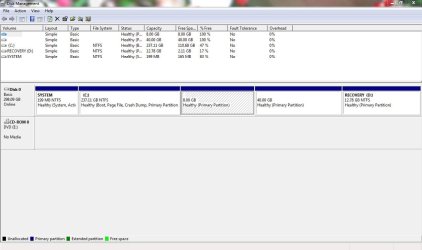
I am attaching a screenshot of my Win Disk Mgt if that could be of some help. Could somebody pls help me out of this mess.
Thx in advance.
 

Attachments

  • Disk Mgt.JPG
    Disk Mgt.JPG
    77.1 KB · Views: 79

My Computer My Computer

At a glance

Windows 7T 66004GB
Computer Manufacturer/Model Number
HP
OS
Windows 7
CPU
T 6600
Memory
4GB
Do you really have 5 primary partitions on the drive? Maybe using Linux as one makes it ok, I do not know, but maybe it is confusing the system during boot.

Do you remember exactly what settings you used for EasyBCD? Maybe remove the current Linux entry and redo it.
 

My Computer My Computer

At a glance

Windows 7 x64i7-2600K8 GGTX 480
Computer Manufacturer/Model Number
Homebuilt
OS
Windows 7 x64
CPU
i7-2600K
Motherboard
Asus P8Z77-v Pro
Memory
8 G
Graphics Card(s)
GTX 480
Sound Card
Onboard
Monitor(s) Displays
LG W2753V
Screen Resolution
1920x1080
Hard Drives
Crucial M4 128 G SSD
Hi Saltgrass, as far as the partitions are concerned, My laptop came with three manufacturer created partitions, C, Recovery and System. I however, as I had mentioned in my first post (in this thread) created two new partitions for ubuntu- one as boot and the other as swap, which is why in the pic attached in my previous post , u see 5 partitions.
As you had suggested, I did remove my older Linux entry from Windows MBR using EasyBCD 2.0. Afterwards, I added a new entry under the linux/BSD tab, choose Grub2 as the type. Rebooted the system twice to check but the problem is where it was.

Any other idea.
 

My Computer My Computer

At a glance

Windows 7T 66004GB
Computer Manufacturer/Model Number
HP
OS
Windows 7
CPU
T 6600
Memory
4GB
OK, if it still doesn't work, add a new entry. I am currently using the 91 build of EasyBCD so some of the tabs have changed.

Instead of Grub 2, use Grub(Legacy) Then name your OS and select the Partition it is in. Then add the entry and try to boot to this entry.

I was told EasyBCD doesn't really use Grub 2 to start to boot sequence.

I am still a little concerned about the 5 primary partitions, if strange things happen in Windows, that might be the cause.
 

My Computer My Computer

At a glance

Windows 7 x64i7-2600K8 GGTX 480
Computer Manufacturer/Model Number
Homebuilt
OS
Windows 7 x64
CPU
i7-2600K
Motherboard
Asus P8Z77-v Pro
Memory
8 G
Graphics Card(s)
GTX 480
Sound Card
Onboard
Monitor(s) Displays
LG W2753V
Screen Resolution
1920x1080
Hard Drives
Crucial M4 128 G SSD
I am still a little concerned about the 5 primary partitions, if strange things happen in Windows, that might be the cause.
Looks odd to me too - I thought the MBR only supported a maximum of 4 Primary partitions or 3 plus 1 Extended partition.

So I do not see how an MBR can handle 5 primary partitions. [But I did see some weird partitioniing over here: http://www.sevenforums.com/installation-setup/74336-partitioning-problem.html#post655816 ]

Perhaps you could consider removing those 2 new partitions, creating a fourth partition then creating 2 logical partitions within it for the Ubuntu Swap and Ubuntu partitions. (Assuming that Ubuntu can be booted from a Logical partition)

-----
Edit:
Some old Ubuntu threads:
http://ubuntuforums.org/showthread.php?t=798942
http://ubuntuforums.org/showthread.php?t=672351
 
Last edited:

My Computer My Computer

At a glance

Windows Home Premium (64)Intel Core i7 8608GB (4x2GB) Corsair TwinX XMS31GB Gainward 9500 GT
Computer type
PC/Desktop
Computer Manufacturer/Model Number
Scan 3XS P55 liteDAW
OS
Windows Home Premium (64)
CPU
Intel Core i7 860
Motherboard
Gigabyte GA-P55A-UD4
Memory
8GB (4x2GB) Corsair TwinX XMS3
Graphics Card(s)
1GB Gainward 9500 GT
Sound Card
M-Audio Delta 66
Monitor(s) Displays
Acer v223wBBd
Screen Resolution
1680 x 1050
Hard Drives
1 x 500 GB WD Barracuda (OS+Docs)
2 x 1TB Samsung Spinpoint F3 (Data)
PSU
Enermax EMD625AWT II - 625W Enermax Modu82+ II
Case
Fractal Design Define R2 Black
Cooling
Prolima Megahalems Super 6 Heatpipe Tower Cooler
Keyboard
Microsoft Digital Media Pro
Mouse
Belkin Optical Ergo
Internet Speed
8 Mbps nominal (14.9 achieved !)
Other Info
Digital Audio Workstation
Back
Top