How to make dual boot install windows 7 gbt problems.

custard

New member
Local time
1:35 PM
Messages
2
I made a partition on harddisk with windows 8.1 already installed, followed the steps on bios to make my usb boot works... it worked the installation of windows 7 started but then i got the message it could not be installed to the disk because of GBT, i have no idea what it is... I used to have 3 systems installed in a other laptop(older) but now with Lenovo and windows 8.1 it seems very difficult to setup a dual boot, anyone could guide me or point me the steps or tutorial :) on how to install a windows 7 in this partition i created? I don't want delete or remove my factory installed windows 8.1 no, i just want to have two systems, a dual boot, is it possible? :huh:
 

My Computer My Computer

Computer type
Laptop
Computer Manufacturer/Model Number
lenovo g50-70
OS
windows 8.1 64 bit
CPU
1.90 ghz
Memory
4.00gb
Graphics Card(s)
intel family 4500 onboard
Hard Drives
900gb
Antivirus
avira
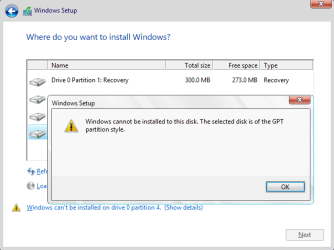
but then i got the message it could not be installed to the disk because of GBT

Quote from this post: UEFI Boot Mode (installing using the GPT partition style) and Legacy BIOS Boot Mode (installing using the MBR partition style). -> link

   Tip
Error message when you boot from the Windows installation media in Legacy BIOS Boot Mode:

Windows cannot be installed to this disk. The selected disk is of the GPT partition style. (see screenshot below)

That is because Windows can only be installed to MBR disk in Legacy BIOS Boot Mode, but you plan to install Windows on a GPT disk.

- Boot from the Windows installation media in UEFI Boot Mode, so you can use GPT (GUID Partition Table).
- But if you want to use MBR (Master Boot Record) partition table, then delete all partitions on the disk.

Windows cannot be installed to this disk. The selected disk is of the GPT partition style.png

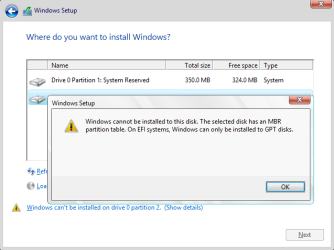
Error message when you boot from the Windows installation media in UEFI Boot Mode:

Windows cannot be installed to this disk. The selected disk has an MBR partition table. On EFI systems, Windows can only be installed to GPT disks. (see screenshot below)

That is because Windows can only be installed to GPT disk in UEFI Boot Mode, but you plan to install Windows on an MBR disk.

- Delete all partitions on the disk, so you can use GPT (GUID Partition Table).
- But if you want to use MBR (Master Boot Record) partition table, then boot from the Windows installation media in Legacy BIOS Boot Mode.

Windows cannot be installed on this disk. The selected disk has an MBR partition table.png
 
Last edited:

My Computer My Computer

Computer type
Laptop
Computer Manufacturer/Model Number
Lenovo IdeaPad G580
OS
Windows 8.1/10 x64
CPU
Intel Core i5-3230M
Memory
8 GB
Graphics Card(s)
Intel HD Graphics 4000
Antivirus
Windows Defender, EMET, standard user account
Browser
Internet Explorer
Thanks i'm going now to try disable the Legacy BIOS mode, and i have another question which i'm abit confused, so if the windows 7 im trying to install(i'm using usb pendrive) is 64bit it will work with GPT? And how i can check if it is a windows 7 64 or 32? I don't remember what it is, and when the installation started i didn't see it does not say.
__________________________________________
I tried to enable UEFI Boot Mode instead of Legacy and i can't boot from the usb stick, when i go to BIOS to select from where to boot and have only 3 options, windows, UEFI AND UEFI i tried both they says not possible, and a ok button, so i clicked ok. Is there any other option? Why Lenovo turned it so hard to install some other system? It is frustating :(
______________________________________________
Im not able to install either from usb either from cd, enabled the options above but it's not working. Seems its really difficult to make one installation, have to update the usb and what more... any more help? I'm kinda lost here
 
Last edited:

My Computer My Computer

Computer type
Laptop
Computer Manufacturer/Model Number
lenovo g50-70
OS
windows 8.1 64 bit
CPU
1.90 ghz
Memory
4.00gb
Graphics Card(s)
intel family 4500 onboard
Hard Drives
900gb
Antivirus
avira
Back
Top