How do I make an extended partition with logical

kiwigal

New member
Local time
6:51 AM
Messages
10
I am totally confused as to the difference between "partition" and "Volume"
I want to partition the C: drive to give an Extended partition with 2 logical partitions to remove Data from the C: and put MY installed programs.
Do I have to use 3rd party software for this?
 

My Computer My Computer

Computer Manufacturer/Model Number
Dell Studio XPS 1645
OS
Windows 7 professional 64 bit
CPU
I7 Q720
Memory
6 Gb DDR3
Hard Drives
640Gb SATA
Welcome!

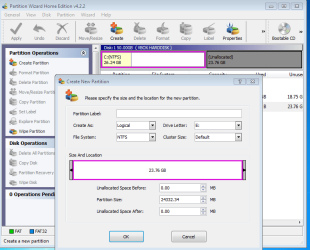
It is easy to create a logical partition using the third-party program Partition Wizard.

Right-click on the empty space, and select Create New. You can then instruct it to create a logical partition.

Capture.PNG
 

My Computer My Computer

Computer Manufacturer/Model Number
Custom
OS
Windows 7 Professional x64
CPU
Intel i7 2600K OC'd @ 4620 MHz
Motherboard
Asus P8Z68-V Pro
Memory
16GB GSkill Sniper 2133 Mhz (4x4GB)
Graphics Card(s)
EVGA GeForce GTX 480 SuperClocked+
Sound Card
Realtek High Definition Audio
Monitor(s) Displays
2x Acer S273HLbmii 27"
Screen Resolution
2 x 1920x1080
Hard Drives
64GB Crucial M4 SSD

Storage: Hitachi 1TB 5400RPM, Samsung 1.5TB 5400RPM
PSU
Corsair HW Series 750w (modular)
Case
Cooler Master HAF 932 Advanced Blue Edition
Cooling
CM Hyper 212+ CPU cooler, 3x 230mm + 1x 140mm case fans
Keyboard
Logitech MK320 (wireless)
Mouse
Logitech MK320 (wireless)
Internet Speed
30 Mb/s : 2 Mb/s
The reason you want to make logical partitions is because you want more than 4 partitions on the drive?
 

My Computer My Computer

Computer Manufacturer/Model Number
Homebuilt
OS
Windows 7 x64
CPU
i7-2600K
Motherboard
Asus P8Z77-v Pro
Memory
8 G
Graphics Card(s)
GTX 480
Sound Card
Onboard
Monitor(s) Displays
LG W2753V
Screen Resolution
1920x1080
Hard Drives
Crucial M4 128 G SSD
Thank you for info

Thanks Jonathon - that is a great program - more closely resembles the old Parition Magic in its layout that I used to use than anything else that I have looked at. The Windows 7 screens are hopelessly confusing - I did find finally that it HAS made an extended partition with a logical one but nowhere did it tell me that when I was trying.
Partition Wizard also has a terrific site with great tutorials and video - I would recommend it to anyone - many thanks.

And no Saltgrass - I just wanted to use an extended partition with Logical drives rather than make further primary ones since I am using them for things like my data files and the programs that I install myself. As well as having the ability to move 'My Documents to somewhere safer than the C: drive
 

My Computer My Computer

Computer Manufacturer/Model Number
Dell Studio XPS 1645
OS
Windows 7 professional 64 bit
CPU
I7 Q720
Memory
6 Gb DDR3
Hard Drives
640Gb SATA
For moving your documents you may want to watch this video tutorial. It is VERY important that you first define folders in your new partition and move the various documents, etc. to the folders, NOT to the partition. That would create a minor mess.
 

My Computer My Computer

Computer Manufacturer/Model Number
HP, Dell, Gateway, Toshiba - 4 laptops and 2 desktops
OS
Vista, Windows7, Mint Mate, Zorin, Windows 8
CPU
from 1.6GHz Duo to i7
Monitor(s) Displays
2x HP w2207
Hard Drives
5x HDD, 7x SSD, 12x Externals
Keyboard
with trackball - no mices
Mouse
Trackball mice
Internet Speed
DSL 6000
There is no real need for Logical partitions in Windows 7. They were mostly used for Windows 95/98 back in the DOS days, I did see some logical partitions with Windows NT but that was because people were formatting FAT32 and needed to dual boot with DOS. You can make primary partitions and put data on them that is perfectly fine.
 

My Computer My Computer

Computer type
PC/Desktop
Computer Manufacturer/Model Number
Dell OP7010
OS
Windows 7 Enterprise (x64); Windows Server 2008 R2 (x64)
Memory
16GB
Monitor(s) Displays
4 Dell 24" LCD
Screen Resolution
1280x1024
Keyboard
Dell
Mouse
Dell Optical
Internet Speed
40meg
Interesting!

I had not given that any thought - system seemed to be carried through in XP so thought that this was necessary - thanks for that
 

My Computer My Computer

Computer Manufacturer/Model Number
Dell Studio XPS 1645
OS
Windows 7 professional 64 bit
CPU
I7 Q720
Memory
6 Gb DDR3
Hard Drives
640Gb SATA
The only time you would need to create a logical drive is if you needed to have more than 4 partitions on a physical drive.

You can have a total of 4 partitions. The fourth one could be a logical drive, on which you can have unlimited extended partitions.
 

My Computer My Computer

Computer Manufacturer/Model Number
Custom
OS
Windows 7 Professional x64
CPU
Intel i7 2600K OC'd @ 4620 MHz
Motherboard
Asus P8Z68-V Pro
Memory
16GB GSkill Sniper 2133 Mhz (4x4GB)
Graphics Card(s)
EVGA GeForce GTX 480 SuperClocked+
Sound Card
Realtek High Definition Audio
Monitor(s) Displays
2x Acer S273HLbmii 27"
Screen Resolution
2 x 1920x1080
Hard Drives
64GB Crucial M4 SSD

Storage: Hitachi 1TB 5400RPM, Samsung 1.5TB 5400RPM
PSU
Corsair HW Series 750w (modular)
Case
Cooler Master HAF 932 Advanced Blue Edition
Cooling
CM Hyper 212+ CPU cooler, 3x 230mm + 1x 140mm case fans
Keyboard
Logitech MK320 (wireless)
Mouse
Logitech MK320 (wireless)
Internet Speed
30 Mb/s : 2 Mb/s
What is this?

There is no real need for Logical partitions in Windows 7. They were mostly used for Windows 95/98 back in the DOS days, I did see some logical partitions with Windows NT but that was because people were formatting FAT32 and needed to dual boot with DOS. You can make primary partitions and put data on them that is perfectly fine.

What is meant by REP? in ".....please add some REP"
Sorry to be ignorant!
 

My Computer My Computer

Computer Manufacturer/Model Number
Dell Studio XPS 1645
OS
Windows 7 professional 64 bit
CPU
I7 Q720
Memory
6 Gb DDR3
Hard Drives
640Gb SATA

My Computer My Computer

Computer Manufacturer/Model Number
Custom
OS
Windows 7 Professional x64
CPU
Intel i7 2600K OC'd @ 4620 MHz
Motherboard
Asus P8Z68-V Pro
Memory
16GB GSkill Sniper 2133 Mhz (4x4GB)
Graphics Card(s)
EVGA GeForce GTX 480 SuperClocked+
Sound Card
Realtek High Definition Audio
Monitor(s) Displays
2x Acer S273HLbmii 27"
Screen Resolution
2 x 1920x1080
Hard Drives
64GB Crucial M4 SSD

Storage: Hitachi 1TB 5400RPM, Samsung 1.5TB 5400RPM
PSU
Corsair HW Series 750w (modular)
Case
Cooler Master HAF 932 Advanced Blue Edition
Cooling
CM Hyper 212+ CPU cooler, 3x 230mm + 1x 140mm case fans
Keyboard
Logitech MK320 (wireless)
Mouse
Logitech MK320 (wireless)
Internet Speed
30 Mb/s : 2 Mb/s
Some folks feel that logical partitions are just as good as primary, and possibly so.

The point I would like to make is in XP you could make logical partitions whenever you wanted. But Win 7's Disk Management will not allow you to create a logical partition until you create a fourth partition with space still left on the drive.

If Win 7 doesn't seem to like them, I see no reason to disagree....

But there is one item that needs to be considered, if you have the System Reserved (100mb) partition, it is one of the 4 allowed.
 

My Computer My Computer

Computer Manufacturer/Model Number
Homebuilt
OS
Windows 7 x64
CPU
i7-2600K
Motherboard
Asus P8Z77-v Pro
Memory
8 G
Graphics Card(s)
GTX 480
Sound Card
Onboard
Monitor(s) Displays
LG W2753V
Screen Resolution
1920x1080
Hard Drives
Crucial M4 128 G SSD
Primary partitions sometimes become marked Active and derail the System MBR from the OS. So I usually suggest Logical partitions for data, although it does require a 3rd party software unless you use Diskpart command line.

You can use either. If you ever need to convert Primary to logical to create a new Primary due to limit, Partition Wizard can do this too.

It is always best to do any shrinking with Disk management as it won't fail, whereas 3rd party partitioning software can sometimes fail during Resize. However during hundreds of times we have helped others use it here for resizing, PW bootable CD has never failed so it is easily the best choice for resizing or any other operations Disk Mgmt can't do.
 
Last edited:
The need for logical partitions is more or less a given the way the systems come these days. They often already have three primary partitions out of the box (system, recovery and the 100MB partition). So it is prudent to make the next one a logical - just in case one wants to add more.
 

My Computer My Computer

Computer Manufacturer/Model Number
HP, Dell, Gateway, Toshiba - 4 laptops and 2 desktops
OS
Vista, Windows7, Mint Mate, Zorin, Windows 8
CPU
from 1.6GHz Duo to i7
Monitor(s) Displays
2x HP w2207
Hard Drives
5x HDD, 7x SSD, 12x Externals
Keyboard
with trackball - no mices
Mouse
Trackball mice
Internet Speed
DSL 6000
There is no real need for Logical partitions in Windows 7. They were mostly used for Windows 95/98 back in the DOS days, I did see some logical partitions with Windows NT but that was because people were formatting FAT32 and needed to dual boot with DOS. You can make primary partitions and put data on them that is perfectly fine.

What is meant by REP? in ".....please add some REP"
Sorry to be ignorant!

I think that JK gave you the links; all you need is to click on the scales icon , for the post that helped.
 

My Computer My Computer

Computer type
PC/Desktop
Computer Manufacturer/Model Number
Dell OP7010
OS
Windows 7 Enterprise (x64); Windows Server 2008 R2 (x64)
Memory
16GB
Monitor(s) Displays
4 Dell 24" LCD
Screen Resolution
1280x1024
Keyboard
Dell
Mouse
Dell Optical
Internet Speed
40meg
Back
Top