re-installing ancient software

TerryinNC

New member
Local time
7:14 AM
Messages
15
I have an automobile service manual on CD that uses an old version (2001) of Stirling Technologies installSHIELD that worked fine on Windows XP. Now that I have "upgraded" to Windows 7 I cannot load the program into the new system, even changing the "compatibility" to WindowsXP or Windows2000. Can you suggest some other trick - I need to fix my car.

There are several "install".exe files on the disk. I can't get any of them to run, and the compatibility troubleshooter can't figure them out either.
Is there a way to identify and run the program directly from the disk without installing it?
 

My Computer My Computer

At a glance

Windows 7Intel E53006GIntel GMA X4500
Computer Manufacturer/Model Number
Gateway 4822
OS
Windows 7
CPU
Intel E5300
Memory
6G
Graphics Card(s)
Intel GMA X4500
Monitor(s) Displays
Gateway FHX2300
Hard Drives
Serial ATA, 1TB
Hmmmm come to think of it I havent installed my service manual for my 1998 F150 since I upgraded to 64 bit from 32 bit Win7.

If it were to happen to me I would copy the CD over to a folder on HDD and try using Compatability Checker again. If that doesn't work try installing the manual in Windows XP Mode.
 

My Computer My Computer

At a glance

Windows 7 Ultimate 64 bit Steve Ballmer Signa...Intel Core 2 Quad - Q9550 - 2.83GHz stock - O...4GB DDR2 800MHz (PC6400) OCZ ReaperNvidia GE Force 8800 GTS
Computer Manufacturer/Model Number
Homebrew PC - "Alpha_Dawg"
OS
Windows 7 Ultimate 64 bit Steve Ballmer Signature Edition
CPU
Intel Core 2 Quad - Q9550 - 2.83GHz stock - OC'd to 3.6GHz
Motherboard
Gigabyte EP45-UD3P
Memory
4GB DDR2 800MHz (PC6400) OCZ Reaper
Graphics Card(s)
Nvidia GE Force 8800 GTS
Sound Card
Asus Xonar DX
Monitor(s) Displays
Samsung SyncMaster 2333HD
Screen Resolution
1920 x 1080
Hard Drives
WD Caviar Black 750GB - 7200RPM - 32MB cache
WD Caviar Green 1.5TB - 5400RPM - 64MB cache
WD Caviar Green 2.0TB - 5400RPM - 64MB cache
PSU
PC Power & Cooling Silencer 750
Case
Gigabyte 3D Aurora
Cooling
Case is Air - 5ea. 120mm fans (mix of Arctic and Xigmatec)
Keyboard
MS Natural Wireless KB
Mouse
MS Wireless Mouse
Internet Speed
50 mbps down/5 mbps up
Other Info
AVerMedia - AVerTVHD G2 Dual Tuner Card
Has this been resolved, TerryinNC?
 

My Computer My Computer

At a glance

Windows 7 Enterprise x64AMD Athlon 64X2 Dual Core 3800+OCZ Platinum Dual Channel - 4x1GbNVIDIA GeForce 8800 GT PCI Express x16
Computer Manufacturer/Model Number
NVIDIA
OS
Windows 7 Enterprise x64
CPU
AMD Athlon 64X2 Dual Core 3800+
Motherboard
GeForce 6100-M9
Memory
OCZ Platinum Dual Channel - 4x1Gb
Graphics Card(s)
NVIDIA GeForce 8800 GT PCI Express x16
Sound Card
Creative Audigy Sound Blaster Extreme PCI
Monitor(s) Displays
Compaq 7500
Screen Resolution
1024x768
Hard Drives
C: Seagate ST3250318AS SataII - 250Gb

D: Seagate ST3500418AS SataII - 500Gb
PSU
OCZ 600w Dual 12v Rails
Case
Thermaltake
Cooling
OCZ Heatsinks, Fans, and Thermal Paste on CPU & Chipsets
Keyboard
Logitech
Mouse
Radio Shack PS2
Internet Speed
Cable
Other Info
Dual Pioneer DVD/RW optical drives. LG CD/RW optical drive.
Hmmmm come to think of it I havent installed my service manual for my 1998 F150 since I upgraded to 64 bit from 32 bit Win7.

Let me know if you get it to work.
Thanks

Terry
 

My Computer My Computer

At a glance

Windows 7Intel E53006GIntel GMA X4500
Computer Manufacturer/Model Number
Gateway 4822
OS
Windows 7
CPU
Intel E5300
Memory
6G
Graphics Card(s)
Intel GMA X4500
Monitor(s) Displays
Gateway FHX2300
Hard Drives
Serial ATA, 1TB
Hmmmm come to think of it I havent installed my service manual for my 1998 F150 since I upgraded to 64 bit from 32 bit Win7.

Let me know if you get it to work.
Thanks

Terry

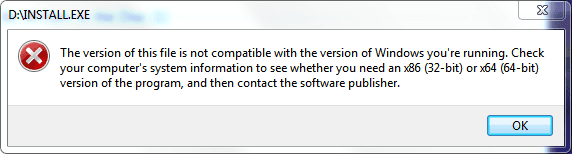
Yep.... I tried installing my service manual and mine wont install either! I have tried XP SP2 compatability and I still get the following error with mine...

Service Manual.PNG

Not sure if mine is from stirling, but I'll try a few things with mine and report back. I'm probably going to just use XP Mode as it is intended for apps that just flat out wont run in win7.

Also, since I had it working on Vista 32, and it worked after I upgraded from Vista 32 to Win7 32 bit... I am now running a clean install of Win7 64bit. I am guessing my issue may be that I am now running a 64 bit OS.
 

My Computer My Computer

At a glance

Windows 7 Ultimate 64 bit Steve Ballmer Signa...Intel Core 2 Quad - Q9550 - 2.83GHz stock - O...4GB DDR2 800MHz (PC6400) OCZ ReaperNvidia GE Force 8800 GTS
Computer Manufacturer/Model Number
Homebrew PC - "Alpha_Dawg"
OS
Windows 7 Ultimate 64 bit Steve Ballmer Signature Edition
CPU
Intel Core 2 Quad - Q9550 - 2.83GHz stock - OC'd to 3.6GHz
Motherboard
Gigabyte EP45-UD3P
Memory
4GB DDR2 800MHz (PC6400) OCZ Reaper
Graphics Card(s)
Nvidia GE Force 8800 GTS
Sound Card
Asus Xonar DX
Monitor(s) Displays
Samsung SyncMaster 2333HD
Screen Resolution
1920 x 1080
Hard Drives
WD Caviar Black 750GB - 7200RPM - 32MB cache
WD Caviar Green 1.5TB - 5400RPM - 64MB cache
WD Caviar Green 2.0TB - 5400RPM - 64MB cache
PSU
PC Power & Cooling Silencer 750
Case
Gigabyte 3D Aurora
Cooling
Case is Air - 5ea. 120mm fans (mix of Arctic and Xigmatec)
Keyboard
MS Natural Wireless KB
Mouse
MS Wireless Mouse
Internet Speed
50 mbps down/5 mbps up
Other Info
AVerMedia - AVerTVHD G2 Dual Tuner Card
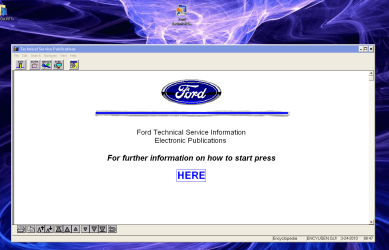
Update... I tried copying entire CD contents to HDD and still no success.

So I fired up XP mode and tried the installation in the virtual machine... naturally it works fine in XP Mode (Using Virtual PC).

Service Manual_2.PNG
 

My Computer My Computer

At a glance

Windows 7 Ultimate 64 bit Steve Ballmer Signa...Intel Core 2 Quad - Q9550 - 2.83GHz stock - O...4GB DDR2 800MHz (PC6400) OCZ ReaperNvidia GE Force 8800 GTS
Computer Manufacturer/Model Number
Homebrew PC - "Alpha_Dawg"
OS
Windows 7 Ultimate 64 bit Steve Ballmer Signature Edition
CPU
Intel Core 2 Quad - Q9550 - 2.83GHz stock - OC'd to 3.6GHz
Motherboard
Gigabyte EP45-UD3P
Memory
4GB DDR2 800MHz (PC6400) OCZ Reaper
Graphics Card(s)
Nvidia GE Force 8800 GTS
Sound Card
Asus Xonar DX
Monitor(s) Displays
Samsung SyncMaster 2333HD
Screen Resolution
1920 x 1080
Hard Drives
WD Caviar Black 750GB - 7200RPM - 32MB cache
WD Caviar Green 1.5TB - 5400RPM - 64MB cache
WD Caviar Green 2.0TB - 5400RPM - 64MB cache
PSU
PC Power & Cooling Silencer 750
Case
Gigabyte 3D Aurora
Cooling
Case is Air - 5ea. 120mm fans (mix of Arctic and Xigmatec)
Keyboard
MS Natural Wireless KB
Mouse
MS Wireless Mouse
Internet Speed
50 mbps down/5 mbps up
Other Info
AVerMedia - AVerTVHD G2 Dual Tuner Card
Thanks very much for checking and reporting. Unfortunately I do not have Virtual PC. I hope I can find another way.

But your behavior is very much what I found. And your program screen is the same, so I suspect Ford (or Helms?) used the same software through the early 2000's. I need a Windows 7 guru to tell me how to fool 7 or how to get it to run in XP configuration. Is the problem simply that it is just not signed, or something like that?

Interesting that I couldn't even open the help file - it needed a patch to read the old 32 bit(?) help.
 

My Computer My Computer

At a glance

Windows 7Intel E53006GIntel GMA X4500
Computer Manufacturer/Model Number
Gateway 4822
OS
Windows 7
CPU
Intel E5300
Memory
6G
Graphics Card(s)
Intel GMA X4500
Monitor(s) Displays
Gateway FHX2300
Hard Drives
Serial ATA, 1TB
Virtual PC is FREE!!! <--- but you must have Pro version win7 or higher!
Windows Virtual PC: Home Page

Also run the freeware utility Securable from grc.com to determine if your CPU is capable of running virtual machines...Most Popular Freeware on GRC.COM

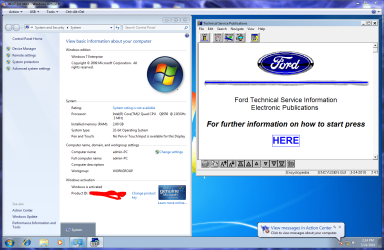
More on the issue... It also runs fine in my Win7 32 bit virtual machine.
Service Manual_3.PNG
So, in my case I have concluded that the issue must be this app has no idea what to do in a 64 bit environment.

Is your win7 32 or 64 bit???
 

My Computer My Computer

At a glance

Windows 7 Ultimate 64 bit Steve Ballmer Signa...Intel Core 2 Quad - Q9550 - 2.83GHz stock - O...4GB DDR2 800MHz (PC6400) OCZ ReaperNvidia GE Force 8800 GTS
Computer Manufacturer/Model Number
Homebrew PC - "Alpha_Dawg"
OS
Windows 7 Ultimate 64 bit Steve Ballmer Signature Edition
CPU
Intel Core 2 Quad - Q9550 - 2.83GHz stock - OC'd to 3.6GHz
Motherboard
Gigabyte EP45-UD3P
Memory
4GB DDR2 800MHz (PC6400) OCZ Reaper
Graphics Card(s)
Nvidia GE Force 8800 GTS
Sound Card
Asus Xonar DX
Monitor(s) Displays
Samsung SyncMaster 2333HD
Screen Resolution
1920 x 1080
Hard Drives
WD Caviar Black 750GB - 7200RPM - 32MB cache
WD Caviar Green 1.5TB - 5400RPM - 64MB cache
WD Caviar Green 2.0TB - 5400RPM - 64MB cache
PSU
PC Power & Cooling Silencer 750
Case
Gigabyte 3D Aurora
Cooling
Case is Air - 5ea. 120mm fans (mix of Arctic and Xigmatec)
Keyboard
MS Natural Wireless KB
Mouse
MS Wireless Mouse
Internet Speed
50 mbps down/5 mbps up
Other Info
AVerMedia - AVerTVHD G2 Dual Tuner Card
I have an automobile service manual on CD that uses an old version (2001) of Stirling Technologies installSHIELD that worked fine on Windows XP. Now that I have "upgraded" to Windows 7 I cannot load the program into the new system, even changing the "compatibility" to WindowsXP or Windows2000. Can you suggest some other trick - I need to fix my car.

There are several "install".exe files on the disk. I can't get any of them to run, and the compatibility troubleshooter can't figure them out either.
Is there a way to identify and run the program directly from the disk without installing it?

As you say that you have 6GB of RAM, I suppose that you're running Win7 X64.

That is supposed to not run 16 bit code. I have read that some 32 bit software uses 16 bit installation code, which gives a problem. I wonder whether either of these caused your difficulties.
 

My Computer My Computer

At a glance

Windows 7 Pro X64 SP1Intel Core I7-3930k16 GB Gskill DDR3-2133eVGA GTX680
Computer Manufacturer/Model Number
homegrown
OS
Windows 7 Pro X64 SP1
CPU
Intel Core I7-3930k
Motherboard
Asus P9X79 Pro
Memory
16 GB Gskill DDR3-2133
Graphics Card(s)
eVGA GTX680
Sound Card
Creative X-Fi Titanium
Monitor(s) Displays
As PA246Q
Screen Resolution
1920 X 1200
Hard Drives
Corsair Force GT, 120 GB
WDC 1.5TB Caviar Black
PSU
PCP&C Silencer 750 Crossfire
Case
Silverstone FT02
Cooling
Noctua NH-D14
Keyboard
cheap Logitech USB
Mouse
Microsoft Intellimouse Explorer (old optical) USB
Internet Speed
6Mb cable
Other Info
Pioneer BDR-205
Samsung SH-203B
Monsoon 5.1 speakers
I think you may have put your finger on it - I'm running 64 bit Home Premium. You think this thing may have some native code in it that is 32 bit only? bummer.

It just occurred to me that my wife's MacBook has XP and Bootcamp - I'll try it over there.


Update: It runs fine over on the Mac, so I'm back in business. The question now is which I will get rid of first - my LS or the Mac.
Thanks for your help. But if anyone finds out how to make 16 bit installers work I'd like to hear.
 
Last edited:

My Computer My Computer

At a glance

Windows 7Intel E53006GIntel GMA X4500
Computer Manufacturer/Model Number
Gateway 4822
OS
Windows 7
CPU
Intel E5300
Memory
6G
Graphics Card(s)
Intel GMA X4500
Monitor(s) Displays
Gateway FHX2300
Hard Drives
Serial ATA, 1TB
I think you may have put your finger on it - I'm running 64 bit Home Premium. You think this thing may have some native code in it that is 32 bit only? bummer.

It just occurred to me that my wife's MacBook has XP and Bootcamp - I'll try it over there.


Home Premium wont run virtual machines, so thats out. You could easy upgrade to pro...?

I noticed on my install cd that some files had a *16* in the file name and some had a *32*, so I am assuming that the install is a 16 bit file and not compatable with our 64 bit OSes.

My manual is for a 1998 F150 (with the CD updated & copyrighted 2002), so its pretty old by todays standards! @ least we know now that virtual pc is the workaround!
 

My Computer My Computer

At a glance

Windows 7 Ultimate 64 bit Steve Ballmer Signa...Intel Core 2 Quad - Q9550 - 2.83GHz stock - O...4GB DDR2 800MHz (PC6400) OCZ ReaperNvidia GE Force 8800 GTS
Computer Manufacturer/Model Number
Homebrew PC - "Alpha_Dawg"
OS
Windows 7 Ultimate 64 bit Steve Ballmer Signature Edition
CPU
Intel Core 2 Quad - Q9550 - 2.83GHz stock - OC'd to 3.6GHz
Motherboard
Gigabyte EP45-UD3P
Memory
4GB DDR2 800MHz (PC6400) OCZ Reaper
Graphics Card(s)
Nvidia GE Force 8800 GTS
Sound Card
Asus Xonar DX
Monitor(s) Displays
Samsung SyncMaster 2333HD
Screen Resolution
1920 x 1080
Hard Drives
WD Caviar Black 750GB - 7200RPM - 32MB cache
WD Caviar Green 1.5TB - 5400RPM - 64MB cache
WD Caviar Green 2.0TB - 5400RPM - 64MB cache
PSU
PC Power & Cooling Silencer 750
Case
Gigabyte 3D Aurora
Cooling
Case is Air - 5ea. 120mm fans (mix of Arctic and Xigmatec)
Keyboard
MS Natural Wireless KB
Mouse
MS Wireless Mouse
Internet Speed
50 mbps down/5 mbps up
Other Info
AVerMedia - AVerTVHD G2 Dual Tuner Card
I have an automobile service manual on CD that uses an old version (2001) of Stirling Technologies installSHIELD that worked fine on Windows XP. Now that I have "upgraded" to Windows 7 I cannot load the program into the new system, even changing the "compatibility" to WindowsXP or Windows2000. Can you suggest some other trick - I need to fix my car.

There are several "install".exe files on the disk. I can't get any of them to run, and the compatibility troubleshooter can't figure them out either.
Is there a way to identify and run the program directly from the disk without installing it?

As you say that you have 6GB of RAM, I suppose that you're running Win7 X64.

That is supposed to not run 16 bit code. I have read that some 32 bit software uses 16 bit installation code, which gives a problem. I wonder whether either of these caused your difficulties.

This is exactly what I was going to say. Yes you are completely right the installer is 16bit and the application is 32bit.....or well....I looked at the application it could be 16bit too. You CANNOT run 16bit software on Windows 7 64bit. - Added some REP!!!

Here is a work around if the installer is 16bit and the application is 32bit. (Note: the application has to BE 32bit):

A limitation to many 16bit installers was that they were not very sophisticated and basically just copied the files from the CD to the hard drive and then created the shortcuts. Or they just unpacked the files from some compressed file and then copied them to the hard drive and created the shortcuts. So the work around is to install the software on Windows XP or such and then just copy the entire directory from Windows XP C:\Program Files\<application> to Windows 7 C:\Program Files\<application> then copy or create your own shortcuts and the software 90% of the time will work. (Another Note: you must copy to C:\Program Files\<application> because that old application has no idea about C:\Program Files (x86)\<application> and since the installer never ran Windows 7 cannot force/redirect the software to use C:\Program Files (x86)\<application>.

I have done this with many 16bit installers for a 32bit applications and have had a very good success rate on the software working.
 

My Computer My Computer

At a glance

Windows 7 Enterprise (x64); Windows Server 20...16GB
Computer type
PC/Desktop
Computer Manufacturer/Model Number
Dell OP7010
OS
Windows 7 Enterprise (x64); Windows Server 2008 R2 (x64)
Memory
16GB
Monitor(s) Displays
4 Dell 24" LCD
Screen Resolution
1280x1024
Keyboard
Dell
Mouse
Dell Optical
Internet Speed
40meg
How does the program display the instructions?
you could probably use winrar or something to extract the documents depending on how they are formatted. IDK; I'm used to the mac pkg system.

Things like this is why I prefer the hardcopy version of service manuals; you don't have any compatibility issues with old books (unless they're in arabic or something)
 

My Computer My Computer

At a glance

Windows 8 Pro (32-bit)1.83GHz Intel Core Duo2GB 667MHz DDR2 SDRAM (PC2-5300) (upgrade)ATI Radeon X1600 with 128MB GDDR3 memory
Computer type
PC/Desktop
Computer Manufacturer/Model Number
Apple 17" iMac MA199LL (Early 2006)
OS
Windows 8 Pro (32-bit)
CPU
1.83GHz Intel Core Duo
Memory
2GB 667MHz DDR2 SDRAM (PC2-5300) (upgrade)
Graphics Card(s)
ATI Radeon X1600 with 128MB GDDR3 memory
Monitor(s) Displays
17-inch TFT active-matrix LCD, millions of colors
Screen Resolution
1440 x 900
Hard Drives
Hitachi 320GB HDT721032SLA360 7200RPM SATA II (upgrade)
Keyboard
Microsoft Wired Keyboard 600
Mouse
Microsoft Basic Optical Mouse v2.0
Internet Speed
4 Mbps
Antivirus
Microsoft Security Essentials
Browser
Google Chrome
Other Info
WEI:
Base Score: 3.9 Processor: 4.4 Memory 4.7
Graphics: 3.9 Gaming Graphics: 4.1 Primary HD: 5.9
So the work around is to install the software on Windows XP or such and then just copy the entire directory from Windows XP C:\Program Files\<application> to Windows 7 C:\Program Files\<application> then copy or create your own shortcuts and the software 90% of the time will work. (Another Note: you must copy to C:\Program Files\<application> because that old application has no idea about C:\Program Files (x86)\<application> and since the installer never ran Windows 7 cannot force/redirect the software to use C:\Program Files (x86)\<application>.

Unfortunately, in my case the CD is damaged just enough that I cant copy its contents to a folder nor make an iso from it! Also, I cant copy from a vhd to my boot drive... already tried that!
 

My Computer My Computer

At a glance

Windows 7 Ultimate 64 bit Steve Ballmer Signa...Intel Core 2 Quad - Q9550 - 2.83GHz stock - O...4GB DDR2 800MHz (PC6400) OCZ ReaperNvidia GE Force 8800 GTS
Computer Manufacturer/Model Number
Homebrew PC - "Alpha_Dawg"
OS
Windows 7 Ultimate 64 bit Steve Ballmer Signature Edition
CPU
Intel Core 2 Quad - Q9550 - 2.83GHz stock - OC'd to 3.6GHz
Motherboard
Gigabyte EP45-UD3P
Memory
4GB DDR2 800MHz (PC6400) OCZ Reaper
Graphics Card(s)
Nvidia GE Force 8800 GTS
Sound Card
Asus Xonar DX
Monitor(s) Displays
Samsung SyncMaster 2333HD
Screen Resolution
1920 x 1080
Hard Drives
WD Caviar Black 750GB - 7200RPM - 32MB cache
WD Caviar Green 1.5TB - 5400RPM - 64MB cache
WD Caviar Green 2.0TB - 5400RPM - 64MB cache
PSU
PC Power & Cooling Silencer 750
Case
Gigabyte 3D Aurora
Cooling
Case is Air - 5ea. 120mm fans (mix of Arctic and Xigmatec)
Keyboard
MS Natural Wireless KB
Mouse
MS Wireless Mouse
Internet Speed
50 mbps down/5 mbps up
Other Info
AVerMedia - AVerTVHD G2 Dual Tuner Card
So the work around is to install the software on Windows XP or such and then just copy the entire directory from Windows XP C:\Program Files\<application> to Windows 7 C:\Program Files\<application> then copy or create your own shortcuts and the software 90% of the time will work. (Another Note: you must copy to C:\Program Files\<application> because that old application has no idea about C:\Program Files (x86)\<application> and since the installer never ran Windows 7 cannot force/redirect the software to use C:\Program Files (x86)\<application>.

Unfortunately, in my case the CD is damaged just enough that I cant copy its contents to a folder nor make an iso from it! Also, I cant copy from a vhd to my boot drive... already tried that!

Depending on the damage: You could try a cleaning/re-surfacing machine or system. I know I have fixed many CD/DVDs that I thought would never work again doing that. We have a place in town that has a $5000 special machine, for $3 they will clean/re-surface the disc. It takes the machine 30 minutes but once it is done the disc looks just like new. I don't know if that is an option but it has saved me a few times.
 

My Computer My Computer

At a glance

Windows 7 Enterprise (x64); Windows Server 20...16GB
Computer type
PC/Desktop
Computer Manufacturer/Model Number
Dell OP7010
OS
Windows 7 Enterprise (x64); Windows Server 2008 R2 (x64)
Memory
16GB
Monitor(s) Displays
4 Dell 24" LCD
Screen Resolution
1280x1024
Keyboard
Dell
Mouse
Dell Optical
Internet Speed
40meg
I have Vista Home Premium 64 bit and VirtualBox will create a VM on it. It should also work on 7 64 bit. If you have an XP install CD you should be able to at least install and use the software on the VM. Of course if you have an XP install CD there's also the option of installing it on its own partition(providing drivers are available for your hardware.) The trick is to find a step by step guide that includes the fix for "ntldr is missing or corrupt" once you fix the W7 boot loader. Googling on that phrase should find the fix though.

VirtualBox is probably easier to set up than rounding up the XP drivers. Depends how much stuff you want to run in XP.

edit: if you venture into the Virtualization forum, Kari is very knowledgeable when it comes to VirtualBox.
 

My Computer My Computer

At a glance

Windows 7 32 bitAMD 5200+ dual core2 GBNVidia GeForce 6150SE 128 MB
Computer Manufacturer/Model Number
HP Media Center
OS
Windows 7 32 bit
CPU
AMD 5200+ dual core
Memory
2 GB
Graphics Card(s)
NVidia GeForce 6150SE 128 MB
Monitor(s) Displays
CRT
Screen Resolution
1280x1024
Hard Drives
500 GB Sata internal :

SIIG USB 3.0 docking stations w/WD Caviar Black 6 Gb/s drives
Keyboard
PS/2
Mouse
PS/2 Wheel Mouse
Other Info
SIIG USB 3.0 PCIexpress card.
I think you may have put your finger on it - I'm running 64 bit Home Premium. You think this thing may have some native code in it that is 32 bit only? bummer.

It just occurred to me that my wife's MacBook has XP and Bootcamp - I'll try it over there.

ANy luck thru bootcamp? You may want to run this app to see if your PC is vm capable Securable GRC|SecurAble: Determine Processor Security Features|

If so, a MS Easy upgrade to Pro might be for you!
 

My Computer My Computer

At a glance

Windows 7 Ultimate 64 bit Steve Ballmer Signa...Intel Core 2 Quad - Q9550 - 2.83GHz stock - O...4GB DDR2 800MHz (PC6400) OCZ ReaperNvidia GE Force 8800 GTS
Computer Manufacturer/Model Number
Homebrew PC - "Alpha_Dawg"
OS
Windows 7 Ultimate 64 bit Steve Ballmer Signature Edition
CPU
Intel Core 2 Quad - Q9550 - 2.83GHz stock - OC'd to 3.6GHz
Motherboard
Gigabyte EP45-UD3P
Memory
4GB DDR2 800MHz (PC6400) OCZ Reaper
Graphics Card(s)
Nvidia GE Force 8800 GTS
Sound Card
Asus Xonar DX
Monitor(s) Displays
Samsung SyncMaster 2333HD
Screen Resolution
1920 x 1080
Hard Drives
WD Caviar Black 750GB - 7200RPM - 32MB cache
WD Caviar Green 1.5TB - 5400RPM - 64MB cache
WD Caviar Green 2.0TB - 5400RPM - 64MB cache
PSU
PC Power & Cooling Silencer 750
Case
Gigabyte 3D Aurora
Cooling
Case is Air - 5ea. 120mm fans (mix of Arctic and Xigmatec)
Keyboard
MS Natural Wireless KB
Mouse
MS Wireless Mouse
Internet Speed
50 mbps down/5 mbps up
Other Info
AVerMedia - AVerTVHD G2 Dual Tuner Card
This is exactly what I was going to say. Yes you are completely right the installer is 16bit and the application is 32bit.....or well....I looked at the application it could be 16bit too. You CANNOT run 16bit software on Windows 7 64bit. - Added some REP!!!

Here is a work around if the installer is 16bit and the application is 32bit. (Note: the application has to BE 32bit)....:

You have identified my problem. The application installed on my old XP system and copied over in the transition is VIEW16.EXE. And of course it gives me the error message that its incompatible. This is the same result when I try to run WINSTALL.EXE from the CD.
However, the original disk seems to have a 32 bit version. But when I try to open WINST32.EXE an error message flashes through the screen too fast to read then nothing happens. I've changed it to run in XP compatability mode - same result.
moz-screenshot.png
moz-screenshot-1.png
 
Last edited:

My Computer My Computer

At a glance

Windows 7Intel E53006GIntel GMA X4500
Computer Manufacturer/Model Number
Gateway 4822
OS
Windows 7
CPU
Intel E5300
Memory
6G
Graphics Card(s)
Intel GMA X4500
Monitor(s) Displays
Gateway FHX2300
Hard Drives
Serial ATA, 1TB

My Computer My Computer

At a glance

Windows 7 Home Premium x64Phenom II X4 955 BE8 GB OCZ BE 1667EVGA GeForce GTX470 SC
Computer Manufacturer/Model Number
Home built
OS
Windows 7 Home Premium x64
CPU
Phenom II X4 955 BE
Motherboard
Asus Sabertooth 990FX
Memory
8 GB OCZ BE 1667
Graphics Card(s)
EVGA GeForce GTX470 SC
Monitor(s) Displays
BenQ 19"
Screen Resolution
1280x1024
Hard Drives
256 GB OCZ Vertex 3 SSD
2x WD 1 TB
1x WD 2 TB
PSU
Thermaltake 850W
Case
Coolermaster Cosmos 1000
Cooling
Air
Keyboard
Logitech
Mouse
Cyborg R.A.T 7
Internet Speed
Standard RR
Virtual PC is free...however you are not able to download and use Windows XP Mode (which comes with a free activated copy of Windows XP) unless you are using Windows 7 Professional, Enterprise or Ultimate.

You have other great choices out there like VMWare Player and Sun Virtual Box...both of which are free. However, neither of them comes with a free activated copy of Windows XP...so you would have to have the license or get a license to run Windows XP under either of those products.
 

My Computer My Computer

At a glance

Windows 7 Ultimate x64Intel Q9550 2.83Ghz OC'd to 3.40Ghz8GB G.Skill PI DDR2-800, 4-4-4-12 timingsEVGA 1280MB Nvidia GeForce GTX570
Computer Manufacturer/Model Number
Self-Built in July 2009
OS
Windows 7 Ultimate x64
CPU
Intel Q9550 2.83Ghz OC'd to 3.40Ghz
Motherboard
Gigabyte GA-EP45-UD3R rev. 1.1, F12 BIOS
Memory
8GB G.Skill PI DDR2-800, 4-4-4-12 timings
Graphics Card(s)
EVGA 1280MB Nvidia GeForce GTX570
Sound Card
Realtek ALC899A 8 channel onboard audio
Monitor(s) Displays
23" Acer x233H
Screen Resolution
1920x1080
Hard Drives
Intel X25-M 80GB Gen 2 SSD
Western Digital 1TB Caviar Black, 32MB cache. WD1001FALS
PSU
Corsair 620HX modular
Case
Antec P182
Cooling
stock
Keyboard
ABS M1 Mechanical
Mouse
Logitech G9 Laser Mouse
Internet Speed
15/2 cable modem
Other Info
Windows and Linux enthusiast. Logitech G35 Headset.
Back
Top