Re-installing Win7 Home Premium Files

You can get it by booting the media I linked. Run dism++ and click on brothers os at top to highlight it in blue, then backup activation.

HERE is how

Very important to then copy the dism++ folder from x:\program files to a hard drive or usb stick.

That is because when you exit the booted media, any changes to the media do not persist. So you must copy it off before exiting the booted media.
 

My Computers My Computers

  • At a glance

    7 X64i5 84002x8gb 3200mhz
    Computer type
    PC/Desktop
    OS
    7 X64
    CPU
    i5 8400
    Motherboard
    gigabyte b365m ds3h
    Memory
    2x8gb 3200mhz
    Hard Drives
    various
    PSU
    pure power 11 400w cm
    Case
    Coolermaster
    Cooling
    cryorig m9i
  • At a glance

    7x64g54008gb ddr4 2400
    Computer type
    PC/Desktop
    OS
    7x64
    CPU
    g5400
    Motherboard
    ga b365m ds3h
    Memory
    8gb ddr4 2400
    PSU
    xfx pro 450w
You can get it by booting the media I linked. Run dism++ and click on brothers os at top to highlight it in blue, then backup activation.

HERE is how

Very important to then copy the dism++ folder from x:\program files to a hard drive or usb stick.

That is because when you exit the booted media, any changes to the media do not persist. So you must copy it off before exiting the booted media.

######################

I am going to have to digest this for a bit....Will hit the "read" in the morning....Good night all.
 

My Computer My Computer

At a glance

windows 7 home premium 32 bit3.2ghz2gigsstock
Computer type
PC/Desktop
Computer Manufacturer/Model Number
dell desktop
OS
windows 7 home premium 32 bit
CPU
3.2ghz
Motherboard
u/k
Memory
2gigs
Graphics Card(s)
stock
Hard Drives
(1) 250gb SATA
Browser
Firefox
Just now momentarily getting back to this after a cursory read.....Let me see if I grasp all this;

I looked up "shadowcopyView" and what I saw was;


"ShadowCopyView is a portable tool that will list the snapshots of your hard drive created by the 'Volume Shadow Copy' service of Windows.

Each of these snapshots contains a previous version of your files and folders from the snapshot creation date. You can browse this older version and copy them into a folder on your disk.

This little utility can come in handy when you perhaps installed a faulty driver that is causing system issues and, for whatever reason, you are not able to rollback to your previous state. ShadowCopyView will easily allow you to access those older drive snapshots.

Using ShadowCopyView allows you to view all the shadow copies including the ones are omitted by Windows. Additionally, the 'Previous Versions' window doesn't allow you to access copy system files unless UAC (User Account Control) is turned off. ShadowCopyView is executed with full admin rights (elevated process), so you can access and extract any file you need."


If I connect my brothers' troublesome HD to my computer - removing my hard drive - and boot into the "shadowcopyView tool" on a flash drive (once I figure out how to do it), will this get me the selection to find and "energize" a previous WORKING restore point and restore the faulty hard drive?....If all his files, docs, picts, etc are still intact, will they also be there?
 

My Computer My Computer

At a glance

windows 7 home premium 32 bit3.2ghz2gigsstock
Computer type
PC/Desktop
Computer Manufacturer/Model Number
dell desktop
OS
windows 7 home premium 32 bit
CPU
3.2ghz
Motherboard
u/k
Memory
2gigs
Graphics Card(s)
stock
Hard Drives
(1) 250gb SATA
Browser
Firefox
You can't boot into shadowcopyview. It is a program.

You would need to boot into bootable media - which is a small operating system that runs in ram. Then you can run programs ( e.g. shadowcopyview) from inside that booted media.It should pick up any shadow copies that are on hard disks attached to the machine.

I linked you to bootable media earlier. Shadowcopyview is already included in it.
 

My Computers My Computers

  • At a glance

    7 X64i5 84002x8gb 3200mhz
    Computer type
    PC/Desktop
    OS
    7 X64
    CPU
    i5 8400
    Motherboard
    gigabyte b365m ds3h
    Memory
    2x8gb 3200mhz
    Hard Drives
    various
    PSU
    pure power 11 400w cm
    Case
    Coolermaster
    Cooling
    cryorig m9i
  • At a glance

    7x64g54008gb ddr4 2400
    Computer type
    PC/Desktop
    OS
    7x64
    CPU
    g5400
    Motherboard
    ga b365m ds3h
    Memory
    8gb ddr4 2400
    PSU
    xfx pro 450w
THANKS FOR THE REPLY!

You can't boot into shadowcopyview. It is a program.
HUMN...FURTHER CONFUSED....IF I MOUNT THE DEFECTIVE DRIVE WHICH WILL NOT BOOT, HOW WOULD I ENERGIZE THE PROGRAM TO UTILIZE IT...W/OUT THE HD FUNCTIONING THE WAY IT IS SUPPOSED TO, I WOULD NOT BE ABLE TO EVEN SEE THE FLASH DRIVE OR IT'S CONTENTS.

You would need to boot into bootable media - which is a small operating system.
BUT, HOW COULD THAT BE DONE SINCE THERE WILL BE ONLY 1 DEFECTIVE HARD DRIVE (MY BROS') AND THE FLASH DRIVE UNRECOGNIZABLE BECAUSE HD ISN'T BOOTING.

Then you can run programs ( e.g. shadowcopyview) from inside that booted media and it should pick up any shadow copies that are on hard disks attached to the machine.
THAT IS WHERE MY CONFUSION COMES IN---WHAT TO BOOT INTO WHEN THERE IS NO "CONTROL PANEL" DISPLAYING THE DRIVES AND YOUR STATEMENT THAT IT IS A PROGRAM AND NOT BOOTABLE.

I linked you to bootable media earlier. Shadowcopyview is included in it.
I MUST HAVE MISSED THE BOOTABLE MEDIA PART!...RE: THE BOOTABLE MEDIA; IS THAT PLACED ONTO A FLASH DRIVE AND IF SO, WHERE THEN IS THE "SHADOWCOPYVIEW"...WOULD NOT BOTH HAVE TO BE ON THE SAME FLASH DRIVE?
 

My Computer My Computer

At a glance

windows 7 home premium 32 bit3.2ghz2gigsstock
Computer type
PC/Desktop
Computer Manufacturer/Model Number
dell desktop
OS
windows 7 home premium 32 bit
CPU
3.2ghz
Motherboard
u/k
Memory
2gigs
Graphics Card(s)
stock
Hard Drives
(1) 250gb SATA
Browser
Firefox
Boot into the boot media I linked to earlier.
It is a very small operating system that already has useful programs in it.

It loads into random access memory (ram).
When it loads up you will see a desktop that looks like a regular windows desktop. You will see shadowcopyview and several other programs on the desktop.

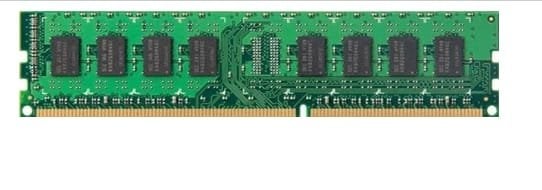
This is random access memory. According to your specs you have 2gb of it in your machine.

ram.jpg

The small operating system ( boot media) does not load onto a hard disk, it loads in ram. It is possible to boot it without any hard disk attached at all.

Am I not explaining this very well?

The boot media is an .iso file

17514x86.iso

If you burn the iso file to cd/dvd, you need to set your bios to boot from dvddrive first.

If you extract the iso to usb stick, you need to set your bios to boot from usb first.
 
Last edited:

My Computers My Computers

  • At a glance

    7 X64i5 84002x8gb 3200mhz
    Computer type
    PC/Desktop
    OS
    7 X64
    CPU
    i5 8400
    Motherboard
    gigabyte b365m ds3h
    Memory
    2x8gb 3200mhz
    Hard Drives
    various
    PSU
    pure power 11 400w cm
    Case
    Coolermaster
    Cooling
    cryorig m9i
  • At a glance

    7x64g54008gb ddr4 2400
    Computer type
    PC/Desktop
    OS
    7x64
    CPU
    g5400
    Motherboard
    ga b365m ds3h
    Memory
    8gb ddr4 2400
    PSU
    xfx pro 450w
Boot into the boot media I linked to earlier. When it loads up you will see a desktop that looks like a regular windows desktop. you will see shadowcopyview and several other programs on the desktop.


Am I not explaining this very well?

##################

No no, no fault of yours...I am waaay past burned out with this and my brother putting me in this position....I also have never attempted this procedure or even heard of the programs you have mentioned.
 

My Computer My Computer

At a glance

windows 7 home premium 32 bit3.2ghz2gigsstock
Computer type
PC/Desktop
Computer Manufacturer/Model Number
dell desktop
OS
windows 7 home premium 32 bit
CPU
3.2ghz
Motherboard
u/k
Memory
2gigs
Graphics Card(s)
stock
Hard Drives
(1) 250gb SATA
Browser
Firefox
Having possibly "found" a restore point when I attempt to do this, is it possible to direct it (for lack of a better phrase) to the faulty hard drive directly to restore it?
 

My Computer My Computer

At a glance

windows 7 home premium 32 bit3.2ghz2gigsstock
Computer type
PC/Desktop
Computer Manufacturer/Model Number
dell desktop
OS
windows 7 home premium 32 bit
CPU
3.2ghz
Motherboard
u/k
Memory
2gigs
Graphics Card(s)
stock
Hard Drives
(1) 250gb SATA
Browser
Firefox
Having possibly "found" a restore point when I attempt to do this, is it possible to direct it (for lack of a better phrase) to the faulty hard drive directly to restore it?

That is called system restore.

In theory, yes. Depends what the damage is.

I suggested that already.

In an earlier post I stated that the first thing to try is system restore.

If that doesn't work, then try the copy out using shadowcopyview.
 

My Computers My Computers

  • At a glance

    7 X64i5 84002x8gb 3200mhz
    Computer type
    PC/Desktop
    OS
    7 X64
    CPU
    i5 8400
    Motherboard
    gigabyte b365m ds3h
    Memory
    2x8gb 3200mhz
    Hard Drives
    various
    PSU
    pure power 11 400w cm
    Case
    Coolermaster
    Cooling
    cryorig m9i
  • At a glance

    7x64g54008gb ddr4 2400
    Computer type
    PC/Desktop
    OS
    7x64
    CPU
    g5400
    Motherboard
    ga b365m ds3h
    Memory
    8gb ddr4 2400
    PSU
    xfx pro 450w
.....Will do...I am sure you can understand my apprehension in doing or attempting all this not having done it before with a lot to lose...I DO APPRECIATE THE PATIENCE OF ALL....Back to couch to wind down for the evening.......
 

My Computer My Computer

At a glance

windows 7 home premium 32 bit3.2ghz2gigsstock
Computer type
PC/Desktop
Computer Manufacturer/Model Number
dell desktop
OS
windows 7 home premium 32 bit
CPU
3.2ghz
Motherboard
u/k
Memory
2gigs
Graphics Card(s)
stock
Hard Drives
(1) 250gb SATA
Browser
Firefox
understand my apprehension in doing or attempting all this not having done it before


Like everything else, it is only obvious after you have done it once.

:-)
 

My Computers My Computers

  • At a glance

    7 X64i5 84002x8gb 3200mhz
    Computer type
    PC/Desktop
    OS
    7 X64
    CPU
    i5 8400
    Motherboard
    gigabyte b365m ds3h
    Memory
    2x8gb 3200mhz
    Hard Drives
    various
    PSU
    pure power 11 400w cm
    Case
    Coolermaster
    Cooling
    cryorig m9i
  • At a glance

    7x64g54008gb ddr4 2400
    Computer type
    PC/Desktop
    OS
    7x64
    CPU
    g5400
    Motherboard
    ga b365m ds3h
    Memory
    8gb ddr4 2400
    PSU
    xfx pro 450w
OK, Started this morning,

Here are some picts taken...Currently, I Initialized system File repair on a 3rd party recovery disc and the displayed window is "working" but, seems to be doing nothing...Says "log file is 593 bytes" and building lox file.

Is this supposed to take this long?
EDIT - (I deleted pict(s) to save on band width, space).
 
Last edited:

My Computer My Computer

At a glance

windows 7 home premium 32 bit3.2ghz2gigsstock
Computer type
PC/Desktop
Computer Manufacturer/Model Number
dell desktop
OS
windows 7 home premium 32 bit
CPU
3.2ghz
Motherboard
u/k
Memory
2gigs
Graphics Card(s)
stock
Hard Drives
(1) 250gb SATA
Browser
Firefox
Page 2

EDIT - (I deleted pict(s) to save on band width, space).
 
Last edited:

My Computer My Computer

At a glance

windows 7 home premium 32 bit3.2ghz2gigsstock
Computer type
PC/Desktop
Computer Manufacturer/Model Number
dell desktop
OS
windows 7 home premium 32 bit
CPU
3.2ghz
Motherboard
u/k
Memory
2gigs
Graphics Card(s)
stock
Hard Drives
(1) 250gb SATA
Browser
Firefox
page 3

EDIT - (I deleted pict(s) to save on band width, space).
 
Last edited:

My Computer My Computer

At a glance

windows 7 home premium 32 bit3.2ghz2gigsstock
Computer type
PC/Desktop
Computer Manufacturer/Model Number
dell desktop
OS
windows 7 home premium 32 bit
CPU
3.2ghz
Motherboard
u/k
Memory
2gigs
Graphics Card(s)
stock
Hard Drives
(1) 250gb SATA
Browser
Firefox
Page 3

EDIT - (I deleted pict(s) to save on band width, space).
 
Last edited:

My Computer My Computer

At a glance

windows 7 home premium 32 bit3.2ghz2gigsstock
Computer type
PC/Desktop
Computer Manufacturer/Model Number
dell desktop
OS
windows 7 home premium 32 bit
CPU
3.2ghz
Motherboard
u/k
Memory
2gigs
Graphics Card(s)
stock
Hard Drives
(1) 250gb SATA
Browser
Firefox
I don't know what 3rd party boot media you are using. Or why. :confused:

Did you do what I suggested checking the shadow copy with the boot media I provided?

It also is possible there is a malware infection.
 

My Computers My Computers

  • At a glance

    7 X64i5 84002x8gb 3200mhz
    Computer type
    PC/Desktop
    OS
    7 X64
    CPU
    i5 8400
    Motherboard
    gigabyte b365m ds3h
    Memory
    2x8gb 3200mhz
    Hard Drives
    various
    PSU
    pure power 11 400w cm
    Case
    Coolermaster
    Cooling
    cryorig m9i
  • At a glance

    7x64g54008gb ddr4 2400
    Computer type
    PC/Desktop
    OS
    7x64
    CPU
    g5400
    Motherboard
    ga b365m ds3h
    Memory
    8gb ddr4 2400
    PSU
    xfx pro 450w
Not yet....

Figured I would try what I used regarding my computer....I have to re-look-up how to terminate a "system repair in progress pending" (or similar) before I can proceed....
 

My Computer My Computer

At a glance

windows 7 home premium 32 bit3.2ghz2gigsstock
Computer type
PC/Desktop
Computer Manufacturer/Model Number
dell desktop
OS
windows 7 home premium 32 bit
CPU
3.2ghz
Motherboard
u/k
Memory
2gigs
Graphics Card(s)
stock
Hard Drives
(1) 250gb SATA
Browser
Firefox
If it is trying a repair, then it might be attempting to replace files from the component store. Let it run and see if it has worked.
 

My Computers My Computers

  • At a glance

    7 X64i5 84002x8gb 3200mhz
    Computer type
    PC/Desktop
    OS
    7 X64
    CPU
    i5 8400
    Motherboard
    gigabyte b365m ds3h
    Memory
    2x8gb 3200mhz
    Hard Drives
    various
    PSU
    pure power 11 400w cm
    Case
    Coolermaster
    Cooling
    cryorig m9i
  • At a glance

    7x64g54008gb ddr4 2400
    Computer type
    PC/Desktop
    OS
    7x64
    CPU
    g5400
    Motherboard
    ga b365m ds3h
    Memory
    8gb ddr4 2400
    PSU
    xfx pro 450w
If it is trying a repair, then it might be attempting to replace files from the component store. Let it run and see if it has worked.

####################

It seemed to do nothing last time.....Was going to attempt file checker.

Looking up directions to shut that down (pending action) then, try SFC again.

I can access his files but, that will be the last thing i will do.

**What is an "elevated command promp" and how to I get there in command line?
 

My Computer My Computer

At a glance

windows 7 home premium 32 bit3.2ghz2gigsstock
Computer type
PC/Desktop
Computer Manufacturer/Model Number
dell desktop
OS
windows 7 home premium 32 bit
CPU
3.2ghz
Motherboard
u/k
Memory
2gigs
Graphics Card(s)
stock
Hard Drives
(1) 250gb SATA
Browser
Firefox
Elevated is the same as run as adminstrator.
You don't need to do that from boot media because it is already running as "system" which is higher than "administrator".
 

My Computers My Computers

  • At a glance

    7 X64i5 84002x8gb 3200mhz
    Computer type
    PC/Desktop
    OS
    7 X64
    CPU
    i5 8400
    Motherboard
    gigabyte b365m ds3h
    Memory
    2x8gb 3200mhz
    Hard Drives
    various
    PSU
    pure power 11 400w cm
    Case
    Coolermaster
    Cooling
    cryorig m9i
  • At a glance

    7x64g54008gb ddr4 2400
    Computer type
    PC/Desktop
    OS
    7x64
    CPU
    g5400
    Motherboard
    ga b365m ds3h
    Memory
    8gb ddr4 2400
    PSU
    xfx pro 450w
Back
Top