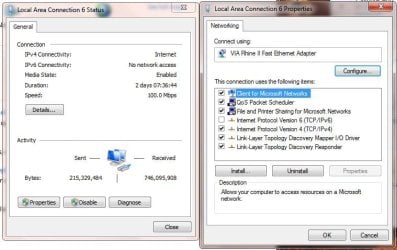
Have I missed the solution to this problem?

Phuxake

New member
Local time
7:07 PM
Messages
18
Hmmm the best way to describe it.....

My desktop running w7 is wired into my router. I have an inventel livebox.

Internet suddenly drops out on my desktop.

I check my phone... nope wireless internet still connects and browses fine.

After a few minutes a yellow triangle appears on the network symbol.

I go to my browser and try to connect to my router.... invalid web page (wtf).

I run the fixing troubleshooting thing - problem not found.

I restart my router... it then connects again.


So this is definitely a windows 7 problem, as it causes my computer to just forget to go online yet restarting the router seems to be the only fix.

It is incredibly frustrating when it happens while in the middle of an online game. I cant be the only one experiencing this, so there has to be a fix that no-one has told me about.
My power settings are telling my lan to never sleep as well as everything else for good measure.


Any help?

Thanks
 

My Computer

OS
Windows 7 64bit
CPU
Intel Core2 Duo E7200 @ 2.53GHz
Motherboard
Gigabyte
Memory
4gb
Graphics Card(s)
Nvidia Geforce 9500gt 1gb
Sound Card
Realtek HD audio Integrated
Other Info
Built Myself On A Tight Budget
Ok it just happened again while i was in the middle of a game.

First:

url]


So i log into my router and get this:

url]


When i click the yellow triangle i get this:

url]


My network map:

url]


I run the diagnostics and this is the outcome:

url]


Leaving the only way to work around it is to disconnect my router. Everything else hooks up to the internet fine. This W7 machine is the only problem.

Any ideas?.... anyone?


Does anyone have a clue why it just randomly shuts me off or any idea how to prevent this from happening?
 

My Computer

OS
Windows 7 64bit
CPU
Intel Core2 Duo E7200 @ 2.53GHz
Motherboard
Gigabyte
Memory
4gb
Graphics Card(s)
Nvidia Geforce 9500gt 1gb
Sound Card
Realtek HD audio Integrated
Other Info
Built Myself On A Tight Budget
I think I would look at manufactures web site for the newest drivers for nic card and mb.
 

My Computer

Computer Manufacturer/Model Number
Gateway GT5692
OS
Windows 7 Ulti. x64
CPU
AMD Phenom 8450 triple-core 2.10 ghz
Memory
4GB
Graphics Card(s)
ATI Radion HD 3200
Monitor(s) Displays
Gateway FPD1775W
Screen Resolution
1280x720
Hard Drives
465.6613 Gibibytes
What router are you using? Is there any software/firmware updates for that router? Have you looked in the device manager for any issues with the network adapter? Have you pulled your routers web based home page, usually something like (192.168.X.X) and checked your settings? Make sure you local DHCP Server is enabled, enable MAC Clone service, NAT is enabled, Dynamic Routing is disabled and you Static Routing Interface is set to LAN
 

My Computer

Computer Manufacturer/Model Number
Custom built
OS
Windows 7 Ultimate 64 bit
CPU
AMD Phenom II X4 965 Black Edition
Motherboard
Gigabyte GA-MA790X-DS4
Memory
GSkill 4 X 2 GB PC 8500
Graphics Card(s)
XFX Radeon HD 6790 D
Sound Card
On board RealTek HD
Monitor(s) Displays
Dual monitors:Samsung SyncMaster S20B300
Screen Resolution
1600 X 900
Hard Drives
Seagate Barracuda 1TB (primary)
Seagate Barracuda 2 X 320 GB
PSU
Ultra X4 750 watt fully modular
Case
Thermaltake Overseer RX 1 full tower
Cooling
Core-Contact 92 mm CPU Cooler
Keyboard
Logitech G510
Mouse
Razor DeathAdder
Internet Speed
50/5 Mbps UL/DL
Other Info
Optical: Super Muliti DVD burner w/lightscribe, Hauppauge WinTV HVR-1800
Do you have IPv6 unchecked in you Lan network connection ?
 

Attachments

  • LanConnection_NO_IPV6.JPG
    LanConnection_NO_IPV6.JPG
    59.5 KB · Views: 13

My Computer

Computer type
PC/Desktop
Computer Manufacturer/Model Number
Built them myself, Science Experiments !
OS
Win7 Enterprise, Win7 x86 (Ult 7600), Win7 x64 Ult 7600, TechNet RTM on AMD x64 (2.8Ghz)
CPU
AMD fx8350 4ghz, AMD-32 2400mhz, AMD-64 3200mhz, AMDx64 2.8G
Motherboard
SIS 755, ECS-K8M890M-M (Ult 7600), GigaByte & others
Memory
2gb, 4gb on the Ult 7600, 4gb on Technet RTM, 32gb on FX8350
Graphics Card(s)
Draw my own Graphics, several nVidia cards
Sound Card
on motherboard
Monitor(s) Displays
19" flat scr, 28" I-Inc widescr,22" Emprex Widescr, 23" Acer
Screen Resolution
1280 x 1024, 1440 x 900, 1920 x 1080
Hard Drives
6 pata Ide HD's & 2 Sata HD's
added 80gb external on Ult 7600 computer,
numerous extra 1tb, 2TB, 3Tb SATA HD's
A collection of ext HD Docks w/ HDs
PSU
430w, 550w, 600w, 700, 800, etc
Case
All Generic Full Towers
Cooling
Open Air & a few fans, some w/ colored LEDs
Keyboard
Compaq & Dell recycled from GoodWill
Mouse
Made in China Optical Wired Mouse
Internet Speed
Fast Cable InterNet
Antivirus
AVG Free on 24 different Desktops, NO Problems!
Browser
IE 8 is preferred, but use FireFox sometimes
Other Info
Linksys Routers, switches, & Hubs
Too Many USB Flash Drives to count, Biggest is 64GB !
Eight computers in my home network.
Sixteen computers at my business network.
Linked via TeamViewer !
Lots of old used spare computer parts everywhere!
Do you have IPv6 unchecked in you Lan network connection ?


No its checked


What router are you using? Is there any software/firmware updates for that router? Have you looked in the device manager for any issues with the network adapter? Have you pulled your routers web based home page, usually something like (192.168.X.X) and checked your settings? Make sure you local DHCP Server is enabled, enable MAC Clone service, NAT is enabled, Dynamic Routing is disabled and you Static Routing Interface is set to LAN

It is an inventel livebox through orange. Logging into the router when this problem is occuring will present me with an invalid web page.
DHCP is enabled but NAT option isn't there.


I think I would look at manufactures web site for the newest drivers for nic card and mb.

You would have thought I had thought of that. Although i keep going back to my motherboards web page to see if there are any updates there never are.

You inspired me though and I brought up cpuz and found I had an nforce chipset... so onto the nvidia website I go and discovered there were drivers that applied to me.... also a network manager! In this network control in the nvidia control panel were two new options I did not have access to previously, one was Sleep on disconnect which I have now disabled and Low power idle mode which I have now also disabled.

I am hoping that this is the cause and I will test test and test, re-enacting everything to try and replicate the fault hoping that this has now solved it.

Thank you for your help!
 

My Computer

OS
Windows 7 64bit
CPU
Intel Core2 Duo E7200 @ 2.53GHz
Motherboard
Gigabyte
Memory
4gb
Graphics Card(s)
Nvidia Geforce 9500gt 1gb
Sound Card
Realtek HD audio Integrated
Other Info
Built Myself On A Tight Budget
Did you ever solve this problem? I have the same issue with my Invatel Livebox! It's driving me insane!!!
 

My Computer

OS
Lancashire
Usually the wireless adapters give such problems, when power saving options are enabled for them. You can disable the power saving features by going in to device manager and Wireless adapter properties.
 

My Computer

Computer Manufacturer/Model Number
Toshiba Satellite P775-S7232
OS
MS Windows 7 Ultimate 64-bit SP1
CPU
i5-2410M 2.3GHz (2.9GHz Turbo-Boost) Sandy Bridge 32nm
Motherboard
Toshiba PHRAA ver. PSBY1U-00F003
Memory
4GB+4GB Samsung DDR3 PC3-10700 (1333 MHz)
Graphics Card(s)
Video Intel(R) HD Graphics Family, 1696MB available memory
Sound Card
Realtek High Definition Audio version=6.0.1.6323
Monitor(s) Displays
17.3 " Trubrite TFT LCD, LED Backlit
Screen Resolution
1600x900 32 bit, Native support for 720P content
Hard Drives
TOSHIBA MK6476GSXN
580.614 [GB] partitioned C: 80GB and D: 500GB with hidden recovery partitons.

Spare bay for 2nd HDD but no SATA connector :-(
PSU
Toshiba AC/DC Adapter
Case
Notebook
Cooling
Built-in Fan
Keyboard
Premium Raised Tile keyboard
Mouse
Logitech M215 wireless mouse
Internet Speed
Not fast enough
Other Info
Built-in Harman Kardon speakers with Dolby Advanced Audio, Waves MaxxAudio® 3. HDMI, 1xUSB3+3xUSB2 ports, WebCam, Battery life 4hrs 11mins, 4GB Readyboost SDHC card, WD My Book Essential Ext HDDs 2 TB, 2x1TB, My Passport SE 1TB and WDTV 1st Gen for Multimedia playing on a Sony Wega 32" LCD.
Recent addition to my toys are Asus Transformer Pad TF300T with 32GB onboard sd card + 32GB microsd card.
Back
Top