
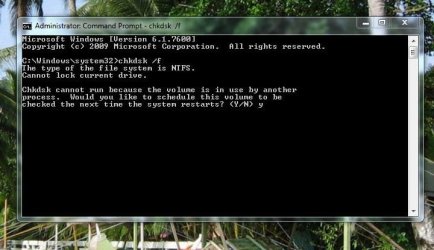
want to run chkdsk on f drive

njnitehawk

New member
Member
Local time
5:33 PM
Messages
77
Location
central part of new jersey
this is what windows is telling me
see attached

pleas advise thanks
 

Attachments

  • f error.JPG
    f error.JPG
    50.7 KB · Views: 2,580

My Computer My Computer

At a glance

windows 7 ultimate 32 bitintel core2 quad Q6600 2.4ghz4gb ddr3 corsair-twin3x2048-1333c9dhxnvidia geforce 8600gt 512mb
Computer Manufacturer/Model Number
home grown
OS
windows 7 ultimate 32 bit
CPU
intel core2 quad Q6600 2.4ghz
Motherboard
gigiabyte x38t-dq6.0
Memory
4gb ddr3 corsair-twin3x2048-1333c9dhx
Graphics Card(s)
nvidia geforce 8600gt 512mb
Sound Card
realtek onboard alc889a
Monitor(s) Displays
samsung 21.3
Screen Resolution
1024 by 768
Hard Drives
500gb wd

250gb wd
PSU
corsair cmpsu-750tx
Case
standard tower
Cooling
arctic cooling freezer 7 pro
Keyboard
microsoft wireless keyboard 7000
Mouse
microsoft wireless mouse 7000
Internet Speed
cable 850
Other Info
pioneer dvd-rw dvr215d

lite-on cd-rw sohr

creative inspire pt7800 7.1

hp officejet pro 8500 wireless
Hello,

Have you tried scheduling the test for the next boot? Probably a program is using the drive, such as Google Desktop or your anti-virus.
 

My Computer My Computer

At a glance

Windows 7 Professional x64Intel i7 2600K OC'd @ 4620 MHz16GB GSkill Sniper 2133 Mhz (4x4GB)EVGA GeForce GTX 480 SuperClocked+
Computer Manufacturer/Model Number
Custom
OS
Windows 7 Professional x64
CPU
Intel i7 2600K OC'd @ 4620 MHz
Motherboard
Asus P8Z68-V Pro
Memory
16GB GSkill Sniper 2133 Mhz (4x4GB)
Graphics Card(s)
EVGA GeForce GTX 480 SuperClocked+
Sound Card
Realtek High Definition Audio
Monitor(s) Displays
2x Acer S273HLbmii 27"
Screen Resolution
2 x 1920x1080
Hard Drives
64GB Crucial M4 SSD

Storage: Hitachi 1TB 5400RPM, Samsung 1.5TB 5400RPM
PSU
Corsair HW Series 750w (modular)
Case
Cooler Master HAF 932 Advanced Blue Edition
Cooling
CM Hyper 212+ CPU cooler, 3x 230mm + 1x 140mm case fans
Keyboard
Logitech MK320 (wireless)
Mouse
Logitech MK320 (wireless)
Internet Speed
30 Mb/s : 2 Mb/s
That's the best way to run CHKDSK anyway.
 

My Computer My Computer

At a glance

Windows 7 Enterprise x64AMD Athlon 64X2 Dual Core 3800+OCZ Platinum Dual Channel - 4x1GbNVIDIA GeForce 8800 GT PCI Express x16
Computer Manufacturer/Model Number
NVIDIA
OS
Windows 7 Enterprise x64
CPU
AMD Athlon 64X2 Dual Core 3800+
Motherboard
GeForce 6100-M9
Memory
OCZ Platinum Dual Channel - 4x1Gb
Graphics Card(s)
NVIDIA GeForce 8800 GT PCI Express x16
Sound Card
Creative Audigy Sound Blaster Extreme PCI
Monitor(s) Displays
Compaq 7500
Screen Resolution
1024x768
Hard Drives
C: Seagate ST3250318AS SataII - 250Gb

D: Seagate ST3500418AS SataII - 500Gb
PSU
OCZ 600w Dual 12v Rails
Case
Thermaltake
Cooling
OCZ Heatsinks, Fans, and Thermal Paste on CPU & Chipsets
Keyboard
Logitech
Mouse
Radio Shack PS2
Internet Speed
Cable
Other Info
Dual Pioneer DVD/RW optical drives. LG CD/RW optical drive.
still states there is a lock on the drive
 

My Computer My Computer

At a glance

windows 7 ultimate 32 bitintel core2 quad Q6600 2.4ghz4gb ddr3 corsair-twin3x2048-1333c9dhxnvidia geforce 8600gt 512mb
Computer Manufacturer/Model Number
home grown
OS
windows 7 ultimate 32 bit
CPU
intel core2 quad Q6600 2.4ghz
Motherboard
gigiabyte x38t-dq6.0
Memory
4gb ddr3 corsair-twin3x2048-1333c9dhx
Graphics Card(s)
nvidia geforce 8600gt 512mb
Sound Card
realtek onboard alc889a
Monitor(s) Displays
samsung 21.3
Screen Resolution
1024 by 768
Hard Drives
500gb wd

250gb wd
PSU
corsair cmpsu-750tx
Case
standard tower
Cooling
arctic cooling freezer 7 pro
Keyboard
microsoft wireless keyboard 7000
Mouse
microsoft wireless mouse 7000
Internet Speed
cable 850
Other Info
pioneer dvd-rw dvr215d

lite-on cd-rw sohr

creative inspire pt7800 7.1

hp officejet pro 8500 wireless
You're trying to run it from C: drive, which will only run after next boot. You need to go to F: drive in the command prompt then run chkdsk, I believe.

It still won't run until the next boot, if I'm not mistaken.
 

My Computer My Computer

At a glance

Windows 10 HomeIntel Core i5 3550Corsair Vengeance DDR3 16GBNvidia GEForce GTX 970 SSC
Computer type
PC/Desktop
Computer Manufacturer/Model Number
Self build
OS
Windows 10 Home
CPU
Intel Core i5 3550
Motherboard
ASUS P8Z77-V LX (LGA1155)
Memory
Corsair Vengeance DDR3 16GB
Graphics Card(s)
Nvidia GEForce GTX 970 SSC
Monitor(s) Displays
Hanns-G 23.6", Acer 17"
Screen Resolution
1920x1080, 1440x900
Hard Drives
Sandisk SSD 256 GB
WD500GB
WD640GB
Seagage Ultra + 1TB ext.
BWD 800GB
WD 1TB ext
PSU
Antec 650w
Case
Cooler Master Centurion 534
Cooling
COOLER MASTER GeminII S524, 3 120 mm case fans.
Keyboard
Logitech MK300
Mouse
Logitech MK300
Internet Speed
Cable
Antivirus
MSSE, Malwarebytes
Browser
IE 10, Chrome
this is what windows is telling me
see attached

pleas advise thanks

I can't believe nobody's caught this...

To run chkdsk on a given drive you have to tell it which drive. If you want drive F: the command line would be:

CHKDSK F: /F
 

My Computer My Computer

At a glance

XP Pro SP3 X86 / Win7 Pro X86Amd 64 x2 4200 (2.4ghz)Kingston DDR2 800 2gbNvidia GF-8400
Computer Manufacturer/Model Number
Homebrew
OS
XP Pro SP3 X86 / Win7 Pro X86
CPU
Amd 64 x2 4200 (2.4ghz)
Motherboard
Asus M2N-MX SE Plus
Memory
Kingston DDR2 800 2gb
Graphics Card(s)
Nvidia GF-8400
Sound Card
Realtek on Motherboard
Monitor(s) Displays
Acer x-193bw
Screen Resolution
1440 x 900
Hard Drives
Western Digital 500g
PSU
350watt In-Win
Case
In-Win
Cooling
Air
Keyboard
yes
Mouse
yes
Internet Speed
5mpbs
Other Info
Also ASRock ION 330 as HTPC (on XP).
Acer Aspire as GP netbook (on XP).
this is what windows is telling me
see attached

pleas advise thanks

I can't believe nobody's caught this...

To run chkdsk on a given drive you have to tell it which drive. If you want drive F: the command line would be:

CHKDSK F: /F

I think I did catch that in the post above yours. But, apparently he's not been back. :D
 

My Computer My Computer

At a glance

Windows 10 HomeIntel Core i5 3550Corsair Vengeance DDR3 16GBNvidia GEForce GTX 970 SSC
Computer type
PC/Desktop
Computer Manufacturer/Model Number
Self build
OS
Windows 10 Home
CPU
Intel Core i5 3550
Motherboard
ASUS P8Z77-V LX (LGA1155)
Memory
Corsair Vengeance DDR3 16GB
Graphics Card(s)
Nvidia GEForce GTX 970 SSC
Monitor(s) Displays
Hanns-G 23.6", Acer 17"
Screen Resolution
1920x1080, 1440x900
Hard Drives
Sandisk SSD 256 GB
WD500GB
WD640GB
Seagage Ultra + 1TB ext.
BWD 800GB
WD 1TB ext
PSU
Antec 650w
Case
Cooler Master Centurion 534
Cooling
COOLER MASTER GeminII S524, 3 120 mm case fans.
Keyboard
Logitech MK300
Mouse
Logitech MK300
Internet Speed
Cable
Antivirus
MSSE, Malwarebytes
Browser
IE 10, Chrome
this is what windows is telling me
see attached

pleas advise thanks

I can't believe nobody's caught this...

To run chkdsk on a given drive you have to tell it which drive. If you want drive F: the command line would be:

CHKDSK F: /F

I think I did catch that in the post above yours. But, apparently he's not been back. :D

Yes you did, sort of but why wouldn't you type in the command line for him?

CHKDSK is one of the very few CMD tools where you actually have to specify a drive letter.
 

My Computer My Computer

At a glance

XP Pro SP3 X86 / Win7 Pro X86Amd 64 x2 4200 (2.4ghz)Kingston DDR2 800 2gbNvidia GF-8400
Computer Manufacturer/Model Number
Homebrew
OS
XP Pro SP3 X86 / Win7 Pro X86
CPU
Amd 64 x2 4200 (2.4ghz)
Motherboard
Asus M2N-MX SE Plus
Memory
Kingston DDR2 800 2gb
Graphics Card(s)
Nvidia GF-8400
Sound Card
Realtek on Motherboard
Monitor(s) Displays
Acer x-193bw
Screen Resolution
1440 x 900
Hard Drives
Western Digital 500g
PSU
350watt In-Win
Case
In-Win
Cooling
Air
Keyboard
yes
Mouse
yes
Internet Speed
5mpbs
Other Info
Also ASRock ION 330 as HTPC (on XP).
Acer Aspire as GP netbook (on XP).
hey guys thanks for advice
on chkdsk

please see the results (see attached)

one area of concern is

this:

The master file table's (MFT) BITMAP attribute is incorrect.
The Volume Bitmap is incorrect.
Windows found problems with the file system.
Run CHKDSK with the /F (fix) option to correct these.

how do correct that
 

Attachments

My Computer My Computer

At a glance

windows 7 ultimate 32 bitintel core2 quad Q6600 2.4ghz4gb ddr3 corsair-twin3x2048-1333c9dhxnvidia geforce 8600gt 512mb
Computer Manufacturer/Model Number
home grown
OS
windows 7 ultimate 32 bit
CPU
intel core2 quad Q6600 2.4ghz
Motherboard
gigiabyte x38t-dq6.0
Memory
4gb ddr3 corsair-twin3x2048-1333c9dhx
Graphics Card(s)
nvidia geforce 8600gt 512mb
Sound Card
realtek onboard alc889a
Monitor(s) Displays
samsung 21.3
Screen Resolution
1024 by 768
Hard Drives
500gb wd

250gb wd
PSU
corsair cmpsu-750tx
Case
standard tower
Cooling
arctic cooling freezer 7 pro
Keyboard
microsoft wireless keyboard 7000
Mouse
microsoft wireless mouse 7000
Internet Speed
cable 850
Other Info
pioneer dvd-rw dvr215d

lite-on cd-rw sohr

creative inspire pt7800 7.1

hp officejet pro 8500 wireless
hey guys thanks for advice
on chkdsk

please see the results (see attached)

one area of concern is

this:

The master file table's (MFT) BITMAP attribute is incorrect.
The Volume Bitmap is incorrect.
Windows found problems with the file system.
Run CHKDSK with the /F (fix) option to correct these.

how do correct that

Ok, based on your text file I believe you've misunderstood the CHKDSK command...

To run CHKDSK on drive F the command is chkdsk f: /f
To run it on drive c the command is chkdsk c: /f

In Windows command shell...
Drive letters end in a colon: c: d: f: etc.
Command flags start with a / as in /F /R /? etc.

The /? flag is worth remembering since it calls up command line help for each program... For example: chkdsk /? would bring up a help list of all the command line switches available in chkdsk...

I do see that you have some problem on drive C .... Now this drive is locked by windows so you'll get a rather odd message when you try to make this work...

CHKDSK /F C:

You will be told the check cannot run right now and it will ask you if you want to schedule it for the next reboot... you can Y for yes or N for no... In this case you should say yes, close the command shell and then reboot... When the system restarts chkdsk will run with your command line parameters.
 

My Computer My Computer

At a glance

XP Pro SP3 X86 / Win7 Pro X86Amd 64 x2 4200 (2.4ghz)Kingston DDR2 800 2gbNvidia GF-8400
Computer Manufacturer/Model Number
Homebrew
OS
XP Pro SP3 X86 / Win7 Pro X86
CPU
Amd 64 x2 4200 (2.4ghz)
Motherboard
Asus M2N-MX SE Plus
Memory
Kingston DDR2 800 2gb
Graphics Card(s)
Nvidia GF-8400
Sound Card
Realtek on Motherboard
Monitor(s) Displays
Acer x-193bw
Screen Resolution
1440 x 900
Hard Drives
Western Digital 500g
PSU
350watt In-Win
Case
In-Win
Cooling
Air
Keyboard
yes
Mouse
yes
Internet Speed
5mpbs
Other Info
Also ASRock ION 330 as HTPC (on XP).
Acer Aspire as GP netbook (on XP).
commontater

what errors do you notice and how do i correct them

thanks
 

My Computer My Computer

At a glance

windows 7 ultimate 32 bitintel core2 quad Q6600 2.4ghz4gb ddr3 corsair-twin3x2048-1333c9dhxnvidia geforce 8600gt 512mb
Computer Manufacturer/Model Number
home grown
OS
windows 7 ultimate 32 bit
CPU
intel core2 quad Q6600 2.4ghz
Motherboard
gigiabyte x38t-dq6.0
Memory
4gb ddr3 corsair-twin3x2048-1333c9dhx
Graphics Card(s)
nvidia geforce 8600gt 512mb
Sound Card
realtek onboard alc889a
Monitor(s) Displays
samsung 21.3
Screen Resolution
1024 by 768
Hard Drives
500gb wd

250gb wd
PSU
corsair cmpsu-750tx
Case
standard tower
Cooling
arctic cooling freezer 7 pro
Keyboard
microsoft wireless keyboard 7000
Mouse
microsoft wireless mouse 7000
Internet Speed
cable 850
Other Info
pioneer dvd-rw dvr215d

lite-on cd-rw sohr

creative inspire pt7800 7.1

hp officejet pro 8500 wireless
commontater

what errors do you notice and how do i correct them

thanks

Code:
The master file table's (MFT) BITMAP attribute is incorrect.
The Volume Bitmap is incorrect.
Windows found problems with the file system.
Run CHKDSK with the /F (fix) option to correct these.

I found this in the last half where you had it checking drive c: but got the command wrong. I already described how to fix it...

Run chkdsk /f c: and when it asks if you want to schedule the scan for the next reboot type a Y to say Yes. Then reboot your system.
 

My Computer My Computer

At a glance

XP Pro SP3 X86 / Win7 Pro X86Amd 64 x2 4200 (2.4ghz)Kingston DDR2 800 2gbNvidia GF-8400
Computer Manufacturer/Model Number
Homebrew
OS
XP Pro SP3 X86 / Win7 Pro X86
CPU
Amd 64 x2 4200 (2.4ghz)
Motherboard
Asus M2N-MX SE Plus
Memory
Kingston DDR2 800 2gb
Graphics Card(s)
Nvidia GF-8400
Sound Card
Realtek on Motherboard
Monitor(s) Displays
Acer x-193bw
Screen Resolution
1440 x 900
Hard Drives
Western Digital 500g
PSU
350watt In-Win
Case
In-Win
Cooling
Air
Keyboard
yes
Mouse
yes
Internet Speed
5mpbs
Other Info
Also ASRock ION 330 as HTPC (on XP).
Acer Aspire as GP netbook (on XP).
done
thank you
 

My Computer My Computer

At a glance

windows 7 ultimate 32 bitintel core2 quad Q6600 2.4ghz4gb ddr3 corsair-twin3x2048-1333c9dhxnvidia geforce 8600gt 512mb
Computer Manufacturer/Model Number
home grown
OS
windows 7 ultimate 32 bit
CPU
intel core2 quad Q6600 2.4ghz
Motherboard
gigiabyte x38t-dq6.0
Memory
4gb ddr3 corsair-twin3x2048-1333c9dhx
Graphics Card(s)
nvidia geforce 8600gt 512mb
Sound Card
realtek onboard alc889a
Monitor(s) Displays
samsung 21.3
Screen Resolution
1024 by 768
Hard Drives
500gb wd

250gb wd
PSU
corsair cmpsu-750tx
Case
standard tower
Cooling
arctic cooling freezer 7 pro
Keyboard
microsoft wireless keyboard 7000
Mouse
microsoft wireless mouse 7000
Internet Speed
cable 850
Other Info
pioneer dvd-rw dvr215d

lite-on cd-rw sohr

creative inspire pt7800 7.1

hp officejet pro 8500 wireless
Back
Top