hackerman1
New member
- Local time
- 2:05 PM
- Messages
- 759
How to Auto-update MSE without Windows Update !
hi !
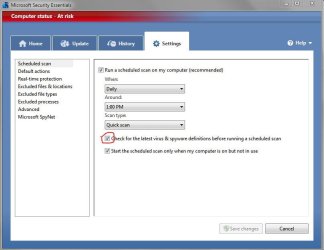
How to update MSE´s virus definitions WITHOUT Windows update,
(if you have selected Windows Update to "notify of available updates"):
use task scheduler, on the right panel click "Create Basic Task".
then enter a name, select daily, 1 day, run a program,
in Program/Script enter: "C:\Program Files\Microsoft Security Essentials\MpCmdRun.exe"
in Add arguments enter: "-SignatureUpdate"
if you want to update more than once a day, than create another task with a different time.
if i remember correctly the definitions are released 3 times a day...
hi !
How to update MSE´s virus definitions WITHOUT Windows update,
(if you have selected Windows Update to "notify of available updates"):
use task scheduler, on the right panel click "Create Basic Task".
then enter a name, select daily, 1 day, run a program,
in Program/Script enter: "C:\Program Files\Microsoft Security Essentials\MpCmdRun.exe"
in Add arguments enter: "-SignatureUpdate"
if you want to update more than once a day, than create another task with a different time.
if i remember correctly the definitions are released 3 times a day...
My Computer
At a glance
W7-Enterprise + WS-2008 (Converted to Worksta...P4 2,4GHz (at 1,8GHz, "slow" RDRAM, only 400M...2GBNVIDIA QUADRO2 PRO 64MB
- Computer Manufacturer/Model Number
- Dell
- OS
- W7-Enterprise + WS-2008 (Converted to Workstation)
- CPU
- P4 2,4GHz (at 1,8GHz, "slow" RDRAM, only 400MHz FSB...)
- Motherboard
- Intel 850E
- Memory
- 2GB
- Graphics Card(s)
- NVIDIA QUADRO2 PRO 64MB
- Sound Card
- Yes
- Monitor(s) Displays
- Dell 1702FP
- Screen Resolution
- 1280x1024
- Hard Drives
- Yes
- PSU
- Yes
- Case
- Yes
- Cooling
- Yes
- Keyboard
- Yes
- Mouse
- Yes, and i also have Cats...
- Internet Speed
- University: 100 MBit/s, Home: UMTS 7,2 MBit/s
- Other Info
- W7 on a DINOSAUR: P2 with 266MHz CPU & 160MB RAM