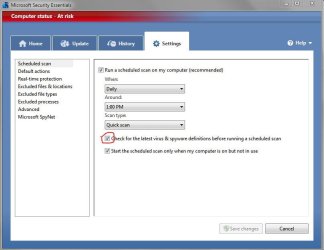
How to update MSE without Windows Update !

hackerman1

Expelled
How to Auto-update MSE without Windows Update !

hi !

How to update MSE´s virus definitions WITHOUT Windows update,
(if you have selected Windows Update to "notify of available updates"):

use task scheduler, on the right panel click "Create Basic Task".
then enter a name, select daily, 1 day, run a program,
in Program/Script enter: "C:\Program Files\Microsoft Security Essentials\MpCmdRun.exe"
in Add arguments enter: "-SignatureUpdate"

if you want to update more than once a day, than create another task with a different time.
if i remember correctly the definitions are released 3 times a day...
 

My Computer

Computer Manufacturer/Model Number
Dell
OS
W7-Enterprise + WS-2008 (Converted to Workstation)
CPU
P4 2,4GHz (at 1,8GHz, "slow" RDRAM, only 400MHz FSB...)
Motherboard
Intel 850E
Memory
2GB
Graphics Card(s)
NVIDIA QUADRO2 PRO 64MB
Sound Card
Yes
Monitor(s) Displays
Dell 1702FP
Screen Resolution
1280x1024
Hard Drives
Yes
PSU
Yes
Case
Yes
Cooling
Yes
Keyboard
Yes
Mouse
Yes, and i also have Cats...
Internet Speed
University: 100 MBit/s, Home: UMTS 7,2 MBit/s
Other Info
W7 on a DINOSAUR: P2 with 266MHz CPU & 160MB RAM
In order for MSE to update it'self ... you need to be running a validated/legal copy of Windows.
Of course, it won't install without the above :p
 

My Computer

Computer type
PC/Desktop
Computer Manufacturer/Model Number
Bruce ... somewhere in his 40's
OS
Windows 7 Ultimate 32bit SP1
CPU
Intel(R) Core(TM)2 Quad CPU @ 2.40GHz, 2400 MHz
Motherboard
INTEL/D975XBX2
Memory
4 GB
Graphics Card(s)
ATI Radeon HD 2600 Pro
Monitor(s) Displays
Samsung SyncMaster 914v
Screen Resolution
1280 x 1024
Hard Drives
2/500GB each ... ST3500630AS ATA Device.
One is not connected
PSU
Rocketfish 700 W
Case
G.Skill Gigabyte Chassis
Keyboard
Standard PS/2 Keyboard
Mouse
Microsoft PS/2 Mouse
Internet Speed
DSL
Antivirus
Avira Internet Security
Browser
IE 11
Other Info
ATI HDMI Audio
hi !

no, not updating MSE.
updating it´s virus definitions...
 

My Computer

Computer Manufacturer/Model Number
Dell
OS
W7-Enterprise + WS-2008 (Converted to Workstation)
CPU
P4 2,4GHz (at 1,8GHz, "slow" RDRAM, only 400MHz FSB...)
Motherboard
Intel 850E
Memory
2GB
Graphics Card(s)
NVIDIA QUADRO2 PRO 64MB
Sound Card
Yes
Monitor(s) Displays
Dell 1702FP
Screen Resolution
1280x1024
Hard Drives
Yes
PSU
Yes
Case
Yes
Cooling
Yes
Keyboard
Yes
Mouse
Yes, and i also have Cats...
Internet Speed
University: 100 MBit/s, Home: UMTS 7,2 MBit/s
Other Info
W7 on a DINOSAUR: P2 with 266MHz CPU & 160MB RAM
Last edited:

My Computer

Computer Manufacturer/Model Number
Custom | Whitebox
OS
Windows 7 Ultimate, OS X 10.7, Ubuntu 11.04
CPU
Intel E6750 @ 3.80GHz
Motherboard
Gigabyte GA-EP45-UD3L (Revision 1.1)
Memory
2x2GB & 2x1GB (6GB) OCZ Reaper 1066MHz @ 1080MHz
Graphics Card(s)
EVGA nVidia GTX 260 896mb (216 Core) FTW Edition
Sound Card
Realtek ALC888
Monitor(s) Displays
21" VIZIO TV
Screen Resolution
1680x1050 @ 60Hz
Hard Drives
Western Digital WD6401AALS - 640GB
Hitachi HDP725016GLA380 - 160GB
PSU
Corsair 750W
Case
NZXT Nemesis Elite
Cooling
Thermaltake SpinQ
Keyboard
Logitech Wireless S520
Mouse
Logitech Wireless S520 - Microsoft Wireless Arc Mouse
Internet Speed
Download: 20mbps, Upload: 3mbps
I'm not sure what is the purpose of this, because MSE seems to update itself regardless of the Windows Update setting.

Anyway, nice job figuring out how to schedule it.
 

My Computer

Computer Manufacturer/Model Number
Too many to list.
OS
XP, Seven, 2008R2
CPU
AMD, Intel, VIA
Motherboard
Various
Memory
Corsair, Kingston, etc.
Graphics Card(s)
ATI, NVIDIA
Monitor(s) Displays
Samsung
Hard Drives
Maxtor, Western Digital
Keyboard
qwerty
Internet Speed
22 Mb/s @ home, 1 Gb/s @ server
Other Info
All of my systems still run fastest on XP 32-bit for the most part. Win7 is fun to play with, but I still prefer XP for raw speed, security, and functionality.

My Computer

Computer Manufacturer/Model Number
Samsung NP530U4B-S02IN
OS
Windows® 8 Pro (64-bit)
CPU
Intel® Core™ i5 Processor 2467M (1.60GHz, 3MB L3 Cache)
Motherboard
Samsung Electronics
Memory
6GB DDR3 System Memory at 1,333MHz (on BD 4GB + 2GB x 1)
Graphics Card(s)
AMD Radeon™ HD7550M 1GB DDR3 (Ext. Graphic)
Sound Card
Realtek High Definition Audio
Monitor(s) Displays
35.56cm (14.0) SuperBright 300nit HD LED Display
Screen Resolution
1366x768
Hard Drives
1TB S-ATA II Hard Drive (5400RPM) with ExpressCache 16GB SSD
Internet Speed
sucks
Antivirus
Microsoft Security Essentials
Browser
Google Chrome (Sync enabled)
c dis pic.. my automatic windows update isoff still MSE update itself..
 

Attachments

  • Capture.JPG
    Capture.JPG
    67 KB · Views: 236

My Computer

OS
Windows 7 ultimate 32bit OEM 6.1 Build7600
CPU
Core 2 Duo CPU E7400 2.8GHz
Motherboard
Mercury PIG31T
Memory
2 GB RAM
Graphics Card(s)
NVIDIA GeForce 8400 GS
Sound Card
VIA HD
Monitor(s) Displays
Samsung SyncMaster 2033
Screen Resolution
1600*900
Hard Drives
500 GB
neoasr said:
c dis pic.. my automatic windows update isoff still MSE update itself..

me said:
I'm not sure what is the purpose of this, because MSE seems to update itself regardless of the Windows Update setting.

:huh:
 

My Computer

Computer Manufacturer/Model Number
Too many to list.
OS
XP, Seven, 2008R2
CPU
AMD, Intel, VIA
Motherboard
Various
Memory
Corsair, Kingston, etc.
Graphics Card(s)
ATI, NVIDIA
Monitor(s) Displays
Samsung
Hard Drives
Maxtor, Western Digital
Keyboard
qwerty
Internet Speed
22 Mb/s @ home, 1 Gb/s @ server
Other Info
All of my systems still run fastest on XP 32-bit for the most part. Win7 is fun to play with, but I still prefer XP for raw speed, security, and functionality.
neoasr said:
c dis pic.. my automatic windows update isoff still MSE update itself..

me said:
I'm not sure what is the purpose of this, because MSE seems to update itself regardless of the Windows Update setting.

:huh:

hackerman1 seems not able to auomatic MSE update.. maybe this wil help...
 

My Computer

OS
Windows 7 ultimate 32bit OEM 6.1 Build7600
CPU
Core 2 Duo CPU E7400 2.8GHz
Motherboard
Mercury PIG31T
Memory
2 GB RAM
Graphics Card(s)
NVIDIA GeForce 8400 GS
Sound Card
VIA HD
Monitor(s) Displays
Samsung SyncMaster 2033
Screen Resolution
1600*900
Hard Drives
500 GB
OK, but if hackerman couldn't figure that out on his own, perhaps he should be changing his name :p
 

My Computer

Computer Manufacturer/Model Number
Too many to list.
OS
XP, Seven, 2008R2
CPU
AMD, Intel, VIA
Motherboard
Various
Memory
Corsair, Kingston, etc.
Graphics Card(s)
ATI, NVIDIA
Monitor(s) Displays
Samsung
Hard Drives
Maxtor, Western Digital
Keyboard
qwerty
Internet Speed
22 Mb/s @ home, 1 Gb/s @ server
Other Info
All of my systems still run fastest on XP 32-bit for the most part. Win7 is fun to play with, but I still prefer XP for raw speed, security, and functionality.
OK, but if hackerman couldn't figure that out on his own, perhaps he should be changing his name :p

may i ask u sumthing wat r u doing in win7 forum if u stll using xp...
 

My Computer

OS
Windows 7 ultimate 32bit OEM 6.1 Build7600
CPU
Core 2 Duo CPU E7400 2.8GHz
Motherboard
Mercury PIG31T
Memory
2 GB RAM
Graphics Card(s)
NVIDIA GeForce 8400 GS
Sound Card
VIA HD
Monitor(s) Displays
Samsung SyncMaster 2033
Screen Resolution
1600*900
Hard Drives
500 GB
neoasr said:
may i ask u sumthing wat r u doing in Windows 7 forum if u stll using xp...

Perhaps you should ask that question to the hundreds of people I've helped with Windows 7.
 

My Computer

Computer Manufacturer/Model Number
Too many to list.
OS
XP, Seven, 2008R2
CPU
AMD, Intel, VIA
Motherboard
Various
Memory
Corsair, Kingston, etc.
Graphics Card(s)
ATI, NVIDIA
Monitor(s) Displays
Samsung
Hard Drives
Maxtor, Western Digital
Keyboard
qwerty
Internet Speed
22 Mb/s @ home, 1 Gb/s @ server
Other Info
All of my systems still run fastest on XP 32-bit for the most part. Win7 is fun to play with, but I still prefer XP for raw speed, security, and functionality.
Relax guys.
 

My Computer

Computer Manufacturer/Model Number
Samsung NP530U4B-S02IN
OS
Windows® 8 Pro (64-bit)
CPU
Intel® Core™ i5 Processor 2467M (1.60GHz, 3MB L3 Cache)
Motherboard
Samsung Electronics
Memory
6GB DDR3 System Memory at 1,333MHz (on BD 4GB + 2GB x 1)
Graphics Card(s)
AMD Radeon™ HD7550M 1GB DDR3 (Ext. Graphic)
Sound Card
Realtek High Definition Audio
Monitor(s) Displays
35.56cm (14.0) SuperBright 300nit HD LED Display
Screen Resolution
1366x768
Hard Drives
1TB S-ATA II Hard Drive (5400RPM) with ExpressCache 16GB SSD
Internet Speed
sucks
Antivirus
Microsoft Security Essentials
Browser
Google Chrome (Sync enabled)
neoasr said:
may i ask u sumthing wat r u doing in Windows 7 forum if u stll using xp...

Perhaps you should ask that question to the hundreds of people I've helped with Windows 7.
helping without using it.... leave.. helping is gud:thumbsup:
 

My Computer

OS
Windows 7 ultimate 32bit OEM 6.1 Build7600
CPU
Core 2 Duo CPU E7400 2.8GHz
Motherboard
Mercury PIG31T
Memory
2 GB RAM
Graphics Card(s)
NVIDIA GeForce 8400 GS
Sound Card
VIA HD
Monitor(s) Displays
Samsung SyncMaster 2033
Screen Resolution
1600*900
Hard Drives
500 GB
hi !

DarkNovaGamer:
"Correct me if I am wrong.. but can you not just use the Update button?"

Dinesh:

"You can download updates and just double click on the file to update MSE. "

yes of course, but then it´s not "automatic"...

neoasr: "my automatic windows update isoff still MSE update itself.."

yes, you can select to have it updating before doing a scan, i have also seen it mentioned that MSE updates daily anyway.
but i have also read about people saying that it doesn´t...

"hackerman1 seems not able to auomatic MSE update.. maybe this wil help..."

for some (still unknown) reason i have had some problems with MSE updating by itself, so i have done it manually, by clicking the "button".

sup3rsprt: "OK, but if hackerman couldn't figure that out on his own, perhaps he should be changing his name" :p

thanks... :D

the whole idea is to be able to auto-update even several times a day,
to be sure you always have the latest definitions even if you are not doing a scan, since they are released about 3 times a day.
i have seen a lot of people complaining about MSE not having this option.
 

My Computer

Computer Manufacturer/Model Number
Dell
OS
W7-Enterprise + WS-2008 (Converted to Workstation)
CPU
P4 2,4GHz (at 1,8GHz, "slow" RDRAM, only 400MHz FSB...)
Motherboard
Intel 850E
Memory
2GB
Graphics Card(s)
NVIDIA QUADRO2 PRO 64MB
Sound Card
Yes
Monitor(s) Displays
Dell 1702FP
Screen Resolution
1280x1024
Hard Drives
Yes
PSU
Yes
Case
Yes
Cooling
Yes
Keyboard
Yes
Mouse
Yes, and i also have Cats...
Internet Speed
University: 100 MBit/s, Home: UMTS 7,2 MBit/s
Other Info
W7 on a DINOSAUR: P2 with 266MHz CPU & 160MB RAM
Well i hope this will work for me. The reason is, MSE is tied into Windows Update, but i dpn;t want Windows installing stuff on my machine that i don't know about. So what happens is, Windows Update will will still search for updates, and because MSE definitions are released every day, every day you'll get a pop-up telling you there are new updates available, when all it is most times is an MSE definition update, and if you wnat that update you have ot do it manually. Which is a bit annoying.
 

My Computer

Computer Manufacturer/Model Number
Dell Dimension 5150
OS
Windows 7 32bit
Memory
3gb
Monitor(s) Displays
22" LG
Hard Drives
160GB
500GB
Well i hope this will work for me. The reason is, MSE is tied into Windows Update, but i dpn;t want Windows installing stuff on my machine that i don't know about. So what happens is, Windows Update will will still search for updates, and because MSE definitions are released every day, every day you'll get a pop-up telling you there are new updates available, when all it is most times is an MSE definition update, and if you wnat that update you have ot do it manually. Which is a bit annoying.

That would drive me crazy! Added to my list of reasons NOT to use MSE.
 

My Computer

Computer Manufacturer/Model Number
tw33k
OS
Windows 7 Ultimate (x64) SP1
CPU
Intel 3770k 4.6GHz
Motherboard
ASUS Maximus V Formula
Memory
8GB (2x 4GB) Crucial Ballistix
Graphics Card(s)
Sapphire 7950 (1060/1600)
Sound Card
On Board Realtek HD Audio
Monitor(s) Displays
27" Acer B273HU (via HDMI)
Screen Resolution
2048 x 1152
Hard Drives
Crucial M4 128GB
2TB WD Black
1TB Samsung F3 SATA
1TB WD Elite External
2TB WD USB 3.0
PSU
Corsair AX750 Gold
Case
Corsair Obsidian 800DW
Cooling
Corsair H100 (2x AP-121/2x UK-3000 push/pull)
Keyboard
Microsoft Wireless 5000
Mouse
Microsoft Wireless 5000
Internet Speed
5mb/s
Other Info
Logitech z-2300 2.1 speakers
Lamptron FC-5 v2
hackerman, thank you for mentioning this.
i've been noticing the exact same thing over the past few days and hadnt gotten around to asking why this is happening.
 

My Computer

OS
Windows 7 Ultimate x64
CPU
Core i7 960
Motherboard
ASUS P6TD Deluxe
Memory
Corsair XMS3 DDR3-1600 - 12 GB
Graphics Card(s)
eVGA GTX 275 1792 MB
Sound Card
Onboard HD etc
Monitor(s) Displays
Dell SP2208WFP
Hard Drives
Western Digital Caviar Black 1 TB x 2 (RAID-1)
PSU
BFG EX-1200
Case
CoolerMaster HAF 922
Cooling
Thermalright Ultra 120 Extreme with Noctua NH-12 Fan
Keyboard
MS Natural (you know, like the ones you find in nature...)
Mouse
MS Intellimouse Explorer
i´m glad that you find my help useful.
 

My Computer

Computer Manufacturer/Model Number
Dell
OS
W7-Enterprise + WS-2008 (Converted to Workstation)
CPU
P4 2,4GHz (at 1,8GHz, "slow" RDRAM, only 400MHz FSB...)
Motherboard
Intel 850E
Memory
2GB
Graphics Card(s)
NVIDIA QUADRO2 PRO 64MB
Sound Card
Yes
Monitor(s) Displays
Dell 1702FP
Screen Resolution
1280x1024
Hard Drives
Yes
PSU
Yes
Case
Yes
Cooling
Yes
Keyboard
Yes
Mouse
Yes, and i also have Cats...
Internet Speed
University: 100 MBit/s, Home: UMTS 7,2 MBit/s
Other Info
W7 on a DINOSAUR: P2 with 266MHz CPU & 160MB RAM
I have the impression that MS updates the definitions file only once per day. If that is the case, multiple updates per day would not make much sense because you would be getting the same stuff all the time - or? So the first question to explore would be whether there are indeed multiple daily updates by MS to that file.
 

My Computer

Computer Manufacturer/Model Number
HP, Dell, Gateway, Toshiba - 4 laptops and 2 desktops
OS
Vista, Windows7, Mint Mate, Zorin, Windows 8
CPU
from 1.6GHz Duo to i7
Monitor(s) Displays
2x HP w2207
Hard Drives
5x HDD, 7x SSD, 12x Externals
Keyboard
with trackball - no mices
Mouse
Trackball mice
Internet Speed
DSL 6000
Back
Top