
Need Router help

Ok,

If you can connect the laptop to the Internet via the router using a cable then at a basic level the connection is correctly set-up :D

The wireless network is in practical terms a special Cable the fact that It works wired should mean it will work wireless ;)

If you open the Network and sharing center and on the left select the Manage wireless networks. Select each item in the list and select remove until there are no entries left
I'm going to reply to you this way today.. so you'll see what I'm doing.
screen shot of the page you ask for above:
View attachment 65742
Hope this is what you wanted to see.. there is nothing on that page I can delete..there are items under Adapter properties..no way to delete those.. so left those nothing else was there..


2nd. Item
Go into the router (using the desktop :) ), and make sure you know the exact name and the password for your SSID (tomatokingdom 2? ), Note that the password will be case sensitive
Screen shot.. as you can see the passowrd worked perfectly.
View attachment 65744

Back on the laptop click on the tray network icon and click on the tomatokingdom 2? entry and select connect - enter the exact password when prompted.

The point of removing any existing entries is to make sure that the security type and encryption type are correct which win7 automatically checks on a new network entry :)
I've tried to do the reply in your message above hope that works..
I hope this is working for you.
 
Last edited:

My Computer

Computer type
Laptop
Computer Manufacturer/Model Number
Gateway 17.3" LCD Intel Dual-Core, 8GB RAM 1TB HDD Windows 8 Laptop
OS
Windows 8 - 64-bit
CPU
2.2GHz Intel Pentium dual-core B960 processor with 2MB L3 ca
Memory
8GB DDR3
Graphics Card(s)
Intel HD Graphics with 128MB of dedicated system memory
Monitor(s) Displays
17.3" Ultrabright HD widescreen LED-backlit LCD
Screen Resolution
1280 X 1024
Hard Drives
1TB hard drive-1000 GB HDD
DVD-Super Multi DL drive
PSU
Intel B960 processor
Case
XXXXX
Cooling
XXXXX
Keyboard
Multi Gesture Touchpad
Mouse
USB - portable mouse... I added this
Antivirus
Avast
Browser
I E 10
Other Info
I see nothing about Motherboard info.
I'm not sure about Sound Card
Ports :(3) USB 2.0, (1) HDMI, (1) VGA, (1) Headphone out, (1) Microphone in, (1) Ethernet LAN

•Fast Wi-Fi wireless and wired Gigabit Ethernet networking
•HDMI output
•Kensington lock slot
I have no idea what all this actually means
Hi LPT

The password you need to check is the wpa2-psk passphrase in the security page in the router.

For safety Ii may be best to set this to "password" for now (once it is working it can be changed to something more secure)

when you have done this, on the laptop connect to your network and when prompted enter "Password", (no Quotes) this should let you in as you were when using the cable
 

My Computers

System One System Two

  • Computer type
    PC/Desktop
    Computer Manufacturer/Model Number
    ChillBlast - Custom to my design
    OS
    Windows 11 Pro x64 [Latest Release and Release Preview]
    CPU
    Ryzen 9 5950X, 3.8 - 5.2 MHz
    Motherboard
    Asus Prime X570-Pro
    Memory
    64GB [2 x 32GB] DDR4 3200MHz
    Graphics Card(s)
    4GB NVIDIA GEFORCE GTX 1650 Ti
    Sound Card
    On-board SPDIF to 5.1 System + HDMI [5.1 system]
    Monitor(s) Displays
    32" UHD 32 Bit HDR Monitor + 43" UHD 4K 32Bit HDR TV
    Screen Resolution
    2 x 3840 x 2160 @60Hz
    Hard Drives
    1TB M2 SSD OS, 500GB Fast Access SSD, 2 x 8TB Data + Various Externals from 1TB to 4TB, 10TB NAS
    PSU
    NZXT C750 80 PLUS Gold 750W Modular PSU
    Case
    Workstation Case [Matt Black]
    Cooling
    NZXT Kraken X63 280mm CPU Cooler +2x Quiet Case fans
    Keyboard
    Logitech Wireless MX Keys & K400 + others
    Mouse
    Logitech Wireless MX Master 3S
    Internet Speed
    920 MB Down 50 MB Up
    Antivirus
    BitDefender Total Security Pro
    Browser
    Chrome (always run latest Non-Beta)
    Other Info
    Also run ...
    Laptop - Quad 8GB - Windows 10 Pro x64
    Nexus 7 Android tablet x2
    Samsung 10.2" tablet
    Blackview TAB 8 4G Android Tablet c/w Keyboard
    Wacom Intuos Pro Medium Pen Pad
    Wacom Intuos Pro Small Pen Pad
    Wacom Expresskeys Remote
    Loopdeck+ Graphics Controller
    Shuttle Pro v2 Control
  • Computer type
    Laptop
    System Manufacturer/Model Number
    Dell XPS 17 10750H
    OS
    Windows 11 Pro x64 Latest RP
    CPU
    Intel I7 10750H 5.0GHz
    Motherboard
    Dell XPS
    Memory
    32GB [2x16GB] DDR4 2933 MHz
    Graphics Card(s)
    nVidia GTX1650Ti 4 GB GDDR6
    Sound Card
    Stock [Realtek] 4 Speaker
    Monitor(s) Displays
    17" IPS UHD+ Infinity Edge Touchscreen
    Screen Resolution
    3840 x 2400
    Hard Drives
    2TB M2 NVMe, 4TB External + various 500GB & 1TB External NVMe (also have access to spinner HDD from
    PSU
    Stock
    Case
    Stock XPS Aluminium & Carbon Fibre
    Cooling
    Stock - Active Fan Control
    Keyboard
    Backlit + Various Logitech
    Mouse
    Stock Track Pad + Logitech MX Trackball
    Internet Speed
    72 MB Down 18MB Up
    Browser
    Chrome
    Other Info
    Also run ...
    Laptop - Quad 8GB - Windows 10 Pro x64
    Nexus 7 Android tablet x2
    10.2" tablet
    Sony Z3 Android Smartphone
    Wacom Intuos Pro Medium Pen Pad
    Wacom Intuos Pro Small Pen Pad
    Wacom Expresskeys Remote
    Loopdeck+ Graphics Controller
    Shuttle Pro v2 Control Pad
    10TB NAS
Ok,

If you can connect the laptop to the Internet via the router using a cable then at a basic level the connection is correctly set-up :D

The wireless network is in practical terms a special Cable the fact that It works wired should mean it will work wireless ;)

If you open the Network and sharing center and on the left select the Manage wireless networks. Select each item in the list and select remove until there are no entries left
I'm going to reply to you this way today.. so you'll see what I'm doing.
screen shot of the page you ask for above:
View attachment 65742
Hope this is what you wanted to see.. there is nothing on that page I can delete..there are items under Adapter properties..no way to delete those.. so left those nothing else was there..


2nd. Item
Go into the router (using the desktop :) ), and make sure you know the exact name and the password for your SSID (tomatokingdom 2? ), Note that the password will be case sensitive
Screen shot.. as you can see the passowrd worked perfectly.
View attachment 65744

Back on the laptop click on the tray network icon and click on the tomatokingdom 2? entry and select connect - enter the exact password when prompted.
Ok am back here using the LAPTOP.. tried to connect as you suggested NO go wouldn't accept my password like it did on the router..SSID..
screen shot of what I saw.. note the one of the items on this shot isn't connected or whatever it shows .not sure now since I can't see it
View attachment 65749

The point of removing any existing entries is to make sure that the security type and encryption type are correct which win7 automatically checks on a new network entry :)
I've tried to do the reply in your message above hope that works..
I hope this is working for you.
I'm trying so hard to get this working for you and me. thank you so much.
 
Last edited:

My Computer

Computer type
Laptop
Computer Manufacturer/Model Number
Gateway 17.3" LCD Intel Dual-Core, 8GB RAM 1TB HDD Windows 8 Laptop
OS
Windows 8 - 64-bit
CPU
2.2GHz Intel Pentium dual-core B960 processor with 2MB L3 ca
Memory
8GB DDR3
Graphics Card(s)
Intel HD Graphics with 128MB of dedicated system memory
Monitor(s) Displays
17.3" Ultrabright HD widescreen LED-backlit LCD
Screen Resolution
1280 X 1024
Hard Drives
1TB hard drive-1000 GB HDD
DVD-Super Multi DL drive
PSU
Intel B960 processor
Case
XXXXX
Cooling
XXXXX
Keyboard
Multi Gesture Touchpad
Mouse
USB - portable mouse... I added this
Antivirus
Avast
Browser
I E 10
Other Info
I see nothing about Motherboard info.
I'm not sure about Sound Card
Ports :(3) USB 2.0, (1) HDMI, (1) VGA, (1) Headphone out, (1) Microphone in, (1) Ethernet LAN

•Fast Wi-Fi wireless and wired Gigabit Ethernet networking
•HDMI output
•Kensington lock slot
I have no idea what all this actually means
Hi LPT

The password you need to check is the wpa2-psk passphrase in the security page in the router.

For safety Ii may be best to set this to "password" for now (once it is working it can be changed to something more secure)

when you have done this, on the laptop connect to your network and when prompted enter "Password", (no Quotes) this should let you in as you were when using the cable

Ok I need to go back to the router page and make sure about the info you have listed above ?
I'll sure go try for you if possible...do I do this on the desktop ?
I'm using the Laptop now.
 

My Computer

Computer type
Laptop
Computer Manufacturer/Model Number
Gateway 17.3" LCD Intel Dual-Core, 8GB RAM 1TB HDD Windows 8 Laptop
OS
Windows 8 - 64-bit
CPU
2.2GHz Intel Pentium dual-core B960 processor with 2MB L3 ca
Memory
8GB DDR3
Graphics Card(s)
Intel HD Graphics with 128MB of dedicated system memory
Monitor(s) Displays
17.3" Ultrabright HD widescreen LED-backlit LCD
Screen Resolution
1280 X 1024
Hard Drives
1TB hard drive-1000 GB HDD
DVD-Super Multi DL drive
PSU
Intel B960 processor
Case
XXXXX
Cooling
XXXXX
Keyboard
Multi Gesture Touchpad
Mouse
USB - portable mouse... I added this
Antivirus
Avast
Browser
I E 10
Other Info
I see nothing about Motherboard info.
I'm not sure about Sound Card
Ports :(3) USB 2.0, (1) HDMI, (1) VGA, (1) Headphone out, (1) Microphone in, (1) Ethernet LAN

•Fast Wi-Fi wireless and wired Gigabit Ethernet networking
•HDMI output
•Kensington lock slot
I have no idea what all this actually means
I'm not sure where you want me to be here..
I have that page open on the router..now.Router Set-up Utilities at the top..
I see the 4 small sq.s with my info on them.. one with the name tomatokingdom..
to the right under..Features..
advise plz.
 

My Computer

Computer type
Laptop
Computer Manufacturer/Model Number
Gateway 17.3" LCD Intel Dual-Core, 8GB RAM 1TB HDD Windows 8 Laptop
OS
Windows 8 - 64-bit
CPU
2.2GHz Intel Pentium dual-core B960 processor with 2MB L3 ca
Memory
8GB DDR3
Graphics Card(s)
Intel HD Graphics with 128MB of dedicated system memory
Monitor(s) Displays
17.3" Ultrabright HD widescreen LED-backlit LCD
Screen Resolution
1280 X 1024
Hard Drives
1TB hard drive-1000 GB HDD
DVD-Super Multi DL drive
PSU
Intel B960 processor
Case
XXXXX
Cooling
XXXXX
Keyboard
Multi Gesture Touchpad
Mouse
USB - portable mouse... I added this
Antivirus
Avast
Browser
I E 10
Other Info
I see nothing about Motherboard info.
I'm not sure about Sound Card
Ports :(3) USB 2.0, (1) HDMI, (1) VGA, (1) Headphone out, (1) Microphone in, (1) Ethernet LAN

•Fast Wi-Fi wireless and wired Gigabit Ethernet networking
•HDMI output
•Kensington lock slot
I have no idea what all this actually means
I'm not sure where you want me to be here..
I have that page open on the router..now.Router Set-up Utilities at the top..
I see the 4 small sq.s with my info on them.. one with the name tomatokingdom..
to the right under..Features..
advise plz.

Ok went in there.. used my password this is the page I get.. see screen shot.
View attachment 65760
Is this what we're looking for ?
 
Last edited:

My Computer

Computer type
Laptop
Computer Manufacturer/Model Number
Gateway 17.3" LCD Intel Dual-Core, 8GB RAM 1TB HDD Windows 8 Laptop
OS
Windows 8 - 64-bit
CPU
2.2GHz Intel Pentium dual-core B960 processor with 2MB L3 ca
Memory
8GB DDR3
Graphics Card(s)
Intel HD Graphics with 128MB of dedicated system memory
Monitor(s) Displays
17.3" Ultrabright HD widescreen LED-backlit LCD
Screen Resolution
1280 X 1024
Hard Drives
1TB hard drive-1000 GB HDD
DVD-Super Multi DL drive
PSU
Intel B960 processor
Case
XXXXX
Cooling
XXXXX
Keyboard
Multi Gesture Touchpad
Mouse
USB - portable mouse... I added this
Antivirus
Avast
Browser
I E 10
Other Info
I see nothing about Motherboard info.
I'm not sure about Sound Card
Ports :(3) USB 2.0, (1) HDMI, (1) VGA, (1) Headphone out, (1) Microphone in, (1) Ethernet LAN

•Fast Wi-Fi wireless and wired Gigabit Ethernet networking
•HDMI output
•Kensington lock slot
I have no idea what all this actually means
It is easier if you use the dedsktop wired to the router to make any router changes.

There should be an entry on the left panel marked Security or wireless security.

in this page you should see several dropdowns

On the security type select wpa2 or wpa2-psk
in the pasword or passphrase box enter a password (password is acceptable for testing and usefull if it appears on any screenshots
choose the default settings for any other boxes

make sure you save the changes

whatever password you enter here is the one you will need to enter on the laptop

to do this you can remove any excess wireless setups that remain on the laptop

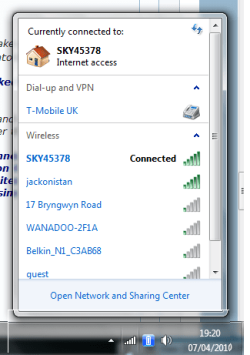
click on the network icon and select the network and sharing center
Wireless networkselect.png

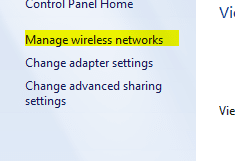
on the left hand panel select manage wireless networks
Manage Wireless.PNG

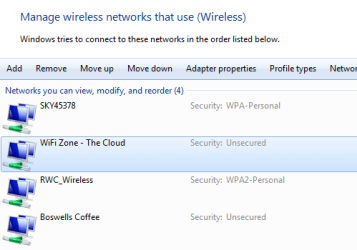
On this screen select each entry in turn and select remove until all are removed.
Remove wireless.png

once you have this done close the network and sharing center and click on the network icon and connect to your wireless network - as there are no existing networks on the laptop the system should automatically configure the network to that on the router, just requiring the password as noted above
 

My Computers

System One System Two

  • Computer type
    PC/Desktop
    Computer Manufacturer/Model Number
    ChillBlast - Custom to my design
    OS
    Windows 11 Pro x64 [Latest Release and Release Preview]
    CPU
    Ryzen 9 5950X, 3.8 - 5.2 MHz
    Motherboard
    Asus Prime X570-Pro
    Memory
    64GB [2 x 32GB] DDR4 3200MHz
    Graphics Card(s)
    4GB NVIDIA GEFORCE GTX 1650 Ti
    Sound Card
    On-board SPDIF to 5.1 System + HDMI [5.1 system]
    Monitor(s) Displays
    32" UHD 32 Bit HDR Monitor + 43" UHD 4K 32Bit HDR TV
    Screen Resolution
    2 x 3840 x 2160 @60Hz
    Hard Drives
    1TB M2 SSD OS, 500GB Fast Access SSD, 2 x 8TB Data + Various Externals from 1TB to 4TB, 10TB NAS
    PSU
    NZXT C750 80 PLUS Gold 750W Modular PSU
    Case
    Workstation Case [Matt Black]
    Cooling
    NZXT Kraken X63 280mm CPU Cooler +2x Quiet Case fans
    Keyboard
    Logitech Wireless MX Keys & K400 + others
    Mouse
    Logitech Wireless MX Master 3S
    Internet Speed
    920 MB Down 50 MB Up
    Antivirus
    BitDefender Total Security Pro
    Browser
    Chrome (always run latest Non-Beta)
    Other Info
    Also run ...
    Laptop - Quad 8GB - Windows 10 Pro x64
    Nexus 7 Android tablet x2
    Samsung 10.2" tablet
    Blackview TAB 8 4G Android Tablet c/w Keyboard
    Wacom Intuos Pro Medium Pen Pad
    Wacom Intuos Pro Small Pen Pad
    Wacom Expresskeys Remote
    Loopdeck+ Graphics Controller
    Shuttle Pro v2 Control
  • Computer type
    Laptop
    System Manufacturer/Model Number
    Dell XPS 17 10750H
    OS
    Windows 11 Pro x64 Latest RP
    CPU
    Intel I7 10750H 5.0GHz
    Motherboard
    Dell XPS
    Memory
    32GB [2x16GB] DDR4 2933 MHz
    Graphics Card(s)
    nVidia GTX1650Ti 4 GB GDDR6
    Sound Card
    Stock [Realtek] 4 Speaker
    Monitor(s) Displays
    17" IPS UHD+ Infinity Edge Touchscreen
    Screen Resolution
    3840 x 2400
    Hard Drives
    2TB M2 NVMe, 4TB External + various 500GB & 1TB External NVMe (also have access to spinner HDD from
    PSU
    Stock
    Case
    Stock XPS Aluminium & Carbon Fibre
    Cooling
    Stock - Active Fan Control
    Keyboard
    Backlit + Various Logitech
    Mouse
    Stock Track Pad + Logitech MX Trackball
    Internet Speed
    72 MB Down 18MB Up
    Browser
    Chrome
    Other Info
    Also run ...
    Laptop - Quad 8GB - Windows 10 Pro x64
    Nexus 7 Android tablet x2
    10.2" tablet
    Sony Z3 Android Smartphone
    Wacom Intuos Pro Medium Pen Pad
    Wacom Intuos Pro Small Pen Pad
    Wacom Expresskeys Remote
    Loopdeck+ Graphics Controller
    Shuttle Pro v2 Control Pad
    10TB NAS
Before I get to your above message I found the WPA WPA2 (PSK) setting under Wireless> Security on the left..
I had a really long password in there.. I wrote that down even tho I removed it and added ...password..then clicked on apply changes.... the page made a slight blink no countdown this time..
I closed that page leaving the word ..password in that box.
Screen shot of the page:
View attachment 65764
 

My Computer

Computer type
Laptop
Computer Manufacturer/Model Number
Gateway 17.3" LCD Intel Dual-Core, 8GB RAM 1TB HDD Windows 8 Laptop
OS
Windows 8 - 64-bit
CPU
2.2GHz Intel Pentium dual-core B960 processor with 2MB L3 ca
Memory
8GB DDR3
Graphics Card(s)
Intel HD Graphics with 128MB of dedicated system memory
Monitor(s) Displays
17.3" Ultrabright HD widescreen LED-backlit LCD
Screen Resolution
1280 X 1024
Hard Drives
1TB hard drive-1000 GB HDD
DVD-Super Multi DL drive
PSU
Intel B960 processor
Case
XXXXX
Cooling
XXXXX
Keyboard
Multi Gesture Touchpad
Mouse
USB - portable mouse... I added this
Antivirus
Avast
Browser
I E 10
Other Info
I see nothing about Motherboard info.
I'm not sure about Sound Card
Ports :(3) USB 2.0, (1) HDMI, (1) VGA, (1) Headphone out, (1) Microphone in, (1) Ethernet LAN

•Fast Wi-Fi wireless and wired Gigabit Ethernet networking
•HDMI output
•Kensington lock slot
I have no idea what all this actually means
It is easier if you use the dedsktop wired to the router to make any router changes.

There should be an entry on the left panel marked Security or wireless security.

in this page you should see several dropdowns

On the security type select wpa2 or wpa2-psk
in the pasword or passphrase box enter a password (password is acceptable for testing and usefull if it appears on any screenshots
choose the default settings for any other boxes

make sure you save the changes

whatever password you enter here is the one you will need to enter on the laptop

to do this you can remove any excess wireless setups that remain on the laptop

click on the network icon and select the network and sharing center
View attachment 65761

on the left hand panel select manage wireless networks
View attachment 65762

On this screen select each entry in turn and select remove until all are removed.
View attachment 65763

once you have this done close the network and sharing center and click on the network icon and connect to your wireless network - as there are no existing networks on the laptop the system should automatically configure the network to that on the router, just requiring the password as noted above

Nigle hi.. I've followed your suggestions as much as possible on the laptop.. I made some screen shots after I was connected using the new password.. I see 2 seperate connections on my connection page where I see the park bench in the middle ..
Tell me now what I need to do.. on the laptop.. I had to go to the power supply/adaptor battery was too low... on the laptop.. I can't get connected to I E on the laptop to reply to you and send the new screen shots. I sew all but the Wi-Fi icon on the router now.. however I'm not on the laptop now..
I'm going to eat very late lunch.. 3:29pm here now. I'll get right back as soon as possible to keep going with this. seems we are quite near this now.
thanks bunches.

Sorry..
 

My Computer

Computer type
Laptop
Computer Manufacturer/Model Number
Gateway 17.3" LCD Intel Dual-Core, 8GB RAM 1TB HDD Windows 8 Laptop
OS
Windows 8 - 64-bit
CPU
2.2GHz Intel Pentium dual-core B960 processor with 2MB L3 ca
Memory
8GB DDR3
Graphics Card(s)
Intel HD Graphics with 128MB of dedicated system memory
Monitor(s) Displays
17.3" Ultrabright HD widescreen LED-backlit LCD
Screen Resolution
1280 X 1024
Hard Drives
1TB hard drive-1000 GB HDD
DVD-Super Multi DL drive
PSU
Intel B960 processor
Case
XXXXX
Cooling
XXXXX
Keyboard
Multi Gesture Touchpad
Mouse
USB - portable mouse... I added this
Antivirus
Avast
Browser
I E 10
Other Info
I see nothing about Motherboard info.
I'm not sure about Sound Card
Ports :(3) USB 2.0, (1) HDMI, (1) VGA, (1) Headphone out, (1) Microphone in, (1) Ethernet LAN

•Fast Wi-Fi wireless and wired Gigabit Ethernet networking
•HDMI output
•Kensington lock slot
I have no idea what all this actually means
Nigel.... I'm back on the laptop connected WIRELESS.. I can now get on line.. yippie..
I have 2 screen shots for you.. to look at.

Tell me now what I need to do about this.
I'll try to get it done for you.
thanks
oops those didn't show.
 

My Computer

Computer type
Laptop
Computer Manufacturer/Model Number
Gateway 17.3" LCD Intel Dual-Core, 8GB RAM 1TB HDD Windows 8 Laptop
OS
Windows 8 - 64-bit
CPU
2.2GHz Intel Pentium dual-core B960 processor with 2MB L3 ca
Memory
8GB DDR3
Graphics Card(s)
Intel HD Graphics with 128MB of dedicated system memory
Monitor(s) Displays
17.3" Ultrabright HD widescreen LED-backlit LCD
Screen Resolution
1280 X 1024
Hard Drives
1TB hard drive-1000 GB HDD
DVD-Super Multi DL drive
PSU
Intel B960 processor
Case
XXXXX
Cooling
XXXXX
Keyboard
Multi Gesture Touchpad
Mouse
USB - portable mouse... I added this
Antivirus
Avast
Browser
I E 10
Other Info
I see nothing about Motherboard info.
I'm not sure about Sound Card
Ports :(3) USB 2.0, (1) HDMI, (1) VGA, (1) Headphone out, (1) Microphone in, (1) Ethernet LAN

•Fast Wi-Fi wireless and wired Gigabit Ethernet networking
•HDMI output
•Kensington lock slot
I have no idea what all this actually means
I'll try here to post those screen shots
[/ATTACH]
 
Last edited:

My Computer

Computer type
Laptop
Computer Manufacturer/Model Number
Gateway 17.3" LCD Intel Dual-Core, 8GB RAM 1TB HDD Windows 8 Laptop
OS
Windows 8 - 64-bit
CPU
2.2GHz Intel Pentium dual-core B960 processor with 2MB L3 ca
Memory
8GB DDR3
Graphics Card(s)
Intel HD Graphics with 128MB of dedicated system memory
Monitor(s) Displays
17.3" Ultrabright HD widescreen LED-backlit LCD
Screen Resolution
1280 X 1024
Hard Drives
1TB hard drive-1000 GB HDD
DVD-Super Multi DL drive
PSU
Intel B960 processor
Case
XXXXX
Cooling
XXXXX
Keyboard
Multi Gesture Touchpad
Mouse
USB - portable mouse... I added this
Antivirus
Avast
Browser
I E 10
Other Info
I see nothing about Motherboard info.
I'm not sure about Sound Card
Ports :(3) USB 2.0, (1) HDMI, (1) VGA, (1) Headphone out, (1) Microphone in, (1) Ethernet LAN

•Fast Wi-Fi wireless and wired Gigabit Ethernet networking
•HDMI output
•Kensington lock slot
I have no idea what all this actually means
Last edited:

My Computer

Computer type
Laptop
Computer Manufacturer/Model Number
Gateway 17.3" LCD Intel Dual-Core, 8GB RAM 1TB HDD Windows 8 Laptop
OS
Windows 8 - 64-bit
CPU
2.2GHz Intel Pentium dual-core B960 processor with 2MB L3 ca
Memory
8GB DDR3
Graphics Card(s)
Intel HD Graphics with 128MB of dedicated system memory
Monitor(s) Displays
17.3" Ultrabright HD widescreen LED-backlit LCD
Screen Resolution
1280 X 1024
Hard Drives
1TB hard drive-1000 GB HDD
DVD-Super Multi DL drive
PSU
Intel B960 processor
Case
XXXXX
Cooling
XXXXX
Keyboard
Multi Gesture Touchpad
Mouse
USB - portable mouse... I added this
Antivirus
Avast
Browser
I E 10
Other Info
I see nothing about Motherboard info.
I'm not sure about Sound Card
Ports :(3) USB 2.0, (1) HDMI, (1) VGA, (1) Headphone out, (1) Microphone in, (1) Ethernet LAN

•Fast Wi-Fi wireless and wired Gigabit Ethernet networking
•HDMI output
•Kensington lock slot
I have no idea what all this actually means
screenshots are not working :( but congratulations on getting on line :party:

I assume that both the desktop and laptop can get online now.

It should be a case with the laptop now to siply boot up in range of the network and the log in will be automatic - if not automatic it's a simple task to manually attach plus there should be a check box to set auto log-in to the wireless.

There are also some properties that are available on the right click that you can set - one usefull one is the middle one here - if this is unchecked it will prevent the system from switching networks if yours is ever not the strongest

Wireless net properties..PNG

Also if you wish to share files etc between the two systems we will have to look at that next - but I would suggest that you enjoy your wireless, for a shot while at least, first as this can be a little complex ;)
 

My Computers

System One System Two

  • Computer type
    PC/Desktop
    Computer Manufacturer/Model Number
    ChillBlast - Custom to my design
    OS
    Windows 11 Pro x64 [Latest Release and Release Preview]
    CPU
    Ryzen 9 5950X, 3.8 - 5.2 MHz
    Motherboard
    Asus Prime X570-Pro
    Memory
    64GB [2 x 32GB] DDR4 3200MHz
    Graphics Card(s)
    4GB NVIDIA GEFORCE GTX 1650 Ti
    Sound Card
    On-board SPDIF to 5.1 System + HDMI [5.1 system]
    Monitor(s) Displays
    32" UHD 32 Bit HDR Monitor + 43" UHD 4K 32Bit HDR TV
    Screen Resolution
    2 x 3840 x 2160 @60Hz
    Hard Drives
    1TB M2 SSD OS, 500GB Fast Access SSD, 2 x 8TB Data + Various Externals from 1TB to 4TB, 10TB NAS
    PSU
    NZXT C750 80 PLUS Gold 750W Modular PSU
    Case
    Workstation Case [Matt Black]
    Cooling
    NZXT Kraken X63 280mm CPU Cooler +2x Quiet Case fans
    Keyboard
    Logitech Wireless MX Keys & K400 + others
    Mouse
    Logitech Wireless MX Master 3S
    Internet Speed
    920 MB Down 50 MB Up
    Antivirus
    BitDefender Total Security Pro
    Browser
    Chrome (always run latest Non-Beta)
    Other Info
    Also run ...
    Laptop - Quad 8GB - Windows 10 Pro x64
    Nexus 7 Android tablet x2
    Samsung 10.2" tablet
    Blackview TAB 8 4G Android Tablet c/w Keyboard
    Wacom Intuos Pro Medium Pen Pad
    Wacom Intuos Pro Small Pen Pad
    Wacom Expresskeys Remote
    Loopdeck+ Graphics Controller
    Shuttle Pro v2 Control
  • Computer type
    Laptop
    System Manufacturer/Model Number
    Dell XPS 17 10750H
    OS
    Windows 11 Pro x64 Latest RP
    CPU
    Intel I7 10750H 5.0GHz
    Motherboard
    Dell XPS
    Memory
    32GB [2x16GB] DDR4 2933 MHz
    Graphics Card(s)
    nVidia GTX1650Ti 4 GB GDDR6
    Sound Card
    Stock [Realtek] 4 Speaker
    Monitor(s) Displays
    17" IPS UHD+ Infinity Edge Touchscreen
    Screen Resolution
    3840 x 2400
    Hard Drives
    2TB M2 NVMe, 4TB External + various 500GB & 1TB External NVMe (also have access to spinner HDD from
    PSU
    Stock
    Case
    Stock XPS Aluminium & Carbon Fibre
    Cooling
    Stock - Active Fan Control
    Keyboard
    Backlit + Various Logitech
    Mouse
    Stock Track Pad + Logitech MX Trackball
    Internet Speed
    72 MB Down 18MB Up
    Browser
    Chrome
    Other Info
    Also run ...
    Laptop - Quad 8GB - Windows 10 Pro x64
    Nexus 7 Android tablet x2
    10.2" tablet
    Sony Z3 Android Smartphone
    Wacom Intuos Pro Medium Pen Pad
    Wacom Intuos Pro Small Pen Pad
    Wacom Expresskeys Remote
    Loopdeck+ Graphics Controller
    Shuttle Pro v2 Control Pad
    10TB NAS
No both are not on line at the same time now..

I have to use the DSL connection to get the laptop on line using I. E.

tomatokingdom will connect the laptop wireless..but won't connect to I E.

..the icon near the clock shows me connected but NO Internet connection to tomatokingdom.

Network 2... has internet access..

How do we get these 2 thing on just one ?
 

My Computer

Computer type
Laptop
Computer Manufacturer/Model Number
Gateway 17.3" LCD Intel Dual-Core, 8GB RAM 1TB HDD Windows 8 Laptop
OS
Windows 8 - 64-bit
CPU
2.2GHz Intel Pentium dual-core B960 processor with 2MB L3 ca
Memory
8GB DDR3
Graphics Card(s)
Intel HD Graphics with 128MB of dedicated system memory
Monitor(s) Displays
17.3" Ultrabright HD widescreen LED-backlit LCD
Screen Resolution
1280 X 1024
Hard Drives
1TB hard drive-1000 GB HDD
DVD-Super Multi DL drive
PSU
Intel B960 processor
Case
XXXXX
Cooling
XXXXX
Keyboard
Multi Gesture Touchpad
Mouse
USB - portable mouse... I added this
Antivirus
Avast
Browser
I E 10
Other Info
I see nothing about Motherboard info.
I'm not sure about Sound Card
Ports :(3) USB 2.0, (1) HDMI, (1) VGA, (1) Headphone out, (1) Microphone in, (1) Ethernet LAN

•Fast Wi-Fi wireless and wired Gigabit Ethernet networking
•HDMI output
•Kensington lock slot
I have no idea what all this actually means
Nigel I have mine set like your last screen shot looks.
Thanks
 

My Computer

Computer type
Laptop
Computer Manufacturer/Model Number
Gateway 17.3" LCD Intel Dual-Core, 8GB RAM 1TB HDD Windows 8 Laptop
OS
Windows 8 - 64-bit
CPU
2.2GHz Intel Pentium dual-core B960 processor with 2MB L3 ca
Memory
8GB DDR3
Graphics Card(s)
Intel HD Graphics with 128MB of dedicated system memory
Monitor(s) Displays
17.3" Ultrabright HD widescreen LED-backlit LCD
Screen Resolution
1280 X 1024
Hard Drives
1TB hard drive-1000 GB HDD
DVD-Super Multi DL drive
PSU
Intel B960 processor
Case
XXXXX
Cooling
XXXXX
Keyboard
Multi Gesture Touchpad
Mouse
USB - portable mouse... I added this
Antivirus
Avast
Browser
I E 10
Other Info
I see nothing about Motherboard info.
I'm not sure about Sound Card
Ports :(3) USB 2.0, (1) HDMI, (1) VGA, (1) Headphone out, (1) Microphone in, (1) Ethernet LAN

•Fast Wi-Fi wireless and wired Gigabit Ethernet networking
•HDMI output
•Kensington lock slot
I have no idea what all this actually means
Congratulations, LPT; you are getting there! Now you have to get internet access on the wireless connection.
 

My Computer

Computer Manufacturer/Model Number
Home built
OS
Windows 7 Ultimate 32 bit
CPU
Intel(R) Pentium(R) 4 CPU 3.00GHz
Motherboard
ASUS P4P800-VM Motherboard Chipset: Intel 865G + ICH5
Memory
2.50 GB RAM
Graphics Card(s)
NVIDIA GeForce 7600 GS
Sound Card
SoundMax Integrated Digital Audio (Chip)
Monitor(s) Displays
ViewSonic VX 1962 wm
Screen Resolution
1680 X 1050
Hard Drives
Seagate Barracuda 7200.10 80 GB
ST380215A ATA Device 18.6 GB
Western Digital "My Book" external hard drive 750 GB
Cooling
Fan based
Keyboard
Microsoft Comfort Curve Keyboard 2000 v10 USB
Mouse
Logitec optic USB
Internet Speed
3.01 Mb/s download 0.64 Mb/s upload
Congratulations, LPT; you are getting there! Now you have to get internet access on the wireless connection.

Carl hi thanks... Yes.. I knew this could be done.. now on to the next steps.. to go about doing that process ?
 

My Computer

Computer type
Laptop
Computer Manufacturer/Model Number
Gateway 17.3" LCD Intel Dual-Core, 8GB RAM 1TB HDD Windows 8 Laptop
OS
Windows 8 - 64-bit
CPU
2.2GHz Intel Pentium dual-core B960 processor with 2MB L3 ca
Memory
8GB DDR3
Graphics Card(s)
Intel HD Graphics with 128MB of dedicated system memory
Monitor(s) Displays
17.3" Ultrabright HD widescreen LED-backlit LCD
Screen Resolution
1280 X 1024
Hard Drives
1TB hard drive-1000 GB HDD
DVD-Super Multi DL drive
PSU
Intel B960 processor
Case
XXXXX
Cooling
XXXXX
Keyboard
Multi Gesture Touchpad
Mouse
USB - portable mouse... I added this
Antivirus
Avast
Browser
I E 10
Other Info
I see nothing about Motherboard info.
I'm not sure about Sound Card
Ports :(3) USB 2.0, (1) HDMI, (1) VGA, (1) Headphone out, (1) Microphone in, (1) Ethernet LAN

•Fast Wi-Fi wireless and wired Gigabit Ethernet networking
•HDMI output
•Kensington lock slot
I have no idea what all this actually means
screenshots are not working :( but congratulations on getting on line :party:

I assume that both the desktop and laptop can get online now.

It should be a case with the laptop now to siply boot up in range of the network and the log in will be automatic - if not automatic it's a simple task to manually attach plus there should be a check box to set auto log-in to the wireless.

There are also some properties that are available on the right click that you can set - one usefull one is the middle one here - if this is unchecked it will prevent the system from switching networks if yours is ever not the strongest

View attachment 65802


Also if you wish to share files etc between the two systems we will have to look at that next - but I would suggest that you enjoy your wireless, for a shot while at least, first as this can be a little complex ;)

Nigel hi..:D.I'm so happy to get this far along with this..thank you so very much for sticking with me on all of this.. Yes ...I want all of this to work as it should .. like yours works.. it seems I need to get an internet connection over on the Laptop.. but maybe I don't know what I'm talking about .
I'll let you rest up from today... let me know when we can get to the next steps.
Thanks again. LPt
 

My Computer

Computer type
Laptop
Computer Manufacturer/Model Number
Gateway 17.3" LCD Intel Dual-Core, 8GB RAM 1TB HDD Windows 8 Laptop
OS
Windows 8 - 64-bit
CPU
2.2GHz Intel Pentium dual-core B960 processor with 2MB L3 ca
Memory
8GB DDR3
Graphics Card(s)
Intel HD Graphics with 128MB of dedicated system memory
Monitor(s) Displays
17.3" Ultrabright HD widescreen LED-backlit LCD
Screen Resolution
1280 X 1024
Hard Drives
1TB hard drive-1000 GB HDD
DVD-Super Multi DL drive
PSU
Intel B960 processor
Case
XXXXX
Cooling
XXXXX
Keyboard
Multi Gesture Touchpad
Mouse
USB - portable mouse... I added this
Antivirus
Avast
Browser
I E 10
Other Info
I see nothing about Motherboard info.
I'm not sure about Sound Card
Ports :(3) USB 2.0, (1) HDMI, (1) VGA, (1) Headphone out, (1) Microphone in, (1) Ethernet LAN

•Fast Wi-Fi wireless and wired Gigabit Ethernet networking
•HDMI output
•Kensington lock slot
I have no idea what all this actually means
OK looking at the screenshot of the laptop Network and sharing center shows you connected to the Internet, via network2 Which is the wired connection

I assume that this wire is connected to the router? with the router connected to the DSL modem?

if you can disconnect the cable and remove all existing wireless networks as my previous posts and then try re-connecting

report back with what happens especially any actual error messages
 

My Computers

System One System Two

  • Computer type
    PC/Desktop
    Computer Manufacturer/Model Number
    ChillBlast - Custom to my design
    OS
    Windows 11 Pro x64 [Latest Release and Release Preview]
    CPU
    Ryzen 9 5950X, 3.8 - 5.2 MHz
    Motherboard
    Asus Prime X570-Pro
    Memory
    64GB [2 x 32GB] DDR4 3200MHz
    Graphics Card(s)
    4GB NVIDIA GEFORCE GTX 1650 Ti
    Sound Card
    On-board SPDIF to 5.1 System + HDMI [5.1 system]
    Monitor(s) Displays
    32" UHD 32 Bit HDR Monitor + 43" UHD 4K 32Bit HDR TV
    Screen Resolution
    2 x 3840 x 2160 @60Hz
    Hard Drives
    1TB M2 SSD OS, 500GB Fast Access SSD, 2 x 8TB Data + Various Externals from 1TB to 4TB, 10TB NAS
    PSU
    NZXT C750 80 PLUS Gold 750W Modular PSU
    Case
    Workstation Case [Matt Black]
    Cooling
    NZXT Kraken X63 280mm CPU Cooler +2x Quiet Case fans
    Keyboard
    Logitech Wireless MX Keys & K400 + others
    Mouse
    Logitech Wireless MX Master 3S
    Internet Speed
    920 MB Down 50 MB Up
    Antivirus
    BitDefender Total Security Pro
    Browser
    Chrome (always run latest Non-Beta)
    Other Info
    Also run ...
    Laptop - Quad 8GB - Windows 10 Pro x64
    Nexus 7 Android tablet x2
    Samsung 10.2" tablet
    Blackview TAB 8 4G Android Tablet c/w Keyboard
    Wacom Intuos Pro Medium Pen Pad
    Wacom Intuos Pro Small Pen Pad
    Wacom Expresskeys Remote
    Loopdeck+ Graphics Controller
    Shuttle Pro v2 Control
  • Computer type
    Laptop
    System Manufacturer/Model Number
    Dell XPS 17 10750H
    OS
    Windows 11 Pro x64 Latest RP
    CPU
    Intel I7 10750H 5.0GHz
    Motherboard
    Dell XPS
    Memory
    32GB [2x16GB] DDR4 2933 MHz
    Graphics Card(s)
    nVidia GTX1650Ti 4 GB GDDR6
    Sound Card
    Stock [Realtek] 4 Speaker
    Monitor(s) Displays
    17" IPS UHD+ Infinity Edge Touchscreen
    Screen Resolution
    3840 x 2400
    Hard Drives
    2TB M2 NVMe, 4TB External + various 500GB & 1TB External NVMe (also have access to spinner HDD from
    PSU
    Stock
    Case
    Stock XPS Aluminium & Carbon Fibre
    Cooling
    Stock - Active Fan Control
    Keyboard
    Backlit + Various Logitech
    Mouse
    Stock Track Pad + Logitech MX Trackball
    Internet Speed
    72 MB Down 18MB Up
    Browser
    Chrome
    Other Info
    Also run ...
    Laptop - Quad 8GB - Windows 10 Pro x64
    Nexus 7 Android tablet x2
    10.2" tablet
    Sony Z3 Android Smartphone
    Wacom Intuos Pro Medium Pen Pad
    Wacom Intuos Pro Small Pen Pad
    Wacom Expresskeys Remote
    Loopdeck+ Graphics Controller
    Shuttle Pro v2 Control Pad
    10TB NAS
Nigel gm.. :D I have some great news for you today.. last night I was going back on the Laptop to finish that last step you suggested I do on the Wireless properties..
I received a message from a friend who mentioned the Wireless button on the Laptop.. to check to see if it was On.. I got my manuel out found that button.. when the Laptop connected Wi-Fi..( didn't have to type in my password)
I went straight to that button punched it off then back on.. WOW
then I was connected to I E ..my mail was there as well... along with being connected to my network.. ( the Newwork 2 is now Gone..) only my tomatokingdom is left..
I then opened the Wireless properties screen as you suggested I do..put a tick in the middle one on that screen..( now the top one and the middle one is ticked) closed it.. was off and running wirelessly.. YIPPIE..
I'm so very greatful to you for hanging with me during all of this.
I think we have now accomplished what we were trying to do. I hope you are as excited today about all of this as I am today.
thanks thanks.. so very much..
hugs :)
LPt
 
Last edited:

My Computer

Computer type
Laptop
Computer Manufacturer/Model Number
Gateway 17.3" LCD Intel Dual-Core, 8GB RAM 1TB HDD Windows 8 Laptop
OS
Windows 8 - 64-bit
CPU
2.2GHz Intel Pentium dual-core B960 processor with 2MB L3 ca
Memory
8GB DDR3
Graphics Card(s)
Intel HD Graphics with 128MB of dedicated system memory
Monitor(s) Displays
17.3" Ultrabright HD widescreen LED-backlit LCD
Screen Resolution
1280 X 1024
Hard Drives
1TB hard drive-1000 GB HDD
DVD-Super Multi DL drive
PSU
Intel B960 processor
Case
XXXXX
Cooling
XXXXX
Keyboard
Multi Gesture Touchpad
Mouse
USB - portable mouse... I added this
Antivirus
Avast
Browser
I E 10
Other Info
I see nothing about Motherboard info.
I'm not sure about Sound Card
Ports :(3) USB 2.0, (1) HDMI, (1) VGA, (1) Headphone out, (1) Microphone in, (1) Ethernet LAN

•Fast Wi-Fi wireless and wired Gigabit Ethernet networking
•HDMI output
•Kensington lock slot
I have no idea what all this actually means
Back
Top