What browser do you guys use?

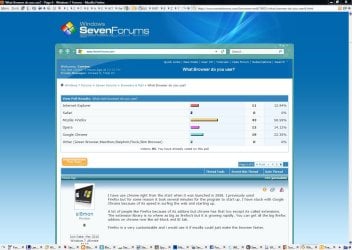
Which Browsers do you use/


  • Total voters
    145
need a credit card, which i don't have, or you need to go into a vodafone store with a driving license or passport, again which i don't have
You would have a hard time surviving around here (Florida).
 

My Computer My Computer

At a glance

Vista, Windows7, Mint Mate, Zorin, Windows 8from 1.6GHz Duo to i7
Computer Manufacturer/Model Number
HP, Dell, Gateway, Toshiba - 4 laptops and 2 desktops
OS
Vista, Windows7, Mint Mate, Zorin, Windows 8
CPU
from 1.6GHz Duo to i7
Monitor(s) Displays
2x HP w2207
Hard Drives
5x HDD, 7x SSD, 12x Externals
Keyboard
with trackball - no mices
Mouse
Trackball mice
Internet Speed
DSL 6000
need a credit card, which i don't have, or you need to go into a vodafone store with a driving license or passport, again which i don't have
You would have a hard time surviving around here (Florida).

I think he'd have more problems getting to Florida without a passport let alone living there, whenever I visit Florida I always pay via debit card because I can't be bothered to work out in my head about ~106.5% of everything I buy.

Oli
 

My Computer My Computer

At a glance

Windows 7 Profesional x86, Mac OS X 10.6 Snow...Intel Core 2 Duo 2.4Ghz4GB DDR3Nvidia 9400m
Computer Manufacturer/Model Number
Apple MacBook 5,1
OS
Windows 7 Profesional x86, Mac OS X 10.6 Snow Leopard
CPU
Intel Core 2 Duo 2.4Ghz
Memory
4GB DDR3
Graphics Card(s)
Nvidia 9400m
Monitor(s) Displays
13.3" Internal + 22" DVI + 21.5" USB
Screen Resolution
1280x800 + 1920x1080 + 1920x1080
Hard Drives
Internal SATA 2.5" 500GB (395GB Mac HFS+, 105GB Windows NTFS)
2.48TB RAID consisting of 5 disks (HFS+)
Case
Aluminium Unibody
Keyboard
Apple Late 2009 Wireless Keyboard (US)
Mouse
Apple Magic Mouse
Internet Speed
6.33Mb/s up. 0.36Mb/s down.
Other Info
Harman Kardon Soundsticks II Speakers
I've switched to Chrome, from Firefox. The latter had become quite unstable, despite regular updates. I still retain Exploder for compatibility reasons (just a handful of sites, really.)
 

My Computer My Computer

At a glance

Windows 7 Home x64Intel Core i7-3610QM @ 2.3GHz x416GBsnVidia GeForce GTX 670M
Computer type
Laptop
Computer Manufacturer/Model Number
Sager NP9150
OS
Windows 7 Home x64
CPU
Intel Core i7-3610QM @ 2.3GHz x4
Motherboard
Clevo P15xEMx
Memory
16GBs
Graphics Card(s)
nVidia GeForce GTX 670M
Sound Card
Realtek High Def Audio
Monitor(s) Displays
Samsung SyncMaster S24B300 + Mobile Display
Screen Resolution
1920x1080 + 1920x1080 (running 1366x768)
Hard Drives
128GBt SSD
500GBt HDD
Keyboard
Logitech K360
Mouse
Logitech Anywhere Mouse MX
Internet Speed
Fat
Antivirus
Avast
Browser
Chrome
I use Chrome, IE, and firefox. Just depends on what i feel like using that day.
 

My Computer My Computer

At a glance

Windows 7 Professional 64bitAMD Athlon II X2 240 Regor 2.8GHz4 gigs DDR3 Dual ChannelRadeon HD 5770 1gig video RAM
Computer Manufacturer/Model Number
Myself
OS
Windows 7 Professional 64bit
CPU
AMD Athlon II X2 240 Regor 2.8GHz
Motherboard
GIGABYTE GA-MA785GMT-UD2H
Memory
4 gigs DDR3 Dual Channel
Graphics Card(s)
Radeon HD 5770 1gig video RAM
Sound Card
Realtek ALC889A
Monitor(s) Displays
Dell E770s 17in
Screen Resolution
1024x768
Hard Drives
1 x 250gb seagate
PSU
Rosewill RP600V2-S-SL 600W
Case
Antec Nine Hundred Black Steel ATX Mid Tower
Cooling
4 Fans
Keyboard
Micro Inovations
Mouse
Microsoft optical mouse
Internet Speed
22 mbps download 1 mbps upload
That is not enabled and Google is still going off all the time trying to contact me or vice-versa. Whether that is secure or not, I don't really like it doing what it wants, when it wants.


I noticed Firefox didn't do it, but I think it is junk. Everytime I install Firefox, within a 2 or 3 week period, something goes wrong and I have to uninstall something, one of the add-ons, or complete re-install of Firefox.

After doing this about 10 or more times, I have had it with Mozilla. Also the Better Privacy feature works for about 2 or 3 days, then won't open.


Should be called Frustra-Fox:p

Not sure what you are doing to FF to get these instabilities....I have never had to re-install any FF or add-ons and I have used it for over 4 years. It has been the most stable browser I have used and I play with them all.
Agreed, that sounds like a seriously unstable FF install. Never ever have I had a problem with FF. The only problem I did have was in May/June 09 (I think it was version 3.4) when I updated and the initial FF startup would take a long time; this was documented on Mozilla forums by plenty of other users and Mozilla resolved the issue within a matter of days. So, I still have no idea why people have problems with the FF startup (time lag) - I am still thinking maybe particular add-ons?


Sorry I never saw your responses. I am thinking it is the add-ons too.

Not sure which ones, but even on my old XP and Vista systems, I had instabiliities with FF over the years. Maybe my Anti-Virus? Now I am just throwing hay-makers, hoping to hit the mark....lol. Yeah, just never could find out what. Maybe I'll give it another shot.....one more time. Again. ;)

Never could figure out why, and many of my friends also said same, that they don't understand why FF gives me so much grief, but it just does.:huh:
 

My Computer My Computer

At a glance

Windows 7 ProfessionalIntel Core2 Duo CPU T6400 @ 2.00GHz3 GBlowly Intel Express Chipset WHOPPING 64 mb de...
Computer Manufacturer/Model Number
Laptop Acer Aspire 6930
OS
Windows 7 Professional
CPU
Intel Core2 Duo CPU T6400 @ 2.00GHz
Memory
3 GB
Graphics Card(s)
lowly Intel Express Chipset WHOPPING 64 mb dedicated.LOL
Monitor(s) Displays
26" RCA and 40" Haier, and laptop 17" screen
Screen Resolution
26":1366X768 40":1920X1080 Laptop Screen: 1366X768
Hard Drives
Onboard HDD 300 GB/
Seagate 1TB External HDD/
Verbatim 500 GB External HDD/
Firelite 160 GB USB HDD
Keyboard
Microsoft Intellitype Wireless Multimedia Keyboard 1.1
Mouse
Microsoft Wireless Optical Mouse 2000
Other Info
Currently using Telus DSL. I currently have a 3.0 connection, but on wait list for 15.0 connection.
lol out of 75 votes no one has voted for the apple safari web browser.:p

Yeah, Safari is real butthurt right now...Steve jobs reminds me of Xerxes from 300.

But this is most awkward.
I always hear horror stories from people (I know personally), saying Firefox has "Failed them", but do you reckon they failed firefox ?
And I'm one of these mystical people who have never had any problems with firefox, and I pimp it out too; even in beta !.

Sort of one of those problems which results in you screaming "WHY ?!?!" While looking upwards.
 

My Computer My Computer

At a glance

Windows 7 Professional x64Intel core 2 quad Q6600 [email protected]4GB 800mhz Kingston DDr2 (wants better..)ASUS ATI HD5770 1GB(Gddr5) OC 900Mhz + 1300Mh...
Computer Manufacturer/Model Number
Eloi and his Kitchen Table
OS
Windows 7 Professional x64
CPU
Intel core 2 quad Q6600 [email protected]
Motherboard
Asrock Glan 4core-1600 (sucks)
Memory
4GB 800mhz Kingston DDr2 (wants better..)
Graphics Card(s)
ASUS ATI HD5770 1GB(Gddr5) OC 900Mhz + 1300Mhz (Great)
Sound Card
Creative Soundblaster Audigy SE 7.1 (Wouldn't recommend)
Monitor(s) Displays
24inch Samsung Syncmaster P2450H (Kickass)
Screen Resolution
1920x1080
Hard Drives
Hitachi 500gb 7600RPM SATAII 32mb

Unknown DVD drive, its haunted.

320GB Hitachi (Philips external)
1TB Stor-e alu.

2x 500GB on Raid server downstairs. (Usually just hosts games and stuff, but its a "Guest" Pc too)
PSU
600W, unknown make yet decent performance
Case
Unknown (Cheap thing, replacing)
Cooling
Zalman9700LED + 1 High speed 1000-3200rpm 120mm <-- Great.
Keyboard
Saitek 3 Eclipse <-- pretty cool..
Mouse
Logitech G500 (ex lachesis owner)
Internet Speed
1MB/s down 100KBs up
Other Info
Server downstairs is an AMD Phenom X3 705E @ 2.8GHz with a mini ninja scythe cooler.
Firefox. Once i started using, i never turned back. I used safari once and once only.

I just prefer the layout, the customisation, ADD-ONS ADD-ONS ADD-ONS and it always seems quicker than IE8.
 

My Computer My Computer

At a glance

Windows 7 Ultimate x64 RTM + SP1Intel Core i7 950 3.06GHZ (OC'd to 3.99Ghz)6GB OCZ Reaper HPC Edition PC3-16000 (set 160...EVGA Nvidia Geforce GTX 570
Computer Manufacturer/Model Number
The HAFmeister (Custom)
OS
Windows 7 Ultimate x64 RTM + SP1
CPU
Intel Core i7 950 3.06GHZ (OC'd to 3.99Ghz)
Motherboard
Asus Rampage III Extreme x58 SATA 6GB & USB 3.0
Memory
6GB OCZ Reaper HPC Edition PC3-16000 (set 1606Mhz 8-8-8-26)
Graphics Card(s)
EVGA Nvidia Geforce GTX 570
Sound Card
Creative SB X-Fi Titanium Fatal1ty Professional Series
Monitor(s) Displays
Samsung SM2433BW 24" Widescreen Monitor
Screen Resolution
1920x1200
Hard Drives
Western Digital Caviar Black 500GB 32Mb Buffer SATA II
Western Digital Caviar Black 750GB 32Mb Buffer SATA II
Western Digital Caviar Blue 500GB 16Mb Buffer SATA II
Western Digital My Book Essential Edition 750GB USB
Samsung Spinpoint 2TB SATA II
PSU
Thermaltake Toughpower 1200w (Modular)
Case
CoolerMaster HAF-932
Cooling
Zalman Reserator XT and ZM-WB5 Plus - GPU uses Stock coolers
Keyboard
Logitech G510
Mouse
Logitech G9 Gaming Mouse
Internet Speed
3MB Profile - 350-400kbs (Real-Speed)
Other Info
IcyBox Hot-Swap Bay,
Logitech G27 Steering Wheel,
Xbox 360 Wirless Elite Controller with Microsoft Reciever and
Play & Charge Kit,
Belkin USB Wireless Adaptor,
GAME Generic Controller (Playstation Looky-Likey),
Epson SX125 All-in-One.
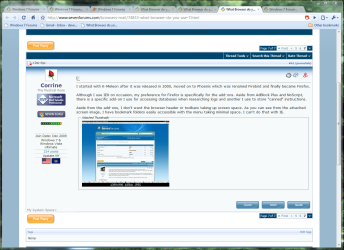
I started with K-Meleon after it was released in 2000, moved on to Phoenix which was renamed Firebird and finally became Firefox.

Although I use IE8 on occasion, my preference for Firefox is specifically for the add-ons. Aside from AdBlock Plus and NoScript, there is a specific add-on I use for accessing databases when researching logs and another I use to store "canned" instructions.

Aside from the add-ons, I don't want the browser header or toolbars taking up screen space. As you can see from the attached screen image, I have bookmark folders easily accessible with the menu taking minimal space. I can't do that with IE.
 

Attachments

  • 7_FF.JPG
    7_FF.JPG
    139.2 KB · Views: 25

My Computer My Computer

At a glance

Windows 7 & Windows Vista Ultimate
OS
Windows 7 & Windows Vista Ultimate
I have a few installed for variety but my default is Opera. For me its the easiest & quickest to use. Only issue with the latest updates has been hotmail wont show correctly.
2nd preferred is Firefox. After that Safari then Chrome. Firefox & Chrome lose points in my book simply because i cant 'paste & go'.
Installed Maxthon, Sea Monkey & Comodo Dragon yesterday so will try those this weekend.
I.E. disabled.

In Chrome right click in the address box "Paste and Search", it will search with your chosen default search engine. The address box is the search box, just paste or type and search from there.

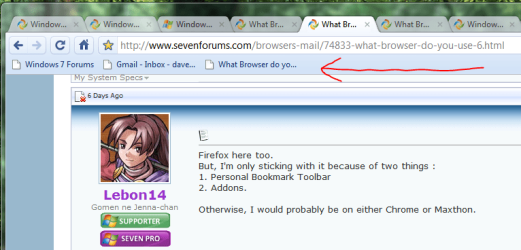
Firefox here too.
But, I'm only sticking with it because of two things :
1. Personal Bookmark Toolbar
2. Addons.

Otherwise, I would probably be on either Chrome or Maxthon.

1. Like this?
Personal Bookmark toolbar.PNG

2. Chrome Extensions are the same as Addons. There are over 1500 3000 and more all the time.

I started with K-Meleon after it was released in 2000, moved on to Phoenix which was renamed Firebird and finally became Firefox.

Although I use IE8 on occasion, my preference for Firefox is specifically for the add-ons. Aside from AdBlock Plus and NoScript, there is a specific add-on I use for accessing databases when researching logs and another I use to store "canned" instructions.

Aside from the add-ons, I don't want the browser header or toolbars taking up screen space. As you can see from the attached screen image, I have bookmark folders easily accessible with the menu taking minimal space. I can't do that with IE.

Chrome extension Adblock plus

Chrome extensions search database, maybe they have some you can use.

You can remove the bookmarks toolbar and other bookmarks to make the header smaller.
Chrome screen shot.PNG

Not really trying to convince anyone to use Chrome. It's a personal choice.
I see a lot of people saying it doesn't have features they want, when it actually has most of them. When it first came out it didn't have many, but has a lot of options now. :D
 
Last edited:

My Computer My Computer

At a glance

Windows 7 Ult x64 - SP1/ Windows 8 Pro x64Intel Core i5-3570K 4.6GHz8GB (2X4GB) DDR3 1600 Corsair Vengeance CL8 1.5vSapphire HD 7770 Vapor-X OC 1GB DDR5
Computer type
PC/Desktop
Computer Manufacturer/Model Number
76~2.0
OS
Windows 7 Ult x64 - SP1/ Windows 8 Pro x64
CPU
Intel Core i5-3570K 4.6GHz
Motherboard
Gigabyte GA-Z77X UD3H, f18
Memory
8GB (2X4GB) DDR3 1600 Corsair Vengeance CL8 1.5v
Graphics Card(s)
Sapphire HD 7770 Vapor-X OC 1GB DDR5
Sound Card
Onboard VIA VT2021
Monitor(s) Displays
22" LCD Dell
Screen Resolution
1680x1050
Hard Drives
Samsung 840Pro 128GB SSD,
Seagate Barracuda 500GB SATA2 7200rpm 32MB cache, Seagate Barracuda 1TB SATA2 7200rpm 32MB cache,
PSU
Corsair HX650W
Case
Cooler Master Storm Scout
Cooling
Corsair H80 2x12cm Noctua NF P12 , 2x14cm case fans
Keyboard
Logitech Wave
Mouse
CM Sentinel
Internet Speed
Dismal
Antivirus
Avast
Browser
Opera Next
Other Info
Haswell laptop: HP Envy 17t-j, i7-4700MQ, GeForce 740M 2GB DDR3, 17.3" Full HD 1920x1080, 16GB RAM, Samsung 840 Pro 128GB, 1TB Hitachi 7200 HDD,
Desktop: eSATA ports,
External eSATA Seagate 500GB SATA2 7200rpm,
External WD USB 500GB
My browser

is Google Chrome because I like simple design, fast response and a intuitive approach. I like typing my search words into the URL box, too. I don't need bells and whistles to make me think my web experience is more than it is.
 

My Computer My Computer

At a glance

windows 7 Home Premium 64bit (6.1, 7600)i7 9206G DDR3Nvidia GTS 250 1G
Computer Manufacturer/Model Number
Custom
OS
windows 7 Home Premium 64bit (6.1, 7600)
CPU
i7 920
Motherboard
ASUS
Memory
6G DDR3
Graphics Card(s)
Nvidia GTS 250 1G
Sound Card
RealTek
Monitor(s) Displays
17" LCD
Hard Drives
1 x 700G
PSU
700 watt
Case
Guardian 921
Cooling
3 x fans
Internet Speed
Dial-up (LOL)
Now this poll should have a Multiple Choice option. I mainly use Firefox, but as a fallback there's always some other browser left. (Which is constantly changing.)
 

My Computer My Computer

At a glance

Windows XP and 7 (with Debian Squeeze in a VM)
OS
Windows XP and 7 (with Debian Squeeze in a VM)
Now this poll should have a Multiple Choice option. I mainly use Firefox, but as a fallback there's always some other browser left. (Which is constantly changing.)

People have said that but I made it single choice because I want to know what is peoples favorite browser or what browser do they use most of the time. I have opera, firefox, IE and chrome all installed on my system. But I only ever use Chrome as my browser.
 

My Computer My Computer

At a glance

Windows 7 Ultimate 64 bitIntel i5 2400 @ 3.80 GHzMushkin Silverline 996768 4GBMSI GTX 460 760MB Cyclone Overclocked
Computer Manufacturer/Model Number
Self-built on 31/1/11
OS
Windows 7 Ultimate 64 bit
CPU
Intel i5 2400 @ 3.80 GHz
Motherboard
Ashrock P67 Extreme 4
Memory
Mushkin Silverline 996768 4GB
Graphics Card(s)
MSI GTX 460 760MB Cyclone Overclocked
Sound Card
Integrated
Monitor(s) Displays
Asus VH202T 20" Widescreen
Screen Resolution
1600x900
Hard Drives
SSD: OCZ Vertex 2 60GB
HDD: Hitachi Deskstar 7K1000.C 500GB
PSU
Silverstone Strider 500W
Case
Zalman Z9 Plus
Cooling
Cooler Master Hyper 212 Plus
Keyboard
Logitech Wireless Keyboard MK520
Mouse
Logitech M310
Internet Speed
3 Mbps
Other Info
UEFI: Ashrock P67/
Network Card :TP-Link WN350GD/
WEI: 7.4/
ODD: Lite-On IHAS324
Hmm, for some people there's no "main browser". :)
 

My Computer My Computer

At a glance

Windows XP and 7 (with Debian Squeeze in a VM)
OS
Windows XP and 7 (with Debian Squeeze in a VM)
is Google Chrome because I like simple design, fast response and a intuitive approach. I like typing my search words into the URL box, too. I don't need bells and whistles to make me think my web experience is more than it is.

Welcome to Seven Forums mos effed.

+1 for that statement :)
 

My Computer My Computer

At a glance

Windows 7 Ult x64 - SP1/ Windows 8 Pro x64Intel Core i5-3570K 4.6GHz8GB (2X4GB) DDR3 1600 Corsair Vengeance CL8 1.5vSapphire HD 7770 Vapor-X OC 1GB DDR5
Computer type
PC/Desktop
Computer Manufacturer/Model Number
76~2.0
OS
Windows 7 Ult x64 - SP1/ Windows 8 Pro x64
CPU
Intel Core i5-3570K 4.6GHz
Motherboard
Gigabyte GA-Z77X UD3H, f18
Memory
8GB (2X4GB) DDR3 1600 Corsair Vengeance CL8 1.5v
Graphics Card(s)
Sapphire HD 7770 Vapor-X OC 1GB DDR5
Sound Card
Onboard VIA VT2021
Monitor(s) Displays
22" LCD Dell
Screen Resolution
1680x1050
Hard Drives
Samsung 840Pro 128GB SSD,
Seagate Barracuda 500GB SATA2 7200rpm 32MB cache, Seagate Barracuda 1TB SATA2 7200rpm 32MB cache,
PSU
Corsair HX650W
Case
Cooler Master Storm Scout
Cooling
Corsair H80 2x12cm Noctua NF P12 , 2x14cm case fans
Keyboard
Logitech Wave
Mouse
CM Sentinel
Internet Speed
Dismal
Antivirus
Avast
Browser
Opera Next
Other Info
Haswell laptop: HP Envy 17t-j, i7-4700MQ, GeForce 740M 2GB DDR3, 17.3" Full HD 1920x1080, 16GB RAM, Samsung 840 Pro 128GB, 1TB Hitachi 7200 HDD,
Desktop: eSATA ports,
External eSATA Seagate 500GB SATA2 7200rpm,
External WD USB 500GB
Yup especially on my new machine with 64 bit :)

I'm curious about chrome. What do you do for bookmark/password control? I took a quick look through and I didn't notice much in the way of addons. Firefox is a bit slow loading off the HD. For awhile I had a copy of Portable loading from a Ramdisk, but that got to be a pain. Plus to keep it small I didn't install my usual assortment of addons. Stuff like ClickCutter AutoCopy I'd find it tough to be without.

edit: I'm using it now. Not so bad as some I've tried. Seems to load fast. Just be a matter of if there's the Addons for features I'm used to.

edit2: Okay, I have AutoCopy but I still am prejudiced against programs that force you to use a ribbon. I don't get what's sexy about having to hunt to find commands.

edit3: now I see why Iron is fast. Bringing up about:blank uses 4 processes!! But on a PC with 8 GB ram that may not be a bad thing. So far I like it.
 
Last edited:

My Computer My Computer

At a glance

Windows 7 32 bitAMD 5200+ dual core2 GBNVidia GeForce 6150SE 128 MB
Computer Manufacturer/Model Number
HP Media Center
OS
Windows 7 32 bit
CPU
AMD 5200+ dual core
Memory
2 GB
Graphics Card(s)
NVidia GeForce 6150SE 128 MB
Monitor(s) Displays
CRT
Screen Resolution
1280x1024
Hard Drives
500 GB Sata internal :

SIIG USB 3.0 docking stations w/WD Caviar Black 6 Gb/s drives
Keyboard
PS/2
Mouse
PS/2 Wheel Mouse
Other Info
SIIG USB 3.0 PCIexpress card.
I'm curious about chrome. What do you do for bookmark/password control?

edit: I'm using it now. Not so bad as some I've tried. Seems to load fast. Just be a matter of if there's the Addons for features I'm used to.

edit2: Okay, I have AutoCopy but I still am prejudiced against programs that force you to use a ribbon. I don't get what's sexy about having to hunt to find commands.

edit3: now I see why Iron is fast. Bringing up about:blank uses 4 processes!! But on a PC with 8 GB ram that may not be a bad thing. So far I like it.

Did you find the Chrome Extensions link?

Extensions are Addons, there are over 3000 now, not as many as FF but more every day.

Then you can click the wrench and 'extensions' to manage them.
 

My Computer My Computer

At a glance

Windows 7 Ult x64 - SP1/ Windows 8 Pro x64Intel Core i5-3570K 4.6GHz8GB (2X4GB) DDR3 1600 Corsair Vengeance CL8 1.5vSapphire HD 7770 Vapor-X OC 1GB DDR5
Computer type
PC/Desktop
Computer Manufacturer/Model Number
76~2.0
OS
Windows 7 Ult x64 - SP1/ Windows 8 Pro x64
CPU
Intel Core i5-3570K 4.6GHz
Motherboard
Gigabyte GA-Z77X UD3H, f18
Memory
8GB (2X4GB) DDR3 1600 Corsair Vengeance CL8 1.5v
Graphics Card(s)
Sapphire HD 7770 Vapor-X OC 1GB DDR5
Sound Card
Onboard VIA VT2021
Monitor(s) Displays
22" LCD Dell
Screen Resolution
1680x1050
Hard Drives
Samsung 840Pro 128GB SSD,
Seagate Barracuda 500GB SATA2 7200rpm 32MB cache, Seagate Barracuda 1TB SATA2 7200rpm 32MB cache,
PSU
Corsair HX650W
Case
Cooler Master Storm Scout
Cooling
Corsair H80 2x12cm Noctua NF P12 , 2x14cm case fans
Keyboard
Logitech Wave
Mouse
CM Sentinel
Internet Speed
Dismal
Antivirus
Avast
Browser
Opera Next
Other Info
Haswell laptop: HP Envy 17t-j, i7-4700MQ, GeForce 740M 2GB DDR3, 17.3" Full HD 1920x1080, 16GB RAM, Samsung 840 Pro 128GB, 1TB Hitachi 7200 HDD,
Desktop: eSATA ports,
External eSATA Seagate 500GB SATA2 7200rpm,
External WD USB 500GB
Did you find the Chrome Extensions link?

Extensions are Addons, there are over 3000 now, not as many as FF but more every day.

Then you can click the wrench and 'extensions' to manage them.

Unfortunately, it seems like despite lower numbers of extensions for chrome, there are more repeats as many people trying to provide the old reliables from Firefox like Flashblock. There are about half a dozen flashblocks and none of them are as effective as the Firefox Flashblock.

Chrome is getting closer all the time. I love how it take all your settings from firefox, so you don't have spend time tweaking another browser to try it.

But overall tweakability seems very lacking, I need more settings, especially the ability to turn off image animations. This is so annoying to have animimated gifs going endlessly that this one is a show stopper for me.

Is there an extension that will kill gif animation for Chrome?
 

My Computer My Computer

At a glance

Windows 7 x64 Home PremiumIntel Q9400 @ 3.2 GHz6GB PC 6400Nvidia 8800GT
OS
Windows 7 x64 Home Premium
CPU
Intel Q9400 @ 3.2 GHz
Motherboard
Gigabyte DS3L
Memory
6GB PC 6400
Graphics Card(s)
Nvidia 8800GT
Screen Resolution
1920x1200
Hard Drives
Dual WD Green 1TB
Internet Speed
10 Mb/s
I have several extensions. But since bookmark sync is built in, I wonder if anyone will bother to port SyncPlaces over to it? I don't want to sync my bookmarks using a Google account. I want to use my own ftp site like I can with SyncPlaces.

I was hoping SyncPlaces would make a version for chrome and clones so that I could upload with Firefox and download with Iron and vice versa. That would make things really easy.

Lacking ftp support, going through a shared folder on my Lan would not be so bad. I just don't want to stick my bookmarks and/or passwords online unless it's my own ftp page.
 

My Computer My Computer

At a glance

Windows 7 32 bitAMD 5200+ dual core2 GBNVidia GeForce 6150SE 128 MB
Computer Manufacturer/Model Number
HP Media Center
OS
Windows 7 32 bit
CPU
AMD 5200+ dual core
Memory
2 GB
Graphics Card(s)
NVidia GeForce 6150SE 128 MB
Monitor(s) Displays
CRT
Screen Resolution
1280x1024
Hard Drives
500 GB Sata internal :

SIIG USB 3.0 docking stations w/WD Caviar Black 6 Gb/s drives
Keyboard
PS/2
Mouse
PS/2 Wheel Mouse
Other Info
SIIG USB 3.0 PCIexpress card.
Did you find the Chrome Extensions link?

Extensions are Addons, there are over 3000 now, not as many as FF but more every day.

Then you can click the wrench and 'extensions' to manage them.

Unfortunately, it seems like despite lower numbers of extensions for chrome, there are more repeats as many people trying to provide the old reliables from Firefox like Flashblock. There are about half a dozen flashblocks and none of them are as effective as the Firefox Flashblock.

Chrome is getting closer all the time. I love how it take all your settings from firefox, so you don't have spend time tweaking another browser to try it.

But overall tweakability seems very lacking, I need more settings, especially the ability to turn off image animations. This is so annoying to have animimated gifs going endlessly that this one is a show stopper for me.

Is there an extension that will kill gif animation for Chrome?

Haven't tried this but, here is one,


Pause! Pause! Pause!
 

My Computer My Computer

At a glance

Windows 7 Ult x64 - SP1/ Windows 8 Pro x64Intel Core i5-3570K 4.6GHz8GB (2X4GB) DDR3 1600 Corsair Vengeance CL8 1.5vSapphire HD 7770 Vapor-X OC 1GB DDR5
Computer type
PC/Desktop
Computer Manufacturer/Model Number
76~2.0
OS
Windows 7 Ult x64 - SP1/ Windows 8 Pro x64
CPU
Intel Core i5-3570K 4.6GHz
Motherboard
Gigabyte GA-Z77X UD3H, f18
Memory
8GB (2X4GB) DDR3 1600 Corsair Vengeance CL8 1.5v
Graphics Card(s)
Sapphire HD 7770 Vapor-X OC 1GB DDR5
Sound Card
Onboard VIA VT2021
Monitor(s) Displays
22" LCD Dell
Screen Resolution
1680x1050
Hard Drives
Samsung 840Pro 128GB SSD,
Seagate Barracuda 500GB SATA2 7200rpm 32MB cache, Seagate Barracuda 1TB SATA2 7200rpm 32MB cache,
PSU
Corsair HX650W
Case
Cooler Master Storm Scout
Cooling
Corsair H80 2x12cm Noctua NF P12 , 2x14cm case fans
Keyboard
Logitech Wave
Mouse
CM Sentinel
Internet Speed
Dismal
Antivirus
Avast
Browser
Opera Next
Other Info
Haswell laptop: HP Envy 17t-j, i7-4700MQ, GeForce 740M 2GB DDR3, 17.3" Full HD 1920x1080, 16GB RAM, Samsung 840 Pro 128GB, 1TB Hitachi 7200 HDD,
Desktop: eSATA ports,
External eSATA Seagate 500GB SATA2 7200rpm,
External WD USB 500GB
Back
Top