Hot weather overloading my fan.

I've been doing the "side panel off, desk fan" trick for years and highly recommend it. Recently I OC'd my chip and the temps rose 2-3 degrees c so I set my fan up and run it when the temps creep up. System is nice and cool.


I've been guilty of that in the past myself. :roflmao:
 

My Computer My Computer

At a glance

W 7 64-bit UltimateIntel Q9550 Yorkfield8GB Dominator 8500C5DATI : XFX 5870
Computer Manufacturer/Model Number
* BFK Customs *
OS
W 7 64-bit Ultimate
CPU
Intel Q9550 Yorkfield
Motherboard
ASUS P5Q Pro
Memory
8GB Dominator 8500C5D
Graphics Card(s)
ATI : XFX 5870
Sound Card
Realtek HD Audio 7-1
Monitor(s) Displays
1x 47" LCD HDMI & 3x 26" LCD HDMI
Screen Resolution
1920x1080P & 1920x1200
Hard Drives
1x 80GB Intel X25-M G2 SSD : 1x 500GB & 1x 640GB WD Caviar Black(s)
PSU
Corsair 620HX
Case
Cooler Master RC-690
Cooling
Tuniq Tower 120, 2x 140mm and 3x 120mm case fans
Keyboard
Microsoft 500
Mouse
Razer Diamondback 3G
Internet Speed
14 Mb/s
Other Info
1x Koutech 3Gb/s SATA HDD Hot Swap Rack
I have a "Scythe Mugen 2", no heat issues here. I would HIGHLY recomend getting a large "over-clocker" style heat-sink.
 

My Computer My Computer

At a glance

windows sevenPhenom II x2 3.14 gigsNvidia GTS 250
Computer Manufacturer/Model Number
iBuyPower
OS
windows seven
CPU
Phenom II x2 3.1
Motherboard
asus
Memory
4 gigs
Graphics Card(s)
Nvidia GTS 250
Monitor(s) Displays
23in Acre
@Tousdae

I'm a bit confused by whether you are talking C or F temps.

One other thing to check regarding the loudness - and I'd bet the family jewels on it: check your PSU fan. What happens is, when you first turn the computer on, the fan is quiet; as things heat up the fan (because its bearings are worn/defective) start making a grinding/rattling noise - quite unlike the normal roar of fans.

Cure: most fans I have seen use a standard 120mm fan. Remove the grate/cover holding the fan in place and replace it with a standard 120mm case fan.

Monk

Hi, Yep, I'm giving you temps in F.

I don't understand your cure. I'm replacing a fan? I just learned what a heatsink was last night online lol .. you're dealing with a very non-suavy pc person here. :confused:

That's exactly why I asked kid about his video cards, wondering if you add a card will you get better performance, maybe less wear and tear on the one you have. Can a game crash to desktop due to a high temp to the card? Thanks for that explanation. It's still a bit over my head and with all the OS and chipset things to worry about, I'm just gonna forget wanting to add a card. lol

I hope it's not the PSU. It's only 4 months old! I'm going to assume tho, that it'd happen no matter what the temp is outside or in the house right?? This is only getting loud when the temp is up there, so far.

I need a new pc guy. If I ask my guy how many fans I can add, he'll just keep telling me that I don't need them. But the fan blowing into the side does help. My fan is right on top of it tho. The fan is now suspended from the wall with the case about 2 inches from it. Should it be that close? I wish I could do all this myself. I thought it was cool that I could put in a video card, hard drive and disc drive ... I need to know so much more!

Thanks for all your help.
 

My Computer My Computer

At a glance

Windows 7 Professional 64 bitAMD Phenom(tm) II X4 955 Processor8 GBXFX Radeon R7 260 X 1GB
Computer type
PC/Desktop
Computer Manufacturer/Model Number
(1) Hitachi HDP725050GLA360 ATA Device (2) ST31000528AS ATA Device (3) Generic USB CF Reader USB
OS
Windows 7 Professional 64 bit
CPU
AMD Phenom(tm) II X4 955 Processor
Motherboard
ASUSTeK Computer INC. M3A78-CM
Memory
8 GB
Graphics Card(s)
XFX Radeon R7 260 X 1GB
Sound Card
AMD High Definition Audio Device
Monitor(s) Displays
Westinghouse TV 26"
Screen Resolution
1366x768
Hard Drives
1TB SATA
PSU
Corsair CX 750 ATX 80 Plus
Keyboard
Standard PS/2
Mouse
Standard
Internet Speed
80-100
Antivirus
Defender
Browser
Opera and Firefox
Hello.

I have 2 video cards running independently so I can run 4 monitors, have a look at the link below to see the ways I've had monitors set up.

Wooo you're serious with your pc's :cool:

Your temps make me feel better btw. I checked out the image you provided. I'm glad to see your ATI gets up there too. That concerned me.

Ok so I guess the plan is to monitor temps in hot weather and then ... keep using this fan blowing in ... maybe add a fan or 2 if my pc guy freakin allows it? He'll do it if I buy the parts elsewhere and bring them to him. I had this experience with my psu. I told him I wanted an 800/850 psu (apparently cost inspired my 650 purchase). He told me no, you don't need a larger psu. So I had to go buy one and bring it to him. If I want more RAM, he tells me that I don't need more RAM. He drives me nuts lol I needed a larger psu for my gaming, I think... so I was told on my gaming forum. He either doesn't like gaming or just doesn't understand with some games you need more powerful cards which in turn need more powerful support sources. So if I need fans, I'll probably be here asking you guys what size etc ... :huh:
 

My Computer My Computer

At a glance

Windows 7 Professional 64 bitAMD Phenom(tm) II X4 955 Processor8 GBXFX Radeon R7 260 X 1GB
Computer type
PC/Desktop
Computer Manufacturer/Model Number
(1) Hitachi HDP725050GLA360 ATA Device (2) ST31000528AS ATA Device (3) Generic USB CF Reader USB
OS
Windows 7 Professional 64 bit
CPU
AMD Phenom(tm) II X4 955 Processor
Motherboard
ASUSTeK Computer INC. M3A78-CM
Memory
8 GB
Graphics Card(s)
XFX Radeon R7 260 X 1GB
Sound Card
AMD High Definition Audio Device
Monitor(s) Displays
Westinghouse TV 26"
Screen Resolution
1366x768
Hard Drives
1TB SATA
PSU
Corsair CX 750 ATX 80 Plus
Keyboard
Standard PS/2
Mouse
Standard
Internet Speed
80-100
Antivirus
Defender
Browser
Opera and Firefox
@Tw33k, Bare Foot Kid: isn't is surprising how many people are aghast when you tell them about the panel off/personal fan routine.

@Tousdae:

1. re "non-suavy [sic] person here": Good to know; helps folks tailor responses by making fewer assumptions. BTW, everyone here at one time or another was a non-savvy person.

2. F-temps; good; no problem.

3. I cannot say one would get less wear and tear on a gfx card by adding a another; theoretically that might be true but I've never observed any discussions on the point.

4. Game crash to DT due to hight temps: I'd say no because if the card is affected by the temps, I should think the effect of the heat would be effected globally, i.e., the temp is not going to cool instantaneously as the system goes from game to DT. If the crash to the DT is card related, I should think it more of a software (SW) - (gfx driver or specific game SW) issue. Game SW often enjoys patches along its history so make sure you have the most recent patch, if available, installed. A more remote possibility is the so-called glitch; many games, under certain game conditions at certain points in the game, simply close. I have a chess app (Chessmaster) that does this (infrequently so I ignore it because the troubleshooting effort for me is not worth it). I should think that, if a gfx card overheated, either your system would crash (reboot or shut down) or you video would become variously garbled giving you a herringbone or that infamous kaleidoscope appearance.

5. The "OS chipset thing": this becomes a hardware (HW) issue, especially when building a machine; it can be a SW issue but not commonly manifest because SW developers give you system requirements for their specific SW so you know in advance if your system will be able to run the SW. For example, if your mobo has an ABC chipset, your CPU and mobo drivers must be matched to that chipset.

6. Four month-old PSU: hey, stuff happens right out of the box; electronics can be so complex such that I think it is unreasonable to expect that every time you install a new component it will function normally. When you talk about your computer becoming noisy, that suggests more to me than the difference between low/high fan speeds. Maybe not; maybe we use similar terms to describe dissimilar events. What I would suggest, is to briefly run your machine with the side panel off, no additional exterior fan, and let it heat up - which will not destroy anything. When/if the noise returns, give a listen here and there to see if you can ID the source. We already know it a fan: there are no other moving parts in the system (unless when you say noise you mean the 60Hz hum made by many appliances/TV/radio/etc.) So, get your ear next to each fan and determine if one is making a peculiar noise - the noise. If so, replace the fan. Low/high-speed will give you a low/high wind rush sound, like any typical house fan but no other noise except possibly a vibration at high-speed if a fan blade was broken or caked with dust, and thus imbalanced, or the fan was loosely attached to the case and the whole thing vibrated.

Changing a PSU fan is a snap but, of course, to save yourself the expense, if the PSU fan was the issue and it's a new PSU, a warranty replacement is in order.

Your assumption is correct: the ambient (room) temp is not going to influence whether the noise is there or not, per se: however, the hotter the room, the more quickly the case will heat up internally and, thus, the sooner the noise will appear.
It is possible that a cool room might keep the case sufficiently cool such that that noise threshold temp would never be reached.

7. If the added external fan allows you to compute normally, do so. In the interim, if you are interested in building a new computer or upgrading your components, you can learn (Google, forums such as SevenForums) are available to assist with ideas/opinions. One thing to remember that many seem to overlook: understand that all of your components work together, i.e., NEVER consider a component in a vacuum. Many times you see folks ask, "What do think of this gizmo?" Many times the response is, "Gee, it appears that that gizmo will not run in your machine."

Finally, running the external fan at a close distance will not do any harm. I blow out my computer case regularly with a shopvac hose connected to the vac exhaust port; now that's air! I have never had anything break. To be sure, when I am finished, I make sure a cable was not inadvertently loosened but nothing is going to break. By the way, vacuums, depending on the type, can create a load of static electricity - a slayer of computer chips. I keep my canister well back from the computer so it's not an issue. This is not a worry with a small personal fan.

Hope this helps and do post back with any/all questions; a variety of answers helps the learning process even where differences of opinions ensue.

Monk

 

My Computer My Computer

At a glance

Dual boot XP Pro SP3x86 and Win7 Pro x64AMD Phenom II x3 720 BE OCed to 3.3 GHz2x2GB OCZ OCZ2RPR10664GK PC2-8500 DDR2Sapphire ATi Radeon 4830 HD x2 (XFire)
Computer Manufacturer/Model Number
Custom
OS
Dual boot XP Pro SP3x86 and Win7 Pro x64
CPU
AMD Phenom II x3 720 BE OCed to 3.3 GHz
Motherboard
Asus M3A79T Deluxe
Memory
2x2GB OCZ OCZ2RPR10664GK PC2-8500 DDR2
Graphics Card(s)
Sapphire ATi Radeon 4830 HD x2 (XFire)
Sound Card
Integrated (SoundMax)
Monitor(s) Displays
Dual: LG L227WTG/LG M237WD
Screen Resolution
1680 x 1050; 1920 x1280
Hard Drives
3 WDC WD7501AALS-00J7B0
PSU
Zalman 750HD Modular
Case
Antec 900
Cooling
4 120mm, 1 200mm fans
Keyboard
Black with lots of keys
Mouse
Razer Lachesis, Logitech RumbePad2, Logitech Marble
Internet Speed
Who counts
Other Info
7:1 SS
@Tousdae: you made a post while I was composing.

Speaking of opinions: for all of my components (over-clocked CPU, two gfx cards, dual monitors, two DVD burners, three HDDs, two other PCIe PNP devices, four fans, and do significant gaming) I accomplish all with a 750W PSU; I think 800-850 is way too much - but that's just me.

One thing I would note about claims on gamers' forums: it seems that many drive a Lamborghini! Man, they are OCed to 7GHz, got four 4890s in an XFire array, got a 78-inch monitor, and completed DAO - in each of its character roles - in two days.

My advice, nod and smile. It's impossible to say but it sounds like your computer guy might be steering you straight. Does he have any comments on the noise?

Monk
 

My Computer My Computer

At a glance

Dual boot XP Pro SP3x86 and Win7 Pro x64AMD Phenom II x3 720 BE OCed to 3.3 GHz2x2GB OCZ OCZ2RPR10664GK PC2-8500 DDR2Sapphire ATi Radeon 4830 HD x2 (XFire)
Computer Manufacturer/Model Number
Custom
OS
Dual boot XP Pro SP3x86 and Win7 Pro x64
CPU
AMD Phenom II x3 720 BE OCed to 3.3 GHz
Motherboard
Asus M3A79T Deluxe
Memory
2x2GB OCZ OCZ2RPR10664GK PC2-8500 DDR2
Graphics Card(s)
Sapphire ATi Radeon 4830 HD x2 (XFire)
Sound Card
Integrated (SoundMax)
Monitor(s) Displays
Dual: LG L227WTG/LG M237WD
Screen Resolution
1680 x 1050; 1920 x1280
Hard Drives
3 WDC WD7501AALS-00J7B0
PSU
Zalman 750HD Modular
Case
Antec 900
Cooling
4 120mm, 1 200mm fans
Keyboard
Black with lots of keys
Mouse
Razer Lachesis, Logitech RumbePad2, Logitech Marble
Internet Speed
Who counts
Other Info
7:1 SS
Apart from wasting a lot of energy it is really not a good idea to leave the PC noodling when you are not around. The energy is better used if you set your AC to e.g. 80F - that keeps the mildew out of your house.

but its cheaper to run a pc than air con ;)
 

My Computer My Computer

At a glance

Win 10 Home Premium 64 BitI7 5930K @ 4.516GB Kingston Hyper X Fury DDR4EVGA 980ti SC + ACX 2.0
Computer type
PC/Desktop
Computer Manufacturer/Model Number
Custom
OS
Win 10 Home Premium 64 Bit
CPU
I7 5930K @ 4.5
Motherboard
Asus X99 s
Memory
16GB Kingston Hyper X Fury DDR4
Graphics Card(s)
EVGA 980ti SC + ACX 2.0
Sound Card
Onboard
Monitor(s) Displays
ROG Swift PG278Q
Screen Resolution
2560x1440
Hard Drives
Kingston Hyper X 250gb SSD
Samsung 2TB mechanical
PSU
Corsair RM 850
Case
NZXT H440 Red
Cooling
Corsair H100i GTX
Keyboard
Razer Reclusa
Mouse
Logitech G5 Gamer
Internet Speed
34mb
Antivirus
Eset Smart Security
Browser
Firefox
Monk,

2. F-temps; good; no problem.

*-Great to hear.-*

4. I should think that, if a gfx card overheated, either your system would crash (reboot or shut down) or you video would become variously garbled giving you a herringbone or that infamous kaleidoscope appearance.

*-While in game, my monitor does have diagnol lines running thru it. Just in game.-*

6. What I would suggest, is to briefly run your machine with the side panel off, no additional exterior fan, and let it heat up - which will not destroy anything. When/if the noise returns, give a listen here and there to see if you can ID the source. We already know it a fan: So, get your ear next to each fan and determine if one is making a peculiar noise - the noise.

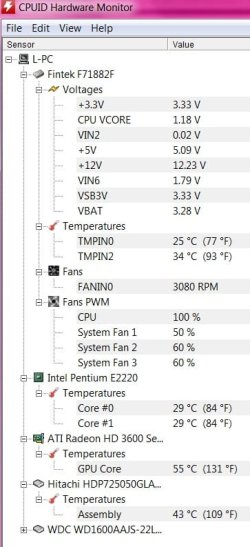
*- K, here is the problem. I see the heatsink thingy and the fan on the video card. That's all I see. I'm going to put up an image to show you the temp readings, maybe you can see if I'm blind and missing something. Today the temp is 74 and right now I'm not using the external fan as the pc is quiet.-*

Thanks for letting me know about the distance with the fan and the static with vacuuming. I've been using q-tips to clean the heatsink. Thank you for all your help.
 

Attachments

  • CPUID.jpg
    CPUID.jpg
    45.7 KB · Views: 17

My Computer My Computer

At a glance

Windows 7 Professional 64 bitAMD Phenom(tm) II X4 955 Processor8 GBXFX Radeon R7 260 X 1GB
Computer type
PC/Desktop
Computer Manufacturer/Model Number
(1) Hitachi HDP725050GLA360 ATA Device (2) ST31000528AS ATA Device (3) Generic USB CF Reader USB
OS
Windows 7 Professional 64 bit
CPU
AMD Phenom(tm) II X4 955 Processor
Motherboard
ASUSTeK Computer INC. M3A78-CM
Memory
8 GB
Graphics Card(s)
XFX Radeon R7 260 X 1GB
Sound Card
AMD High Definition Audio Device
Monitor(s) Displays
Westinghouse TV 26"
Screen Resolution
1366x768
Hard Drives
1TB SATA
PSU
Corsair CX 750 ATX 80 Plus
Keyboard
Standard PS/2
Mouse
Standard
Internet Speed
80-100
Antivirus
Defender
Browser
Opera and Firefox
@Tousdae: you made a post while I was composing.

My advice, nod and smile. It's impossible to say but it sounds like your computer guy might be steering you straight. Does he have any comments on the noise?

Monk

LOL you're right. Many claim to have top of the line pc's for gaming and I guess they've made me believe what they have is what I need.

Yeah, he said I don't need any more fans and when it's over 80 degrees outside to turn off my pc. Ok, If I don't need anymore fans, how come I bought a pc that had 4-6 fans in it before the motherboard died and he replaced my case? Did you read my post to Kid? My guy is thick headed. I have to beg for RAM, etc. He loses money on me too with his thick headedness. I'm just as thick and when I want a part, I get it regardless if he'll provide it to me or not. He doesn't charge me for labor, so then I bring the part to him and he installs it. He's not thinking clearly lol
 

My Computer My Computer

At a glance

Windows 7 Professional 64 bitAMD Phenom(tm) II X4 955 Processor8 GBXFX Radeon R7 260 X 1GB
Computer type
PC/Desktop
Computer Manufacturer/Model Number
(1) Hitachi HDP725050GLA360 ATA Device (2) ST31000528AS ATA Device (3) Generic USB CF Reader USB
OS
Windows 7 Professional 64 bit
CPU
AMD Phenom(tm) II X4 955 Processor
Motherboard
ASUSTeK Computer INC. M3A78-CM
Memory
8 GB
Graphics Card(s)
XFX Radeon R7 260 X 1GB
Sound Card
AMD High Definition Audio Device
Monitor(s) Displays
Westinghouse TV 26"
Screen Resolution
1366x768
Hard Drives
1TB SATA
PSU
Corsair CX 750 ATX 80 Plus
Keyboard
Standard PS/2
Mouse
Standard
Internet Speed
80-100
Antivirus
Defender
Browser
Opera and Firefox
Monk,

2. F-temps; good; no problem.

*-Great to hear.-*

4. I should think that, if a gfx card overheated, either your system would crash (reboot or shut down) or you video would become variously garbled giving you a herringbone or that infamous kaleidoscope appearance.

*-While in game, my monitor does have diagnol lines running thru it. Just in game.-*

6. What I would suggest, is to briefly run your machine with the side panel off, no additional exterior fan, and let it heat up - which will not destroy anything. When/if the noise returns, give a listen here and there to see if you can ID the source. We already know it a fan: So, get your ear next to each fan and determine if one is making a peculiar noise - the noise.

*- K, here is the problem. I see the heatsink thingy and the fan on the video card. That's all I see. I'm going to put up an image to show you the temp readings, maybe you can see if I'm blind and missing something. Today the temp is 74 and right now I'm not using the external fan as the pc is quiet.-*

Thanks for letting me know about the distance with the fan and the static with vacuuming. I've been using q-tips to clean the heatsink. Thank you for all your help.


There's nothing at all wrong with these temps, if the CPU doesn't get above 60C during heavy gaming you have nothing to be concerned about. ;)
 

My Computer My Computer

At a glance

W 7 64-bit UltimateIntel Q9550 Yorkfield8GB Dominator 8500C5DATI : XFX 5870
Computer Manufacturer/Model Number
* BFK Customs *
OS
W 7 64-bit Ultimate
CPU
Intel Q9550 Yorkfield
Motherboard
ASUS P5Q Pro
Memory
8GB Dominator 8500C5D
Graphics Card(s)
ATI : XFX 5870
Sound Card
Realtek HD Audio 7-1
Monitor(s) Displays
1x 47" LCD HDMI & 3x 26" LCD HDMI
Screen Resolution
1920x1080P & 1920x1200
Hard Drives
1x 80GB Intel X25-M G2 SSD : 1x 500GB & 1x 640GB WD Caviar Black(s)
PSU
Corsair 620HX
Case
Cooler Master RC-690
Cooling
Tuniq Tower 120, 2x 140mm and 3x 120mm case fans
Keyboard
Microsoft 500
Mouse
Razer Diamondback 3G
Internet Speed
14 Mb/s
Other Info
1x Koutech 3Gb/s SATA HDD Hot Swap Rack
@Tousdae:

To me, your gfx card temp is a little high if you are just putting about the Net. Not, "OMG - that's too high!" Just higher than I would expect. Can you see its fan spinning? Given that your CPU/mobo/HDD temps are lower, I now do wonder about the gfx card temp. Again, it's not too high but why 55C when the CPU is at 34C? It's like everyone is idling except the GPU.


My assumption would be that the game producing diagonal line is related to the card being stressed by the demands of the game, if this occurs with any game of comparable intensity; obviously, you cannot compare Myst1 with MW2. If it only occurs on one particular game, I would wonder about the game; otherwise I'm going to be thinking about HW/SW issues of the card itself. You've probably done it but make sure the heat sink/fan blades/fan cowling are free of dust; again, make sure the fan is spinning when the system is on.


Q-tips good; small artist's paint brush for heat sinks whose elements are close together; compressed "air" with the long, slender tube attached; whatever will get the dust out if the vac does not.


Well, the customer is always right, of course but as long as the computer guy says "you don't need this," I am wont to give him the benefit of the doubt regarding his sincerity and desire to keep you from spending more than required to do the job well. Then too, we all have to make assumptions regarding his experiences and expertise.


You say you are headstrong; you certainly have the gumption and enthusiasm. I would definitely channel that into a bit of research/study and develop skills that will serve your specific needs or desires. If I say 850W is more than you need for a PSU, so what - that's my opinion, which, by the way, does not bear any imprimatur; it's just my opinion. What I am saying is that after a bit of research, including visits to tech forums and legit "test" sites, you might change your mind. To what end? Well, if you "skimp" on one part because you decide you really do not need it, you have more to spend on higher-end parts you want, whether you need them or not. One personal example: my mobo has an integrated audio (SoundMax); it's good enough for me so why would I spend several hundred (to more than a thousand) for an audio card, egged on by all of the audiophiles who stated I should? Me. I have an XFire array for improved video performance; money saved on audio card went into the second 4830 gfx card.


So, back to gfx card temp: not excessive, not a worry, per se, but 10 degrees C hotter than I would have expected. Diagonal line if on any game but no where else: gfx card. Do you have an old card that is compatible with your machine that you could drop in, install its drivers, and see what the results are? Maybe you computer guy would let you accomplish a diagnostic test run using a card he has. Speaking of drivers, your gfx card will run on Windows generic drivers. One test, uninstall your current driver, reboot, cancel out any attempt by Windows's "found new hardware" dialog to install new driver, and play a game to see what happens.


Monk
 

My Computer My Computer

At a glance

Dual boot XP Pro SP3x86 and Win7 Pro x64AMD Phenom II x3 720 BE OCed to 3.3 GHz2x2GB OCZ OCZ2RPR10664GK PC2-8500 DDR2Sapphire ATi Radeon 4830 HD x2 (XFire)
Computer Manufacturer/Model Number
Custom
OS
Dual boot XP Pro SP3x86 and Win7 Pro x64
CPU
AMD Phenom II x3 720 BE OCed to 3.3 GHz
Motherboard
Asus M3A79T Deluxe
Memory
2x2GB OCZ OCZ2RPR10664GK PC2-8500 DDR2
Graphics Card(s)
Sapphire ATi Radeon 4830 HD x2 (XFire)
Sound Card
Integrated (SoundMax)
Monitor(s) Displays
Dual: LG L227WTG/LG M237WD
Screen Resolution
1680 x 1050; 1920 x1280
Hard Drives
3 WDC WD7501AALS-00J7B0
PSU
Zalman 750HD Modular
Case
Antec 900
Cooling
4 120mm, 1 200mm fans
Keyboard
Black with lots of keys
Mouse
Razer Lachesis, Logitech RumbePad2, Logitech Marble
Internet Speed
Who counts
Other Info
7:1 SS
There's nothing at all wrong with these temps, if the CPU doesn't get above 60C during heavy gaming you have nothing to be concerned about. ;)

Ok, good. I just played for about 2 hours. I kept minimizing to desktop to check out temps. The cpu never went over 60. The card got to 150F tho.

Thanks :)
 

My Computer My Computer

At a glance

Windows 7 Professional 64 bitAMD Phenom(tm) II X4 955 Processor8 GBXFX Radeon R7 260 X 1GB
Computer type
PC/Desktop
Computer Manufacturer/Model Number
(1) Hitachi HDP725050GLA360 ATA Device (2) ST31000528AS ATA Device (3) Generic USB CF Reader USB
OS
Windows 7 Professional 64 bit
CPU
AMD Phenom(tm) II X4 955 Processor
Motherboard
ASUSTeK Computer INC. M3A78-CM
Memory
8 GB
Graphics Card(s)
XFX Radeon R7 260 X 1GB
Sound Card
AMD High Definition Audio Device
Monitor(s) Displays
Westinghouse TV 26"
Screen Resolution
1366x768
Hard Drives
1TB SATA
PSU
Corsair CX 750 ATX 80 Plus
Keyboard
Standard PS/2
Mouse
Standard
Internet Speed
80-100
Antivirus
Defender
Browser
Opera and Firefox
Monk,

I just bought that card too, to be able to meet the game demands. It was one of the cards the official site listed that would be ok. The game came out in Jan or Feb so that's why I added the 650 PSU, more RAM and a new video card before the game came out. Maybe I should stop buying products online? You know what tho? I didn't have lines right from the start. I'm questioning my monitor going since it used to black out once in awhile (before I started turning it off), but out of game, no lines that I can see. I don't have an old card to drop in. Maybe I'll head to a store, buy a new one, a better one, and see what happens in the game. I've always kept with ATI. Gamers have complained about NVIDIA with this game and there is some issue that EA is trying to working out with NVIDIA. Yes, the fan was moving when in game. It still is. Should it be moving if it's not being used? About 10 mins in game, my pc got pretty loud again. The ATI fan was at 150F. I put the external fan on and got it in the 130's. After the pc got loud, I looked at the heatsink and saw how fast it was going and checked the RPM's. It was around 4200. It's at 3067 now. Is 4200 too fast? The max said 3797.

Ya, I put a lot of faith on the sites that I come to for help, since I know squat. Earlier you said you use a 750W? So now I'll believe I don't need an 850W. Yeah, I should do more research. I just need the time between 2 jobs and life. Everytime I come here, tho, I'm taught a few new things too :D

I can't trust Ming when it comes to gaming. He always tells me to just stop playing the darn game. The official site puts up the specs and I print them out as proof to him that I need these things, and then I still get a hard time from him. I think he's very basic. I love him, he's been who I go to for about 11 years ... just saying ... he gives me a hard time when anything revolves around THE SIMS. There, I said it. I was holding back that piece of info to avoid heckling lol :p Everytime there is a new Sims base game, I pretty much need a whole new pc.
 

My Computer My Computer

At a glance

Windows 7 Professional 64 bitAMD Phenom(tm) II X4 955 Processor8 GBXFX Radeon R7 260 X 1GB
Computer type
PC/Desktop
Computer Manufacturer/Model Number
(1) Hitachi HDP725050GLA360 ATA Device (2) ST31000528AS ATA Device (3) Generic USB CF Reader USB
OS
Windows 7 Professional 64 bit
CPU
AMD Phenom(tm) II X4 955 Processor
Motherboard
ASUSTeK Computer INC. M3A78-CM
Memory
8 GB
Graphics Card(s)
XFX Radeon R7 260 X 1GB
Sound Card
AMD High Definition Audio Device
Monitor(s) Displays
Westinghouse TV 26"
Screen Resolution
1366x768
Hard Drives
1TB SATA
PSU
Corsair CX 750 ATX 80 Plus
Keyboard
Standard PS/2
Mouse
Standard
Internet Speed
80-100
Antivirus
Defender
Browser
Opera and Firefox
OK. C=5/9 (F-32) so your GPU is at 65.6C. With a CPU at 60, I don't regard the GPU at 65.6 as high at all. It's not necessarily valid to compare systems due to different ambient temps, case designs, etc. - but I use an Antec 900 case and have a panel mounted fan that blows directly across my gfx card. Last time I monitored it, my GPU temp, under a load, tends to stay right around 49-50C. So, if you see that your GPU fan blade is spinning and your temps stay in the 60s, maybe 70s depending on the situation, I think you are cool - pun intended.

The diagonal line across the screen, if it persists, is not to be expected under any circumstances. Verify you have the correct gfx drivers, that your monitor refresh rate is properly set according to the mfr, that you run only your monitor's native resolution, that the monitor driver is updated, that you have ATi's Catalyst Control Center appropriately tweaked, if you have it installed; reload the defaults if you previously tweaked it and see what happens.

You say your machine is an HP. One thing about drivers, when updating go to the machine mfr first just in case they use OEM drivers (v. retail) which are often tweaked to satisfy BIOS demands. For example, ASUS will occasionally post a driver for my SoundMax. I could get the driver from SoundMax but I get the one at ASUS. Are they different, who knows, but if ASUS integrates SoundMax on the mobo I figure their driver will play nice with the system, in general.

So, it appears that most of us would agree that your temps do not pose an issue. I would focus on the diagonal line like you did with the temps: what are you doing when it appears and does it always happen when you do that; how long does it take before it appears; is it program related, time related, always in the same spot, etc., etc.: whatever you can tell us about its behavior.

Monk
 

My Computer My Computer

At a glance

Dual boot XP Pro SP3x86 and Win7 Pro x64AMD Phenom II x3 720 BE OCed to 3.3 GHz2x2GB OCZ OCZ2RPR10664GK PC2-8500 DDR2Sapphire ATi Radeon 4830 HD x2 (XFire)
Computer Manufacturer/Model Number
Custom
OS
Dual boot XP Pro SP3x86 and Win7 Pro x64
CPU
AMD Phenom II x3 720 BE OCed to 3.3 GHz
Motherboard
Asus M3A79T Deluxe
Memory
2x2GB OCZ OCZ2RPR10664GK PC2-8500 DDR2
Graphics Card(s)
Sapphire ATi Radeon 4830 HD x2 (XFire)
Sound Card
Integrated (SoundMax)
Monitor(s) Displays
Dual: LG L227WTG/LG M237WD
Screen Resolution
1680 x 1050; 1920 x1280
Hard Drives
3 WDC WD7501AALS-00J7B0
PSU
Zalman 750HD Modular
Case
Antec 900
Cooling
4 120mm, 1 200mm fans
Keyboard
Black with lots of keys
Mouse
Razer Lachesis, Logitech RumbePad2, Logitech Marble
Internet Speed
Who counts
Other Info
7:1 SS
OK: posts crossing each other in route.

I get everything computing online: everything. Most I get from Amazon (98% of the time free shipping, also no sales tax); next in line is mWave. I have gone to TigerDirect but no longer: too many issues, one of which is their selling returned merchandize, often not marking it as having been returned/repackaged and, as such lacking parts - like an SATA DVD burner with no cables, no install/burning SW: just the drive in a plastic bag. Also, Amazon is so big that they do not have to squabble about returns.


Did I miss it: what game are you playing that gives you the issues? Is that Sims (what's wrong with Sims) Also not in your specs, what monitor?


ATi v. NVIDIA: for many years now I exclusively use ATi for many reasons. XFire is one, but the fact is that over the years, I have had more issues with NVIDIA drivers that I care to relive.


Moving fan: from the moment you turn the machine on.


PC getting loud after 10 minutes: again put an ear to the source. A fan: rushing air v. grinding or other noises; PSU fan? Interesting:
here is a ComputerShopper review of your gfx card. Notice the left column on the front page under cons: "loud fan." Put an ear to the gfx card fan when you first start, then when you hear the noise: this the noisy fan? If we are talking air noise, like a B-29 prop, I would guess that is what ComputerShopper is talking about. Is the fan exceeding its max? If you are able to adjust the speed down to that 3800 range try it. Big difference in cooling between 3800 and 4200, I wouldn't think so but over spinning the fan might make the blades vibrate (it's like a 20x v. a 50x CD ROM - the latter almost whines).

Time between two jobs and life: I hear you! If two jobs means making ends meet or having a few bucks left over to diddle with, I should think a more focused (learned) computer buying scheme would serve you well. Keep what you now have if you can get by with it, see what's available component wise - and what's on the horizon (next 6 months or so), understand the pros, cons, limits of the HW, and then, over time, if you want to build a new machine, purchase the pieces little by little and, when ready, put it all together.


And yes, if EA says "You'll need this at a minimum if you want to unlock the full features of Sims," then at least get what they recommend as the minimum.


Final note thinking about Sims, or any other game you might like. There are all sorts of games for all sorts of people. My favorites are puzzles, like the Myst/URU series; they are damned tough to solve. I have many role-play games on the order of Baldur's Gate, Elder Scrolls, DAO. And I have FPS/War games.


Point is, don't worry about being heckled because you play a certain game, have a certain computer, wear a certain T, drive a certain car. Over the years I have discovered the I am happiest when I am being me, doing what me wants to do. What do others think? It's like I said about those Lamborghini drivers on game forums: smile and nod. The Sufi say, "We are the makers of our dreams." Everyone is different: we become like sheep when we try to be like everyone else. Play Sims and enjoy.


One other thing: I joined SevenForums on May 14, 2010; I'm a noob here, but I dare say from my limited time here, you will not find many hecklers here. If you get heckled here, message me; I'd be interested in what they had to say. I may even be interested in responding. :cool:


Monk
 

My Computer My Computer

At a glance

Dual boot XP Pro SP3x86 and Win7 Pro x64AMD Phenom II x3 720 BE OCed to 3.3 GHz2x2GB OCZ OCZ2RPR10664GK PC2-8500 DDR2Sapphire ATi Radeon 4830 HD x2 (XFire)
Computer Manufacturer/Model Number
Custom
OS
Dual boot XP Pro SP3x86 and Win7 Pro x64
CPU
AMD Phenom II x3 720 BE OCed to 3.3 GHz
Motherboard
Asus M3A79T Deluxe
Memory
2x2GB OCZ OCZ2RPR10664GK PC2-8500 DDR2
Graphics Card(s)
Sapphire ATi Radeon 4830 HD x2 (XFire)
Sound Card
Integrated (SoundMax)
Monitor(s) Displays
Dual: LG L227WTG/LG M237WD
Screen Resolution
1680 x 1050; 1920 x1280
Hard Drives
3 WDC WD7501AALS-00J7B0
PSU
Zalman 750HD Modular
Case
Antec 900
Cooling
4 120mm, 1 200mm fans
Keyboard
Black with lots of keys
Mouse
Razer Lachesis, Logitech RumbePad2, Logitech Marble
Internet Speed
Who counts
Other Info
7:1 SS
There's nothing at all wrong with these temps, if the CPU doesn't get above 60C during heavy gaming you have nothing to be concerned about. ;)

Ok, good. I just played for about 2 hours. I kept minimizing to desktop to check out temps. The cpu never went over 60. The card got to 150F tho.

Thanks :)


Howdy.

Don't be concerned, if the gfx card doesn't go a lot higher it's OK, 150F is nothing for a gfx card, some idle way higher than that, my 4870 idled at 75c.
 

My Computer My Computer

At a glance

W 7 64-bit UltimateIntel Q9550 Yorkfield8GB Dominator 8500C5DATI : XFX 5870
Computer Manufacturer/Model Number
* BFK Customs *
OS
W 7 64-bit Ultimate
CPU
Intel Q9550 Yorkfield
Motherboard
ASUS P5Q Pro
Memory
8GB Dominator 8500C5D
Graphics Card(s)
ATI : XFX 5870
Sound Card
Realtek HD Audio 7-1
Monitor(s) Displays
1x 47" LCD HDMI & 3x 26" LCD HDMI
Screen Resolution
1920x1080P & 1920x1200
Hard Drives
1x 80GB Intel X25-M G2 SSD : 1x 500GB & 1x 640GB WD Caviar Black(s)
PSU
Corsair 620HX
Case
Cooler Master RC-690
Cooling
Tuniq Tower 120, 2x 140mm and 3x 120mm case fans
Keyboard
Microsoft 500
Mouse
Razer Diamondback 3G
Internet Speed
14 Mb/s
Other Info
1x Koutech 3Gb/s SATA HDD Hot Swap Rack
OK: posts crossing each other in route.

Did I miss it: what game are you playing that gives you the issues? Is that Sims (what's wrong with Sims) Also not in your specs, what monitor?


PC getting loud after 10 minutes: again put an ear to the source.

Is the fan exceeding its max? If you are able to adjust the speed down to that 3800 range try it. Big difference in cooling between 3800 and 4200, I wouldn't think so but over spinning the fan might make the blades vibrate (it's like a 20x v. a 50x CD ROM - the latter almost whines).

Keep what you now have if you can get by with it, see what's available component wise - and what's on the horizon (next 6 months or so), understand the pros, cons, limits of the HW, and then, over time, if you want to build a new machine, purchase the pieces little by little and, when ready, put it all together.

If you get heckled here, message me; I'd be interested in what they had to say. I may even be interested in responding. :cool:

Monk

I took a listen inside. The noise is coming from the heatsink, I believe and it's spinning crazy fast. I went into the game earlier (new EP out today and had to check it out), but I haven't been in it for over 3 hours and it's still loud and spinning fast. I guess the loudness comes from how fast it's spinning. External fan is on and has been. I put it on while in the game, after it got loud. ATI is at 56C and CPU (?) at 35C.

Yes, it's The Sims that I play.
You want to know the name of my monitor? Westinghouse LCD.

It was an HP. After he changed the case, the motherboard ... I don't know anymore.

I shop at Amazon too.

Interesting review. Frequent crashes at 3D stuff with high resolution huh? I put down the graphics as much as I could in game some time ago, without it looking like crap. I wish it was $99 when I bought it! .... Ok, I listened again. It's definitely the heatsink. I have no idea how to adjust the speed.

Honestly, when I need new parts I research like crazy. Then I get frazzled (after days of research) and just pick something.

Speaking of RP games, I love Vampire The Masquerade RP games - Bloodlines and Redemption, but can't play them anymore. Troika went out of business so no more new games and I can install them, but they won't boot up on Windows 7. :mad:

Yep, on a gaming site I visited ONCE (lol) - The Sims was a joke. It's a cute game that I've played since the first release 10 years ago. To heck with them.

Thanks, I will. Everyone here has been nice, very nice.. and very patient!

Sorry for the delay. Memorial Day is over and it was back to the grind today. :(
 

My Computer My Computer

At a glance

Windows 7 Professional 64 bitAMD Phenom(tm) II X4 955 Processor8 GBXFX Radeon R7 260 X 1GB
Computer type
PC/Desktop
Computer Manufacturer/Model Number
(1) Hitachi HDP725050GLA360 ATA Device (2) ST31000528AS ATA Device (3) Generic USB CF Reader USB
OS
Windows 7 Professional 64 bit
CPU
AMD Phenom(tm) II X4 955 Processor
Motherboard
ASUSTeK Computer INC. M3A78-CM
Memory
8 GB
Graphics Card(s)
XFX Radeon R7 260 X 1GB
Sound Card
AMD High Definition Audio Device
Monitor(s) Displays
Westinghouse TV 26"
Screen Resolution
1366x768
Hard Drives
1TB SATA
PSU
Corsair CX 750 ATX 80 Plus
Keyboard
Standard PS/2
Mouse
Standard
Internet Speed
80-100
Antivirus
Defender
Browser
Opera and Firefox
Howdy.

Don't be concerned, if the gfx card doesn't go a lot higher it's OK, 150F is nothing for a gfx card, some idle way higher than that, my 4870 idled at 75c.

I'll trust that I'm ok with the card temp then :) Thanks
 

My Computer My Computer

At a glance

Windows 7 Professional 64 bitAMD Phenom(tm) II X4 955 Processor8 GBXFX Radeon R7 260 X 1GB
Computer type
PC/Desktop
Computer Manufacturer/Model Number
(1) Hitachi HDP725050GLA360 ATA Device (2) ST31000528AS ATA Device (3) Generic USB CF Reader USB
OS
Windows 7 Professional 64 bit
CPU
AMD Phenom(tm) II X4 955 Processor
Motherboard
ASUSTeK Computer INC. M3A78-CM
Memory
8 GB
Graphics Card(s)
XFX Radeon R7 260 X 1GB
Sound Card
AMD High Definition Audio Device
Monitor(s) Displays
Westinghouse TV 26"
Screen Resolution
1366x768
Hard Drives
1TB SATA
PSU
Corsair CX 750 ATX 80 Plus
Keyboard
Standard PS/2
Mouse
Standard
Internet Speed
80-100
Antivirus
Defender
Browser
Opera and Firefox
Noise coming from heat sink? You mean the little fan sitting on top of your CPU heat sink?

Fan speeds can be controlled either in the BIOS (allow you to set various threshold speeds) or by software included with the mobo install disc or third-party software. What can be controlled depends on the architecture of your mobo. You might give SpeedFan a try which you can DL here.

Obviously, one cannot judge if your fan is behaving properly by a subjective description but if you are talking about the little CPU fan, I would say that under no circumstances should you be able to hear it; it's just too small compared to case fans.

If you are talking about a noisy gfx card fan, then I wonder if what you hear is what the reviews say is a loud fan. I would differentiate between four types of fan noises: rushing air (the whooshing sound), gear noise (like the whirring sound of a 50x CD-ROM spinning), grinding or rattling noise (a sort of chattering sound as the bearings bounce around in a broken race), or a vibrating sound (made by a loose fan frame or blade).

Now, I suppose that if your were really concerned or annoyed by the noise, you could try recording it and uploading an MP3. Regardless, the temps are OK so you might just ignore it and see what happens.

Monk
 

My Computer My Computer

At a glance

Dual boot XP Pro SP3x86 and Win7 Pro x64AMD Phenom II x3 720 BE OCed to 3.3 GHz2x2GB OCZ OCZ2RPR10664GK PC2-8500 DDR2Sapphire ATi Radeon 4830 HD x2 (XFire)
Computer Manufacturer/Model Number
Custom
OS
Dual boot XP Pro SP3x86 and Win7 Pro x64
CPU
AMD Phenom II x3 720 BE OCed to 3.3 GHz
Motherboard
Asus M3A79T Deluxe
Memory
2x2GB OCZ OCZ2RPR10664GK PC2-8500 DDR2
Graphics Card(s)
Sapphire ATi Radeon 4830 HD x2 (XFire)
Sound Card
Integrated (SoundMax)
Monitor(s) Displays
Dual: LG L227WTG/LG M237WD
Screen Resolution
1680 x 1050; 1920 x1280
Hard Drives
3 WDC WD7501AALS-00J7B0
PSU
Zalman 750HD Modular
Case
Antec 900
Cooling
4 120mm, 1 200mm fans
Keyboard
Black with lots of keys
Mouse
Razer Lachesis, Logitech RumbePad2, Logitech Marble
Internet Speed
Who counts
Other Info
7:1 SS

My Computer My Computer

At a glance

W 7 64-bit UltimateIntel Q9550 Yorkfield8GB Dominator 8500C5DATI : XFX 5870
Computer Manufacturer/Model Number
* BFK Customs *
OS
W 7 64-bit Ultimate
CPU
Intel Q9550 Yorkfield
Motherboard
ASUS P5Q Pro
Memory
8GB Dominator 8500C5D
Graphics Card(s)
ATI : XFX 5870
Sound Card
Realtek HD Audio 7-1
Monitor(s) Displays
1x 47" LCD HDMI & 3x 26" LCD HDMI
Screen Resolution
1920x1080P & 1920x1200
Hard Drives
1x 80GB Intel X25-M G2 SSD : 1x 500GB & 1x 640GB WD Caviar Black(s)
PSU
Corsair 620HX
Case
Cooler Master RC-690
Cooling
Tuniq Tower 120, 2x 140mm and 3x 120mm case fans
Keyboard
Microsoft 500
Mouse
Razer Diamondback 3G
Internet Speed
14 Mb/s
Other Info
1x Koutech 3Gb/s SATA HDD Hot Swap Rack
Back
Top