@Tw33k, Bare Foot Kid: isn't is surprising how many people are aghast when you tell them about the panel off/personal fan routine.
@Tousdae:
1. re "non-suavy [sic] person here": Good to know; helps folks tailor responses by making fewer assumptions. BTW, everyone here at one time or another was a non-savvy person.
2. F-temps; good; no problem.
3. I cannot say one would get less wear and tear on a gfx card by adding a another; theoretically that might be true but I've never observed any discussions on the point.
4. Game crash to DT due to hight temps: I'd say no because if the card is affected by the temps, I should think the effect of the heat would be effected globally, i.e., the temp is not going to cool instantaneously as the system goes from game to DT. If the crash to the DT is card related, I should think it more of a software (SW) - (gfx driver or specific game SW) issue. Game SW often enjoys patches along its history so make sure you have the most recent patch, if available, installed. A more remote possibility is the so-called glitch; many games, under certain game conditions at certain points in the game, simply close. I have a chess app (Chessmaster) that does this (infrequently so I ignore it because the troubleshooting effort for me is not worth it). I should think that, if a gfx card overheated, either your system would crash (reboot or shut down) or you video would become variously garbled giving you a herringbone or that infamous kaleidoscope appearance.
5. The "OS chipset thing": this becomes a hardware (HW) issue, especially when building a machine; it can be a SW issue but not commonly manifest because SW developers give you system requirements for their specific SW so you know in advance if your system will be able to run the SW. For example, if your mobo has an ABC chipset, your CPU and mobo drivers must be matched to that chipset.
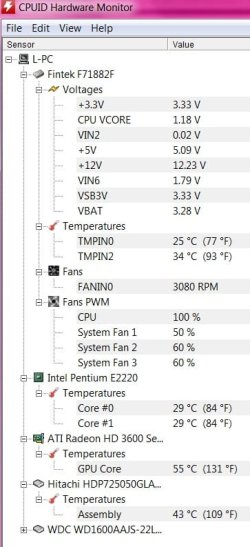
6. Four month-old PSU: hey, stuff happens right out of the box; electronics can be so complex such that I think it is unreasonable to expect that every time you install a new component it will function normally. When you talk about your computer becoming noisy, that suggests more to me than the difference between low/high fan speeds. Maybe not; maybe we use similar terms to describe dissimilar events. What I would suggest, is to briefly run your machine with the side panel off, no additional exterior fan, and let it heat up - which will not destroy anything. When/if the noise returns, give a listen here and there to see if you can ID the source. We already know it a fan: there are no other moving parts in the system (unless when you say noise you mean the 60Hz hum made by many appliances/TV/radio/etc.) So, get your ear next to each fan and determine if one is making a peculiar noise - the noise. If so, replace the fan. Low/high-speed will give you a low/high wind rush sound, like any typical house fan but no other noise except possibly a vibration at high-speed if a fan blade was broken or caked with dust, and thus imbalanced, or the fan was loosely attached to the case and the whole thing vibrated.
Changing a PSU fan is a snap but, of course, to save yourself the expense, if the PSU fan was the issue and it's a new PSU, a warranty replacement is in order.
Your assumption is correct: the ambient (room) temp is not going to influence whether the noise is there or not, per se: however, the hotter the room, the more quickly the case will heat up internally and, thus, the sooner the noise will appear.
It is possible that a cool room might keep the case sufficiently cool such that that noise threshold temp would never be reached.
7. If the added external fan allows you to compute normally, do so. In the interim, if you are interested in building a new computer or upgrading your components, you can learn (Google, forums such as SevenForums) are available to assist with ideas/opinions. One thing to remember that many seem to overlook: understand that all of your components work together, i.e., NEVER consider a component in a vacuum. Many times you see folks ask, "What do think of this gizmo?" Many times the response is, "Gee, it appears that that gizmo will not run in your machine."
Finally, running the external fan at a close distance will not do any harm. I blow out my computer case regularly with a shopvac hose connected to the vac exhaust port; now that's air! I have never had anything break. To be sure, when I am finished, I make sure a cable was not inadvertently loosened but nothing is going to break. By the way, vacuums, depending on the type, can create a load of static electricity - a slayer of computer chips. I keep my canister well back from the computer so it's not an issue. This is not a worry with a small personal fan.
Hope this helps and do post back with any/all questions; a variety of answers helps the learning process even where differences of opinions ensue.
Monk





 Everytime there is a new Sims base game, I pretty much need a whole new pc.


