Background white square to desktop icons!

mitchell65

New member
Guru
Gold Member
VIP
Local time
2:58 AM
Messages
5,228
Location
Cornwall UK
I know I have seen a way to remove this here on the Forum somwhere. If I remember it was related to the arrows that appear on icons but for the life of me I can't find it. I have gone all through Brink's tuts to no avail. Anyone remember where the solution is please?
Here's what I mean:
 
Last edited:

My Computer My Computer

Computer type
PC/Desktop
OS
Microsoft Windows 7 Home Premium 64-bit 7601 Multiprocessor Free Service Pack 1
CPU
Intel(R) Core(TM) i7-3770 CPU @ 3.40GHz
Motherboard
ASUSTeK COMPUTER INC. P8H77-M
Memory
8.00 GB
Graphics Card(s)
Intel(R) HD Graphics 4000
Sound Card
On Board
Monitor(s) Displays
Dell 24"
Screen Resolution
1920 x 1080
Hard Drives
(1) INTEL SSDSC2CT180A3 ATA Device (2) ST500DM002-1BD142 ATA Device (3) WDC WD3200AAKS-75L9A0 ATA Device (4) Generic- Compact Flash USB Device (5) Generic- MS/MS-Pro USB Device (6) Generic- SD/MMC USB Device (7) Generic- SM/xD-Picture USB
PSU
500w Corsair
Case
Cooler Master
Cooling
3 Fans
Keyboard
Logitech MK300
Mouse
Logitech WOM
Internet Speed
75Mb
Antivirus
Norton 360
Browser
Firefox, Opera, IE
I know I have seen a way to remove this here on the Forum somwhere. If I remember it was related to the arrows that appear on icons but for the life of me I can't find it. I have gone all through Brink's tuts to no avail. Anyone remember where the solution is please?
Here's what I mean:

Are all your icons like this cos I've never seen it before? Are you sure it's not part of the icon itself?
 

My Computer My Computer

OS
Windows 7
I know I have seen a way to remove this here on the Forum somwhere. If I remember it was related to the arrows that appear on icons but for the life of me I can't find it. I have gone all through Brink's tuts to no avail. Anyone remember where the solution is please?
Here's what I mean:

Are all your icons like this cos I've never seen it before? Are you sure it's not part of the icon itself?
Some have it some do not, see screenshot;
 
Last edited:

My Computer My Computer

Computer type
PC/Desktop
OS
Microsoft Windows 7 Home Premium 64-bit 7601 Multiprocessor Free Service Pack 1
CPU
Intel(R) Core(TM) i7-3770 CPU @ 3.40GHz
Motherboard
ASUSTeK COMPUTER INC. P8H77-M
Memory
8.00 GB
Graphics Card(s)
Intel(R) HD Graphics 4000
Sound Card
On Board
Monitor(s) Displays
Dell 24"
Screen Resolution
1920 x 1080
Hard Drives
(1) INTEL SSDSC2CT180A3 ATA Device (2) ST500DM002-1BD142 ATA Device (3) WDC WD3200AAKS-75L9A0 ATA Device (4) Generic- Compact Flash USB Device (5) Generic- MS/MS-Pro USB Device (6) Generic- SD/MMC USB Device (7) Generic- SM/xD-Picture USB
PSU
500w Corsair
Case
Cooler Master
Cooling
3 Fans
Keyboard
Logitech MK300
Mouse
Logitech WOM
Internet Speed
75Mb
Antivirus
Norton 360
Browser
Firefox, Opera, IE
The white bordered icons are file icons, not shortcuts. They are files saved on desktop, or shortcuts to files, not to programs. The white bordered explorer icons is a IE file, not sure about the Helston Computer icon.

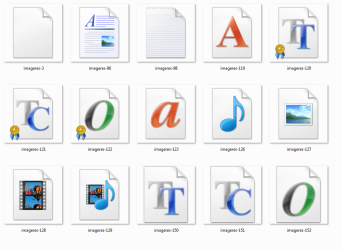
The case is supported by the screenshot of my file types icon collection ... here the file icons are somehow look alike :)
 

Attachments

  • Capture1.PNG
    Capture1.PNG
    29.5 KB · Views: 141

My Computer My Computer

Computer type
PC/Desktop
Computer Manufacturer/Model Number
Self Assembled
OS
Microsoft Windows 10 Pro Insider Preview 64-bit
CPU
Intel(R) Core(TM) i3-4130 CPU @ 3.40GHz
Motherboard
Gigabyte Technology Co., Ltd. B85M-D3H
Memory
Corsair Vengence 4GB x2 (8.00GB Dual-Channel DDR3 @ 798MHz)
Graphics Card(s)
2047MB GeForce GTS 450 (ZOTAC International)
Sound Card
Onboard (Realtek High Definition Audio)
Monitor(s) Displays
LG Flatron E2040T
Screen Resolution
1600x900
Hard Drives
Western Digital 1 TB
Seagate 500 GB
PSU
Corsair VS550
Case
Cooler Master K380
Cooling
Cooler Master Seidon 120V Plus
Keyboard
Logitech MK260r
Mouse
Logitech MK260r
Internet Speed
PMPL Broadband
Antivirus
Windows Defender + MBAM
Browser
Firefox
Other Info
Dell Studio 15" Laptop
  • Like
Reactions: JMH
The white bordered icons are file icons, not shortcuts. They are files saved on desktop, or shortcuts to files, not to programs. The white bordered explorer icons is a IE file, not sure about the Helston Computer icon.

The case is supported by the screenshot of my file types icon collection ... here the file icons are somehow look alike :)

Aha! Which, as I never save files to the desktop, would also explain why I'd not seen the like!
 

My Computer My Computer

OS
Windows 7
There are a few default windows 7 file types icons . Generally the first icon (imageres-3) is used alongwith the program icon to make a file icon , that is why there is a white border in the file icons :D
 

Attachments

  • Capture.PNG
    Capture.PNG
    65.3 KB · Views: 57

My Computer My Computer

Computer type
PC/Desktop
Computer Manufacturer/Model Number
Self Assembled
OS
Microsoft Windows 10 Pro Insider Preview 64-bit
CPU
Intel(R) Core(TM) i3-4130 CPU @ 3.40GHz
Motherboard
Gigabyte Technology Co., Ltd. B85M-D3H
Memory
Corsair Vengence 4GB x2 (8.00GB Dual-Channel DDR3 @ 798MHz)
Graphics Card(s)
2047MB GeForce GTS 450 (ZOTAC International)
Sound Card
Onboard (Realtek High Definition Audio)
Monitor(s) Displays
LG Flatron E2040T
Screen Resolution
1600x900
Hard Drives
Western Digital 1 TB
Seagate 500 GB
PSU
Corsair VS550
Case
Cooler Master K380
Cooling
Cooler Master Seidon 120V Plus
Keyboard
Logitech MK260r
Mouse
Logitech MK260r
Internet Speed
PMPL Broadband
Antivirus
Windows Defender + MBAM
Browser
Firefox
Other Info
Dell Studio 15" Laptop
Actually the white border icons in question are created on the desktop by dragging a URL from the address bar in IE to the desktop. So they are not stricktly files but shortcuts to a URL.
 

My Computer My Computer

Computer type
PC/Desktop
OS
Microsoft Windows 7 Home Premium 64-bit 7601 Multiprocessor Free Service Pack 1
CPU
Intel(R) Core(TM) i7-3770 CPU @ 3.40GHz
Motherboard
ASUSTeK COMPUTER INC. P8H77-M
Memory
8.00 GB
Graphics Card(s)
Intel(R) HD Graphics 4000
Sound Card
On Board
Monitor(s) Displays
Dell 24"
Screen Resolution
1920 x 1080
Hard Drives
(1) INTEL SSDSC2CT180A3 ATA Device (2) ST500DM002-1BD142 ATA Device (3) WDC WD3200AAKS-75L9A0 ATA Device (4) Generic- Compact Flash USB Device (5) Generic- MS/MS-Pro USB Device (6) Generic- SD/MMC USB Device (7) Generic- SM/xD-Picture USB
PSU
500w Corsair
Case
Cooler Master
Cooling
3 Fans
Keyboard
Logitech MK300
Mouse
Logitech WOM
Internet Speed
75Mb
Antivirus
Norton 360
Browser
Firefox, Opera, IE
So they are shortcuts of internet explorer files , I think :D

In this case, the icon is created with default file icon (imageres -3 in the attachment of the above post), with a icon of the program (IE in this case) centered on it . You may change it to any icon you want. Right click on it , properties > Icon > Change Icon , browse to your desired icon, apply and then ok .
 

My Computer My Computer

Computer type
PC/Desktop
Computer Manufacturer/Model Number
Self Assembled
OS
Microsoft Windows 10 Pro Insider Preview 64-bit
CPU
Intel(R) Core(TM) i3-4130 CPU @ 3.40GHz
Motherboard
Gigabyte Technology Co., Ltd. B85M-D3H
Memory
Corsair Vengence 4GB x2 (8.00GB Dual-Channel DDR3 @ 798MHz)
Graphics Card(s)
2047MB GeForce GTS 450 (ZOTAC International)
Sound Card
Onboard (Realtek High Definition Audio)
Monitor(s) Displays
LG Flatron E2040T
Screen Resolution
1600x900
Hard Drives
Western Digital 1 TB
Seagate 500 GB
PSU
Corsair VS550
Case
Cooler Master K380
Cooling
Cooler Master Seidon 120V Plus
Keyboard
Logitech MK260r
Mouse
Logitech MK260r
Internet Speed
PMPL Broadband
Antivirus
Windows Defender + MBAM
Browser
Firefox
Other Info
Dell Studio 15" Laptop
hi i have the same problem when trying to delete the icon i got"are you sure;;;" i click YES and then i got could not find this item 'this is no longer located in c:\users\.... the size is 0 bytes

i tryed the above but this did not help
under general i see
logo_profile_sn_facebook

as brouwser i use mozilla


please any help
thanks a lot
 
Last edited:

My Computer My Computer

OS
windows 7
White Border on icons

Mitchell65 and ARC,

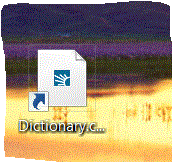
Thanks for the clarification. I have the same problem. As it turns out, I saved a shortcut to a URL on my desktop, in this case from Dictionary.com. The site's logo is visibile, but it is very small within the thick white border of the icon. If I change the icon to get rid of the border, though, I will lose the site logo as an icon. I'd like to keep the site logos as icons if possible to make it simpler to find them on the desktop. In earlier versions of Windows while on website, I could just click File, Send to Desktop as Shortcut and the full icon appeared. As always with Windows, they can't seem to leave well enough alone.

So my question then, is there a way to convert the icon with the border to a true icon with out the border? If not, iIs there a way to to download a company's logo as an .ICO file and then change the shortcut's icon as you suggest?

Here is a sample of what the icons look like now:

Icon with White Border.GIF


Thanks . . .
 
Last edited:

My Computer My Computer

OS
Windows 7 Premium 64 bit
Hi Nanjing88 , welcome to the forums :D

You can change the default icon with the supplied one using the properties tab . (The png is for display only, and the ico (which one you are to apply) is in the zip)
 

Attachments

  • Untitled-1.png
    Untitled-1.png
    52.2 KB · Views: 19
  • Dictionary.zip
    Dictionary.zip
    90.1 KB · Views: 41

My Computer My Computer

Computer type
PC/Desktop
Computer Manufacturer/Model Number
Self Assembled
OS
Microsoft Windows 10 Pro Insider Preview 64-bit
CPU
Intel(R) Core(TM) i3-4130 CPU @ 3.40GHz
Motherboard
Gigabyte Technology Co., Ltd. B85M-D3H
Memory
Corsair Vengence 4GB x2 (8.00GB Dual-Channel DDR3 @ 798MHz)
Graphics Card(s)
2047MB GeForce GTS 450 (ZOTAC International)
Sound Card
Onboard (Realtek High Definition Audio)
Monitor(s) Displays
LG Flatron E2040T
Screen Resolution
1600x900
Hard Drives
Western Digital 1 TB
Seagate 500 GB
PSU
Corsair VS550
Case
Cooler Master K380
Cooling
Cooler Master Seidon 120V Plus
Keyboard
Logitech MK260r
Mouse
Logitech MK260r
Internet Speed
PMPL Broadband
Antivirus
Windows Defender + MBAM
Browser
Firefox
Other Info
Dell Studio 15" Laptop
Back
Top