lock icon next to my user name??

eldinv

New member
Guru
Local time
1:59 AM
Messages
560
Location
New Hampshire
i had a problem before with my files being encrypted and when i reinstall the OS lost all my access to those files because they couldnt be decrypted..


again, for some reason when i go to C Drive> Users> there arel two folders, Eldin and Public.

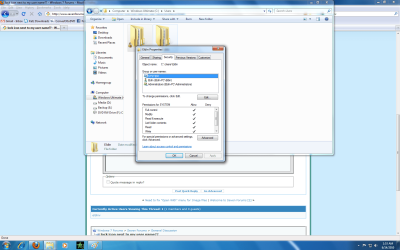
the Eldin folder should be my administrator account cause i dont have any other accounts. for some reason there is a lock next to my user name. i will post screenie at the bottom.

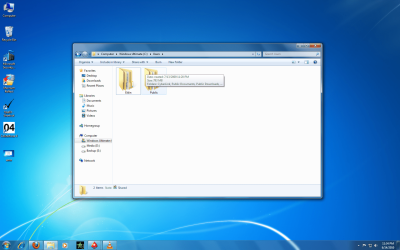
now if i go into the folder and find for instance a picture (jpeg file) and i transfer that file to another partition (secondary hard drive) it shows the file in that drive but also has a lock next to the file.

i dont want a problem with these files somehow being encrypted again and not having access to them if i dont decrpyted them first.

please help i had a nightmare before with this

thanks,
eldin
 

Attachments
  • user lock.png
    user lock.png
    323.2 KB · Views: 261
  • lock when moving files.png
    lock when moving files.png
    325.6 KB · Views: 110
  • general tab.png
    general tab.png
    93.3 KB · Views: 131
  • security tab.png
    security tab.png
    98.9 KB · Views: 123
Last edited:

My Computers My Computers

  • At a glance

    WIN10AMD Ryzen 5 3600 6-Core Processor 3.59 GHz16.0 GB
    Computer type
    PC/Desktop
    Computer Manufacturer/Model Number
    PowerSpec G164
    OS
    WIN10
    CPU
    AMD Ryzen 5 3600 6-Core Processor 3.59 GHz
    Memory
    16.0 GB
    Internet Speed
    VERY FAST>>>!!!
  • Antivirus
    ESET Security Premium
i had a problem before with my files being encrypted and when i reinstall the OS lost all my access to those files because they couldnt be decrypted..


again, for some reason when i go to C Drive> Users> there arel two folders, Eldin and Public.

the Eldin folder should be my administrator account cause i dont have any other accounts. for some reason there is a lock next to my user name. i will post screenie at the bottom.

now if i go into the folder and find for instance a picture (jpeg file) and i transfer that file to another partition (secondary hard drive) it shows the file in that drive but also has a lock next to the file.

i dont want a problem with these files somehow being encrypted again and not having access to them if i dont decrpyted them first.

please help i had a nightmare before with this

thanks,
eldin


One thing that will cause the lock to appear is if the Everyone group is not listed as usernames under the properties of your folder. Also it's an ownership issue too. Try the following:

1. Add the "Everyone" group to the Security tab for users. Assign rights as normal. you may get an error, just hit continue when they come up as it will continue to run.
2. If step one doesn't work, On the same tab click "Advanced"
3. On the next screen click owner tab.
4. Then click the edit button.
5. Highlight your username and click apply. you will get a dialogue box just click o.k. on that.
6. Click o.k. again out of everything.

That should hopefully resolve your issue.
 

My Computer My Computer

At a glance

Windows 7Core i78 GBATI FireGL
Computer Manufacturer/Model Number
HP Pavilion dv7
OS
Windows 7
CPU
Core i7
Memory
8 GB
Graphics Card(s)
ATI FireGL
Monitor(s) Displays
Secondary is an HP L1940T
Screen Resolution
1680x1050
Hard Drives
160 GB SSD and 500 GB SATA
Keyboard
G11 Logitech
Mouse
G7 Logitech
Internet Speed
Fiber
Other Info
My rig smegging rules!
sos did that work?
 

My Computer My Computer

At a glance

Windows 7Core i78 GBATI FireGL
Computer Manufacturer/Model Number
HP Pavilion dv7
OS
Windows 7
CPU
Core i7
Memory
8 GB
Graphics Card(s)
ATI FireGL
Monitor(s) Displays
Secondary is an HP L1940T
Screen Resolution
1680x1050
Hard Drives
160 GB SSD and 500 GB SATA
Keyboard
G11 Logitech
Mouse
G7 Logitech
Internet Speed
Fiber
Other Info
My rig smegging rules!
i followed another site that said i had to add "users" and it removed the icon but still when i copy the files it says a lock. so what i did was for each partition i c d f i went to the security tab and add users to all of them and it gave some error messages but it seems to work. i guess i cant really tell until i have to reinstall OS. so im praying nothing messes up

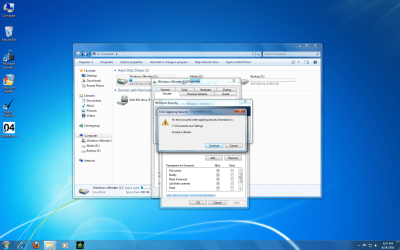
the pic is no of the errors i got when i add everyone in addition to users as i first did before reading your post.
 

Attachments

  • error.png
    error.png
    360.9 KB · Views: 115

My Computers My Computers

  • At a glance

    WIN10AMD Ryzen 5 3600 6-Core Processor 3.59 GHz16.0 GB
    Computer type
    PC/Desktop
    Computer Manufacturer/Model Number
    PowerSpec G164
    OS
    WIN10
    CPU
    AMD Ryzen 5 3600 6-Core Processor 3.59 GHz
    Memory
    16.0 GB
    Internet Speed
    VERY FAST>>>!!!
  • Antivirus
    ESET Security Premium
...Just leave things alone! This lock icon is nothing to be concerned about.
You are just going to screw things up by trying to mess with file (esp., drive permissions!) permissions.
 

My Computer My Computer

At a glance

Windows 10 Pro (x64)Intel Core i7-3930K (3.2GHz - 4.5GHz)4x Samsung 4GB PC3-12800 DDR3 (16GB 1600MHz)Nvidia Geforce GTX 690
Computer type
PC/Desktop
Computer Manufacturer/Model Number
Alienware Aurora ALX R4
OS
Windows 10 Pro (x64)
CPU
Intel Core i7-3930K (3.2GHz - 4.5GHz)
Motherboard
Alienware Aurora-R4 x79
Memory
4x Samsung 4GB PC3-12800 DDR3 (16GB 1600MHz)
Graphics Card(s)
Nvidia Geforce GTX 690
Sound Card
SteelSeries Siberia Elite
Monitor(s) Displays
Dell UltraSharp U3011
Screen Resolution
2560x1600
Hard Drives
Samsung 850 Pro 256 GB, Seagate 1TB Desktop Hybrid HDD, 2x Western Digital 4TB Green HDD
PSU
875W Some Dell PSU <.<
Case
Alienware Aurora ALX
Cooling
Custom Liquid Cooling (EK CPU & GPU blocks) dual EK 480RAD
Keyboard
Logitech G710+ Mechanical
Mouse
Logitech G700s
Internet Speed
Verizon Fios (50 mbps average)
Other Info
Server: Intel NUC D54250WYK: i5-4250U, 16GB, 256 GB mSATA, Windows Server 2012 R2
...Just leave things alone! This lock icon is nothing to be concerned about.
You are just going to screw things up by trying to mess with file (esp., drive permissions!) permissions.

thats what happen last time with that lock that means my files are encrypted and if i dont remove the encrtyption i cant access on another computer or if i reformat.

that was the problem i had last time and so thats why i wanted to remove the lock.
 

My Computers My Computers

  • At a glance

    WIN10AMD Ryzen 5 3600 6-Core Processor 3.59 GHz16.0 GB
    Computer type
    PC/Desktop
    Computer Manufacturer/Model Number
    PowerSpec G164
    OS
    WIN10
    CPU
    AMD Ryzen 5 3600 6-Core Processor 3.59 GHz
    Memory
    16.0 GB
    Internet Speed
    VERY FAST>>>!!!
  • Antivirus
    ESET Security Premium
...Just leave things alone! This lock icon is nothing to be concerned about.
You are just going to screw things up by trying to mess with file (esp., drive permissions!) permissions.

thats what happen last time with that lock that means my files are encrypted and if i dont remove the encrtyption i cant access on another computer or if i reformat.

that was the problem i had last time and so thats why i wanted to remove the lock.

Don't touch it; I have the lock and its fine - if you add Everyone to your users, then everyone can access your files - get it?
 

My Computer My Computer

At a glance

Windows 7 Home Premium x86-64AMD Athlon x2 250 @ 3.0GHz (2MB L2 cache, no L3)Elixir 4GB DDR2 800MHz 5-5-5-15 (2x2GB)Gigabyte ATI Radeon 5570 1GB GDDR3 (670MHz co...
Computer Manufacturer/Model Number
Built by me
OS
Windows 7 Home Premium x86-64
CPU
AMD Athlon x2 250 @ 3.0GHz (2MB L2 cache, no L3)
Motherboard
Gigabyte MA-785GM-US2H mATX/785G/DDR2 (F11 BIOS, IGP disable
Memory
Elixir 4GB DDR2 800MHz 5-5-5-15 (2x2GB)
Graphics Card(s)
Gigabyte ATI Radeon 5570 1GB GDDR3 (670MHz core/800MHz memor
Sound Card
Onboard Realtek 889A
Monitor(s) Displays
1) BenQ M2200HD 21.5" (HDMI, TN, 1920x1080p); 2) Phillips 17
Hard Drives
HARD DRIVE 1: Samsung HD103UJ 1TB 7200RPM 32MB cache

HARD DRIVE 2: Seagate Barracuda 7200.12 500GB 7200RPM 16MB cache
PSU
Antec True Power New 550w
Case
Antec Two Hundred v2 [with SSD bracket]
Cooling
1 x 140mm fan top [low], 1 x 120mm fan rear [low]
...Just leave things alone! This lock icon is nothing to be concerned about.
You are just going to screw things up by trying to mess with file (esp., drive permissions!) permissions.

thats what happen last time with that lock that means my files are encrypted and if i dont remove the encrtyption i cant access on another computer or if i reformat.

that was the problem i had last time and so thats why i wanted to remove the lock.

Don't touch it; I have the lock and its fine - if you add Everyone to your users, then everyone can access your files - get it?

dude i understand and im not in a network so its fine, maybe u dont understand that LOCK means your files are encrypted... and so read here for more understanding of it.

"
Recovery

Files encrypted with EFS can only be decrypted by using the RSA private key(s) matching the previously-used public key(s). The stored copy of the user's private key is ultimately protected by the user's logon password. Accessing encrypted files from outside Windows with other operating systems (Linux, for example) is not possible — not least of which because there is currently no third party EFS component driver. Further, using special tools to reset the user's login password will render it impossible to decrypt the user's private key and thus useless for gaining access to the user's encrypted files. The significance of this is occasionally lost on users, resulting in data loss if a user forgets his or her password, or fails to back up the encryption key. This led to coining of the term "delayed recycle bin", to describe the seeming inevitability of data loss if an inexperienced user encrypts his or her files.
If EFS is configured to use keys issued by a Public Key Infrastructure and the PKI is configured to enable Key Archival and Recovery, encrypted files can be recovered by recovering the private key first."


if i dont decrypted them and and for reason i need to reformat pc or move files to another computer i cant access them without the key or unless i FIRST DECRYPTED them.
thats what happen to me before and i lost over 200GB worth of media and some important files. i just didnt know how that lock got there and why since i didnt mess with anything.

so anyhow i figured out how too and now im fine.


source:Encrypting File System - Wikipedia, the free encyclopedia
 

My Computers My Computers

  • At a glance

    WIN10AMD Ryzen 5 3600 6-Core Processor 3.59 GHz16.0 GB
    Computer type
    PC/Desktop
    Computer Manufacturer/Model Number
    PowerSpec G164
    OS
    WIN10
    CPU
    AMD Ryzen 5 3600 6-Core Processor 3.59 GHz
    Memory
    16.0 GB
    Internet Speed
    VERY FAST>>>!!!
  • Antivirus
    ESET Security Premium
Nothing is encrypted here - look in the advanced properties, the encrypted check box for my User folder is unchecked; there is no encryption. These files can be opened by any OS.
 

My Computer My Computer

At a glance

Windows 7 Home Premium x86-64AMD Athlon x2 250 @ 3.0GHz (2MB L2 cache, no L3)Elixir 4GB DDR2 800MHz 5-5-5-15 (2x2GB)Gigabyte ATI Radeon 5570 1GB GDDR3 (670MHz co...
Computer Manufacturer/Model Number
Built by me
OS
Windows 7 Home Premium x86-64
CPU
AMD Athlon x2 250 @ 3.0GHz (2MB L2 cache, no L3)
Motherboard
Gigabyte MA-785GM-US2H mATX/785G/DDR2 (F11 BIOS, IGP disable
Memory
Elixir 4GB DDR2 800MHz 5-5-5-15 (2x2GB)
Graphics Card(s)
Gigabyte ATI Radeon 5570 1GB GDDR3 (670MHz core/800MHz memor
Sound Card
Onboard Realtek 889A
Monitor(s) Displays
1) BenQ M2200HD 21.5" (HDMI, TN, 1920x1080p); 2) Phillips 17
Hard Drives
HARD DRIVE 1: Samsung HD103UJ 1TB 7200RPM 32MB cache

HARD DRIVE 2: Seagate Barracuda 7200.12 500GB 7200RPM 16MB cache
PSU
Antec True Power New 550w
Case
Antec Two Hundred v2 [with SSD bracket]
Cooling
1 x 140mm fan top [low], 1 x 120mm fan rear [low]
My question would be, how are they getting encrypted?
 

My Computer My Computer

At a glance

Windows 10 Pro X64Intel Quad Core i7-4770 @ 3.4Ghz16.0GB PC3-12800 DDR3 SDRAM 1600 MHzIntel Integrated HD Graphics
Computer type
PC/Desktop
Computer Manufacturer/Model Number
Lenovo IdeaCenter 450
OS
Windows 10 Pro X64
CPU
Intel Quad Core i7-4770 @ 3.4Ghz
Memory
16.0GB PC3-12800 DDR3 SDRAM 1600 MHz
Graphics Card(s)
Intel Integrated HD Graphics
Sound Card
Realtek HD Audio
Monitor(s) Displays
HP 22" LCD
Screen Resolution
1680 x 1050
Hard Drives
250GB Samsung EVO SATA-3 SSD
2TB Seagate ST2000DM001 SATA-2
1.5TB Seagate ST3150041AS SATA
Keyboard
Dell USB
Mouse
Lenovo USB
Internet Speed
Cable via Road Runner 3MB Upload, 30MB Download
Antivirus
Windows Defender, MBAM Pro, MBAE
Browser
Seamonkey
Other Info
UEFI/GPT
PLDS DVD-RW DH16AERSH
Nothing is encrypted here - look in the advanced properties, the encrypted check box for my User folder is unchecked; there is no encryption. These files can be opened by any OS.


now they are not, but if u look in the first pic you can see there was a lock and how when i transfer a file over to another partition it had a lock. ive since fixed the problem. and yes my question would also be how are they getting encrypted in the beginning.
 

My Computers My Computers

  • At a glance

    WIN10AMD Ryzen 5 3600 6-Core Processor 3.59 GHz16.0 GB
    Computer type
    PC/Desktop
    Computer Manufacturer/Model Number
    PowerSpec G164
    OS
    WIN10
    CPU
    AMD Ryzen 5 3600 6-Core Processor 3.59 GHz
    Memory
    16.0 GB
    Internet Speed
    VERY FAST>>>!!!
  • Antivirus
    ESET Security Premium
Either way, the lock signifies read only - encryption isn't on, as the check box isn't enabled. You must have broken permissions and ACL's some how.
 

My Computer My Computer

At a glance

Windows 7 Home Premium x86-64AMD Athlon x2 250 @ 3.0GHz (2MB L2 cache, no L3)Elixir 4GB DDR2 800MHz 5-5-5-15 (2x2GB)Gigabyte ATI Radeon 5570 1GB GDDR3 (670MHz co...
Computer Manufacturer/Model Number
Built by me
OS
Windows 7 Home Premium x86-64
CPU
AMD Athlon x2 250 @ 3.0GHz (2MB L2 cache, no L3)
Motherboard
Gigabyte MA-785GM-US2H mATX/785G/DDR2 (F11 BIOS, IGP disable
Memory
Elixir 4GB DDR2 800MHz 5-5-5-15 (2x2GB)
Graphics Card(s)
Gigabyte ATI Radeon 5570 1GB GDDR3 (670MHz core/800MHz memor
Sound Card
Onboard Realtek 889A
Monitor(s) Displays
1) BenQ M2200HD 21.5" (HDMI, TN, 1920x1080p); 2) Phillips 17
Hard Drives
HARD DRIVE 1: Samsung HD103UJ 1TB 7200RPM 32MB cache

HARD DRIVE 2: Seagate Barracuda 7200.12 500GB 7200RPM 16MB cache
PSU
Antec True Power New 550w
Case
Antec Two Hundred v2 [with SSD bracket]
Cooling
1 x 140mm fan top [low], 1 x 120mm fan rear [low]
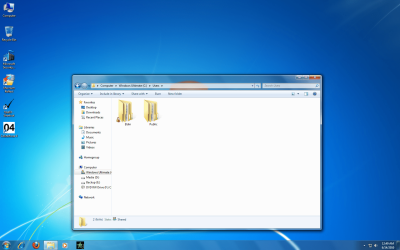
notice how now there is no lock under my user name, so i believe the problem is fixed. thats why i posted original questions thanks all for helping.
 

Attachments

  • no lock.png
    no lock.png
    330.3 KB · Views: 45

My Computers My Computers

  • At a glance

    WIN10AMD Ryzen 5 3600 6-Core Processor 3.59 GHz16.0 GB
    Computer type
    PC/Desktop
    Computer Manufacturer/Model Number
    PowerSpec G164
    OS
    WIN10
    CPU
    AMD Ryzen 5 3600 6-Core Processor 3.59 GHz
    Memory
    16.0 GB
    Internet Speed
    VERY FAST>>>!!!
  • Antivirus
    ESET Security Premium
Possibly, but that doesn't look right.
 

My Computer My Computer

At a glance

Windows 7 Home Premium x86-64AMD Athlon x2 250 @ 3.0GHz (2MB L2 cache, no L3)Elixir 4GB DDR2 800MHz 5-5-5-15 (2x2GB)Gigabyte ATI Radeon 5570 1GB GDDR3 (670MHz co...
Computer Manufacturer/Model Number
Built by me
OS
Windows 7 Home Premium x86-64
CPU
AMD Athlon x2 250 @ 3.0GHz (2MB L2 cache, no L3)
Motherboard
Gigabyte MA-785GM-US2H mATX/785G/DDR2 (F11 BIOS, IGP disable
Memory
Elixir 4GB DDR2 800MHz 5-5-5-15 (2x2GB)
Graphics Card(s)
Gigabyte ATI Radeon 5570 1GB GDDR3 (670MHz core/800MHz memor
Sound Card
Onboard Realtek 889A
Monitor(s) Displays
1) BenQ M2200HD 21.5" (HDMI, TN, 1920x1080p); 2) Phillips 17
Hard Drives
HARD DRIVE 1: Samsung HD103UJ 1TB 7200RPM 32MB cache

HARD DRIVE 2: Seagate Barracuda 7200.12 500GB 7200RPM 16MB cache
PSU
Antec True Power New 550w
Case
Antec Two Hundred v2 [with SSD bracket]
Cooling
1 x 140mm fan top [low], 1 x 120mm fan rear [low]
Either way, the lock signifies read only - encryption isn't on, as the check box isn't enabled. You must have broken permissions and ACL's some how.


yea i dont understand it, how it became a read only file, the problem was a major one back when this happen like a month ago, image all your files lost. anyhow thanks again
 

My Computers My Computers

  • At a glance

    WIN10AMD Ryzen 5 3600 6-Core Processor 3.59 GHz16.0 GB
    Computer type
    PC/Desktop
    Computer Manufacturer/Model Number
    PowerSpec G164
    OS
    WIN10
    CPU
    AMD Ryzen 5 3600 6-Core Processor 3.59 GHz
    Memory
    16.0 GB
    Internet Speed
    VERY FAST>>>!!!
  • Antivirus
    ESET Security Premium
The lock icon in Windows Explorer means only you (or Administrator users) have access. It does not mean your files are encrypted. Encrypted files get a different font color (blue) not a lock icon.
 

My Computer My Computer

At a glance

Windows 10 Pro (x64)Intel Core i7-3930K (3.2GHz - 4.5GHz)4x Samsung 4GB PC3-12800 DDR3 (16GB 1600MHz)Nvidia Geforce GTX 690
Computer type
PC/Desktop
Computer Manufacturer/Model Number
Alienware Aurora ALX R4
OS
Windows 10 Pro (x64)
CPU
Intel Core i7-3930K (3.2GHz - 4.5GHz)
Motherboard
Alienware Aurora-R4 x79
Memory
4x Samsung 4GB PC3-12800 DDR3 (16GB 1600MHz)
Graphics Card(s)
Nvidia Geforce GTX 690
Sound Card
SteelSeries Siberia Elite
Monitor(s) Displays
Dell UltraSharp U3011
Screen Resolution
2560x1600
Hard Drives
Samsung 850 Pro 256 GB, Seagate 1TB Desktop Hybrid HDD, 2x Western Digital 4TB Green HDD
PSU
875W Some Dell PSU <.<
Case
Alienware Aurora ALX
Cooling
Custom Liquid Cooling (EK CPU & GPU blocks) dual EK 480RAD
Keyboard
Logitech G710+ Mechanical
Mouse
Logitech G700s
Internet Speed
Verizon Fios (50 mbps average)
Other Info
Server: Intel NUC D54250WYK: i5-4250U, 16GB, 256 GB mSATA, Windows Server 2012 R2
Back
Top