CD/DVD drives not recognised by W7

pacman10

New member
Member
Local time
6:18 AM
Messages
36
I recently upgraded my laptop from Windows XP 32-bit to Windows 7 64-bit and now have a dual-boot system. The Windows 7 system will not recognise the laptop's internal CD/DVD drive nor will it recognise an external CD/DVD drive (HP DVD420e) connected via USB.

Before installing Windows 7 I ran the compatibility scan and there was nothing to suggest that these drives were not compatible with Windows 7.

The Windows XP system still recognises both drives.

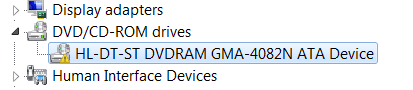
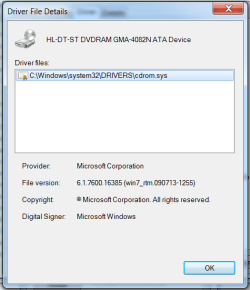
The Windows 7 Device Manager shows the internal CD/DVD drive as "HL-DT-ST DVDRAM GMA-4082N ATA Device" and reports under Device Status "Windows cannot load the device driver for this hardware. The driver may be corrupted or missing. (Code 39)". For the external CD/DVD drive the Device Status is identical, i.e. "Windows cannot load the device driver for this hardware. The driver may be corrupted or missing. (Code 39)".

I searched for drivers for these devices without success. Specifically, HP reports that there is no Windows 7 64-bit device driver for their external HP DVD420e drive.

I find it a bit incredible that there are no Windows 7 drivers for these common or garden CD/DVD drives and suspect that the problem lies elsewhere, i.e. that the "....corrupted or missing driver...." might be a red herring.

I have checked the Windows 7 system files with SCANNOW and it reports that "Windows Resource Protection did not find any integrity violations".

I shut down the system, inserted the original Windows 7 DVD, and fired up the system anew to attempt a repair. No success. There was a lot of whirring from the internal CD/DVD drive, a message asked me whether I wanted to boot from the DVD, I answered 'Yes' but I didn't get the expected Windows 7 DVD screen asking me if I wanted to Repair the system or Install it. It simply started the normal installed Windows 7 system. So via this route the system seemed to be able to run the DVD/CD drive at startup but once the Windows 7 system was up and running it didn't recognise the internal CD/DVD drive.

Can anyone suggest the next diagnostic/therapeutic step ?

Paddy
 

My Computer My Computer

OS
Windows 7 64-bit
I recently upgraded my laptop from Windows XP 32-bit to Windows 7 64-bit and now have a dual-boot system. The Windows 7 system will not recognise the laptop's internal CD/DVD drive nor will it recognise an external CD/DVD drive (HP DVD420e) connected via USB.

Before installing Windows 7 I ran the compatibility scan and there was nothing to suggest that these drives were not compatible with Windows 7.

The Windows XP system still recognises both drives.

The Windows 7 Device Manager shows the internal CD/DVD drive as "HL-DT-ST DVDRAM GMA-4082N ATA Device" and reports under Device Status "Windows cannot load the device driver for this hardware. The driver may be corrupted or missing. (Code 39)". For the external CD/DVD drive the Device Status is identical, i.e. "Windows cannot load the device driver for this hardware. The driver may be corrupted or missing. (Code 39)".

I searched for drivers for these devices without success. Specifically, HP reports that there is no Windows 7 64-bit device driver for their external HP DVD420e drive.

I find it a bit incredible that there are no Windows 7 drivers for these common or garden CD/DVD drives and suspect that the problem lies elsewhere, i.e. that the "....corrupted or missing driver...." might be a red herring.

I have checked the Windows 7 system files with SCANNOW and it reports that "Windows Resource Protection did not find any integrity violations".

I shut down the system, inserted the original Windows 7 DVD, and fired up the system anew to attempt a repair. No success. There was a lot of whirring from the internal CD/DVD drive, a message asked me whether I wanted to boot from the DVD, I answered 'Yes' but I didn't get the expected Windows 7 DVD screen asking me if I wanted to Repair the system or Install it. It simply started the normal installed Windows 7 system. So via this route the system seemed to be able to run the DVD/CD drive at startup but once the Windows 7 system was up and running it didn't recognise the internal CD/DVD drive.

Can anyone suggest the next diagnostic/therapeutic step ?

Paddy
Welcome Pacman toWindows 7 Support Forum.
Your issue is: Existing OS is XP x86, installed OS7 X64 internal optical drive not working in OS 7 but does work in XP. No driver available for OS7. Is this correct?
 

My Computer My Computer

Computer Manufacturer/Model Number
Custom Build
OS
Windows 7 7600 1 X64
CPU
AMD PHENOM II X 550 PROCESSOR 3.1 ghz
Motherboard
ASUS M4A78-TE
Memory
Corsair 4 gig ddr 3
Graphics Card(s)
ati radeon 3300
Sound Card
ati hd
Monitor(s) Displays
syncmaster 2033sw
Screen Resolution
1600X900 60 hz refresh
Hard Drives
twin_seagates SATA's 1 TB & 500 Gig, hitachi_slimline 160 gig
PSU
antec_550 watt
Case
cooler master GLite
Cooling
stock_heat sink
Internet Speed
20mbs up/ 1.5mbs down
Other Info
favorite child "stewie"
favorite dog "brian"
The Windows 7 Device Manager shows the internal CD/DVD drive as "HL-DT-ST DVDRAM GMA-4082N ATA Device" and reports under Device Status "Windows cannot load the device driver for this hardware. The driver may be corrupted or missing. (Code 39)". For the external CD/DVD drive the Device Status is identical, i.e. "Windows cannot load the device driver for this hardware. The driver may be corrupted or missing. (Code 39)".
Paddy
We will attempt to trouble shoot the issue:
Begin the following steps and report back.
  • Access device manager and review your optical driver.
  • Are ther any caution yellow exclamation warnings?:warn:
  • Review driver profile if it exists.
Report your findings
 

My Computer My Computer

Computer Manufacturer/Model Number
Custom Build
OS
Windows 7 7600 1 X64
CPU
AMD PHENOM II X 550 PROCESSOR 3.1 ghz
Motherboard
ASUS M4A78-TE
Memory
Corsair 4 gig ddr 3
Graphics Card(s)
ati radeon 3300
Sound Card
ati hd
Monitor(s) Displays
syncmaster 2033sw
Screen Resolution
1600X900 60 hz refresh
Hard Drives
twin_seagates SATA's 1 TB & 500 Gig, hitachi_slimline 160 gig
PSU
antec_550 watt
Case
cooler master GLite
Cooling
stock_heat sink
Internet Speed
20mbs up/ 1.5mbs down
Other Info
favorite child "stewie"
favorite dog "brian"
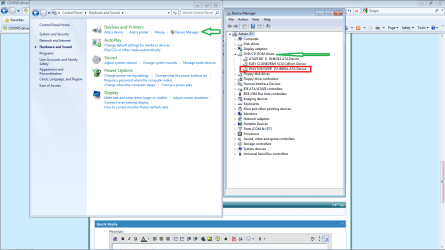
Device Manager

See attached, device manager in Windows 7
 

Attachments

  • Device.png
    Device.png
    71.2 KB · Views: 719

My Computer My Computer

Computer Manufacturer/Model Number
Custom Build
OS
Windows 7 7600 1 X64
CPU
AMD PHENOM II X 550 PROCESSOR 3.1 ghz
Motherboard
ASUS M4A78-TE
Memory
Corsair 4 gig ddr 3
Graphics Card(s)
ati radeon 3300
Sound Card
ati hd
Monitor(s) Displays
syncmaster 2033sw
Screen Resolution
1600X900 60 hz refresh
Hard Drives
twin_seagates SATA's 1 TB & 500 Gig, hitachi_slimline 160 gig
PSU
antec_550 watt
Case
cooler master GLite
Cooling
stock_heat sink
Internet Speed
20mbs up/ 1.5mbs down
Other Info
favorite child "stewie"
favorite dog "brian"
Thanks for this rapid reply, Adrian.

Slight corrections: Existing OS is XP x86, installed OS7 X64 internal optical drive and external optical drive not working in OS 7 but both work in XP. Either no driver available for OS7 or I haven't been successful in finding it (as I say, I find it a little incredible that a powerful system like W7/64-bit doesn't have drivers for these commonplace optical drives and they didn't pop up in the pre-W7-installation scan for incompatibilities).

A P.S. I ran CHKDSK. It threw up two defective files which I couldn't recognise but the optical drives still don't work.

Paddy
 

My Computer My Computer

OS
Windows 7 64-bit
See attached, device manager in Windows 7

moz-screenshot.png
No caution yellow exclamation warnings?
warnsmall.png


Not sure where to find the Driver Profile

Opened up the device properties and couldn't find anything about a Driver Profile.

Paddy
 

My Computer My Computer

OS
Windows 7 64-bit
See attached, device manager in Windows 7

moz-screenshot.png
No caution yellow exclamation warnings?
warnsmall.png


Not sure where to find the Driver Profile

Opened up the device properties and couldn't find anything about a Driver Profile.

Paddy
Are you able to perform screen capture of your device manager?:geek:
 

My Computer My Computer

Computer Manufacturer/Model Number
Custom Build
OS
Windows 7 7600 1 X64
CPU
AMD PHENOM II X 550 PROCESSOR 3.1 ghz
Motherboard
ASUS M4A78-TE
Memory
Corsair 4 gig ddr 3
Graphics Card(s)
ati radeon 3300
Sound Card
ati hd
Monitor(s) Displays
syncmaster 2033sw
Screen Resolution
1600X900 60 hz refresh
Hard Drives
twin_seagates SATA's 1 TB & 500 Gig, hitachi_slimline 160 gig
PSU
antec_550 watt
Case
cooler master GLite
Cooling
stock_heat sink
Internet Speed
20mbs up/ 1.5mbs down
Other Info
favorite child "stewie"
favorite dog "brian"
Yes, but I've been trying unsuccessfully to post it here. It must be simple but........
 

My Computer My Computer

OS
Windows 7 64-bit
Yes, but I've been trying unsuccessfully to post it here. It must be simple but........
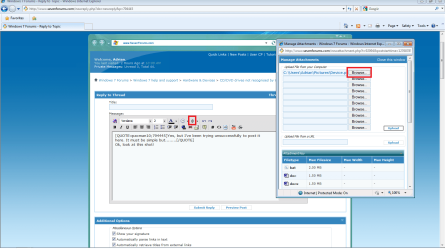
Ok, look at this shot!
See the paper clip? I marked it for you in red, browse to the folder where you stored the image. Then upload and post.
 

Attachments

  • shot.png
    shot.png
    76.9 KB · Views: 365

My Computer My Computer

Computer Manufacturer/Model Number
Custom Build
OS
Windows 7 7600 1 X64
CPU
AMD PHENOM II X 550 PROCESSOR 3.1 ghz
Motherboard
ASUS M4A78-TE
Memory
Corsair 4 gig ddr 3
Graphics Card(s)
ati radeon 3300
Sound Card
ati hd
Monitor(s) Displays
syncmaster 2033sw
Screen Resolution
1600X900 60 hz refresh
Hard Drives
twin_seagates SATA's 1 TB & 500 Gig, hitachi_slimline 160 gig
PSU
antec_550 watt
Case
cooler master GLite
Cooling
stock_heat sink
Internet Speed
20mbs up/ 1.5mbs down
Other Info
favorite child "stewie"
favorite dog "brian"
Thanks. Here it is.
 

Attachments

  • Optical drive device.png
    Optical drive device.png
    4 KB · Views: 39

My Computer My Computer

OS
Windows 7 64-bit
Thanks. Here it is.
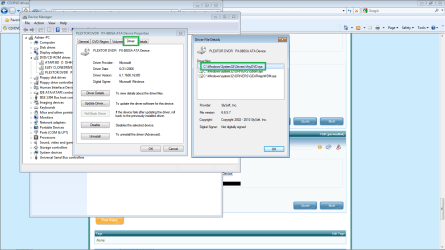
Next, while you are in Windows 7 goback to the device manager and review your device driver for your Drive, here is what mine looks like.
 

Attachments

  • dvd.png
    dvd.png
    55.1 KB · Views: 191

My Computer My Computer

Computer Manufacturer/Model Number
Custom Build
OS
Windows 7 7600 1 X64
CPU
AMD PHENOM II X 550 PROCESSOR 3.1 ghz
Motherboard
ASUS M4A78-TE
Memory
Corsair 4 gig ddr 3
Graphics Card(s)
ati radeon 3300
Sound Card
ati hd
Monitor(s) Displays
syncmaster 2033sw
Screen Resolution
1600X900 60 hz refresh
Hard Drives
twin_seagates SATA's 1 TB & 500 Gig, hitachi_slimline 160 gig
PSU
antec_550 watt
Case
cooler master GLite
Cooling
stock_heat sink
Internet Speed
20mbs up/ 1.5mbs down
Other Info
favorite child "stewie"
favorite dog "brian"
HP Support

Well Paddy, it seems your laptop/drive is about 5-7 years old. There are no drivers on the support page other than xp.
I would like you to go into Windows 7 and access the device manager and un-install your drive and reboot in Windows 7 and see if the drive installs again.
 

My Computer My Computer

Computer Manufacturer/Model Number
Custom Build
OS
Windows 7 7600 1 X64
CPU
AMD PHENOM II X 550 PROCESSOR 3.1 ghz
Motherboard
ASUS M4A78-TE
Memory
Corsair 4 gig ddr 3
Graphics Card(s)
ati radeon 3300
Sound Card
ati hd
Monitor(s) Displays
syncmaster 2033sw
Screen Resolution
1600X900 60 hz refresh
Hard Drives
twin_seagates SATA's 1 TB & 500 Gig, hitachi_slimline 160 gig
PSU
antec_550 watt
Case
cooler master GLite
Cooling
stock_heat sink
Internet Speed
20mbs up/ 1.5mbs down
Other Info
favorite child "stewie"
favorite dog "brian"
Well Paddy, it seems your laptop/drive is about 5-7 years old. There are no drivers on the support page other than xp.
I would like you to go into Windows 7 and access the device manager and un-install your drive and reboot in Windows 7 and see if the drive installs again.

No luck, I'm afraid, BUT please see reply to next posting. And thank you very much for taking so much time. I hope my feedback (in the next posting) can help someone else.

Paddy
 

My Computer My Computer

OS
Windows 7 64-bit
Follow Adrian advice.

If reinstalling the drivers, did not work.

Try this:
Your CD or DVD drive cannot read or write media

Thank you for these suggestions.

SUCCESS !

I spent almost two hours thrashing around in this jungle of webpages with their circular references but finally stumbled on a Microsoft diagnostic utility called Mats_Run.dvd, an exe file described as Microsoft Automated Troubleshooting Services timestamped 19-Apr-2010 (so fairly new). It is a diagnostic tool that runs in question-and-answer mode. When I ran it it detected my drive and, from the stuff that flashed by I suspect that it installed something from Texas Instruments, possibly a generic driver, and the internal optical drive appeared in the Explorer (or whatever it's called this week).

I then inserted a software installation disk (Adobe Photoshop Elements 5) and it recognised it and was able to go through most of the installation process (which ground to a halt asking for something called Disk 1 which meant nothing to me and then said it couldn't complete the installation; I suspect that the problem here is that Adobe PE5 isn't compatible with W7 64-bit, but that's another story).

I then popped in a music CD and it played it.

I then plugged in the external HP DVD 420e DVD writer DVD and Explorer recognised it.

So it looks as if I'm several steps forward. My next step is to try and write a DVD (watch this space).

Again, many thanks to you both.

Paddy
 

My Computer My Computer

OS
Windows 7 64-bit
Good Job Paddy, +1 Rep
 

My Computer My Computer

Computer Manufacturer/Model Number
Custom Build
OS
Windows 7 7600 1 X64
CPU
AMD PHENOM II X 550 PROCESSOR 3.1 ghz
Motherboard
ASUS M4A78-TE
Memory
Corsair 4 gig ddr 3
Graphics Card(s)
ati radeon 3300
Sound Card
ati hd
Monitor(s) Displays
syncmaster 2033sw
Screen Resolution
1600X900 60 hz refresh
Hard Drives
twin_seagates SATA's 1 TB & 500 Gig, hitachi_slimline 160 gig
PSU
antec_550 watt
Case
cooler master GLite
Cooling
stock_heat sink
Internet Speed
20mbs up/ 1.5mbs down
Other Info
favorite child "stewie"
favorite dog "brian"
Pacman, please post the link for the dvd diagnostic.
 

My Computer My Computer

Computer Manufacturer/Model Number
Custom Build
OS
Windows 7 7600 1 X64
CPU
AMD PHENOM II X 550 PROCESSOR 3.1 ghz
Motherboard
ASUS M4A78-TE
Memory
Corsair 4 gig ddr 3
Graphics Card(s)
ati radeon 3300
Sound Card
ati hd
Monitor(s) Displays
syncmaster 2033sw
Screen Resolution
1600X900 60 hz refresh
Hard Drives
twin_seagates SATA's 1 TB & 500 Gig, hitachi_slimline 160 gig
PSU
antec_550 watt
Case
cooler master GLite
Cooling
stock_heat sink
Internet Speed
20mbs up/ 1.5mbs down
Other Info
favorite child "stewie"
favorite dog "brian"

My Computer My Computer

Computer Manufacturer/Model Number
Custom Build
OS
Windows 7 7600 1 X64
CPU
AMD PHENOM II X 550 PROCESSOR 3.1 ghz
Motherboard
ASUS M4A78-TE
Memory
Corsair 4 gig ddr 3
Graphics Card(s)
ati radeon 3300
Sound Card
ati hd
Monitor(s) Displays
syncmaster 2033sw
Screen Resolution
1600X900 60 hz refresh
Hard Drives
twin_seagates SATA's 1 TB & 500 Gig, hitachi_slimline 160 gig
PSU
antec_550 watt
Case
cooler master GLite
Cooling
stock_heat sink
Internet Speed
20mbs up/ 1.5mbs down
Other Info
favorite child "stewie"
favorite dog "brian"
Back
Top