Fresh Install of 7 - blinking HDD every few seconds

Zaraphrax

New member
Local time
12:28 AM
Messages
8
Location
Australia
Hi all,

I recently (about 3 days ago) did a fresh install of 7 on my Dell Latitude E6410. All drivers are up to date, and this problem does not occur when I boot to my Linux partition. When I'm in 7, my hard disk sits there blinking constantly, whether the machine is idle or not. It's a bit annoying. I've tried turning of the paging file, system restore, superfetching and search indexing, but it still doesn't seem to make any difference. I initially thought it was my AV software (freeware version of Avira), so I uninstalled that just to see if it made any difference, which it doesn't either. Task manager seems to report csrss.exe is making all the I/O reads. Is there anyway I can stop this, it's very annoying. The only other thing I can think of which this could be is Prefetching - but does it usually take this long for it sort itself out?

Thanks.

Post script edit - Another tidbit of info, the drive is definitely *not* doing load-unload cycles. That's the first thing I checked since my previous laptop had this problem and that's certainly not it. I even forced the power settings on the drive using QuietHDD (since this corrected the problem on my previous laptop) just to be sure and it makes no difference.
 

My Computer My Computer

At a glance

Windows 7 Ultimate x64 + Linux Mint 9Intel Core i5 520M8gb DDR3nVidia NVS 3100M
Computer Manufacturer/Model Number
Dell Latitude E6410
OS
Windows 7 Ultimate x64 + Linux Mint 9
CPU
Intel Core i5 520M
Memory
8gb DDR3
Graphics Card(s)
nVidia NVS 3100M
Monitor(s) Displays
14.1" WLEC LCD + 22" Dell LCD
Screen Resolution
1440 x 900 + 1680 x 1050
Hard Drives
1 x 500gb 7200RPM (Internal)
Various external drives (about 2.5tb in total)
PSU
Dell power brick, lol.
Keyboard
Dell Multimedia keyboard (external) when docked
Mouse
Logitech TrackMan Wheel
How was Win7 activated?

Did you reinstall with just the OS DVD, or Recovery?

If you clean reinstalled did you keep the Dell Utility partition?

Has the problem been there since the reinstall or did it possibly begin after your changed out a driver given by the installer or optional Windows Updates?

Run a virus scan with Malwarebytes and MSE, which is a better free AV solution than Avira.

Google repeat errors in Event Viewer>Admin VIew and Performance Diagnostics log at Control Panel\All Control Panel Items\Performance Information and Tools\Advanced Tools where you can also Generate a System Health Report.

Try a clean boot procedure: How to Troubleshoot a Problem by Performing a Clean Startup in Windows 7 or Vista

Uncheck all items at msconfig>Startup except AV and gadgets.

Run chkdsk and maker's HD diag/repair full CD scan: Hard Drive Diagnostics Tools and Utilities (Storage) - TACKtech Corp.

Run sfc /scannow to make sure nothing has already corrupted System Files.

Finally, if nothing else helps then run a http://www.sevenforums.com/tutorials/3413-repair-install.html?ltr=R which is next best thing to reinstall.
 
Last edited by a moderator:
How was Win7 activated?

Did you reinstall with just the OS DVD, or Recovery?

If you clean reinstalled did you keep the Dell Utility partition?

Was already activated when I installed it from the Dell supplied OS DVD (not a recovery disc either). I nuked the Dell utility partition because I could create my Linux partition with it still on there. The machine is brand new btw.

Has the problem been there since the reinstall or did it possibly begin after your changed out a driver given by the installer or optional Windows Updates?
Since the reinstall I've noticed it.

Run a virus scan with Malwarebytes and MSE, which is a better free AV solution than Avira.
It's clean as a whistle.

Google repeat errors in Event Viewer>Admin VIew and Performance Diagnostics log at Control Panel\All Control Panel Items\Performance Information and Tools\Advanced Tools where you can also Generate a System Health Report.

Try a clean boot procedure: How to Troubleshoot a Problem by Performing a Clean Startup in Windows 7 or Vista

Uncheck all items at msconfig>Startup except AV and gadgets.

Run chkdsk and maker's HD diag/repair full CD scan: Hard Drive Diagnostics Tools and Utilities (Storage) - TACKtech Corp.

Run sfc /scannow to make sure nothing has already corrupted System Files.

Finally, if nothing else helps then run a http://www.sevenforums.com/tutorials/3413-repair-install.html?ltr=R which is next best thing to reinstall.
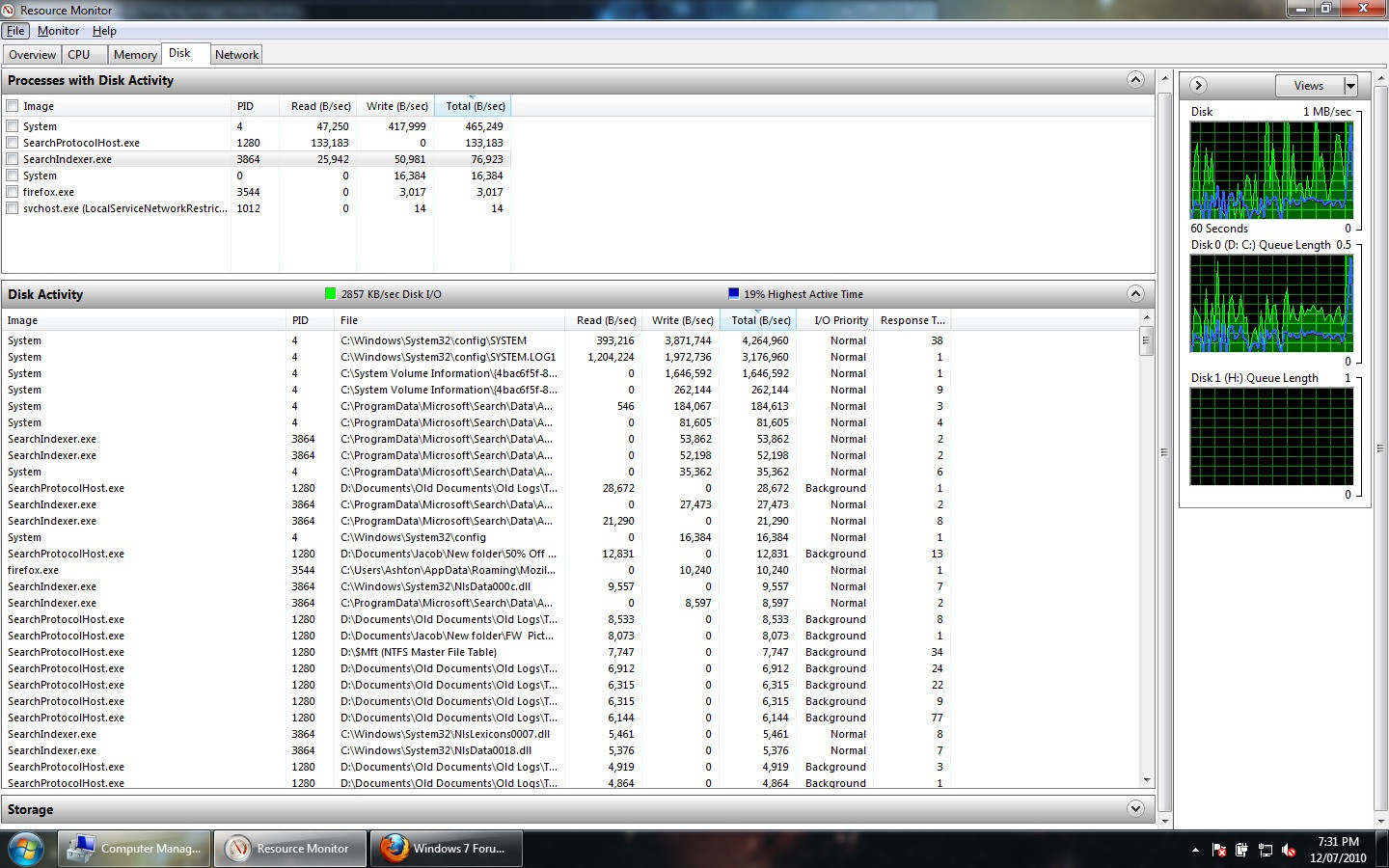
Couldn't find any errors at all that seem related (one of my USB external disks gives controller errors, but I'm not sure that's related), so I opened up Perfmon to see what it's actually doing. I also reinstalled some Intel drivers, and it seems to have made it slightly better. The activity isn't just slight pulses any more, it's basically constant now. Windows seems to be indexing constantly now, whereas it was just trying to do it intermittently before. I wonder whether that had something to do with the driver reinstall or just coincidence.

2WFyD.jpg


I personally can't see anything out of the ordinary going on.....
 
Last edited by a moderator:

My Computer My Computer

At a glance

Windows 7 Ultimate x64 + Linux Mint 9Intel Core i5 520M8gb DDR3nVidia NVS 3100M
Computer Manufacturer/Model Number
Dell Latitude E6410
OS
Windows 7 Ultimate x64 + Linux Mint 9
CPU
Intel Core i5 520M
Memory
8gb DDR3
Graphics Card(s)
nVidia NVS 3100M
Monitor(s) Displays
14.1" WLEC LCD + 22" Dell LCD
Screen Resolution
1440 x 900 + 1680 x 1050
Hard Drives
1 x 500gb 7200RPM (Internal)
Various external drives (about 2.5tb in total)
PSU
Dell power brick, lol.
Keyboard
Dell Multimedia keyboard (external) when docked
Mouse
Logitech TrackMan Wheel
How large is your documents folder? Most of those reads/writes showing in that screen shot have to do with the Windows Search and Indexing, and depending on the size of the folders included in the index can take a few days on a clean install to complete. Once the index is finished the hard drive activity will fall off.

Don't forget that most of that sort of process is a background task and will be paused if something else requires the resources.
 

My Computer My Computer

At a glance

Win 7 Ultimate x64FX-8350 @ 4.6 GHz so farADATA XPG V1 Series Black 8GB DDR3 1600Sapphire R9 270x Dual-X
Computer type
PC/Desktop
Computer Manufacturer/Model Number
Me
OS
Win 7 Ultimate x64
CPU
FX-8350 @ 4.6 GHz so far
Motherboard
Asus M5A97 EVO
Memory
ADATA XPG V1 Series Black 8GB DDR3 1600
Graphics Card(s)
Sapphire R9 270x Dual-X
Sound Card
Xonar DGX w/ Corsair Vengence 1300
Monitor(s) Displays
Acer S232HL Abid
Screen Resolution
1920x1080
Hard Drives
120 GB OCZ Vertex 3
500 GB Seagate 7200.12
PSU
Antec Earthwatts 650W Green
Case
Antec Three Hundred
Cooling
Cooler Master 212 EVO
Keyboard
Logitech G510
Mouse
Logitech G500s
Internet Speed
35000/3000
How large is your documents folder? Most of those reads/writes showing in that screen shot have to do with the Windows Search and Indexing, and depending on the size of the folders included in the index can take a few days on a clean install to complete. Once the index is finished the hard drive activity will fall off.

Don't forget that most of that sort of process is a background task and will be paused if something else requires the resources.

I've got just over 143gb of stuff on my Data partition + 2.5TB of external storage. Everything seems to have settled off again now, and it's still flashing occasionally but I think that's just because I'm doing the initial update on MSE. It's certainly better than it was, csrss.exe isn't chewing on it constantly now. This is certainly not something I've seen before.
 

My Computer My Computer

At a glance

Windows 7 Ultimate x64 + Linux Mint 9Intel Core i5 520M8gb DDR3nVidia NVS 3100M
Computer Manufacturer/Model Number
Dell Latitude E6410
OS
Windows 7 Ultimate x64 + Linux Mint 9
CPU
Intel Core i5 520M
Memory
8gb DDR3
Graphics Card(s)
nVidia NVS 3100M
Monitor(s) Displays
14.1" WLEC LCD + 22" Dell LCD
Screen Resolution
1440 x 900 + 1680 x 1050
Hard Drives
1 x 500gb 7200RPM (Internal)
Various external drives (about 2.5tb in total)
PSU
Dell power brick, lol.
Keyboard
Dell Multimedia keyboard (external) when docked
Mouse
Logitech TrackMan Wheel
Last edited by a moderator:

My Computer My Computer

At a glance

Vista, Windows7, Mint Mate, Zorin, Windows 8from 1.6GHz Duo to i7
Computer Manufacturer/Model Number
HP, Dell, Gateway, Toshiba - 4 laptops and 2 desktops
OS
Vista, Windows7, Mint Mate, Zorin, Windows 8
CPU
from 1.6GHz Duo to i7
Monitor(s) Displays
2x HP w2207
Hard Drives
5x HDD, 7x SSD, 12x Externals
Keyboard
with trackball - no mices
Mouse
Trackball mice
Internet Speed
DSL 6000
Go to the "Reliability and Performance Monitor > Disk (Start > right click on "Computer" > Manage > R&P Monitor) and check who is doing all the reads or writes.

Isn't that what I've got here? I can't seem to find it the way you listed it.

How was Win7 activated?

Did you reinstall with just the OS DVD, or Recovery?

If you clean reinstalled did you keep the Dell Utility partition?

Was already activated when I installed it from the Dell supplied OS DVD (not a recovery disc either). I nuked the Dell utility partition because I could create my Linux partition with it still on there. The machine is brand new btw.

Has the problem been there since the reinstall or did it possibly begin after your changed out a driver given by the installer or optional Windows Updates?
Since the reinstall I've noticed it.

Run a virus scan with Malwarebytes and MSE, which is a better free AV solution than Avira.
It's clean as a whistle.

Google repeat errors in Event Viewer>Admin VIew and Performance Diagnostics log at Control Panel\All Control Panel Items\Performance Information and Tools\Advanced Tools where you can also Generate a System Health Report.

Try a clean boot procedure: How to Troubleshoot a Problem by Performing a Clean Startup in Windows 7 or Vista

Uncheck all items at msconfig>Startup except AV and gadgets.

Run chkdsk and maker's HD diag/repair full CD scan: Hard Drive Diagnostics Tools and Utilities (Storage) - TACKtech Corp.

Run sfc /scannow to make sure nothing has already corrupted System Files.

Finally, if nothing else helps then run a http://www.sevenforums.com/tutorials/3413-repair-install.html?ltr=R which is next best thing to reinstall.
Couldn't find any errors at all that seem related (one of my USB external disks gives controller errors, but I'm not sure that's related), so I opened up Perfmon to see what it's actually doing. I also reinstalled some Intel drivers, and it seems to have made it slightly better. The activity isn't just slight pulses any more, it's basically constant now. Windows seems to be indexing constantly now, whereas it was just trying to do it intermittently before. I wonder whether that had something to do with the driver reinstall or just coincidence.

2WFyD.jpg


I personally can't see anything out of the ordinary going on.....
 
Last edited by a moderator:

My Computer My Computer

At a glance

Windows 7 Ultimate x64 + Linux Mint 9Intel Core i5 520M8gb DDR3nVidia NVS 3100M
Computer Manufacturer/Model Number
Dell Latitude E6410
OS
Windows 7 Ultimate x64 + Linux Mint 9
CPU
Intel Core i5 520M
Memory
8gb DDR3
Graphics Card(s)
nVidia NVS 3100M
Monitor(s) Displays
14.1" WLEC LCD + 22" Dell LCD
Screen Resolution
1440 x 900 + 1680 x 1050
Hard Drives
1 x 500gb 7200RPM (Internal)
Various external drives (about 2.5tb in total)
PSU
Dell power brick, lol.
Keyboard
Dell Multimedia keyboard (external) when docked
Mouse
Logitech TrackMan Wheel
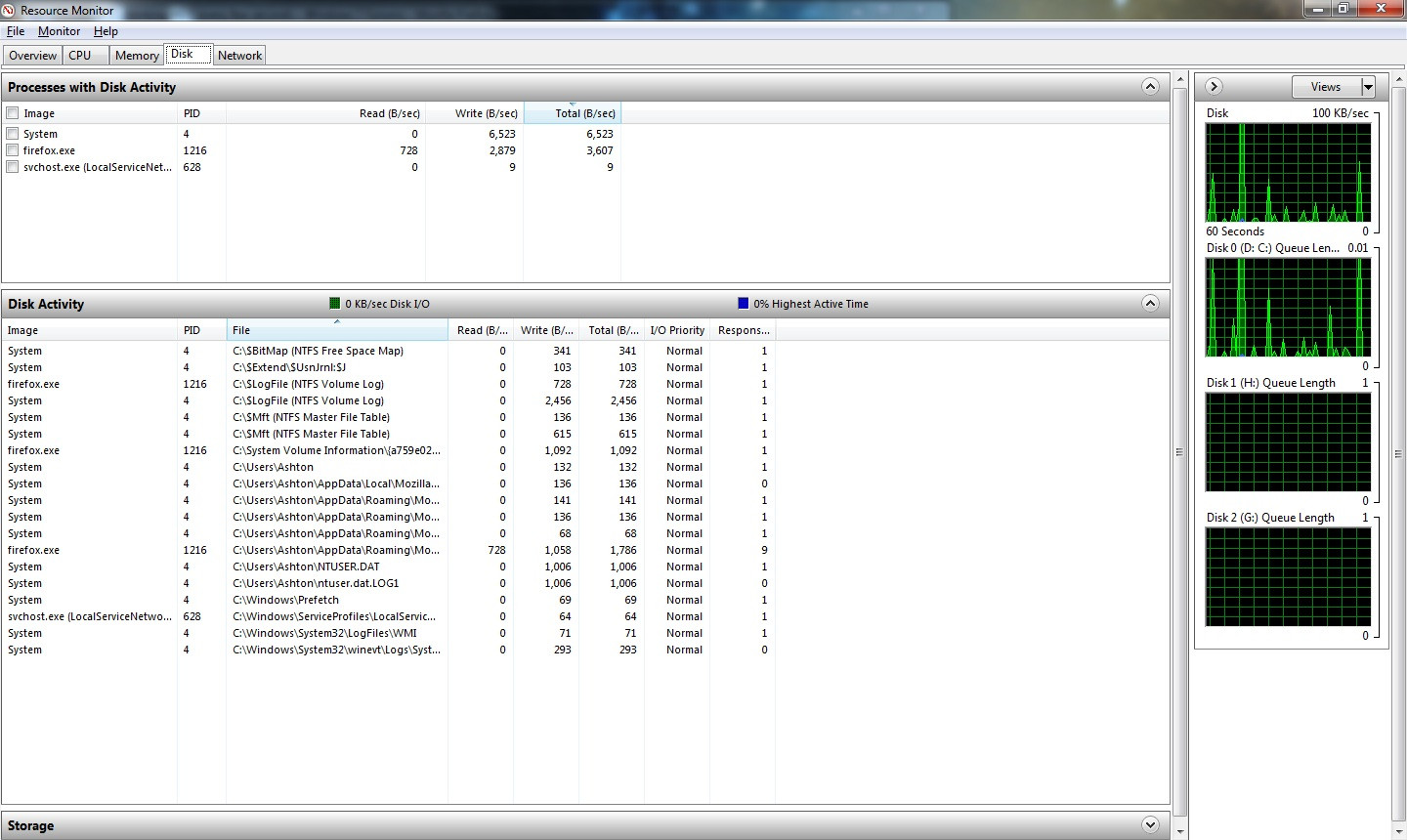
There is a lot of system log activity. For a test, disable the System Event Notification Service and see whether that helps. But reenable it later because there are some services that depend on it.
 

My Computer My Computer

At a glance

Vista, Windows7, Mint Mate, Zorin, Windows 8from 1.6GHz Duo to i7
Computer Manufacturer/Model Number
HP, Dell, Gateway, Toshiba - 4 laptops and 2 desktops
OS
Vista, Windows7, Mint Mate, Zorin, Windows 8
CPU
from 1.6GHz Duo to i7
Monitor(s) Displays
2x HP w2207
Hard Drives
5x HDD, 7x SSD, 12x Externals
Keyboard
with trackball - no mices
Mouse
Trackball mice
Internet Speed
DSL 6000
Nope, that didn't do anything. Although it's less busy now, the drive light still pulses constantly even at the desktop with nothing running except MSE in the tray.

Here's a screenshot with that service stopped, and only Firefox, Task Manager and Resource Monitor running. I'm starting to wonder if I borked something when I resized the partition to install Linux (I defragmented first though, and it let me shrink it down so there can't have been anything in it's road, right?).

EDIT - sfc didn't find any errors, so perhaps not. Hmm.
EDIT2 - Neither did chkdsk.

DnCHn.jpg
 
Last edited:

My Computer My Computer

At a glance

Windows 7 Ultimate x64 + Linux Mint 9Intel Core i5 520M8gb DDR3nVidia NVS 3100M
Computer Manufacturer/Model Number
Dell Latitude E6410
OS
Windows 7 Ultimate x64 + Linux Mint 9
CPU
Intel Core i5 520M
Memory
8gb DDR3
Graphics Card(s)
nVidia NVS 3100M
Monitor(s) Displays
14.1" WLEC LCD + 22" Dell LCD
Screen Resolution
1440 x 900 + 1680 x 1050
Hard Drives
1 x 500gb 7200RPM (Internal)
Various external drives (about 2.5tb in total)
PSU
Dell power brick, lol.
Keyboard
Dell Multimedia keyboard (external) when docked
Mouse
Logitech TrackMan Wheel
Ooh, I think I've solved it.

I did a bit more Googling and came across this thread (and being a computer engineer, I don't know why I didn't think of this). It says in a post in there that it's more of "I/O" light, rather than just purely disc activity. It talks about it polling the DVD drive to see if a new disc has been inserted. So, I clicked Safely Remove Hardware and "ejected" my laptop's DVD burner. Now the light pulses at a much, much less frequent rate. It was pulsing at a rate of about 1-2 pulses per 2 seconds before, I've just timed in and it's pulsing at about 1 pulse every 5 or 6 seconds, which is more what I was expecting under general use conditions. I guess I didn't notice it because the seeking on this hard disk is very quiet, even in my nice quiet room.

I wonder if it's a bug in Dell's latest BIOS or something (this is a brand spanking new model, so I guess that's possible).

Brb, rebooting to "re-attach" the drive.

EDIT - And sure enough, light goes berserk again. Ejected the drive again and it stops. That's incredibly weird.
 

My Computer My Computer

At a glance

Windows 7 Ultimate x64 + Linux Mint 9Intel Core i5 520M8gb DDR3nVidia NVS 3100M
Computer Manufacturer/Model Number
Dell Latitude E6410
OS
Windows 7 Ultimate x64 + Linux Mint 9
CPU
Intel Core i5 520M
Memory
8gb DDR3
Graphics Card(s)
nVidia NVS 3100M
Monitor(s) Displays
14.1" WLEC LCD + 22" Dell LCD
Screen Resolution
1440 x 900 + 1680 x 1050
Hard Drives
1 x 500gb 7200RPM (Internal)
Various external drives (about 2.5tb in total)
PSU
Dell power brick, lol.
Keyboard
Dell Multimedia keyboard (external) when docked
Mouse
Logitech TrackMan Wheel
Back
Top