

sortoffaerygirl
New member
- Local time
- 2:42 PM
- Messages
- 13
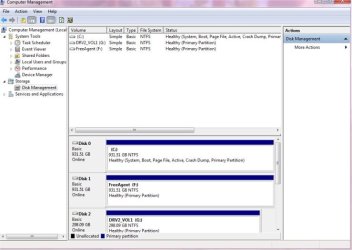
I just installed Windows 7 today, and while everything else has gone smooth, I can't get it to find my 2nd internal hard drive. It has no problem finding my externals and my dvd burners, and I have read through the forums and went to the Computer Management -> Storage -> Disk Management, only to find that the hard drive wasn't there. It is showing my primary drive and the two externals, but not the second internal drive. I went into the BIOS to see if it was being detected there, but to be honest, I'm not familiar enough with the BIOS to fool around with it.
Any suggestions? And yes, the 2nd internal hard drive was there on Vista before I installed Win7... I just have no clue as to why it can't access it now. Also, yes, I have already checked all of the cables. Everything works fine and was working fine until I installed 7.
Thanks for any help.
Any suggestions? And yes, the 2nd internal hard drive was there on Vista before I installed Win7... I just have no clue as to why it can't access it now. Also, yes, I have already checked all of the cables. Everything works fine and was working fine until I installed 7.
Thanks for any help.
Attachments
My Computer
At a glance
Windows 7 Ultimate
- OS
- Windows 7 Ultimate


 But that can come up on you too since you have external as well as the extra internal drive. For the internal drive situation you would still shut down and then start back once you unplugged that one allowing Windows to load without it being present.

