
Can't get Windows 7 to find my 2nd hard drive

sortoffaerygirl

New member
Local time
5:54 PM
Messages
13
I just installed Windows 7 today, and while everything else has gone smooth, I can't get it to find my 2nd internal hard drive. It has no problem finding my externals and my dvd burners, and I have read through the forums and went to the Computer Management -> Storage -> Disk Management, only to find that the hard drive wasn't there. It is showing my primary drive and the two externals, but not the second internal drive. I went into the BIOS to see if it was being detected there, but to be honest, I'm not familiar enough with the BIOS to fool around with it.

Any suggestions? And yes, the 2nd internal hard drive was there on Vista before I installed Win7... I just have no clue as to why it can't access it now. Also, yes, I have already checked all of the cables. Everything works fine and was working fine until I installed 7.

Thanks for any help.
 

Attachments
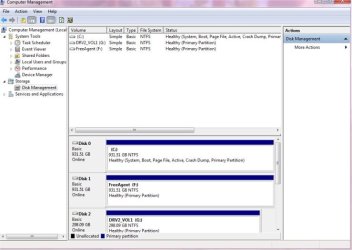
  • hard drive problem.jpg
    hard drive problem.jpg
    39.3 KB · Views: 443

My Computer My Computer

At a glance

Windows 7 Ultimate
OS
Windows 7 Ultimate
Welcome to the Seven Forums! sortoffaerygirl

Your problem reminds of what was happening on the last custom case here where one storage kept disappearing while known to be in top working order. The solution was examination of the sata data cable found only slightly lfted up in the port at the board end of it.

The drive was seen in the bios post screen but not even in the Disk Management when it vanished and then returned until going over things like that assuming it could have been a cable gone bad. Sometimes a little dust or dirt will get in there over time from the warm up and cooling off along with the need to clean things up with a can of air cleaner.

First make sure both ends are all the way in. If nothing try another cable to see that's all it is. Generally unless a drive fails completely it's always some little thing like that.
 

My Computers My Computers

  • At a glance

    W7 Ultimate x64/W10 Pro x64/W11 Pro Triple Bo...AMD Phenom II X4 975 Deneb 3.6ghz - 965 2nd r...Kingston Hyper X DDR3 1600 1.5v 16gb - Hyper ...MSI HD Radeon 5750 1gb - MSI HD Radeon 6450 o...
    Computer type
    PC/Desktop
    Computer Manufacturer/Model Number
    Custom builds = 2
    OS
    W7 Ultimate x64/W10 Pro x64/W11 Pro Triple Boot - Main PC W7 Remote PC Micro ATX W7 Pro x64/W11 Pro
    CPU
    AMD Phenom II X4 975 Deneb 3.6ghz - 965 2nd remote pc
    Motherboard
    Gigabyte GA-790XTA-UD4-Gigabyte GA-880GM-D2H remote pc
    Memory
    Kingston Hyper X DDR3 1600 1.5v 16gb - Hyper X Fury 8gb 2nd
    Graphics Card(s)
    MSI HD Radeon 5750 1gb - MSI HD Radeon 6450 on mini tower
    Sound Card
    Creative Labs X-Fi Xtreme Audio P - Realtek onooard 2nd case
    Monitor(s) Displays
    ASUS VW199T-P 19" HP 2082a Main-HP 2082a 20" remote pc
    Screen Resolution
    Asus 1440x900 - HP 1600x900
    Hard Drives
    WD Black 1TB HD per OS W7, W10, and pending W11 presently on 500gb OS Drive - Pending Triple 1TB HDs for Spanned Storage/backup volume
    Single 2TB external USB enclosure, single 1TB System 7 Host/Boot drive, Pending 8TB external HD for system image b
    PSU
    Corsair 750TX - primary / Corsair CX600 - second
    Case
    Antec 900-2 - SSD compatible / NZXT Vulcan mini tower
    Cooling
    Zalman CNPS9900A
    Keyboard
    AZIO L70 Backlit Letters Gaming - ONN Cordless/USB
    Mouse
    MSI DS200 Programmable, Logitech Cordless
    Internet Speed
    30mbps upgrade - primary hard wired - mini tower usb WiFi
    Antivirus
    GFI VIPRE Internet Security 2014 on W7 2016 beta on W10,
    Browser
    Cyberfox, WaterFox 64bit FF variants, FireFox x64, Pale Moon
    Other Info
    Accomdata fan cooled usb 2.0 PIDE/Sata II, III external enclosure.
    Sambient usb/eSata PATA/Sata II, III external enclosure.
  • At a glance

    W7 Pro x64/W11 ProAMD Deneb 3.6ghz - 965Kingston Hyper X Fury 8gbMSI HD Radeon 6450 DVI Output
    Computer type
    PC/Desktop
    System Manufacturer/Model Number
    CUSTOM ASSEMBLY
    OS
    W7 Pro x64/W11 Pro
    CPU
    AMD Deneb 3.6ghz - 965
    Motherboard
    Gigabyte GA-880GM-D2H remote pc
    Memory
    Kingston Hyper X Fury 8gb
    Graphics Card(s)
    MSI HD Radeon 6450 DVI Output
    Sound Card
    Realtek onooard Creative or Other separate PENDING
    Monitor(s) Displays
    VIZIO 32" LCD TV Separate LCD Pending
    Screen Resolution
    1600x1080
    Hard Drives
    WD 500GB OS Host/Boot WD Green 1TB Storage/Backup
    PSU
    Corsair 600W - THERMALTAKE 600W spare case
    Case
    NZXT Vulcan mini tower
    Cooling
    Twin 120mm Top Fans - 240mm Side Cover
    Keyboard
    ONN Cordless/USB Logitech Cordless
    Mouse
    ONN USB/Cordless - Logitech Cordless
    Internet Speed
    DSL 5G
    Browser
    MS Edge, FireFox, WaterFox x64, FireFox Nightly
    Other Info
    OS Testing-Remote Access to Main TeamViewer
Welcome to the Seven Forums! sortoffaerygirl

Your problem reminds of what was happening on the last custom case here where one storage kept disappearing while known to be in top working order. The solution was examination of the sata data cable found only slightly lfted up in the port at the board end of it.

The drive was seen in the bios post screen but not even in the Disk Management when it vanished and then returned until going over things like that assuming it could have been a cable gone bad. Sometimes a little dust or dirt will get in there over time from the warm up and cooling off along with the need to clean things up with a can of air cleaner.

First make sure both ends are all the way in. If nothing try another cable to see that's all it is. Generally unless a drive fails completely it's always some little thing like that.

Thanks for the response, but as I have already said: I checked the cables. Which means, I have already checked to make sure they were in place, I have swapped them out, cables are not the problem.

Also I have taken the drive out and tested it: it works. The data is there. I worked my way through the BIOS since I made the post and the drive isn't showing up.
 
Last edited:

My Computer My Computer

At a glance

Windows 7 Ultimate
OS
Windows 7 Ultimate
Hard drives can connect to more than 1 port on the motherboard.

Have you tried connecting the drive to another port?

I assume you have changed both the power and data cables?
 

My Computer My Computer

At a glance

Windows 7 Home Premium SP1, 64-bitIntel Skylake i5-6600K, not overclocked8 GB HyperX DDR4-2666 (2 x 4 GB)none; graphics are integrated on CPU
Computer type
PC/Desktop
Computer Manufacturer/Model Number
Ignatz Special; 4 speed manual gearbox; factory air conditioning; one of one
OS
Windows 7 Home Premium SP1, 64-bit
CPU
Intel Skylake i5-6600K, not overclocked
Motherboard
AsRock Z170M Extreme 4, micro ATX
Memory
8 GB HyperX DDR4-2666 (2 x 4 GB)
Graphics Card(s)
none; graphics are integrated on CPU
Sound Card
onboard: Realtek ALC1150; external: USB Behringer UF0-202
Monitor(s) Displays
Dell S2340M 23 inch IPS
Screen Resolution
1600 x 900
Hard Drives
System: Crucial MX100 series SSD, 128 GB;
Data: Samsung Spinpoint 103SJ, 1 TB;
Backup: WD Caviar Green WD30EZRX-00D8PB0, 3 TB
PSU
Rosewill SilentNight 500 watt fanless, semi-modular
Case
Antec Solo II
Cooling
Noctua NH-U12S; Noctua F12 intake, Noctua S12A exhaust
Keyboard
Microsoft 200 6JH-00001 USB
Mouse
Dell or Microsoft optical wired; USB
Antivirus
Microsoft Security Essentials and Malwarebytes Premium
Browser
Pale Moon
Other Info
All fans PWM; speeds at idle: CPU circa 500 rpm; intake circa 600 rpm; exhaust circa 600 rpm; CPU temps 27 idle and 47 C load in a warm room (27 C/81 F) when running Intel Extreme Tuning Utility stress test.
Hard drives can connect to more than 1 port on the motherboard.

Have you tried connecting the drive to another port?

I assume you have changed both the power and data cables?

Yes, I have done all of that. No dice. Again, this morning it was working with Vista just fine. It works when I take it out and put it in an enclosure. It is not being picked up by the BIOS or by Windows 7 now, for what reason, I cannot understand, but it is not a problem with the hardware. What do I need to do either in the BIOS or in Windows 7 to fix this?

Thanks for the response.
 

My Computer My Computer

At a glance

Windows 7 Ultimate
OS
Windows 7 Ultimate
With everything checked surprizingly a second look never hurts since everything was in working here too when seeing this same problem only with an internal drive.

The next thing of course for a usb external would be try plugging it into a different usb port in case that one is having a problem. Sometimes the simple change to another port while the first is still good forces Windows to perform a fresh detection of an external drive or device like a flash drive, usb keyboard, or some other external item.

Once Windows has properly detected it again you will want to take another trip into the DM to see it initialize the drive by assigning a drive letter. Then you can verify it took when opening up any explorer window and seeing it appear with that same letter used.

You would do this by first shutting down entirely and unplugging the drive for then starting up normally without it plugged in. Once everything is loaded up you then plug it back in and wait for the new hardware found notification before entering the DM for the next look and providing a drive letter.

Was the drive left with the factory Fat 32 colume on it and simply used or did you reformat it to NTFS at some point? In Vista most drives would need the software installer in order to see the previous version see the Fat volume external drives and even flash drives come with. For 7 simply getting Windows to first detect the drive fresh due to now having Fat support return along with new support for exFat 7 will automatically assign the next available drive letter usually on it's own unless you need to encourage it a little in the DM.
 

My Computers My Computers

  • At a glance

    W7 Ultimate x64/W10 Pro x64/W11 Pro Triple Bo...AMD Phenom II X4 975 Deneb 3.6ghz - 965 2nd r...Kingston Hyper X DDR3 1600 1.5v 16gb - Hyper ...MSI HD Radeon 5750 1gb - MSI HD Radeon 6450 o...
    Computer type
    PC/Desktop
    Computer Manufacturer/Model Number
    Custom builds = 2
    OS
    W7 Ultimate x64/W10 Pro x64/W11 Pro Triple Boot - Main PC W7 Remote PC Micro ATX W7 Pro x64/W11 Pro
    CPU
    AMD Phenom II X4 975 Deneb 3.6ghz - 965 2nd remote pc
    Motherboard
    Gigabyte GA-790XTA-UD4-Gigabyte GA-880GM-D2H remote pc
    Memory
    Kingston Hyper X DDR3 1600 1.5v 16gb - Hyper X Fury 8gb 2nd
    Graphics Card(s)
    MSI HD Radeon 5750 1gb - MSI HD Radeon 6450 on mini tower
    Sound Card
    Creative Labs X-Fi Xtreme Audio P - Realtek onooard 2nd case
    Monitor(s) Displays
    ASUS VW199T-P 19" HP 2082a Main-HP 2082a 20" remote pc
    Screen Resolution
    Asus 1440x900 - HP 1600x900
    Hard Drives
    WD Black 1TB HD per OS W7, W10, and pending W11 presently on 500gb OS Drive - Pending Triple 1TB HDs for Spanned Storage/backup volume
    Single 2TB external USB enclosure, single 1TB System 7 Host/Boot drive, Pending 8TB external HD for system image b
    PSU
    Corsair 750TX - primary / Corsair CX600 - second
    Case
    Antec 900-2 - SSD compatible / NZXT Vulcan mini tower
    Cooling
    Zalman CNPS9900A
    Keyboard
    AZIO L70 Backlit Letters Gaming - ONN Cordless/USB
    Mouse
    MSI DS200 Programmable, Logitech Cordless
    Internet Speed
    30mbps upgrade - primary hard wired - mini tower usb WiFi
    Antivirus
    GFI VIPRE Internet Security 2014 on W7 2016 beta on W10,
    Browser
    Cyberfox, WaterFox 64bit FF variants, FireFox x64, Pale Moon
    Other Info
    Accomdata fan cooled usb 2.0 PIDE/Sata II, III external enclosure.
    Sambient usb/eSata PATA/Sata II, III external enclosure.
  • At a glance

    W7 Pro x64/W11 ProAMD Deneb 3.6ghz - 965Kingston Hyper X Fury 8gbMSI HD Radeon 6450 DVI Output
    Computer type
    PC/Desktop
    System Manufacturer/Model Number
    CUSTOM ASSEMBLY
    OS
    W7 Pro x64/W11 Pro
    CPU
    AMD Deneb 3.6ghz - 965
    Motherboard
    Gigabyte GA-880GM-D2H remote pc
    Memory
    Kingston Hyper X Fury 8gb
    Graphics Card(s)
    MSI HD Radeon 6450 DVI Output
    Sound Card
    Realtek onooard Creative or Other separate PENDING
    Monitor(s) Displays
    VIZIO 32" LCD TV Separate LCD Pending
    Screen Resolution
    1600x1080
    Hard Drives
    WD 500GB OS Host/Boot WD Green 1TB Storage/Backup
    PSU
    Corsair 600W - THERMALTAKE 600W spare case
    Case
    NZXT Vulcan mini tower
    Cooling
    Twin 120mm Top Fans - 240mm Side Cover
    Keyboard
    ONN Cordless/USB Logitech Cordless
    Mouse
    ONN USB/Cordless - Logitech Cordless
    Internet Speed
    DSL 5G
    Browser
    MS Edge, FireFox, WaterFox x64, FireFox Nightly
    Other Info
    OS Testing-Remote Access to Main TeamViewer
With everything checked surprizingly a second look never hurts since everything was in working here too when seeing this same problem only with an internal drive.

Um... my problem is with an internal drive... there is no USB port to check... and I'm very confused by your response because you say that the problem you described was same the problem only with an internal drive... but it's not the same problem...

The problem you mentioned was the drive showing on the BIOS and not in DM. Here, the drive is showing in neither place.

And again, I say it's the "2nd internal hard drive" at least twice in the post... why are you confusing this with an external? That is just confusing me!

Thanks for the reply.
 
Last edited:

My Computer My Computer

At a glance

Windows 7 Ultimate
OS
Windows 7 Ultimate
Cross circuit at this end. sorry! :o But that can come up on you too since you have external as well as the extra internal drive. For the internal drive situation you would still shut down and then start back once you unplugged that one allowing Windows to load without it being present.

Once loaded fully you then shutdown a second time only to plug it back in and see if Windows will then properly detect as a new drive and install it for you. It seems something may be off in the Windows install itself or simply didn't see a full detection of everything like it should have when you first went to install 7.

If everything is performing normally that can help rule out a bad install of Windows but you may want to run the system file checker tool just the same. Simply type "sfc .scannow" in at the Run command line to get that going for it's quick verification and even repair of any main system files needing it.
 

My Computers My Computers

  • At a glance

    W7 Ultimate x64/W10 Pro x64/W11 Pro Triple Bo...AMD Phenom II X4 975 Deneb 3.6ghz - 965 2nd r...Kingston Hyper X DDR3 1600 1.5v 16gb - Hyper ...MSI HD Radeon 5750 1gb - MSI HD Radeon 6450 o...
    Computer type
    PC/Desktop
    Computer Manufacturer/Model Number
    Custom builds = 2
    OS
    W7 Ultimate x64/W10 Pro x64/W11 Pro Triple Boot - Main PC W7 Remote PC Micro ATX W7 Pro x64/W11 Pro
    CPU
    AMD Phenom II X4 975 Deneb 3.6ghz - 965 2nd remote pc
    Motherboard
    Gigabyte GA-790XTA-UD4-Gigabyte GA-880GM-D2H remote pc
    Memory
    Kingston Hyper X DDR3 1600 1.5v 16gb - Hyper X Fury 8gb 2nd
    Graphics Card(s)
    MSI HD Radeon 5750 1gb - MSI HD Radeon 6450 on mini tower
    Sound Card
    Creative Labs X-Fi Xtreme Audio P - Realtek onooard 2nd case
    Monitor(s) Displays
    ASUS VW199T-P 19" HP 2082a Main-HP 2082a 20" remote pc
    Screen Resolution
    Asus 1440x900 - HP 1600x900
    Hard Drives
    WD Black 1TB HD per OS W7, W10, and pending W11 presently on 500gb OS Drive - Pending Triple 1TB HDs for Spanned Storage/backup volume
    Single 2TB external USB enclosure, single 1TB System 7 Host/Boot drive, Pending 8TB external HD for system image b
    PSU
    Corsair 750TX - primary / Corsair CX600 - second
    Case
    Antec 900-2 - SSD compatible / NZXT Vulcan mini tower
    Cooling
    Zalman CNPS9900A
    Keyboard
    AZIO L70 Backlit Letters Gaming - ONN Cordless/USB
    Mouse
    MSI DS200 Programmable, Logitech Cordless
    Internet Speed
    30mbps upgrade - primary hard wired - mini tower usb WiFi
    Antivirus
    GFI VIPRE Internet Security 2014 on W7 2016 beta on W10,
    Browser
    Cyberfox, WaterFox 64bit FF variants, FireFox x64, Pale Moon
    Other Info
    Accomdata fan cooled usb 2.0 PIDE/Sata II, III external enclosure.
    Sambient usb/eSata PATA/Sata II, III external enclosure.
  • At a glance

    W7 Pro x64/W11 ProAMD Deneb 3.6ghz - 965Kingston Hyper X Fury 8gbMSI HD Radeon 6450 DVI Output
    Computer type
    PC/Desktop
    System Manufacturer/Model Number
    CUSTOM ASSEMBLY
    OS
    W7 Pro x64/W11 Pro
    CPU
    AMD Deneb 3.6ghz - 965
    Motherboard
    Gigabyte GA-880GM-D2H remote pc
    Memory
    Kingston Hyper X Fury 8gb
    Graphics Card(s)
    MSI HD Radeon 6450 DVI Output
    Sound Card
    Realtek onooard Creative or Other separate PENDING
    Monitor(s) Displays
    VIZIO 32" LCD TV Separate LCD Pending
    Screen Resolution
    1600x1080
    Hard Drives
    WD 500GB OS Host/Boot WD Green 1TB Storage/Backup
    PSU
    Corsair 600W - THERMALTAKE 600W spare case
    Case
    NZXT Vulcan mini tower
    Cooling
    Twin 120mm Top Fans - 240mm Side Cover
    Keyboard
    ONN Cordless/USB Logitech Cordless
    Mouse
    ONN USB/Cordless - Logitech Cordless
    Internet Speed
    DSL 5G
    Browser
    MS Edge, FireFox, WaterFox x64, FireFox Nightly
    Other Info
    OS Testing-Remote Access to Main TeamViewer
It works when I take it out and put it in an enclosure.

Do you mean that it works under Windows 7 in an enclosure connected to the very same PC?

I was going to suggest making sure you have fully updated Windows 7, but that may not apply if you know that the drive is seen and works fine under Windows 7---but only in an enclosure.
 

My Computer My Computer

At a glance

Windows 7 Home Premium SP1, 64-bitIntel Skylake i5-6600K, not overclocked8 GB HyperX DDR4-2666 (2 x 4 GB)none; graphics are integrated on CPU
Computer type
PC/Desktop
Computer Manufacturer/Model Number
Ignatz Special; 4 speed manual gearbox; factory air conditioning; one of one
OS
Windows 7 Home Premium SP1, 64-bit
CPU
Intel Skylake i5-6600K, not overclocked
Motherboard
AsRock Z170M Extreme 4, micro ATX
Memory
8 GB HyperX DDR4-2666 (2 x 4 GB)
Graphics Card(s)
none; graphics are integrated on CPU
Sound Card
onboard: Realtek ALC1150; external: USB Behringer UF0-202
Monitor(s) Displays
Dell S2340M 23 inch IPS
Screen Resolution
1600 x 900
Hard Drives
System: Crucial MX100 series SSD, 128 GB;
Data: Samsung Spinpoint 103SJ, 1 TB;
Backup: WD Caviar Green WD30EZRX-00D8PB0, 3 TB
PSU
Rosewill SilentNight 500 watt fanless, semi-modular
Case
Antec Solo II
Cooling
Noctua NH-U12S; Noctua F12 intake, Noctua S12A exhaust
Keyboard
Microsoft 200 6JH-00001 USB
Mouse
Dell or Microsoft optical wired; USB
Antivirus
Microsoft Security Essentials and Malwarebytes Premium
Browser
Pale Moon
Other Info
All fans PWM; speeds at idle: CPU circa 500 rpm; intake circa 600 rpm; exhaust circa 600 rpm; CPU temps 27 idle and 47 C load in a warm room (27 C/81 F) when running Intel Extreme Tuning Utility stress test.
It works when I take it out and put it in an enclosure.

Do you mean that it works under Windows 7 in an enclosure connected to the very same PC?

I was going to suggest making sure you have fully updated Windows 7, but that may not apply if you know that the drive is seen and works fine under Windows 7---but only in an enclosure.

Yes that's what I mean. It works in an enclosure on all three of my computers. When I put it back in and plug it is, the BIOS doesn't see it, DM doesn't see it, in fact if it weren't for the fact that I have a see through case and can see it there and plugged in, no one would be able to see it!

And yes, I am fully updated... after installing windows 7, that was the first thing I did.

So it's not a hardware problem... now does anyone know how I go into the BIOS and fix this?
 

My Computer My Computer

At a glance

Windows 7 Ultimate
OS
Windows 7 Ultimate
Cross circuit at this end. sorry! :o But that can come up on you too since you have external as well as the extra internal drive. For the internal drive situation you would still shut down and then start back once you unplugged that one allowing Windows to load without it being present.

Once loaded fully you then shutdown a second time only to plug it back in and see if Windows will then properly detect as a new drive and install it for you. It seems something may be off in the Windows install itself or simply didn't see a full detection of everything like it should have when you first went to install 7.

If everything is performing normally that can help rule out a bad install of Windows but you may want to run the system file checker tool just the same. Simply type "sfc .scannow" in at the Run command line to get that going for it's quick verification and even repair of any main system files needing it.

Yeah, I had already done all of that before I made this post initially. I need to know how to make the BIOS find the drive.
 

My Computer My Computer

At a glance

Windows 7 Ultimate
OS
Windows 7 Ultimate
Try another troubleshooter: Power down. Disconnect the sata cable at drive end, then reconnect it into your primary drive. Power up again.
If it doesnt boot into windows, then we can confirm that the sata port itself is naffed, and probably requires a good clean.

Also, could you fill in your system specs so we know what gear your using.
In particular, what is your motherboard?
 

My Computer My Computer

At a glance

Windows 7 EnterpriseIntel Pentium Dual E2200 @2.2GHz4GBPalit GForce 9500GT 1GB
OS
Windows 7 Enterprise
CPU
Intel Pentium Dual E2200 @2.2GHz
Motherboard
Gigabyte II-G31
Memory
4GB
Graphics Card(s)
Palit GForce 9500GT 1GB
Sound Card
onBoard
Hard Drives
WesternDigital: 250GB + 1TB + 1TB + 2TB
PSU
450W
Case
CoolerMaster CM690
Cooling
Corsair H50
Mouse
Logitech MX518
Try another troubleshooter: Power down. Disconnect the sata cable at drive end, then reconnect it into your primary drive. Power up again.
If it doesnt boot into windows, then we can confirm that the sata port itself is naffed, and probably requires a good clean.

Also, could you fill in your system specs so we know what gear your using.
In particular, what is your motherboard?

That was part of testing the cables. So, no, it didn't help. I appreciate the help, but I keep saying I already tested these things; I said it in post one.

The motherboard is an ASUS P5Q... but again, that doesn't make sense because yesterday morning, while I was still running Vista, everything was fine; after I installed 7, 2nd hard drive disappears, and that makes no sense because the motherboard should be unaffected by the install and that is where the BIOS information is.

So to repeat: On Vista yesterday, everything is fine and 100% a-ok. I install win7 while making ZERO physical changes to the tower, 2nd internal hard drive is not found. All of the cables and ports check out and work. The hard drive has been pulled out, tested and found to be in perfect working order. The computer has been started with and without the 2nd hard drive in it, and with the first hard drive hooked up to its cables and in its port. All of this was done, before I made the first post.
 

My Computer My Computer

At a glance

Windows 7 Ultimate
OS
Windows 7 Ultimate
Something made the second drive inactive or hidden for some reason. It still should be seen in the bios regardless if the drive is working and plugged in correctly.

Don't hesitate to double check cables just the same since they can fool you at times especially if they have loose contacts or the port or drive end is seeing a bit of play where the end lifts up or eases out a little unnoticed when moving the case around to get in and out of it.

The bios part is strictly cable or drive related when not showing there. The vanishing drive originally came in en external enclosure and was simply installed for internal use when finding this. Not being seen in the bios however can be the power connector as well as the ends of the data cable being loose.

With all this done have you booted back into Vista since the drive was reinstalled to see if it still shows? If so you may have seen a bad install of 7 being another likely cause to consider. 7 generally spots any changes on the spot having multiple drives in use here.
 

My Computers My Computers

  • At a glance

    W7 Ultimate x64/W10 Pro x64/W11 Pro Triple Bo...AMD Phenom II X4 975 Deneb 3.6ghz - 965 2nd r...Kingston Hyper X DDR3 1600 1.5v 16gb - Hyper ...MSI HD Radeon 5750 1gb - MSI HD Radeon 6450 o...
    Computer type
    PC/Desktop
    Computer Manufacturer/Model Number
    Custom builds = 2
    OS
    W7 Ultimate x64/W10 Pro x64/W11 Pro Triple Boot - Main PC W7 Remote PC Micro ATX W7 Pro x64/W11 Pro
    CPU
    AMD Phenom II X4 975 Deneb 3.6ghz - 965 2nd remote pc
    Motherboard
    Gigabyte GA-790XTA-UD4-Gigabyte GA-880GM-D2H remote pc
    Memory
    Kingston Hyper X DDR3 1600 1.5v 16gb - Hyper X Fury 8gb 2nd
    Graphics Card(s)
    MSI HD Radeon 5750 1gb - MSI HD Radeon 6450 on mini tower
    Sound Card
    Creative Labs X-Fi Xtreme Audio P - Realtek onooard 2nd case
    Monitor(s) Displays
    ASUS VW199T-P 19" HP 2082a Main-HP 2082a 20" remote pc
    Screen Resolution
    Asus 1440x900 - HP 1600x900
    Hard Drives
    WD Black 1TB HD per OS W7, W10, and pending W11 presently on 500gb OS Drive - Pending Triple 1TB HDs for Spanned Storage/backup volume
    Single 2TB external USB enclosure, single 1TB System 7 Host/Boot drive, Pending 8TB external HD for system image b
    PSU
    Corsair 750TX - primary / Corsair CX600 - second
    Case
    Antec 900-2 - SSD compatible / NZXT Vulcan mini tower
    Cooling
    Zalman CNPS9900A
    Keyboard
    AZIO L70 Backlit Letters Gaming - ONN Cordless/USB
    Mouse
    MSI DS200 Programmable, Logitech Cordless
    Internet Speed
    30mbps upgrade - primary hard wired - mini tower usb WiFi
    Antivirus
    GFI VIPRE Internet Security 2014 on W7 2016 beta on W10,
    Browser
    Cyberfox, WaterFox 64bit FF variants, FireFox x64, Pale Moon
    Other Info
    Accomdata fan cooled usb 2.0 PIDE/Sata II, III external enclosure.
    Sambient usb/eSata PATA/Sata II, III external enclosure.
  • At a glance

    W7 Pro x64/W11 ProAMD Deneb 3.6ghz - 965Kingston Hyper X Fury 8gbMSI HD Radeon 6450 DVI Output
    Computer type
    PC/Desktop
    System Manufacturer/Model Number
    CUSTOM ASSEMBLY
    OS
    W7 Pro x64/W11 Pro
    CPU
    AMD Deneb 3.6ghz - 965
    Motherboard
    Gigabyte GA-880GM-D2H remote pc
    Memory
    Kingston Hyper X Fury 8gb
    Graphics Card(s)
    MSI HD Radeon 6450 DVI Output
    Sound Card
    Realtek onooard Creative or Other separate PENDING
    Monitor(s) Displays
    VIZIO 32" LCD TV Separate LCD Pending
    Screen Resolution
    1600x1080
    Hard Drives
    WD 500GB OS Host/Boot WD Green 1TB Storage/Backup
    PSU
    Corsair 600W - THERMALTAKE 600W spare case
    Case
    NZXT Vulcan mini tower
    Cooling
    Twin 120mm Top Fans - 240mm Side Cover
    Keyboard
    ONN Cordless/USB Logitech Cordless
    Mouse
    ONN USB/Cordless - Logitech Cordless
    Internet Speed
    DSL 5G
    Browser
    MS Edge, FireFox, WaterFox x64, FireFox Nightly
    Other Info
    OS Testing-Remote Access to Main TeamViewer
Something made the second drive inactive or hidden for some reason. It still should be seen in the bios regardless if the drive is working and plugged in correctly.

Don't hesitate to double check cables just the same since they can fool you at times especially if they have loose contacts or the port or drive end is seeing a bit of play where the end lifts up or eases out a little unnoticed when moving the case around to get in and out of it.

The bios part is strictly cable or drive related when not showing there. The vanishing drive originally came in en external enclosure and was simply installed for internal use when finding this. Not being seen in the bios however can be the power connector as well as the ends of the data cable being loose.

With all this done have you booted back into Vista since the drive was reinstalled to see if it still shows? If so you may have seen a bad install of 7 being another likely cause to consider. 7 generally spots any changes on the spot having multiple drives in use here.

No, no, no. The vanishing drive has nothing to do with an external enclosure, and no the cables aren't loose. There was no way for them to get loose in the act of inserting a windows 7 disk and installing it. I did not open up my computer and loosen the cables when I installed 7, nor did I kick my desk, the tower, or jump around the apartment in lead shoes. It is physically impossible for the cables to have become an issue. *headdesks* Here's why:

1) the cables couldn't be the problem because there was no change to them and everyone has ignored the fact that I said that I had checked them in the first post, which is a little insulting and makes me wonder if I'm being told to do the noob stuff because I'm a girl when anyone with a brain would have already checked that stuff at least 3 times; 2) that notwithstanding, they were checked multiple times and they work, and, again, I said that in the first post. Please get off of the cables because it is completely 100% impossible for that to be the problem. In fact, there is no hardware problem at all. Every piece checks out. How do I know it checks out? Because I triple checked it before I made post 1.

Additionally, I can't go back into Vista, because Vista is gone. I would have to reinstall it to get it back and I'm not about to do that.

Thanks, but no one here has suggested anything that I haven't already tried that I could do. This has been a frustrating experience... but I'm convinced this forum can't help. Thanks anyway for your time and your responses.
 

My Computer My Computer

At a glance

Windows 7 Ultimate
OS
Windows 7 Ultimate
Because 9 out of 10 times its the 'noob stuff' thats at fault.
If its not appearing in bios, it has something to do with hardware.
 

My Computer My Computer

At a glance

Windows 7 EnterpriseIntel Pentium Dual E2200 @2.2GHz4GBPalit GForce 9500GT 1GB
OS
Windows 7 Enterprise
CPU
Intel Pentium Dual E2200 @2.2GHz
Motherboard
Gigabyte II-G31
Memory
4GB
Graphics Card(s)
Palit GForce 9500GT 1GB
Sound Card
onBoard
Hard Drives
WesternDigital: 250GB + 1TB + 1TB + 2TB
PSU
450W
Case
CoolerMaster CM690
Cooling
Corsair H50
Mouse
Logitech MX518
Because 9 out of 10 times its the 'noob stuff' thats at fault.
If its not appearing in bios, it has something to do with hardware.

Except that any and all possible hardware failures have been ruled out. And not, "I think they are ruled out" ... they are 100% ruled out. All of the hardware works.
 

My Computer My Computer

At a glance

Windows 7 Ultimate
OS
Windows 7 Ultimate
unplug all your drives - connect up only the suspect one and try to install windows7 on it..

if it won't install - it's probably gone duff..

if it's still under guarantee - whizz it back to the vendors for a replacement..
 

My Computer My Computer

At a glance

Windows10 Pro - 64Bit vs.10547i7-965 Extreme Edition (8 Cores) at 3.3GHz (n...12G Corsair Dominator DDR3 - tripled2xAMD SapphireNITRO R9 380(4G) crossfire
Computer type
PC/Desktop
Computer Manufacturer/Model Number
benchtec, built to personal specs
OS
Windows10 Pro - 64Bit vs.10547
CPU
i7-965 Extreme Edition (8 Cores) at 3.3GHz (no OC)
Motherboard
BloodRageX58 (Socket1366)
Memory
12G Corsair Dominator DDR3 - tripled
Graphics Card(s)
2xAMD SapphireNITRO R9 380(4G) crossfire
Sound Card
Sonar(SB)X-Fi onboard
Monitor(s) Displays
SyncMaster P2050 20"
Screen Resolution
1600x900 (widescreen)
Hard Drives
480G\OCZSolid3SSD, 64G\OCZVertex3SSD,60G\OCZVertex2SSD, 1TB\spinpointF1SATAHDD
PSU
1200w Power Station Gold
Case
ANTEC 900/2 all blue lights, etc..
Cooling
Noctua SE1366 NH-U12P - a tight fit, but a monster cooler!!
Keyboard
Logitech G19 (wired)
Mouse
Logitech G9 Laser (wired)
Internet Speed
150mb unlimited
Browser
IE11(RP)
Other Info
Xbox One, Nokia735 Windows10 mobile, LG HD/DVD/Blu-Ray r/w, CyberlinkPowerDVD15, LogitechZ5500-SS(5.1), LogitechG35Phones-SS(7.1),MSOffice 2007,CorelDrawX7,Painter2016, Wacom Intuos Pro-SE
unplug all your drives - connect up only the suspect one and try to install windows7 on it..

if it won't install - it's probably gone duff..

Waste of time... The drive works... I have removed it, twice now, and tested it, it works, all the data on it is still there, and I have already said this.
 

My Computer My Computer

At a glance

Windows 7 Ultimate
OS
Windows 7 Ultimate
does it show up in Disk Management..??
 

My Computer My Computer

At a glance

Windows10 Pro - 64Bit vs.10547i7-965 Extreme Edition (8 Cores) at 3.3GHz (n...12G Corsair Dominator DDR3 - tripled2xAMD SapphireNITRO R9 380(4G) crossfire
Computer type
PC/Desktop
Computer Manufacturer/Model Number
benchtec, built to personal specs
OS
Windows10 Pro - 64Bit vs.10547
CPU
i7-965 Extreme Edition (8 Cores) at 3.3GHz (no OC)
Motherboard
BloodRageX58 (Socket1366)
Memory
12G Corsair Dominator DDR3 - tripled
Graphics Card(s)
2xAMD SapphireNITRO R9 380(4G) crossfire
Sound Card
Sonar(SB)X-Fi onboard
Monitor(s) Displays
SyncMaster P2050 20"
Screen Resolution
1600x900 (widescreen)
Hard Drives
480G\OCZSolid3SSD, 64G\OCZVertex3SSD,60G\OCZVertex2SSD, 1TB\spinpointF1SATAHDD
PSU
1200w Power Station Gold
Case
ANTEC 900/2 all blue lights, etc..
Cooling
Noctua SE1366 NH-U12P - a tight fit, but a monster cooler!!
Keyboard
Logitech G19 (wired)
Mouse
Logitech G9 Laser (wired)
Internet Speed
150mb unlimited
Browser
IE11(RP)
Other Info
Xbox One, Nokia735 Windows10 mobile, LG HD/DVD/Blu-Ray r/w, CyberlinkPowerDVD15, LogitechZ5500-SS(5.1), LogitechG35Phones-SS(7.1),MSOffice 2007,CorelDrawX7,Painter2016, Wacom Intuos Pro-SE
Back
Top