
SSD Boot drive filled up need clean up

cmoazz

New member
Member
Local time
10:56 AM
Messages
49
Ok so my SSD boot/programs drive is already near full, shows bar in the red. I don't have any garbage on there it's a new PC.

Anything I can do to clean it up a bit? Atleast so it's not in the red... any garbage that can be removed from Win7 Ultimate 64?

Thanks all.
 

My Computer My Computer

OS
Windows 7 Ultimate 64bit
CPU
Intel Core i7-875K Lynnfield 2.93GHz LGA 1156 Quad-Core
Motherboard
ASUS Maximus III Extreme LGA 1156 P55 SATA 6Gb/s USB 3.0
Memory
8GB (4 x 2GB) G.SKILL Ripjaws Series DDR3 1600 SDRAM
Graphics Card(s)
XFX HD-585X-ZAFC Radeon HD 5850 1GB 256-bit GDDR5
Sound Card
Logitech G930 wireless 7.1 surround sound USB software
Monitor(s) Displays
ASUS VH242H Black 23.6" 5ms HDMI Full 1080P Widescreen
Screen Resolution
1080p
Hard Drives
OCZ Vertex 2 OCZSSD2-2VTXE60G 2.5" 60GB SATA II MLC
WD Caviar Black WD1002FAEX 1TB 7200 RPM SATA III 3.5"
PSU
CORSAIR CMPSU-750TX 750W ATX12V / EPS12V SLI Ready CrossFire
Case
COOLERMASTER HAF-X RC-942-KKN1 Black Steel/Plastic ATX Full
Cooling
CORSAIR H50 Cooling Hydro Series CWCH50-1 120mm
Keyboard
Microsoft SideWinder X6
Mouse
Microsoft SideWinder X8
Internet Speed
12MB U-Verse
Other Info
Headset
Logitech G930 wireless 7.1 surround sound
Webcam
Microsoft LifeCam Studio HD 1080p

My Computer My Computer

Computer type
Laptop
Computer Manufacturer/Model Number
Toshiba P775-S7100
OS
Windows 7 Professional SP1 64-bit
CPU
Intel Core i5-2450M @2.5 GHz
Memory
6 GB DDR3 1333MHz
Graphics Card(s)
Intel HD 3000
Monitor(s) Displays
Built-in 17.3" LED; 22" Insignia NS-L22Q-10A
Screen Resolution
1600x900; 1360x768
Hard Drives
750 GB Hitachi
1TB Seagate FreeAgent External
Internet Speed
Verizon DSL Speed(Down/Up): 3360 Kbps / 800 Kbps
Antivirus
MSE and MBAM Pro
Browser
IE10
Do what Petey said, it's good advice.

What other hard drives (if any) are in the computer?
 

My Computer My Computer

Computer Manufacturer/Model Number
Self
OS
Main - Windows 7 Pro SP1 64-Bit; 2nd - Windows Server 2008 R2
CPU
Main - Core i7 2600K; 2nd - Core i7 920
Motherboard
Main - Asus P8Z68-V Pro/Gen3; 2nd - Gigabyte GA-EX58-UDR3
Memory
Main - 16GB Corsair Vengeance; 2nd - 12GB Corsair Vengeance
Graphics Card(s)
Main - XFX Radeon 6870 1GB; 2nd - XFX Radeon 4870 1GB
Sound Card
Both: Onboard Realtek Azalia
Monitor(s) Displays
Main - Hann 25" + I-INC 25" + Acer 23"; 2nd - Upgrading Soon
Screen Resolution
Main - 1920x1080 (All Three Monitors); 2nd - Upgrading Soon
Hard Drives
Main - (1) Crucial M4 128GB (Boot)
Main - (1) Seagate 2TB 64MB Cache (Data)
Main - (1) Seagate 2TB 64MB Cache (Data Backup)
2nd - (1) Intel X25-M SSD 80GB (Boot)
2nd - (3) Seagate 1TB 32MB Cache (Data Backup)
2nd - (1) Seagate 320GB (Because)
PSU
Main - OCZ 600W Modular; 2nd - OCZ 600W
Case
Main - Thermaltake Element G; 2nd - NZXT something or other
Cooling
Main - Corsair H80; 2nd - Prolimatech Megahalems
Keyboard
Main - Razer Reclusa; 2nd - Old MS Keyboard
Mouse
Main - Logitech MX Revolution; 2nd - Old MS Mouse
Internet Speed
20Mbps Time-Warner Cable
It's a 60GB, yea, disk cleanup only did a few MB's of space

I also have a 1TB media drive.
 

My Computer My Computer

OS
Windows 7 Ultimate 64bit
CPU
Intel Core i7-875K Lynnfield 2.93GHz LGA 1156 Quad-Core
Motherboard
ASUS Maximus III Extreme LGA 1156 P55 SATA 6Gb/s USB 3.0
Memory
8GB (4 x 2GB) G.SKILL Ripjaws Series DDR3 1600 SDRAM
Graphics Card(s)
XFX HD-585X-ZAFC Radeon HD 5850 1GB 256-bit GDDR5
Sound Card
Logitech G930 wireless 7.1 surround sound USB software
Monitor(s) Displays
ASUS VH242H Black 23.6" 5ms HDMI Full 1080P Widescreen
Screen Resolution
1080p
Hard Drives
OCZ Vertex 2 OCZSSD2-2VTXE60G 2.5" 60GB SATA II MLC
WD Caviar Black WD1002FAEX 1TB 7200 RPM SATA III 3.5"
PSU
CORSAIR CMPSU-750TX 750W ATX12V / EPS12V SLI Ready CrossFire
Case
COOLERMASTER HAF-X RC-942-KKN1 Black Steel/Plastic ATX Full
Cooling
CORSAIR H50 Cooling Hydro Series CWCH50-1 120mm
Keyboard
Microsoft SideWinder X6
Mouse
Microsoft SideWinder X8
Internet Speed
12MB U-Verse
Other Info
Headset
Logitech G930 wireless 7.1 surround sound
Webcam
Microsoft LifeCam Studio HD 1080p
You might want to move ALL personal files to the other hard drive. The SSD should only be used for the OS and programs. If you have any programs installed you almost never use or never use at all for that matter, then uninstall them.

EDIT: It sounded like you wanted to remove system files in your original post. This can not be done.
 

My Computer My Computer

Computer type
Laptop
Computer Manufacturer/Model Number
Toshiba P775-S7100
OS
Windows 7 Professional SP1 64-bit
CPU
Intel Core i5-2450M @2.5 GHz
Memory
6 GB DDR3 1333MHz
Graphics Card(s)
Intel HD 3000
Monitor(s) Displays
Built-in 17.3" LED; 22" Insignia NS-L22Q-10A
Screen Resolution
1600x900; 1360x768
Hard Drives
750 GB Hitachi
1TB Seagate FreeAgent External
Internet Speed
Verizon DSL Speed(Down/Up): 3360 Kbps / 800 Kbps
Antivirus
MSE and MBAM Pro
Browser
IE10
Oh ok. No I have nothing but the OS and the few programs which I really use on there. I guess I just never thought I'd use 60 already! Is there a way to RAID an identical drive after installation or would I need to do clean install again?
 

My Computer My Computer

OS
Windows 7 Ultimate 64bit
CPU
Intel Core i7-875K Lynnfield 2.93GHz LGA 1156 Quad-Core
Motherboard
ASUS Maximus III Extreme LGA 1156 P55 SATA 6Gb/s USB 3.0
Memory
8GB (4 x 2GB) G.SKILL Ripjaws Series DDR3 1600 SDRAM
Graphics Card(s)
XFX HD-585X-ZAFC Radeon HD 5850 1GB 256-bit GDDR5
Sound Card
Logitech G930 wireless 7.1 surround sound USB software
Monitor(s) Displays
ASUS VH242H Black 23.6" 5ms HDMI Full 1080P Widescreen
Screen Resolution
1080p
Hard Drives
OCZ Vertex 2 OCZSSD2-2VTXE60G 2.5" 60GB SATA II MLC
WD Caviar Black WD1002FAEX 1TB 7200 RPM SATA III 3.5"
PSU
CORSAIR CMPSU-750TX 750W ATX12V / EPS12V SLI Ready CrossFire
Case
COOLERMASTER HAF-X RC-942-KKN1 Black Steel/Plastic ATX Full
Cooling
CORSAIR H50 Cooling Hydro Series CWCH50-1 120mm
Keyboard
Microsoft SideWinder X6
Mouse
Microsoft SideWinder X8
Internet Speed
12MB U-Verse
Other Info
Headset
Logitech G930 wireless 7.1 surround sound
Webcam
Microsoft LifeCam Studio HD 1080p
It sounds weird that you would use up that much. I have dozens of pictures, few hundred songs, some stuff I don't need, and have only used 41.7 GB. But it might also depend on exactly what programs you use.

How to Set Up RAID on Your PC - PCWorld

EDIT: Just thought about the conversions for actual vs. advertised HDD/SSD size, do it seems a little less odd.
 

My Computer My Computer

Computer type
Laptop
Computer Manufacturer/Model Number
Toshiba P775-S7100
OS
Windows 7 Professional SP1 64-bit
CPU
Intel Core i5-2450M @2.5 GHz
Memory
6 GB DDR3 1333MHz
Graphics Card(s)
Intel HD 3000
Monitor(s) Displays
Built-in 17.3" LED; 22" Insignia NS-L22Q-10A
Screen Resolution
1600x900; 1360x768
Hard Drives
750 GB Hitachi
1TB Seagate FreeAgent External
Internet Speed
Verizon DSL Speed(Down/Up): 3360 Kbps / 800 Kbps
Antivirus
MSE and MBAM Pro
Browser
IE10
Yes I was thinking it was filling up rather quickly. I'm not home but basically I have Win7 Ult 64 bit, DVDFab, Adobe CS5 Master Collection(5GB alone), Microsoft Security Essential, iTunes, Steam(Counter Strike Source only game downloaded), WinRAR, Mozilla Firefox, Microsoft Office Enterprise 2007, ConvertXtoDVD, PeerBlock, uTorrent, PCProbe(PC temp and fan speed reader came with mobo), and that's about it I guess.

I guess I was just so used to XP and it must be smaller than Win7 Ult 64 that took 25GB
 

My Computer My Computer

OS
Windows 7 Ultimate 64bit
CPU
Intel Core i7-875K Lynnfield 2.93GHz LGA 1156 Quad-Core
Motherboard
ASUS Maximus III Extreme LGA 1156 P55 SATA 6Gb/s USB 3.0
Memory
8GB (4 x 2GB) G.SKILL Ripjaws Series DDR3 1600 SDRAM
Graphics Card(s)
XFX HD-585X-ZAFC Radeon HD 5850 1GB 256-bit GDDR5
Sound Card
Logitech G930 wireless 7.1 surround sound USB software
Monitor(s) Displays
ASUS VH242H Black 23.6" 5ms HDMI Full 1080P Widescreen
Screen Resolution
1080p
Hard Drives
OCZ Vertex 2 OCZSSD2-2VTXE60G 2.5" 60GB SATA II MLC
WD Caviar Black WD1002FAEX 1TB 7200 RPM SATA III 3.5"
PSU
CORSAIR CMPSU-750TX 750W ATX12V / EPS12V SLI Ready CrossFire
Case
COOLERMASTER HAF-X RC-942-KKN1 Black Steel/Plastic ATX Full
Cooling
CORSAIR H50 Cooling Hydro Series CWCH50-1 120mm
Keyboard
Microsoft SideWinder X6
Mouse
Microsoft SideWinder X8
Internet Speed
12MB U-Verse
Other Info
Headset
Logitech G930 wireless 7.1 surround sound
Webcam
Microsoft LifeCam Studio HD 1080p
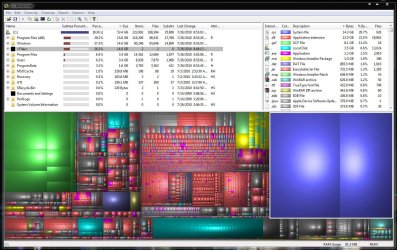
The first thing you should do is to run WinDirStat. Then post the top left quadrant of the WinDirStat result so that we can see what exactly is on your disk. After that we can make intelligent suggestions. Your system should be around 20GBs - not more.
 

My Computer My Computer

Computer Manufacturer/Model Number
HP, Dell, Gateway, Toshiba - 4 laptops and 2 desktops
OS
Vista, Windows7, Mint Mate, Zorin, Windows 8
CPU
from 1.6GHz Duo to i7
Monitor(s) Displays
2x HP w2207
Hard Drives
5x HDD, 7x SSD, 12x Externals
Keyboard
with trackball - no mices
Mouse
Trackball mice
Internet Speed
DSL 6000
Umm, how do I copy the top left quadrant..
 

My Computer My Computer

OS
Windows 7 Ultimate 64bit
CPU
Intel Core i7-875K Lynnfield 2.93GHz LGA 1156 Quad-Core
Motherboard
ASUS Maximus III Extreme LGA 1156 P55 SATA 6Gb/s USB 3.0
Memory
8GB (4 x 2GB) G.SKILL Ripjaws Series DDR3 1600 SDRAM
Graphics Card(s)
XFX HD-585X-ZAFC Radeon HD 5850 1GB 256-bit GDDR5
Sound Card
Logitech G930 wireless 7.1 surround sound USB software
Monitor(s) Displays
ASUS VH242H Black 23.6" 5ms HDMI Full 1080P Widescreen
Screen Resolution
1080p
Hard Drives
OCZ Vertex 2 OCZSSD2-2VTXE60G 2.5" 60GB SATA II MLC
WD Caviar Black WD1002FAEX 1TB 7200 RPM SATA III 3.5"
PSU
CORSAIR CMPSU-750TX 750W ATX12V / EPS12V SLI Ready CrossFire
Case
COOLERMASTER HAF-X RC-942-KKN1 Black Steel/Plastic ATX Full
Cooling
CORSAIR H50 Cooling Hydro Series CWCH50-1 120mm
Keyboard
Microsoft SideWinder X6
Mouse
Microsoft SideWinder X8
Internet Speed
12MB U-Verse
Other Info
Headset
Logitech G930 wireless 7.1 surround sound
Webcam
Microsoft LifeCam Studio HD 1080p
Umm, how do I copy the top left quadrant..

Windows 7 has the new snipping tool, or there is the old school Prnt Scrn button. Press it, then open paint and press Paste. Then cut out the portion we need, open a new paint page, paste again, then save it, and then upload it for us to look at.
 

My Computer My Computer

Computer type
Laptop
Computer Manufacturer/Model Number
Toshiba P775-S7100
OS
Windows 7 Professional SP1 64-bit
CPU
Intel Core i5-2450M @2.5 GHz
Memory
6 GB DDR3 1333MHz
Graphics Card(s)
Intel HD 3000
Monitor(s) Displays
Built-in 17.3" LED; 22" Insignia NS-L22Q-10A
Screen Resolution
1600x900; 1360x768
Hard Drives
750 GB Hitachi
1TB Seagate FreeAgent External
Internet Speed
Verizon DSL Speed(Down/Up): 3360 Kbps / 800 Kbps
Antivirus
MSE and MBAM Pro
Browser
IE10

My Computer My Computer

Computer Manufacturer/Model Number
HP, Dell, Gateway, Toshiba - 4 laptops and 2 desktops
OS
Vista, Windows7, Mint Mate, Zorin, Windows 8
CPU
from 1.6GHz Duo to i7
Monitor(s) Displays
2x HP w2207
Hard Drives
5x HDD, 7x SSD, 12x Externals
Keyboard
with trackball - no mices
Mouse
Trackball mice
Internet Speed
DSL 6000
I just did whole thing... hope I didn't need to open up all folders and all that.
 

Attachments

  • windirstat.JPG
    windirstat.JPG
    227.6 KB · Views: 470

My Computer My Computer

OS
Windows 7 Ultimate 64bit
CPU
Intel Core i7-875K Lynnfield 2.93GHz LGA 1156 Quad-Core
Motherboard
ASUS Maximus III Extreme LGA 1156 P55 SATA 6Gb/s USB 3.0
Memory
8GB (4 x 2GB) G.SKILL Ripjaws Series DDR3 1600 SDRAM
Graphics Card(s)
XFX HD-585X-ZAFC Radeon HD 5850 1GB 256-bit GDDR5
Sound Card
Logitech G930 wireless 7.1 surround sound USB software
Monitor(s) Displays
ASUS VH242H Black 23.6" 5ms HDMI Full 1080P Widescreen
Screen Resolution
1080p
Hard Drives
OCZ Vertex 2 OCZSSD2-2VTXE60G 2.5" 60GB SATA II MLC
WD Caviar Black WD1002FAEX 1TB 7200 RPM SATA III 3.5"
PSU
CORSAIR CMPSU-750TX 750W ATX12V / EPS12V SLI Ready CrossFire
Case
COOLERMASTER HAF-X RC-942-KKN1 Black Steel/Plastic ATX Full
Cooling
CORSAIR H50 Cooling Hydro Series CWCH50-1 120mm
Keyboard
Microsoft SideWinder X6
Mouse
Microsoft SideWinder X8
Internet Speed
12MB U-Verse
Other Info
Headset
Logitech G930 wireless 7.1 surround sound
Webcam
Microsoft LifeCam Studio HD 1080p
Yes I was thinking it was filling up rather quickly. I'm not home but basically I have Win7 Ult 64 bit, DVDFab, Adobe CS5 Master Collection(5GB alone), Microsoft Security Essential, iTunes, Steam(Counter Strike Source only game downloaded), WinRAR, Mozilla Firefox, Microsoft Office Enterprise 2007, ConvertXtoDVD, PeerBlock, uTorrent, PCProbe(PC temp and fan speed reader came with mobo), and that's about it I guess.

I guess I was just so used to XP and it must be smaller than Win7 Ult 64 that took 25GB

steam can be installed and run from another drive as can Utorrent and possibly iTunes ?

the .gcf files are valve for steam so thats 6gb already ;)
 

My Computer My Computer

Computer Manufacturer/Model Number
built my own
OS
win7 ultimate / virtual box
CPU
Intel Core i7 3770K,1155, Ivy Bridge
Motherboard
MSI Z77A-G43
Memory
GSkill Ripjaws Z Series 1600 CL 9.0 16GB
Graphics Card(s)
KFA2 GeForce GTX 670 EX OC 2048MB GDDR5 PCI-E gfx card
Sound Card
onboard Nvidia HDMI audio
Monitor(s) Displays
ASUS VK222H 22" widescreen LCD monitor
Screen Resolution
1680x1050
Hard Drives
Kingston 128gb SSD
OCZ Vertex 90gb SSD
500GB WDCaviar 16mb 5000KS
320GB WDCaviar 16mb 3200AAKS sata 2
1TB Samsung 16mb HD103SJ sata 2
PSU
Corsair HX 750W ATX2.2 Modular
Cooling
Antec 25 Kuhler H2O 620
Keyboard
logitech
Mouse
logitech MX518
Internet Speed
7mb adsl
My guess is that you have a load of system restore points on your drive, you might want to check that and consider deleting them.


Steve
 

My Computer My Computer

Computer Manufacturer/Model Number
Over Clockers Ultima Viper 2.80Ghz
OS
Windows 7 Ultimate 64 - OEM Service Pack 1
CPU
Intel Core i7 930 2.80Ghz Bloomfield Socket LGA 1366
Motherboard
Gigabyte GA-X58A-UD3R Intel X58 Socket 1366 DDR3
Memory
Patriot Viper 6GB 3x2GB DDR3 PC3-1200C9 1600Mhz Tri Channel
Graphics Card(s)
Asus ATI Radeon HD 5770 CuCore 1024MB GDDR5 PCI Express
Sound Card
Realtek ALC889 @ Intel 82801JB ICH10 - High Definition Audio
Monitor(s) Displays
Samsung SyncMaster 920N 19"
Screen Resolution
1280*1024
Hard Drives
1 x OCZ Vertex2 Series 120GB 2.5" SATA-II SSD
1 x Seagate Barracuda 7200.12 1TB SATA-II 32MB Cache
1 x Western Digital Caviar Green 2TB SATA-II 64 MB Cache
PSU
Corsair TX 650W ATX SLi
Case
Antec 902 Ultimate Gaming Case Black
Cooling
Prolimatech Megahalems Rev B CPU Cooler Socket 775/1156/1366
Keyboard
Microsoft Comfort Curve Keyboard
Mouse
Microsoft Optical USB
Internet Speed
ADSL24 FTTC 34.2 Mbps Down 7.1Mbps Up
Other Info
OcUK 22x DVDSATA ReWriter Black
Akasa AK-FN058 Apache Black Super Silent 120mm Fan
Printer Epson Stylus Photo R300
Scanner Canon Canoscan 8000F
Indeed, reducing the amount that system restore can use will free some space up.
 

My Computer My Computer

Computer type
Laptop
Computer Manufacturer/Model Number
Toshiba P775-S7100
OS
Windows 7 Professional SP1 64-bit
CPU
Intel Core i5-2450M @2.5 GHz
Memory
6 GB DDR3 1333MHz
Graphics Card(s)
Intel HD 3000
Monitor(s) Displays
Built-in 17.3" LED; 22" Insignia NS-L22Q-10A
Screen Resolution
1600x900; 1360x768
Hard Drives
750 GB Hitachi
1TB Seagate FreeAgent External
Internet Speed
Verizon DSL Speed(Down/Up): 3360 Kbps / 800 Kbps
Antivirus
MSE and MBAM Pro
Browser
IE10
steam can be installed and run from another drive as can Utorrent and possibly iTunes ?

the .gcf files are valve for steam so thats 6gb already ;)

but I want Steam and iTunes to run fast that's why they're on the SSD.

My guess is that you have a load of system restore points on your drive, you might want to check that and consider deleting them.


Steve

and how is this done? :(
 

My Computer My Computer

OS
Windows 7 Ultimate 64bit
CPU
Intel Core i7-875K Lynnfield 2.93GHz LGA 1156 Quad-Core
Motherboard
ASUS Maximus III Extreme LGA 1156 P55 SATA 6Gb/s USB 3.0
Memory
8GB (4 x 2GB) G.SKILL Ripjaws Series DDR3 1600 SDRAM
Graphics Card(s)
XFX HD-585X-ZAFC Radeon HD 5850 1GB 256-bit GDDR5
Sound Card
Logitech G930 wireless 7.1 surround sound USB software
Monitor(s) Displays
ASUS VH242H Black 23.6" 5ms HDMI Full 1080P Widescreen
Screen Resolution
1080p
Hard Drives
OCZ Vertex 2 OCZSSD2-2VTXE60G 2.5" 60GB SATA II MLC
WD Caviar Black WD1002FAEX 1TB 7200 RPM SATA III 3.5"
PSU
CORSAIR CMPSU-750TX 750W ATX12V / EPS12V SLI Ready CrossFire
Case
COOLERMASTER HAF-X RC-942-KKN1 Black Steel/Plastic ATX Full
Cooling
CORSAIR H50 Cooling Hydro Series CWCH50-1 120mm
Keyboard
Microsoft SideWinder X6
Mouse
Microsoft SideWinder X8
Internet Speed
12MB U-Verse
Other Info
Headset
Logitech G930 wireless 7.1 surround sound
Webcam
Microsoft LifeCam Studio HD 1080p
My guess is that you have a load of system restore points on your drive, you might want to check that and consider deleting them.


Steve

and how is this done? :(

Right click My Computer and click properties. Click System Protection. Go to the System Protection tab if it does not take you there automatically, and hit configure. You can control most if not all System Restore settings from there.
 

My Computer My Computer

Computer type
Laptop
Computer Manufacturer/Model Number
Toshiba P775-S7100
OS
Windows 7 Professional SP1 64-bit
CPU
Intel Core i5-2450M @2.5 GHz
Memory
6 GB DDR3 1333MHz
Graphics Card(s)
Intel HD 3000
Monitor(s) Displays
Built-in 17.3" LED; 22" Insignia NS-L22Q-10A
Screen Resolution
1600x900; 1360x768
Hard Drives
750 GB Hitachi
1TB Seagate FreeAgent External
Internet Speed
Verizon DSL Speed(Down/Up): 3360 Kbps / 800 Kbps
Antivirus
MSE and MBAM Pro
Browser
IE10
To save space on mine, i always disable the hibernate file. (about 8gigs approx) od space can be saved if you dont use this feature.

You can also reduce the PF size if you have plenty of RAM, or move it to another drive. Around 2GB perhaps left on the SSD would be fine, but do not disable it.

As suggested, reduce the amount of space 7 can use for restore points.

This should free up around 10GB of space. (depending how much RAM you have it may be a bit more)

However, if I were you, I would just put Steam at the very front of a spining Drive where it will perform best (or a secondary SSD) as well as all music, video, and picture folders.
just let the SSD handle the OS and all other Programs.

While it is true a game will load a bit faster on the SSD, the simple fact is once the game is loaded it really doesnt make that much of a difference in the grand scheme of things.
Once the game loads, its running from memory which is faster than the SSD anyway. The exception would be a few games that load the game world on the fly. Even then, not that drastic of a difference.

However, the choice is yours. So a couple tips to save some space if you choose to leave it where it is.
 

My Computer My Computer

Computer Manufacturer/Model Number
Custom (Self Build)
OS
Windows 7 Home Premium 64bit
CPU
Intel Core i7 2700k
Motherboard
eVGA P67 SLI
Memory
8GB Mushkin Redline Ridgebacks @1866
Graphics Card(s)
EVGA GTX570 SC
Sound Card
XiFi Titanium HD
Monitor(s) Displays
LG W2453V
Screen Resolution
1920x1080
Hard Drives
Intel 320 80GB -- Intel X25-V 40GB --WD Black 1TB x2 -- WD Blue 640GB
PSU
Seasonic x750
Case
Corsair 600T SE White
Cooling
eVGA Superclocked CPU Cooler
Keyboard
Saitek Cyborg
Antivirus
Kaspersky
Browser
IE
Other Info
LG BD/DVD
Back
Top