Should I or Shouldn't I?

Hoody123

New member
Local time
10:05 AM
Messages
3
I just got a new Advent Roma 3001 a budget laptop.
It has 4GB ram, with Windows 7 32-bit with an integrated intel mobile 4 series.

As you can see Im only getting 2.93gb of my 4gb ram usable
2rdhidf.png


Now i've read (on this forum :)) that this is down to me being on 32-bit windows as 32 bit only shows 4gb ram.
Now I'm wondering, if I format my laptop with 64 bit windows, will I get my full 4gb ram and is it safe too, and is it worth it because my harddrive is already packed with all my files so should I or shouldn't I?

Thanks
 

My Computer My Computer

OS
windows 7

My Computer My Computer

Computer type
PC/Desktop
Computer Manufacturer/Model Number
Built them myself, Science Experiments !
OS
Win7 Enterprise, Win7 x86 (Ult 7600), Win7 x64 Ult 7600, TechNet RTM on AMD x64 (2.8Ghz)
CPU
AMD fx8350 4ghz, AMD-32 2400mhz, AMD-64 3200mhz, AMDx64 2.8G
Motherboard
SIS 755, ECS-K8M890M-M (Ult 7600), GigaByte & others
Memory
2gb, 4gb on the Ult 7600, 4gb on Technet RTM, 32gb on FX8350
Graphics Card(s)
Draw my own Graphics, several nVidia cards
Sound Card
on motherboard
Monitor(s) Displays
19" flat scr, 28" I-Inc widescr,22" Emprex Widescr, 23" Acer
Screen Resolution
1280 x 1024, 1440 x 900, 1920 x 1080
Hard Drives
6 pata Ide HD's & 2 Sata HD's
added 80gb external on Ult 7600 computer,
numerous extra 1tb, 2TB, 3Tb SATA HD's
A collection of ext HD Docks w/ HDs
PSU
430w, 550w, 600w, 700, 800, etc
Case
All Generic Full Towers
Cooling
Open Air & a few fans, some w/ colored LEDs
Keyboard
Compaq & Dell recycled from GoodWill
Mouse
Made in China Optical Wired Mouse
Internet Speed
Fast Cable InterNet
Antivirus
AVG Free on 24 different Desktops, NO Problems!
Browser
IE 8 is preferred, but use FireFox sometimes
Other Info
Linksys Routers, switches, & Hubs
Too Many USB Flash Drives to count, Biggest is 64GB !
Eight computers in my home network.
Sixteen computers at my business network.
Linked via TeamViewer !
Lots of old used spare computer parts everywhere!
That person has 64-bit already though.. Im on 32 bit and I tried going into advanced options and max memory is already unchecked and ive tried checking it and rebooting and still same so I unchecked it again
 

My Computer My Computer

OS
windows 7
That person has 64-bit already though.. Im on 32 bit and I tried going into advanced options and max memory is already unchecked and ive tried checking it and rebooting and still same so I unchecked it again


Some Bios have a setting that needs to be looked at for memory allowcation.
You will never get the full 4gb because of a laptop on board video card. :(
 

My Computer My Computer

Computer type
PC/Desktop
Computer Manufacturer/Model Number
Built them myself, Science Experiments !
OS
Win7 Enterprise, Win7 x86 (Ult 7600), Win7 x64 Ult 7600, TechNet RTM on AMD x64 (2.8Ghz)
CPU
AMD fx8350 4ghz, AMD-32 2400mhz, AMD-64 3200mhz, AMDx64 2.8G
Motherboard
SIS 755, ECS-K8M890M-M (Ult 7600), GigaByte & others
Memory
2gb, 4gb on the Ult 7600, 4gb on Technet RTM, 32gb on FX8350
Graphics Card(s)
Draw my own Graphics, several nVidia cards
Sound Card
on motherboard
Monitor(s) Displays
19" flat scr, 28" I-Inc widescr,22" Emprex Widescr, 23" Acer
Screen Resolution
1280 x 1024, 1440 x 900, 1920 x 1080
Hard Drives
6 pata Ide HD's & 2 Sata HD's
added 80gb external on Ult 7600 computer,
numerous extra 1tb, 2TB, 3Tb SATA HD's
A collection of ext HD Docks w/ HDs
PSU
430w, 550w, 600w, 700, 800, etc
Case
All Generic Full Towers
Cooling
Open Air & a few fans, some w/ colored LEDs
Keyboard
Compaq & Dell recycled from GoodWill
Mouse
Made in China Optical Wired Mouse
Internet Speed
Fast Cable InterNet
Antivirus
AVG Free on 24 different Desktops, NO Problems!
Browser
IE 8 is preferred, but use FireFox sometimes
Other Info
Linksys Routers, switches, & Hubs
Too Many USB Flash Drives to count, Biggest is 64GB !
Eight computers in my home network.
Sixteen computers at my business network.
Linked via TeamViewer !
Lots of old used spare computer parts everywhere!
That person has 64-bit already though.. Im on 32 bit and I tried going into advanced options and max memory is already unchecked and ive tried checking it and rebooting and still same so I unchecked it again


Some Bios have a setting that needs to be looked at for memory allowcation.
You will never get the full 4gb because of a laptop on board video card. :(

But wouldn't installing 64-bit allow me 4gb? or am I getting it all wrong :P?
 

My Computer My Computer

OS
windows 7
That person has 64-bit already though.. Im on 32 bit and I tried going into advanced options and max memory is already unchecked and ive tried checking it and rebooting and still same so I unchecked it again


Some Bios have a setting that needs to be looked at for memory allowcation.
You will never get the full 4gb because of a laptop on board video card. :(

But wouldn't installing 64-bit allow me 4gb? or am I getting it all wrong :P?

32bit allows 4gb & 64bit allows :

While the maximum RAM limit for 32-bit Windows 7 editions is 4GB, when it comes to the 64-bit editions, the amount of memory that the OS can address depends on which edition you are running.
Here are the upper RAM limits for the different editions of Windows 7:
  • Starter: 8GB
  • Home Basic: 8GB
  • Home Premium: 16GB
  • Professional: 192GB
  • Enterprise: 192GB
  • Ultimate: 192GB
 

My Computer My Computer

Computer type
PC/Desktop
Computer Manufacturer/Model Number
Built them myself, Science Experiments !
OS
Win7 Enterprise, Win7 x86 (Ult 7600), Win7 x64 Ult 7600, TechNet RTM on AMD x64 (2.8Ghz)
CPU
AMD fx8350 4ghz, AMD-32 2400mhz, AMD-64 3200mhz, AMDx64 2.8G
Motherboard
SIS 755, ECS-K8M890M-M (Ult 7600), GigaByte & others
Memory
2gb, 4gb on the Ult 7600, 4gb on Technet RTM, 32gb on FX8350
Graphics Card(s)
Draw my own Graphics, several nVidia cards
Sound Card
on motherboard
Monitor(s) Displays
19" flat scr, 28" I-Inc widescr,22" Emprex Widescr, 23" Acer
Screen Resolution
1280 x 1024, 1440 x 900, 1920 x 1080
Hard Drives
6 pata Ide HD's & 2 Sata HD's
added 80gb external on Ult 7600 computer,
numerous extra 1tb, 2TB, 3Tb SATA HD's
A collection of ext HD Docks w/ HDs
PSU
430w, 550w, 600w, 700, 800, etc
Case
All Generic Full Towers
Cooling
Open Air & a few fans, some w/ colored LEDs
Keyboard
Compaq & Dell recycled from GoodWill
Mouse
Made in China Optical Wired Mouse
Internet Speed
Fast Cable InterNet
Antivirus
AVG Free on 24 different Desktops, NO Problems!
Browser
IE 8 is preferred, but use FireFox sometimes
Other Info
Linksys Routers, switches, & Hubs
Too Many USB Flash Drives to count, Biggest is 64GB !
Eight computers in my home network.
Sixteen computers at my business network.
Linked via TeamViewer !
Lots of old used spare computer parts everywhere!
maximum ram that can be used for 32 bit is 3.25gb

the other amount is being used for video memory this is why 2.93 is showing usable
 

My Computer My Computer

OS
Windows 7 Ultimate 64bit
CPU
AMD Phenom II X4 945 @3.0ghz
Motherboard
Asrock
Memory
4gb kingston hyperX
Graphics Card(s)
1gb Radeon HD 5670
Actually its addressing space.

32bit allows 4Gb of address space.

So, in a nut shell (assuming 4Gb are installed) its 4GB minus Video memory = approx amount of RAM useable by the OS.


To hopefully better explain:
Lets assume you have a dedicated graphics card that has 512MB RAM.

With a 32bit system, you have 4Gb of address space.
This means that you have 4GB of space to map everything to. (RAM, Video cards etc).

So, 4GB RAM + 512MB Graphics Card= 4.5 GB total adress space.
The system doesnt not have the room to address it all.
So it will address all periphials first, in this case a 512MB GPU, then assign what space is left to map physical RAM, leaving you a useable 3.5GB approx out of 4GB installed.

With a 64bit OS, that address space is significantly more as DocBrown has shown above.

So the system is able to address the 4GB of physical RAM installed, as well as your dedicated graphics card on board RAM (in this case 512MB) leaving you 4GB of useable system memory out 4GB installed.
And a total of approx. 4.5GB of address space assigned.


However, as DocBrown also pointed out, you will still have less 4GB of useable RAM however with a 64bit OS.

The reason is, onboard video does not have its own RAM.
So it must borrow memory form somewhere. So it does so from the installed system RAM at whatever value it is set at in the bios.

In your case, it is not an issue of needing more addressing space to assign everything.
The integrated GPU itself must borrow its RAM from the system itself.
Even with a 64bit OS, you will still have less RAm useable than is installed in the system.

With a integrated GPU, how a 64bit system can help is amount of RAm it can adress.
So if you were to put 8Gb into a 32bit OS, youd have the useable RAM you do now.
If under 64 bit, it would raise, minus the set value your integrated GPU uses (if set to 512MB it would show 7.5GB useable out of 8GB)
 

My Computer My Computer

Computer Manufacturer/Model Number
Custom (Self Build)
OS
Windows 7 Home Premium 64bit
CPU
Intel Core i7 2700k
Motherboard
eVGA P67 SLI
Memory
8GB Mushkin Redline Ridgebacks @1866
Graphics Card(s)
EVGA GTX570 SC
Sound Card
XiFi Titanium HD
Monitor(s) Displays
LG W2453V
Screen Resolution
1920x1080
Hard Drives
Intel 320 80GB -- Intel X25-V 40GB --WD Black 1TB x2 -- WD Blue 640GB
PSU
Seasonic x750
Case
Corsair 600T SE White
Cooling
eVGA Superclocked CPU Cooler
Keyboard
Saitek Cyborg
Antivirus
Kaspersky
Browser
IE
Other Info
LG BD/DVD
no wishmaster you are incorrect

the maximum 32 bits could possibly use including the total addressable memory is 4gb, so if u had a 512mb portion going to video the most ram thats possible is 3.5gb not 4.5gb. and in pretty much every case the most ram 32bit windows will ever recognize is 3.25gb
 

My Computer My Computer

OS
Windows 7 Ultimate 64bit
CPU
AMD Phenom II X4 945 @3.0ghz
Motherboard
Asrock
Memory
4gb kingston hyperX
Graphics Card(s)
1gb Radeon HD 5670
Kirspy I have seen with my own eyes 32-bit windows address 3.5GB. 3.25 is an average.
 

My Computer My Computer

Computer type
Laptop
Computer Manufacturer/Model Number
Toshiba P775-S7100
OS
Windows 7 Professional SP1 64-bit
CPU
Intel Core i5-2450M @2.5 GHz
Memory
6 GB DDR3 1333MHz
Graphics Card(s)
Intel HD 3000
Monitor(s) Displays
Built-in 17.3" LED; 22" Insignia NS-L22Q-10A
Screen Resolution
1600x900; 1360x768
Hard Drives
750 GB Hitachi
1TB Seagate FreeAgent External
Internet Speed
Verizon DSL Speed(Down/Up): 3360 Kbps / 800 Kbps
Antivirus
MSE and MBAM Pro
Browser
IE10
But wouldn't installing 64-bit allow me 4gb?

In most cases, yes. In the case of your laptop, from what I can find about its specs,

UKT Support - Advent Roma 3001 Laptop

it only supports up to 4 GB of ram. That in and of itself isn't the problem as far as 64 bit and 4 GB of ram. The problem comes up if the 4 GB max is a chipset limit as well, which when that occurs causes this to happen,

The system memory that is reported in the System Information dialog box in Windows Vista is less than you expect if 4 GB of RAM is installed

Note When the physical RAM that is installed on a computer equals the address space that is supported by the chipset, the total system memory that is available to the operating system is always less than the physical RAM that is installed. For example, consider a computer that has an Intel 975X chipset that supports 8 GB of address space. If you install 8 GB of RAM, the system memory that is available to the operating system will be reduced by the PCI configuration requirements. In this scenario, PCI configuration requirements reduce the memory that is available to the operating system by an amount that is between approximately 200 MB and approximately 1 GB. The reduction depends on the configuration.

Unless there is an option in the bios for memory remapping (required to push the virtual addressing space above the 4 GB limit), even with 64 bit Windows you will still see similar for available memory.
 

My Computer My Computer

Computer type
PC/Desktop
Computer Manufacturer/Model Number
Me
OS
Win 7 Ultimate x64
CPU
FX-8350 @ 4.6 GHz so far
Motherboard
Asus M5A97 EVO
Memory
ADATA XPG V1 Series Black 8GB DDR3 1600
Graphics Card(s)
Sapphire R9 270x Dual-X
Sound Card
Xonar DGX w/ Corsair Vengence 1300
Monitor(s) Displays
Acer S232HL Abid
Screen Resolution
1920x1080
Hard Drives
120 GB OCZ Vertex 3
500 GB Seagate 7200.12
PSU
Antec Earthwatts 650W Green
Case
Antec Three Hundred
Cooling
Cooler Master 212 EVO
Keyboard
Logitech G510
Mouse
Logitech G500s
Internet Speed
35000/3000
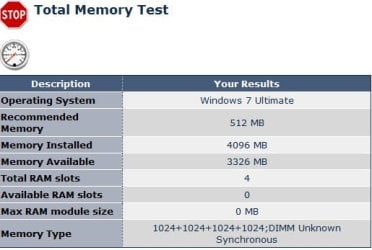
This is what my Win7 Ultimate 32bit is showing
 

Attachments

  • Memory.jpg
    Memory.jpg
    22.9 KB · Views: 3

My Computer My Computer

Computer type
PC/Desktop
Computer Manufacturer/Model Number
Bruce ... somewhere in his 40's
OS
Windows 7 Ultimate 32bit SP1
CPU
Intel(R) Core(TM)2 Quad CPU @ 2.40GHz, 2400 MHz
Motherboard
INTEL/D975XBX2
Memory
4 GB
Graphics Card(s)
ATI Radeon HD 2600 Pro
Monitor(s) Displays
Samsung SyncMaster 914v
Screen Resolution
1280 x 1024
Hard Drives
2/500GB each ... ST3500630AS ATA Device.
One is not connected
PSU
Rocketfish 700 W
Case
G.Skill Gigabyte Chassis
Keyboard
Standard PS/2 Keyboard
Mouse
Microsoft PS/2 Mouse
Internet Speed
DSL
Antivirus
Avira Internet Security
Browser
IE 11
Other Info
ATI HDMI Audio
no wishmaster you are incorrect

the maximum 32 bits could possibly use including the total addressable memory is 4gb, so if u had a 512mb portion going to video the most ram thats possible is 3.5gb not 4.5gb. and in pretty much every case the most ram 32bit windows will ever recognize is 3.25gb

I think you misunderstand.

In order for the system to show complete use of 4GB of installed physical RAM, + a 512 graphics card for example:

It must address them, for a total of 4.5GB of space.
4GB physical RAM + 512 for the video card= 4.5GB
(or whatever size the video card has)
Of course, there may also be other things that need to be addresed.

32bit can only address (by default settings) 4GB of space.
Physical RAM gets addressed last. Under 32bit, Amount of RAM available will be 4GB minus everything else that gets addressed first.


64bit is capable of addressing all of this, and still have full use of installed RAM.

Granted, there are ways to increase a 32bit systems addressing space, but thats a different subject entirely.

But, if the system must borrow video RAM from the systems physical system memory, (integrated graphics) it will always show less than installed,
as addressing space can not solve that. Even under 64bit.

Or perhaps I am completely misunderstanding it all..
 

My Computer My Computer

Computer Manufacturer/Model Number
Custom (Self Build)
OS
Windows 7 Home Premium 64bit
CPU
Intel Core i7 2700k
Motherboard
eVGA P67 SLI
Memory
8GB Mushkin Redline Ridgebacks @1866
Graphics Card(s)
EVGA GTX570 SC
Sound Card
XiFi Titanium HD
Monitor(s) Displays
LG W2453V
Screen Resolution
1920x1080
Hard Drives
Intel 320 80GB -- Intel X25-V 40GB --WD Black 1TB x2 -- WD Blue 640GB
PSU
Seasonic x750
Case
Corsair 600T SE White
Cooling
eVGA Superclocked CPU Cooler
Keyboard
Saitek Cyborg
Antivirus
Kaspersky
Browser
IE
Other Info
LG BD/DVD

My Computer My Computer

Computer type
PC/Desktop
Computer Manufacturer/Model Number
Bruce ... somewhere in his 40's
OS
Windows 7 Ultimate 32bit SP1
CPU
Intel(R) Core(TM)2 Quad CPU @ 2.40GHz, 2400 MHz
Motherboard
INTEL/D975XBX2
Memory
4 GB
Graphics Card(s)
ATI Radeon HD 2600 Pro
Monitor(s) Displays
Samsung SyncMaster 914v
Screen Resolution
1280 x 1024
Hard Drives
2/500GB each ... ST3500630AS ATA Device.
One is not connected
PSU
Rocketfish 700 W
Case
G.Skill Gigabyte Chassis
Keyboard
Standard PS/2 Keyboard
Mouse
Microsoft PS/2 Mouse
Internet Speed
DSL
Antivirus
Avira Internet Security
Browser
IE 11
Other Info
ATI HDMI Audio
no wishmaster you are incorrect

the maximum 32 bits could possibly use including the total addressable memory is 4gb, so if u had a 512mb portion going to video the most ram thats possible is 3.5gb not 4.5gb. and in pretty much every case the most ram 32bit windows will ever recognize is 3.25gb

I think you misunderstand.

In order for the system to show complete use of 4GB of installed physical RAM, + a 512 graphics card for example:

It must address them, for a total of 4.5GB of space.
4GB physical RAM + 512 for the video card= 4.5GB
(or whatever size the video card has)
Of course, there may also be other things that need to be addresed.

32bit can only address (by default settings) 4GB of space.
Physical RAM gets addressed last. Under 32bit, Amount of RAM available will be 4GB minus everything else that gets addressed first.


64bit is capable of addressing all of this, and still have full use of installed RAM.

Granted, there are ways to increase a 32bit systems addressing space, but thats a different subject entirely.

But, if the system must borrow video RAM from the systems physical system memory, (integrated graphics) it will always show less than installed,
as addressing space can not solve that. Even under 64bit.

Or perhaps I am completely misunderstanding it all..


you are still incorrect.

the total addressable ram for 32bit is 4gb this includes peripherals like the video memory.

u can read this for some more info 3 GB barrier - Wikipedia, the free encyclopedia
 

My Computer My Computer

OS
Windows 7 Ultimate 64bit
CPU
AMD Phenom II X4 945 @3.0ghz
Motherboard
Asrock
Memory
4gb kingston hyperX
Graphics Card(s)
1gb Radeon HD 5670
Do you have the DVD and enough HD space to install a Dual Boot to test 64 bit?
 
Hoody I suppose the question to ask here is this. Are you actually needing to have more RAM avalable for what you are doing. You can check this by right clicking on your task bar and opening task manager. Now click on performance and then recourse monitor. This will give you a detailed look at what you are using your RAM on. So will the pain of having to do a fresh install 64 bit to gain a small amount of memory be worth it to you :D
 

My Computer My Computer

Computer Manufacturer/Model Number
Proline
OS
Windows 7 Pro 64 bit
CPU
Intel(R) Core(TM) i7 CPU 870 @ 2.93GHz
Motherboard
H55-G43(MS-7638)
Memory
4GB
Graphics Card(s)
NVIDIA GeForce GTX 470
Sound Card
Onboard
Monitor(s) Displays
Proline LCD 19 inch
Screen Resolution
1280 x 1024
Hard Drives
2 x SATA 250 Gig 1 x External 2TB
PSU
RX 730 SS
Case
Proline
Cooling
Standard
Keyboard
PS2
Mouse
PS2
Internet Speed
To embarrassed to tell lol
Back
Top