How to copy files between two hard drives faster?

I'd like to add, that these problem seem to be confined to internal disks, strangely enough. I have an external hard drive connected via eSATA, and transfer rates to and from this device are way higher that between internal disks. This does not make sense at all. We are talking about same internal disks - with or without their formatting problems, but why would a transfer rate from the external drive be higher then between different partitions on the same internal drive?
Because the transfer between partitions is hitting the same physical hardware for each read and write, whereas copying to a different physical disk is just that - aka, less overhead on the disk I/O controller (which may not be the greatest firmware to begin with, especially with random reads while writing and random writes while reading, where most bad firmware falls down).
 

My Computer My Computer

At a glance

Windows 10 Pro x64Intel Core i7 4790K @ 4.5GHz32GB DDR3Nvidia GeForce GTX970
Computer type
PC/Desktop
Computer Manufacturer/Model Number
Custom
OS
Windows 10 Pro x64
CPU
Intel Core i7 4790K @ 4.5GHz
Motherboard
Asus Maximus Hero VII
Memory
32GB DDR3
Graphics Card(s)
Nvidia GeForce GTX970
Sound Card
Realtek HD Audio
Screen Resolution
1920x1200
Hard Drives
1x Samsung 250GB SSD
4x WD RE 2TB (RAIDZ)
PSU
Corsair AX760i
Case
Fractal Design Define R4
Cooling
Noctua NH-D15
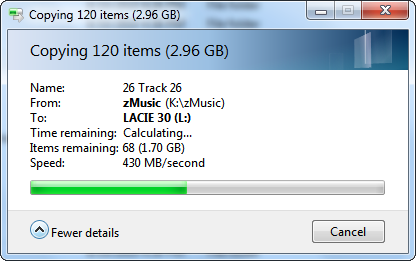
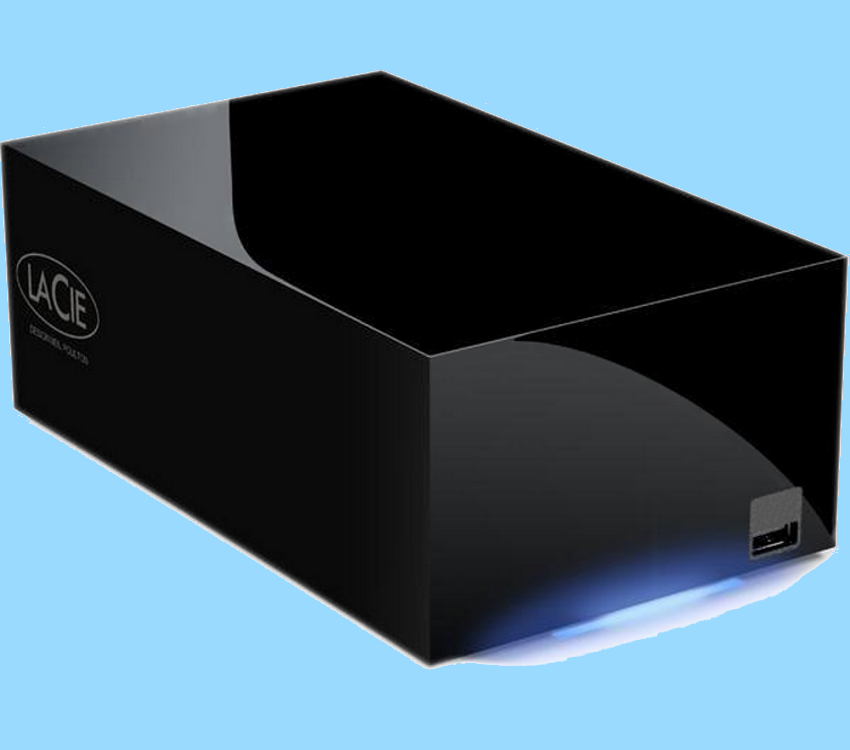
My computer used to also suffer from low 2 digit transfer rates the highest of which was 38.3 MBps over 400 Firewire. That was until I hooked up a LaCie 2TB eSATA Raid 0 drive and now file transfers go more than 10X as fast...

430MBps.png


LaCieHDMax.png


~Maxx~
.
938af360.png
 

My Computer My Computer

At a glance

Windows 7 x64 Home PremiumIntel Core i7 930 @ 2.8 Ghz Socket 1366 LGA8 GB 1366 Mhz DDR3 (PC3-10700) RAMATI Radeon 5770 1 GB DDR5 RAM
Computer Manufacturer/Model Number
HP HPE 270f
OS
Windows 7 x64 Home Premium
CPU
Intel Core i7 930 @ 2.8 Ghz Socket 1366 LGA
Motherboard
Pegatron Truckee v1.04E41
Memory
8 GB 1366 Mhz DDR3 (PC3-10700) RAM
Graphics Card(s)
ATI Radeon 5770 1 GB DDR5 RAM
Sound Card
Realtech High Definition
Monitor(s) Displays
32" Sony Bravia
Screen Resolution
1366 X 768
Hard Drives
Intel 25nm 120 GB Series 320 SSD HD Tune- 265 MBps Read/ 130 MBps Write

LaCie 1TB + 1TB RAID 0 eSATA Drive HD Tune- 160 MBps Read/ 90 MBps Write
Keyboard
Logitech Illuminated
Mouse
Logitech MX Revolution
Internet Speed
36.4 Mbps Maximum on a 37 Mbps Motorola SB501 Modem
I hate to burst your bubble maxxwire, but there is no way that your internal Hitachi disk drive can read fast enough to supply data to that Lacie drive at 430MB/s. If you were actually copying that fast, your 3GB file copy would have been done in about 6 seconds.

@The original poster....20MB/s seems pretty slow between 2 physical drives. But with some drive fragmentation and such...and a drive that only gets around 60MB/s anyway...if you have lots of little files.....20MB/s might be right

For those interested in robocopy, the syntax is easy
robocopy C:\sourceFolder X:\destinationFolder /mir /dst

The /mir means to mirror everything...even deletions. So, when you delete from C:\sourceFolder, it would also remove the file from X:\destinationFolder.
 

My Computer My Computer

At a glance

Windows 7 Ultimate x64Intel Q9550 2.83Ghz OC'd to 3.40Ghz8GB G.Skill PI DDR2-800, 4-4-4-12 timingsEVGA 1280MB Nvidia GeForce GTX570
Computer Manufacturer/Model Number
Self-Built in July 2009
OS
Windows 7 Ultimate x64
CPU
Intel Q9550 2.83Ghz OC'd to 3.40Ghz
Motherboard
Gigabyte GA-EP45-UD3R rev. 1.1, F12 BIOS
Memory
8GB G.Skill PI DDR2-800, 4-4-4-12 timings
Graphics Card(s)
EVGA 1280MB Nvidia GeForce GTX570
Sound Card
Realtek ALC899A 8 channel onboard audio
Monitor(s) Displays
23" Acer x233H
Screen Resolution
1920x1080
Hard Drives
Intel X25-M 80GB Gen 2 SSD
Western Digital 1TB Caviar Black, 32MB cache. WD1001FALS
PSU
Corsair 620HX modular
Case
Antec P182
Cooling
stock
Keyboard
ABS M1 Mechanical
Mouse
Logitech G9 Laser Mouse
Internet Speed
15/2 cable modem
Other Info
Windows and Linux enthusiast. Logitech G35 Headset.
I hate to burst your bubble maxxwire, but there is no way that your internal Hitachi disk drive can read fast enough to supply data to that Lacie drive at 430MB/s.

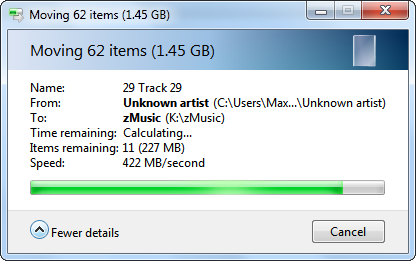
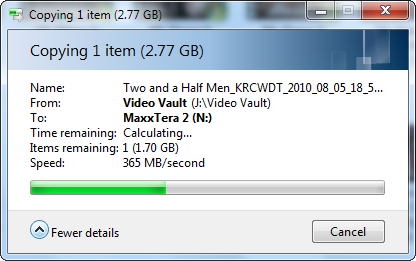
Yes you are correct, but you're not bursting my bubble because I made no claim that it was the HDD that was making the file transfer go at 430 MBps because I have discovered that it is something quite different and much much faster than spinning discs that develops this kind speed. Having shown you a straight up honest unaltered screenshot of the speed Win 7 is saying it transferred those music files at now let me share with you what I discovered about how the amazing Win 7 OS architecture accomplishes incredibly high speed file transfers such as this.

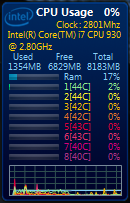
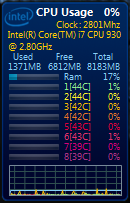
During these high speed transfers Win 7 employs over 1 GB of 1333 Mhz DDR3 RAM which as we all know is much faster than any HDD. Here is a second music file transfer as well as a Win 7 video file transfer to further demonstrate how fast this 1+ GB of DDR 3 RAM works...

8056a41f.png
00f6a39b.png


d7dc9751.png
c25ac6a2.png
59c2f41d.png


.........Before............During Transfer.............After..........

As you can see by the screenshots above that I took before, during and after a high speed file transfer there's only a total of 3% of the Core i7 930 CPU being used with only one of the 8 logical cores making even a modest 12% effort which leaves Win 7 speeding the file transfer along by cleverly implementing 1.04 GB of 1.333 GHz DDR 3 RAM. In other words Win 7 employs enough RAM to run several XP computers in order to be able to transfer files at these high speeds.

As far as the Mobo goes the specs on the Intel ICH10 Southbridge benchmark it at 650 MBps which is more than fast enough for these transfer speeds which Win 7 has recorded time and time again...

x58_chipset.jpg


~Maxx~
.
938af360.png
 
Last edited:

My Computer My Computer

At a glance

Windows 7 x64 Home PremiumIntel Core i7 930 @ 2.8 Ghz Socket 1366 LGA8 GB 1366 Mhz DDR3 (PC3-10700) RAMATI Radeon 5770 1 GB DDR5 RAM
Computer Manufacturer/Model Number
HP HPE 270f
OS
Windows 7 x64 Home Premium
CPU
Intel Core i7 930 @ 2.8 Ghz Socket 1366 LGA
Motherboard
Pegatron Truckee v1.04E41
Memory
8 GB 1366 Mhz DDR3 (PC3-10700) RAM
Graphics Card(s)
ATI Radeon 5770 1 GB DDR5 RAM
Sound Card
Realtech High Definition
Monitor(s) Displays
32" Sony Bravia
Screen Resolution
1366 X 768
Hard Drives
Intel 25nm 120 GB Series 320 SSD HD Tune- 265 MBps Read/ 130 MBps Write

LaCie 1TB + 1TB RAID 0 eSATA Drive HD Tune- 160 MBps Read/ 90 MBps Write
Keyboard
Logitech Illuminated
Mouse
Logitech MX Revolution
Internet Speed
36.4 Mbps Maximum on a 37 Mbps Motorola SB501 Modem
Having shown you a straight up honest unaltered screenshot of the speed Win 7 is saying it transferred those music files at
I realize that you didn't alter the screenshot, but the Windows file transfer speed being displayed is known at times to be inaccurate or showing cached values instead.

Let me ask...when you copied the 1.5GB of music...did the copy complete in less than 4 seconds?

During these high speed transfers Win 7 employs over 1 GB of 1333 Mhz DDR3 RAM which as we all know is much faster than any HDD.
Yes, RAM is much faster than the hard drive. However, unless you are actually storing these music files somehow in your RAM...they would have to be accessed via your hard drive first to get them into RAM. And you are limited by the physical speed of your hard drive making that 1st process happen.


As you can see by the screenshots above that I took before, during and after a high speed file transfer there's only a total of 3% of the Core i7 930 CPU being used with only one of the 8 logical cores making even a modest 12% effort which leaves Win 7 speeding the file transfer along by cleverly implementing 1.04 GB of 1.333 GHz DDR 3 RAM.
I'm not following this logic at all. A file copy procedure is not CPU intensive in any way at all....never has been.

So, are these 1.5GB file copies finishing in 3-4 seconds? That's all I really want to know.
 

My Computer My Computer

At a glance

Windows 7 Ultimate x64Intel Q9550 2.83Ghz OC'd to 3.40Ghz8GB G.Skill PI DDR2-800, 4-4-4-12 timingsEVGA 1280MB Nvidia GeForce GTX570
Computer Manufacturer/Model Number
Self-Built in July 2009
OS
Windows 7 Ultimate x64
CPU
Intel Q9550 2.83Ghz OC'd to 3.40Ghz
Motherboard
Gigabyte GA-EP45-UD3R rev. 1.1, F12 BIOS
Memory
8GB G.Skill PI DDR2-800, 4-4-4-12 timings
Graphics Card(s)
EVGA 1280MB Nvidia GeForce GTX570
Sound Card
Realtek ALC899A 8 channel onboard audio
Monitor(s) Displays
23" Acer x233H
Screen Resolution
1920x1080
Hard Drives
Intel X25-M 80GB Gen 2 SSD
Western Digital 1TB Caviar Black, 32MB cache. WD1001FALS
PSU
Corsair 620HX modular
Case
Antec P182
Cooling
stock
Keyboard
ABS M1 Mechanical
Mouse
Logitech G9 Laser Mouse
Internet Speed
15/2 cable modem
Other Info
Windows and Linux enthusiast. Logitech G35 Headset.
Let me ask...when you copied the 1.5GB of music...did the copy complete in less than 4 seconds?

Yes, RAM is much faster than the hard drive. However, unless you are actually storing these music files somehow in your RAM...they would have to be accessed via your hard drive first to get them into RAM. And you are limited by the physical speed of your hard drive making that 1st process happen.

A file copy procedure is not CPU intensive in any way at all....never has been.

So, are these 1.5GB file copies finishing in 3-4 seconds? That's all I really want to know.

When I first saw these Win 7 file transfer benchmarks and wondered how they could be so fast I remembered an article I had read by Mark Russinovich, Technical Fellow in the Platform and Services Division at Microsoft, and previously of Winternals and Sysinternals.com. in which he explained that people who compared the file copy speed of XP to that of Vista using a stopwatch and supposing XP to be much faster than Vista because they stopped timing when the dialog box in disappeared were getting inaccurate results because XP was not faster, but rather when the dialog box dissapeared XP just committed the remaining files to RAM to finish the file transfer.

3c07e102.jpg


Here Mark Russinovich describes the inner complexities of Windows file transfer...

"Copying a file seems like a relatively straightforward operation: open the source file, create the destination, and then read from the source and write to the destination. In reality, however, the performance of copying files is measured along the dimensions of accurate progress indication, CPU usage, memory usage, and throughput".

This puts your over simplified assumptions about how file copying works into proper prespective and reveals Mark Russinovich's knowledge that RAM does play a part in Windows OS file transfer which is quite accurately and adequately shown in the screenshot which clearly shows 1.04 GB of RAM (which is just slightly less than the total amount of RAM that the entire OS is using) being used on a temporary basis in order to accomplish the Win 7 file transfers just as it was designed to and here's the documented proof of the truth that just as Mark Russinovich pointed out file transfer involves both CPU usage and RAM usage...

0dfe4359.png


I'm sure that you are aware that any value shown in the dialog box during a file transfer is representative of the speed at the moment it was taken. Most of these file transfer screenshots were taken about 1/2 way through simply because that is as fast as I could possibly move the mouse to operate the fscapture tool. As far as the total elapsed time of the Win 7 file transfers goes as you know the dialog box does not give this information and I apologize but the file transfers had completely finished long before I was able to store the screen captures in an effort to prove how amazingly fast the file transfers were going thus creating an unfortunate Catch 22 situation.

~Maxx~
.
938af360.png
 
Last edited:

My Computer My Computer

At a glance

Windows 7 x64 Home PremiumIntel Core i7 930 @ 2.8 Ghz Socket 1366 LGA8 GB 1366 Mhz DDR3 (PC3-10700) RAMATI Radeon 5770 1 GB DDR5 RAM
Computer Manufacturer/Model Number
HP HPE 270f
OS
Windows 7 x64 Home Premium
CPU
Intel Core i7 930 @ 2.8 Ghz Socket 1366 LGA
Motherboard
Pegatron Truckee v1.04E41
Memory
8 GB 1366 Mhz DDR3 (PC3-10700) RAM
Graphics Card(s)
ATI Radeon 5770 1 GB DDR5 RAM
Sound Card
Realtech High Definition
Monitor(s) Displays
32" Sony Bravia
Screen Resolution
1366 X 768
Hard Drives
Intel 25nm 120 GB Series 320 SSD HD Tune- 265 MBps Read/ 130 MBps Write

LaCie 1TB + 1TB RAID 0 eSATA Drive HD Tune- 160 MBps Read/ 90 MBps Write
Keyboard
Logitech Illuminated
Mouse
Logitech MX Revolution
Internet Speed
36.4 Mbps Maximum on a 37 Mbps Motorola SB501 Modem
When I first saw these Win 7 file transfer benchmarks and wondered how they could be so fast I remembered an article I had read by Mark Russinovich, Technical Fellow in the Platform and Services Division at Microsoft, and previously of Winternals and Sysinternals.com. in which he explained that people who compared the file copy speed of XP to that of Vista using a stopwatch and supposing XP to be much faster than Vista because they stopped timing when the dialog box in disappeared were getting inaccurate results because XP was not faster, but rather when the dialog box dissapeared XP just committed the remaining files to RAM to finish the file transfer.

The point of that discussion was that people thought that the file copies in XP were much faster because the dialog box disappeared faster. However, that wasn't the end of the file transfer at all within XP. So, people were disappointed with Vista, especially with network file transfers because it seemed like they took MUCH longer...not that they were faster. Microsoft made strides to ensure that the dialog boxes reflected more accurately true performance and thus they stay up on the screen for a longer period of time.
Thanks, you posted a picture. I'm assuming that you meant to attach a youtube video or something that I could watch :) ?

This puts your over simplified assumptions about how file copying works into proper prespective
I said that file copying was NOT CPU intensive...and it's not. Sure, it uses the CPU...but you aren't going to see a huge spike in task manager when you simply copy a file from one location to another.


Don't worry about screenshots, just time the overall file copy operation. If you copy 3GB of data from your C drive to your LACIE drive and the file copy is done in under 7 seconds...then I will concede that you are getting over 400MB/s. I'd be willing to bet the file copy takes closer to 35 seconds however putting you legitimately around 85MB/s
 

My Computer My Computer

At a glance

Windows 7 Ultimate x64Intel Q9550 2.83Ghz OC'd to 3.40Ghz8GB G.Skill PI DDR2-800, 4-4-4-12 timingsEVGA 1280MB Nvidia GeForce GTX570
Computer Manufacturer/Model Number
Self-Built in July 2009
OS
Windows 7 Ultimate x64
CPU
Intel Q9550 2.83Ghz OC'd to 3.40Ghz
Motherboard
Gigabyte GA-EP45-UD3R rev. 1.1, F12 BIOS
Memory
8GB G.Skill PI DDR2-800, 4-4-4-12 timings
Graphics Card(s)
EVGA 1280MB Nvidia GeForce GTX570
Sound Card
Realtek ALC899A 8 channel onboard audio
Monitor(s) Displays
23" Acer x233H
Screen Resolution
1920x1080
Hard Drives
Intel X25-M 80GB Gen 2 SSD
Western Digital 1TB Caviar Black, 32MB cache. WD1001FALS
PSU
Corsair 620HX modular
Case
Antec P182
Cooling
stock
Keyboard
ABS M1 Mechanical
Mouse
Logitech G9 Laser Mouse
Internet Speed
15/2 cable modem
Other Info
Windows and Linux enthusiast. Logitech G35 Headset.
You are severely underestimating the considerable load that it takes to require the Intel Core i7 930 to work at 3% during a file transfer which means you have yet to prove Mark Russinovich and myself wrong that file transfers are not both CPU and RAM intensive in light of the Win 7 file transfers. Is it your contention that a sudden 77% increase in RAM use during a Win 7 file transfer doesn't qualify as intensive? I think that the vast majority of users would agree that it is quite an intensive increase on an order of magnitude...

0dfe4359.png


I've offered a set of proof in the form of file transfer benchmarks that are legitimately represented and a corroborating opinion from the creator of some of Window's most reliable testing programs aka the comprehensive Sysinternals Suite. I would expect a senior member such as yourself would reciprocate with an equally legitimate proof of your conjecture involving benchmarks and stats of your own and not continue to simply making wildly underestimated, undocumented and unsubstantiated assumptions in the face of not only the legitimately created and submitted documentation, but the word of a Microsoft insider who many say knows more about the inner workings of the Windows OS than anyone else and who wholly contradicts your assumptions concerning the nature of resource consumption during file transfer in Windows that you have yet to refute.

~Maxx~
.
938af360.png
 

My Computer My Computer

At a glance

Windows 7 x64 Home PremiumIntel Core i7 930 @ 2.8 Ghz Socket 1366 LGA8 GB 1366 Mhz DDR3 (PC3-10700) RAMATI Radeon 5770 1 GB DDR5 RAM
Computer Manufacturer/Model Number
HP HPE 270f
OS
Windows 7 x64 Home Premium
CPU
Intel Core i7 930 @ 2.8 Ghz Socket 1366 LGA
Motherboard
Pegatron Truckee v1.04E41
Memory
8 GB 1366 Mhz DDR3 (PC3-10700) RAM
Graphics Card(s)
ATI Radeon 5770 1 GB DDR5 RAM
Sound Card
Realtech High Definition
Monitor(s) Displays
32" Sony Bravia
Screen Resolution
1366 X 768
Hard Drives
Intel 25nm 120 GB Series 320 SSD HD Tune- 265 MBps Read/ 130 MBps Write

LaCie 1TB + 1TB RAID 0 eSATA Drive HD Tune- 160 MBps Read/ 90 MBps Write
Keyboard
Logitech Illuminated
Mouse
Logitech MX Revolution
Internet Speed
36.4 Mbps Maximum on a 37 Mbps Motorola SB501 Modem
All I am asking is a time frame of how long those file copies took to happen. I'm not saying that you aren't representing the facts, but your screenshots make it appear that you are getting well over 400MB/s and I don't think this is accurate. I wouldn't want somebody else on this forum to buy one of these drives and assume they will get similar results.

But I've asked numerous times for the amount of time involved, but you keep talking about CPU and RAM usage. Which I comment on the CPU side...but it isn't the main point that I am trying to make.

Clearly it uses CPU and RAM...I don't argue this fact. And I don't want to quantify how much 3% of a particular CPU equates to. Generally speaking, when I see my CPU at 5% or less...it's doing next to nothing. All I want to know is the speed of the transfer. The amount of CPU, core temps and RAM usage doesn't concern me.

Regardless of how fast your CPU and ram might be, or how heavily it is being used....to transfer a file from your C drive to your external Lacie drive means the files must be read from your C drive. And I don't think, in spite of the pictures showing otherwise, that this could possible occur at 430MB/s. I've got an SSD drive in my box and it can only read at about 220MB/s.

Perhaps I've missed the fact that you have a RAID 0 array for your C drive. This could give you a huge bump in speed.
 

My Computer My Computer

At a glance

Windows 7 Ultimate x64Intel Q9550 2.83Ghz OC'd to 3.40Ghz8GB G.Skill PI DDR2-800, 4-4-4-12 timingsEVGA 1280MB Nvidia GeForce GTX570
Computer Manufacturer/Model Number
Self-Built in July 2009
OS
Windows 7 Ultimate x64
CPU
Intel Q9550 2.83Ghz OC'd to 3.40Ghz
Motherboard
Gigabyte GA-EP45-UD3R rev. 1.1, F12 BIOS
Memory
8GB G.Skill PI DDR2-800, 4-4-4-12 timings
Graphics Card(s)
EVGA 1280MB Nvidia GeForce GTX570
Sound Card
Realtek ALC899A 8 channel onboard audio
Monitor(s) Displays
23" Acer x233H
Screen Resolution
1920x1080
Hard Drives
Intel X25-M 80GB Gen 2 SSD
Western Digital 1TB Caviar Black, 32MB cache. WD1001FALS
PSU
Corsair 620HX modular
Case
Antec P182
Cooling
stock
Keyboard
ABS M1 Mechanical
Mouse
Logitech G9 Laser Mouse
Internet Speed
15/2 cable modem
Other Info
Windows and Linux enthusiast. Logitech G35 Headset.
All I am asking is a time frame of how long those file copies took to happen. I'm not saying that you aren't representing the facts, but your screenshots make it appear that you are getting well over 400MB/s and I don't think this is accurate. I wouldn't want somebody else on this forum to buy one of these drives and assume they will get similar results.
.

The screenshots were instantaneous and took place during the transfer precisely when the screenshots say they do which was approximately 1/2 way through the transfer. I just can't do any more to convince you than to show you the screencaptured truth. I do not know if anyone else could get these exact same results because I've had my HP HPE270f less than 2 months, but I guarantee you that I did! And I believe that Mark Russinovich is right about the 1.04 GB of RAM use being responsible for these file transfer speeds that I have dozens of examples of on file.

I'm sad that you are not able to understand what Mark Russinovich is talking about I'm sure that what he is saying is not over your head, but you rather prefer to cast dispersions on the truth of how fast my new Win 7 x64 computer transfers files because you are unwilling to accept his simple truth.

~Maxx~
.
938af360.png
 

My Computer My Computer

At a glance

Windows 7 x64 Home PremiumIntel Core i7 930 @ 2.8 Ghz Socket 1366 LGA8 GB 1366 Mhz DDR3 (PC3-10700) RAMATI Radeon 5770 1 GB DDR5 RAM
Computer Manufacturer/Model Number
HP HPE 270f
OS
Windows 7 x64 Home Premium
CPU
Intel Core i7 930 @ 2.8 Ghz Socket 1366 LGA
Motherboard
Pegatron Truckee v1.04E41
Memory
8 GB 1366 Mhz DDR3 (PC3-10700) RAM
Graphics Card(s)
ATI Radeon 5770 1 GB DDR5 RAM
Sound Card
Realtech High Definition
Monitor(s) Displays
32" Sony Bravia
Screen Resolution
1366 X 768
Hard Drives
Intel 25nm 120 GB Series 320 SSD HD Tune- 265 MBps Read/ 130 MBps Write

LaCie 1TB + 1TB RAID 0 eSATA Drive HD Tune- 160 MBps Read/ 90 MBps Write
Keyboard
Logitech Illuminated
Mouse
Logitech MX Revolution
Internet Speed
36.4 Mbps Maximum on a 37 Mbps Motorola SB501 Modem
The screenshots were instantaneous and took place during the transfer precisely when the screenshots say they do which was approximately 1/2 way through the transfer. I just can't do any more to convince you than to show you the screencaptured truth.
Take out a stopwatch and time then. if they are 4.5 seconds tell me, if they are 12.5 seconds tell me. That's all that I have been asking for. That's all the convincing that I need. And please time it after a reboot...not after a trial run or two when everything is cached. I mean you tell me it was 1/2 way through...but halfway through what?? 5 seconds, 1 minute, 1 hour, etc?

I'm sad that you are not able to understand what Mark Russinovich is talking about I'm sure that what he is saying is not over your head, but you rather prefer to cast dispersions on the truth of how fast my new Win 7 x64 computer transfers files because you are unwilling to accept his simple truth.
Please send me the link to the article that you are referring to. You only posted a picture earlier, I haven't had a chance to read it to weigh in on it. But I'm not entirely sure what impact his concepts are on how fast your computer actually is. But I'd really like to read what you are talking about so we can be on an even surface.
 

My Computer My Computer

At a glance

Windows 7 Ultimate x64Intel Q9550 2.83Ghz OC'd to 3.40Ghz8GB G.Skill PI DDR2-800, 4-4-4-12 timingsEVGA 1280MB Nvidia GeForce GTX570
Computer Manufacturer/Model Number
Self-Built in July 2009
OS
Windows 7 Ultimate x64
CPU
Intel Q9550 2.83Ghz OC'd to 3.40Ghz
Motherboard
Gigabyte GA-EP45-UD3R rev. 1.1, F12 BIOS
Memory
8GB G.Skill PI DDR2-800, 4-4-4-12 timings
Graphics Card(s)
EVGA 1280MB Nvidia GeForce GTX570
Sound Card
Realtek ALC899A 8 channel onboard audio
Monitor(s) Displays
23" Acer x233H
Screen Resolution
1920x1080
Hard Drives
Intel X25-M 80GB Gen 2 SSD
Western Digital 1TB Caviar Black, 32MB cache. WD1001FALS
PSU
Corsair 620HX modular
Case
Antec P182
Cooling
stock
Keyboard
ABS M1 Mechanical
Mouse
Logitech G9 Laser Mouse
Internet Speed
15/2 cable modem
Other Info
Windows and Linux enthusiast. Logitech G35 Headset.
3c07e102.jpg


Here Mark Russinovich describes the inner complexities of Windows file transfer...

"Copying a file seems like a relatively straightforward operation: open the source file, create the destination, and then read from the source and write to the destination. In reality, however, the performance of copying files is measured along the dimensions of accurate progress indication, CPU usage, memory usage, and throughput".

I have already spent dozens of hours testing and recording the file transfer rates in my new Win 7 x64 computer some of which I have shared here and you have flatly rejected them as unacceptable proof even though I presented you with very credible and authoritative evidence that justifies and shows those results to be credible. So as to prevent both of us from wasting each others precious time here are my conditions for discussing this subject with you any further...

1) Do you accept Mark Russinovich's simple explanation about the real truth of how file transfer actually works in Windows in part that it requires and involves both CPU usage and memory usage in excess of 1 GB RAM? (Also please remember that my computer is quite different from yours in that its core i7 930 processor always idles at flat zeros for all 4 cores)

2) What I've already done and shown proof that Win 7 applies high amounts of RAM to obtain these accelerated file transfer rates and the average speed over the duration of the file transfer would do nothing to invalidate the fact that the peak recorded speed of 430 MBps did occur. Do you agree?

3) Are you willing to accept the results of highly fallible stopwatch tests over the unimpeachable screencaptures you have already dismissed as flawed?

~Maxx~
.
938af360.png
[/QUOTE]
 

My Computer My Computer

At a glance

Windows 7 x64 Home PremiumIntel Core i7 930 @ 2.8 Ghz Socket 1366 LGA8 GB 1366 Mhz DDR3 (PC3-10700) RAMATI Radeon 5770 1 GB DDR5 RAM
Computer Manufacturer/Model Number
HP HPE 270f
OS
Windows 7 x64 Home Premium
CPU
Intel Core i7 930 @ 2.8 Ghz Socket 1366 LGA
Motherboard
Pegatron Truckee v1.04E41
Memory
8 GB 1366 Mhz DDR3 (PC3-10700) RAM
Graphics Card(s)
ATI Radeon 5770 1 GB DDR5 RAM
Sound Card
Realtech High Definition
Monitor(s) Displays
32" Sony Bravia
Screen Resolution
1366 X 768
Hard Drives
Intel 25nm 120 GB Series 320 SSD HD Tune- 265 MBps Read/ 130 MBps Write

LaCie 1TB + 1TB RAID 0 eSATA Drive HD Tune- 160 MBps Read/ 90 MBps Write
Keyboard
Logitech Illuminated
Mouse
Logitech MX Revolution
Internet Speed
36.4 Mbps Maximum on a 37 Mbps Motorola SB501 Modem
This isn't a link to anything. Mark isn't describing anything. You have posted a picture. AGAIN.

Here Mark Russinovich describes the inner complexities of Windows file transfer...

"Copying a file seems like a relatively straightforward operation: open the source file, create the destination, and then read from the source and write to the destination. In reality, however, the performance of copying files is measured along the dimensions of accurate progress indication, CPU usage, memory usage, and throughput".
This isn't telling me anything. It just says that you need to weight and evaluate the progress bars, system usage and throughput to get the overall picture.

1) Do you accept Mark Russinovich's simple explanation about the real truth of how file transfer actually works in Windows in part that it requires and involves both CPU usage and memory usage in excess of 1 GB RAM? (Also please remember that my computer is quite different from yours in that its core i7 930 processor always idles at flat zeros for all 4 cores)
Before I agree to what you have paraphrased, I would like to actually see the story that you are referring to.

With regards to my computer, yeah we are a bit different...however my Q9500 Quad Core Intel CPU idles at 0, is overclocked as well, is also running 8GB of RAM with 4-4-4-12 timings at a 1:1 FSB/CPU ratio, and has an SSD drive for the OS.

2) What I've already done and shown proof that Win 7 applies high amounts of RAM to obtain these accelerated file transfer rates and the average speed over the duration of the file transfer would do nothing to invalidate the fact that the peak recorded speed of 430 MBps did occur. Do you agree?
Yes, I agree an average would not highlight the peak.

3) Are you willing to accept the results of highly fallible stopwatch tests over the unimpeachable screencaptures you have already dismissed as flawed?
Yes, I always trust the stopwatch. If you copy 200MB and it takes 10 seconds, you were copying at 20MB/s. Perhaps you momentarily went faster or slower...but the average copy is 20MB/s.


I guess if we have to set ground rules to continue our conversation, I want
1). To know how long, in seconds, it takes you to copy a few GB worth of data

2). Can you accept the fact that your file copies cannot honestly go any faster than your hard drives can supply that data?

3). Can you please post a link to the article that you keep discussing. I feel it's being misinterpreted, but my attempts to get to the source keep failing.
 

My Computer My Computer

At a glance

Windows 7 Ultimate x64Intel Q9550 2.83Ghz OC'd to 3.40Ghz8GB G.Skill PI DDR2-800, 4-4-4-12 timingsEVGA 1280MB Nvidia GeForce GTX570
Computer Manufacturer/Model Number
Self-Built in July 2009
OS
Windows 7 Ultimate x64
CPU
Intel Q9550 2.83Ghz OC'd to 3.40Ghz
Motherboard
Gigabyte GA-EP45-UD3R rev. 1.1, F12 BIOS
Memory
8GB G.Skill PI DDR2-800, 4-4-4-12 timings
Graphics Card(s)
EVGA 1280MB Nvidia GeForce GTX570
Sound Card
Realtek ALC899A 8 channel onboard audio
Monitor(s) Displays
23" Acer x233H
Screen Resolution
1920x1080
Hard Drives
Intel X25-M 80GB Gen 2 SSD
Western Digital 1TB Caviar Black, 32MB cache. WD1001FALS
PSU
Corsair 620HX modular
Case
Antec P182
Cooling
stock
Keyboard
ABS M1 Mechanical
Mouse
Logitech G9 Laser Mouse
Internet Speed
15/2 cable modem
Other Info
Windows and Linux enthusiast. Logitech G35 Headset.
Edit: actually I'm done discussing this. Sometimes you reach a point where you realize that no matter what you say or do, both parties are incapable of following what each other is saying. I'm sure in many regards, we are both right and both wrong...but we are clearly talking about 2 different things. Rather than resort to name calling and getting nasty, I'm just bowing out as I'm 100% comfortable in my assertions. I don't think anybody on this board has seen a mechanical spinning hard drive capable of supplying data at over 400 MB/s.

I apologize to the rest of the members of this board, for dragging this out so long and derailing the conversation. What can I say, I'm passionate.
 

My Computer My Computer

At a glance

Windows 7 Ultimate x64Intel Q9550 2.83Ghz OC'd to 3.40Ghz8GB G.Skill PI DDR2-800, 4-4-4-12 timingsEVGA 1280MB Nvidia GeForce GTX570
Computer Manufacturer/Model Number
Self-Built in July 2009
OS
Windows 7 Ultimate x64
CPU
Intel Q9550 2.83Ghz OC'd to 3.40Ghz
Motherboard
Gigabyte GA-EP45-UD3R rev. 1.1, F12 BIOS
Memory
8GB G.Skill PI DDR2-800, 4-4-4-12 timings
Graphics Card(s)
EVGA 1280MB Nvidia GeForce GTX570
Sound Card
Realtek ALC899A 8 channel onboard audio
Monitor(s) Displays
23" Acer x233H
Screen Resolution
1920x1080
Hard Drives
Intel X25-M 80GB Gen 2 SSD
Western Digital 1TB Caviar Black, 32MB cache. WD1001FALS
PSU
Corsair 620HX modular
Case
Antec P182
Cooling
stock
Keyboard
ABS M1 Mechanical
Mouse
Logitech G9 Laser Mouse
Internet Speed
15/2 cable modem
Other Info
Windows and Linux enthusiast. Logitech G35 Headset.
Edit: actually I'm done discussing this. Sometimes you reach a point where you realize that no matter what you say or do, both parties are incapable of following what each other is saying.

Now it seems as though we are finally in agreement. I'm sure that we each have much better things to do than carry on like this and I hope that we will be able to meet and discuss other subjects under more favorable circumstances in the near future. I'm sorry that we got off to a bad start. Hopefully my exuberance over getting Win 7 just a few short weeks ago hasn't gotten in the way of someday being able to rectify this unfortunate riff between us.

~Maxx~
.
938af360.png
 

My Computer My Computer

At a glance

Windows 7 x64 Home PremiumIntel Core i7 930 @ 2.8 Ghz Socket 1366 LGA8 GB 1366 Mhz DDR3 (PC3-10700) RAMATI Radeon 5770 1 GB DDR5 RAM
Computer Manufacturer/Model Number
HP HPE 270f
OS
Windows 7 x64 Home Premium
CPU
Intel Core i7 930 @ 2.8 Ghz Socket 1366 LGA
Motherboard
Pegatron Truckee v1.04E41
Memory
8 GB 1366 Mhz DDR3 (PC3-10700) RAM
Graphics Card(s)
ATI Radeon 5770 1 GB DDR5 RAM
Sound Card
Realtech High Definition
Monitor(s) Displays
32" Sony Bravia
Screen Resolution
1366 X 768
Hard Drives
Intel 25nm 120 GB Series 320 SSD HD Tune- 265 MBps Read/ 130 MBps Write

LaCie 1TB + 1TB RAID 0 eSATA Drive HD Tune- 160 MBps Read/ 90 MBps Write
Keyboard
Logitech Illuminated
Mouse
Logitech MX Revolution
Internet Speed
36.4 Mbps Maximum on a 37 Mbps Motorola SB501 Modem
wow:shock:
 

My Computer My Computer

At a glance

windows 7 professional & ultimate 64bit laptops2.27 boost to 2.53 & 2.53 boost to 2.804GBIntel® Graphics Media Accelerator HD
Computer Manufacturer/Model Number
Gateway/NV7923u & NV79C52u Laptops
OS
windows 7 professional & ultimate 64bit laptops
CPU
2.27 boost to 2.53 & 2.53 boost to 2.80
Motherboard
Mobile Intel® HM55 Express Chipset ???
Memory
4GB
Graphics Card(s)
Intel® Graphics Media Accelerator HD
Sound Card
realtek High-definition audio support
Monitor(s) Displays
17.3 " HD 1600 x 900
Hard Drives
hatachi Travelstar 5400 500GB & west digital 500GB
Internet Speed
35MB fios
Hmm, an illuminating discussion? no doubt :)

Now, I have another piece of intelligence. I have moved my page file on a separate partition on my second hard drive. It made things a bit faster. But a much bigger difference is between copy and move operations. Copy is way faster, about two or three times faster. So now I copy and subsequently delete, rather than move, since that takes less time - if we are talking about large files.

At the same time, transferring files to my USB flash drive is now way slower than before. So this moving of the page file seems to be a double-edged sword.
 

My Computer My Computer

At a glance

Windows 7 Ultimate (x64)Q66008 GBATI Radeon HD 2600 XT
Computer Manufacturer/Model Number
Dell Inspiron 530
OS
Windows 7 Ultimate (x64)
CPU
Q6600
Memory
8 GB
Graphics Card(s)
ATI Radeon HD 2600 XT
Monitor(s) Displays
Samsung Syncmaster P2450
Screen Resolution
1920x1080
Hard Drives
Samsung HD103UJ
Samsung HD501LJ
Internet Speed
25 Mb/s
Found this on the net:

Go to

  1. Control panel
  2. System and Maintenance
  3. Administrative tools
  4. Run services shortcut


Once the services program loads find the services called Background intelligent transfer service and stop it

also right click on the same service and click properties then change the start value to manual or disabled this should also fix the network problem and USB copy and paste problem
 

My Computer My Computer

At a glance

Win7 HP (x64)/Win7 Ultimate (x64)Core i7 9206 x 2GB Corsair XMS3CF HD4890
Computer Manufacturer/Model Number
Custom
OS
Win7 HP (x64)/Win7 Ultimate (x64)
CPU
Core i7 920
Motherboard
Intel X58
Memory
6 x 2GB Corsair XMS3
Graphics Card(s)
CF HD4890
Sound Card
Asus Xonar
Monitor(s) Displays
Dell 2408WFP
Screen Resolution
1920 x 1200
Hard Drives
2 x 150GB WDC Velociraptors (Raid 0)
1 x 1TB Seagate
1 x 1.5TB Seagate
PSU
Corsair HX1000W
Case
Antec 1200
Keyboard
Razer Lycosa/N52te
Mouse
Razer Lachesis
Thanks Lomai, but I have this service on manual start already, it's not running.

The USB transfer rate must be related to the page file since it became slow after I moved the page file to another disc. And what is it with the "discovering items" nonsense when I am copying a single file by dragging it in Explorer?
 

My Computer My Computer

At a glance

Windows 7 Ultimate (x64)Q66008 GBATI Radeon HD 2600 XT
Computer Manufacturer/Model Number
Dell Inspiron 530
OS
Windows 7 Ultimate (x64)
CPU
Q6600
Memory
8 GB
Graphics Card(s)
ATI Radeon HD 2600 XT
Monitor(s) Displays
Samsung Syncmaster P2450
Screen Resolution
1920x1080
Hard Drives
Samsung HD103UJ
Samsung HD501LJ
Internet Speed
25 Mb/s
Does the speed increase again when you move the paging file back?
 

My Computer My Computer

At a glance

Windows 10 Pro x64Intel Core i7 4790K @ 4.5GHz32GB DDR3Nvidia GeForce GTX970
Computer type
PC/Desktop
Computer Manufacturer/Model Number
Custom
OS
Windows 10 Pro x64
CPU
Intel Core i7 4790K @ 4.5GHz
Motherboard
Asus Maximus Hero VII
Memory
32GB DDR3
Graphics Card(s)
Nvidia GeForce GTX970
Sound Card
Realtek HD Audio
Screen Resolution
1920x1200
Hard Drives
1x Samsung 250GB SSD
4x WD RE 2TB (RAIDZ)
PSU
Corsair AX760i
Case
Fractal Design Define R4
Cooling
Noctua NH-D15
Back
Top