
You are using an out of date browser. It may not display this or other websites correctly.
You should upgrade or use an alternative browser.
You should upgrade or use an alternative browser.
Solved WD EXTERNAL HARD DISK 1TB suddenly "unallocated" and "not initialized"
- Thread starter Jon Snow
- Start date

- Local time
- 9:53 PM
- Messages
- 5,915
Now it shows its true colour. Bad Disk
If Partition Wizard shows BAD DISK no software solution will work.
In most cases the Interface card inside the enclosure is the one that gives up. In some cases there may be another electronic card on the HDD. ( I don't know the innards of the enclosure) Even that could have gone bad. Since it was a power interruption I guess only the electronics would have been affected and the Hard drive itself - I mean the mechanicals inside - may be OK. In such a case
the data can be retrieved only by professional data recovery service. The Data recovery service may try to change the cards if those are available or they may use their own electronics to get access.
If Partition Wizard shows BAD DISK no software solution will work.
In most cases the Interface card inside the enclosure is the one that gives up. In some cases there may be another electronic card on the HDD. ( I don't know the innards of the enclosure) Even that could have gone bad. Since it was a power interruption I guess only the electronics would have been affected and the Hard drive itself - I mean the mechanicals inside - may be OK. In such a case
the data can be retrieved only by professional data recovery service. The Data recovery service may try to change the cards if those are available or they may use their own electronics to get access.
My Computer
At a glance
Windows 7 Home Premium 32 bit
- OS
- Windows 7 Home Premium 32 bit
Alright. I guess I just have to let the expert solve this. Thanks for your help guys. I appreciate it.
My Computer
At a glance
Windows 7 Ultimate x64
- Computer type
- Laptop
- Computer Manufacturer/Model Number
- Acer
- OS
- Windows 7 Ultimate x64

You're welcome Jon, hopefully the repair isn't too costly, you might still get your data. Just make sure the shop knows the data is important.
You're gained a lot of experience on the thread. If the shop can repair the HW waive the recovery until you attempt it using the tools on the thread. If you still can't get the data then you might consider paying for recovery - it is usually expensive.
Oh, you might want to tap the scale icon (just below the post#) on any of jumanji's posts - he gave it his best effort trying to recover your data, but software can only do so much.
Best of luck,
Bill
.
You're gained a lot of experience on the thread. If the shop can repair the HW waive the recovery until you attempt it using the tools on the thread. If you still can't get the data then you might consider paying for recovery - it is usually expensive.
Oh, you might want to tap the scale icon (just below the post#) on any of jumanji's posts - he gave it his best effort trying to recover your data, but software can only do so much.
Best of luck,
Bill
.
Last edited:
My Computer
At a glance
x64 (6.3.9600) Win8.1 Pro & soon dual boot x6...AMD A6-3420M APU with Radeon(tm) HD Graphics6.00 GBAMD Radeon(TM) HD 6520G
- Computer type
- Laptop
- Computer Manufacturer/Model Number
- HP Pavilion dv6-6c10us
- OS
- x64 (6.3.9600) Win8.1 Pro & soon dual boot x64 (6.1.7601) Win7_SP1 HomePrem
- CPU
- AMD A6-3420M APU with Radeon(tm) HD Graphics
- Motherboard
- Hewlett-Packard 1805
- Memory
- 6.00 GB
- Graphics Card(s)
- AMD Radeon(TM) HD 6520G
- Sound Card
- (1) AMD High Definition Audio Device (2) IDT High Definiti
- Monitor(s) Displays
- HP W2072a 20" LCD (1600 x 900) @ 60 Hz
- Screen Resolution
- 1366 x 768 x 32 bits (4294967296 colors) @ 60 Hz
- Hard Drives
- ST640LM0 00 HM641JI SATA Disk Device
- Keyboard
- Logitech k520 wireless KB
- Mouse
- Logitech m320 wireless mouse (bundled with KB)
- Internet Speed
- 15/5 | 54 MB Wireless 'n'
- Antivirus
- Realtime: Defender or Avast | On-demand: Malwarebytes, ESET
- Browser
- IE 11 on Win8, IE 10 on win 7
- Other Info
- Media: [Gimp, Audacity, VLC] || Comm: [WEmail 2012, Skype] || Productivity: [OpenOffice,| Textpad] || Utils: [Sysinternals, cCleaner, Speccy, Defraggler]
Yes I gained a lot of info from you guys. First experience about this sh*t and already the worst case ever for me haha. Life goes on. I still believe the data is in the HD, so I'm gonna try my best to get them back. Those videos, photos, argh. It makes me mad, so mad actually. But yeah, I'll send this to the repair shop. It's expensive, i already surveyed them. But those data inside are priceless, i cant afford to lose them, really.
My Computer
At a glance
Windows 7 Ultimate x64
- Computer type
- Laptop
- Computer Manufacturer/Model Number
- Acer
- OS
- Windows 7 Ultimate x64
- Local time
- 9:53 PM
- Messages
- 5,915
That is the sudden power interruption that killed the electronics.
1. Buy an UPS so that your computer can continue to run when power fails suddenly. Then you will have sufficient time to close any activity and shut down. Most UPS will also suppress surges.
2. Back up all your data into another external drive which you will use and connect only for backups. Backup means you should have the same data in more than one device. If one fails you have it on the other which again you should backup to another device.
1. Buy an UPS so that your computer can continue to run when power fails suddenly. Then you will have sufficient time to close any activity and shut down. Most UPS will also suppress surges.
2. Back up all your data into another external drive which you will use and connect only for backups. Backup means you should have the same data in more than one device. If one fails you have it on the other which again you should backup to another device.
My Computer
At a glance
Windows 7 Home Premium 32 bit
- OS
- Windows 7 Home Premium 32 bit
Here are the instructions I mentioned I would write in our PM.
Remember, this is only an exercise to determine if PW under Windows gave a false indication of the drive status. We'll have to see what this test tells you to know if other actions might help recover the data.
I cobbled these instructions from another post I wrote and added PW - there might be some "translation" errors from a Linux boot to PW boot. Basically, if I missed an edit - if you see Linux or Mint Mate - it should read Partition Wizard or PW.
Hope for the best, prepare for the worst.
1. Download the Rufus bootable USB drive creation utility 2. Download the Partition Wizard ISO
Launch PW and check the status of the faulty drive on the main screen.
If PW still tells you Bad Disk, then you're done with this exercise.
If PW can read the disk, there is hope and we can pick up the recovery attempt later.
Remember, this is only an exercise to determine if PW under Windows gave a false indication of the drive status. We'll have to see what this test tells you to know if other actions might help recover the data.
I cobbled these instructions from another post I wrote and added PW - there might be some "translation" errors from a Linux boot to PW boot. Basically, if I missed an edit - if you see Linux or Mint Mate - it should read Partition Wizard or PW.
Hope for the best, prepare for the worst.
1. Download the Rufus bootable USB drive creation utility 2. Download the Partition Wizard ISO
Free Download MiniTool® Partition Wizard Now!
Scroll down to the second table of downloads on the page (bootable CD - don't worry about the CD reference)
Select Local Download in the right most column of the table
pwhe811.iso (48.3 MB)
3. Create a bootable USB thumb drive using Rufus and the Partition Wizard ISOScroll down to the second table of downloads on the page (bootable CD - don't worry about the CD reference)
Select Local Download in the right most column of the table
pwhe811.iso (48.3 MB)
Partition Wizard is only 48.3 MB, so you don't need a huge thumb drive.
:warn: Creating a bootable thumb drive erases all data on the thumb drive.
:warn: If you have data on the thumb drive that you need, move it to your Hard Drive or burn it to an Optical Disc.
Leave the Partition Wizard thumb drive connected for the next steps
4. Boot to Partition Wizard:warn: Creating a bootable thumb drive erases all data on the thumb drive.
:warn: If you have data on the thumb drive that you need, move it to your Hard Drive or burn it to an Optical Disc.
- Connect the USB thumb drive to a USB port
- Launch Rufus
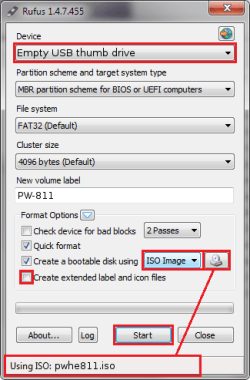
- The fields in Rufus are filled in with defaults. The defaults work well, but a few things need to be verified or changed.
- Verify that Rufus selected the thumb drive you want to write. Change the Device if the wrong USB thumb drive is presented in that field.
- Change Create a bootable disk using from the default to ISO image
- Press the small button (CD/disk icon) next to ISO Image to add the Partition Wizard ISO file
Select Partition Wizard ISO (pwhe811.iso) as the source.
The file name should appear on the status bar
:note: The ISO name in the status bar is subject to change as new versions of PW are released - unTick Create extended label and icon files
- Compare your Rufus window with the image above. If everything other than the Device field and New volume label are the same, then continue to the next step.
- Press the Start button
- The status bar notifies you when the process is DONE
- Press the Close button
Leave the Partition Wizard thumb drive connected for the next steps
Save any files you are working on, then Restart your machine
Check your machine documentation to determine the Fkey assigned by BIOS that brings up the Boot Order startup menu.
When the machine begins to start again (black screen) tap the BIOS Fkey you identified to bring up the Boot Order startup menu. There is only a short time to "catch" the Boot Order menu. If Windows starts, you will have to try again.
When the Boot menu appears, use the arrow down key to select the USB device and press enter
Check your machine documentation to determine the Fkey assigned by BIOS that brings up the Boot Order startup menu.
When the machine begins to start again (black screen) tap the BIOS Fkey you identified to bring up the Boot Order startup menu. There is only a short time to "catch" the Boot Order menu. If Windows starts, you will have to try again.
When the Boot menu appears, use the arrow down key to select the USB device and press enter
Launch PW and check the status of the faulty drive on the main screen.
If PW still tells you Bad Disk, then you're done with this exercise.
If PW can read the disk, there is hope and we can pick up the recovery attempt later.
Last edited:
My Computer
At a glance
x64 (6.3.9600) Win8.1 Pro & soon dual boot x6...AMD A6-3420M APU with Radeon(tm) HD Graphics6.00 GBAMD Radeon(TM) HD 6520G
- Computer type
- Laptop
- Computer Manufacturer/Model Number
- HP Pavilion dv6-6c10us
- OS
- x64 (6.3.9600) Win8.1 Pro & soon dual boot x64 (6.1.7601) Win7_SP1 HomePrem
- CPU
- AMD A6-3420M APU with Radeon(tm) HD Graphics
- Motherboard
- Hewlett-Packard 1805
- Memory
- 6.00 GB
- Graphics Card(s)
- AMD Radeon(TM) HD 6520G
- Sound Card
- (1) AMD High Definition Audio Device (2) IDT High Definiti
- Monitor(s) Displays
- HP W2072a 20" LCD (1600 x 900) @ 60 Hz
- Screen Resolution
- 1366 x 768 x 32 bits (4294967296 colors) @ 60 Hz
- Hard Drives
- ST640LM0 00 HM641JI SATA Disk Device
- Keyboard
- Logitech k520 wireless KB
- Mouse
- Logitech m320 wireless mouse (bundled with KB)
- Internet Speed
- 15/5 | 54 MB Wireless 'n'
- Antivirus
- Realtime: Defender or Avast | On-demand: Malwarebytes, ESET
- Browser
- IE 11 on Win8, IE 10 on win 7
- Other Info
- Media: [Gimp, Audacity, VLC] || Comm: [WEmail 2012, Skype] || Productivity: [OpenOffice,| Textpad] || Utils: [Sysinternals, cCleaner, Speccy, Defraggler]
 Slarty.
jumanji: Figure two in a row couldn't be just bad luck 
Jon Snow: Please post a camera shot of the PW Main window if the disk is NOT flagged as a Bad disk
I don't know of a way to screen capture using the PW USB boot.
It doesn't have to be great photography, a phone camera is fine. Try to limit the glare (turn off flash if camera has one) so the image is readable.
Bill
.
Jon Snow: Please post a camera shot of the PW Main window if the disk is NOT flagged as a Bad disk
I don't know of a way to screen capture using the PW USB boot.
It doesn't have to be great photography, a phone camera is fine. Try to limit the glare (turn off flash if camera has one) so the image is readable.
Bill
.
My Computer
At a glance
x64 (6.3.9600) Win8.1 Pro & soon dual boot x6...AMD A6-3420M APU with Radeon(tm) HD Graphics6.00 GBAMD Radeon(TM) HD 6520G
- Computer type
- Laptop
- Computer Manufacturer/Model Number
- HP Pavilion dv6-6c10us
- OS
- x64 (6.3.9600) Win8.1 Pro & soon dual boot x64 (6.1.7601) Win7_SP1 HomePrem
- CPU
- AMD A6-3420M APU with Radeon(tm) HD Graphics
- Motherboard
- Hewlett-Packard 1805
- Memory
- 6.00 GB
- Graphics Card(s)
- AMD Radeon(TM) HD 6520G
- Sound Card
- (1) AMD High Definition Audio Device (2) IDT High Definiti
- Monitor(s) Displays
- HP W2072a 20" LCD (1600 x 900) @ 60 Hz
- Screen Resolution
- 1366 x 768 x 32 bits (4294967296 colors) @ 60 Hz
- Hard Drives
- ST640LM0 00 HM641JI SATA Disk Device
- Keyboard
- Logitech k520 wireless KB
- Mouse
- Logitech m320 wireless mouse (bundled with KB)
- Internet Speed
- 15/5 | 54 MB Wireless 'n'
- Antivirus
- Realtime: Defender or Avast | On-demand: Malwarebytes, ESET
- Browser
- IE 11 on Win8, IE 10 on win 7
- Other Info
- Media: [Gimp, Audacity, VLC] || Comm: [WEmail 2012, Skype] || Productivity: [OpenOffice,| Textpad] || Utils: [Sysinternals, cCleaner, Speccy, Defraggler]
It still shows as "bad disk".
Nevermind guys. I really appreciate your help.
Btw, I check again on my other hard disk (old but still working, didnt use for years!), turned out I've made backups before. (or by accident with blessings, I've copied them to that sucky HD) They're all saved!
Nevermind the movies saved inside, i can still download them. What's more important is my memorable photos and all. Like i said, those are priceless. I'm gonna make a lot of backups later on.
Thank you Slartybart and Jumanji! You guys are awesome, I've learned a lot from you guys.
Nevermind guys. I really appreciate your help.
Btw, I check again on my other hard disk (old but still working, didnt use for years!), turned out I've made backups before. (or by accident with blessings, I've copied them to that sucky HD) They're all saved!
Nevermind the movies saved inside, i can still download them. What's more important is my memorable photos and all. Like i said, those are priceless. I'm gonna make a lot of backups later on.
Thank you Slartybart and Jumanji! You guys are awesome, I've learned a lot from you guys.
My Computer
At a glance
Windows 7 Ultimate x64
- Computer type
- Laptop
- Computer Manufacturer/Model Number
- Acer
- OS
- Windows 7 Ultimate x64
- Local time
- 9:53 PM
- Messages
- 5,915
Thanks Jon Snow for your feedback. Just like you learnt, we have also learnt quite a few things from your experience. We appreciate your active cooperation and indulgence in this thread that made it possible.
More than that we are really glad you found that backup and that must have eased all your tensions.We share your joy.
Thanks again.
More than that we are really glad you found that backup and that must have eased all your tensions.We share your joy.
Thanks again.
My Computer
At a glance
Windows 7 Home Premium 32 bit
- OS
- Windows 7 Home Premium 32 bit
Just to let you guys know, when I boot from the thumbdrive, the partition wizard listed my thumbdrive as a "bad disk" too. Is that normal? I forgot to take a pic. If you guys want to see that, I could post it here after defragment my hard disks and doing a lot of backups on DVDs (safer this way, I think).
*Sudden important data loss is a nightmare. I keep thinking about it, it affects my social life. To those who stumble upon this thread, please back up, you never know what's gonna happen in the future. I've learn this thing through the hardest way.*
*Sudden important data loss is a nightmare. I keep thinking about it, it affects my social life. To those who stumble upon this thread, please back up, you never know what's gonna happen in the future. I've learn this thing through the hardest way.*
My Computer
At a glance
Windows 7 Ultimate x64
- Computer type
- Laptop
- Computer Manufacturer/Model Number
- Acer
- OS
- Windows 7 Ultimate x64
Thanks for going through the exercise, even though it didn't come to fruition.
The faulty drive is indeed faulty, but the Universe is mysterious in the way it works.
The pictures were on another drive and that was the data important to you.
As jumanji already mentioned, we all learn helping members solve issues even if the attempt is not successful.
The price is fair.
Backups are good - I run live data, backup copy 1 for quick "recovery" (oops, I didn't mean to delete that file), and backup copy 2 for cold storage (never touched unless copy 2 fails)
A periodic System image (thrice a year, replacing the oldest). I copy my live User data at the same time, but archives only get backed up once a year. It's a bit of work and it might be overkill, but you just can't predict when a drive might go bad. It seems to happen more frequently now-a-days, probably because the drives pack more data.
I just copy my live data to another drive and use imaging software for archives. There are backup programs that have some intelligence (checking the archive bit) but early experience with 3rd party software proved disastrous when the company changed the backup format. As long as I could run the older version of the software, it was ok, but eventually I couldn't install / run it on a newer OS.
So I have all sorts of media (tapes, floppy disks, zip disks, CDs, DVDs) with something on them - who knows?
Bill
.
The faulty drive is indeed faulty, but the Universe is mysterious in the way it works.
The pictures were on another drive and that was the data important to you.
As jumanji already mentioned, we all learn helping members solve issues even if the attempt is not successful.
The price is fair.
Backups are good - I run live data, backup copy 1 for quick "recovery" (oops, I didn't mean to delete that file), and backup copy 2 for cold storage (never touched unless copy 2 fails)
A periodic System image (thrice a year, replacing the oldest). I copy my live User data at the same time, but archives only get backed up once a year. It's a bit of work and it might be overkill, but you just can't predict when a drive might go bad. It seems to happen more frequently now-a-days, probably because the drives pack more data.
I just copy my live data to another drive and use imaging software for archives. There are backup programs that have some intelligence (checking the archive bit) but early experience with 3rd party software proved disastrous when the company changed the backup format. As long as I could run the older version of the software, it was ok, but eventually I couldn't install / run it on a newer OS.
So I have all sorts of media (tapes, floppy disks, zip disks, CDs, DVDs) with something on them - who knows?
Bill
.
My Computer
At a glance
x64 (6.3.9600) Win8.1 Pro & soon dual boot x6...AMD A6-3420M APU with Radeon(tm) HD Graphics6.00 GBAMD Radeon(TM) HD 6520G
- Computer type
- Laptop
- Computer Manufacturer/Model Number
- HP Pavilion dv6-6c10us
- OS
- x64 (6.3.9600) Win8.1 Pro & soon dual boot x64 (6.1.7601) Win7_SP1 HomePrem
- CPU
- AMD A6-3420M APU with Radeon(tm) HD Graphics
- Motherboard
- Hewlett-Packard 1805
- Memory
- 6.00 GB
- Graphics Card(s)
- AMD Radeon(TM) HD 6520G
- Sound Card
- (1) AMD High Definition Audio Device (2) IDT High Definiti
- Monitor(s) Displays
- HP W2072a 20" LCD (1600 x 900) @ 60 Hz
- Screen Resolution
- 1366 x 768 x 32 bits (4294967296 colors) @ 60 Hz
- Hard Drives
- ST640LM0 00 HM641JI SATA Disk Device
- Keyboard
- Logitech k520 wireless KB
- Mouse
- Logitech m320 wireless mouse (bundled with KB)
- Internet Speed
- 15/5 | 54 MB Wireless 'n'
- Antivirus
- Realtime: Defender or Avast | On-demand: Malwarebytes, ESET
- Browser
- IE 11 on Win8, IE 10 on win 7
- Other Info
- Media: [Gimp, Audacity, VLC] || Comm: [WEmail 2012, Skype] || Productivity: [OpenOffice,| Textpad] || Utils: [Sysinternals, cCleaner, Speccy, Defraggler]
No that is not normal - unless the thumbdrive is also a bad device.
Try the following:
Please follow the instructions in OPTION TWO of http://www.sevenforums.com/tutorials/1538-sfc-scannow-command-system-file-checker.html
Attach the entire CBS.log to a post. (copy it to your Desktop first)
Thanks
Try the following:
Please follow the instructions in OPTION TWO of http://www.sevenforums.com/tutorials/1538-sfc-scannow-command-system-file-checker.html
Attach the entire CBS.log to a post. (copy it to your Desktop first)
Thanks
My Computer
At a glance
x64 (6.3.9600) Win8.1 Pro & soon dual boot x6...AMD A6-3420M APU with Radeon(tm) HD Graphics6.00 GBAMD Radeon(TM) HD 6520G
- Computer type
- Laptop
- Computer Manufacturer/Model Number
- HP Pavilion dv6-6c10us
- OS
- x64 (6.3.9600) Win8.1 Pro & soon dual boot x64 (6.1.7601) Win7_SP1 HomePrem
- CPU
- AMD A6-3420M APU with Radeon(tm) HD Graphics
- Motherboard
- Hewlett-Packard 1805
- Memory
- 6.00 GB
- Graphics Card(s)
- AMD Radeon(TM) HD 6520G
- Sound Card
- (1) AMD High Definition Audio Device (2) IDT High Definiti
- Monitor(s) Displays
- HP W2072a 20" LCD (1600 x 900) @ 60 Hz
- Screen Resolution
- 1366 x 768 x 32 bits (4294967296 colors) @ 60 Hz
- Hard Drives
- ST640LM0 00 HM641JI SATA Disk Device
- Keyboard
- Logitech k520 wireless KB
- Mouse
- Logitech m320 wireless mouse (bundled with KB)
- Internet Speed
- 15/5 | 54 MB Wireless 'n'
- Antivirus
- Realtime: Defender or Avast | On-demand: Malwarebytes, ESET
- Browser
- IE 11 on Win8, IE 10 on win 7
- Other Info
- Media: [Gimp, Audacity, VLC] || Comm: [WEmail 2012, Skype] || Productivity: [OpenOffice,| Textpad] || Utils: [Sysinternals, cCleaner, Speccy, Defraggler]
I recently had a reoccurrence with a WD external drive becoming "unallocated" and have observed this is a problem others have had. After reading through this thread, I did not notice a mention of the MBR being missing. This was the case in both of my experiences. Did I fail to see this check for the Master Boot Record?
Thanks
Thanks
My Computer
At a glance
Windows 7 Home Premium 64bit.
- Computer type
- PC/Desktop
- OS
- Windows 7 Home Premium 64bit.
Hi guys, frankly speaking I didnt even read all the posts. I faced the same problem. Only one thing I did was to remove all the USB connections (mouse and keyboard if any) and then tried to link my WD HD and it got recognized..  ... Hope this information helps and sorry if I am repeating the same stuff.. Peace Out
... Hope this information helps and sorry if I am repeating the same stuff.. Peace Out My Computer
At a glance
Windows 7 Ultimate 32-bit Operating System
- Computer type
- PC/Desktop
- OS
- Windows 7 Ultimate 32-bit Operating System
UncleVanya
New member
- Local time
- 11:23 AM
- Messages
- 8
Hi there,
A friend of mine wanted some data from my Windows 7 desktop pc and brought over a laptop
hard disk which she assured me was empty. So,I plugged it in a usb port. I also have an
external 3 tb hard disk in a Startech seat plugged in a usb. When her disk came on it
showed that she had windows Vista on it. Of course I was angry, but I thought I could format
her disk to get rid Vista. It dis get rid of Vista, and I gave her the data she wanted.
Then I booted my pc and now my 3tb external disk does no show up in My Computer, and in
Computer Management it shows up as Not Initialed and with 746.52 Unallocated space. I have
over 2tb of data on this disk. I ran Testdisk and stopped when I got to this:
Disk/dev/sdc - 3000 GB/2794 GiB - CHS 364801 255 63
Partition Start End Size in sectors
>P MS Data 262206 1565550314 1565288109
P MS Data 1565550592 5860530175 4294979584
Below this it says Structure: OK
As well as up/down keys to select partion
Keys A: Add Partition, L:n Load Backup, T: Change Type, P: List Files
Enter: to continue
NTFS, blocksize=4096, 801 GB / 746 GiB
It is here where I don't know what to next. (I really don't want to lose my data, but does
that prospect not look good?)
I think it was Jumanji who I was reading yesterday who suggested to someone else to use Testdisk.
Sorry if i made any mistakes posting images (this is my first time).
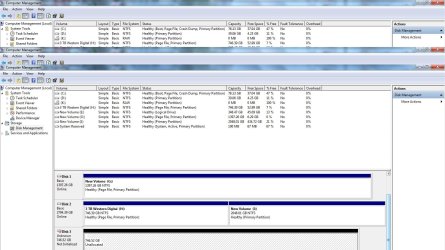
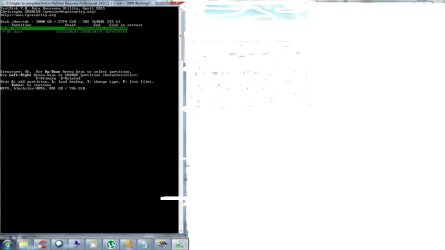
A friend of mine wanted some data from my Windows 7 desktop pc and brought over a laptop
hard disk which she assured me was empty. So,I plugged it in a usb port. I also have an
external 3 tb hard disk in a Startech seat plugged in a usb. When her disk came on it
showed that she had windows Vista on it. Of course I was angry, but I thought I could format
her disk to get rid Vista. It dis get rid of Vista, and I gave her the data she wanted.
Then I booted my pc and now my 3tb external disk does no show up in My Computer, and in
Computer Management it shows up as Not Initialed and with 746.52 Unallocated space. I have
over 2tb of data on this disk. I ran Testdisk and stopped when I got to this:
Disk/dev/sdc - 3000 GB/2794 GiB - CHS 364801 255 63
Partition Start End Size in sectors
>P MS Data 262206 1565550314 1565288109
P MS Data 1565550592 5860530175 4294979584
Below this it says Structure: OK
As well as up/down keys to select partion
Keys A: Add Partition, L:n Load Backup, T: Change Type, P: List Files
Enter: to continue
NTFS, blocksize=4096, 801 GB / 746 GiB
It is here where I don't know what to next. (I really don't want to lose my data, but does
that prospect not look good?)
I think it was Jumanji who I was reading yesterday who suggested to someone else to use Testdisk.
Sorry if i made any mistakes posting images (this is my first time).
My Computer
At a glance
Windows 7 Home Premium 32 bitAMD Athalon II + 2 250 Processor 3.01 GHz3 GB
- Computer type
- PC/Desktop
- Computer Manufacturer/Model Number
- Asus
- OS
- Windows 7 Home Premium 32 bit
- CPU
- AMD Athalon II + 2 250 Processor 3.01 GHz
- Motherboard
- M2N68-AM PLUS ASUS
- Memory
- 3 GB
- Hard Drives
- 3 Internal
1 external
- Antivirus
- Avast
- Browser
Similar threads
- Replies
- 62
- Views
- 5K

- Replies
- 6
- Views
- 3K
- Replies
- 18
- Views
- 5K

- Replies
- 8
- Views
- 3K
