Ext USB drive has drive letter but does not appear in Explorer

rebadurchee

New member
Local time
1:39 AM
Messages
27
I use an external USB 3.0 4TB Touro (HGST disk) as backup. Lately it does not show up in Explorer. It does show up in Device Manager. I use Partition Magic and find that it does not have a drive letter anymore. Then I assign it to the letter it used to have. And it still does not show up in Explorer.

If I look at the disk in Partition Manager I can see all the directories and files but I can't access it with Explorer.

I have uninstalled it from the system and rebooted and plugged it in again. I used drivecleanup. I get the message that the driver was installed correctly and it is ready for use, but it won't show up in Explorer.

I'm running Win7 Home 64bit.

Help! Thank you.
 

My Computer My Computer

At a glance

Windows 7 64 bit Home Premiumi7-930Corsair 12 GBNvidia 250 GTS
Computer Manufacturer/Model Number
AVA Direct
OS
Windows 7 64 bit Home Premium
CPU
i7-930
Motherboard
Asus P6X58D-E
Memory
Corsair 12 GB
Graphics Card(s)
Nvidia 250 GTS
Sound Card
onboard
Monitor(s) Displays
NEC 2490
Screen Resolution
1920x 1280
Hard Drives
Samsung F3 1TB x2
Seagate 500GB
PSU
Seasonic 650
Case
Antec 300
Cooling
Scythe Mugen Rev B
Keyboard
MS Natural Ergonomic 4000 v1.0
Mouse
Logitech Wheelman
Internet Speed
Cable
I use Partition Magic and find that it does not have a drive letter anymore

Do you mean MiniTools Partition Wizard?

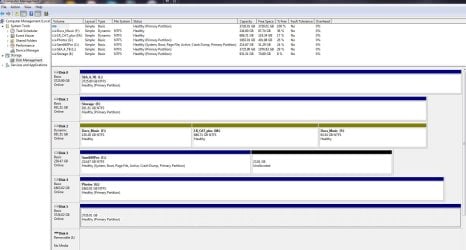
If I look at the disk in Partition Manager I can see all the directories and files .....

What Partition Manager is that? Can you please post a full screenshot of what you see?

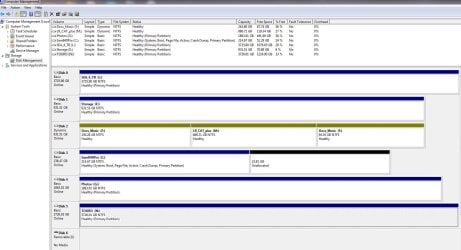
Also post a screenshot of Windows Disk Management with only your 4TB external drive plugged in.(Please remove all other external drives /Flash drives). In Windows Disk Management screen tool bar on top, click on Show/Hide Console Tree, and Show/Hide Action Pane Icons to hide those so that we get an untruncated picture with all the information visible. If need be, adjust the seperators in the Drive list on top so that we can clearly see Capacity, Free Space and % Free.

http://www.sevenforums.com/tutorials/274797-disk-management-post-screen-capture-image.html

From what you have said the folders and files are still there. So don't panic.
 

My Computer My Computer

At a glance

Windows 7 Home Premium 32 bit
OS
Windows 7 Home Premium 32 bit
Jumanji, thanks! It was late last night and I misstated the program I was using. It is Paragon Hard Disk Manager 15. I'm posting the Paragon and Disk Management captures. Thank you.
 

Attachments

  • rebadurchee Paragon disk mgt.JPG
    rebadurchee Paragon disk mgt.JPG
    66.7 KB · Views: 1
  • rebadurchee_disk mgt.JPG
    rebadurchee_disk mgt.JPG
    166.1 KB · Views: 7

My Computer My Computer

At a glance

Windows 7 64 bit Home Premiumi7-930Corsair 12 GBNvidia 250 GTS
Computer Manufacturer/Model Number
AVA Direct
OS
Windows 7 64 bit Home Premium
CPU
i7-930
Motherboard
Asus P6X58D-E
Memory
Corsair 12 GB
Graphics Card(s)
Nvidia 250 GTS
Sound Card
onboard
Monitor(s) Displays
NEC 2490
Screen Resolution
1920x 1280
Hard Drives
Samsung F3 1TB x2
Seagate 500GB
PSU
Seasonic 650
Case
Antec 300
Cooling
Scythe Mugen Rev B
Keyboard
MS Natural Ergonomic 4000 v1.0
Mouse
Logitech Wheelman
Internet Speed
Cable
Jumanji, This is very weird. After posting the screen shot of the Computer - Disk Mgt screen I noticed that it did not show that the Touro had a drive letter. I had assigned it one in Paragon but it did not show up in Windows Disk Mgt. I then went back to Win Disk Mgt and assigned the letter N: to it there. And now, all of a sudden, it shows up in Explorer.

I don't know what to make of that. Does Paragon Hard Disk Manager not work in the way it's supposed to? Or is this some random thing?

I do know that for over a year I had no problems with the disk being recognized when I plugged it in. It's only in the last few months that when I plug it in there is no drive letter and I have to go through all these contortions. I used to use Win Disk Mgt but recently got Paragon for partition and back up. Color me puzzled.
 

Attachments

  • rebdurchee Second disk mgt.JPG
    rebdurchee Second disk mgt.JPG
    167.1 KB · Views: 3

My Computer My Computer

At a glance

Windows 7 64 bit Home Premiumi7-930Corsair 12 GBNvidia 250 GTS
Computer Manufacturer/Model Number
AVA Direct
OS
Windows 7 64 bit Home Premium
CPU
i7-930
Motherboard
Asus P6X58D-E
Memory
Corsair 12 GB
Graphics Card(s)
Nvidia 250 GTS
Sound Card
onboard
Monitor(s) Displays
NEC 2490
Screen Resolution
1920x 1280
Hard Drives
Samsung F3 1TB x2
Seagate 500GB
PSU
Seasonic 650
Case
Antec 300
Cooling
Scythe Mugen Rev B
Keyboard
MS Natural Ergonomic 4000 v1.0
Mouse
Logitech Wheelman
Internet Speed
Cable
I experienced something like that around last year (after I upgraded to x64 bit) with my Seagate external drive. I would also not show in explorer and in Disc Management it's there but no drive letter. What I did was assign a drive letter to it, "Z" and after reboot it would now show in explorer. Might be just a random "Windows" thing and might not be with Paragon....there were no repeat of the incident as of this writing.
 

My Computer My Computer

At a glance

Windows 7 Ultimate x32
Computer type
PC/Desktop
OS
Windows 7 Ultimate x32
Hard Drives
WD 320gb/500gb/1TB
Seagate 500gb/1TB
Thanks for your reply. My experience is a bit different. This external drive is my offsite one so I bring it home, load it up and take it back offsite the next day. I have another two complete backups in house (I'm paranoid after disc failures).

I got the disk after I upgraded to 64-bit and, for a while everything was fine, always coming up with the same drive letter and letting me back up. But a few months ago started not showing up in Explorer. I went to Disc Mgt and found it did not have a drive letter. I manually assigned it the same one it always had, and then it would work. This happened several times over the last few months.

Then I bought Paragon and started using it for disc backups to other disks. This time when I brought it home it would not show up. I then used Paragon and found that it had no drive letter and assigned it the letter through Paragon. The drive letter showed up in Paragon but Explorer would not see it.

After posting my problem, and the images, and after rebooting, I went back to Disc Mgt and saw that it had no drive letter. So, within Disc Mgt I assigned it the same drive letter it always had, and now it shows up in Explorer and I have backed up my files.

So, now I don't know whether this is a disk specific problem or a Paragon problem.
 

My Computer My Computer

At a glance

Windows 7 64 bit Home Premiumi7-930Corsair 12 GBNvidia 250 GTS
Computer Manufacturer/Model Number
AVA Direct
OS
Windows 7 64 bit Home Premium
CPU
i7-930
Motherboard
Asus P6X58D-E
Memory
Corsair 12 GB
Graphics Card(s)
Nvidia 250 GTS
Sound Card
onboard
Monitor(s) Displays
NEC 2490
Screen Resolution
1920x 1280
Hard Drives
Samsung F3 1TB x2
Seagate 500GB
PSU
Seasonic 650
Case
Antec 300
Cooling
Scythe Mugen Rev B
Keyboard
MS Natural Ergonomic 4000 v1.0
Mouse
Logitech Wheelman
Internet Speed
Cable
Just try the following drive cleanup act and see whether it resolves the problem.

Download v 0.8.1 of the drivecleanup.zip from Drive Tools for Windows.( I hadn't tried v0.9.0 and so I shall stick with the known 0.8.1)

Unzip it to a folder, say drivecleanup.

You will have two folders Win32 and x64 each containing DriveCleanup.exe for 32 bit and 64 bit respectively.

Remove all USB storage devices from your system (except your Keyboard and mouse) and reboot.

Right click on the DriveCleanup.exe and run as administrator. (Use the DriveCleanup.exe file appropriate for your bit version of Windows.).

After the clean up act, reboot. This removes all non-present drives, registry entries pertaining to these drives, drive letters associated with those and you will be starting with a clean slate. All external drives connected will be installed afresh and get their drive letters afresh.

When you connect your off-site drive, check what drive letter it gets. Reassign drive letter/s if necessary and see whether it sticks.

Looking at the Disk Management screenshot, I feel its so much disorganised and needs to be organised better. But I would leave it to more proficient hands here.
 

My Computer My Computer

At a glance

Windows 7 Home Premium 32 bit
OS
Windows 7 Home Premium 32 bit
You should use Disk Mgmt for the functions it can provide as it is safest, e.g. shrink from right, assign drive letter, etc. All other disk managers except Partition Wizard bootable CD can and will fail with data loss. This is based on helping with tens of thousands of complicated partition operations here, while no other website would consider doing even one.

You have a Dynamic disk which is meant to span a single partition over multiple hard drives. Is there? If not then you'll need to Convert a Dynamic Disk to a Basic Disk
 
Lots of work and family stuff so I'm late getting back here.

Jumanji - Thanks! I had already tried drivecleanup and it worked for two restarts. Then, for an unknown reason, it failed. But... now it's working again. I've had it plugged in and not and then plugged in about five consecutive times and it's connected each time. Color me baffled. But I sure appreciate you being here with me during this time.

gregrocker - thanks for the post. I had purchased Paragon to try to fix this dynamic disk situation, but I couldn't figure it out. I'm beginning to see why. Thanks for the referral links. I'll try them and then post here about the progress. Much appreciated.
 

My Computer My Computer

At a glance

Windows 7 64 bit Home Premiumi7-930Corsair 12 GBNvidia 250 GTS
Computer Manufacturer/Model Number
AVA Direct
OS
Windows 7 64 bit Home Premium
CPU
i7-930
Motherboard
Asus P6X58D-E
Memory
Corsair 12 GB
Graphics Card(s)
Nvidia 250 GTS
Sound Card
onboard
Monitor(s) Displays
NEC 2490
Screen Resolution
1920x 1280
Hard Drives
Samsung F3 1TB x2
Seagate 500GB
PSU
Seasonic 650
Case
Antec 300
Cooling
Scythe Mugen Rev B
Keyboard
MS Natural Ergonomic 4000 v1.0
Mouse
Logitech Wheelman
Internet Speed
Cable
There is no need to purchase Paragon. Use Option 1 in tutorial I linked for free non-destructive conversion to Basic. The installed version of Easeus also offers this.
 
You have a Dynamic disk which is meant to span a single partition over multiple hard drives. Is there? If not then you'll need to Convert a Dynamic Disk to a Basic Disk
@greg
OP is having a problem with drive letter assignment to a USB drive. Would Dynamic Disk on his hard drive be an issue/apply to drive letter assignments to a USB drive? I wouldn't guess so. Just curious your thoughts

@rebadurchee
Sure sounds like a drive letter conflict problem (which is one of the things that DriveCleanup tool helps fix). Though not sure why it keeps coming back since "N" seems far enough away from your other drive letters to avoid conflict (is why m256997683119 suggested "Z")

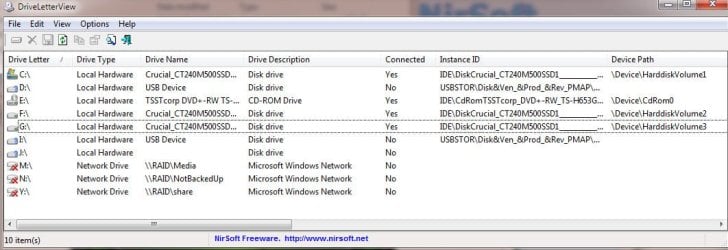
This might help shed more information. Run the DriveLetterView tool. When everything is working, click Ctl-A to select all items in the display, Ctl-S to save. Before you actually save the file use the Save As pull down menu to save the file as Tab Delimited Text. Upload the txt file. Next time problem occurs, create and upload another report so i can compare.

Drive letters are assigned to disk volumes and mapped network drives. Windows remembers drive letter assignment to a device when its removed. (Letter isn't released until the device driver is uninstalled, not device simply removed) - or you manually change the letter. So letter conflicts can occur when different USB disk/flash are un-plugged / re-plugged

So maybe <fingers crossed> the tool might help reveal something
 

Attachments

  • DLV.jpg
    DLV.jpg
    65.5 KB · Views: 0

My Computer My Computer

At a glance

Desk 1: Win 7 Pro x32; Desk 2: Windows 10 x64
Computer type
PC/Desktop
Computer Manufacturer/Model Number
Dell Optiplex 360 and Optiplex 755
OS
Desk 1: Win 7 Pro x32; Desk 2: Windows 10 x64
Hard Drives
500GB Crucial SSD in both Desktops
Other Info
Buffalo 6TB NAS, Raid 1
I thought the drive letter assignment was resolved awhile back so was only warning him about the possibly misconfigured Dynamic disk which can cause other problems.

I also noted to always use Disk Mgmt for the functions it can do safest, then for something it cannot do what has worked best here in tens of thousands of complicated partitioning operations we've helped with is Partition Wizard boot disk, which has never failed while all others can and will fail except Disk Mgmt.
 
@gregrocker

Thank you for the reply to my curiousity :) as well as the tip! I'll add Partition Wizard to my tool kit
 

My Computer My Computer

At a glance

Desk 1: Win 7 Pro x32; Desk 2: Windows 10 x64
Computer type
PC/Desktop
Computer Manufacturer/Model Number
Dell Optiplex 360 and Optiplex 755
OS
Desk 1: Win 7 Pro x32; Desk 2: Windows 10 x64
Hard Drives
500GB Crucial SSD in both Desktops
Other Info
Buffalo 6TB NAS, Raid 1
Back
Top