Excessive Read Write overloading HDD

XP VM User

New member
Member
VIP
Local time
7:20 PM
Messages
279
Hi everyone!

I hesitated to write anything.... but if I don't I'm afraid my almost 8 year old HDD in laptop (see system description below) will run too hard too long and melt down the drive!

Its not a BSOD (thought I've had the "PAGE OVERFLOW" BSOD a few times), but I attributed it to the recent series of bad patches from Windows Updates and my Pale Moon Browser and Malwarebytes Premium all since beginning of April and they have all three already supplied patches to "fix" what they referred to as crashes. (That BSOD says always if this is the "first" time you've seen it ....i.e. after downloading and installing new patch update, etc, just ignore it and restart computer and it goes away, until next time I do "something" and it reappears---but again its stopped doing this for past few days since I got all the latest fixes for the patches that were "bad" I assumed)...

But this problem which I describe below and have been taking notes on for asking "someone" about it...has been occurring on my Windows 7 system (x64 Professional version) since the end of March so it actually predates all the updates which just caused many BSOD's until they were repaired by the addition of new updates.

I check (CTL ALT DEL and Task Manager] to see WHAT IN THE WORLD is running my HDD so much?

Under Performance I see CPU history of all four Quad chips i5 all show 1% to 10 % unless I press a button or move the mouse so they are free and ready to use for CPU computations. The Memory is similarly low function, though it spikes up to 30% for no discernable reason.

One "user" only/

Applications is EMPTY! I don't do anything while waiting for taht HDD light to slow down from 100% on.

I know when I set the Norton AV to run and when the Malwarebytes does its daily scan and of course the light is supposed to be 100% during those times.....but why is ti 100% solid most other times....

I checked Processes and I see 00 for all the CPU use as nothing is being used.

Yes! I found a lot of "services" running in the background Dropbox is one of the worst.....but even though it says 119,000 that does not seem to be what is doing this as it ALWAYS said that amount since I got it on here in 2011 or so...


I have written here about needing a larger HDD as I have too many items and files saved. In preparing for a large save of a new iPad, I've emptied what I can so out of c. 486 GB I now have 80 or so free space so no problem anymore about memory using parts of the HDD as I learned it does to assist its operation. (or whatever that is that it does).

[Oh I don't know if this is relevant but I toss it in..... I've gotten the following messages:
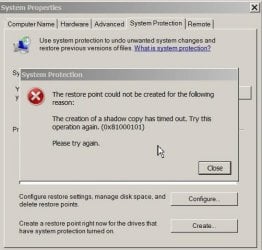
Shadow Copy timed out PS35281.jpg

"The restore point could not be created for the following reason: The creation of a shadow copy has timed out. Try this operation again (0x81000101) Please try again. [Note I have had a weird relationship on this Laptop with the VSS services. Old thread here and asked other web help sites before I found this great site and they "gave up" and told me to get a new computer that something was permanently wrong with the VSS which they say is almost impossible to happen--especially if Norton and Malwarebytes both say the computer is clean of viruses and I really never install FREEWARE/SHAREWARE unless directed to do so by the members at this site, etc. sites. and avoid alll PUP's whenever downloading new upgrades to programs I have here.

and
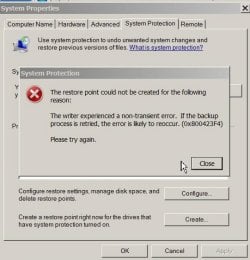
Restore Point had non-transient error PS35318.jpg

"The writer experienced a non-transient error . If the backup process is retried, the error is likely to reoccur. (0x800423F4) Please try again" [And of course it fails over and over until I close computer and open a whole new session ---not a restart a let the HDD cool down an hour or so before trying again!)

[Hopefully I've attached those two for you to view as screenshots to prove I get these weird messages].

messages...when trying to create restore points before loading in software---- I did a "workaround" which is watch for HOURS (yes I guess I don't watch movies or tv or anything else this past few weeks) the little yellow drive light on the Laptop. When I finally see it flickering and not 100% lit and steady, I attempt to do a fast "create" a restore point and "sometimes" that works so I can download and install the necessary updates to fix things]

I'm sure you will direct me to provide some reports or other things I'm not always famlilar with getting and I'll do my best to get them to you.

Oh I almost forgot!

Deleterious effect of having the HDD running like it does... EVERYTHING else I click on or "do" on here is SLOWED DOWN IMMENSELY!

How slow you ask? [I answer this question in the fifth paragraph below my digressions.....sorry] I did this draft on another older computer and emailed it to myself so that I would NOT have to spend a year or more typing on the laptop to do it for you!

Lets say I was typing the above sentence;

I press the keys in order: "How slow you ask?"

I see on the blank word processing screen (does not matter which one I use, I have WordPad, NotePad, Jarte Plus and a few other regular ones like WordPerfect.)

I hope I write this correctly to describe the problem:

I see on the screen..

H..........ow ...... [space].........

.........(five minutes can pass ).......slow..........

........(another two minutes passes with the HDD light on 100% of the time and I get) y.....ou.....

[space]...... (another two minutes then I see ) .....ask?

Its impossible to type anything and think while typing...... I have to write it down on paper or go to another computer to write it down and print it out and carry it over for the slow entry method.

Also occurrs when posting to sites like yours so I managed to get it on Email (which is ALSO slowed down) but I got it all spell checked and corrected and just had to "copy" once and "paste" once which still took minutes to wait for the "paste" to happen on your site blank page.

[It got a bit better now and I added in the two screenshots....I don't know why it goes from 100% solid to flashing.... I am not using it during any of the scans or other times when the computer or Norton says "scanning in background" so I'm not overloading the HDD purposely.

Thanks for reading this head scratcher of a problem!

XP VM USER.

P.S. As I arrived on your site to post a new thread, I read someone here had a slow computer Sorry this is Vague: Need help with Laptop Please and someone recommended running msconfig to see what is starting up. I entered it in "search" box----is that right? The computer grayed out the screen (of course) said its " not responding" to the search request....until I canceled it and waited a few minutes (4 or so) until it released me so I could post this for you! Sorry, I know you say not to copy other's solutions as they may not apply to me, but I read a few (slowly clicking on them to read of course!) and this sounded sensible to try first, so I thought I'd try something I vaguely remembered being asked to do on earlier posts.
 

My Computer

Computer type
Laptop
Computer Manufacturer/Model Number
SONY VAIO VPCS111FM
OS
Windows7 Professional 64bit
CPU
Intel(R) Core (TM) i5 CPU M 430 @2.27 Ghz
Memory
8.0 GB
Hard Drives
Seagate 500GB Momentus
Cooling
Internal fan
Mouse
Logitech bluetooth trackball
Browser
Pale Moon Browser for x64
Hi Xp VMUser,
What have you tried to correct your issue?
Have you run Disk Cleanup?
Disk Cleanup Extended?
CCleaner?
Disk Defragmenter?
 

My Computer

Computer type
PC/Desktop
Computer Manufacturer/Model Number
HP Desktop & Compaq Laptop
OS
Win 10 x64, Linux Lite, Win 7 x64, BlackArch, & Kali
Hard Drives
Samsung 850 Pro 256Gb,
Hitachi HDD 1Tb,
Crucial MX SSD 250Gb
Segate 3Tb USB 3.0 Ext. Backup HDD
Internet Speed
150Mbps dn, 20Mbps up
Antivirus
Avast Free, Malwarebytes Anti-Exploit & Anti-Ransomware
Browser
Firefox, Chrome, Opera, & VPN
Backup Images

Your HDD may be dying. :eek:

IMO, you should:

  1. Create at least one Backup Image of your PC
  2. Try to save your important data to another drive (e.g. external HDD) before trying any disc repair tools.

I prefer to use Macrium Reflect Free Edition to create Backup Images.
After you install it, create a Macrium Recovery CD/USB.
Then create your Backup Image.
Make sure you use the "Verify" option or verify the image after you have made it. :geek:

Tutorial
Imaging with free Macrium

If anything goes wrong, you can restore your PC using the Backup Image (you can restore to a new HDD if necessary).
 

My Computer

Computer type
PC/Desktop
Computer Manufacturer/Model Number
n/a
OS
W7 Ultimate SP1, LM19.2 MATE, W10 Home 1703, W10 Pro 1703 VM, #All 64 bit
CPU
AMD Phenom II x6 1100T, 3.3 GHz
Motherboard
ASUS M4A88T-M/USB3 (AM3)
Memory
12GB DDR3 1333 G-Skill (4GB x 2), G-Skill (2GB x 2)
Graphics Card(s)
NVIDIA GeForce GTX 660
Sound Card
Realtek?
Monitor(s) Displays
Samsung S23B350
Screen Resolution
1920x1080
Hard Drives
WD Green 2TB (SATA), WD Green 3TB (SATA), WD Blue 4TB (SATA), WD Blue 6TB (SATA)
PSU
Cooler Master
Case
Antec GX300 Tower
Cooling
3x Antec TRICOOL 120mm Fans
Mouse
Wired Optical
Internet Speed
DSL
Antivirus
Avast
Browser
Pale Moon (64 bit)
Other Info
2018-12-27 Upgraded HDDs
2015-12-10 Upgraded case, graphics card, storage
2015-08-15 Upgraded motherboard & RAM
2015-07-15 Upgraded LM17.1 to LM17.2
Hi Snick and lehnerus2000!

Thank you so very much for reading and replying to my question(s)!

Will answer (most) of them below:

Hi Xp VMUser,
What have you tried to correct your issue?

[Checked out Google for the Error messages----mostly unhelpful as they talk about removing Windows 7 and all programs and putting them back one by one. Like I have two or three lifetimes to figure out where in the world are all the Emails or papers with the license codes for every program is, and calling for $$$ advice to ask how to re-load in each third party program and all that before I even have time on the computer to examine said programs and see if I want that old program or comparing Google to see if my limited funds should be spent on a "different" third party program----I don't even have all the programs written down anywhere and unlike some other OS's you can't just copy and paste to a word document all the names and information of programs from the Change Program list....WHEW! I hope that explains most of what I did not try and why I didn't even begin and went to you guys first/instead]

Have you run Disk Cleanup?
Disk Cleanup Extended?
CCleaner?
Disk Defragmenter?

[Well around January 1st each year I check out all computers as I have that day and time around it available to lock myself away from world and do things like that..... I defragmented what computer told me I could. I did make a copy AFTER the defragmentation as at 20% it just hit the minimum required to request to me that I authorize a defragmentation.----see lehnerus2000's reply for more!]


---------------

Your HDD may be dying.

[Thanks for the assessment.....I appreciate your honesty and really didn't want that to happen too soon as trying to figure out how to "upgrade" just the HDD inside the Laptop instead of spending for a new laptop with Windows 10 that MOST if not all of my programs will scream and request I install the "product code or key or whatever" they use to verify that I am still the owner of the program and original owner and where are all these keys? And how many are now out of date that they contact the company through the server and find I should now pay monthly high usage fees that I can't afford.... All because I got the (once it was!) "free" download of Windows 10.

Yes I read above in another posting thread that I should have accepted the free Windows 10 and stored my old one on old.windows.exe file.....But Microsoft on phone and on instructions in the first weeks it was offered told me that 1. I only had 30 days to determine if all my programs would work under Windows 10 (impossible! I don't have 300 days, one day per program, I have 30 days and can't figure out which program to do "first" anyway and being tired out that long doing that I'd made 100% errors for which I'd have to call the company for $$ on help phone to ask how to get out of the problem I created for myself tyring to test that many programs before the 30 days expires.

Then... what happens?

I was told that if I don't "revert" back to Windows 7, the Windows 10 would "stay" as my OS of choice and the "old" one would be deleted!

HA! I said to Microsoft, I'll just change the name of that file, so I can keep it longer and do 300 or more days of working to test it out!

Microsoft (not you guys) told me at that time on the phone call with them (Free as I was asking about upgrade so I didn't have to pay their $149 per "incident" charge which I cannot afford (don't know how I'll afford the larger HDD for this but I will just make it and the cost of installation as I prefer towers so I can install things myself and not squeeze fat fingers into tiny laptop HDD spaces! with tiny screws)

Lets try that again!

Microsoft (not you guys) told me at that time on the phone call with them that they had a plan for that!
1. The "revision" process back to Windows 7 "expires" after 30 days no ifs ands or buts, so even if I managed to save it elsewhere...its useless to go back using that "old.windows7.exe" file.
2. The OS Windows 10 is very smart and will look for the boot or other information hidden inside that saved "old.wiundows7.exe" file and force it to be permanently deleted to say that I can NEVER go back to Windows 7 ever again if I spend over 30 days figuring out how much switching to Windows 10 will cost me in extra fees for third Party product codes, etc etc.

So you know what I did by now.... I never tried Windows 10 at all despite everyone here talking about how easy it is to go back and forth and read lots of the posts here about all of that while you were helping others with your advice.....

So while my posts are few here.... I've been reading many of your other posts and learning from your answers to others ... at least as far as I can without these
long
long
replies
back to you...

So thanks for reading all of that!


IMO, you should:

Create at least one Backup Image of your PC
Try to save your important data to another drive (e.g. external HDD) before trying any disc repair tools.

{yes, did it and done-----
January 2018

Want more details? (I can't get a reply so I'll just type them here and you can read it or skip to next paragraph if you don't want to know.....as drive is "breaking down" you know....
7200 RPM HDD with i5 quad chip...
Then WHY using Paid version of Macrium Reflect did it take 21 hours (yes that is not a misprint! 21 hours) to copy and save image over to an external HDD....
I knew it would take about that long as prior one took 18 hours 5 or 6 months before that... and because I don't have enough room on my HDD I have to "force erase" my saved backup when I create a new backup...
AND
I'm sooo confused between the following:
Backup image
Copy HDD all sectors
Copy Windows OS
and trying to figure out which one or all three ? Do I need to do to make certain I have the correct information necessary to restore my HDD should the HDD fail!
AND

So Sorry to "Bold" this so if you're skimming you'll read it:

I did not do verify on this one January 2018 Backup Image
---its the first time I did not check "verify" button and first time only---as after 18 hours running orange drive light (its orange I figured out not yellow as I said above).... I turned off the verify as it says "this option will take significantly longer"
AND
Did I mention that keeping the computer "on" too long causes "memory overflow" as I have the "memory inflation" which mysteriously uses up my RAM memory so Windows says it has to "close programs to prevent memory loss"....fortunately Macrium would save the point of the loss... but other programs by then go crazy and don't shut down properly causing me to spend hours on their companies web sites and with their community people trying to fix what went wrong when I re-start up their program...

So I guess I agree the HDD is dying...
But so strange... I lose "GUI" symbols like next to WordPad, NotePad and Documents and Windows Explorer (and even games which I don't have time to play but I click on to prove my point) those little "arrows" that show menus to the right VANISH! from the screen.... and don't show up! I can make a "new" WordPad or "new" NotePad or new other items but can't access older ones as the arrow is gone... and some of the choices have blank spaces where the words should be and the GUI appears so slowly so probably saving
my current files via Macrium
is not going to help me if they are already "destroyed" and
I'm going to
purposely "destroy" my only last "good" copy of the Computer HDD by doing another Macrium save..... and also trying to download another program for a month now and asking for extensions of time to do that.. from the company while waiting to make certain I can install it without damaging the computer....but I paid for it a while ago before all this began...so now I'm "stuck" of course but they have been nice and helpful as I did pay for their program which i wanted for years and lost for years and old one died inside here a while ago (not due to HDD just won't contact its old server as its out of date etc etc....don't blame it on the HDD ok?)

Alright! I'm back... for those who wanted to skip all those details....


I prefer to use Macrium Reflect Free Edition to create Backup Images.
After you install it, create a Macrium Recovery CD/USB.
Then create your Backup Image.

[Aha! so you want me to do "Backup image" not "disk copy" !]


Make sure you use the "Verify" option or verify the image after you have made it.

[OK I explained in that long paragraph about why "verify" might just destroy what is left of the lifetime of the HDD I'm using now....
and without a computer....if the HDD fails...and I don't have another modern one, how do I contact WindowsSevenForum for help anyway?]

Tutorial
Imaging with free Macrium

Thanks for the Tutorial...will study it

If anything goes wrong, you can restore your PC using the Backup Image (you can restore to a new HDD if necessary).

But here is a new problem (or should I do a new thread question again)...

If I get a new HDD
I can't get my fat fingers inside the HDD space of a laptop---its not a tower that I'm more used to with earlier Windows OS's
I was told I'd have to bring it to Best Buy for Geek Squad to install the HDD

"GREAT! DO it" I tell them ! I'm here..... emptying the piggy bank just to afford to get a larger HDD for a new iPad storage I'll need and for a brand new HDD on the old Laptop so it can keep working at least two more years until Microsoft kills off Windows 7 and I'm forced to find funds to pay for all those unknown number of non-working Product keys when I migrate to Widows 10....but lets not get ahead of ourselves here...

Geek Squad/Best Buy has informed me that I will need a lot of more
LOTS of money! Because all they do is install the new larger 1TB etc HDD (for which I need to buy a new, larger external HDD too in order to hold the new Macrium backup images, etc without compressing it a lot and running the HDD a lot doing that....
Why? I ask....do I need more money?
As all they will do is install Windows 7 (or 10) into that empty HDD and say "bye bye"
They will not and do not have the facility to transfer my data... they referred me to "data savers" to do that...
and they (on my one phone call to them) quoted me high prices to transfer all the data!

(Even if I did buy a new computer which I can't afford....I'd still need data savers to transfer all that data...

and i KNOW Macrium does just that....
But I have never done that "restore" a drive back to an empty drive.....
so ....
I have no idea how to do it!

And when I did things like that with the Towers....the OS would have problems recognizing the new larger HDD as the program does not know it unless you use jumpers and set BIOS to that larger HDD and all sorts of things that I don't really know how to do and I try try but mess it up and have to call or write here for "help"

but again... how to call for help on a web page without a working computer..:confused:

So please be assured I'm so happy :D someone is reading all these problems I'm having....
and willing to work with me to figure them out so I can go on using the computer for what it was purchased to do...i.e. those 300 programs I never seem to have time to use as I'm always "fixing" something that broke..

I think I need a F/T IT person living here to provide the answers I need so I can just "use" the computer!

Thanks for reading this!

XP VM User
 
Last edited:

My Computer

Computer type
Laptop
Computer Manufacturer/Model Number
SONY VAIO VPCS111FM
OS
Windows7 Professional 64bit
CPU
Intel(R) Core (TM) i5 CPU M 430 @2.27 Ghz
Memory
8.0 GB
Hard Drives
Seagate 500GB Momentus
Cooling
Internal fan
Mouse
Logitech bluetooth trackball
Browser
Pale Moon Browser for x64
But here is a new problem (or should I do a new thread question again)...

If I get a new HDD
I can't get my fat fingers inside the HDD space of a laptop---its not a tower that I'm more used to with earlier Windows OS's
I was told I'd have to bring it to Best Buy for Geek Squad to install the HDD

"

Dear sir, with all due respect, your posts are unnecessarily long and hard to read (would be much worse had you not split things into paragraphs) keeping things concise, clear and straight to the point is likely to result in better help.

If the computer in question is the one in your "System Specs" then here is a tutorial on replacing the hard drive: How to disassemble Sony Vaio VPCS111FM. Fixing power button. Inside my laptop with pictures. See steps 2-4. It seems quite straight-forward, and there seems to be easy access to it. (the new hdd will not come with a metal "caddy" - it will have to be transferred from the old one, to the new one)

You could check the hard drive's S.M.A.R.T attributes using something like HD Tune (Free, or Pro Trial, either is good) http://www.hdtune.com/ as they can be a good indication of whether the drive is reaching the end of its life. If you could post a screenshot of all the attributes for us here, that would be helpful, thank you.
 

My Computer

OS
Windows 7 x64
A little question.. Have you open the Resource Monitor and checked out disk activity and what for files that the disk is working so hard on?
 

My Computer

Computer type
PC/Desktop
Computer Manufacturer/Model Number
AsusX53, Aspire E1-572. AsusUX32A, HP Pro3130mt+3010mt, HP Proliant ML150G3, 3xCustom, i3, i5, i7
OS
Linux:Debian, Kali.. 2xWin8.1,2x,1x7Pro, Retro:1x2003server.1xXPpro, 1xW2k,1x98SE,1x95,1x3.11
CPU
cpu's intel 8088 up to intel i7 gen9.. dual xenon on server
Motherboard
a lot of them :-)
Memory
oldest 1024KB newest 64GB
Graphics Card(s)
mostly internals i don't game
Sound Card
old retro=soundblaster.. newer ones internal
Monitor(s) Displays
smalest 12" largest 26"
Internet Speed
100/100
Antivirus
NortonInternetSecurity, MS, Avast, (not on the same computer
Browser
IE8, IE9. IE11, Firefox
Other Info
I can't fit all info on all my computers in these fields :-D
I had to edit on screen as any moment I get not responding

Hi The Deer Dude and Marie SWE!

I really appreciate your reading my lengthy posts!

Dear sir, with all due respect, your posts are unnecessarily long and hard to read (would be much worse had you not split things into paragraphs) keeping things concise, clear and straight to the point is likely to result in better help.


Yes I'm aware of this "problem" and its a unfortunate life long one with no solution for me.

So Guess what Marie?

I was attempting to write these posts "shorter"= shorter for me is I have to leave out lots of real information!

Of course I tried what you said:

A little question.. Have you open the Resource Monitor and checked out disk activity and what for files that the disk is working so hard on?

Computer/System Properties/Performance Information and Tools/ GOT IT NOW CTL+ALT+DEL opens Windows Task manager. Shows me Memory and Physical history and main CPU and four CPU histories
and at bottom "with the UAC Shield on it is the "Resource Meter"

I can see the Windows Task manager (with all LOW LOW readings...its doing nothing at all!)

When I attempt to click on the "Open Resource Meter"

EVERYTHING FREEZES "not responding" on any open windows!

I have not seen it for (since I noticed the problem about a month or more ago so I forget what it shows)

The most I can get....after letting it "sit" and running the HDD orange light
APOLOGIES for writing too long but I did omit this, remember?
is an open GUI Graphics frame with just the words in the Blue area at the top
"Windows Resource Meter" and the frame and "nothing " inside it...in fact it shows whatever the other windows I had open behind it....
It stays there for an hour or more or until I'm forced to FORCE A SHUT DOWN to get out of this

So you see, I have no "recent" answer for your question!

Is there another way to get into it without using so many "resources" that the computer freezes up?

I thank you THe Deer Dude for the link to HD Tune

I'd like to try it..

You could check the hard drive's S.M.A.R.T attributes using something like HD Tune (Free, or Pro Trial, either is good) http://www.hdtune.com/ as they can be a good indication of whether the drive is reaching the end of its life. If you could post a screenshot of all the attributes for us here, that would be helpful, thank you.

Will definitely post what I see here!

I hope my computer lets me have enough time to down load it...Norton has to check it first... I also check for PUP's and other unwanted garbage as I'm sooo slow in typing so am I in learning how to undo-remove any unwanted stuff I get so I avoid freebie sites like the plague....
Keeps me from getting viruses too

But it sounds good from the reviews on line so I'll give it a chance...

Have to be careful! See what others say about download sites. They will warn me if its a bad site to go to..

I'll let you know but I have to shut everything down again as memory is getting full and wanted to send what I knew off before working on the new program (and you know what happens when I try to set a "restore point" for the new installation of HD Tune.....so I'll see what happens. If the computer lets me do a restore point I'll definitely give it a try I need to know when this is going to die on me...

I didn't' ignore The Deer Dude's video with the instructions. At the moment to lesson the freezing on the HDD trying to watch it here... I'll copy and send link via Email to another relative's computer where I can view it (but not experiment with things) on it as NOTHING lets me view You Tubes or any video or ads on sites jam the site with "unresponsive script" warnings so I can't view many free sites as the video ads get blocked and jam up the computer with frozen "(not responding)" in the top banner of windows--and they will flicker and go away but come right back again as the HDD is working (but not the CPU or the RAM memory....all remain at very low levels...its maybe caught in a loop that I can't get out of....

Thanks for them! I will look into this! I might have to take whatever money I saved up for a larger HDD and just buy another external drive so I can attempt once more" in April to save everything using Macrium before the whole computer dies on me.... but since I know this version is probably buggy and very worn out and only has all these conversations copied here and notes and saved screenshots (I take many more than I decide to post!) all that would be lost if I "reverted" back to an earlier version of the Windows program or if the HDD fails and grinds to a halt during the middle of a marathon 21 hour plus copying session to get everything off to a new external HDD.

(Of course... without my paid programs and keys... how do I open Macrium... in a new HDD with a new Windows Professional X64 Windows 7 to get the data to recopy back to the new HDD? Of course I didn't see your installation video, and maybe that quesiton is answered there too! I hope I know what I'm doing and don't mess it up so I have to write even more about what I did wrong!


thanks again! Signing off to go do the HD tune tasks!
XP VM User

P.S. I was going to write about another new problem..... when I found your two replies so that takes importance as I'm grateful for your replies;;......

Here is what I "was" working on to write about:

Windows has recovered from an unexpected shutdown (1 hr waiting for "memory dump" to say "Failed" like it has for past year when I get a blue screen.... so I forced a shutdown

Windows can check online for a solution to the problem (that's how I overloaded the computer turning on a browser!)


Problem signature:
Problem Event Name: BlueScreen
OS Version: 6.1.7601.2.1.0.256.48
Locale ID: 1033

Additional information about the problem:
BCCode: 7a
BCP1: 0000000000000020
BCP2: FFFFFFFFC000009D
BCP3: FFFFFA8007E8A078
BCP4: 0000000000000000
OS Version: 6_1_7601
Service Pack: 1_0
Product: 256_1

Files that help describe the problem:
C:\Windows\Minidump\041418-152756-01.dmp
C:\Users\ \AppData\Local\Temp\WER-602226-0.sysdata.xml

Read our privacy statement online:
Windows 7 Privacy Statement

If the online privacy statement is not available, please read our privacy statement offline:
C:\Windows\system32\en-US\erofflps.txt

P.P.S. (I guess I still write old fashioned paper letters too often)

I have more information for Marie SWE:

in reply to:


A little question.. Have you open the Resource Monitor and checked out disk activity and what for files that the disk is working so hard on?

I check (CTL ALT DEL and Task Manager] to see WHAT IN THE WORLD is running my HDD so much?

Under Performance I see CPU history of all four Quad chips i5 all show 1% to 10 % unless I press a button or move the mouse so they are free and ready to use for CPU computations. The Memory is similarly low function, though it spikes up to 30% for no discernable reason.

One "user" only/

Applications is EMPTY! I don't do anything while waiting for taht HDD light to slow down from 100% on.

I know when I set the Norton AV to run and when the Malwarebytes does its daily scan and of course the light is supposed to be 100% during those times.....but why is ti 100% solid most other times....

I checked Processes and I see 00 for all the CPU use as nothing is being used.

Yes! I found a lot of "services" running in the background Dropbox is one of the worst.....but even though it says 119,000 that does not seem to be what is doing this as it ALWAYS said that amount since I got it on here in 2011 or so...

I had written this earlier and forgot I posted it...hope that answers your question more fully as I wrote this down while the Computer was still working a few weeks ago to ask someone!
 
Last edited:

My Computer

Computer type
Laptop
Computer Manufacturer/Model Number
SONY VAIO VPCS111FM
OS
Windows7 Professional 64bit
CPU
Intel(R) Core (TM) i5 CPU M 430 @2.27 Ghz
Memory
8.0 GB
Hard Drives
Seagate 500GB Momentus
Cooling
Internal fan
Mouse
Logitech bluetooth trackball
Browser
Pale Moon Browser for x64
Okay.. and how is the computer/HDD behaves if you start the computer in safe mode? Is it calmer in activity or equal.
I have some experience that it can be a lot of stuff in the scheduler that can cause a lot of hard drive activity.
That's why I wonder about safe mode.

Edit:
If the computer/HDD calms down considerably in safe mode.
Then I've prepared a post with things you can try to disable as well as change times when it's should activate
 
Last edited:

My Computer

Computer type
PC/Desktop
Computer Manufacturer/Model Number
AsusX53, Aspire E1-572. AsusUX32A, HP Pro3130mt+3010mt, HP Proliant ML150G3, 3xCustom, i3, i5, i7
OS
Linux:Debian, Kali.. 2xWin8.1,2x,1x7Pro, Retro:1x2003server.1xXPpro, 1xW2k,1x98SE,1x95,1x3.11
CPU
cpu's intel 8088 up to intel i7 gen9.. dual xenon on server
Motherboard
a lot of them :-)
Memory
oldest 1024KB newest 64GB
Graphics Card(s)
mostly internals i don't game
Sound Card
old retro=soundblaster.. newer ones internal
Monitor(s) Displays
smalest 12" largest 26"
Internet Speed
100/100
Antivirus
NortonInternetSecurity, MS, Avast, (not on the same computer
Browser
IE8, IE9. IE11, Firefox
Other Info
I can't fit all info on all my computers in these fields :-D
Thanks again and hi to The Deer Dude and Marie SWE (and anyone else viewing my long posts--I'll try to be shorter in this one!)

Great ideas Marie SWE!

Okay.. and how is the computer/HDD behaves if you start the computer in safe mode? Is it calmer in activity or equal.
I have some experience that it can be a lot of stuff in the scheduler that can cause a lot of hard drive activity.
That's why I wonder about safe mode.

Edit:
If the computer/HDD calms down considerably in safe mode.
Then I've prepared a post with things you can try to disable as well as change times when it's should activate

Yes! Safe Mode worked! (I went into it to save some files between January and March for the iPad to an external drive, saved and freed up 5GB too!) and discovered just as you predicted that the Orange light is not 100% anymore!

So I quickly (before I lose more HDD functionality) downloaded The Deer Dude's recommended HD Tuner [Omitted here a long discussion of why it was not installing after downloading---see photos I posted and you might guess why!]

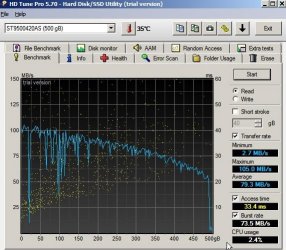
I will post the results (I hope I got the SMART health ones you wanted, I included a benchmark photo too?)

So here are some of the screenshots I have generated for you to view:

(remember a picture is worth a 1000 words so this posting is very much shorter than the others with inclusion of the photos which are self explanatory or have a sentence with them).

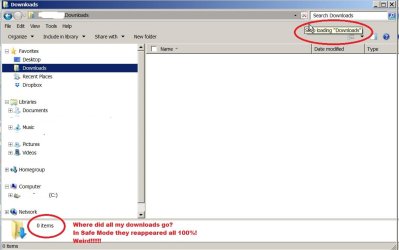
Note the file where I saved the HD Tuner is now "empty" of all my downloaded $$$ programs installers and program downloads! :eek:
Downloads folder is 0  Empty why PS35402.jpg

OK! I got the HD Tuner installed and working while I was in "Safe Mode" I had no idea I could also use Safe Mode with Networking (i.e. means I can go on web to download a program!---and also post to the WindowsSevenForum website!---thanks Marie SWE for suggesting to try it!!

HD Tune results p 1 PS35431.jpg

Oh oh !

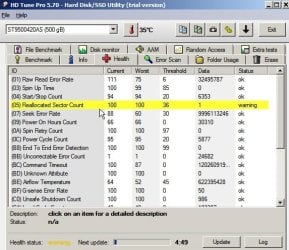
I'm in trouble! I got two yellow "warnings" on the Health "SMART?" test

HD Tune results p 2 two yellow warnings PS35435.jpg

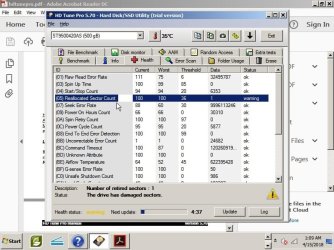
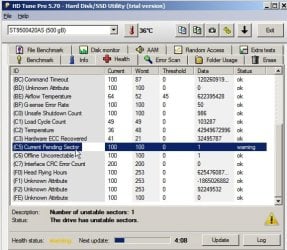
Clicked on them to show the details!

HD Tune results p 3 PS35436.jpg

HD Tune results p 4 PS35437.jpg

So what happened to the data in the damaged sectors? Destroyed forever? Or can I use Macrium to pull it back again? But how do I know what exactly was damaged? Items are not stored by file sector in Macrium so that I could see which ones to pull out. I can't restore back to the January 2018 version as I'd lose all the iPad etc work I did between January 2018 and now...

Decisions decisions and no easy way to decide what to do next.

New Question: Does anyone use their computer / Windows7 entirely under Safe Mode? Pros and Cons if anyone knows?

Oh Marie SWE please post your

Then I've prepared a post with things you can try to disable as well as change times when it's should activate

Thanks again everyone!

XP VM User
 
Last edited:

My Computer

Computer type
Laptop
Computer Manufacturer/Model Number
SONY VAIO VPCS111FM
OS
Windows7 Professional 64bit
CPU
Intel(R) Core (TM) i5 CPU M 430 @2.27 Ghz
Memory
8.0 GB
Hard Drives
Seagate 500GB Momentus
Cooling
Internal fan
Mouse
Logitech bluetooth trackball
Browser
Pale Moon Browser for x64
Maybe

So what happened to the data in the damaged sectors? Destroyed forever? Or can I use Macrium to pull it back again? But how do I know what exactly was damaged? Items are not stored by file sector in Macrium so that I could see which ones to pull out. I can't restore back to the January 2018 version as I'd lose all the iPad etc work I did between January 2018 and now...
It the sectors became corrupted after you made the Macrium Image, you may be able to recover the files.

You can mount a Macrium Image and browse it as if it were a drive or partition.
https://knowledgebase.macrium.com/d...eflect+images+and+backups+in+Windows+Explorer

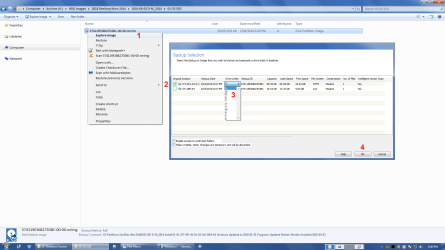
Here's an example using one of my Backup Images.
MR - Browse Image 01.png
If you can identify any corrupt files you can attempt to copy them from the mounted Image.
You can use the normal methods (e.g. "Drag & Drop", "Ctrl + C" & "Ctrl + V", etc.).
 

My Computer

Computer type
PC/Desktop
Computer Manufacturer/Model Number
n/a
OS
W7 Ultimate SP1, LM19.2 MATE, W10 Home 1703, W10 Pro 1703 VM, #All 64 bit
CPU
AMD Phenom II x6 1100T, 3.3 GHz
Motherboard
ASUS M4A88T-M/USB3 (AM3)
Memory
12GB DDR3 1333 G-Skill (4GB x 2), G-Skill (2GB x 2)
Graphics Card(s)
NVIDIA GeForce GTX 660
Sound Card
Realtek?
Monitor(s) Displays
Samsung S23B350
Screen Resolution
1920x1080
Hard Drives
WD Green 2TB (SATA), WD Green 3TB (SATA), WD Blue 4TB (SATA), WD Blue 6TB (SATA)
PSU
Cooler Master
Case
Antec GX300 Tower
Cooling
3x Antec TRICOOL 120mm Fans
Mouse
Wired Optical
Internet Speed
DSL
Antivirus
Avast
Browser
Pale Moon (64 bit)
Other Info
2018-12-27 Upgraded HDDs
2015-12-10 Upgraded case, graphics card, storage
2015-08-15 Upgraded motherboard & RAM
2015-07-15 Upgraded LM17.1 to LM17.2
Thank you for getting back to us with your results,

It's certainly very interesting (Marie asked a very good question) how the PC seems to behave normally in safe mode. Could it be some malicious or dodgy software, just glitching and using your HDD when in "normal mode"?

Another thing you could try, is have a look in the Resource Monitor in the "Disk" tab to see which process is reading/writing to the hard drive so intensly. To open resource monitor, hold down the windows key on your keyboard and press "R" (win+r) in the "Run" dialogue box that appears, type in "resmon" and press enter.

As for the hard drive, yes it seems that it has a single bad sector, and another single bad sector waiting to be replaced. Some drives are fine with a few bad sectors that have been reallocated (marked as bad, and spare sectors put in place of them) others are only going to get worse. We can't know what will happen. I have recently had an external 750GB drive with over 200 bad sectors, and the only two files I wasn't able to recover were 2 photos, so I wouldn't worry about how much damage a single sector did (yes, single, because the other one has been reallocated and is no longer a problem)

However, after formatting and running chkdsk on the hard drive I mentioned, the bad sectors grew from 200 to 4000.

So, have you made a backup image with macrium, of your hard drive? which mode did you use? Can someone else confirm that OP backed up his personal files? I'm not familiar with Macrium. The fact that it took so long, would hint at the hard drive dying, and so does the poor performance, and it not wanting to load your "Downloads"
 

My Computer

OS
Windows 7 x64

My Computer

Computer type
PC/Desktop
Computer Manufacturer/Model Number
HP Desktop & Compaq Laptop
OS
Win 10 x64, Linux Lite, Win 7 x64, BlackArch, & Kali
Hard Drives
Samsung 850 Pro 256Gb,
Hitachi HDD 1Tb,
Crucial MX SSD 250Gb
Segate 3Tb USB 3.0 Ext. Backup HDD
Internet Speed
150Mbps dn, 20Mbps up
Antivirus
Avast Free, Malwarebytes Anti-Exploit & Anti-Ransomware
Browser
Firefox, Chrome, Opera, & VPN
No The only time you use Safe Mode is to troubleshoot or to make restores, backups and so on.
When in Safe mode try this in the command prompt (as an administrator)
sfc/ scannow
chkdsk c:

Here's a small list of things you can check. Also check if you have other scheduled activities that are enabled when logging in and when the computer is not in use after a few minutes.
This I wrote stands for me. I have done this because I hate when the hard disk runs constantly in the background.

Check if the scheduler has following.
AV. Is there a trigger that activates file scanning or update when the computer is idle. If yes, change the activation time to allow the computer to wait for 30-40 minutes of inactivity.
Applications experiencis. Disable all if you do not participate in customer experience programs
Autochk. Disable it It's also to customer experience program
Customer Experience Improvement Program. Disable all
Defrag. Disable and run it yourself once a week. Or change the time for the computer to wait for at least 20-40 minutes of inactivity. (if you have a SSD disk it should be Disabled)
Disk Diagnostic. Change it to 20 minutes inactivity
Maintenance. Change it to 20 minutes of inactivity
Power Efficiency Diagnostic. Disable or change to 10 minutes inactivity
Registry. change to 7-10 minutes inactivity (don't disable this one it backups your registry)
System Restore. change to 15 minutes
Windows Defender. Disable and scan ones a day, or every other day. Or change to 10-15 Minutes inactivity(if you ave an other AV disable this one)

Services under Administrator Tools
Microsoft.NET. I have changed it to manual
Superfetch. I have it disabled
Windows search. I have it disabled, but it stops indexing. so try changing it to disabled just to see how it affects your hard drive activity. You can re-enable it later

I may have missed something since we all have different things installed on our computers. Then look into your scheduled activities if you have other things enabled.
Under services, can you also look at what more things that are auto-start or delayed automatic start on.

Never disable anything that you do not know what it is for. Ask if you're unsure.:)
 

My Computer

Computer type
PC/Desktop
Computer Manufacturer/Model Number
AsusX53, Aspire E1-572. AsusUX32A, HP Pro3130mt+3010mt, HP Proliant ML150G3, 3xCustom, i3, i5, i7
OS
Linux:Debian, Kali.. 2xWin8.1,2x,1x7Pro, Retro:1x2003server.1xXPpro, 1xW2k,1x98SE,1x95,1x3.11
CPU
cpu's intel 8088 up to intel i7 gen9.. dual xenon on server
Motherboard
a lot of them :-)
Memory
oldest 1024KB newest 64GB
Graphics Card(s)
mostly internals i don't game
Sound Card
old retro=soundblaster.. newer ones internal
Monitor(s) Displays
smalest 12" largest 26"
Internet Speed
100/100
Antivirus
NortonInternetSecurity, MS, Avast, (not on the same computer
Browser
IE8, IE9. IE11, Firefox
Other Info
I can't fit all info on all my computers in these fields :-D
Nice list Marie SWE! Well done!
 

My Computer

Computer type
PC/Desktop
Computer Manufacturer/Model Number
HP Desktop & Compaq Laptop
OS
Win 10 x64, Linux Lite, Win 7 x64, BlackArch, & Kali
Hard Drives
Samsung 850 Pro 256Gb,
Hitachi HDD 1Tb,
Crucial MX SSD 250Gb
Segate 3Tb USB 3.0 Ext. Backup HDD
Internet Speed
150Mbps dn, 20Mbps up
Antivirus
Avast Free, Malwarebytes Anti-Exploit & Anti-Ransomware
Browser
Firefox, Chrome, Opera, & VPN

My Computer

Computer type
PC/Desktop
Computer Manufacturer/Model Number
AsusX53, Aspire E1-572. AsusUX32A, HP Pro3130mt+3010mt, HP Proliant ML150G3, 3xCustom, i3, i5, i7
OS
Linux:Debian, Kali.. 2xWin8.1,2x,1x7Pro, Retro:1x2003server.1xXPpro, 1xW2k,1x98SE,1x95,1x3.11
CPU
cpu's intel 8088 up to intel i7 gen9.. dual xenon on server
Motherboard
a lot of them :-)
Memory
oldest 1024KB newest 64GB
Graphics Card(s)
mostly internals i don't game
Sound Card
old retro=soundblaster.. newer ones internal
Monitor(s) Displays
smalest 12" largest 26"
Internet Speed
100/100
Antivirus
NortonInternetSecurity, MS, Avast, (not on the same computer
Browser
IE8, IE9. IE11, Firefox
Other Info
I can't fit all info on all my computers in these fields :-D
Reasons why I cant just run in Safe Mode all the time!

First, let me thank lehnerus2000 for his VERY CLEAR! information on using Macrium!

I can't wait to try that out and see if I can find my missing stuff (yes it did occur after all the iPad stuff as I probabaly killed the HDD trying to save an old iPad data to upload it to new one without spending for a data restoration person to do it "professionally". (sad bad boy face emojii).

I wish I could Rep you lehnerus2000 for that but the little window says I must spread around some reps before I do that (I played a game here hoping that it would let me do just that, but fortunately the designers of this site had the foresight to remove reps from all but serious work here helping others. Wish I had the knowledge to help others here in return for all the help I've been getting. (but they would have to read long replies I guess so maybe better that I don't do that).

Now for a few questions about my current situation:

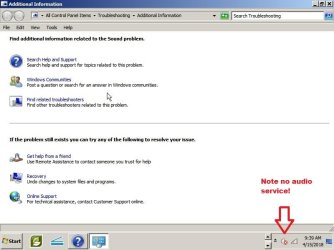
1. My biggest problem with using "Safe Mode" 100% or so of the time is that I have no Audio Service. The Speaker has a "x" on it and clicking repair only leads me to the standard Microsoft Page: See Screenshot:

No Audio service and suggestions PS35459.jpg

2. No printers! I had seven. Now I got none! I can assume only way is to spend each session I'm in Safe Mode an hour or more re-installing a printer (if it would even allow me to do it as I've not tried and things don't just work like they do in regular Windows while in Safe mode).

So that is a big problem, not being able to print out receipts or product information to make buying choices while I can use the browsers without overloading the HDD light.

3. I can't edit old files! It says that with the absence of Audio and other "services" (it lumped them all together in one message), I can't go and edit files I created using a program. And in fact I think its making any new files "unreadable" when I get back to the regular Windows for the same reason in reverse...but I haven't tried that as much as I would need to as hitting my head against the keyboard here so often is giving me a splitting headache trying to naviagte in the primitive world of Safe Mode.

Atari anyone? (just joking...but that is how it feels and looks like on the screen!)

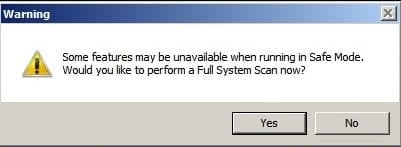
4. My Norton AV and Malwarebytes hate working in the Safe Mode and let me know all the time with annoying pop ups and notifications that I am not protected (see 2 screenshots):

Norton Internet Security

Safe Mode cant run AV page 2  PS35464.jpg

Malwarebytes Premium

Safe Mode cant run AV page 1 PS35463.jpg

* * * * *

Yes I'm happy I can go on line and communicate directly with WindowsSevenForum without the convolulted work around using a more primitive computer to compose items and Emailing them to myself to post here.

Yes I'm happy that the HDD light is OUT! Actually its not on at all while I'm typing on the Word Proessing document and it flashsing on and off while I'm online.

Unfortunately, having BOTH the Word document open and the Web page open and the Paint and other things I used to get screenshots set up to post for WindowsSevenForum causes the Orange light to stay on 100% as it struggles to do all that under Safe Mode.

Yes, some weird things happen....like when trying to order online---I can get a jam when I go to apage with tooo many ads/video ads for me to order something online which I need to do every day... so I'm sent back forced to go and turn on the regular full system in order to do that very slowly.....one click at a time!

At least I have my information stored else I'd be typing my home address.... one letter at a time....over 15 to 20 minutes jst to write a sentence...but MarieSWE may have what services I'm running too much to solve that

A Question, anyone? How do I "exit" Safe Mode and not lose all the programs I have open ? Or is the only way to close everything... shut down (or restart, both methods work) and launch the regular session of Windows again with the over-running HDD light problem slowing me down again!
 

My Computer

Computer type
Laptop
Computer Manufacturer/Model Number
SONY VAIO VPCS111FM
OS
Windows7 Professional 64bit
CPU
Intel(R) Core (TM) i5 CPU M 430 @2.27 Ghz
Memory
8.0 GB
Hard Drives
Seagate 500GB Momentus
Cooling
Internal fan
Mouse
Logitech bluetooth trackball
Browser
Pale Moon Browser for x64
Opps sorry took too long to reply to just lehnerus2000 and now I see

So Sorry all! I took too long to write this after viewing lehnerus2000's reply and wanting to post my screenshots I didn't mean to ignore all of your excellent replies

Kudos! :thumbsup: To Marie! for her list! Great! I'll get to work on it and see my revised posting below here when I respond to the suggestions by others about Macrium and Safe Mode etc....
 

My Computer

Computer type
Laptop
Computer Manufacturer/Model Number
SONY VAIO VPCS111FM
OS
Windows7 Professional 64bit
CPU
Intel(R) Core (TM) i5 CPU M 430 @2.27 Ghz
Memory
8.0 GB
Hard Drives
Seagate 500GB Momentus
Cooling
Internal fan
Mouse
Logitech bluetooth trackball
Browser
Pale Moon Browser for x64
Only a reboot make you come out of safe mode. so be sure to save all files you have open before rebooting.
But before you do, go through my list and perform sfc / scannow before you restart.
I would backup files and maybe do a whole system backup before rebooting. while the hard drive is not so heavily loaded.
But that's me. :)
 

My Computer

Computer type
PC/Desktop
Computer Manufacturer/Model Number
AsusX53, Aspire E1-572. AsusUX32A, HP Pro3130mt+3010mt, HP Proliant ML150G3, 3xCustom, i3, i5, i7
OS
Linux:Debian, Kali.. 2xWin8.1,2x,1x7Pro, Retro:1x2003server.1xXPpro, 1xW2k,1x98SE,1x95,1x3.11
CPU
cpu's intel 8088 up to intel i7 gen9.. dual xenon on server
Motherboard
a lot of them :-)
Memory
oldest 1024KB newest 64GB
Graphics Card(s)
mostly internals i don't game
Sound Card
old retro=soundblaster.. newer ones internal
Monitor(s) Displays
smalest 12" largest 26"
Internet Speed
100/100
Antivirus
NortonInternetSecurity, MS, Avast, (not on the same computer
Browser
IE8, IE9. IE11, Firefox
Other Info
I can't fit all info on all my computers in these fields :-D
I have not learned Macrium yet, so I pass that question to the others.:D


Edit:
and yes, it is normal for a lot of things not to work in safe mode, it's the whole point that Windows only loads the key features
 

My Computer

Computer type
PC/Desktop
Computer Manufacturer/Model Number
AsusX53, Aspire E1-572. AsusUX32A, HP Pro3130mt+3010mt, HP Proliant ML150G3, 3xCustom, i3, i5, i7
OS
Linux:Debian, Kali.. 2xWin8.1,2x,1x7Pro, Retro:1x2003server.1xXPpro, 1xW2k,1x98SE,1x95,1x3.11
CPU
cpu's intel 8088 up to intel i7 gen9.. dual xenon on server
Motherboard
a lot of them :-)
Memory
oldest 1024KB newest 64GB
Graphics Card(s)
mostly internals i don't game
Sound Card
old retro=soundblaster.. newer ones internal
Monitor(s) Displays
smalest 12" largest 26"
Internet Speed
100/100
Antivirus
NortonInternetSecurity, MS, Avast, (not on the same computer
Browser
IE8, IE9. IE11, Firefox
Other Info
I can't fit all info on all my computers in these fields :-D

My Computer

Computer type
PC/Desktop
Computer Manufacturer/Model Number
n/a
OS
W7 Ultimate SP1, LM19.2 MATE, W10 Home 1703, W10 Pro 1703 VM, #All 64 bit
CPU
AMD Phenom II x6 1100T, 3.3 GHz
Motherboard
ASUS M4A88T-M/USB3 (AM3)
Memory
12GB DDR3 1333 G-Skill (4GB x 2), G-Skill (2GB x 2)
Graphics Card(s)
NVIDIA GeForce GTX 660
Sound Card
Realtek?
Monitor(s) Displays
Samsung S23B350
Screen Resolution
1920x1080
Hard Drives
WD Green 2TB (SATA), WD Green 3TB (SATA), WD Blue 4TB (SATA), WD Blue 6TB (SATA)
PSU
Cooler Master
Case
Antec GX300 Tower
Cooling
3x Antec TRICOOL 120mm Fans
Mouse
Wired Optical
Internet Speed
DSL
Antivirus
Avast
Browser
Pale Moon (64 bit)
Other Info
2018-12-27 Upgraded HDDs
2015-12-10 Upgraded case, graphics card, storage
2015-08-15 Upgraded motherboard & RAM
2015-07-15 Upgraded LM17.1 to LM17.2
Back
Top