Solved Windows Explorer Crashing a Lot

TDKMate

New member
Member
VIP
Local time
6:28 PM
Messages
335
Windows Explore (Win 7 Pro 64) is crashing a heck of a lot lately, maybe for a month or two. I use WE a lot in my workflow and some times I can work for hours with no problems, other times it might crash several times in 10 minutes.

In Googling the problem, I found it quite often is a Context Menu issue. I discovered ShellExViewer and I didn't see anything I felt was strange. I then learned it could be a '.com' issue. I ran CCleaner and fixed a bunch of those. That seemed to help, but didn't eliminate the problem.

I uninstalled a couple of recently installed utilities, like UltraSearch, but no real change. I have updated several programs, but they have always updated just fine, like Lightroom and other photo editors.

I also ran SFC and it didn't find any problems. Chkdsk come up clean, too. I've run multiple virus and malware scans; no problems found. Memory tests fine.

This is very frustrating and any help is appreciated.

I've discovered I can keep working with no issues (I was rebooting after the crashes) but I do loose some of my icons on the bottom right of the Task Bar (I forget what that area's called...).
 

My Computer

Computer type
PC/Desktop
Computer Manufacturer/Model Number
home built
OS
Win 7 Pro 64 SP1
CPU
i7 6700K SkyLake
Motherboard
MSI Gaming M7
Memory
32 GB
Graphics Card(s)
nVidia GTX 970
Sound Card
onboard
Monitor(s) Displays
DELL U2711
Screen Resolution
2560x1440
Hard Drives
1 SSD OS, 2 WD Black Caviar data harddrives
PSU
EVGA Super Nova 850W G2 'Gold'
Case
Thermaltake Soprano Snow Edition
Cooling
Cooler Master Hyper 212 evo
Keyboard
Logitech K350
Mouse
Mad Kats RATT
Antivirus
Avast
Browser
Firefox
See this post:

http://www.sevenforums.com/general-...e-keeps-crashing-post3162495.html#post3162495

Upload Explorer Crash Dump (zipped) and attach it to a post if you can figure out how to enable Explorer Crash Dumps.

Also download Autoruns then extract the files to a folder on your desktop and right click autoruns.exe then choose run as administrator. Wait for the scan to complete and you should then see the word "ready" appear at the bottom of the window.

Click the "Explorer" tab and post a screenshot of context menu handlers.

Autoruns.jpg
 

My Computer

Computer type
Laptop
Computer Manufacturer/Model Number
ASUS
OS
Microsoft Windows 7 Home Premium 64-bit 7601 Multiprocessor Free Service Pack 1
CPU
AMD C-60 APU with Radeon(tm) HD Graphics
Motherboard
ASUSTeK COMPUTER INC. X501U
Memory
4.00 GB
Graphics Card(s)
AMD Radeon HD 6290 Graphics
Sound Card
(1) AMD High Definition Audio Device (2) Realtek High Defi
Screen Resolution
1366 x 768 x 32 bits (4294967296 colors) @ 60 Hz
Hard Drives
Hitachi HTS545050A7E380 SATA Disk Device
Antivirus
Comodo CIS & FW, SecureAplus App Whitelisting, Threatfire
Browser
Cyberfox 64bit, Opera 64bit, Airfox
Other Info
Spy-The-Spy, HitmanPro.Alert, Norton Connect Safe, MJRegWatcher, BitDefender TrafficLight, Voodoo Shield, Zemana AntiMalware
Thanks for the post, Callender.

Before I forget, I even installed an old video card (nVidia 770) driver/software version using the clean install option: no change. It’s still installed.

Steps performed:
Downloaded and ran Autoruns. Screenshot attached.

I’ll post a crash log as soon as I get one.

From the other link(s):
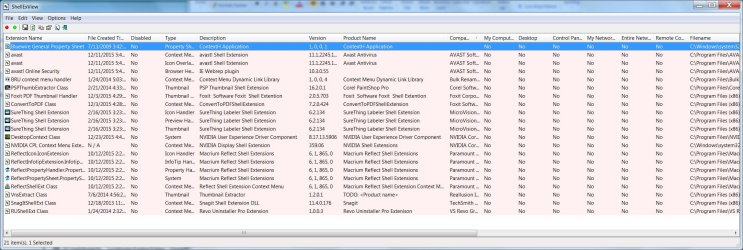
ShellExView already installed. I took a screenshot of it, sans Windows items. I put the file date up front to see recent files added. The only items new enough to coincide with my problem are: Avast, antivirus update; FoxIt Reader, a new install; Reflect, a regular program update. I’m thinking of uninstalling FoxIt (with Reflect) after I get a crash log, but the problem existed before I installed FoxIt.

I downloaded and installed the reg fix to enable the crash log.

I ran services.msc and set Windows Error Reporting to startup Automatically.

Naturally I did a full reboot.


.
 

Attachments

  • ShellExView Screenshot 1-2-15.jpg
    ShellExView Screenshot 1-2-15.jpg
    1.1 MB · Views: 4
  • AutoRuns Screenshot 1-2-16.jpg
    AutoRuns Screenshot 1-2-16.jpg
    1.1 MB · Views: 3

My Computer

Computer type
PC/Desktop
Computer Manufacturer/Model Number
home built
OS
Win 7 Pro 64 SP1
CPU
i7 6700K SkyLake
Motherboard
MSI Gaming M7
Memory
32 GB
Graphics Card(s)
nVidia GTX 970
Sound Card
onboard
Monitor(s) Displays
DELL U2711
Screen Resolution
2560x1440
Hard Drives
1 SSD OS, 2 WD Black Caviar data harddrives
PSU
EVGA Super Nova 850W G2 'Gold'
Case
Thermaltake Soprano Snow Edition
Cooling
Cooler Master Hyper 212 evo
Keyboard
Logitech K350
Mouse
Mad Kats RATT
Antivirus
Avast
Browser
Firefox
Sorry, I forgot I had the below. It's Not from the crash log method you requested; it's from the 'Details' area of the error window when Windows Explorer stops working. I saved several:

Problem signature:
Problem Event Name: APPCRASH
Application Name: Explorer.EXE
Application Version: 6.1.7601.17567
Application Timestamp: 4d672ee4
Fault Module Name: DUI70.dll
Fault Module Version: 6.1.7600.16385
Fault Module Timestamp: 4a5bdf25
Exception Code: c0000005
Exception Offset: 0000000000001134
OS Version: 6.1.7601.2.1.0.256.48
Locale ID: 1033
Additional Information 1: 4589
Additional Information 2: 458970727bb8c3d19e66bbe2bd9c8be5
Additional Information 3: 8e85
Additional Information 4: 8e854223c73423d4817a2f771109ff16

** another:
Problem signature:
Problem Event Name: APPCRASH
Application Name: Explorer.EXE
Application Version: 6.1.7601.17567
Application Timestamp: 4d672ee4
Fault Module Name: ntdll.dll
Fault Module Version: 6.1.7601.19045
Fault Module Timestamp: 56259295
Exception Code: c0000005
Exception Offset: 000000000004ac04
OS Version: 6.1.7601.2.1.0.256.48
Locale ID: 1033
Additional Information 1: d735
Additional Information 2: d735188622cbec476c04d69ee4c5680c
Additional Information 3: eb40
Additional Information 4: eb40b0022b4885798629fb1650a4f992

** another:
Problem signature:
Problem Event Name: APPCRASH
Application Name: Explorer.EXE
Application Version: 6.1.7601.17567
Application Timestamp: 4d672ee4
Fault Module Name: ntdll.dll
Fault Module Version: 6.1.7601.19045
Fault Module Timestamp: 56259295
Exception Code: c0000005
Exception Offset: 000000000004ac04
OS Version: 6.1.7601.2.1.0.256.48
Locale ID: 1033
Additional Information 1: d735
Additional Information 2: d735188622cbec476c04d69ee4c5680c
Additional Information 3: eb40
Additional Information 4: eb40b0022b4885798629fb1650a4f992
 

My Computer

Computer type
PC/Desktop
Computer Manufacturer/Model Number
home built
OS
Win 7 Pro 64 SP1
CPU
i7 6700K SkyLake
Motherboard
MSI Gaming M7
Memory
32 GB
Graphics Card(s)
nVidia GTX 970
Sound Card
onboard
Monitor(s) Displays
DELL U2711
Screen Resolution
2560x1440
Hard Drives
1 SSD OS, 2 WD Black Caviar data harddrives
PSU
EVGA Super Nova 850W G2 'Gold'
Case
Thermaltake Soprano Snow Edition
Cooling
Cooler Master Hyper 212 evo
Keyboard
Logitech K350
Mouse
Mad Kats RATT
Antivirus
Avast
Browser
Firefox
If you get an Explorer crash dump upload it and hopefully it will point to a specific .dll (shell extension)

In the meantime I'd suggest checking for and installing any updates for:

Bulk Rename Utility. Doesn't look like it's been updated by the author since 2012.

SnagIt current version. Your version looks old (2013)

Re: Gadgets. Do you use them? Currently the advice from Microsoft is to disable them but opinions vary.

Re: Foxit and Reflect. It seems unlikely that either of those cause problems.

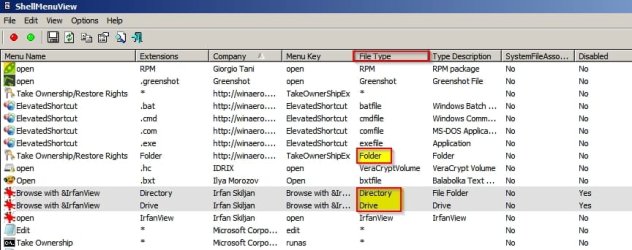
You might also want to look at ShellMenuView x64 and check any entries where "File Type" is listed as Drive. Directory or Folder. If you spot any of those entries that you don not actually use - it might be worth disabling them.

Examples:

ShellMenuView.jpg
 

My Computer

Computer type
Laptop
Computer Manufacturer/Model Number
ASUS
OS
Microsoft Windows 7 Home Premium 64-bit 7601 Multiprocessor Free Service Pack 1
CPU
AMD C-60 APU with Radeon(tm) HD Graphics
Motherboard
ASUSTeK COMPUTER INC. X501U
Memory
4.00 GB
Graphics Card(s)
AMD Radeon HD 6290 Graphics
Sound Card
(1) AMD High Definition Audio Device (2) Realtek High Defi
Screen Resolution
1366 x 768 x 32 bits (4294967296 colors) @ 60 Hz
Hard Drives
Hitachi HTS545050A7E380 SATA Disk Device
Antivirus
Comodo CIS & FW, SecureAplus App Whitelisting, Threatfire
Browser
Cyberfox 64bit, Opera 64bit, Airfox
Other Info
Spy-The-Spy, HitmanPro.Alert, Norton Connect Safe, MJRegWatcher, BitDefender TrafficLight, Voodoo Shield, Zemana AntiMalware
If you get an Explorer crash dump upload it and hopefully it will point to a specific .dll (shell extension)
Will do. (I’m surprised it hasn’t crashed yet today! The computer’s been on for hours.)

“In the meantime I'd suggest checking for and installing any updates for:
Bulk Rename Utility. Doesn't look like it's been updated by the author since 2012
.”
Yeah, it’s the latest-n-greatest from their Web site. I’ve been using it for years. It’s a great utility I can’t live without. Give it a try if you do a lot of file renaming (it does more than that!).

SnagIt current version. Your version looks old (2013)
Actually, I have the latest-n-greatest on this too, with all updates. But I do have the prior version still installed; I’ll uninstall it.

I have a (bad?) habit of leaving a prior version of a program installed until all the bugs are worked out in the new version. I’ve got other old programs I can uninstall.

Re: Gadgets. Do you use them? Currently the advice from Microsoft is to disable them but opinions vary.”
No, never have used them. I Googled it and used “Turn Windows feature on or off” in which I unchecked “Windows Gadget Platform”.

Re: Foxit and Reflect. It seems unlikely that either of those cause problems.”
What I’d like to do is uninstall Adobe Read DC as I can’t stand this version, which is why I'm trying out FoxIt. (Little things like the constant nag screen that I’m not signed in.)

Any thoughts on this?

You might also want to look at ShellMenuView x64 and check any entries where "File Type" is listed as Drive. Directory or Folder. If you spot any of those entries that you don not actually use - it might be worth disabling them.
Disabled:
Folder: “Add to VLC media player's Playlist” Never used it, but I have been using VLC since the beta versions.
Folder: “Browse in Adobe Bridge CS6” Installed for years but never use it.
Folder: “Browse with Corel PaintShop Pro X6” Never use this, either.
Folder: “&TreeSize Free” Rarely used… I might just uninstall it.

Drive: “Browse with Corel PaintShop Pro X6” Don’t use it.
Drive: “&TreeSize Free” Same as above.

Going to restart and see what happens…
 

My Computer

Computer type
PC/Desktop
Computer Manufacturer/Model Number
home built
OS
Win 7 Pro 64 SP1
CPU
i7 6700K SkyLake
Motherboard
MSI Gaming M7
Memory
32 GB
Graphics Card(s)
nVidia GTX 970
Sound Card
onboard
Monitor(s) Displays
DELL U2711
Screen Resolution
2560x1440
Hard Drives
1 SSD OS, 2 WD Black Caviar data harddrives
PSU
EVGA Super Nova 850W G2 'Gold'
Case
Thermaltake Soprano Snow Edition
Cooling
Cooler Master Hyper 212 evo
Keyboard
Logitech K350
Mouse
Mad Kats RATT
Antivirus
Avast
Browser
Firefox
What I’d like to do is uninstall Adobe Read DC as I can’t stand this version, which is why I'm trying out FoxIt. (Little things like the constant nag screen that I’m not signed in.)

Any thoughts on this?

Personally I use Nitro PDF Reader. I will not use any Adode Reader! Foxit is okay but it installs Foxit Cloud Reading.
 

My Computer

Computer type
Laptop
Computer Manufacturer/Model Number
ASUS
OS
Microsoft Windows 7 Home Premium 64-bit 7601 Multiprocessor Free Service Pack 1
CPU
AMD C-60 APU with Radeon(tm) HD Graphics
Motherboard
ASUSTeK COMPUTER INC. X501U
Memory
4.00 GB
Graphics Card(s)
AMD Radeon HD 6290 Graphics
Sound Card
(1) AMD High Definition Audio Device (2) Realtek High Defi
Screen Resolution
1366 x 768 x 32 bits (4294967296 colors) @ 60 Hz
Hard Drives
Hitachi HTS545050A7E380 SATA Disk Device
Antivirus
Comodo CIS & FW, SecureAplus App Whitelisting, Threatfire
Browser
Cyberfox 64bit, Opera 64bit, Airfox
Other Info
Spy-The-Spy, HitmanPro.Alert, Norton Connect Safe, MJRegWatcher, BitDefender TrafficLight, Voodoo Shield, Zemana AntiMalware
Personally I use Nitro PDF Reader. I will not use any Adode Reader! Foxit is okay but it installs Foxit Cloud Reading.
I Googled on uninstalling Foxit Cloud and it seems straight forward. I went to uninstall it, but found no traces of it! Not listed in Programs, no Foxit Services running, etc. I don't remember for sure, but maybe the version of Foxit Reader I installed had an opt-out option...?

I also Googled Nitro Reader and overall it looks pretty good. I could not find if it has a Firefox plug-in or the like, however. I do checkout PDFs online a fair amount, owner's / repair manuals and the like, so I don't really want to lose that capability.

Can you view online PDFs with it?
 

My Computer

Computer type
PC/Desktop
Computer Manufacturer/Model Number
home built
OS
Win 7 Pro 64 SP1
CPU
i7 6700K SkyLake
Motherboard
MSI Gaming M7
Memory
32 GB
Graphics Card(s)
nVidia GTX 970
Sound Card
onboard
Monitor(s) Displays
DELL U2711
Screen Resolution
2560x1440
Hard Drives
1 SSD OS, 2 WD Black Caviar data harddrives
PSU
EVGA Super Nova 850W G2 'Gold'
Case
Thermaltake Soprano Snow Edition
Cooling
Cooler Master Hyper 212 evo
Keyboard
Logitech K350
Mouse
Mad Kats RATT
Antivirus
Avast
Browser
Firefox
I also Googled Nitro Reader and overall it looks pretty good. I could not find if it has a Firefox plug-in or the like, however. I do checkout PDFs online a fair amount, owner's / repair manuals and the like, so I don't really want to lose that capability.

Can you view online PDFs with it?

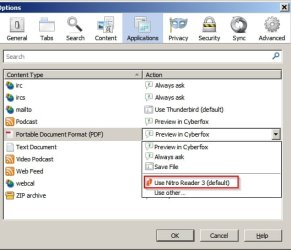
Yes you can. I think (from memory) but I'm not too sure that there's an option to install the web plugin on install. Anyway I prefer to use Cyberfox's (Firefox variant) built in PDF reader for viewing PDF's online but you can configure browsers to use Nitro PDF.

Nitro.jpg

I just mentioned that I use Nitro rather than Adobe and it has some useful features. If you were looking for a basic PDF Reader then check out the thread here:

http://www.sevenforums.com/software/323493-suggestions-free-pdf-reader.html
 

My Computer

Computer type
Laptop
Computer Manufacturer/Model Number
ASUS
OS
Microsoft Windows 7 Home Premium 64-bit 7601 Multiprocessor Free Service Pack 1
CPU
AMD C-60 APU with Radeon(tm) HD Graphics
Motherboard
ASUSTeK COMPUTER INC. X501U
Memory
4.00 GB
Graphics Card(s)
AMD Radeon HD 6290 Graphics
Sound Card
(1) AMD High Definition Audio Device (2) Realtek High Defi
Screen Resolution
1366 x 768 x 32 bits (4294967296 colors) @ 60 Hz
Hard Drives
Hitachi HTS545050A7E380 SATA Disk Device
Antivirus
Comodo CIS & FW, SecureAplus App Whitelisting, Threatfire
Browser
Cyberfox 64bit, Opera 64bit, Airfox
Other Info
Spy-The-Spy, HitmanPro.Alert, Norton Connect Safe, MJRegWatcher, BitDefender TrafficLight, Voodoo Shield, Zemana AntiMalware
dmp file attached

After no crashes yesterday, I was having a little hope. But it crashes pretty soon after startup this morning.
 

Attachments

My Computer

Computer type
PC/Desktop
Computer Manufacturer/Model Number
home built
OS
Win 7 Pro 64 SP1
CPU
i7 6700K SkyLake
Motherboard
MSI Gaming M7
Memory
32 GB
Graphics Card(s)
nVidia GTX 970
Sound Card
onboard
Monitor(s) Displays
DELL U2711
Screen Resolution
2560x1440
Hard Drives
1 SSD OS, 2 WD Black Caviar data harddrives
PSU
EVGA Super Nova 850W G2 'Gold'
Case
Thermaltake Soprano Snow Edition
Cooling
Cooler Master Hyper 212 evo
Keyboard
Logitech K350
Mouse
Mad Kats RATT
Antivirus
Avast
Browser
Firefox
From your Explorer Crash Dump:

Code:
SYMBOL_NAME:  nvspcap64+67536

FOLLOWUP_NAME:  MachineOwner

MODULE_NAME: nvspcap64

IMAGE_NAME:  nvspcap64.dll

DEBUG_FLR_IMAGE_TIMESTAMP:  566785ad

STACK_COMMAND:  ~35s; .ecxr ; kb

FAILURE_BUCKET_ID:  NULL_CLASS_PTR_WRITE_c0000005_nvspcap64.dll!Unknown

BUCKET_ID:  X64_APPLICATION_FAULT_NULL_CLASS_PTR_WRITE_nvspcap64+67536

I'm not expert on Nvidia stuff but as a test try:

Start> Run> msconfig> Startup Tab

Look for something like this and uncheck if found.

C:\Windows\system32\rundll32.exe C:\Windows\system32\nvspcap64.dll,ShadowPlayOnSystemStart

Also try:

Start> Run> services.msc

Try disabling Nvidia GeForce Experience Service or setting it to manual start.

Consider uninstalling Nvidia GeForce Experience via Control Panel> Prorams and Featutes> Uninstall or change a program

Then then reboot and dowload it again and reinstall it.

If problems persist then you'll need help from someone who knows more about Nvidia than I do!

EDIT:

Check this tutorial. Maybe it helps.

http://www.sevenforums.com/tutorials/329639-nvidia-geforce-experience-beginners-guide.html

Personally with Graphics Card Drivers I install the working driver from my computer manufacturer's website rather than getting the latest updates which might include features that I don't want or need.
 
Last edited:

My Computer

Computer type
Laptop
Computer Manufacturer/Model Number
ASUS
OS
Microsoft Windows 7 Home Premium 64-bit 7601 Multiprocessor Free Service Pack 1
CPU
AMD C-60 APU with Radeon(tm) HD Graphics
Motherboard
ASUSTeK COMPUTER INC. X501U
Memory
4.00 GB
Graphics Card(s)
AMD Radeon HD 6290 Graphics
Sound Card
(1) AMD High Definition Audio Device (2) Realtek High Defi
Screen Resolution
1366 x 768 x 32 bits (4294967296 colors) @ 60 Hz
Hard Drives
Hitachi HTS545050A7E380 SATA Disk Device
Antivirus
Comodo CIS & FW, SecureAplus App Whitelisting, Threatfire
Browser
Cyberfox 64bit, Opera 64bit, Airfox
Other Info
Spy-The-Spy, HitmanPro.Alert, Norton Connect Safe, MJRegWatcher, BitDefender TrafficLight, Voodoo Shield, Zemana AntiMalware
That’s a good lead: Shadow Play. I just discovered Windows’ Reliability Monitor. Pretty handy; I never knew it exited. I went back in history and the first instance I could find of Windows Explorer crashing was in the middle of November. nVidia rapidly released multiple drivers in November, so maybe they were having issues. I downloaded the only drivers from October and will try to clean install them today, time permitting. Since I actually use Shadow Play, I figured I’d try a prior version from when I didn’t have problems. If I still have problems, I’ll disable it and see what happens. It could also be issues with a new version of a photo editor I installed roughly the same time that uses nVidia's CUDA cores.


Either way, I’ll keep you posted on progress/results.
 

My Computer

Computer type
PC/Desktop
Computer Manufacturer/Model Number
home built
OS
Win 7 Pro 64 SP1
CPU
i7 6700K SkyLake
Motherboard
MSI Gaming M7
Memory
32 GB
Graphics Card(s)
nVidia GTX 970
Sound Card
onboard
Monitor(s) Displays
DELL U2711
Screen Resolution
2560x1440
Hard Drives
1 SSD OS, 2 WD Black Caviar data harddrives
PSU
EVGA Super Nova 850W G2 'Gold'
Case
Thermaltake Soprano Snow Edition
Cooling
Cooler Master Hyper 212 evo
Keyboard
Logitech K350
Mouse
Mad Kats RATT
Antivirus
Avast
Browser
Firefox
Sorry, I don't know the etiquette on this, so if I should start a new thread, please let me know. While looking for programs to uninstall in Revo Uninstaller Pro (latest version and updates) I found lots of duplicates on:

Java updates. 5 of them.
MS Visual C++ Redistributable. 17 of them! All different versions ranging from v8-v12.

Are all of these needed?
 

My Computer

Computer type
PC/Desktop
Computer Manufacturer/Model Number
home built
OS
Win 7 Pro 64 SP1
CPU
i7 6700K SkyLake
Motherboard
MSI Gaming M7
Memory
32 GB
Graphics Card(s)
nVidia GTX 970
Sound Card
onboard
Monitor(s) Displays
DELL U2711
Screen Resolution
2560x1440
Hard Drives
1 SSD OS, 2 WD Black Caviar data harddrives
PSU
EVGA Super Nova 850W G2 'Gold'
Case
Thermaltake Soprano Snow Edition
Cooling
Cooler Master Hyper 212 evo
Keyboard
Logitech K350
Mouse
Mad Kats RATT
Antivirus
Avast
Browser
Firefox
Sorry, I don't know the etiquette on this, so if I should start a new thread, please let me know. While looking for programs to uninstall in Revo Uninstaller Pro (latest version and updates) I found lots of duplicates on:

Java updates. 5 of them.
MS Visual C++ Redistributable. 17 of them! All different versions ranging from v8-v12.

Are all of these needed?

RE: Starting a new thread. If you need help with Nvidia drivers I'd suggest a new thread for that.

RE: MS Visual C++ Redistributable. Some of those are installed by windows updates and some of them are installed when installing third party software that requires a particular version of MS Visual C++

It's best to leave them installed.

RE: Java. Personally I don't keep it installed but if you need it then you just need the latest version.

Revo "should" take care of the removal but in the past I've used JavaRa:

Download JavaRA - MajorGeeks

It's possible to use the program to fully remove all Java versions then reboot - run Ccleaner or similar and fresh install the latest Java.
 

My Computer

Computer type
Laptop
Computer Manufacturer/Model Number
ASUS
OS
Microsoft Windows 7 Home Premium 64-bit 7601 Multiprocessor Free Service Pack 1
CPU
AMD C-60 APU with Radeon(tm) HD Graphics
Motherboard
ASUSTeK COMPUTER INC. X501U
Memory
4.00 GB
Graphics Card(s)
AMD Radeon HD 6290 Graphics
Sound Card
(1) AMD High Definition Audio Device (2) Realtek High Defi
Screen Resolution
1366 x 768 x 32 bits (4294967296 colors) @ 60 Hz
Hard Drives
Hitachi HTS545050A7E380 SATA Disk Device
Antivirus
Comodo CIS & FW, SecureAplus App Whitelisting, Threatfire
Browser
Cyberfox 64bit, Opera 64bit, Airfox
Other Info
Spy-The-Spy, HitmanPro.Alert, Norton Connect Safe, MJRegWatcher, BitDefender TrafficLight, Voodoo Shield, Zemana AntiMalware
Thanks for the uninstall tips, Callender, and all the help above, too. :)

I won't be around the computer for most, if not all week. So I'll finish all the tips on the original problem and see how it goes.

So you're not left hanging, I'll post back with results as soon as I can.
 

My Computer

Computer type
PC/Desktop
Computer Manufacturer/Model Number
home built
OS
Win 7 Pro 64 SP1
CPU
i7 6700K SkyLake
Motherboard
MSI Gaming M7
Memory
32 GB
Graphics Card(s)
nVidia GTX 970
Sound Card
onboard
Monitor(s) Displays
DELL U2711
Screen Resolution
2560x1440
Hard Drives
1 SSD OS, 2 WD Black Caviar data harddrives
PSU
EVGA Super Nova 850W G2 'Gold'
Case
Thermaltake Soprano Snow Edition
Cooling
Cooler Master Hyper 212 evo
Keyboard
Logitech K350
Mouse
Mad Kats RATT
Antivirus
Avast
Browser
Firefox
Short version: I think you nailed it with the 'Shadow Play' diagnosis! I've been able to use the computer a lot more the last several days than I expected and no problems so far.

Instead of messing around with re-installing older video card drivers, it hit me that I can simply turn off Shadow Play when I don't need it. (I'm a little slow sometimes...) Windows Explorer has not blown up since I turned off Shadow Play.

Just in case there's more clues to be had, I'm attaching some more .dmp files. One is from the 4th, the other two are from the 6th, which is the last day I had a crash.
 

Attachments

My Computer

Computer type
PC/Desktop
Computer Manufacturer/Model Number
home built
OS
Win 7 Pro 64 SP1
CPU
i7 6700K SkyLake
Motherboard
MSI Gaming M7
Memory
32 GB
Graphics Card(s)
nVidia GTX 970
Sound Card
onboard
Monitor(s) Displays
DELL U2711
Screen Resolution
2560x1440
Hard Drives
1 SSD OS, 2 WD Black Caviar data harddrives
PSU
EVGA Super Nova 850W G2 'Gold'
Case
Thermaltake Soprano Snow Edition
Cooling
Cooler Master Hyper 212 evo
Keyboard
Logitech K350
Mouse
Mad Kats RATT
Antivirus
Avast
Browser
Firefox
Those dumps all show the same problem with nvspcap64.dll as shown in your first dump. At least they are consistent!

Code:
SYMBOL_NAME:  nvspcap64+67536

FOLLOWUP_NAME:  MachineOwner

MODULE_NAME: nvspcap64

IMAGE_NAME:  nvspcap64.dll

DEBUG_FLR_IMAGE_TIMESTAMP:  566785ad

STACK_COMMAND:  ~28s; .ecxr ; kb

FAILURE_BUCKET_ID:  NULL_CLASS_PTR_WRITE_c0000005_nvspcap64.dll!Unknown

BUCKET_ID:  X64_APPLICATION_FAULT_NULL_CLASS_PTR_WRITE_nvspcap64+67536
 

My Computer

Computer type
Laptop
Computer Manufacturer/Model Number
ASUS
OS
Microsoft Windows 7 Home Premium 64-bit 7601 Multiprocessor Free Service Pack 1
CPU
AMD C-60 APU with Radeon(tm) HD Graphics
Motherboard
ASUSTeK COMPUTER INC. X501U
Memory
4.00 GB
Graphics Card(s)
AMD Radeon HD 6290 Graphics
Sound Card
(1) AMD High Definition Audio Device (2) Realtek High Defi
Screen Resolution
1366 x 768 x 32 bits (4294967296 colors) @ 60 Hz
Hard Drives
Hitachi HTS545050A7E380 SATA Disk Device
Antivirus
Comodo CIS & FW, SecureAplus App Whitelisting, Threatfire
Browser
Cyberfox 64bit, Opera 64bit, Airfox
Other Info
Spy-The-Spy, HitmanPro.Alert, Norton Connect Safe, MJRegWatcher, BitDefender TrafficLight, Voodoo Shield, Zemana AntiMalware
Thanks!

Thanks, Callender, for all the help! You're the greatest :)

Will flag as Solved.
 

My Computer

Computer type
PC/Desktop
Computer Manufacturer/Model Number
home built
OS
Win 7 Pro 64 SP1
CPU
i7 6700K SkyLake
Motherboard
MSI Gaming M7
Memory
32 GB
Graphics Card(s)
nVidia GTX 970
Sound Card
onboard
Monitor(s) Displays
DELL U2711
Screen Resolution
2560x1440
Hard Drives
1 SSD OS, 2 WD Black Caviar data harddrives
PSU
EVGA Super Nova 850W G2 'Gold'
Case
Thermaltake Soprano Snow Edition
Cooling
Cooler Master Hyper 212 evo
Keyboard
Logitech K350
Mouse
Mad Kats RATT
Antivirus
Avast
Browser
Firefox
It's baaaaack....

I've been using the computer a lot lately, and sadly the problem is persisting. Not near a bad, but it's still there. Like this morning on a fresh startup, the only item I opened was Windows Explorer. It crashed in less than a minute.

It crashed only once all day yesterday (1.17.16) but three times on 1.14.16. No crashes on 1.15 or 1.16 and the computer was used almost all day.

Dump #5032 is from today.
Dump #4844 is from yesterday.
Dump #5016 is the 3rd crash from 1.14. If you'd like the other two from this day, let me know.

The only changes are that I uninstalled Acrobat Reader 10, and disabled indexing on all drives but my SSD OS drive: no change. I still get the green bar at the top of Windows Explorer when going to hard drives that are no longer indexed; I don't get that... I thought that was the Indexing indicator.


Thanks!!
 

Attachments

My Computer

Computer type
PC/Desktop
Computer Manufacturer/Model Number
home built
OS
Win 7 Pro 64 SP1
CPU
i7 6700K SkyLake
Motherboard
MSI Gaming M7
Memory
32 GB
Graphics Card(s)
nVidia GTX 970
Sound Card
onboard
Monitor(s) Displays
DELL U2711
Screen Resolution
2560x1440
Hard Drives
1 SSD OS, 2 WD Black Caviar data harddrives
PSU
EVGA Super Nova 850W G2 'Gold'
Case
Thermaltake Soprano Snow Edition
Cooling
Cooler Master Hyper 212 evo
Keyboard
Logitech K350
Mouse
Mad Kats RATT
Antivirus
Avast
Browser
Firefox
5032, 4844 &5016 zip all show exactly the same errors.

Code:
MODULE_NAME: nvspcap64

IMAGE_NAME:  nvspcap64.dll

DEBUG_FLR_IMAGE_TIMESTAMP:  56939422

STACK_COMMAND:  ~28s; .ecxr ; kb

FAILURE_BUCKET_ID:  NULL_CLASS_PTR_WRITE_c0000005_nvspcap64.dll!Unknown

BUCKET_ID:  X64_APPLICATION_FAULT_NULL_CLASS_PTR_WRITE_nvspcap64+68f96

I reckon that you need help from someone who knows what they are doing with Nvidia drivers.
 

My Computer

Computer type
Laptop
Computer Manufacturer/Model Number
ASUS
OS
Microsoft Windows 7 Home Premium 64-bit 7601 Multiprocessor Free Service Pack 1
CPU
AMD C-60 APU with Radeon(tm) HD Graphics
Motherboard
ASUSTeK COMPUTER INC. X501U
Memory
4.00 GB
Graphics Card(s)
AMD Radeon HD 6290 Graphics
Sound Card
(1) AMD High Definition Audio Device (2) Realtek High Defi
Screen Resolution
1366 x 768 x 32 bits (4294967296 colors) @ 60 Hz
Hard Drives
Hitachi HTS545050A7E380 SATA Disk Device
Antivirus
Comodo CIS & FW, SecureAplus App Whitelisting, Threatfire
Browser
Cyberfox 64bit, Opera 64bit, Airfox
Other Info
Spy-The-Spy, HitmanPro.Alert, Norton Connect Safe, MJRegWatcher, BitDefender TrafficLight, Voodoo Shield, Zemana AntiMalware
Back
Top