Solved Windows Explorer Crashing a Lot

Thanks, Callender. I have to admit I screwed up a little. When you said to disable "ShadowPlayOnSystemStart" I turned it off in nVidia's control panel so it would not start on start up. I also went into Task Manager services and looked for it, and CCleaner and didn't see it. So I figured it was Off. And things were good for a few days.

Somehow I missed the fine print of going into msconfig in one of your prior posts. Ops... I'm embarrassed and I apologize. I did find it in msconfig today, turned it off, and rebooted.

I'll give it a try for a week or so and hopefully it's fixed. I'll let you know.

Again, thanks for your help.
 

My Computer My Computer

Computer type
PC/Desktop
Computer Manufacturer/Model Number
home built
OS
Win 7 Pro 64 SP1
CPU
i7 6700K SkyLake
Motherboard
MSI Gaming M7
Memory
32 GB
Graphics Card(s)
nVidia GTX 970
Sound Card
onboard
Monitor(s) Displays
DELL U2711
Screen Resolution
2560x1440
Hard Drives
1 SSD OS, 2 WD Black Caviar data harddrives
PSU
EVGA Super Nova 850W G2 'Gold'
Case
Thermaltake Soprano Snow Edition
Cooling
Cooler Master Hyper 212 evo
Keyboard
Logitech K350
Mouse
Mad Kats RATT
Antivirus
Avast
Browser
Firefox
I figured that you'd tried disabling via msconfig already! Never mind. Here's what appears to be a decent enough guide:

TweakGuides.com - Nvidia GeForce Tweak Guide

There are several pages including a "Clean Install" guide for the drivers. Note: I really know nothing about Nvidia drivers. I do know how to clean install my AMD graphics driver but it's not the same thing.
 

My Computer My Computer

Computer type
Laptop
Computer Manufacturer/Model Number
ASUS
OS
Microsoft Windows 7 Home Premium 64-bit 7601 Multiprocessor Free Service Pack 1
CPU
AMD C-60 APU with Radeon(tm) HD Graphics
Motherboard
ASUSTeK COMPUTER INC. X501U
Memory
4.00 GB
Graphics Card(s)
AMD Radeon HD 6290 Graphics
Sound Card
(1) AMD High Definition Audio Device (2) Realtek High Defi
Screen Resolution
1366 x 768 x 32 bits (4294967296 colors) @ 60 Hz
Hard Drives
Hitachi HTS545050A7E380 SATA Disk Device
Antivirus
Comodo CIS & FW, SecureAplus App Whitelisting, Threatfire
Browser
Cyberfox 64bit, Opera 64bit, Airfox
Other Info
Spy-The-Spy, HitmanPro.Alert, Norton Connect Safe, MJRegWatcher, BitDefender TrafficLight, Voodoo Shield, Zemana AntiMalware
Thanks for the link, Callender. I skimmed it and can tell I'll be using some of the tips. I've got a couple days off coming up soon so I'll be able to read it in full and apply it.
 

My Computer My Computer

Computer type
PC/Desktop
Computer Manufacturer/Model Number
home built
OS
Win 7 Pro 64 SP1
CPU
i7 6700K SkyLake
Motherboard
MSI Gaming M7
Memory
32 GB
Graphics Card(s)
nVidia GTX 970
Sound Card
onboard
Monitor(s) Displays
DELL U2711
Screen Resolution
2560x1440
Hard Drives
1 SSD OS, 2 WD Black Caviar data harddrives
PSU
EVGA Super Nova 850W G2 'Gold'
Case
Thermaltake Soprano Snow Edition
Cooling
Cooler Master Hyper 212 evo
Keyboard
Logitech K350
Mouse
Mad Kats RATT
Antivirus
Avast
Browser
Firefox
Sorry for the delay in getting back to you.

Before I forget: what is that green bar that goes across the top of Windows Explorer?? I thought it was for indexing, but I've turned that off on all partitions/drives except for 'C' drive. But yet, it sometimes still just creeps along as I switch drives/directories.

Is there some kind of buffer or cache I can increase to help prevent this slowdown?

I've been keeping a couple of Windows Explorer windows open at all time for testing and things have been a lot better in the crash department. One crash happened while the green bar was slowly moving across. I deleted a large 22GB file, and while the green bar was about 1/3 the way across, I deleted a second large file, and it crashed.

I followed some tips in your link above and got rid of nVidia stuff I don't use/need. Out of habit, I installed the latest drivers the other day, using the installer option of a clean install. And I used the 'advanced' option to not reinstall all the junk I just got rid of. I checked in MSCONFIG and Shadow Play is still disabled. No crashes since this install.

It's crashed "only" four times; the dumps are attached. Their dates:

4968 - 1/20/16
4404 - 1/24/16
4876 - 1/31/16
1968 - 2/3/16
 

Attachments

My Computer My Computer

Computer type
PC/Desktop
Computer Manufacturer/Model Number
home built
OS
Win 7 Pro 64 SP1
CPU
i7 6700K SkyLake
Motherboard
MSI Gaming M7
Memory
32 GB
Graphics Card(s)
nVidia GTX 970
Sound Card
onboard
Monitor(s) Displays
DELL U2711
Screen Resolution
2560x1440
Hard Drives
1 SSD OS, 2 WD Black Caviar data harddrives
PSU
EVGA Super Nova 850W G2 'Gold'
Case
Thermaltake Soprano Snow Edition
Cooling
Cooler Master Hyper 212 evo
Keyboard
Logitech K350
Mouse
Mad Kats RATT
Antivirus
Avast
Browser
Firefox
Sorry for the delay in getting back to you.

Before I forget: what is that green bar that goes across the top of Windows Explorer?? I thought it was for indexing, but I've turned that off on all partitions/drives except for 'C' drive. But yet, it sometimes still just creeps along as I switch drives/directories.

Is there some kind of buffer or cache I can increase to help prevent this slowdown?

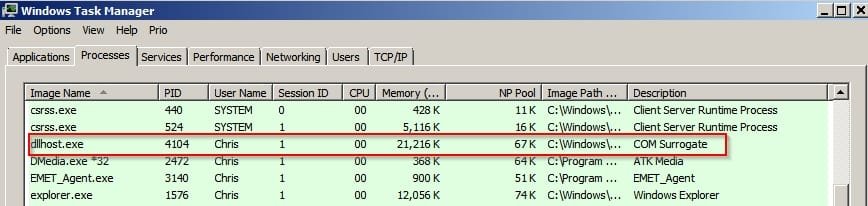
The green bar means that Windows is collecting information. It can be tricky to pin down the cause of a slow green bar. Do you see dllhost.exe COM Surrogate appear in Task Manager when this issue occurs?

Windows Task Manager.jpg

I will look at your crash dumps and post a reply.
 

My Computer My Computer

Computer type
Laptop
Computer Manufacturer/Model Number
ASUS
OS
Microsoft Windows 7 Home Premium 64-bit 7601 Multiprocessor Free Service Pack 1
CPU
AMD C-60 APU with Radeon(tm) HD Graphics
Motherboard
ASUSTeK COMPUTER INC. X501U
Memory
4.00 GB
Graphics Card(s)
AMD Radeon HD 6290 Graphics
Sound Card
(1) AMD High Definition Audio Device (2) Realtek High Defi
Screen Resolution
1366 x 768 x 32 bits (4294967296 colors) @ 60 Hz
Hard Drives
Hitachi HTS545050A7E380 SATA Disk Device
Antivirus
Comodo CIS & FW, SecureAplus App Whitelisting, Threatfire
Browser
Cyberfox 64bit, Opera 64bit, Airfox
Other Info
Spy-The-Spy, HitmanPro.Alert, Norton Connect Safe, MJRegWatcher, BitDefender TrafficLight, Voodoo Shield, Zemana AntiMalware
I get the same error:

FAILURE_BUCKET_ID: NULL_CLASS_PTR_WRITE_c0000005_nvspcap64.dll!Unknown

However I also notice:

*** WARNING: Unable to verify timestamp for msmpeg2vdec.dll
*** ERROR: Module load completed but symbols could not be loaded for msmpeg2vdec.dll

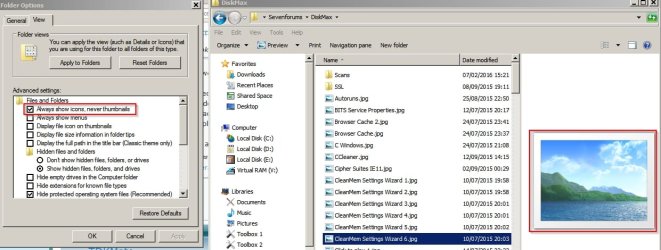
You could try disabling thumbnail previews as a test:

Disable Thumbnail Previews.jpg

Maybe a corrupt video thumbnail exists somewhere.

Once thumbnails are disabled try clearing the thumbnail cache:

http://www.sevenforums.com/tutorials/10797-thumbnail-cache-clear-reset.html
 

My Computer My Computer

Computer type
Laptop
Computer Manufacturer/Model Number
ASUS
OS
Microsoft Windows 7 Home Premium 64-bit 7601 Multiprocessor Free Service Pack 1
CPU
AMD C-60 APU with Radeon(tm) HD Graphics
Motherboard
ASUSTeK COMPUTER INC. X501U
Memory
4.00 GB
Graphics Card(s)
AMD Radeon HD 6290 Graphics
Sound Card
(1) AMD High Definition Audio Device (2) Realtek High Defi
Screen Resolution
1366 x 768 x 32 bits (4294967296 colors) @ 60 Hz
Hard Drives
Hitachi HTS545050A7E380 SATA Disk Device
Antivirus
Comodo CIS & FW, SecureAplus App Whitelisting, Threatfire
Browser
Cyberfox 64bit, Opera 64bit, Airfox
Other Info
Spy-The-Spy, HitmanPro.Alert, Norton Connect Safe, MJRegWatcher, BitDefender TrafficLight, Voodoo Shield, Zemana AntiMalware
...The green bar means that Windows is collecting information. It can be tricky to pin down the cause of a slow green bar. Do you see dllhost.exe COM Surrogate appear in Task Manager when this issue occurs?I will look at your crash dumps and post a reply.
First, I followed part of your suggestion in your second post: I cleared the thumbnail cache.

I then opened Task Manager and sorted by name. dllhost... was not visible. I then switched to an open Windows Explorer window (one of two), arranging things so I could see the Task Manager list. I went to a couple of drives (partitions, actually) and no green bar and things were snappy as they should be. Then on the 3rd or 4th try, Windows Explorer crashed, and dllhost.exe 'magically' appeared in Task Manager.

Crash dump attached.
 

Attachments

My Computer My Computer

Computer type
PC/Desktop
Computer Manufacturer/Model Number
home built
OS
Win 7 Pro 64 SP1
CPU
i7 6700K SkyLake
Motherboard
MSI Gaming M7
Memory
32 GB
Graphics Card(s)
nVidia GTX 970
Sound Card
onboard
Monitor(s) Displays
DELL U2711
Screen Resolution
2560x1440
Hard Drives
1 SSD OS, 2 WD Black Caviar data harddrives
PSU
EVGA Super Nova 850W G2 'Gold'
Case
Thermaltake Soprano Snow Edition
Cooling
Cooler Master Hyper 212 evo
Keyboard
Logitech K350
Mouse
Mad Kats RATT
Antivirus
Avast
Browser
Firefox
I get the same error:

FAILURE_BUCKET_ID: NULL_CLASS_PTR_WRITE_c0000005_nvspcap64.dll!Unknown

However I also notice:

*** WARNING: Unable to verify timestamp for msmpeg2vdec.dll
*** ERROR: Module load completed but symbols could not be loaded for msmpeg2vdec.dll

You could try disabling thumbnail previews as a test:
...snip...
Maybe a corrupt video thumbnail exists somewhere.

Once thumbnails are disabled try clearing the thumbnail cache:

http://www.sevenforums.com/tutorials/10797-thumbnail-cache-clear-reset.html
Live and learn... I wasn't logged in so I didn't see your attachment, which is why I only cleared the cache. I was going to mention I couldn't see the attachment...

Maybe I'm thinking of XP, but I thought you could keep thumbnail viewing intact (I have many thousands of photos scattered all over), but not cache them. I'm sure I turned the cache off once in the past but could still see thumbnails in Windows Explorer... Am I remembering wrong?

.
 

My Computer My Computer

Computer type
PC/Desktop
Computer Manufacturer/Model Number
home built
OS
Win 7 Pro 64 SP1
CPU
i7 6700K SkyLake
Motherboard
MSI Gaming M7
Memory
32 GB
Graphics Card(s)
nVidia GTX 970
Sound Card
onboard
Monitor(s) Displays
DELL U2711
Screen Resolution
2560x1440
Hard Drives
1 SSD OS, 2 WD Black Caviar data harddrives
PSU
EVGA Super Nova 850W G2 'Gold'
Case
Thermaltake Soprano Snow Edition
Cooling
Cooler Master Hyper 212 evo
Keyboard
Logitech K350
Mouse
Mad Kats RATT
Antivirus
Avast
Browser
Firefox
Maybe I'm thinking of XP, but I thought you could keep thumbnail viewing intact (I have many thousands of photos scattered all over), but not cache them. I'm sure I turned the cache off once in the past but could still see thumbnails in Windows Explorer... Am I remembering wrong?

.

On my machine thumbnail cache is disabled but I can still see images if I need to.

Tutorial - Thumbnail Cache - Enable or Disable

With thumbnail cache disabled and "Always show icons" checked then I don't see images in Explorer.

Checked.jpg

If left unchecked then I see images (thumbnails preview)

Unchecked.jpg

RE: dllhost.exe

I think that the problem must be down to a corrupt media file (image or video) somewhere on one of your other partitions. I can suggest a tool to run in order to deal with corrupt image (jpg) files but have no idea how to track down corrupt video files other than playing each video one by one.

Personally when I have suspected that corrupt video files might be causing problems I copy all video files to an external drive then disconnect the drive to test if the issue is resolved. Then I copy them back in batches and test to see if the issue has returned.
 

My Computer My Computer

Computer type
Laptop
Computer Manufacturer/Model Number
ASUS
OS
Microsoft Windows 7 Home Premium 64-bit 7601 Multiprocessor Free Service Pack 1
CPU
AMD C-60 APU with Radeon(tm) HD Graphics
Motherboard
ASUSTeK COMPUTER INC. X501U
Memory
4.00 GB
Graphics Card(s)
AMD Radeon HD 6290 Graphics
Sound Card
(1) AMD High Definition Audio Device (2) Realtek High Defi
Screen Resolution
1366 x 768 x 32 bits (4294967296 colors) @ 60 Hz
Hard Drives
Hitachi HTS545050A7E380 SATA Disk Device
Antivirus
Comodo CIS & FW, SecureAplus App Whitelisting, Threatfire
Browser
Cyberfox 64bit, Opera 64bit, Airfox
Other Info
Spy-The-Spy, HitmanPro.Alert, Norton Connect Safe, MJRegWatcher, BitDefender TrafficLight, Voodoo Shield, Zemana AntiMalware
I'll try your tips and hope for the best. I do have some time off right now, but I'm booked solid with the Honey Do list. Plus I'm trying to put together a new build I got parts for last year. It's giving me fits and problems so I'm eager to get to that, too.

I'll keep you posted.
 

My Computer My Computer

Computer type
PC/Desktop
Computer Manufacturer/Model Number
home built
OS
Win 7 Pro 64 SP1
CPU
i7 6700K SkyLake
Motherboard
MSI Gaming M7
Memory
32 GB
Graphics Card(s)
nVidia GTX 970
Sound Card
onboard
Monitor(s) Displays
DELL U2711
Screen Resolution
2560x1440
Hard Drives
1 SSD OS, 2 WD Black Caviar data harddrives
PSU
EVGA Super Nova 850W G2 'Gold'
Case
Thermaltake Soprano Snow Edition
Cooling
Cooler Master Hyper 212 evo
Keyboard
Logitech K350
Mouse
Mad Kats RATT
Antivirus
Avast
Browser
Firefox
Well, I've gotten to use the computer a lot lately, and the news is good: no new crashes! I've regularly had 2-4 Explorer windows open at time, shuffling files and getting organized (long over due).

I don't know if this could make a difference or not, but one thing I've been doing is open Windows Explorer first, then my other two standard items: Firefox and Outlook.
 

My Computer My Computer

Computer type
PC/Desktop
Computer Manufacturer/Model Number
home built
OS
Win 7 Pro 64 SP1
CPU
i7 6700K SkyLake
Motherboard
MSI Gaming M7
Memory
32 GB
Graphics Card(s)
nVidia GTX 970
Sound Card
onboard
Monitor(s) Displays
DELL U2711
Screen Resolution
2560x1440
Hard Drives
1 SSD OS, 2 WD Black Caviar data harddrives
PSU
EVGA Super Nova 850W G2 'Gold'
Case
Thermaltake Soprano Snow Edition
Cooling
Cooler Master Hyper 212 evo
Keyboard
Logitech K350
Mouse
Mad Kats RATT
Antivirus
Avast
Browser
Firefox
I don't know if this could make a difference or not, but one thing I've been doing is open Windows Explorer first, then my other two standard items: Firefox and Outlook.

Thanks for letting us know. :)
 

My Computer My Computer

Computer type
Laptop
Computer Manufacturer/Model Number
ASUS
OS
Microsoft Windows 7 Home Premium 64-bit 7601 Multiprocessor Free Service Pack 1
CPU
AMD C-60 APU with Radeon(tm) HD Graphics
Motherboard
ASUSTeK COMPUTER INC. X501U
Memory
4.00 GB
Graphics Card(s)
AMD Radeon HD 6290 Graphics
Sound Card
(1) AMD High Definition Audio Device (2) Realtek High Defi
Screen Resolution
1366 x 768 x 32 bits (4294967296 colors) @ 60 Hz
Hard Drives
Hitachi HTS545050A7E380 SATA Disk Device
Antivirus
Comodo CIS & FW, SecureAplus App Whitelisting, Threatfire
Browser
Cyberfox 64bit, Opera 64bit, Airfox
Other Info
Spy-The-Spy, HitmanPro.Alert, Norton Connect Safe, MJRegWatcher, BitDefender TrafficLight, Voodoo Shield, Zemana AntiMalware
Got another update, Callender. It's been a two month of a spare time project, but I finally have my new build up-n-running (mostly-this is a test before I finish putting in all the 'stuff').

That means that the 'old' computer is now delegated to a not often used one. But (there always seems to be a 'but,' LOL) this system is basically a clone of the old one. So, hopefully, with an upgraded video card and drivers, motherboard and drivers, etc. the problem will not be present in this one.

~~~~~~~~~~~~~~~~~`

On your corrupt media file tip, I did delete some jpegs that one of my photo editors didn't like. Also, on one of my data drives, I had a directory that was always very slow to load in Explorer. I figured it was just slow due to the amount of video files in that directory. However, I noticed one of my crashes was when I went to it. It was just shy of 1TB of stuff captured with my TV tuner/capture card. I didn't look to see how many hundreds of files were in it. Any way, I moved it to an external drive but don't know if it made a difference as I got this new build done before any more crashes occurred. I'll just leave the files there and see if Explorer crashes when I access them.

And a big Thank You for your help and patience!
 

My Computer My Computer

Computer type
PC/Desktop
Computer Manufacturer/Model Number
home built
OS
Win 7 Pro 64 SP1
CPU
i7 6700K SkyLake
Motherboard
MSI Gaming M7
Memory
32 GB
Graphics Card(s)
nVidia GTX 970
Sound Card
onboard
Monitor(s) Displays
DELL U2711
Screen Resolution
2560x1440
Hard Drives
1 SSD OS, 2 WD Black Caviar data harddrives
PSU
EVGA Super Nova 850W G2 'Gold'
Case
Thermaltake Soprano Snow Edition
Cooling
Cooler Master Hyper 212 evo
Keyboard
Logitech K350
Mouse
Mad Kats RATT
Antivirus
Avast
Browser
Firefox
Thanks for letting us know. :)
 

My Computer My Computer

Computer type
Laptop
Computer Manufacturer/Model Number
ASUS
OS
Microsoft Windows 7 Home Premium 64-bit 7601 Multiprocessor Free Service Pack 1
CPU
AMD C-60 APU with Radeon(tm) HD Graphics
Motherboard
ASUSTeK COMPUTER INC. X501U
Memory
4.00 GB
Graphics Card(s)
AMD Radeon HD 6290 Graphics
Sound Card
(1) AMD High Definition Audio Device (2) Realtek High Defi
Screen Resolution
1366 x 768 x 32 bits (4294967296 colors) @ 60 Hz
Hard Drives
Hitachi HTS545050A7E380 SATA Disk Device
Antivirus
Comodo CIS & FW, SecureAplus App Whitelisting, Threatfire
Browser
Cyberfox 64bit, Opera 64bit, Airfox
Other Info
Spy-The-Spy, HitmanPro.Alert, Norton Connect Safe, MJRegWatcher, BitDefender TrafficLight, Voodoo Shield, Zemana AntiMalware
Things have been working good for the last month or so. I was just thinking about turning on Shadow Play to see if the new MSI motherboard and nVidia video card had fixed the problem...

And then it crashed this morning :(

The only thing I did differently today is:

1) Disable the 'Killer Network Manager' from starting up. It doesn't have any features I use and is just another background program running I don't need. I followed the help from the MSI forum on how to do it.

2) I forgot to start Explorer first like I have been doing.

Is this something new happening? I think the last crash was the middle of last month.
.
 

Attachments

My Computer My Computer

Computer type
PC/Desktop
Computer Manufacturer/Model Number
home built
OS
Win 7 Pro 64 SP1
CPU
i7 6700K SkyLake
Motherboard
MSI Gaming M7
Memory
32 GB
Graphics Card(s)
nVidia GTX 970
Sound Card
onboard
Monitor(s) Displays
DELL U2711
Screen Resolution
2560x1440
Hard Drives
1 SSD OS, 2 WD Black Caviar data harddrives
PSU
EVGA Super Nova 850W G2 'Gold'
Case
Thermaltake Soprano Snow Edition
Cooling
Cooler Master Hyper 212 evo
Keyboard
Logitech K350
Mouse
Mad Kats RATT
Antivirus
Avast
Browser
Firefox
Oh, and I forgot to mention that I was deleting a folder in my Documents when it happened. Explorer gave me an error something like it couldn't find the folder...!? Maybe I somehow hit the delete key twice?

After logging out then back in (quicker than rebooting) the folder was indeed deleted.
 

My Computer My Computer

Computer type
PC/Desktop
Computer Manufacturer/Model Number
home built
OS
Win 7 Pro 64 SP1
CPU
i7 6700K SkyLake
Motherboard
MSI Gaming M7
Memory
32 GB
Graphics Card(s)
nVidia GTX 970
Sound Card
onboard
Monitor(s) Displays
DELL U2711
Screen Resolution
2560x1440
Hard Drives
1 SSD OS, 2 WD Black Caviar data harddrives
PSU
EVGA Super Nova 850W G2 'Gold'
Case
Thermaltake Soprano Snow Edition
Cooling
Cooler Master Hyper 212 evo
Keyboard
Logitech K350
Mouse
Mad Kats RATT
Antivirus
Avast
Browser
Firefox
It's not the same problem. I see this in your uploaded dump:

Code:
OVERLAPPED_MODULE: Address regions for 'ndfapi' and 'zipfldr.dll' overlap

and

IMAGE_NAME:  dui70.dll

FAILURE_BUCKET_ID:  INVALID_POINTER_READ_c0000005_dui70.dll!DirectUI::Element::_GetLocalValueFromVM

BUCKET_ID:  X64_APPLICATION_FAULT_INVALID_POINTER_READ_dui70!DirectUI::Element::_GetLocalValueFromVM+4

dui70.dll is nothing to worry about. It is labeled as the faulting module path when explorer.exe crashes even if dui70.dll is not the cause of the crash.

As for Address regions for 'ndfapi' and 'zipfldr.dll' overlap - sorry but I have not got a clue what that means!

Maybe someone else can offer suggestions.
 

My Computer My Computer

Computer type
Laptop
Computer Manufacturer/Model Number
ASUS
OS
Microsoft Windows 7 Home Premium 64-bit 7601 Multiprocessor Free Service Pack 1
CPU
AMD C-60 APU with Radeon(tm) HD Graphics
Motherboard
ASUSTeK COMPUTER INC. X501U
Memory
4.00 GB
Graphics Card(s)
AMD Radeon HD 6290 Graphics
Sound Card
(1) AMD High Definition Audio Device (2) Realtek High Defi
Screen Resolution
1366 x 768 x 32 bits (4294967296 colors) @ 60 Hz
Hard Drives
Hitachi HTS545050A7E380 SATA Disk Device
Antivirus
Comodo CIS & FW, SecureAplus App Whitelisting, Threatfire
Browser
Cyberfox 64bit, Opera 64bit, Airfox
Other Info
Spy-The-Spy, HitmanPro.Alert, Norton Connect Safe, MJRegWatcher, BitDefender TrafficLight, Voodoo Shield, Zemana AntiMalware
Oh, and I forgot to mention that I was deleting a folder in my Documents when it happened. Explorer gave me an error something like it couldn't find the folder...!? Maybe I somehow hit the delete key twice?

After logging out then back in (quicker than rebooting) the folder was indeed deleted.
http://www.sevenforums.com/newreply.php?do=newreply&p=3228724
If you get this error again when deleting a folder try finding out if any process is locking the folder. You can use something like LockHunter.

Right click the folder after the first attempt at deletion and use the LockHunter context menu entry to see if any processes have locked the folder.

RE: Disabling unwanted startup entries. My opinion is that it's a good idea to disable anything that you don't actually need or use.
 

My Computer My Computer

Computer type
Laptop
Computer Manufacturer/Model Number
ASUS
OS
Microsoft Windows 7 Home Premium 64-bit 7601 Multiprocessor Free Service Pack 1
CPU
AMD C-60 APU with Radeon(tm) HD Graphics
Motherboard
ASUSTeK COMPUTER INC. X501U
Memory
4.00 GB
Graphics Card(s)
AMD Radeon HD 6290 Graphics
Sound Card
(1) AMD High Definition Audio Device (2) Realtek High Defi
Screen Resolution
1366 x 768 x 32 bits (4294967296 colors) @ 60 Hz
Hard Drives
Hitachi HTS545050A7E380 SATA Disk Device
Antivirus
Comodo CIS & FW, SecureAplus App Whitelisting, Threatfire
Browser
Cyberfox 64bit, Opera 64bit, Airfox
Other Info
Spy-The-Spy, HitmanPro.Alert, Norton Connect Safe, MJRegWatcher, BitDefender TrafficLight, Voodoo Shield, Zemana AntiMalware
Thanks for the tips and for working your magic again, Callender. Yeah, agreed, I get rid of all the startup items I can. They seem to keep multiplying with new programs :( And things like Java keeps adding it's updater to the mix. I'll keep at it, though.

I guess I'll give it a little more time before trying out Shadow Play. I'd sure like to get it back. I'll keep you posted.
 

My Computer My Computer

Computer type
PC/Desktop
Computer Manufacturer/Model Number
home built
OS
Win 7 Pro 64 SP1
CPU
i7 6700K SkyLake
Motherboard
MSI Gaming M7
Memory
32 GB
Graphics Card(s)
nVidia GTX 970
Sound Card
onboard
Monitor(s) Displays
DELL U2711
Screen Resolution
2560x1440
Hard Drives
1 SSD OS, 2 WD Black Caviar data harddrives
PSU
EVGA Super Nova 850W G2 'Gold'
Case
Thermaltake Soprano Snow Edition
Cooling
Cooler Master Hyper 212 evo
Keyboard
Logitech K350
Mouse
Mad Kats RATT
Antivirus
Avast
Browser
Firefox
Hi Callender. This is just an update: things have been working fine. I did mostly a new build a short while ago and one thing I put in was a new video card (nVidia 970) and it's drivers. After a few weeks, about 3-4 weeks ago I had need to run Shadow Play, the item that was giving me problems.

Everything worked great, including going into Sleep mode which was sporadically problematic. I was going to post then, but then new video drivers came out and I wanted to run them for a couple of weeks to make sure no problems crept in.

So far so good!

And I want to thank you for your time and patience with me. It is appreciated.
.
 

My Computer My Computer

Computer type
PC/Desktop
Computer Manufacturer/Model Number
home built
OS
Win 7 Pro 64 SP1
CPU
i7 6700K SkyLake
Motherboard
MSI Gaming M7
Memory
32 GB
Graphics Card(s)
nVidia GTX 970
Sound Card
onboard
Monitor(s) Displays
DELL U2711
Screen Resolution
2560x1440
Hard Drives
1 SSD OS, 2 WD Black Caviar data harddrives
PSU
EVGA Super Nova 850W G2 'Gold'
Case
Thermaltake Soprano Snow Edition
Cooling
Cooler Master Hyper 212 evo
Keyboard
Logitech K350
Mouse
Mad Kats RATT
Antivirus
Avast
Browser
Firefox
Back
Top