
10 Windows speed tips that DON'T work.

JMH

Banned
Local time
5:09 PM
Messages
6,448
Tweaks that do nothing, or could even slow your PC down.
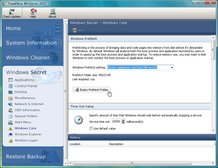


Many speedup tools include the "unload DLLs" tweak - but it hasn't done anything useful for years


If your PC seems to have slowed down recently, then there's plenty of help to be found online.

A few minutes at Google will turn up hundreds of speed-up guides and tweaking tools, each promising that they can revitalise your system.

And that would be fine, if it wasn't for the fact that many of their tweaks are obsolete, some are urban myths and have never worked, and a few will even cut your performance.

Identifying the dubious tips can be difficult, though, so we've got you off to a head start by listing our top 10.

Despite some of them not doing anything since Windows 98, and others being utterly useless on all versions of Windows, most have regularly appeared in speed-up guides and tools across the web. But, as you'll see, they're all best avoided, so you can focus your attention on the speed-up tweaks that actually deliver.
More......
10 Windows speed tips that don't work | News | TechRadar UK
 

My Computer My Computer

Computer Manufacturer/Model Number
LAPTOP. HP Pavilion dv7-4010TX .
OS
Win 7 Ultimate 64-bit. SP1.
CPU
Intel i7 -720QM.[1.6GHz Turbo Boost 2.8GHz. 6MB Cache.]
Memory
8 DDR 3 RAM. 1066MHZ
Graphics Card(s)
ATI 1024 MB. DDR3. Radeon HD5650
Monitor(s) Displays
17.3" High Definition Brightview LCD. LED Backlit.
Screen Resolution
1600 x 900.
Hard Drives
640GB
Case
Laptop / notebook.
Mouse
Logitech Anywhere mouse. MX.
Internet Speed
ADSL [ but too slow ]
Interesting read -- and I simply think Windows 7 needs very little tweaking, out of the box IMO . Thanks JMH.
 

My Computer My Computer

OS
Windows XP - Now Windows 7 Home Premium (64-bit).
:roflmao: Breaking the Myth!
 

My Computer My Computer

Computer type
PC/Desktop
Computer Manufacturer/Model Number
Custom Build
OS
Windows 7 Professional SP1 - x64 [Non-UEFI Boot]
CPU
Ivy Bridge Core i5 3570K (Delidded)
Motherboard
Asus P8Z77-V LE PLUS
Memory
G.Skill "Ares" DDR3 PC3-12800 - 1600MHz (16Gb)
Graphics Card(s)
Asus Dual-RX480-O4G
Sound Card
Creative Sound Blaster Z w/5.1 sound system
Monitor(s) Displays
Asus IPS 23"
Screen Resolution
16/9
Hard Drives
Internal:
500Go Sata 6Gb/s (x2)
500Go Sata 3Gb/s (x2)
SSD 60Go Sata 6Gb/s
PSU
In Win C 900W Series 80+ Platinum
Case
Thermaltake Chaser A71
Cooling
Custom Water Cooling Loop
Keyboard
Cooler Master QuickFire XTi
Mouse
Razer Imperator 2012 (4G)
Antivirus
MSE
Browser
IE 11.0.xxx Rtm
Other Info
"Raid0" with Intel Smart Response Technology (HDD/SSD)
Some of those tweaks even on XP wouldn't do anything if you had a clean install. On systems that were jacked up, some of them would help a little in some cases, but they were really bandaging the problems.
 

My Computer My Computer

OS
Windows 7
CPU
i5-750
Motherboard
Asus
Memory
4GB DDR3 1600
Graphics Card(s)
GT220
Tweaks that do nothing, or could even slow your PC down.


Many speedup tools include the "unload DLLs" tweak - but it hasn't done anything useful for years


If your PC seems to have slowed down recently, then there's plenty of help to be found online.

A few minutes at Google will turn up hundreds of speed-up guides and tweaking tools, each promising that they can revitalise your system.

And that would be fine, if it wasn't for the fact that many of their tweaks are obsolete, some are urban myths and have never worked, and a few will even cut your performance.

Identifying the dubious tips can be difficult, though, so we've got you off to a head start by listing our top 10.

Despite some of them not doing anything since Windows 98, and others being utterly useless on all versions of Windows, most have regularly appeared in speed-up guides and tools across the web. But, as you'll see, they're all best avoided, so you can focus your attention on the speed-up tweaks that actually deliver.
More......
10 Windows speed tips that don't work | News | TechRadar UK

Good post! Those that really need this info, unfortunately, will probably never read it.

Interesting read -- and I simply think Windows 7 needs very little tweaking, out of the box IMO . Thanks JMH.

I agree 100%.

:roflmao: Breaking the Myth!

Unfortunately, the myths persist.

Some of those tweaks even on XP wouldn't do anything if you had a clean install. On systems that were jacked up, some of them would help a little in some cases, but they were really bandaging the problems.

Exactly.
 

My Computer My Computer

Computer Manufacturer/Model Number
Home built
OS
Windows 7 Ultimate 32 bit
CPU
Intel(R) Pentium(R) 4 CPU 3.00GHz
Motherboard
ASUS P4P800-VM Motherboard Chipset: Intel 865G + ICH5
Memory
2.50 GB RAM
Graphics Card(s)
NVIDIA GeForce 7600 GS
Sound Card
SoundMax Integrated Digital Audio (Chip)
Monitor(s) Displays
ViewSonic VX 1962 wm
Screen Resolution
1680 X 1050
Hard Drives
Seagate Barracuda 7200.10 80 GB
ST380215A ATA Device 18.6 GB
Western Digital "My Book" external hard drive 750 GB
Cooling
Fan based
Keyboard
Microsoft Comfort Curve Keyboard 2000 v10 USB
Mouse
Logitec optic USB
Internet Speed
3.01 Mb/s download 0.64 Mb/s upload
Before I found Vista and Seven Forums,
I tried one or two of those. Was not impressed and usually ended up with a clean install shortly afterward. Lesson learned. As well as almost everything I now know about computers. Good Post Jan.
 

My Computer My Computer

Computer type
PC/Desktop
Computer Manufacturer/Model Number
Self Built
OS
Win 10 Pro x64
CPU
Intel I5-2500K @3.3GHz
Motherboard
Asrock P67 Extreme4
Memory
16GB G.Skill Ripjaws X (4x4GB)
Graphics Card(s)
EVGA GeForce 750 Ti SC 2GB
Sound Card
ASUS Xonar DG 5.1 Channels 24-bit 96KHz PCI Interface Sound
Monitor(s) Displays
auria eq2367
Screen Resolution
1920 x 1080
Hard Drives
250GB Samsung 850 EVO SSD
1TB WD Blue
1TB Hitachi
PSU
SeaSonic X 650W 80 Plus Gold
Case
Corsair Obsidian 750D
Cooling
Corsair H60, Three 140mm case fans
Keyboard
Logitech Wireless Keyboard K520
Mouse
Logitech Wireless Mouse M310
Internet Speed
Wave Broadband ~ 100 dn 5 up
Antivirus
Windows Defender, Malwarebytes Premium
Browser
Edge, IE11, Chrome
Other Info
Laptop specs: HP g7-1365dx /
CPU: AMD A6-3420M APU with Radeon(tm) HD Graphics /
RAM: Crucial 8Gb (2x4Gb) /
SSD: Crucial M4-CT128M4SSD2 ATA Device/ FW 000F /
GFX: AMD Radeon HD 6520G /
OS: Windows 10 Pro x64
oh, but there are things that will speed stuff up.
(will do a big post later)
 

My Computer My Computer

OS
Window 7 Home Premium Dual Boot Ubuntu Linux
CPU
Phenom x3
Memory
4 gigs
Graphics Card(s)
N260GTX OCV4
Sound Card
built in HD
Monitor(s) Displays
CRT
Case
fish aquarium
Cooling
oil cooled
oh, but there are things that will speed stuff up.
(will do a big post later)

There is no tweaks or settings in Windows that will speed things up. Period. Modifying the default, out of the box setup of Windows with not improve performance. Period.
 

My Computer My Computer

Computer type
PC/Desktop
Computer Manufacturer/Model Number
Alienware Aurora ALX R4
OS
Windows 10 Pro (x64)
CPU
Intel Core i7-3930K (3.2GHz - 4.5GHz)
Motherboard
Alienware Aurora-R4 x79
Memory
4x Samsung 4GB PC3-12800 DDR3 (16GB 1600MHz)
Graphics Card(s)
Nvidia Geforce GTX 690
Sound Card
SteelSeries Siberia Elite
Monitor(s) Displays
Dell UltraSharp U3011
Screen Resolution
2560x1600
Hard Drives
Samsung 850 Pro 256 GB, Seagate 1TB Desktop Hybrid HDD, 2x Western Digital 4TB Green HDD
PSU
875W Some Dell PSU <.<
Case
Alienware Aurora ALX
Cooling
Custom Liquid Cooling (EK CPU & GPU blocks) dual EK 480RAD
Keyboard
Logitech G710+ Mechanical
Mouse
Logitech G700s
Internet Speed
Verizon Fios (50 mbps average)
Other Info
Server: Intel NUC D54250WYK: i5-4250U, 16GB, 256 GB mSATA, Windows Server 2012 R2
The only thing that will speed up your computer is more RAM.
 

My Computer My Computer

Computer Manufacturer/Model Number
Samsung NP530U4B-S02IN
OS
Windows® 8 Pro (64-bit)
CPU
Intel® Core™ i5 Processor 2467M (1.60GHz, 3MB L3 Cache)
Motherboard
Samsung Electronics
Memory
6GB DDR3 System Memory at 1,333MHz (on BD 4GB + 2GB x 1)
Graphics Card(s)
AMD Radeon™ HD7550M 1GB DDR3 (Ext. Graphic)
Sound Card
Realtek High Definition Audio
Monitor(s) Displays
35.56cm (14.0) SuperBright 300nit HD LED Display
Screen Resolution
1366x768
Hard Drives
1TB S-ATA II Hard Drive (5400RPM) with ExpressCache 16GB SSD
Internet Speed
sucks
Antivirus
Microsoft Security Essentials
Browser
Google Chrome (Sync enabled)
oh, but there are things that will speed stuff up.
(will do a big post later)

We do have tutorial on speeding up Win 7. It is basically cutting out the bells, whistles and glitter. I agree with logicearth; but I am looking forward to reading what you post.
 

My Computer My Computer

Computer Manufacturer/Model Number
Home built
OS
Windows 7 Ultimate 32 bit
CPU
Intel(R) Pentium(R) 4 CPU 3.00GHz
Motherboard
ASUS P4P800-VM Motherboard Chipset: Intel 865G + ICH5
Memory
2.50 GB RAM
Graphics Card(s)
NVIDIA GeForce 7600 GS
Sound Card
SoundMax Integrated Digital Audio (Chip)
Monitor(s) Displays
ViewSonic VX 1962 wm
Screen Resolution
1680 X 1050
Hard Drives
Seagate Barracuda 7200.10 80 GB
ST380215A ATA Device 18.6 GB
Western Digital "My Book" external hard drive 750 GB
Cooling
Fan based
Keyboard
Microsoft Comfort Curve Keyboard 2000 v10 USB
Mouse
Logitec optic USB
Internet Speed
3.01 Mb/s download 0.64 Mb/s upload
The only thing that will speed up your computer is more RAM.
A very fast hard drive (AKA SSD) will make a huge improvement and will speed up your computer substantially.

Also, there comes a point when more and more RAM doesn't provide benefits unless you have applications or multitask to a point where you really chew up RAM. Going from 1gig to 2gig..makes a big difference. Going from 2gig to 4gig, makes a difference, but much less noticeable. going from 4gb to 8gb is usually not perceivable.
 

My Computer My Computer

Computer Manufacturer/Model Number
Self-Built in July 2009
OS
Windows 7 Ultimate x64
CPU
Intel Q9550 2.83Ghz OC'd to 3.40Ghz
Motherboard
Gigabyte GA-EP45-UD3R rev. 1.1, F12 BIOS
Memory
8GB G.Skill PI DDR2-800, 4-4-4-12 timings
Graphics Card(s)
EVGA 1280MB Nvidia GeForce GTX570
Sound Card
Realtek ALC899A 8 channel onboard audio
Monitor(s) Displays
23" Acer x233H
Screen Resolution
1920x1080
Hard Drives
Intel X25-M 80GB Gen 2 SSD
Western Digital 1TB Caviar Black, 32MB cache. WD1001FALS
PSU
Corsair 620HX modular
Case
Antec P182
Cooling
stock
Keyboard
ABS M1 Mechanical
Mouse
Logitech G9 Laser Mouse
Internet Speed
15/2 cable modem
Other Info
Windows and Linux enthusiast. Logitech G35 Headset.
I find Windows 7 and Vista(after sp1) quite speedy
and in no need of tweaks.
 

My Computer My Computer

Computer type
PC/Desktop
Computer Manufacturer/Model Number
Acer M5641
OS
Windows 7 Home Premium 64bit
CPU
Q6600
Motherboard
Nvidia MCP73PV
Memory
4GB.
Graphics Card(s)
Sapphire Vapor-X 5750
Sound Card
XFI Extreem music
Monitor(s) Displays
Acer X223W
Screen Resolution
1680x1050
Hard Drives
WD10 02FAEX
WD64 00AAKS
PSU
stock 450w
Case
acer
Cooling
stock
Keyboard
Microsoft Digital Media Pro.
Mouse
Logitech MX620
Internet Speed
49.51Mbs down 4.98Mbs up 17.6ms ping
Antivirus
MSE
Browser
Waterfox
Other Info
Shaw Cable
Netgear R6200

My Computer My Computer

Computer type
PC/Desktop
Computer Manufacturer/Model Number
Dell OP7010
OS
Windows 7 Enterprise (x64); Windows Server 2008 R2 (x64)
Memory
16GB
Monitor(s) Displays
4 Dell 24" LCD
Screen Resolution
1280x1024
Keyboard
Dell
Mouse
Dell Optical
Internet Speed
40meg
oh, but there are things that will speed stuff up.
(will do a big post later)

There is no tweaks or settings in Windows that will speed things up. Period. Modifying the default, out of the box setup of Windows with not improve performance. Period.


In my experience, Win7 is actually faster and smoother if left alone.
For those that have issues running just the OS smoothly, the problem is most likely hardware realted (upgrades required)
No software or tweak can negate that fact.

Many of the tweaks break the way things are intended to run, or attempt reduce the amount of RAM used , (which is really bad)

Side from a few small tweaks, such as disabling hiberfile and system restore (if you have a better back up option)
My guess is you'll find the large majority of members here agree ... leave it alone.
 

My Computer My Computer

Computer Manufacturer/Model Number
Custom (Self Build)
OS
Windows 7 Home Premium 64bit
CPU
Intel Core i7 2700k
Motherboard
eVGA P67 SLI
Memory
8GB Mushkin Redline Ridgebacks @1866
Graphics Card(s)
EVGA GTX570 SC
Sound Card
XiFi Titanium HD
Monitor(s) Displays
LG W2453V
Screen Resolution
1920x1080
Hard Drives
Intel 320 80GB -- Intel X25-V 40GB --WD Black 1TB x2 -- WD Blue 640GB
PSU
Seasonic x750
Case
Corsair 600T SE White
Cooling
eVGA Superclocked CPU Cooler
Keyboard
Saitek Cyborg
Antivirus
Kaspersky
Browser
IE
Other Info
LG BD/DVD
oh, but there are things that will speed stuff up.
(will do a big post later)

There is no tweaks or settings in Windows that will speed things up. Period. Modifying the default, out of the box setup of Windows with not improve performance. Period.

+1

Tried to rep, have to 'spread around' first, so here's a public thank you for always producing clear and to-the-point posts.

Kari
 

My Computer My Computer

Computer type
Laptop
Computer Manufacturer/Model Number
HP ENVY 17-1150eg
OS
Windows 10 Pro x64 EN-GB
CPU
1.6 GHz Intel Core i7-720QM Processor
Memory
6 GB
Graphics Card(s)
ATI Mobility Radeon HD 5850 Graphics
Sound Card
Beats sound system with integrated subwoofer
Monitor(s) Displays
17" laptop display, 22" LED and 32" Full HD TV through HDMI
Screen Resolution
1600*900 (1), 1920*1080 (2&3)
Hard Drives
Internal: 2 x 500 GB SATA Hard Disk Drive 7200 rpm
External: 2TB for backups, 3TB USB3 network drive for media
Cooling
As Envy runs a bit warm, I have it on a Cooler Master pad
Keyboard
Logitech diNovo Media Desktop Laser (bluetooth)
Mouse
Logitech Performance Mouse MX
Internet Speed
50/10 Mbps VDSL
Antivirus
Windows Defender 4.3.9431.0
Browser
Maxthon 3.5.2., IE11
oh, but there are things that will speed stuff up.
(will do a big post later)

There is no tweaks or settings in Windows that will speed things up. Period. Modifying the default, out of the box setup of Windows with not improve performance. Period.


In my experience, Win7 is actually faster and smoother if left alone.
For those that have issues running just the OS smoothly, the problem is most likely hardware realted (upgrades required)
No software or tweak can negate that fact.

Many of the tweaks break the way things are intended to run, or attempt reduce the amount of RAM used , (which is really bad)

Side from a few small tweaks, such as disabling hiberfile and system restore (if you have a better back up option)
My guess is you'll find the large majority of members here agree ... leave it alone.

Good post, Wishmaster. +1
 

My Computer My Computer

Computer Manufacturer/Model Number
Home built
OS
Windows 7 Ultimate 32 bit
CPU
Intel(R) Pentium(R) 4 CPU 3.00GHz
Motherboard
ASUS P4P800-VM Motherboard Chipset: Intel 865G + ICH5
Memory
2.50 GB RAM
Graphics Card(s)
NVIDIA GeForce 7600 GS
Sound Card
SoundMax Integrated Digital Audio (Chip)
Monitor(s) Displays
ViewSonic VX 1962 wm
Screen Resolution
1680 X 1050
Hard Drives
Seagate Barracuda 7200.10 80 GB
ST380215A ATA Device 18.6 GB
Western Digital "My Book" external hard drive 750 GB
Cooling
Fan based
Keyboard
Microsoft Comfort Curve Keyboard 2000 v10 USB
Mouse
Logitec optic USB
Internet Speed
3.01 Mb/s download 0.64 Mb/s upload
oh, but there are things that will speed stuff up.
(will do a big post later)

There is no tweaks or settings in Windows that will speed things up. Period. Modifying the default, out of the box setup of Windows with not improve performance. Period.


In my experience, Win7 is actually faster and smoother if left alone.
For those that have issues running just the OS smoothly, the problem is most likely hardware realted (upgrades required)
No software or tweak can negate that fact.

Many of the tweaks break the way things are intended to run, or attempt reduce the amount of RAM used , (which is really bad)

Side from a few small tweaks, such as disabling hiberfile and system restore (if you have a better back up option)
My guess is you'll find the large majority of members here agree ... leave it alone.

I agree with this. I've tested a fair amount at home and at work with tweaks and a stop watch and many tweaks led to no results and after making a handful of changes, my machine actually got slower.
 

My Computer My Computer

Computer Manufacturer/Model Number
Self-Built in July 2009
OS
Windows 7 Ultimate x64
CPU
Intel Q9550 2.83Ghz OC'd to 3.40Ghz
Motherboard
Gigabyte GA-EP45-UD3R rev. 1.1, F12 BIOS
Memory
8GB G.Skill PI DDR2-800, 4-4-4-12 timings
Graphics Card(s)
EVGA 1280MB Nvidia GeForce GTX570
Sound Card
Realtek ALC899A 8 channel onboard audio
Monitor(s) Displays
23" Acer x233H
Screen Resolution
1920x1080
Hard Drives
Intel X25-M 80GB Gen 2 SSD
Western Digital 1TB Caviar Black, 32MB cache. WD1001FALS
PSU
Corsair 620HX modular
Case
Antec P182
Cooling
stock
Keyboard
ABS M1 Mechanical
Mouse
Logitech G9 Laser Mouse
Internet Speed
15/2 cable modem
Other Info
Windows and Linux enthusiast. Logitech G35 Headset.
oh, but there are things that will speed stuff up.
(will do a big post later)

There is no tweaks or settings in Windows that will speed things up. Period. Modifying the default, out of the box setup of Windows with not improve performance. Period.


In my experience, Win7 is actually faster and smoother if left alone.
For those that have issues running just the OS smoothly, the problem is most likely hardware realted (upgrades required)
No software or tweak can negate that fact.

Many of the tweaks break the way things are intended to run, or attempt reduce the amount of RAM used , (which is really bad)

Side from a few small tweaks, such as disabling hiberfile and system restore (if you have a better back up option)
My guess is you'll find the large majority of members here agree ... leave it alone.

Great Post +1 from me. -WS
 

My Computer My Computer

Computer type
PC/Desktop
Computer Manufacturer/Model Number
Dell OP7010
OS
Windows 7 Enterprise (x64); Windows Server 2008 R2 (x64)
Memory
16GB
Monitor(s) Displays
4 Dell 24" LCD
Screen Resolution
1280x1024
Keyboard
Dell
Mouse
Dell Optical
Internet Speed
40meg
oh, but there are things that will speed stuff up.
(will do a big post later)

There is no tweaks or settings in Windows that will speed things up. Period. Modifying the default, out of the box setup of Windows with not improve performance. Period.


In my experience, Win7 is actually faster and smoother if left alone.
For those that have issues running just the OS smoothly, the problem is most likely hardware realted (upgrades required)
No software or tweak can negate that fact.

Many of the tweaks break the way things are intended to run, or attempt reduce the amount of RAM used , (which is really bad)

Side from a few small tweaks, such as disabling hiberfile and system restore (if you have a better back up option)
My guess is you'll find the large majority of members here agree ... leave it alone.
+1 from me as well. Great post.
 

My Computer My Computer

Computer type
PC/Desktop
Computer Manufacturer/Model Number
Mellon Labs (custom build)
OS
Win 7 Pro x64/Win 10 Pro x64 dual boot
CPU
AMD FX 8350 Vishera @ 4200
Motherboard
ASUS M5A97 R2.0
Memory
16 GB Mushkin Blackline DDR3-2400 @ 1866 (9-10-10-10-31)
Graphics Card(s)
XFX Radeon R9 280 Double D Black Edition
Sound Card
Realtek HD Audio on MB. Sounds great.
Monitor(s) Displays
Acer 24", Acer 22"
Screen Resolution
3840 x 1080
Hard Drives
1 x Mushkin Chronos 120 GB SSD (Win 10)
1 x Samsung 850 EVO 250 GB SSD (Win 7)
1 x WD 1TB SATA Blue
1 x WD 1TB SATA Green
PSU
Corsair TX-750
Case
CoolerMaster HAF 912+
Cooling
Coolermaster Seidon 240M Liquid AIO. 6 case fans
Keyboard
Logitech G710+
Mouse
Logitech G500s
Internet Speed
Much better since I got fiber, but still way overpriced.
Antivirus
MSE, Malware Bytes for scanning
Browser
Firefox
Other Info
Corsair VOID USB headphones.

A Mellon Labs X-1 - LCD Smartie driven system status display.

Brought to you by the letter E
Back
Top