Solved 100% CPU

Tetramesh

New member
Hello

Hopefully I can get some help here. A friend has given me their laptop to look at, they said it was running very sluggish. Previously when I have been asked to have a look at why someone's computer is running slow it has been easy to sort out, usually there has been a virus, malware, too many items at start-up etc.
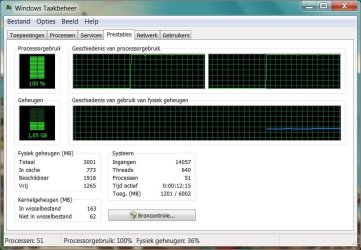
After starting the laptop it took absolutely ages for anything to start, the sound is very distorted and when I open the Task Manager it shows the CPU at 100% and seems to stay at that usage for quite some time, there are hardly any processes running.
I've tried updating and running a full virus scan (MSE), Malwarebytes, SUPERAntispyware, Spybot - Search & Destroy, HijackThis (without changing anything), run a memory test and also ran sfc /scannow but no problems have been detected apart from a couple of ad cookies.

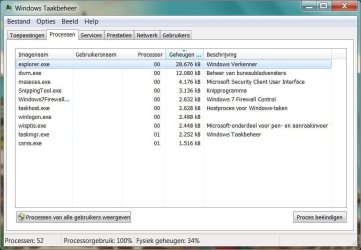
Below are a couple of screenshots of the Task Manager, the first showing a modest amount of processes and the second showing high CPU usage.

I've filled in the system specs for this laptop in my profile.

Does anyone have any ideas as to what the problem might be?

Thanks.
 

Attachments
  • Knipsel.JPG
    Knipsel.JPG
    95.5 KB · Views: 133
  • Knipsel1.JPG
    Knipsel1.JPG
    107.8 KB · Views: 79

My Computer

Computer Manufacturer/Model Number
Dell Inspiron 6400
OS
Windows 7 Home Premium 32-bit SP1
CPU
Intel Pentium T2060 @ 1.60GHz
Motherboard
Dell Inc. 0KD882 (Microprocessor)
Memory
2.0GB Dual-Channel DDR2 @ 265MHz (4-4-4-12)
Graphics Card(s)
Mobile Intel(R) 945 Express Chipset Family
Sound Card
High Definition Audio Device
Monitor(s) Displays
Generic PnP Monitor (1280x800@60Hz)
Screen Resolution
1280x800 pixels
Hard Drives
78GB Western Digital WDC WD800BEVS-75RST0 ATA Device (SATA)
Keyboard
HP PS2 Keyboard (2K - 20)
Mouse
Logitech HID-compliant mouse
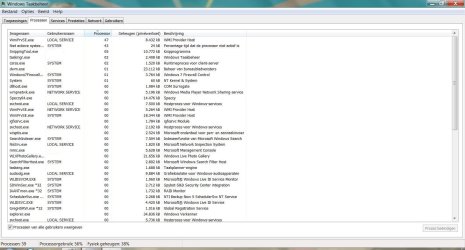
Select Show processess from all users,or in your language...Processen van alle ... to see what proccess use your cpu all the time.
 

My Computer

Computer type
PC/Desktop
Computer Manufacturer/Model Number
Custom Build
OS
Windows 10 Pro x64
CPU
Intel Core i5 4440 @Stock
Motherboard
Gigabyte Z97 D3H
Memory
4 x 4GB HyperX Fury DDR3
Graphics Card(s)
Gigabyte GTX 1050Ti O4G
Sound Card
Integrated
Monitor(s) Displays
Dell P2417H
Screen Resolution
1920 x 1080
Hard Drives
Samsung EVO 850 120GB / Toshiba DT01ACA050 1TB 7200prm 32MB
PSU
Riotoro Onyx 750W
Case
NZXT H500 Black-Red
Cooling
Stock CPU + NZXT 120mm + 2x120mm red fans
Keyboard
Modecom Volcano Lanparty
Mouse
Asus ROG Gladius / DeepCool E-Pad Plus
Internet Speed
DOCSIS 50/3 Mbit
Browser
Google Chrome
Other Info
Asus K55VJ(i5 3210M, GT635M / 2GB, 8GB DDR3, 500GB HDD)
Also, this is easier troubleshot when using ResMon than task manager for inbox components, and best when using Process Explorer rather than the other two.
 

My Computer

Computer type
PC/Desktop
Computer Manufacturer/Model Number
Custom
OS
Windows 10 Pro x64
CPU
Intel Core i7 4790K @ 4.5GHz
Motherboard
Asus Maximus Hero VII
Memory
32GB DDR3
Graphics Card(s)
Nvidia GeForce GTX970
Sound Card
Realtek HD Audio
Screen Resolution
1920x1200
Hard Drives
1x Samsung 250GB SSD
4x WD RE 2TB (RAIDZ)
PSU
Corsair AX760i
Case
Fractal Design Define R4
Cooling
Noctua NH-D15
Select Show processess from all users,or in your language...Processen van alle ... to see what proccess use your cpu all the time.

Also, this is easier troubleshot when using ResMon than task manager for inbox components, and best when using Process Explorer rather than the other two.

Thanks for the quick replies.
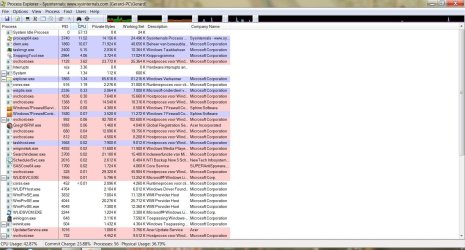
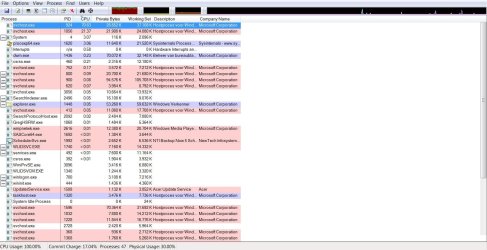
The first image is a screenshot of Process Explorer and the second from Task Manager showing all users.
 

Attachments

  • Knipsel3.JPG
    Knipsel3.JPG
    244.4 KB · Views: 171
  • Knipsel2.JPG
    Knipsel2.JPG
    223.2 KB · Views: 90

My Computer

Computer Manufacturer/Model Number
Dell Inspiron 6400
OS
Windows 7 Home Premium 32-bit SP1
CPU
Intel Pentium T2060 @ 1.60GHz
Motherboard
Dell Inc. 0KD882 (Microprocessor)
Memory
2.0GB Dual-Channel DDR2 @ 265MHz (4-4-4-12)
Graphics Card(s)
Mobile Intel(R) 945 Express Chipset Family
Sound Card
High Definition Audio Device
Monitor(s) Displays
Generic PnP Monitor (1280x800@60Hz)
Screen Resolution
1280x800 pixels
Hard Drives
78GB Western Digital WDC WD800BEVS-75RST0 ATA Device (SATA)
Keyboard
HP PS2 Keyboard (2K - 20)
Mouse
Logitech HID-compliant mouse

My Computer

Computer type
PC/Desktop
Computer Manufacturer/Model Number
Custom Build
OS
Windows 10 Pro x64
CPU
Intel Core i5 4440 @Stock
Motherboard
Gigabyte Z97 D3H
Memory
4 x 4GB HyperX Fury DDR3
Graphics Card(s)
Gigabyte GTX 1050Ti O4G
Sound Card
Integrated
Monitor(s) Displays
Dell P2417H
Screen Resolution
1920 x 1080
Hard Drives
Samsung EVO 850 120GB / Toshiba DT01ACA050 1TB 7200prm 32MB
PSU
Riotoro Onyx 750W
Case
NZXT H500 Black-Red
Cooling
Stock CPU + NZXT 120mm + 2x120mm red fans
Keyboard
Modecom Volcano Lanparty
Mouse
Asus ROG Gladius / DeepCool E-Pad Plus
Internet Speed
DOCSIS 50/3 Mbit
Browser
Google Chrome
Other Info
Asus K55VJ(i5 3210M, GT635M / 2GB, 8GB DDR3, 500GB HDD)
That's the idle process.
 

My Computer

Computer type
PC/Desktop
Computer Manufacturer/Model Number
Custom
OS
Windows 10 Pro x64
CPU
Intel Core i7 4790K @ 4.5GHz
Motherboard
Asus Maximus Hero VII
Memory
32GB DDR3
Graphics Card(s)
Nvidia GeForce GTX970
Sound Card
Realtek HD Audio
Screen Resolution
1920x1200
Hard Drives
1x Samsung 250GB SSD
4x WD RE 2TB (RAIDZ)
PSU
Corsair AX760i
Case
Fractal Design Define R4
Cooling
Noctua NH-D15
Yes, that is 'System Idle Process'.
 

My Computer

Computer Manufacturer/Model Number
Dell Inspiron 6400
OS
Windows 7 Home Premium 32-bit SP1
CPU
Intel Pentium T2060 @ 1.60GHz
Motherboard
Dell Inc. 0KD882 (Microprocessor)
Memory
2.0GB Dual-Channel DDR2 @ 265MHz (4-4-4-12)
Graphics Card(s)
Mobile Intel(R) 945 Express Chipset Family
Sound Card
High Definition Audio Device
Monitor(s) Displays
Generic PnP Monitor (1280x800@60Hz)
Screen Resolution
1280x800 pixels
Hard Drives
78GB Western Digital WDC WD800BEVS-75RST0 ATA Device (SATA)
Keyboard
HP PS2 Keyboard (2K - 20)
Mouse
Logitech HID-compliant mouse
ProcExp would indicate no issues, whereas task manager shows the WMI provider process consuming CPU. Do you happen to have a screenshot of procexp showing the high CPU in wmiprvse? You can also go to the properties of that process and get a breakdown of which threads are consuming CPU in the process as well.
 

My Computer

Computer type
PC/Desktop
Computer Manufacturer/Model Number
Custom
OS
Windows 10 Pro x64
CPU
Intel Core i7 4790K @ 4.5GHz
Motherboard
Asus Maximus Hero VII
Memory
32GB DDR3
Graphics Card(s)
Nvidia GeForce GTX970
Sound Card
Realtek HD Audio
Screen Resolution
1920x1200
Hard Drives
1x Samsung 250GB SSD
4x WD RE 2TB (RAIDZ)
PSU
Corsair AX760i
Case
Fractal Design Define R4
Cooling
Noctua NH-D15
ProcExp would indicate no issues, whereas task manager shows the WMI provider process consuming CPU. Do you happen to have a screenshot of procexp showing the high CPU in wmiprvse? You can also go to the properties of that process and get a breakdown of which threads are consuming CPU in the process as well.

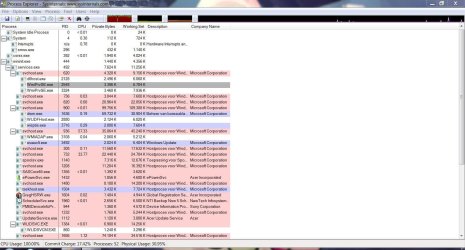
I took these two screenshots. Do they show what you asked for?
 

Attachments

  • Knipsel4.JPG
    Knipsel4.JPG
    103.7 KB · Views: 47
  • Knipsel5.JPG
    Knipsel5.JPG
    235.4 KB · Views: 52

My Computer

Computer Manufacturer/Model Number
Dell Inspiron 6400
OS
Windows 7 Home Premium 32-bit SP1
CPU
Intel Pentium T2060 @ 1.60GHz
Motherboard
Dell Inc. 0KD882 (Microprocessor)
Memory
2.0GB Dual-Channel DDR2 @ 265MHz (4-4-4-12)
Graphics Card(s)
Mobile Intel(R) 945 Express Chipset Family
Sound Card
High Definition Audio Device
Monitor(s) Displays
Generic PnP Monitor (1280x800@60Hz)
Screen Resolution
1280x800 pixels
Hard Drives
78GB Western Digital WDC WD800BEVS-75RST0 ATA Device (SATA)
Keyboard
HP PS2 Keyboard (2K - 20)
Mouse
Logitech HID-compliant mouse
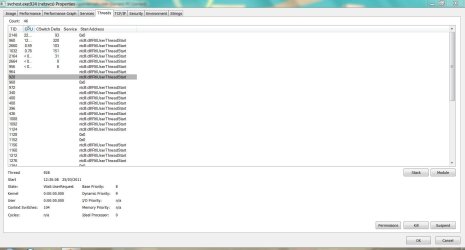
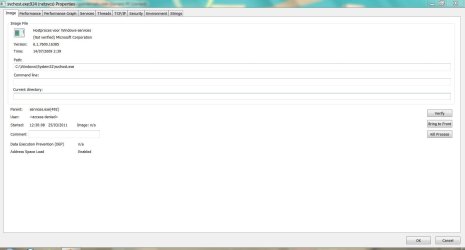
The CPU time was in svchost.exe from your screenshot - it would be helpful to look at the process consuming the CPU time when it is happening. Does that make sense? No matter which process it is, get a screenshot of the process list, then double-click the process consuming the CPU and take a screenshot of the image tab, and then a third screenshot of the threads tab.
 

My Computer

Computer type
PC/Desktop
Computer Manufacturer/Model Number
Custom
OS
Windows 10 Pro x64
CPU
Intel Core i7 4790K @ 4.5GHz
Motherboard
Asus Maximus Hero VII
Memory
32GB DDR3
Graphics Card(s)
Nvidia GeForce GTX970
Sound Card
Realtek HD Audio
Screen Resolution
1920x1200
Hard Drives
1x Samsung 250GB SSD
4x WD RE 2TB (RAIDZ)
PSU
Corsair AX760i
Case
Fractal Design Define R4
Cooling
Noctua NH-D15
The CPU time was in svchost.exe from your screenshot - it would be helpful to look at the process consuming the CPU time when it is happening. Does that make sense? No matter which process it is, get a screenshot of the process list, then double-click the process consuming the CPU and take a screenshot of the image tab, and then a third screenshot of the threads tab.

So I should take a screenshot of Process Explorer and also a screenshot of the threads and image tabs of whatever is using the most CPU at the time?

Going by what you have seen so far do you think this is a hardware problem or something wrong with Windows?
The person who owns the laptop has said that if it solves the problem then to use the recovery discs that were made at the time of purchase to start fresh.
 

My Computer

Computer Manufacturer/Model Number
Dell Inspiron 6400
OS
Windows 7 Home Premium 32-bit SP1
CPU
Intel Pentium T2060 @ 1.60GHz
Motherboard
Dell Inc. 0KD882 (Microprocessor)
Memory
2.0GB Dual-Channel DDR2 @ 265MHz (4-4-4-12)
Graphics Card(s)
Mobile Intel(R) 945 Express Chipset Family
Sound Card
High Definition Audio Device
Monitor(s) Displays
Generic PnP Monitor (1280x800@60Hz)
Screen Resolution
1280x800 pixels
Hard Drives
78GB Western Digital WDC WD800BEVS-75RST0 ATA Device (SATA)
Keyboard
HP PS2 Keyboard (2K - 20)
Mouse
Logitech HID-compliant mouse
It sounds like it's a software problem, but not a Windows one. And yes, those are the screenshots I would look to see.
 

My Computer

Computer type
PC/Desktop
Computer Manufacturer/Model Number
Custom
OS
Windows 10 Pro x64
CPU
Intel Core i7 4790K @ 4.5GHz
Motherboard
Asus Maximus Hero VII
Memory
32GB DDR3
Graphics Card(s)
Nvidia GeForce GTX970
Sound Card
Realtek HD Audio
Screen Resolution
1920x1200
Hard Drives
1x Samsung 250GB SSD
4x WD RE 2TB (RAIDZ)
PSU
Corsair AX760i
Case
Fractal Design Define R4
Cooling
Noctua NH-D15
Hi cluberti.
Below are (hopefully) the screenshots you have asked to see.
 

Attachments

  • Process Explorer1.jpg
    Process Explorer1.jpg
    234 KB · Views: 52
  • Threads.JPG
    Threads.JPG
    131.3 KB · Views: 35
  • Image.JPG
    Image.JPG
    98.9 KB · Views: 32

My Computer

Computer Manufacturer/Model Number
Dell Inspiron 6400
OS
Windows 7 Home Premium 32-bit SP1
CPU
Intel Pentium T2060 @ 1.60GHz
Motherboard
Dell Inc. 0KD882 (Microprocessor)
Memory
2.0GB Dual-Channel DDR2 @ 265MHz (4-4-4-12)
Graphics Card(s)
Mobile Intel(R) 945 Express Chipset Family
Sound Card
High Definition Audio Device
Monitor(s) Displays
Generic PnP Monitor (1280x800@60Hz)
Screen Resolution
1280x800 pixels
Hard Drives
78GB Western Digital WDC WD800BEVS-75RST0 ATA Device (SATA)
Keyboard
HP PS2 Keyboard (2K - 20)
Mouse
Logitech HID-compliant mouse
Almost (good screenshots otherwise) - you will need to run process monitor elevated (right-click, run as administrator) to get the data from the Image tab. This is likely the svchost that contains the event log (which could explain the WMI spikes if something is using the eventing APIs and scanning for information), but it would be beneficial to make sure. If so, I'll give you a command to get a dump of it once we're sure doing so won't crash the machine ;).
 

My Computer

Computer type
PC/Desktop
Computer Manufacturer/Model Number
Custom
OS
Windows 10 Pro x64
CPU
Intel Core i7 4790K @ 4.5GHz
Motherboard
Asus Maximus Hero VII
Memory
32GB DDR3
Graphics Card(s)
Nvidia GeForce GTX970
Sound Card
Realtek HD Audio
Screen Resolution
1920x1200
Hard Drives
1x Samsung 250GB SSD
4x WD RE 2TB (RAIDZ)
PSU
Corsair AX760i
Case
Fractal Design Define R4
Cooling
Noctua NH-D15
Hi cluberti
Do you think it would solve all problems if I were to just restore the laptop to factory settings using Acer eRecovery Management? I tried installing SP1 for Windows 7 and a few other updates but they have all failed to install so I'm wondering if it might be better just to wipe everything.
 

My Computer

Computer Manufacturer/Model Number
Dell Inspiron 6400
OS
Windows 7 Home Premium 32-bit SP1
CPU
Intel Pentium T2060 @ 1.60GHz
Motherboard
Dell Inc. 0KD882 (Microprocessor)
Memory
2.0GB Dual-Channel DDR2 @ 265MHz (4-4-4-12)
Graphics Card(s)
Mobile Intel(R) 945 Express Chipset Family
Sound Card
High Definition Audio Device
Monitor(s) Displays
Generic PnP Monitor (1280x800@60Hz)
Screen Resolution
1280x800 pixels
Hard Drives
78GB Western Digital WDC WD800BEVS-75RST0 ATA Device (SATA)
Keyboard
HP PS2 Keyboard (2K - 20)
Mouse
Logitech HID-compliant mouse
Depending on how much time you want to spend, yes, it would probably be easier to do that. Make sure you back up the user's data completely before doing so, of course.
 

My Computer

Computer type
PC/Desktop
Computer Manufacturer/Model Number
Custom
OS
Windows 10 Pro x64
CPU
Intel Core i7 4790K @ 4.5GHz
Motherboard
Asus Maximus Hero VII
Memory
32GB DDR3
Graphics Card(s)
Nvidia GeForce GTX970
Sound Card
Realtek HD Audio
Screen Resolution
1920x1200
Hard Drives
1x Samsung 250GB SSD
4x WD RE 2TB (RAIDZ)
PSU
Corsair AX760i
Case
Fractal Design Define R4
Cooling
Noctua NH-D15
Depending on how much time you want to spend, yes, it would probably be easier to do that. Make sure you back up the user's data completely before doing so, of course.

I've already transferred all of his documents, emails and browser preferences onto an external hard drive so I'll get started on it. I'll let you know if the performance improves when I've finished.
Thank you very much for all the help you have given so far, it is appreciated.:)
 

My Computer

Computer Manufacturer/Model Number
Dell Inspiron 6400
OS
Windows 7 Home Premium 32-bit SP1
CPU
Intel Pentium T2060 @ 1.60GHz
Motherboard
Dell Inc. 0KD882 (Microprocessor)
Memory
2.0GB Dual-Channel DDR2 @ 265MHz (4-4-4-12)
Graphics Card(s)
Mobile Intel(R) 945 Express Chipset Family
Sound Card
High Definition Audio Device
Monitor(s) Displays
Generic PnP Monitor (1280x800@60Hz)
Screen Resolution
1280x800 pixels
Hard Drives
78GB Western Digital WDC WD800BEVS-75RST0 ATA Device (SATA)
Keyboard
HP PS2 Keyboard (2K - 20)
Mouse
Logitech HID-compliant mouse
Just to let you know that I have restored the laptop to factory settings and after a bit of tidying up it is running smoothly.
Thank you very much for taking time to help with this matter.
 

My Computer

Computer Manufacturer/Model Number
Dell Inspiron 6400
OS
Windows 7 Home Premium 32-bit SP1
CPU
Intel Pentium T2060 @ 1.60GHz
Motherboard
Dell Inc. 0KD882 (Microprocessor)
Memory
2.0GB Dual-Channel DDR2 @ 265MHz (4-4-4-12)
Graphics Card(s)
Mobile Intel(R) 945 Express Chipset Family
Sound Card
High Definition Audio Device
Monitor(s) Displays
Generic PnP Monitor (1280x800@60Hz)
Screen Resolution
1280x800 pixels
Hard Drives
78GB Western Digital WDC WD800BEVS-75RST0 ATA Device (SATA)
Keyboard
HP PS2 Keyboard (2K - 20)
Mouse
Logitech HID-compliant mouse
No problem, and glad to hear it is working. Hopefully whatever it was won't return.
 

My Computer

Computer type
PC/Desktop
Computer Manufacturer/Model Number
Custom
OS
Windows 10 Pro x64
CPU
Intel Core i7 4790K @ 4.5GHz
Motherboard
Asus Maximus Hero VII
Memory
32GB DDR3
Graphics Card(s)
Nvidia GeForce GTX970
Sound Card
Realtek HD Audio
Screen Resolution
1920x1200
Hard Drives
1x Samsung 250GB SSD
4x WD RE 2TB (RAIDZ)
PSU
Corsair AX760i
Case
Fractal Design Define R4
Cooling
Noctua NH-D15
My wining card was disabling IP helper service. For some reason, it caused the high usage of my CPU. Once I've disabled it, my Windows works perfectly.

Note: It's safe to disable the service if you are NOT using IPv6 protocols.
 

My Computer

OS
Windows 7 Ultimate x32
CPU
DualCore AMD Athlon 64 X2, 2100 MHz (10.5 x 200) 4000+
Motherboard
Gigabyte GA-M52L-S3
Memory
2048 MB (DDR2-800 DDR2 SDRAM)
Graphics Card(s)
ATI Radeon HD 3450 (Microsoft Corporation WDDM
Sound Card
ATI Radeon HDMI @ ATI RV620 - High Definition
Monitor(s) Displays
Asus VW198
Hard Drives
Drive #1 - WDC WD5000AAKS-00UU3 (465 GB)
Drive #2 - WDC WD2500AAJS-00VTA (232 GB)
Back
Top