100% Disk Access / Slow Startup

technicbuff

New member
Local time
12:48 PM
Messages
4
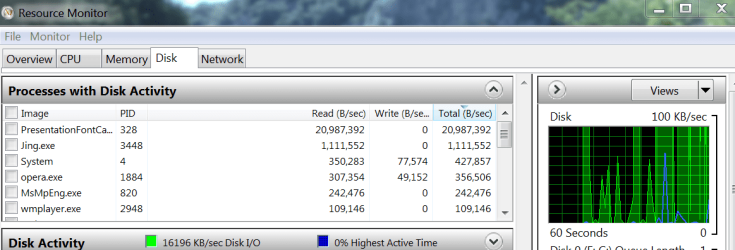
I have been using my desktop for a while now, and I notice that even when the memory, CPU are active or inactive but not at a high usage level, a single task (such as right clicking on a tray icon) or opening a program will stall the hard drive, as disk access shoots up to 100% or near it.

I have posted a screenshot of my hard disk activity as monitored by the system utility 'Resource Monitor': All I did was open up windows live messenger, and then right click some system tray icons a couple of times, and then the resulting spikes happened.

Screenshot: http://i.imgur.com/hiYWM.png

When I first boot up my computer from a shutdown or sleep state, logging into an inactive account also hogs the disk access as everything slows down a lot for the first 30-60 seconds, as well.

OS Version: Microsoft Windows 7 Ultimate, Service Pack 1, 64 bit
Processor: Intel(R) Core(TM)2 Quad CPU Q8200 @ 2.33GHz, Intel64 Family 6 Model 23 Stepping 7
Processor Count: 4
RAM: 4094 Mb (667 MHz)
Graphics Card: ATI Radeon HD 4800 Series, 512 Mb
Hard Drives: C: Total - 305141 MB, Free - 67058 MB;
Motherboard: Gigabyte Technology Co., Ltd., G31M-ES2L
Antivirus: Avira Desktop, Updated and Enabled
 

My Computer My Computer

Computer Manufacturer/Model Number
Custom Whitebox/Ebay Seller/Non-Brand
OS
Windows 7 Ultimate x64 - 64 Bit, Service Pack 1
CPU
Intel(R) Core(TM)2 Quad CPU Q8200 @ 2.33GHz, Intel64 Family
Motherboard
Gigabyte Technology Co., Ltd., G31M-ES2L (Socket 775)
Memory
4 GB DDR2 667 MHz
Graphics Card(s)
ATI Radeon HD 4800 Series, 512 Mb
Sound Card
Realtek High Definition Audio
Monitor(s) Displays
21" Samsung
Screen Resolution
1680 x 1050
Hard Drives
Western Digital Caviar 320 GB
WDC WD3200AAKS-00V1A0 ATA Device
PSU
500 W Generic
Case
"Multimedia Computer System"
Keyboard
Lenovo Standard 121 key US Standard
Mouse
Lenovo USB Wired Laser Mouse
Internet Speed
2400 megabits/second Fibre Optic Landline
Hello and welcome to the forums, technicbuff!

Can you please perform a Clean Boot/Startup on your system and then open up and run chkdsk /r from an elevated command prompt?

http://www.sevenforums.com/tutorial...ation-conflicts-performing-clean-startup.html

To open an elevated command prompt:-

1. Click Start Orb
2. In search box, type cmd
3. Right-click on cmd.exe, and choose 'Run as Administrator'

In the command prompt type in chkdsk /r and when it prompts you to reboot, go ahead and do so...
 

My Computer My Computer

Computer Manufacturer/Model Number
DELL SXPS 1640
OS
Windows 7 x64 Professional SP1
CPU
Intel C2D T9550 2.66 GHz @ 2.793 GHz (Thanks ThrottleStop!!)
Motherboard
Intel PM45
Memory
8 GB DDR3
Graphics Card(s)
ATI MOBILITY RADEON 4670
Sound Card
CREATIVE XFI AUDIO NOTEBOOK
Monitor(s) Displays
16.1 WLED
Screen Resolution
1920x1080
Hard Drives
Seagate ST9500420AS 500GB (465GiBi) 7200 RPM Drive

External Drives:-
2 TB WD Essentials x 3
1 TB WD Mybook Gen 1
1 TB WD Mybook Gen 2
1 TB Seagate
1 TB Seagate
320 GB WD Scorpio Black (enclosed)
PSU
90W Dell Power Brick
Case
Dell Chassis
Cooling
Coolermaster Cooling Pad
Keyboard
Built-in backlighted Keyboard
Mouse
Logitech Wireless Mini Mouse
Internet Speed
4/0.5

My Computer My Computer

Computer type
PC/Desktop
Computer Manufacturer/Model Number
Home made Desktop
OS
Windows 10 Pro. 64/ version 1709 Windows 7 Pro/64
CPU
Intel i7-6800K @ 4.3
Motherboard
ASUS X-99 Deluxe II
Memory
Corsair Platinum 16 gig @2400
Graphics Card(s)
EVGA GTX 1070 OC
Monitor(s) Displays
Asus 27" LED LCD/VE278Q
Screen Resolution
1920-1080 or 1280-720 HDMI
Hard Drives
INTEL SSD 730-240 Gb Sata 3.0/
PSU
EVGA Platium 1200W
Case
Phanteks Luxe Tempered Glass 8 fans/ one radiator
Cooling
XSPC/ Water Cooled CPU
Keyboard
Das 4 Professional
Mouse
Logitech M705/MX Anywhere 2-S
Internet Speed
100 mbits
Antivirus
Microsoft Security Essentials/ Malwarebytes Premium 3.0/ SAS
Browser
I.E. 11 default/Firefox/ ISP Time Warner Cable/Spectrum
Other Info
LG BluRay Burner/
Sound system-KLipsch-THX/
Icy Dock ssd Hot Swap bays.
I see nothing wrong with your disk activity. I have done appr. the same as in your scenario and have a look at my disk activity.
 

Attachments

  • 2012-07-07_2033.png
    2012-07-07_2033.png
    38.4 KB · Views: 83

My Computer My Computer

Computer Manufacturer/Model Number
HP, Dell, Gateway, Toshiba - 4 laptops and 2 desktops
OS
Vista, Windows7, Mint Mate, Zorin, Windows 8
CPU
from 1.6GHz Duo to i7
Monitor(s) Displays
2x HP w2207
Hard Drives
5x HDD, 7x SSD, 12x Externals
Keyboard
with trackball - no mices
Mouse
Trackball mice
Internet Speed
DSL 6000
I see nothing wrong with your disk activity. I have done appr. the same as in your scenario and have a look at my disk activity.

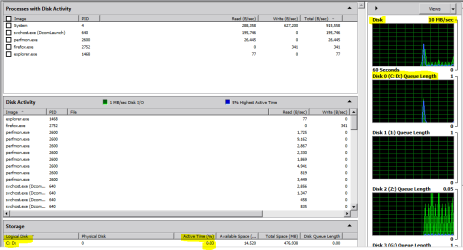
That's what i thought so too whs, until i looked at this section of his screenshot again...

Capture1.PNG

Those are not normal numbers for only 1 - 10 MB/s transfers... especially that Disc Queue...

For example here's mine with the disk activity factored in and similar spikes on the disk graph

Capture5.PNG

There's something definitely wrong with his disk accesses... Disk Activity and Queue Depth should not be as high as it is give the relatively low speeds.
 
Last edited:

My Computer My Computer

Computer Manufacturer/Model Number
DELL SXPS 1640
OS
Windows 7 x64 Professional SP1
CPU
Intel C2D T9550 2.66 GHz @ 2.793 GHz (Thanks ThrottleStop!!)
Motherboard
Intel PM45
Memory
8 GB DDR3
Graphics Card(s)
ATI MOBILITY RADEON 4670
Sound Card
CREATIVE XFI AUDIO NOTEBOOK
Monitor(s) Displays
16.1 WLED
Screen Resolution
1920x1080
Hard Drives
Seagate ST9500420AS 500GB (465GiBi) 7200 RPM Drive

External Drives:-
2 TB WD Essentials x 3
1 TB WD Mybook Gen 1
1 TB WD Mybook Gen 2
1 TB Seagate
1 TB Seagate
320 GB WD Scorpio Black (enclosed)
PSU
90W Dell Power Brick
Case
Dell Chassis
Cooling
Coolermaster Cooling Pad
Keyboard
Built-in backlighted Keyboard
Mouse
Logitech Wireless Mini Mouse
Internet Speed
4/0.5
These seam high to me.
msnmsg.exe 705,298
wicomm.exe 592,213
agcp.exe 555,282
Of course I very easily could be wrong.
 

My Computer My Computer

Computer type
PC/Desktop
Computer Manufacturer/Model Number
Home made Desktop
OS
Windows 10 Pro. 64/ version 1709 Windows 7 Pro/64
CPU
Intel i7-6800K @ 4.3
Motherboard
ASUS X-99 Deluxe II
Memory
Corsair Platinum 16 gig @2400
Graphics Card(s)
EVGA GTX 1070 OC
Monitor(s) Displays
Asus 27" LED LCD/VE278Q
Screen Resolution
1920-1080 or 1280-720 HDMI
Hard Drives
INTEL SSD 730-240 Gb Sata 3.0/
PSU
EVGA Platium 1200W
Case
Phanteks Luxe Tempered Glass 8 fans/ one radiator
Cooling
XSPC/ Water Cooled CPU
Keyboard
Das 4 Professional
Mouse
Logitech M705/MX Anywhere 2-S
Internet Speed
100 mbits
Antivirus
Microsoft Security Essentials/ Malwarebytes Premium 3.0/ SAS
Browser
I.E. 11 default/Firefox/ ISP Time Warner Cable/Spectrum
Other Info
LG BluRay Burner/
Sound system-KLipsch-THX/
Icy Dock ssd Hot Swap bays.
technicbuff,

Welcome to SevenForums.

Two things needed:
Update your SevenForums System Specs
User CP (located on the top menu bar) |
Your Profile | Edit System Spec
(left-hand column)

To gather info, use Speccy (my favorite) or SIW or System Info

In the System Manufacturer Block, enter:
Manufacturer and Model and
ADD the word laptop, desktop, netbook or tablet.
For example:
Toshiba Satellite L305D notebook.

Provide full windows version info, for example:
MS Windows 7 Ultimate SP1 64-bit

Use the “Other Info” block for Optical Reader,
Mouse, touchpad, wifi adapter, speakers, monitor, etc

Scroll down and click on SAVE CHANGES.

You will find that in Speccy, you can select info from the display
using your mouse/touchpad and then paste that info into your specs.

SIW is a marvelous program, but the free version does not offer
this capability.
===============================================
==================================================

Install CCleaner:
CCleaner - PC Optimization and Cleaning - Free Download

list of STARTUP PROGRAMS

CCleaner | Tools
icon | Startup button | Windows tab |
click on Save to text file button (bottom right side) |
accept Startup.txt as file name | SAVE button

list of SCHEDULED TASKS

CCleaner | Tools
icon | Startup button | Scheduled Tasks tab |
click on Save to text file button (bottom right side) |
enter Scheduled Tasks as File name | Save button

List of INSTALLED PROGRAMS

CCleaner | Tools
icon | Uninstall button |
click on Save to text file button (bottom right side) |
accept install.txt as File name | Save button


UPLOAD, as an attachment, the startup.txt file
UPLOAD, as an attachment, the Scheduled Tasks.txt file
UPLOAD, as an attachment, the install.txt file.

HOW TO UPLOAD
Post a File or Screenshot in Seven Forums
==========================================

Since now CCleaner is installed then run the cleaner portion thereof on the off-chance that you've filled up some areas that need to be emptied.

Actually, I'm going to ask for a third piece of info:

HOW TO POST A SNAPSHOT OF DISK MANAGEMENT DISPLAY
Run disk management:
WIN |
type DISKMGMT.MSC | ENTER
This method gives you a display without the unneeded navigation pane.
WIN=key with Microsoft logo on top.

Maximize the output of Disk Management:
ALT-Spacebar key combo | X key (selects Maximize) |
Drag the field separators (such as between Status and Capacity) to show entire field.


Make a snapshot:
WIN |
type SNIPPING | ENTER | New
Drag the cursor around the area you want to snip.
File | Save as | select save location and name | Save


Post the snapshot:
Post a File or Screenshot in Seven Forums

===========================================
Looking forward to solving your problems.

karl
 

My Computer My Computer

Computer Manufacturer/Model Number
Toshiba Satellite S875D-S7239 laptop
OS
MS Windows 7 Ultimate SP1 64-bit
CPU
AMD A10-4600M
Motherboard
AMD Pumori (Socket FT1)
Memory
6.00 GB Dual-Channel DDR3 @ 798MHz (11-11-12-28)
Graphics Card(s)
AMD Radeon HD 7660G
Sound Card
High Definition Audio Device
Monitor(s) Displays
Generic PnP Monitor (1600x900@60Hz)
Screen Resolution
1600x900@60Hz
Hard Drives
SSD 119GB Corsair CSSD-V128GB2 ATA Device
Keyboard
Standard PS/2 Keyboard
Mouse
HP Wireless Optical Mobile Mouse Model FHA-3410
Internet Speed
What the local pub, local coffee shop offers.
Other Info
Optical Drive:MATSHITA BD-CMB UJ160B ATA Device


Also have an Asus ha1002xp netbook with Win 7 Ultimate installed.
Hello everyone,

Thank you for your replies. I live in two different residences so I can't use the affected computer all the time, but now I am back here again.

I will attempt to run all the tests that have been recommended since the first post. I ran chkdsk and no problems were found with my hard drive. I also tried a 'clean startup' and it did not alleviate the problems in any noticeable way.

I already have CC Cleaner installed on my computer and will run a registry clean-up shortly.

At this point, does anyone think a defragmentation of my hard drive would be useful? I think I did one one or two years earlier, but I can't be sure. THe drive itself is about 66% full.

I will update this post as new information comes along, or if that is not possible I will make another post.

Thank you for the responses, it is good to know there are many knowledgeable and active members here.
 

My Computer My Computer

Computer Manufacturer/Model Number
Custom Whitebox/Ebay Seller/Non-Brand
OS
Windows 7 Ultimate x64 - 64 Bit, Service Pack 1
CPU
Intel(R) Core(TM)2 Quad CPU Q8200 @ 2.33GHz, Intel64 Family
Motherboard
Gigabyte Technology Co., Ltd., G31M-ES2L (Socket 775)
Memory
4 GB DDR2 667 MHz
Graphics Card(s)
ATI Radeon HD 4800 Series, 512 Mb
Sound Card
Realtek High Definition Audio
Monitor(s) Displays
21" Samsung
Screen Resolution
1680 x 1050
Hard Drives
Western Digital Caviar 320 GB
WDC WD3200AAKS-00V1A0 ATA Device
PSU
500 W Generic
Case
"Multimedia Computer System"
Keyboard
Lenovo Standard 121 key US Standard
Mouse
Lenovo USB Wired Laser Mouse
Internet Speed
2400 megabits/second Fibre Optic Landline
Use the Windows 7 defragger. Most defraggers can cause disasters under certain conditions. The Win 7 defragger is perfectly safe.

Perform the defrag and let us know the results.

karl
 

My Computer My Computer

Computer Manufacturer/Model Number
Toshiba Satellite S875D-S7239 laptop
OS
MS Windows 7 Ultimate SP1 64-bit
CPU
AMD A10-4600M
Motherboard
AMD Pumori (Socket FT1)
Memory
6.00 GB Dual-Channel DDR3 @ 798MHz (11-11-12-28)
Graphics Card(s)
AMD Radeon HD 7660G
Sound Card
High Definition Audio Device
Monitor(s) Displays
Generic PnP Monitor (1600x900@60Hz)
Screen Resolution
1600x900@60Hz
Hard Drives
SSD 119GB Corsair CSSD-V128GB2 ATA Device
Keyboard
Standard PS/2 Keyboard
Mouse
HP Wireless Optical Mobile Mouse Model FHA-3410
Internet Speed
What the local pub, local coffee shop offers.
Other Info
Optical Drive:MATSHITA BD-CMB UJ160B ATA Device


Also have an Asus ha1002xp netbook with Win 7 Ultimate installed.
technicbuff,

What anti-malware do you use?

Carry out following please:

Install CCleaner:
CCleaner - PC Optimization and Cleaning - Free Download

list of STARTUP PROGRAMS

CCleaner | Tools
icon | Startup button | Windows tab |
click on Save to text file button (bottom right side) |
accept Startup.txt as file name | SAVE button

list of SCHEDULED TASKS

CCleaner | Tools
icon | Startup button | Scheduled Tasks tab |
click on Save to text file button (bottom right side) |
enter Scheduled Tasks as File name | Save button

List of INSTALLED PROGRAMS

CCleaner | Tools
icon | Uninstall button |
click on Save to text file button (bottom right side) |
accept install.txt as File name | Save button


UPLOAD, as an attachment, the startup.txt file
UPLOAD, as an attachment, the Scheduled Tasks.txt file
UPLOAD, as an attachment, the install.txt file.

HOW TO UPLOAD
Post a File or Screenshot in Seven Forums


==========================================

Carry out the following. Please note that this the 2nd request for the disk management display.

HOW TO POST A SNAPSHOT OF DISK MANAGEMENT DISPLAY
Run disk management:
WIN |
type DISKMGMT.MSC | ENTER
This method gives you a display without the unneeded navigation pane.
WIN=key with Microsoft logo on top.

Maximize the output of Disk Management:
ALT-Spacebar key combo | X key (selects Maximize) |
Drag the field separators (such as between Status and Capacity) to show entire field.


Make a snapshot:
WIN |
type SNIPPING | ENTER | New
Drag the cursor around the area you want to snip.
File | Save as | select save location and name | Save


Post the snapshot:
Post a File or Screenshot in Seven Forums
 

My Computer My Computer

Computer Manufacturer/Model Number
Toshiba Satellite S875D-S7239 laptop
OS
MS Windows 7 Ultimate SP1 64-bit
CPU
AMD A10-4600M
Motherboard
AMD Pumori (Socket FT1)
Memory
6.00 GB Dual-Channel DDR3 @ 798MHz (11-11-12-28)
Graphics Card(s)
AMD Radeon HD 7660G
Sound Card
High Definition Audio Device
Monitor(s) Displays
Generic PnP Monitor (1600x900@60Hz)
Screen Resolution
1600x900@60Hz
Hard Drives
SSD 119GB Corsair CSSD-V128GB2 ATA Device
Keyboard
Standard PS/2 Keyboard
Mouse
HP Wireless Optical Mobile Mouse Model FHA-3410
Internet Speed
What the local pub, local coffee shop offers.
Other Info
Optical Drive:MATSHITA BD-CMB UJ160B ATA Device


Also have an Asus ha1002xp netbook with Win 7 Ultimate installed.
I have updated my system specs in my profile. I can't post all the documents you wanted from CC Cleaner however, my layout/GUI looks like this:

imgur: the simple image sharer.

Do I need to install a new version or change some setting? I don't see any 'windows' tabs or scheduled tasks tab. I have attached install.txt
 

Attachments

My Computer My Computer

Computer Manufacturer/Model Number
Custom Whitebox/Ebay Seller/Non-Brand
OS
Windows 7 Ultimate x64 - 64 Bit, Service Pack 1
CPU
Intel(R) Core(TM)2 Quad CPU Q8200 @ 2.33GHz, Intel64 Family
Motherboard
Gigabyte Technology Co., Ltd., G31M-ES2L (Socket 775)
Memory
4 GB DDR2 667 MHz
Graphics Card(s)
ATI Radeon HD 4800 Series, 512 Mb
Sound Card
Realtek High Definition Audio
Monitor(s) Displays
21" Samsung
Screen Resolution
1680 x 1050
Hard Drives
Western Digital Caviar 320 GB
WDC WD3200AAKS-00V1A0 ATA Device
PSU
500 W Generic
Case
"Multimedia Computer System"
Keyboard
Lenovo Standard 121 key US Standard
Mouse
Lenovo USB Wired Laser Mouse
Internet Speed
2400 megabits/second Fibre Optic Landline

My Computer My Computer

Computer Manufacturer/Model Number
Toshiba Satellite S875D-S7239 laptop
OS
MS Windows 7 Ultimate SP1 64-bit
CPU
AMD A10-4600M
Motherboard
AMD Pumori (Socket FT1)
Memory
6.00 GB Dual-Channel DDR3 @ 798MHz (11-11-12-28)
Graphics Card(s)
AMD Radeon HD 7660G
Sound Card
High Definition Audio Device
Monitor(s) Displays
Generic PnP Monitor (1600x900@60Hz)
Screen Resolution
1600x900@60Hz
Hard Drives
SSD 119GB Corsair CSSD-V128GB2 ATA Device
Keyboard
Standard PS/2 Keyboard
Mouse
HP Wireless Optical Mobile Mouse Model FHA-3410
Internet Speed
What the local pub, local coffee shop offers.
Other Info
Optical Drive:MATSHITA BD-CMB UJ160B ATA Device


Also have an Asus ha1002xp netbook with Win 7 Ultimate installed.
Are you sure that's necessary? At this point I don't have a reliable backup installed for this computer so I would not be able to perform a recovery or clean install until I have backed up my data. I will run the other tests.

I have taken a screenshot of the Disk Management Utility: imgur: the simple image sharer.

I also analyzed my hard drive and the windows 7 utility told me it was 0% fragmented, so I didn't do a defragmentation.
 

My Computer My Computer

Computer Manufacturer/Model Number
Custom Whitebox/Ebay Seller/Non-Brand
OS
Windows 7 Ultimate x64 - 64 Bit, Service Pack 1
CPU
Intel(R) Core(TM)2 Quad CPU Q8200 @ 2.33GHz, Intel64 Family
Motherboard
Gigabyte Technology Co., Ltd., G31M-ES2L (Socket 775)
Memory
4 GB DDR2 667 MHz
Graphics Card(s)
ATI Radeon HD 4800 Series, 512 Mb
Sound Card
Realtek High Definition Audio
Monitor(s) Displays
21" Samsung
Screen Resolution
1680 x 1050
Hard Drives
Western Digital Caviar 320 GB
WDC WD3200AAKS-00V1A0 ATA Device
PSU
500 W Generic
Case
"Multimedia Computer System"
Keyboard
Lenovo Standard 121 key US Standard
Mouse
Lenovo USB Wired Laser Mouse
Internet Speed
2400 megabits/second Fibre Optic Landline
Boot up your system from a Puppy Linux CD and save all data dear to your heart.
Puppy Linux Community Home - Getting Started

Any info you might need is at that link. Very simple and easy to use user interface. None of that linux command stuff.
 

My Computer My Computer

Computer Manufacturer/Model Number
Toshiba Satellite S875D-S7239 laptop
OS
MS Windows 7 Ultimate SP1 64-bit
CPU
AMD A10-4600M
Motherboard
AMD Pumori (Socket FT1)
Memory
6.00 GB Dual-Channel DDR3 @ 798MHz (11-11-12-28)
Graphics Card(s)
AMD Radeon HD 7660G
Sound Card
High Definition Audio Device
Monitor(s) Displays
Generic PnP Monitor (1600x900@60Hz)
Screen Resolution
1600x900@60Hz
Hard Drives
SSD 119GB Corsair CSSD-V128GB2 ATA Device
Keyboard
Standard PS/2 Keyboard
Mouse
HP Wireless Optical Mobile Mouse Model FHA-3410
Internet Speed
What the local pub, local coffee shop offers.
Other Info
Optical Drive:MATSHITA BD-CMB UJ160B ATA Device


Also have an Asus ha1002xp netbook with Win 7 Ultimate installed.
Back
Top