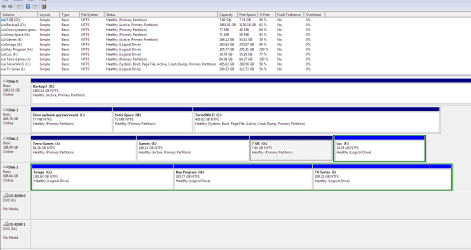
149MB drive made by windows can I delete it?

Max Pen

Creative Kid
Member
VIP
Local time
12:47 AM
Messages
165
Location
Belgium, Flanders
I don't know how but the drive is visible in my drive list in windows explorer.

So just wondering if I can delete this System Reserved partition?

In any case I shrink it and got now an extra 72 MB free as a result. :)

But let me know if I can remove it completely.
 

My Computer My Computer

At a glance

Windows 7 Ultimate 64-bit
Computer type
PC/Desktop
Computer Manufacturer/Model Number
Asus
OS
Windows 7 Ultimate 64-bit
Browser
Chrome
No.
The System Reserved partition is created by Windows Installation and contains the files necessary to startup Windows. It should not be deleted or changed.
 

My Computer My Computer

At a glance

Windows 7 64 Bit Home Premium SP1i7-3820GSkill F3-14900CL9Q - 16GBEVGA GeForce GTX660 - Driver 352.86
Computer type
PC/Desktop
Computer Manufacturer/Model Number
Home Built - Jan 2013
OS
Windows 7 64 Bit Home Premium SP1
CPU
i7-3820
Motherboard
Asus P9X79-PRO - Bios 4608
Memory
GSkill F3-14900CL9Q - 16GB
Graphics Card(s)
EVGA GeForce GTX660 - Driver 352.86
Sound Card
On board Realtek ALC898
Monitor(s) Displays
Acer S271HL
Screen Resolution
1920 x 1080
Hard Drives
#1- Samsung 840 Pro Series
#2- Western Digital WD1002FAEX Sata3 Black
#3- Western Digital WD1002FAEX Sata3 Black
PSU
Corsair CMPSU-850TX-V2 - 850 watt (by Seasonic)
Case
Corsair Obsidian 550D
Cooling
Standard 3 120mm case fans, Cooler Master Hyper 212 EVO
Keyboard
MS KC-0405
Mouse
Intellimouse 5-button
Internet Speed
56 Mbits/Sec (on a good day)
Antivirus
Avast & Malwarebytes
Browser
Firefox
Other Info
Asus DVD - DRW-24B1ST 24X
It is the L drive in the picture that I shrank from 149 to the current size and with the extra space that came free I created an other drive called Extra Space (N).


So what do I gotta do? Make it 149MB again? Is that really needed? Because I was able to restart windows just fine.

Also how to hide it? Should I remove the drive letter as suggested in that tutorial you linked to? And if I hide it how to get it back if needed?
 

Attachments

  • Capture.PNG
    Capture.PNG
    28.7 KB · Views: 9

My Computer My Computer

At a glance

Windows 7 Ultimate 64-bit
Computer type
PC/Desktop
Computer Manufacturer/Model Number
Asus
OS
Windows 7 Ultimate 64-bit
Browser
Chrome
C is booting itself so you don't need a System Reserved partition, but its ridiculous to keep and format those two tiny 71mb partitions you made apparently out of the old System Reserved partition. Just delete them in Disk Mgmt and leave them be as they are not worth adding to C.

Only the OS partition C should be marked Active so mark the other partitions which are also marked Active Inactive now: Partition - Mark as Inactive - Windows 7 Forums

Be aware that if you reinstall or run Startup Repair on C it may derail the SyStem boot files to a preceding Primary partition, which is a good reason to always have C in DIsk0 position, or at least unplug the other hard drives if you ever reinstall or run Startup Repair.
 
how to put C in Disk0 position?
 

My Computer My Computer

At a glance

Windows 7 Ultimate 64-bit
Computer type
PC/Desktop
Computer Manufacturer/Model Number
Asus
OS
Windows 7 Ultimate 64-bit
Browser
Chrome
Swap the data cables making sure to set C as first Hard drive to boot in BIOS setup.
 
Back
Top