Solved 1st Build - Major help needed

A couple of points. Greg's tutorial should answer all questions on a fresh install for w7.

Only connect the SSD during install.

The w7 installer will do the alignment for you, no need for the diskpart dance. :D
 

My Computer My Computer

At a glance

Windows 7 Ultimate X64 SP1Intel i5-2550K, Differing ~4.4-4.8GHz No buil...16GB G.Skill Sniper 1866MHz @ 2133MHz 2x8GBASUS GTX650TIB-DC2OC-2GD5, (650TI Boost)
Computer type
PC/Desktop
Computer Manufacturer/Model Number
Home Built Desktop By DataTech
OS
Windows 7 Ultimate X64 SP1
CPU
Intel i5-2550K, Differing ~4.4-4.8GHz No built in GPU
Motherboard
ASUS P8Z68-V PRO/GEN3
Memory
16GB G.Skill Sniper 1866MHz @ 2133MHz 2x8GB
Graphics Card(s)
ASUS GTX650TIB-DC2OC-2GD5, (650TI Boost)
Sound Card
Onboard Realtek 5-1
Monitor(s) Displays
Samsung P2570HD
Screen Resolution
1920x1080
Hard Drives
Samsung 840 Pro 256GB SSD for OS, 500GB Seagate Constellation (Enterprise drive) for Data
PSU
Corsair HX650W
Case
Inwin Dragon Rider
Cooling
Hyper 212 EVO w/two Noctua fans, push-pull, @1300 RPM
Keyboard
E-Z Eyes, bright yellow keys with large characters
Mouse
steelseries SENSEI Laser Pro Gaming
Internet Speed
48-51Mbs Mbs down, 11 Mbs up Xfinity Cable
Antivirus
Norton Internet Security 2013
Browser
IE 10, Opera, Pale Moon if needed
Other Info
4 case fans, LG BluRay-RE, ASUS DVD-RW, Mr. Fusion power supply, 1.21 gigawatts.
I'm using my friends USB DVD.

That message "a required CD/DVD device driver is missing" can occur in a system with a UEFI Bios and you are trying to boot from an unsupported device for the boot mode you are in.

To boot from a USB device I have found that the device must be plugged into a USB 2 port. If I try and plug a USB installation stick into a USB 3 port I get that message. The reason is that my system board has a separate Asmedia USB3 controller and that controller is not native to the UEFI/BIOS. It only works in Windows using the ASmedia Drivers. To boot in UEFI you must use the native USB ports.
So try the install with the USB DVD in a USB 2 port.
U DA Man! The USB DVD was in a USB 3 port. I assumed it was 2.0 :p. This board has a lot of 3.0 ports it turns out.

OK...1 hurdle jumped. I'm sure it will install w/NO problem now. :D
 

My Computer My Computer

At a glance

7 Ultimate 64 bit2x4Gb DDR3-SDRAMt750
Computer type
PC/Desktop
Computer Manufacturer/Model Number
need to update!
OS
7 Ultimate 64 bit
Memory
2x4Gb DDR3-SDRAM
Graphics Card(s)
t750
Monitor(s) Displays
AOC 24" yee haw and Dell 19"
Screen Resolution
1680 x 1050 @60hz
Hard Drives
Samsung 840EVO
Internet Speed
100/20
Antivirus
MSE
Browser
Firefox
I am not clear.
I have 2 DVD devices. The SATA, PC powered DVD is most def hosed. The USB, wall outlet powered, DVD works fine. It wants to load windows and its been used fairly recently.
I have done everything you said to do and the BIOS sees everything and the boot order is OK.

"It wants to load Windows". I am not clear on that. It sounds like your problem is solved.

Do you mean: "It starts to load windows but I am still getting the error message"?

Even after resetting defaults and switching to a USB 2 port?

Sorry I was replying to Ranger4 and had not tried your suggestions yet. The USB 2 port worked.
 

My Computer My Computer

At a glance

7 Ultimate 64 bit2x4Gb DDR3-SDRAMt750
Computer type
PC/Desktop
Computer Manufacturer/Model Number
need to update!
OS
7 Ultimate 64 bit
Memory
2x4Gb DDR3-SDRAM
Graphics Card(s)
t750
Monitor(s) Displays
AOC 24" yee haw and Dell 19"
Screen Resolution
1680 x 1050 @60hz
Hard Drives
Samsung 840EVO
Internet Speed
100/20
Antivirus
MSE
Browser
Firefox
Excellent!
 

My Computer My Computer

At a glance

Windows 7 64 Bit Home Premium SP1i7-3820GSkill F3-14900CL9Q - 16GBEVGA GeForce GTX660 - Driver 352.86
Computer type
PC/Desktop
Computer Manufacturer/Model Number
Home Built - Jan 2013
OS
Windows 7 64 Bit Home Premium SP1
CPU
i7-3820
Motherboard
Asus P9X79-PRO - Bios 4608
Memory
GSkill F3-14900CL9Q - 16GB
Graphics Card(s)
EVGA GeForce GTX660 - Driver 352.86
Sound Card
On board Realtek ALC898
Monitor(s) Displays
Acer S271HL
Screen Resolution
1920 x 1080
Hard Drives
#1- Samsung 840 Pro Series
#2- Western Digital WD1002FAEX Sata3 Black
#3- Western Digital WD1002FAEX Sata3 Black
PSU
Corsair CMPSU-850TX-V2 - 850 watt (by Seasonic)
Case
Corsair Obsidian 550D
Cooling
Standard 3 120mm case fans, Cooler Master Hyper 212 EVO
Keyboard
MS KC-0405
Mouse
Intellimouse 5-button
Internet Speed
56 Mbits/Sec (on a good day)
Antivirus
Avast & Malwarebytes
Browser
Firefox
Other Info
Asus DVD - DRW-24B1ST 24X
Next Step: Spinners

How should I proceed? The last time I took this next step I started getting crashes and BSODs etc...however...I'm pretty sure the MB was broken.

One of the HDs had Win7 installed on it and it does have the small 100/200 Mb partition. The other drive is formatted for storage, no OS.

After I started having problems adding the 1st (OS) spinner I decided to use Gparted to remove the partition to see if that would help. I never had a chance to try it.
Is that a good idea? If not, how should I proceed?

Also, I'm sure this has been covered on 7F.com so should I just go research or continue here?
 

My Computer My Computer

At a glance

7 Ultimate 64 bit2x4Gb DDR3-SDRAMt750
Computer type
PC/Desktop
Computer Manufacturer/Model Number
need to update!
OS
7 Ultimate 64 bit
Memory
2x4Gb DDR3-SDRAM
Graphics Card(s)
t750
Monitor(s) Displays
AOC 24" yee haw and Dell 19"
Screen Resolution
1680 x 1050 @60hz
Hard Drives
Samsung 840EVO
Internet Speed
100/20
Antivirus
MSE
Browser
Firefox
On the spinner - use GParted to delete the small 100/200 partition (System Reserved). No OS partition - no System Reserved partition on the spinner.
(Later you can create a new data partition with that extra space.)

Clean or Wipe (write all zeros) the SSD. Nothing on it.

When you get ready to install W7 on the SSD, disconnect all other hard drives - only the SSD and DVD connected (Very Important!)

Then reset the BIOS defaults. After, make sure the SATA controller is set to AHCI (Very Important!)

Then install W7. The tutorial Gregrocker posted is excellent. Either run through it to be familiar, or print it out.

If you follow all these instructions it should go without a hitch.
 

My Computer My Computer

At a glance

Windows 7 64 Bit Home Premium SP1i7-3820GSkill F3-14900CL9Q - 16GBEVGA GeForce GTX660 - Driver 352.86
Computer type
PC/Desktop
Computer Manufacturer/Model Number
Home Built - Jan 2013
OS
Windows 7 64 Bit Home Premium SP1
CPU
i7-3820
Motherboard
Asus P9X79-PRO - Bios 4608
Memory
GSkill F3-14900CL9Q - 16GB
Graphics Card(s)
EVGA GeForce GTX660 - Driver 352.86
Sound Card
On board Realtek ALC898
Monitor(s) Displays
Acer S271HL
Screen Resolution
1920 x 1080
Hard Drives
#1- Samsung 840 Pro Series
#2- Western Digital WD1002FAEX Sata3 Black
#3- Western Digital WD1002FAEX Sata3 Black
PSU
Corsair CMPSU-850TX-V2 - 850 watt (by Seasonic)
Case
Corsair Obsidian 550D
Cooling
Standard 3 120mm case fans, Cooler Master Hyper 212 EVO
Keyboard
MS KC-0405
Mouse
Intellimouse 5-button
Internet Speed
56 Mbits/Sec (on a good day)
Antivirus
Avast & Malwarebytes
Browser
Firefox
Other Info
Asus DVD - DRW-24B1ST 24X
I really need to give more info.

I have successfully installed W7pro and have done all 9 billion updates.

I did change to AHCI before installing.

So...installed and only the SSD is running at this point.

Drop in the spinner OS HD and boot to Gparted, delete the small partition, reboot?
Hopefully everything works and then add the 2nd spinner...
 

My Computer My Computer

At a glance

7 Ultimate 64 bit2x4Gb DDR3-SDRAMt750
Computer type
PC/Desktop
Computer Manufacturer/Model Number
need to update!
OS
7 Ultimate 64 bit
Memory
2x4Gb DDR3-SDRAM
Graphics Card(s)
t750
Monitor(s) Displays
AOC 24" yee haw and Dell 19"
Screen Resolution
1680 x 1050 @60hz
Hard Drives
Samsung 840EVO
Internet Speed
100/20
Antivirus
MSE
Browser
Firefox
I do not see a screenshot for Disk Management - Post a Screen Capture Image so we can see what you're talking about. Point out the partition you're asking about deleting.

As long as you installed to SSD with all other HD's unplugged, and the SSD remains set first to boot then adding back the other HD's should not interfere. But let us see a pic with all drives connected, tell us exactly what you want to do, and we will give you the steps.
 
OK. The SSD is the only drive installed. The only reason I'm moving slow and asking questions is because the last time I got to this step everything went haywire. I added the spinner and started getting all kinds of errors.
But again...that was probably related to the board malfunctioning.
 

My Computer My Computer

At a glance

7 Ultimate 64 bit2x4Gb DDR3-SDRAMt750
Computer type
PC/Desktop
Computer Manufacturer/Model Number
need to update!
OS
7 Ultimate 64 bit
Memory
2x4Gb DDR3-SDRAM
Graphics Card(s)
t750
Monitor(s) Displays
AOC 24" yee haw and Dell 19"
Screen Resolution
1680 x 1050 @60hz
Hard Drives
Samsung 840EVO
Internet Speed
100/20
Antivirus
MSE
Browser
Firefox
I do not see a screenshot for Disk Management - Post a Screen Capture Image so we can see what you're talking about. Point out the partition you're asking about deleting.

As long as you installed to SSD with all other HD's unplugged, and the SSD remains set first to boot then adding back the other HD's should not interfere. But let us see a pic with all drives connected, tell us exactly what you want to do, and we will give you the steps.

Hey Greg! I think we established (about 60 posts back) that the old spinner had an OS partition (C) and a System Reserved Partition (the 100MB one). The OP deleted the OS Partition but not the SR.
So this sounds like that oldie but goodie where you add a second ACTIVE partition to a system. And with a smidgeon of missing OS to boot! (or not boot - as the case would be ;) )
 

My Computer My Computer

At a glance

Windows 7 64 Bit Home Premium SP1i7-3820GSkill F3-14900CL9Q - 16GBEVGA GeForce GTX660 - Driver 352.86
Computer type
PC/Desktop
Computer Manufacturer/Model Number
Home Built - Jan 2013
OS
Windows 7 64 Bit Home Premium SP1
CPU
i7-3820
Motherboard
Asus P9X79-PRO - Bios 4608
Memory
GSkill F3-14900CL9Q - 16GB
Graphics Card(s)
EVGA GeForce GTX660 - Driver 352.86
Sound Card
On board Realtek ALC898
Monitor(s) Displays
Acer S271HL
Screen Resolution
1920 x 1080
Hard Drives
#1- Samsung 840 Pro Series
#2- Western Digital WD1002FAEX Sata3 Black
#3- Western Digital WD1002FAEX Sata3 Black
PSU
Corsair CMPSU-850TX-V2 - 850 watt (by Seasonic)
Case
Corsair Obsidian 550D
Cooling
Standard 3 120mm case fans, Cooler Master Hyper 212 EVO
Keyboard
MS KC-0405
Mouse
Intellimouse 5-button
Internet Speed
56 Mbits/Sec (on a good day)
Antivirus
Avast & Malwarebytes
Browser
Firefox
Other Info
Asus DVD - DRW-24B1ST 24X
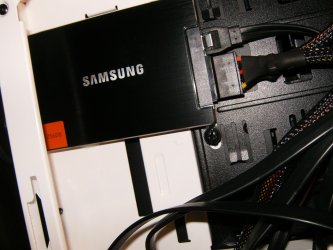
I'm at a loss again. There are 4 3.5" spaces for HDs. 2 are in a cage that comes off. I can put the 2 spinners in there. The other spot for HDs is right in front of the memory and when I slide the SSD in, which is on a 2.5 to 3.5 adapter, it actually hits the memory before it clicks into place??? There's no way a 3.5" HD would fit in there. It's close but won't click. If there were 4 sticks of memory in there it wouldn't even be close.
Case is a R363 Rosewill. I'll need to look at this later.
 

My Computer My Computer

At a glance

7 Ultimate 64 bit2x4Gb DDR3-SDRAMt750
Computer type
PC/Desktop
Computer Manufacturer/Model Number
need to update!
OS
7 Ultimate 64 bit
Memory
2x4Gb DDR3-SDRAM
Graphics Card(s)
t750
Monitor(s) Displays
AOC 24" yee haw and Dell 19"
Screen Resolution
1680 x 1050 @60hz
Hard Drives
Samsung 840EVO
Internet Speed
100/20
Antivirus
MSE
Browser
Firefox
I do not see a screenshot for Disk Management - Post a Screen Capture Image so we can see what you're talking about. Point out the partition you're asking about deleting.

As long as you installed to SSD with all other HD's unplugged, and the SSD remains set first to boot then adding back the other HD's should not interfere. But let us see a pic with all drives connected, tell us exactly what you want to do, and we will give you the steps.

Hey Greg! I think we established (about 60 posts back) that the old spinner had an OS partition (C) and a System Reserved Partition (the 100MB one). The OP deleted the OS Partition but not the SR.
So this sounds like that oldie but goodie where you add a second ACTIVE partition to a system. And with a smidgeon of missing OS to boot! (or not boot - as the case would be ;) )

YES. But I never deleted the 100MB partition because everything went haywire.
 

My Computer My Computer

At a glance

7 Ultimate 64 bit2x4Gb DDR3-SDRAMt750
Computer type
PC/Desktop
Computer Manufacturer/Model Number
need to update!
OS
7 Ultimate 64 bit
Memory
2x4Gb DDR3-SDRAM
Graphics Card(s)
t750
Monitor(s) Displays
AOC 24" yee haw and Dell 19"
Screen Resolution
1680 x 1050 @60hz
Hard Drives
Samsung 840EVO
Internet Speed
100/20
Antivirus
MSE
Browser
Firefox
You need to consider that a wasted HDD bay. The designers did not anticipate the MASSIVE RAM sticks we use today.
You can Jerry-rig a SSD in there without the 3.5" caddy, but that is just wrong, so use the other 3 bays and get a new case if you ever want to install a 4th hard drive.
 

My Computer My Computer

At a glance

Windows 7 64 Bit Home Premium SP1i7-3820GSkill F3-14900CL9Q - 16GBEVGA GeForce GTX660 - Driver 352.86
Computer type
PC/Desktop
Computer Manufacturer/Model Number
Home Built - Jan 2013
OS
Windows 7 64 Bit Home Premium SP1
CPU
i7-3820
Motherboard
Asus P9X79-PRO - Bios 4608
Memory
GSkill F3-14900CL9Q - 16GB
Graphics Card(s)
EVGA GeForce GTX660 - Driver 352.86
Sound Card
On board Realtek ALC898
Monitor(s) Displays
Acer S271HL
Screen Resolution
1920 x 1080
Hard Drives
#1- Samsung 840 Pro Series
#2- Western Digital WD1002FAEX Sata3 Black
#3- Western Digital WD1002FAEX Sata3 Black
PSU
Corsair CMPSU-850TX-V2 - 850 watt (by Seasonic)
Case
Corsair Obsidian 550D
Cooling
Standard 3 120mm case fans, Cooler Master Hyper 212 EVO
Keyboard
MS KC-0405
Mouse
Intellimouse 5-button
Internet Speed
56 Mbits/Sec (on a good day)
Antivirus
Avast & Malwarebytes
Browser
Firefox
Other Info
Asus DVD - DRW-24B1ST 24X
I do not see a screenshot for Disk Management - Post a Screen Capture Image so we can see what you're talking about. Point out the partition you're asking about deleting.

As long as you installed to SSD with all other HD's unplugged, and the SSD remains set first to boot then adding back the other HD's should not interfere. But let us see a pic with all drives connected, tell us exactly what you want to do, and we will give you the steps.

Hey Greg! I think we established (about 60 posts back) that the old spinner had an OS partition (C) and a System Reserved Partition (the 100MB one). The OP deleted the OS Partition but not the SR.
So this sounds like that oldie but goodie where you add a second ACTIVE partition to a system. And with a smidgeon of missing OS to boot! (or not boot - as the case would be ;) )

YES. But I never deleted the 100MB partition because everything went haywire.

What I would do is disconnect the SSD, connect the problem spinner, boot to GParted (I am assuming you have bootable media for GParted), then delete the partition from GParted.

(I would also create my new data partition at the same time.)

After it is all cleaned up then you can connect the SSD and the old spinner together and not need to worry about Windows throwing a hissy-fit because of the second ACTIVE partition.
 

My Computer My Computer

At a glance

Windows 7 64 Bit Home Premium SP1i7-3820GSkill F3-14900CL9Q - 16GBEVGA GeForce GTX660 - Driver 352.86
Computer type
PC/Desktop
Computer Manufacturer/Model Number
Home Built - Jan 2013
OS
Windows 7 64 Bit Home Premium SP1
CPU
i7-3820
Motherboard
Asus P9X79-PRO - Bios 4608
Memory
GSkill F3-14900CL9Q - 16GB
Graphics Card(s)
EVGA GeForce GTX660 - Driver 352.86
Sound Card
On board Realtek ALC898
Monitor(s) Displays
Acer S271HL
Screen Resolution
1920 x 1080
Hard Drives
#1- Samsung 840 Pro Series
#2- Western Digital WD1002FAEX Sata3 Black
#3- Western Digital WD1002FAEX Sata3 Black
PSU
Corsair CMPSU-850TX-V2 - 850 watt (by Seasonic)
Case
Corsair Obsidian 550D
Cooling
Standard 3 120mm case fans, Cooler Master Hyper 212 EVO
Keyboard
MS KC-0405
Mouse
Intellimouse 5-button
Internet Speed
56 Mbits/Sec (on a good day)
Antivirus
Avast & Malwarebytes
Browser
Firefox
Other Info
Asus DVD - DRW-24B1ST 24X
You need to consider that a wasted HDD bay. The designers did not anticipate the MASSIVE RAM sticks we use today.
You can Jerry-rig a SSD in there without the 3.5" caddy, but that is just wrong, so use the other 3 bays and get a new case if you ever want to install a 4th hard drive.

Yeah this is ****. I think i'm going to drill a hole in one of the cages and attach the SSD bracket to it. If need be I guess I'll use the 5.25 slots to install HDs.

I wanted a learning experience and I'm getting it!
 

My Computer My Computer

At a glance

7 Ultimate 64 bit2x4Gb DDR3-SDRAMt750
Computer type
PC/Desktop
Computer Manufacturer/Model Number
need to update!
OS
7 Ultimate 64 bit
Memory
2x4Gb DDR3-SDRAM
Graphics Card(s)
t750
Monitor(s) Displays
AOC 24" yee haw and Dell 19"
Screen Resolution
1680 x 1050 @60hz
Hard Drives
Samsung 840EVO
Internet Speed
100/20
Antivirus
MSE
Browser
Firefox
Hey Greg! I think we established (about 60 posts back) that the old spinner had an OS partition (C) and a System Reserved Partition (the 100MB one). The OP deleted the OS Partition but not the SR.
So this sounds like that oldie but goodie where you add a second ACTIVE partition to a system. And with a smidgeon of missing OS to boot! (or not boot - as the case would be ;) )

YES. But I never deleted the 100MB partition because everything went haywire.

What I would do is disconnect the SSD, connect the problem spinner, boot to GParted (I am assuming you have bootable media for GParted), then delete the partition from GParted.

(I would also create my new data partition at the same time.)

After it is all cleaned up then you can connect the SSD and the old spinner together and not need to worry about Windows throwing a hissy-fit because of the second ACTIVE partition.

Sounds like a plan. I do have Gp bootable on disc.
 

My Computer My Computer

At a glance

7 Ultimate 64 bit2x4Gb DDR3-SDRAMt750
Computer type
PC/Desktop
Computer Manufacturer/Model Number
need to update!
OS
7 Ultimate 64 bit
Memory
2x4Gb DDR3-SDRAM
Graphics Card(s)
t750
Monitor(s) Displays
AOC 24" yee haw and Dell 19"
Screen Resolution
1680 x 1050 @60hz
Hard Drives
Samsung 840EVO
Internet Speed
100/20
Antivirus
MSE
Browser
Firefox
I need to admit something: sometimes I build a new rig and everything goes together perfectly and it starts right up and everything installs without problems...... and I'm depressed for a week! What the hell is the fun in THAT!

Learning is good. What you are going through is how all of us learned this stuff.
 

My Computer My Computer

At a glance

Windows 7 64 Bit Home Premium SP1i7-3820GSkill F3-14900CL9Q - 16GBEVGA GeForce GTX660 - Driver 352.86
Computer type
PC/Desktop
Computer Manufacturer/Model Number
Home Built - Jan 2013
OS
Windows 7 64 Bit Home Premium SP1
CPU
i7-3820
Motherboard
Asus P9X79-PRO - Bios 4608
Memory
GSkill F3-14900CL9Q - 16GB
Graphics Card(s)
EVGA GeForce GTX660 - Driver 352.86
Sound Card
On board Realtek ALC898
Monitor(s) Displays
Acer S271HL
Screen Resolution
1920 x 1080
Hard Drives
#1- Samsung 840 Pro Series
#2- Western Digital WD1002FAEX Sata3 Black
#3- Western Digital WD1002FAEX Sata3 Black
PSU
Corsair CMPSU-850TX-V2 - 850 watt (by Seasonic)
Case
Corsair Obsidian 550D
Cooling
Standard 3 120mm case fans, Cooler Master Hyper 212 EVO
Keyboard
MS KC-0405
Mouse
Intellimouse 5-button
Internet Speed
56 Mbits/Sec (on a good day)
Antivirus
Avast & Malwarebytes
Browser
Firefox
Other Info
Asus DVD - DRW-24B1ST 24X
In terms of a learning experience Chris; lets just say we have all been there done that. The computer im using now is my first build; and it didnt go off without a few snags along the way. But yea as far as finding space goes; I guess some computer case designers just may not have been thinking about the emerging tech coming down the pipe; so they just kinda threw stuff together. Granted some designers have done a much better job then others. So i guess i can say been there done that....;)
 

My Computer My Computer

At a glance

Windows 7 ultimate 64-bitIntel I7 2600K 3.4ghzCorsair 16gb ddr3 1600mhzNvidia Geforce gt 430
Computer type
PC/Desktop
Computer Manufacturer/Model Number
custom built
OS
Windows 7 ultimate 64-bit
CPU
Intel I7 2600K 3.4ghz
Motherboard
Asus Evo P8P67
Memory
Corsair 16gb ddr3 1600mhz
Graphics Card(s)
Nvidia Geforce gt 430
Sound Card
Sound Blaster Titanium x-fi pci express
Monitor(s) Displays
Dell E198WFP
Hard Drives
1 western digital 2TB drive.
PSU
Antec 1200 watt
Case
Inwin Dragon Rider
Cooling
6 case supplied cooling fans
Keyboard
logitech mk700
Mouse
logitech m705
Internet Speed
25-50mbps download; 10mbps upload(i think)
Antivirus
avg free 2014
Browser
mozilla firefox
Other Info
Also have a pretty bad speaker setup which is a klipsch promedia 5.1 surround speaker setup with huge subwoofer and lg blu ray player/writer. Also a hp officejet pro 8600 plus wireless all in one and a logitech s7500 webcam.
I'll make it work. I shall ~ ~ ~
 

My Computer My Computer

At a glance

7 Ultimate 64 bit2x4Gb DDR3-SDRAMt750
Computer type
PC/Desktop
Computer Manufacturer/Model Number
need to update!
OS
7 Ultimate 64 bit
Memory
2x4Gb DDR3-SDRAM
Graphics Card(s)
t750
Monitor(s) Displays
AOC 24" yee haw and Dell 19"
Screen Resolution
1680 x 1050 @60hz
Hard Drives
Samsung 840EVO
Internet Speed
100/20
Antivirus
MSE
Browser
Firefox
You need to consider that a wasted HDD bay. The designers did not anticipate the MASSIVE RAM sticks we use today.
You can Jerry-rig a SSD in there without the 3.5" caddy, but that is just wrong, so use the other 3 bays and get a new case if you ever want to install a 4th hard drive.

Yeah this is ****. I think i'm going to drill a hole in one of the cages and attach the SSD bracket to it. If need be I guess I'll use the 5.25 slots to install HDs.

I wanted a learning experience and I'm getting it!

SSD's can be mounted anywhere with a couple of velcro dots. Personally I like them behind the mobo.
HPIM2655.jpg
 

My Computer My Computer

At a glance

Windows 7 Ultimate 64i7 3770k OC'd 4.6 @ 1.17v, also FX 8120 & i5 ...32 gb G.Skill Sniper DDR3 10-12-12-31 @ 2133XFX Radeon 7870 2GB DDR5
Computer type
PC/Desktop
Computer Manufacturer/Model Number
A blend of brains, brawn and dumb luck.
OS
Windows 7 Ultimate 64
CPU
i7 3770k OC'd 4.6 @ 1.17v, also FX 8120 & i5 miniITX
Motherboard
MSI P67A-GD80 b3
Memory
32 gb G.Skill Sniper DDR3 10-12-12-31 @ 2133
Graphics Card(s)
XFX Radeon 7870 2GB DDR5
Sound Card
Sound Blaster Z Series Card
Monitor(s) Displays
(2) LG LED 23" 1920 x 1080 2ms Monitors via mini d-port
Screen Resolution
1680 X 1050 p
Hard Drives
Samsung 256 gb 830 SSD sata III
(1) 1 tb WD Black
(2) 1 tb Hitachi deskmates/sata II
(2) 1 tb WD green/sata II
(2) 3 tb Seagate Barracuda
(1) 120 gb OCZ Vertex SS
(1) Drobo 5N w/5 Seagate 3tb
PSU
EVGA modular 1000G2 80% gold rating & APC 1200 RS
Case
CoolerMaster Storm Styker
Cooling
7 case fans 140mm & 120mm, NZXT Kraken X60
Keyboard
(2) Logitech Illuminated Keyboards (1) usb (1) wireless
Mouse
Logitech G700 & T-BC21 - nano nx for the laptop
Internet Speed
Basic 120mbps down
Antivirus
Trend Micro Titanium Max Security & Malwarebytes Premium
Browser
Chrome and IE 10
Other Info
5 Noctua case fans + 3 Noctua in p/p on NZXT cooler
Integrated hot swap drive bays for 2.5" Drives
(2) Lite-on dvd/cd/Blu Ray optical 22X
Integrated fan controller and led on/off
HP Officejet Pro 8630 all-n-one
Hot-swappable 3.5" hard drive bay
Netgear Nighthawk router
Asus USB 3 & sata 6 PCIe card
Vantec IDE to sata adptr./Ultra sata adptr
Lenovo L420 i5 lappy with m sata
Drobo 5N advanced NAS
Back
Top