Solved 1st Build - Major help needed

I was thinking about doing that w/the SSD. The rest of the bays are a cluster though. My only option for more than 2 HDs (excluding SSD) is too put them in the 2 5.25" bays. I guess that's not a big deal but I will have to buy adapters.
 

My Computer My Computer

At a glance

7 Ultimate 64 bit2x4Gb DDR3-SDRAMt750
Computer type
PC/Desktop
Computer Manufacturer/Model Number
need to update!
OS
7 Ultimate 64 bit
Memory
2x4Gb DDR3-SDRAM
Graphics Card(s)
t750
Monitor(s) Displays
AOC 24" yee haw and Dell 19"
Screen Resolution
1680 x 1050 @60hz
Hard Drives
Samsung 840EVO
Internet Speed
100/20
Antivirus
MSE
Browser
Firefox
There is no screenshot because I haven't done it yet. Got totally stumped last night when I couldn't fit the drives into their bays because they would RAM (get it) into the memory sticks.
 

My Computer My Computer

At a glance

7 Ultimate 64 bit2x4Gb DDR3-SDRAMt750
Computer type
PC/Desktop
Computer Manufacturer/Model Number
need to update!
OS
7 Ultimate 64 bit
Memory
2x4Gb DDR3-SDRAM
Graphics Card(s)
t750
Monitor(s) Displays
AOC 24" yee haw and Dell 19"
Screen Resolution
1680 x 1050 @60hz
Hard Drives
Samsung 840EVO
Internet Speed
100/20
Antivirus
MSE
Browser
Firefox
1. Disconnect SSD
2. Connect DVD and Spinner
3. Boot UEFI - DVD / Gparted
4. Format small partition on spinner 1
5. Shut down
6. Plug in spinner 2 (This was actually the one w/the OS)
7. Delete 100mb partition
8. Partition 100mb
9. FAIL to format last partition on spinner 2
10. Reboot w/SSD plugged in
11. Set BIOS to SSD in the boot position

There is 1 more partition on spinner 2 but Gp refuses to partion. It simply fails, immediately.

However...it booted to the SSD w/both spinners attached! Probably shouldn't be excited but I went through so much cr@p w/the other board that this seems like a great accomplishment.

The other drives came up like I had plugged in a USB stick. I've never seen that.

SSD asked to reboot.

Everything seems fine though the SSD does seem to boot slower. Maybe that will be different the next time. Obvously the OS was doing something since it asked to reboot.

The 1 partition on spinner 2 doesn't want to format in Disk Management.

So
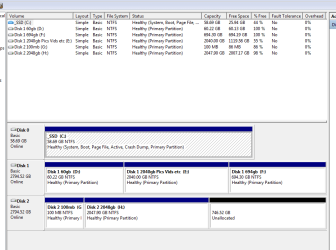
Disk 0 - SSD - 1 partition
Disk 1 - 3TB - 3 partitions 60gb/2040gb/694gb (this is the result of win home server formatting at install)
Disk 2 - 3TB - 3 partitions 100mb/2047.90gb/745.52unallocated

I will mess w/the partitions but I want to make sure I get what I need first. I think I simply reformat Disk 2 completely to deal with whatever is going on w/that last partition.
 

My Computer My Computer

At a glance

7 Ultimate 64 bit2x4Gb DDR3-SDRAMt750
Computer type
PC/Desktop
Computer Manufacturer/Model Number
need to update!
OS
7 Ultimate 64 bit
Memory
2x4Gb DDR3-SDRAM
Graphics Card(s)
t750
Monitor(s) Displays
AOC 24" yee haw and Dell 19"
Screen Resolution
1680 x 1050 @60hz
Hard Drives
Samsung 840EVO
Internet Speed
100/20
Antivirus
MSE
Browser
Firefox
Yea I didn't go the ssd route because they don't have the size I want yet in ssd where they do in a regular hard drive plus the ss drives are still too pricey for my pockets
 

My Computer My Computer

At a glance

Windows 7 ultimate 64-bitIntel I7 2600K 3.4ghzCorsair 16gb ddr3 1600mhzNvidia Geforce gt 430
Computer type
PC/Desktop
Computer Manufacturer/Model Number
custom built
OS
Windows 7 ultimate 64-bit
CPU
Intel I7 2600K 3.4ghz
Motherboard
Asus Evo P8P67
Memory
Corsair 16gb ddr3 1600mhz
Graphics Card(s)
Nvidia Geforce gt 430
Sound Card
Sound Blaster Titanium x-fi pci express
Monitor(s) Displays
Dell E198WFP
Hard Drives
1 western digital 2TB drive.
PSU
Antec 1200 watt
Case
Inwin Dragon Rider
Cooling
6 case supplied cooling fans
Keyboard
logitech mk700
Mouse
logitech m705
Internet Speed
25-50mbps download; 10mbps upload(i think)
Antivirus
avg free 2014
Browser
mozilla firefox
Other Info
Also have a pretty bad speaker setup which is a klipsch promedia 5.1 surround speaker setup with huge subwoofer and lg blu ray player/writer. Also a hp officejet pro 8600 plus wireless all in one and a logitech s7500 webcam.
Yea I didn't go the ssd route because they don't have the size I want yet in ssd where they do in a regular hard drive plus the ss drives are still too pricey for my pockets

I dig. This 64gb Sandisk was $55-60. Still sort of unnecessary for a server like this but I just 'discovered' SSDs and was freaking out at how fast they are. So I figured it could be the OS and the big spinners can store everything. Still....not necessary at all. Total overkill :cool:
 

My Computer My Computer

At a glance

7 Ultimate 64 bit2x4Gb DDR3-SDRAMt750
Computer type
PC/Desktop
Computer Manufacturer/Model Number
need to update!
OS
7 Ultimate 64 bit
Memory
2x4Gb DDR3-SDRAM
Graphics Card(s)
t750
Monitor(s) Displays
AOC 24" yee haw and Dell 19"
Screen Resolution
1680 x 1050 @60hz
Hard Drives
Samsung 840EVO
Internet Speed
100/20
Antivirus
MSE
Browser
Firefox
So I can basically nuke Disk 2. It had the OS on it and has no data that I need.
Format it using GPT?
 

My Computer My Computer

At a glance

7 Ultimate 64 bit2x4Gb DDR3-SDRAMt750
Computer type
PC/Desktop
Computer Manufacturer/Model Number
need to update!
OS
7 Ultimate 64 bit
Memory
2x4Gb DDR3-SDRAM
Graphics Card(s)
t750
Monitor(s) Displays
AOC 24" yee haw and Dell 19"
Screen Resolution
1680 x 1050 @60hz
Hard Drives
Samsung 840EVO
Internet Speed
100/20
Antivirus
MSE
Browser
Firefox
So I can basically nuke Disk 2. It had the OS on it and has no data that I need.
Format it using GPT?

Yes, if it contains nothing you need then that would be a good idea.

An even better idea would be to WIPE that drive. I believe GParted has that functionality. This is where you write all zeros to the entire drive. Do it overnight, as it takes about 6 hours on a 1TB drive.

Then I suggest running the hard disk manufacturer's diagnostic software on the drive.
The fact that it would not format the last partition could be due to a bad file table (and that would be fixed in the wipe), or it could be the drive is headed south. The test will give a clue to which it is.

If the SSD is formatted GPT then you are free to format the spinner GPT.
If the SSD is formatted MBR then the spinner must be MBR.
The reason is that W7 must be installed on the disk that is formatted GPT in a UEFI system with mixed format hard drives.
 

My Computer My Computer

At a glance

Windows 7 64 Bit Home Premium SP1i7-3820GSkill F3-14900CL9Q - 16GBEVGA GeForce GTX660 - Driver 352.86
Computer type
PC/Desktop
Computer Manufacturer/Model Number
Home Built - Jan 2013
OS
Windows 7 64 Bit Home Premium SP1
CPU
i7-3820
Motherboard
Asus P9X79-PRO - Bios 4608
Memory
GSkill F3-14900CL9Q - 16GB
Graphics Card(s)
EVGA GeForce GTX660 - Driver 352.86
Sound Card
On board Realtek ALC898
Monitor(s) Displays
Acer S271HL
Screen Resolution
1920 x 1080
Hard Drives
#1- Samsung 840 Pro Series
#2- Western Digital WD1002FAEX Sata3 Black
#3- Western Digital WD1002FAEX Sata3 Black
PSU
Corsair CMPSU-850TX-V2 - 850 watt (by Seasonic)
Case
Corsair Obsidian 550D
Cooling
Standard 3 120mm case fans, Cooler Master Hyper 212 EVO
Keyboard
MS KC-0405
Mouse
Intellimouse 5-button
Internet Speed
56 Mbits/Sec (on a good day)
Antivirus
Avast & Malwarebytes
Browser
Firefox
Other Info
Asus DVD - DRW-24B1ST 24X

My Computer My Computer

At a glance

Windows 7 Ultimate X64 SP1Intel i5-2550K, Differing ~4.4-4.8GHz No buil...16GB G.Skill Sniper 1866MHz @ 2133MHz 2x8GBASUS GTX650TIB-DC2OC-2GD5, (650TI Boost)
Computer type
PC/Desktop
Computer Manufacturer/Model Number
Home Built Desktop By DataTech
OS
Windows 7 Ultimate X64 SP1
CPU
Intel i5-2550K, Differing ~4.4-4.8GHz No built in GPU
Motherboard
ASUS P8Z68-V PRO/GEN3
Memory
16GB G.Skill Sniper 1866MHz @ 2133MHz 2x8GB
Graphics Card(s)
ASUS GTX650TIB-DC2OC-2GD5, (650TI Boost)
Sound Card
Onboard Realtek 5-1
Monitor(s) Displays
Samsung P2570HD
Screen Resolution
1920x1080
Hard Drives
Samsung 840 Pro 256GB SSD for OS, 500GB Seagate Constellation (Enterprise drive) for Data
PSU
Corsair HX650W
Case
Inwin Dragon Rider
Cooling
Hyper 212 EVO w/two Noctua fans, push-pull, @1300 RPM
Keyboard
E-Z Eyes, bright yellow keys with large characters
Mouse
steelseries SENSEI Laser Pro Gaming
Internet Speed
48-51Mbs Mbs down, 11 Mbs up Xfinity Cable
Antivirus
Norton Internet Security 2013
Browser
IE 10, Opera, Pale Moon if needed
Other Info
4 case fans, LG BluRay-RE, ASUS DVD-RW, Mr. Fusion power supply, 1.21 gigawatts.
Chris you PMed to ask what I wanted of you. Replying to this or at least acknowledging it would be a start. Also the DM snip as has been requested a few times, describing it is of no help.

http://www.sevenforums.com/tutorial...nt-post-screen-capture-image.html#post2261610

Replying to what???? This thread is getting nice and long due to all my replying!
Win is installed on the SSd.
All 3 HDs are in DM but 1 of the HDs has a partition that doesn't want to play nice.
I was going to take TVeblen's advice but I'll cap DM first.
 

My Computer My Computer

At a glance

7 Ultimate 64 bit2x4Gb DDR3-SDRAMt750
Computer type
PC/Desktop
Computer Manufacturer/Model Number
need to update!
OS
7 Ultimate 64 bit
Memory
2x4Gb DDR3-SDRAM
Graphics Card(s)
t750
Monitor(s) Displays
AOC 24" yee haw and Dell 19"
Screen Resolution
1680 x 1050 @60hz
Hard Drives
Samsung 840EVO
Internet Speed
100/20
Antivirus
MSE
Browser
Firefox
Click the word "this"?
 

My Computer My Computer

At a glance

Windows 7 Ultimate X64 SP1Intel i5-2550K, Differing ~4.4-4.8GHz No buil...16GB G.Skill Sniper 1866MHz @ 2133MHz 2x8GBASUS GTX650TIB-DC2OC-2GD5, (650TI Boost)
Computer type
PC/Desktop
Computer Manufacturer/Model Number
Home Built Desktop By DataTech
OS
Windows 7 Ultimate X64 SP1
CPU
Intel i5-2550K, Differing ~4.4-4.8GHz No built in GPU
Motherboard
ASUS P8Z68-V PRO/GEN3
Memory
16GB G.Skill Sniper 1866MHz @ 2133MHz 2x8GB
Graphics Card(s)
ASUS GTX650TIB-DC2OC-2GD5, (650TI Boost)
Sound Card
Onboard Realtek 5-1
Monitor(s) Displays
Samsung P2570HD
Screen Resolution
1920x1080
Hard Drives
Samsung 840 Pro 256GB SSD for OS, 500GB Seagate Constellation (Enterprise drive) for Data
PSU
Corsair HX650W
Case
Inwin Dragon Rider
Cooling
Hyper 212 EVO w/two Noctua fans, push-pull, @1300 RPM
Keyboard
E-Z Eyes, bright yellow keys with large characters
Mouse
steelseries SENSEI Laser Pro Gaming
Internet Speed
48-51Mbs Mbs down, 11 Mbs up Xfinity Cable
Antivirus
Norton Internet Security 2013
Browser
IE 10, Opera, Pale Moon if needed
Other Info
4 case fans, LG BluRay-RE, ASUS DVD-RW, Mr. Fusion power supply, 1.21 gigawatts.
000
 

Attachments

  • Capture.PNG
    Capture.PNG
    16.3 KB · Views: 2

My Computer My Computer

At a glance

7 Ultimate 64 bit2x4Gb DDR3-SDRAMt750
Computer type
PC/Desktop
Computer Manufacturer/Model Number
need to update!
OS
7 Ultimate 64 bit
Memory
2x4Gb DDR3-SDRAM
Graphics Card(s)
t750
Monitor(s) Displays
AOC 24" yee haw and Dell 19"
Screen Resolution
1680 x 1050 @60hz
Hard Drives
Samsung 840EVO
Internet Speed
100/20
Antivirus
MSE
Browser
Firefox
A couple of points. Greg's tutorial should answer all questions on a fresh install for Windows 7.

Only connect the SSD during install.

The Windows 7 installer will do the alignment for you, no need for the diskpart dance. :D
""""

Yes, I saw the link and clicked on it. Still, I'm not sure what I'm supposed to say
I followed the advice. What am I supposed to say?
 

My Computer My Computer

At a glance

7 Ultimate 64 bit2x4Gb DDR3-SDRAMt750
Computer type
PC/Desktop
Computer Manufacturer/Model Number
need to update!
OS
7 Ultimate 64 bit
Memory
2x4Gb DDR3-SDRAM
Graphics Card(s)
t750
Monitor(s) Displays
AOC 24" yee haw and Dell 19"
Screen Resolution
1680 x 1050 @60hz
Hard Drives
Samsung 840EVO
Internet Speed
100/20
Antivirus
MSE
Browser
Firefox
Hey Chris... what happens when you try and create a New Volume in that unallocated area in Disk Manager? (Right click inside the area)
 

My Computer My Computer

At a glance

Windows 7 64 Bit Home Premium SP1i7-3820GSkill F3-14900CL9Q - 16GBEVGA GeForce GTX660 - Driver 352.86
Computer type
PC/Desktop
Computer Manufacturer/Model Number
Home Built - Jan 2013
OS
Windows 7 64 Bit Home Premium SP1
CPU
i7-3820
Motherboard
Asus P9X79-PRO - Bios 4608
Memory
GSkill F3-14900CL9Q - 16GB
Graphics Card(s)
EVGA GeForce GTX660 - Driver 352.86
Sound Card
On board Realtek ALC898
Monitor(s) Displays
Acer S271HL
Screen Resolution
1920 x 1080
Hard Drives
#1- Samsung 840 Pro Series
#2- Western Digital WD1002FAEX Sata3 Black
#3- Western Digital WD1002FAEX Sata3 Black
PSU
Corsair CMPSU-850TX-V2 - 850 watt (by Seasonic)
Case
Corsair Obsidian 550D
Cooling
Standard 3 120mm case fans, Cooler Master Hyper 212 EVO
Keyboard
MS KC-0405
Mouse
Intellimouse 5-button
Internet Speed
56 Mbits/Sec (on a good day)
Antivirus
Avast & Malwarebytes
Browser
Firefox
Other Info
Asus DVD - DRW-24B1ST 24X
properties or help.

Dskchk it? Does dskchk work on unallocated? Seagate disk utility?
 

My Computer My Computer

At a glance

7 Ultimate 64 bit2x4Gb DDR3-SDRAMt750
Computer type
PC/Desktop
Computer Manufacturer/Model Number
need to update!
OS
7 Ultimate 64 bit
Memory
2x4Gb DDR3-SDRAM
Graphics Card(s)
t750
Monitor(s) Displays
AOC 24" yee haw and Dell 19"
Screen Resolution
1680 x 1050 @60hz
Hard Drives
Samsung 840EVO
Internet Speed
100/20
Antivirus
MSE
Browser
Firefox
I'm disk checking the HD.
 

My Computer My Computer

At a glance

7 Ultimate 64 bit2x4Gb DDR3-SDRAMt750
Computer type
PC/Desktop
Computer Manufacturer/Model Number
need to update!
OS
7 Ultimate 64 bit
Memory
2x4Gb DDR3-SDRAM
Graphics Card(s)
t750
Monitor(s) Displays
AOC 24" yee haw and Dell 19"
Screen Resolution
1680 x 1050 @60hz
Hard Drives
Samsung 840EVO
Internet Speed
100/20
Antivirus
MSE
Browser
Firefox
So I can basically nuke Disk 2. It had the OS on it and has no data that I need.
Format it using GPT?

Yes, if it contains nothing you need then that would be a good idea.

An even better idea would be to WIPE that drive. I believe GParted has that functionality. This is where you write all zeros to the entire drive. Do it overnight, as it takes about 6 hours on a 1TB drive.

Then I suggest running the hard disk manufacturer's diagnostic software on the drive.
The fact that it would not format the last partition could be due to a bad file table (and that would be fixed in the wipe), or it could be the drive is headed south. The test will give a clue to which it is.

If the SSD is formatted GPT then you are free to format the spinner GPT.
If the SSD is formatted MBR then the spinner must be MBR.
The reason is that W7 must be installed on the disk that is formatted GPT in a UEFI system with mixed format hard drives.

Does this mean that IF there is only 1 GPT disk in the system then it must be the OS disk?
 

My Computer My Computer

At a glance

7 Ultimate 64 bit2x4Gb DDR3-SDRAMt750
Computer type
PC/Desktop
Computer Manufacturer/Model Number
need to update!
OS
7 Ultimate 64 bit
Memory
2x4Gb DDR3-SDRAM
Graphics Card(s)
t750
Monitor(s) Displays
AOC 24" yee haw and Dell 19"
Screen Resolution
1680 x 1050 @60hz
Hard Drives
Samsung 840EVO
Internet Speed
100/20
Antivirus
MSE
Browser
Firefox
I dont' think the partition's GPT unless you know different, since there's no EFI partiiton for old Win7 so it wouldn't have booted. Check this by right clicking on the panel which says Disk 2 to check which it offers to convert to: If GPT then its already MBR.

And yes, I would wipe Disk 2 with Diskpart Clean Command from your Win7 Elevated Command Prompt. Then if you want GPT convert it using the link above.

This removes the old boot code so it can't ever interfere, and prepares the HD best for repartitioning in Disk Mgmt. Partition or Volume - Create New
 
Back
Top