Solved 2.5" drives hights...

Cr00zng

New member
Pro User
Local time
6:13 PM
Messages
568
I have a Lenovo Thinkpad T430 with a Seagate Momentus 320GBs HDD, pretty much OEM setup as far as the hardware is concerned. The laptop had pretty good speed with Windows 7 Ultimate, but had been updated to Windows 10. The system is noticeably slower and some of the programs didn't work, despite the fact that MS stated otherwise prior to upgrading. It seems that time to update the HDD to an SSD, or just roll back the update.

Since I have an OCZ Vertex 3 laying around, not a problem, just swap the drives. And that's where the roadblock showed up and in addition, it confuses me to no end...

The Seagate website lists the Momentus as "Thin" and shows the physical dimension as:

seagate specs.jpg

The actual height measurement does show 7mm (0.276"), while the Vertex shows a little more ~9mm (0.37"). Some of the websites do show the Vertex as 9mm height, if it's still available.

With the advent of "ultra laptop", was there a new standard height for the 2.5" drives? The Vertex 3 had been released about five years ego, so, it is possible that the "Thin" had became the standard since then.

Can anyone confirm the dimension change for the 2.5" HDD/SSD? I'd hate to purchase a new SSD that also would not fit in the bay.
TIA...
 

My Computer

Computer type
PC/Desktop
Computer Manufacturer/Model Number
Custom built at Home
OS
Windows 7 64-bit, Windows 8.1 64-bit, OSX El Capitan, Windows 10 (VMware)
CPU
Intel i5-3350P 3.1 GHz
Motherboard
Gigabyte GA-Z77X-UP5 TH
Memory
16 GBs GSkill Sniper
Graphics Card(s)
Radeon HD 7850
Sound Card
VIA HD Audio
Monitor(s) Displays
Dell U2410 24"
Screen Resolution
1920x1200
Hard Drives
1 x Intel 520 240 GBs
1 x Seagate 1TBs SATA 2.0,
1 x Seagate 1TBs eSATA 2.0
PSU
Thermaltake 850W
Case
Antec P183
Cooling
Noctua NH-D14 Heatsink 2 x 120mm fans, 4 x 120mm case fans
Keyboard
Dell Multimedia keyboard
Mouse
Logitech Trackball
Internet Speed
28.5 Mb/s
I confirm these measurements. I just verified that on 2 SSDs that I had lying around - one is thin (7mm) and the other one is normal (9mm). For the thin one I have an extra adaptor to bring it up to 9mm.
 

My Computer

Computer Manufacturer/Model Number
HP, Dell, Gateway, Toshiba - 4 laptops and 2 desktops
OS
Vista, Windows7, Mint Mate, Zorin, Windows 8
CPU
from 1.6GHz Duo to i7
Monitor(s) Displays
2x HP w2207
Hard Drives
5x HDD, 7x SSD, 12x Externals
Keyboard
with trackball - no mices
Mouse
Trackball mice
Internet Speed
DSL 6000
I confirm these measurements. I just verified that on 2 SSDs that I had lying around - one is thin (7mm) and the other one is normal (9mm). For the thin one I have an extra adaptor to bring it up to 9mm.

Thanks VHS! Off to buy an SSD...

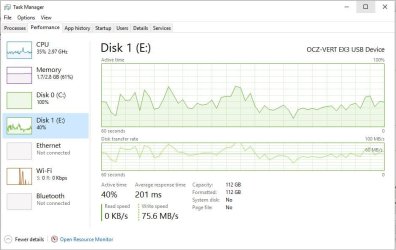
I've used the Vertex SSD as USB 3 external drive for creating an image if Windows 10 via Macrium Reflect. While this is not a good transfer speed for the USB 3 port, especially with lot of small files, it's not too bad:

hdd to usb ssd.jpg

Close to 60MB/s on average, but the HDD was hammered to 100% utilization. I'll retest it after getting the new SSD...
 

My Computer

Computer type
PC/Desktop
Computer Manufacturer/Model Number
Custom built at Home
OS
Windows 7 64-bit, Windows 8.1 64-bit, OSX El Capitan, Windows 10 (VMware)
CPU
Intel i5-3350P 3.1 GHz
Motherboard
Gigabyte GA-Z77X-UP5 TH
Memory
16 GBs GSkill Sniper
Graphics Card(s)
Radeon HD 7850
Sound Card
VIA HD Audio
Monitor(s) Displays
Dell U2410 24"
Screen Resolution
1920x1200
Hard Drives
1 x Intel 520 240 GBs
1 x Seagate 1TBs SATA 2.0,
1 x Seagate 1TBs eSATA 2.0
PSU
Thermaltake 850W
Case
Antec P183
Cooling
Noctua NH-D14 Heatsink 2 x 120mm fans, 4 x 120mm case fans
Keyboard
Dell Multimedia keyboard
Mouse
Logitech Trackball
Internet Speed
28.5 Mb/s
Standard heights for 2.5" drives are 7mm, 9mm, 12mm, and 15mm. The ones most people will encounter, such as the ones used in laptops, etc. are the smaller two.

You usually cannot install a 9mm drive in a laptop that uses a 7mm drive (especially the thinner ones) but you can install a 7mm drive in a laptop that previously had a 9mm in it. In some cases, you may need the adapter Wolfgang (whs) mentioned, which usually is just a 2mm spacer.

If you want more speed when booting up the computer and loading programs, I would get a good SSD, such as the Samsung 850 EVOs (unless you are on the computer a solid 8 hours a day or more, in which case I recommend the Samsung 850 Pros).
 

My Computer

Computer type
PC/Desktop
Computer Manufacturer/Model Number
Custom Build
OS
Win 7 Ultimate 64 bit
CPU
Intel i7-3930K
Motherboard
ASUS P9X79 WS
Memory
Kingston HyperX Genesis 32GB Kit (8x4GB Modules) 1600MHz DDR
Graphics Card(s)
MSI R7850 Twin Frozr 2GD5/OC Radeon HD 7850 2GB 256-bit GDDR
Sound Card
Asus Xonar Essence STX
Monitor(s) Displays
3x Asus VG248QE 24", Vizio 32" TV
Screen Resolution
1920 x 1080, ?
Hard Drives
Samsung 128GB 840 Pro SSD (1),
Samsung 4TB 850 EVO SSDs (4)
Samsung 4TB 850 EVO SSDs (16) external backup drives used in 2.5" hot swap bays in the computer.
PSU
Corsair HX750w
Case
Antec Two Hundred v2 (modified)
Cooling
Cooler Master GeminII S524 120mm (fan replaced with a 140mm)
Keyboard
Logitech G510s
Mouse
Logitech M525 (two in use)
Internet Speed
=< 32Mbps down, 8Mbps up
Antivirus
AVAST!, MBAM, SAS, Spybot S&D (all but MBAM free) Glary Util
Browser
IE11
Other Info
LSI 9211-8i HBA card (8 SATA III ports), 2.5" & 3.5" Hot Swap Bays, HooToo HT-CR001 PCI-E to USB 3.0 Internal Hub + 6 Slot Card Reader, and LG Model CH12LS28 BD-ROM Optical Drive. Also, ScanSnap S1500 ADF duplexing scanner, Canon 9000F flat bed scanner, Corsair SP2500 2.1 speakers, Samsung CLP 415nw laser color printer, Cyberpower PP2200SW UPS
Back
Top