
2 minute blank screen before boot up

ExNavy11

Member
Power User
Local time
4:41 PM
Messages
256
I recently have noticed longer boot times with my computer. This happens with Vista or 7 both 64 bit.
After I am at the OS select screen, ill see the little Windows load screen w/ the small bar. After that I get a blank screen that lasts as long as 2 minutes before Im taken to the log-in/welcome.

There is no cursor, just a blank screen. I noticed this when for Vista 64, but did not see it when I had 7022 on the Win 7 side. But now see it as well for Build 7048
 

My Computer

Computer Manufacturer/Model Number
Built
OS
Windows 7 RTM
CPU
Intel I7 920 2.67 ghz
Motherboard
EVGA X58
Memory
6GB CORSAIR DOMINATOR
Graphics Card(s)
GeForce GTX 260 Core 216 896MB 448-bit GDDR3 PCI Express 2.0
That sounds like a program start-up issue to me
Spybot in advanced mode is helpful for working out good and bad start-up items with its detailed explanations on most items
AV programmers also like to try prioritise there software to boot before important windows files which can also cause windows to stall and struggle at boot so you can check this also
 

My Computer

Computer Manufacturer/Model Number
Me :P
OS
Windows 7 Home Premium x64 SP1
CPU
Core 2 Quad Q6600
Motherboard
Abit IN9 32X MAX
Memory
8 GB OCZ PC2-6400 nVIDIA SLI-Ready Edition (4X2GB)
Graphics Card(s)
AMP! GeForce GTX 260² 896MB 448-bit GDDR3 (650MHz/2100MHz)
Sound Card
Realtek 7.1 CH HD Audio
Monitor(s) Displays
37" LG 1080p HD LCD TV
Screen Resolution
1280x1024 + 1360x768
Hard Drives
40GB Mushkin SSD
60GB Intel 520 SSD
150GB Raptor HDD
500GB Caviar HDD
PSU
Thermaltake W0133RB 1200W PSU
Case
Antec 900
Cooling
OCZ Vendetta 2 + Antec 900 case fans
Keyboard
Logitech G15 (full layout)
Mouse
R.A.T.9
Internet Speed
Not fast enough!
It took 152 seconds. My computer is new with good hard ware. No way it should take this long.
Ripbox, i think i understand what youre saying but I dont have that much installed on my system yet, and have next to nothing running on boot up. Ill try the Spybot thing out but hopefully you arent talking about there being some virus or what not. This is a freshly installed system and I do not have any viruses or spyware.
 

My Computer

Computer Manufacturer/Model Number
Built
OS
Windows 7 RTM
CPU
Intel I7 920 2.67 ghz
Motherboard
EVGA X58
Memory
6GB CORSAIR DOMINATOR
Graphics Card(s)
GeForce GTX 260 Core 216 896MB 448-bit GDDR3 PCI Express 2.0
Hi BucSox79,I also have the same problem, and it drives me mad,my laptop with windows seven loads up like lightening, which is 32 bit,compared to my main machine which is 64bit,so I am going to try out Spybot as well just to see if it helps, I am like you, I have no programs starting at start up,I will let you know if I find out something in the meantime.
 

My Computer

Computer Manufacturer/Model Number
Self Build 64bit
OS
Vista Ult64, Win7600
CPU
Intel Core 2 Quad Q6600 @ 2400 MHz 64bit OS
Motherboard
Asus P5E3 Deluxe WiFi @p 64 bit OS
Memory
4096 MB DDR3-SDRAM
Graphics Card(s)
ATI Radeon HD 3870 Series x2 Crossfired
Sound Card
Realtek on board
Monitor(s) Displays
Samsung SyncMaster - 23 inches
Screen Resolution
1680x1050 pixels at 60 Hz in True Colors
Hard Drives
Hitachi (250 GB)/Samsung 750 GB. /Barracuda 160 GB.
My Book 1 TB external..
PSU
Cooler Master 1000w
Case
Cooler Master Cosmos 1000.
Cooling
Fans and fresh air,
Keyboard
Wireless
Mouse
Wireless
Internet Speed
Never fast enough
Other Info
I use a Magnum.
Yeah, I dont think its a programs issue.

As you can see from the screen shot, there are only a few items there, one of which, I just installed (spybot).
 

Attachments

  • Untitled1.png
    Untitled1.png
    102.1 KB · Views: 507

My Computer

Computer Manufacturer/Model Number
Built
OS
Windows 7 RTM
CPU
Intel I7 920 2.67 ghz
Motherboard
EVGA X58
Memory
6GB CORSAIR DOMINATOR
Graphics Card(s)
GeForce GTX 260 Core 216 896MB 448-bit GDDR3 PCI Express 2.0
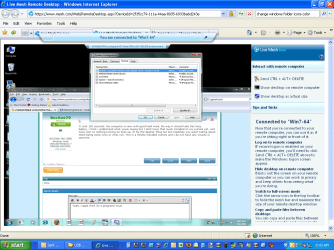
Maybe its just a 64 bit issue. Though I doubt it because I remember seeing some quick boot times by some posted in here that Im sure they run 64 bit systems.
 

My Computer

Computer Manufacturer/Model Number
Built
OS
Windows 7 RTM
CPU
Intel I7 920 2.67 ghz
Motherboard
EVGA X58
Memory
6GB CORSAIR DOMINATOR
Graphics Card(s)
GeForce GTX 260 Core 216 896MB 448-bit GDDR3 PCI Express 2.0
Try this,turn off everything in the start up and only leave your AV on, what ever that is, and see if anything changes ,if I posted a picture of my start up, (like yours above) ,it would only show my AV starting up.
 

My Computer

Computer Manufacturer/Model Number
Self Build 64bit
OS
Vista Ult64, Win7600
CPU
Intel Core 2 Quad Q6600 @ 2400 MHz 64bit OS
Motherboard
Asus P5E3 Deluxe WiFi @p 64 bit OS
Memory
4096 MB DDR3-SDRAM
Graphics Card(s)
ATI Radeon HD 3870 Series x2 Crossfired
Sound Card
Realtek on board
Monitor(s) Displays
Samsung SyncMaster - 23 inches
Screen Resolution
1680x1050 pixels at 60 Hz in True Colors
Hard Drives
Hitachi (250 GB)/Samsung 750 GB. /Barracuda 160 GB.
My Book 1 TB external..
PSU
Cooler Master 1000w
Case
Cooler Master Cosmos 1000.
Cooling
Fans and fresh air,
Keyboard
Wireless
Mouse
Wireless
Internet Speed
Never fast enough
Other Info
I use a Magnum.
I turned everything off but my display driver and Live Mesh. Im at work and must leave Live Mesh on at start up , or else I can not access my home pc.
When I get home, I am turning those two off as well and see what happens.
Im at 144 seconds now.
 

My Computer

Computer Manufacturer/Model Number
Built
OS
Windows 7 RTM
CPU
Intel I7 920 2.67 ghz
Motherboard
EVGA X58
Memory
6GB CORSAIR DOMINATOR
Graphics Card(s)
GeForce GTX 260 Core 216 896MB 448-bit GDDR3 PCI Express 2.0
Wow 8 seconds:D:D
 

My Computer

Computer Manufacturer/Model Number
Self Build 64bit
OS
Vista Ult64, Win7600
CPU
Intel Core 2 Quad Q6600 @ 2400 MHz 64bit OS
Motherboard
Asus P5E3 Deluxe WiFi @p 64 bit OS
Memory
4096 MB DDR3-SDRAM
Graphics Card(s)
ATI Radeon HD 3870 Series x2 Crossfired
Sound Card
Realtek on board
Monitor(s) Displays
Samsung SyncMaster - 23 inches
Screen Resolution
1680x1050 pixels at 60 Hz in True Colors
Hard Drives
Hitachi (250 GB)/Samsung 750 GB. /Barracuda 160 GB.
My Book 1 TB external..
PSU
Cooler Master 1000w
Case
Cooler Master Cosmos 1000.
Cooling
Fans and fresh air,
Keyboard
Wireless
Mouse
Wireless
Internet Speed
Never fast enough
Other Info
I use a Magnum.
Hi, Well you shouldn't need your display, whatever you have there in the picture, to be starting up when windows starts up,I bet you nothing happens when you turn it off,if it does let me know.
 

My Computer

Computer Manufacturer/Model Number
Self Build 64bit
OS
Vista Ult64, Win7600
CPU
Intel Core 2 Quad Q6600 @ 2400 MHz 64bit OS
Motherboard
Asus P5E3 Deluxe WiFi @p 64 bit OS
Memory
4096 MB DDR3-SDRAM
Graphics Card(s)
ATI Radeon HD 3870 Series x2 Crossfired
Sound Card
Realtek on board
Monitor(s) Displays
Samsung SyncMaster - 23 inches
Screen Resolution
1680x1050 pixels at 60 Hz in True Colors
Hard Drives
Hitachi (250 GB)/Samsung 750 GB. /Barracuda 160 GB.
My Book 1 TB external..
PSU
Cooler Master 1000w
Case
Cooler Master Cosmos 1000.
Cooling
Fans and fresh air,
Keyboard
Wireless
Mouse
Wireless
Internet Speed
Never fast enough
Other Info
I use a Magnum.
Yeah, I don't think its a programs issue.

As you can see from the screen shot, there are only a few items there, one of which, I just installed (spybot).
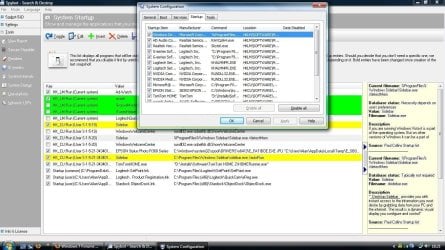
no no no what i meant was that spybot has a feature that shows you all the start-up items, A lot more than windows does and also gives full detailed descriptions of each start up items
In spybot you can sometimes find that what looks like 1 entry ie nvidia can actually be several items ie drive + control centre + physics and so on

what i was pointing out was that some start-up items can take over priority and even conflict important windows start-up items... this was the case with the very early days of vista with avast

see my attachment
 

Attachments

  • Untitled.jpg
    Untitled.jpg
    181.8 KB · Views: 202

My Computer

Computer Manufacturer/Model Number
Me :P
OS
Windows 7 Home Premium x64 SP1
CPU
Core 2 Quad Q6600
Motherboard
Abit IN9 32X MAX
Memory
8 GB OCZ PC2-6400 nVIDIA SLI-Ready Edition (4X2GB)
Graphics Card(s)
AMP! GeForce GTX 260² 896MB 448-bit GDDR3 (650MHz/2100MHz)
Sound Card
Realtek 7.1 CH HD Audio
Monitor(s) Displays
37" LG 1080p HD LCD TV
Screen Resolution
1280x1024 + 1360x768
Hard Drives
40GB Mushkin SSD
60GB Intel 520 SSD
150GB Raptor HDD
500GB Caviar HDD
PSU
Thermaltake W0133RB 1200W PSU
Case
Antec 900
Cooling
OCZ Vendetta 2 + Antec 900 case fans
Keyboard
Logitech G15 (full layout)
Mouse
R.A.T.9
Internet Speed
Not fast enough!
I saw the same delay in my Windows 7 7048 64bit after I installed Nvidia drivers... Try re-installing graphics card drivers.

Nvidia has also released downloadable drivers directly from their website for both 32 and 64bit Windows 7.
NVIDIA Graphics Supercharge Microsoft Windows 7

A graphics driver issue could be the same reason in Vista. If needed, roll-back the graphics driver or re-install.
 

My Computer

Computer Manufacturer/Model Number
ENIAC
OS
Windows 7 RC 7100 32bit/64bit
CPU
Intel Core2Duo E4500 2.20 GHz
Motherboard
ASUS P5LD2-X/1333
Memory
2x1GB Kinsgston DDR2 800MHz
Graphics Card(s)
Nvidia 8500GT
Sound Card
Onboard High Definition Audio Device
Monitor(s) Displays
Sony Bravia 42"
Case
LINKW 2222
Cooling
Standard Intel
Keyboard
Some cheap one
Mouse
Microsoft Intellimouse something
Internet Speed
24MBps ADSL
I tried those new drivers and its still taking about 150 seconds
 

My Computer

Computer Manufacturer/Model Number
Built
OS
Windows 7 RTM
CPU
Intel I7 920 2.67 ghz
Motherboard
EVGA X58
Memory
6GB CORSAIR DOMINATOR
Graphics Card(s)
GeForce GTX 260 Core 216 896MB 448-bit GDDR3 PCI Express 2.0
Does the Event Viewer show anything suspicious?
 

My Computer

Computer Manufacturer/Model Number
ENIAC
OS
Windows 7 RC 7100 32bit/64bit
CPU
Intel Core2Duo E4500 2.20 GHz
Motherboard
ASUS P5LD2-X/1333
Memory
2x1GB Kinsgston DDR2 800MHz
Graphics Card(s)
Nvidia 8500GT
Sound Card
Onboard High Definition Audio Device
Monitor(s) Displays
Sony Bravia 42"
Case
LINKW 2222
Cooling
Standard Intel
Keyboard
Some cheap one
Mouse
Microsoft Intellimouse something
Internet Speed
24MBps ADSL
Not really. I do see errors about the time the computer boots. Heres a screen shot. Not sure if this has anything to do with my problem or not.
 

Attachments

  • Capture.PNG
    Capture.PNG
    1.5 KB · Views: 194

My Computer

Computer Manufacturer/Model Number
Built
OS
Windows 7 RTM
CPU
Intel I7 920 2.67 ghz
Motherboard
EVGA X58
Memory
6GB CORSAIR DOMINATOR
Graphics Card(s)
GeForce GTX 260 Core 216 896MB 448-bit GDDR3 PCI Express 2.0

Ive disabled ALL start up items and still deal with the blank screen issue after I get to the Starting Windows screen. Yes Windows eventually starts but after 150 seconds or so.
Besides the Processor Management firmware error, I dont see anything else in the Event Viewer that explains the problem. Though, id like to know what exactly The Performance Power Management is.
 

My Computer

Computer Manufacturer/Model Number
Built
OS
Windows 7 RTM
CPU
Intel I7 920 2.67 ghz
Motherboard
EVGA X58
Memory
6GB CORSAIR DOMINATOR
Graphics Card(s)
GeForce GTX 260 Core 216 896MB 448-bit GDDR3 PCI Express 2.0
Hi BucSox79,I just installed Windows 7048 and it starts up like lightening compared to Windows 7000 and Vista ,now i installed this build on a seperate drive all on its own,so maybe the reason why mine was so slow at booting, is something to do with the fact that 7000 and Vista are on a partitioned drive?,is yours on a partitioned drive?,let me know,Thanks.
 

My Computer

Computer Manufacturer/Model Number
Self Build 64bit
OS
Vista Ult64, Win7600
CPU
Intel Core 2 Quad Q6600 @ 2400 MHz 64bit OS
Motherboard
Asus P5E3 Deluxe WiFi @p 64 bit OS
Memory
4096 MB DDR3-SDRAM
Graphics Card(s)
ATI Radeon HD 3870 Series x2 Crossfired
Sound Card
Realtek on board
Monitor(s) Displays
Samsung SyncMaster - 23 inches
Screen Resolution
1680x1050 pixels at 60 Hz in True Colors
Hard Drives
Hitachi (250 GB)/Samsung 750 GB. /Barracuda 160 GB.
My Book 1 TB external..
PSU
Cooler Master 1000w
Case
Cooler Master Cosmos 1000.
Cooling
Fans and fresh air,
Keyboard
Wireless
Mouse
Wireless
Internet Speed
Never fast enough
Other Info
I use a Magnum.
Hi BucSox79,I just installed Windows 7048 and it starts up like lightening compared to Windows 7000 and Vista ,now i installed this build on a seperate drive all on its own,so maybe the reason why mine was so slow at booting, is something to do with the fact that 7000 and Vista are on a partitioned drive?,is yours on a partitioned drive?,let me know,Thanks.

Both my Vista Ultimate 64 bit and Win 7 7048 64 bit are on separate hard drives. This isnt some huge deal but 150 seconds for this system is ridiculous start up time

Im thinking of installing Build 7000 or 7022 again and see what happens. Ive disabled all start up items and still have the problem. I think ill uninstall the Nvidia drivers and leave them uninstalled and see what happens maybe too. Im not sure which route to take next really. Id just like to figure this out.
 

My Computer

Computer Manufacturer/Model Number
Built
OS
Windows 7 RTM
CPU
Intel I7 920 2.67 ghz
Motherboard
EVGA X58
Memory
6GB CORSAIR DOMINATOR
Graphics Card(s)
GeForce GTX 260 Core 216 896MB 448-bit GDDR3 PCI Express 2.0
I think I can rule out the NVIDIA drivers. I just uninstalled them and still have the issue. I may have to go driver by driver but not sure if its a driver issue. But not sure where else to go from here, I can only assume.
 

My Computer

Computer Manufacturer/Model Number
Built
OS
Windows 7 RTM
CPU
Intel I7 920 2.67 ghz
Motherboard
EVGA X58
Memory
6GB CORSAIR DOMINATOR
Graphics Card(s)
GeForce GTX 260 Core 216 896MB 448-bit GDDR3 PCI Express 2.0
Hi, sorry I was away for a while. I have ATI drivers not NVidia ,if that would make any difference,did you by any chance have trouble with either OS and have to do a fix by putting your OS cd /dvd back in to fix it .
 

My Computer

Computer Manufacturer/Model Number
Self Build 64bit
OS
Vista Ult64, Win7600
CPU
Intel Core 2 Quad Q6600 @ 2400 MHz 64bit OS
Motherboard
Asus P5E3 Deluxe WiFi @p 64 bit OS
Memory
4096 MB DDR3-SDRAM
Graphics Card(s)
ATI Radeon HD 3870 Series x2 Crossfired
Sound Card
Realtek on board
Monitor(s) Displays
Samsung SyncMaster - 23 inches
Screen Resolution
1680x1050 pixels at 60 Hz in True Colors
Hard Drives
Hitachi (250 GB)/Samsung 750 GB. /Barracuda 160 GB.
My Book 1 TB external..
PSU
Cooler Master 1000w
Case
Cooler Master Cosmos 1000.
Cooling
Fans and fresh air,
Keyboard
Wireless
Mouse
Wireless
Internet Speed
Never fast enough
Other Info
I use a Magnum.
Back
Top