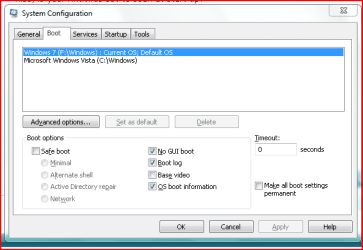
I doubt that enabling two CPU's in Msconfig, has improved anything. Msconfig is mainly a text editor and has only written in the entry for information. The CPU,itself triggers this information, to be read by the OS. You might find this page interesting:
Mythbusting: Debunking Common Windows Performance Tweaking Myths
As you stated yourself, the OS boot info scrolls too fast to be of real value, but can indicate any drivers which are slow in loading.
A better way to view the files loading on start up, is to open, from the Windows folder, Ntbtlog.txt. This is added to on a daily boot schedule. If you are in no need of the comparison, delete the entire contents, keeping the file itself intact but empty, of course. Now on a subsequent boot it will only show what was loaded on that single occasion.
However, it would be interesting to here what your boot up time has now become?
Later.
By the way, no reflection on jacees, suggestion, but be wary of Black Viper's excellent page. If you select the "safe" column, and thoroughly read the information on each service you intend to stop, you will find little to stop or disable. It worked admirably in Vista, but, after experimenting, I think it is something else that MS have got right. Stoppng the services does not seem to make any significant difference to CPU load, startup time, otr memory useage.
Mine, by the way, fwiw, was 50 seconds on a fresh install, including loading the internet, a networked printer and lan. After installing all of my software, including Avast (Anti virus programs are a real killer of boot times!) it now takes 1min.25secs. As I do not sit and watch it, it does not bother me too much. This is on a quite slow laptop, which I use for testing, with only 2Gbs memory. Dual core.1.66 Intel.