2 Partitions down to 1

letsdoamazing

New member
Local time
9:59 AM
Messages
226
I currently have a HDD with 2 partitions (1XP, 1Win7) I don't want the XP anymore. Is there a way to just delete 1 partition and make the other one have more space?
 

My Computer

Computer Manufacturer/Model Number
HP
OS
Windows 7 Ultimate 64-bit
CPU
Intel(R) Core(TM) i5-540M @ 2.53GHz
Motherboard
Hewlett-Packard 1522
Memory
4GB DDR3 System Memory
Graphics Card(s)
1GB ATI Mobility Radeon HD 5830 Graphics
Monitor(s) Displays
15.6" diagonal Full High Definition LED
Screen Resolution
1920x1080
Hard Drives
500GB 7200RPM SATA Hard Drive
PSU
6 Cell Lithium Ion Polymer Battery
Cooling
NZXT Aluminum Notebook Cooler With 3 120mm Adjustable Fans
Other Info
Envy 15
Please post back a screenshot of your maximized Disk Management drive map and listings, using Snipping Tool in Start Menu. We will give you the exact steps based on what we see.
 

My Computer

Computer Manufacturer/Model Number
Custom Built
OS
Windows 7 Pro with SP1 32bit
Motherboard
Intel D845GVS1 X86-based PC
Memory
2 gigs of RAM
Graphics Card(s)
Intel(R) 82845G/GL/GE/PE/GV Graphics Controller
Sound Card
Realtek AC'97 Audio
Monitor(s) Displays
Samsung SyncMaster 931BF Black 19" LCD Monitor
Screen Resolution
1280X960
Hard Drives
1. SAMSUNG SP0822N ATA Device ~ 80 GigaBytes

2. Seagate FreeAgent Go USB Device ~ 500 GigaBytes
Keyboard
COMPAQ Standard PS/2 Keyboard
Mouse
iBall Laser Precise Speedster
Internet Speed
4 mb/sec
Please post back a screenshot of your maximized Disk Management drive map and listings, using Snipping Tool in Start Menu. We will give you the exact steps based on what we see.

I have attached this
 

Attachments

  • Capture.PNG
    Capture.PNG
    10.3 KB · Views: 52

My Computer

Computer Manufacturer/Model Number
HP
OS
Windows 7 Ultimate 64-bit
CPU
Intel(R) Core(TM) i5-540M @ 2.53GHz
Motherboard
Hewlett-Packard 1522
Memory
4GB DDR3 System Memory
Graphics Card(s)
1GB ATI Mobility Radeon HD 5830 Graphics
Monitor(s) Displays
15.6" diagonal Full High Definition LED
Screen Resolution
1920x1080
Hard Drives
500GB 7200RPM SATA Hard Drive
PSU
6 Cell Lithium Ion Polymer Battery
Cooling
NZXT Aluminum Notebook Cooler With 3 120mm Adjustable Fans
Other Info
Envy 15
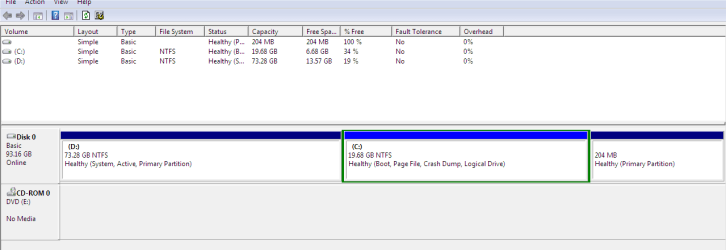
This is the reason we needed to see the screenshot. You have Win7 on a Logical Partition which needs be converted to Primary so it can be marked Active to receive the System boot files.

To do this, boot free Partition Wizard bootable CD, rightclick on C to Modify>Convert to Primary partition, click OK.

Next rightclick again on C to Modify>Set to Active, OK.

Next click on HD # to highlight HD, from Disk tab select Rebuild MBR, Apply all steps. THis may preclude the need to run Startup Repair - Run 3 Separate Times.

At reboot if Win7 doesn't start and hold the System flag, boot into Win7 DVD Repair console to run the Startup Repairs.

Once C starts and holds the System flag, boot back into PW CD, rightclick D to Delete, OK. Then rightclick on C to Resize, slide left border to the left to take up the space left by D, OK, Apply both steps.

Always back up your files before resizing operations although we have never had one fail using PW CD.

Sometimes you may need to Rebuild or Repair after resizing on the boot sector.
 
Back
Top