2 Wireless NIC connecting to 2 diffrent AP at same time.

ejecthunter

New member
Local time
8:42 AM
Messages
14
hi as per title i would like to connect 2 diffrent wireless NIC to 2 diffrent wireless connections...

wirelss nic A to connection ABC

and

Wireless NIC B to conenction XYZ

...


now as i understand from my previous exp with XP pro...i could connect 2 LAN nic to 2 diffrent Routers and they worked....


why is that when i try to conenct the wireless to one of the conenctions the first one dsconnects.

any help would be very much appreciated..

thanks!
 

My Computer My Computer

Computer Manufacturer/Model Number
Home made
OS
windows 7 ultimate edition
CPU
Athlon x2 64 3.00ghz
Motherboard
Asrock UCC68
Memory
1333 2 gb x 2
Graphics Card(s)
8600GT
Sound Card
on boards
Monitor(s) Displays
ACER 24 inch
Hard Drives
2 x 500GB Seagate
1 tb caviar green
PSU
GTR 80N
Case
Coolermaster somthing
Cooling
stock
I have tried this as an experiment a week ago but when I did it I tried to connect through a wired and a wireless connection at the same time "two different nics".

When I tried to connect to both at once Windows 7 would automatically use the wired connection instead of the wireless. The second I unplugged the wired connection the wireless one was used by Windows 7 automatically. There was no way to use them both at once and I suspect this might be true even with two wireless connections.
 

My Computer My Computer

Computer type
PC/Desktop
Computer Manufacturer/Model Number
Home built
OS
Windows 7 Ult, Windows 8.1 Pro,
CPU
Q9650-4.275GHz, E8600 4.5GHz, E6750-3.8GHz
Motherboard
Evga 780i FTW
Memory
G.Skill PC2 9600 1200Mhz 5 5 5 15 2T
Graphics Card(s)
GTX480
Sound Card
Asus Xonar D2
Monitor(s) Displays
HannsG
Screen Resolution
1680X1050
Hard Drives
GSkill Phoenix Pro 120GB SSD
PSU
ThermalTake Toughpower 1000Watt modular
Case
ThermalTake XaserV
Cooling
Xigmatek S1283
Keyboard
Logitech G15
Mouse
Logitech G9
Internet Speed
T1
I have tried this as an experiment a week ago but when I did it I tried to connect through a wired and a wireless connection at the same time "two different nics".

When I tried to connect to both at once Windows 7 would automatically use the wired connection instead of the wireless. The second I unplugged the wired connection the wireless one was used by Windows 7 automatically. There was no way to use them both at once and I suspect this might be true even with two wireless connections.

this mean windows xp pro is better at custom networking than windows 7 ultimate 64 bit,

i wasted alot of cash ...
 

My Computer My Computer

Computer Manufacturer/Model Number
Home made
OS
windows 7 ultimate edition
CPU
Athlon x2 64 3.00ghz
Motherboard
Asrock UCC68
Memory
1333 2 gb x 2
Graphics Card(s)
8600GT
Sound Card
on boards
Monitor(s) Displays
ACER 24 inch
Hard Drives
2 x 500GB Seagate
1 tb caviar green
PSU
GTR 80N
Case
Coolermaster somthing
Cooling
stock
atually i just woke up and something tells me that it is possible to run 2 wirelss networks with 2 wireless NIC at the same time in windows 7

i am gonna wait for other gurus to check this thread out
 

My Computer My Computer

Computer Manufacturer/Model Number
Home made
OS
windows 7 ultimate edition
CPU
Athlon x2 64 3.00ghz
Motherboard
Asrock UCC68
Memory
1333 2 gb x 2
Graphics Card(s)
8600GT
Sound Card
on boards
Monitor(s) Displays
ACER 24 inch
Hard Drives
2 x 500GB Seagate
1 tb caviar green
PSU
GTR 80N
Case
Coolermaster somthing
Cooling
stock
bump! please dont ban me for this....i just trying to get this noticed by the other experts
 

My Computer My Computer

Computer Manufacturer/Model Number
Home made
OS
windows 7 ultimate edition
CPU
Athlon x2 64 3.00ghz
Motherboard
Asrock UCC68
Memory
1333 2 gb x 2
Graphics Card(s)
8600GT
Sound Card
on boards
Monitor(s) Displays
ACER 24 inch
Hard Drives
2 x 500GB Seagate
1 tb caviar green
PSU
GTR 80N
Case
Coolermaster somthing
Cooling
stock
Why do you need two wireless connections?

this mean windows xp pro is better at custom networking than windows 7 ultimate 64 bit...

Not at all, you only mentioned you used 2 "LAN" nic with Windows XP, I assume you mean wired. Windows 7 can work with two wired connections easily. Wireless is a completely different ball game. Even for Windows XP. Having two wireless connections emitting from the same computer is more likely to cause crosstalk and/or interference.
 

My Computer My Computer

Computer type
PC/Desktop
Computer Manufacturer/Model Number
Alienware Aurora ALX R4
OS
Windows 10 Pro (x64)
CPU
Intel Core i7-3930K (3.2GHz - 4.5GHz)
Motherboard
Alienware Aurora-R4 x79
Memory
4x Samsung 4GB PC3-12800 DDR3 (16GB 1600MHz)
Graphics Card(s)
Nvidia Geforce GTX 690
Sound Card
SteelSeries Siberia Elite
Monitor(s) Displays
Dell UltraSharp U3011
Screen Resolution
2560x1600
Hard Drives
Samsung 850 Pro 256 GB, Seagate 1TB Desktop Hybrid HDD, 2x Western Digital 4TB Green HDD
PSU
875W Some Dell PSU <.<
Case
Alienware Aurora ALX
Cooling
Custom Liquid Cooling (EK CPU & GPU blocks) dual EK 480RAD
Keyboard
Logitech G710+ Mechanical
Mouse
Logitech G700s
Internet Speed
Verizon Fios (50 mbps average)
Other Info
Server: Intel NUC D54250WYK: i5-4250U, 16GB, 256 GB mSATA, Windows Server 2012 R2
My understanding is that you would have to set up routing tables in order to use two different network connections at the same time.

Make sure that the two wireless routers are not on the same subnet, and then specify which subnet is routed where... You would not (with typical equipment) be able to use both routes for the same connection. For example, most software won't allow you to use both connections at the same time to double throughput.

I don't know the mechanics to connect to both in Windows 7, but if you describe your expectations more completely you might get better help.
 

My Computer My Computer

Computer Manufacturer/Model Number
Gateway GM5472
OS
Windows 7 Home Premium (64 bit)
CPU
AMD Athlon 56 X2 5000+
Motherboard
ECS MCP61P-AM
Memory
4.0 GB
Graphics Card(s)
Sapphire HD 4350 fanless w/512MB
Monitor(s) Displays
VeiwSonic VX2035WM
Screen Resolution
1680x1050
Other Info
Stock system except for the addition of 2GB memory, a Swann PCDVR 4 Card and a Hauppage dual HD tuner and a Sapphire HD 4550 video card
ok i will explain this in detail as much as possible...

i have acces to 2 connections... 1 is broadband modem to which i connect my wireless router.. 2 is the SAME modem which also emits the wireless signal...

what i want to achive by having to wireless NIC is that 1st wireless NIC would be used for my host windows 7 machine and the 2nd wireless NIC will be bridged to my VMware linux which host my telnet and other test projects.

* My modem is basically a router provided by the ISP which literally can give me 4 public dynamic IPs meaning if i stick four cables in the port of the modem i will get 4 diffrent IP which can be used to host multiple Virtual Machines...

Now this is 100% possible in XP LAN NIC...as i have done it already....but since i moved to windows 7 for better VM virtualization, (and thanks to my kids keep pulling the LAN cable from the walls) i am having to use the wireless option instead of LAN NIC

i hope i am clear english isnt my native language... :p

thanks
 

My Computer My Computer

Computer Manufacturer/Model Number
Home made
OS
windows 7 ultimate edition
CPU
Athlon x2 64 3.00ghz
Motherboard
Asrock UCC68
Memory
1333 2 gb x 2
Graphics Card(s)
8600GT
Sound Card
on boards
Monitor(s) Displays
ACER 24 inch
Hard Drives
2 x 500GB Seagate
1 tb caviar green
PSU
GTR 80N
Case
Coolermaster somthing
Cooling
stock
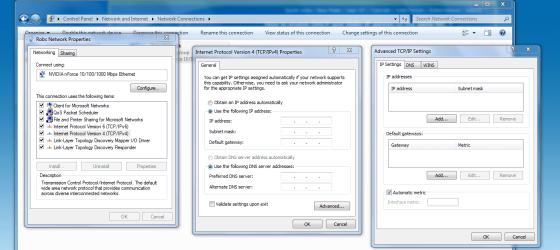
Try going into TCP-IP settings under the advanced settings, you can put in two different IP's, DNS, gateways,subnets and may be able to connect to both of them at once, I haven't tried this one yet but it's worth a try. This may only work with wired connections but I havn't test this out because I only have one ISP.
 

Attachments

  • Advanced TCP-IP settings.PNG
    Advanced TCP-IP settings.PNG
    71.8 KB · Views: 139

My Computer My Computer

Computer type
PC/Desktop
Computer Manufacturer/Model Number
Home built
OS
Windows 7 Ult, Windows 8.1 Pro,
CPU
Q9650-4.275GHz, E8600 4.5GHz, E6750-3.8GHz
Motherboard
Evga 780i FTW
Memory
G.Skill PC2 9600 1200Mhz 5 5 5 15 2T
Graphics Card(s)
GTX480
Sound Card
Asus Xonar D2
Monitor(s) Displays
HannsG
Screen Resolution
1680X1050
Hard Drives
GSkill Phoenix Pro 120GB SSD
PSU
ThermalTake Toughpower 1000Watt modular
Case
ThermalTake XaserV
Cooling
Xigmatek S1283
Keyboard
Logitech G15
Mouse
Logitech G9
Internet Speed
T1
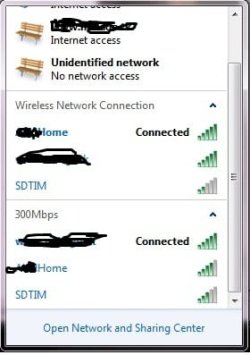
lol, it worked....i did ocnfigure the LAN and subnet in my own router....basically i chaged my router to emit a class a ip with a subnet which someone might never use lol...and used DHCP

thats it...and it worked on its won somehow.. :p no idea what happened...
 

Attachments

  • Untitled.jpg
    Untitled.jpg
    17.3 KB · Views: 12

My Computer My Computer

Computer Manufacturer/Model Number
Home made
OS
windows 7 ultimate edition
CPU
Athlon x2 64 3.00ghz
Motherboard
Asrock UCC68
Memory
1333 2 gb x 2
Graphics Card(s)
8600GT
Sound Card
on boards
Monitor(s) Displays
ACER 24 inch
Hard Drives
2 x 500GB Seagate
1 tb caviar green
PSU
GTR 80N
Case
Coolermaster somthing
Cooling
stock
Back
Top