3 problems after installing windows 7

thanks man
 

My Computer

OS
Windows 7 Ultimate x64
CPU
intel i7-3770k @3.5GHz
Memory
8 GB
Graphics Card(s)
NVIDIA GeForce GTX 670
Screen Resolution
1920x1080
Keyboard
razer
Mouse
razer
Internet Speed
2.4 mb
theog, I always used NIS that served me well. I was wondering what would be different/better with Norton 360. Would you have any idea?
 

My Computer

Computer Manufacturer/Model Number
HP, Dell, Gateway, Toshiba - 4 laptops and 2 desktops
OS
Vista, Windows7, Mint Mate, Zorin, Windows 8
CPU
from 1.6GHz Duo to i7
Monitor(s) Displays
2x HP w2207
Hard Drives
5x HDD, 7x SSD, 12x Externals
Keyboard
with trackball - no mices
Mouse
Trackball mice
Internet Speed
DSL 6000
For creating full system images of your main drive with all partitions intact and the boot sector information included Acronis True Image available in a free form at WD for WD drives and the option found in the Backup & Restore section in the Contrrol Panel.

I've been creating and restoring images to one drive here for Vista as well as 7 even using the clone option in Acronis to find the good old option in the CP works fast and effective while Acronis allows you to mount an image as a duplicate of the main drive when seen for incrementally adding more to the image itself. Macrium still gets another good rep there while I have to give Acronis the edge.

As for an av program I have to lean on VIPRE Premium which also includes a firewall and antispyware protections. Try a 30day trial with that and you likely won't want any other program!

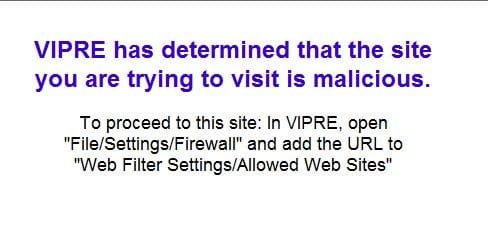
Super light as it lives up to the claims without any bloat but being seen as far more effective being an updated software over others which simply update the same type of builds. The firewall is also a plus at entirely blocking out malicious sites upon any detection of ??? crud!
 

Attachments

  • Virpre Security Warning.jpg
    Virpre Security Warning.jpg
    24.6 KB · Views: 0

My Computers

System One System Two

  • Computer type
    PC/Desktop
    Computer Manufacturer/Model Number
    Custom builds = 2
    OS
    W7 Ultimate x64/W10 Pro x64/W11 Pro Triple Boot - Main PC W7 Remote PC Micro ATX W7 Pro x64/W11 Pro
    CPU
    AMD Phenom II X4 975 Deneb 3.6ghz - 965 2nd remote pc
    Motherboard
    Gigabyte GA-790XTA-UD4-Gigabyte GA-880GM-D2H remote pc
    Memory
    Kingston Hyper X DDR3 1600 1.5v 16gb - Hyper X Fury 8gb 2nd
    Graphics Card(s)
    MSI HD Radeon 5750 1gb - MSI HD Radeon 6450 on mini tower
    Sound Card
    Creative Labs X-Fi Xtreme Audio P - Realtek onooard 2nd case
    Monitor(s) Displays
    ASUS VW199T-P 19" HP 2082a Main-HP 2082a 20" remote pc
    Screen Resolution
    Asus 1440x900 - HP 1600x900
    Hard Drives
    WD Black 1TB HD per OS W7, W10, and pending W11 presently on 500gb OS Drive - Pending Triple 1TB HDs for Spanned Storage/backup volume
    Single 2TB external USB enclosure, single 1TB System 7 Host/Boot drive, Pending 8TB external HD for system image b
    PSU
    Corsair 750TX - primary / Corsair CX600 - second
    Case
    Antec 900-2 - SSD compatible / NZXT Vulcan mini tower
    Cooling
    Zalman CNPS9900A
    Keyboard
    AZIO L70 Backlit Letters Gaming - ONN Cordless/USB
    Mouse
    MSI DS200 Programmable, Logitech Cordless
    Internet Speed
    30mbps upgrade - primary hard wired - mini tower usb WiFi
    Antivirus
    GFI VIPRE Internet Security 2014 on W7 2016 beta on W10,
    Browser
    Cyberfox, WaterFox 64bit FF variants, FireFox x64, Pale Moon
    Other Info
    Accomdata fan cooled usb 2.0 PIDE/Sata II, III external enclosure.
    Sambient usb/eSata PATA/Sata II, III external enclosure.
  • Computer type
    PC/Desktop
    System Manufacturer/Model Number
    CUSTOM ASSEMBLY
    OS
    W7 Pro x64/W11 Pro
    CPU
    AMD Deneb 3.6ghz - 965
    Motherboard
    Gigabyte GA-880GM-D2H remote pc
    Memory
    Kingston Hyper X Fury 8gb
    Graphics Card(s)
    MSI HD Radeon 6450 DVI Output
    Sound Card
    Realtek onooard Creative or Other separate PENDING
    Monitor(s) Displays
    VIZIO 32" LCD TV Separate LCD Pending
    Screen Resolution
    1600x1080
    Hard Drives
    WD 500GB OS Host/Boot WD Green 1TB Storage/Backup
    PSU
    Corsair 600W - THERMALTAKE 600W spare case
    Case
    NZXT Vulcan mini tower
    Cooling
    Twin 120mm Top Fans - 240mm Side Cover
    Keyboard
    ONN Cordless/USB Logitech Cordless
    Mouse
    ONN USB/Cordless - Logitech Cordless
    Internet Speed
    DSL 5G
    Browser
    MS Edge, FireFox, WaterFox x64, FireFox Nightly
    Other Info
    OS Testing-Remote Access to Main TeamViewer
theog, I always used NIS that served me well. I was wondering what would be different/better with Norton 360. Would you have any idea?

Hi whs

I like the maintenance side of Norton 360; I look after over 20 Pc's in the family.
I just go round, do a few clicks, all done in 5 mins.360 will shut down the PC aswell.

Example:

setup1.PNG
 

My Computer

OS
ME/XP/Vista/Win7
theog, I always used NIS that served me well. I was wondering what would be different/better with Norton 360. Would you have any idea?

Hi whs

I like the maintenance side of Norton 360; I look after over 20 Pc's in the family.
I just go round, do a few clicks, all done in 5 mins.360 will shut down the PC aswell.

Example:

View attachment 89168

Thanks for the info. That is interesting but would not apply to me. I do not have such a great number of systems to look after.
 

My Computer

Computer Manufacturer/Model Number
HP, Dell, Gateway, Toshiba - 4 laptops and 2 desktops
OS
Vista, Windows7, Mint Mate, Zorin, Windows 8
CPU
from 1.6GHz Duo to i7
Monitor(s) Displays
2x HP w2207
Hard Drives
5x HDD, 7x SSD, 12x Externals
Keyboard
with trackball - no mices
Mouse
Trackball mice
Internet Speed
DSL 6000
theog, I always used NIS that served me well. I was wondering what would be different/better with Norton 360. Would you have any idea?

Hi whs

I like the maintenance side of Norton 360; I look after over 20 Pc's in the family.
I just go round, do a few clicks, all done in 5 mins.360 will shut down the PC aswell.

Example:

View attachment 89168
Thanks for the info. That is interesting but would not apply to me. I do not have such a great number of systems to look after.

That's OK.
Ray
 

My Computer

OS
ME/XP/Vista/Win7
Back
Top