Solved 6 GB RAM (4 GB usable)

Clyde54

New member
Local time
1:58 PM
Messages
18
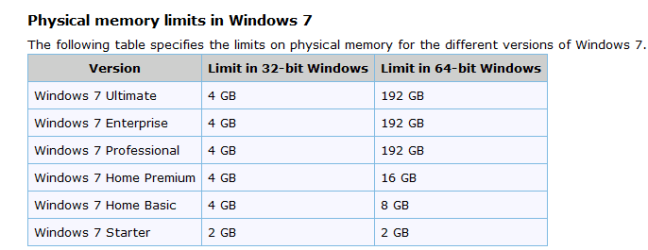
I have win64 installed on a system with 6 GB RAM. But when I click on Computer Properties, it says only 4 GB of the RAM are usable. I understand that 32 bit windows only recognizes 4 GB of RAM but in a 64 bit system why would the extra 2 GB not be usable?
 

My Computer My Computer

Computer Manufacturer/Model Number
Self-constructed
OS
Win64
CPU
i7-930
Motherboard
Gigabyte GA-X58A-UD3R
Memory
G.SKILL Ripjaws Series 6GB (3 x 2GB) 240-Pin DDR3 SDRAM
Graphics Card(s)
GIGABYTE GV-N250OC-1GI Rev 2.0 GeForce GTS 250 1GB 256-bit
Monitor(s) Displays
ASUS VB195T Black 19" 5ms LCD Monitor
Screen Resolution
1280 x 1024
Hard Drives
Western Digital Caviar Black WD1001FALS 1TB 7200 RPM SATA 3.0Gb/s 3.5" Internal Hard Drive -Bare Drive
PSU
CORSAIR CMPSU-750TX 750W ATX12V / EPS12V SLI Ready CrossFire
Case
COOLER MASTER HAF 932 Blue RC-932-KKN3-GP Black Steel ATX
Keyboard
Saitek Eclipse II Illuminated Keyboard
Mouse
Logitech Wireless Mouse M510
Internet Speed
5 mbps
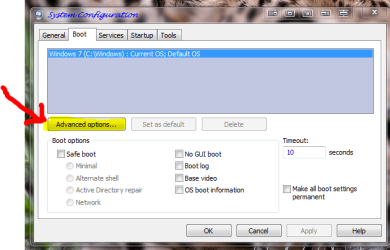
1. Click Start, type msconfig in the Search programs and files box, and then click msconfig in the Programs list.
2. In the System Configuration window, click Advanced options on the Boot tab.
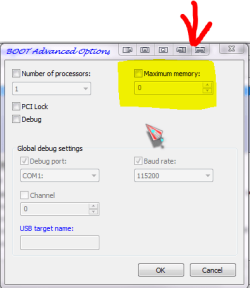
3. Click to clear the Maximum memory check box, and then click OK.
4. Restart the computer.

See if that clears things up. :)

By the way, your system specifications are incredibly unhelpful.
 

My Computer My Computer

Computer Manufacturer/Model Number
Pugh Technologies
OS
W7 Professional x64
CPU
AMD Athlon II X3 445 Rana 3.10 GHz
Motherboard
MSI 870A-G54
Memory
PNY XLR DDR3 1600 4x2GB
Graphics Card(s)
NVIDIA GeForce GTS 450 (fermi) 1GB GDDR5
Sound Card
Realtek ALC892 onboard
Monitor(s) Displays
ASUS VE205t, Viewsonic VX2035WM
Screen Resolution
1600x900, 1600x1050
Hard Drives
977GB Hitachi Hitachi HDS721010CLA332
244GB Western Digital WDC WD2500AAJS-65B4A0
488GB Western Digital WDC WD5000AAJS-00A8B0
488GB Western Digital WDC WD5000AAKS-00UU3A0
PSU
Antec EarthWatts EA650 650W
Case
ThermalTake Armor A90 Mid Tower
Cooling
3x 120mm in, 1x 120mm & 200mm out, self built hydro-cooler
Keyboard
Logitec 55
Mouse
Razer Deathadder
Internet Speed
20 Mbps D/L, 9 Mbps U/L
The Maximum memory box was unchecked. When I checked it 6144 popped into the window. I re-booted and went back to this window and it said 2048. What is going on here?

btw I filled in my system specs
 

My Computer My Computer

Computer Manufacturer/Model Number
Self-constructed
OS
Win64
CPU
i7-930
Motherboard
Gigabyte GA-X58A-UD3R
Memory
G.SKILL Ripjaws Series 6GB (3 x 2GB) 240-Pin DDR3 SDRAM
Graphics Card(s)
GIGABYTE GV-N250OC-1GI Rev 2.0 GeForce GTS 250 1GB 256-bit
Monitor(s) Displays
ASUS VB195T Black 19" 5ms LCD Monitor
Screen Resolution
1280 x 1024
Hard Drives
Western Digital Caviar Black WD1001FALS 1TB 7200 RPM SATA 3.0Gb/s 3.5" Internal Hard Drive -Bare Drive
PSU
CORSAIR CMPSU-750TX 750W ATX12V / EPS12V SLI Ready CrossFire
Case
COOLER MASTER HAF 932 Blue RC-932-KKN3-GP Black Steel ATX
Keyboard
Saitek Eclipse II Illuminated Keyboard
Mouse
Logitech Wireless Mouse M510
Internet Speed
5 mbps
make sure the box is still unchecked.

If that did not fix the issue, check to see if your settings in BIOS are correct, or maybe your bios is outdated.
 

My Computer My Computer

Computer Manufacturer/Model Number
Pugh Technologies
OS
W7 Professional x64
CPU
AMD Athlon II X3 445 Rana 3.10 GHz
Motherboard
MSI 870A-G54
Memory
PNY XLR DDR3 1600 4x2GB
Graphics Card(s)
NVIDIA GeForce GTS 450 (fermi) 1GB GDDR5
Sound Card
Realtek ALC892 onboard
Monitor(s) Displays
ASUS VE205t, Viewsonic VX2035WM
Screen Resolution
1600x900, 1600x1050
Hard Drives
977GB Hitachi Hitachi HDS721010CLA332
244GB Western Digital WDC WD2500AAJS-65B4A0
488GB Western Digital WDC WD5000AAJS-00A8B0
488GB Western Digital WDC WD5000AAKS-00UU3A0
PSU
Antec EarthWatts EA650 650W
Case
ThermalTake Armor A90 Mid Tower
Cooling
3x 120mm in, 1x 120mm & 200mm out, self built hydro-cooler
Keyboard
Logitec 55
Mouse
Razer Deathadder
Internet Speed
20 Mbps D/L, 9 Mbps U/L
Or it is likely that one or more of your memory modules is bad. I would suggest run a memtest on it. I had a similar issue and after replacing the memory modules, all is fine.
 

My Computer My Computer

OS
Windows 7 x64
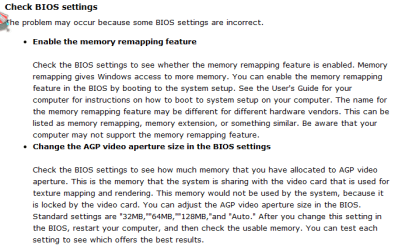
What graphics card do you have and does it use 'shared' memory? If so then the 2GB could be used/reserved for GFX usage. You can normally change the setting in the BIOS.


OS
 

My Computer My Computer

Computer Manufacturer/Model Number
Compaq Desktop
OS
Windows 7 Ultimate x64
CPU
AMD Sempron Dual Core
Memory
3GB
Graphics Card(s)
NVIDIA GeForce 6150SE nForce 430
Screen Resolution
1024x768
Hard Drives
150GB Sata
hi every one :)
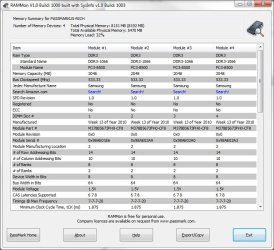
i use this good program to check the ram PassMark RAMMon - Identify RAM type, speed & memory timings
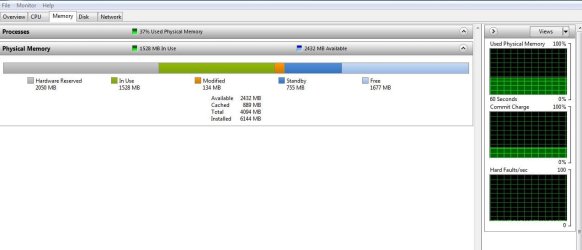
if you hit the windows key and r and type resmon you can see what windows has allocated to ram
also check your bios setings and make sure the ram is seated proper with the *click sound*
 

Attachments

  • rammonscreenshot.jpg
    rammonscreenshot.jpg
    84 KB · Views: 364
  • resmon sunday.PNG
    resmon sunday.PNG
    43.6 KB · Views: 216

My Computer My Computer

Computer Manufacturer/Model Number
packard bell IXTREME M5722
OS
Operating System : Windows 7 Home Premium Edition 6.01.7600 SP1 (x64)
CPU
Processor : Intel Core 2 Quad Q8300 @ 2500 MHz
Motherboard
Mainboard : Packard Bell (Acer EG43M )
Memory
Physical Memory :8GB Corsair4x 2GB 800MHz C5 DDR2
Graphics Card(s)
Video Card : XFX 6700 AMD
Monitor(s) Displays
Maestro 234DL - BenQ V2220 - BenQ VW2420H
Screen Resolution
Current Display :1920x1080p pixels at 60 Hz in HD LED
Hard Drives
Hard Disks : WDC (1000 GB)
Drive C: (Hard Disk) : 428 GB available on 491 GB
Drive D: (Hard Disk) : 426 GB available on 492 GB
SAMSUNG spinpoint HD103SJ 1000.2 GB
(X 2) KINGSTON SSD NOW V 30GB
PSU
XFX ProSeries 550W PSU
Case
PACKARD BELL IXTREME
Cooling
System Blower Current: 150mA Air Flow16CFM ;Akasa 90mm rear
Keyboard
Gigabyte Aivia K8100
Mouse
TRUST-Wireless Laser Mouse - Carbon edition MI-7770C
Internet Speed
TP-LINK > TL-WN951N / AV500 Gigabit Powerline Adapters
Browser
chrome dev
Other Info
EXTRA COOLING>(FAN CONTROLLER) PC Bay Cooler 3 x 40mm fans; Akasa AK-HD-BL Blue hard drive cooler 2 x 40 mm fan 4500 rpm 29.7 dBA
Bios> American Megatrends Inc.
Version : P01-A1
Date : 08/31/2009
I have recently added 2 GB to my RAM. I did not know whether the DIMMs that I bought would be recognized by the system, so the only way was to try. In the end it went well, but the first attempt was unsuccessful.

Here's what should be happening: first and foremost, the memory should be recognized by the BIOS. Therefore, restart your computer and enter BIOS. See how much memory is reported there. If you see all 6 GB, then you can proceed with the above advice of how to make Windows to recognize the memory. But if the BIOS does not see it, then you should check the DIMMs individually, and if they are OK, then proceed with a BIOS update, if one is available or check with the manufacturer on the overall memory limit imposed by the motherboard and/or BIOS.
 

My Computer My Computer

Computer Manufacturer/Model Number
Dell Inspiron 530
OS
Windows 7 Ultimate (x64)
CPU
Q6600
Memory
8 GB
Graphics Card(s)
ATI Radeon HD 2600 XT
Monitor(s) Displays
Samsung Syncmaster P2450
Screen Resolution
1920x1080
Hard Drives
Samsung HD103UJ
Samsung HD501LJ
Internet Speed
25 Mb/s
I would not recommend any bios update activity..You HAVE to know what your doing there..:eek: Trust me!!!
 

My Computer My Computer

Computer Manufacturer/Model Number
Custom
OS
Windows 7 Ultimate 32bit
CPU
INTEL Pentium4 3.2ghz(QuadCore MonthEnd!!!)
Motherboard
Asus P5QL-EM
Memory
2gb kingston DDR2 800
Graphics Card(s)
hd powercolour 5570 512MB
Sound Card
8ch onboard
Monitor(s) Displays
21" Samsung
Screen Resolution
Change alot
Hard Drives
samsung 500GB 7200rpm
PSU
Sparta 500w
Case
Alienware
Cooling
Aero cooling
Keyboard
Microsoft Multi-Media
Mouse
Scorpion 3000dpi
Internet Speed
none
Other Info
Xforce-5 5.1 Surround
windows 7 should allocate the ram auto if the ram is seated properly after reboot check this> windows key + r type resmon then enter and see whats allocated.
In msconifg (windows key + r type misconfig press enter) In the System Configuration window, click Advanced options on the Boot tab the box in Maximum memory should be empty so windows can allocate the max ram , and then click OK.
Restart the computer.
 

My Computer My Computer

Computer Manufacturer/Model Number
packard bell IXTREME M5722
OS
Operating System : Windows 7 Home Premium Edition 6.01.7600 SP1 (x64)
CPU
Processor : Intel Core 2 Quad Q8300 @ 2500 MHz
Motherboard
Mainboard : Packard Bell (Acer EG43M )
Memory
Physical Memory :8GB Corsair4x 2GB 800MHz C5 DDR2
Graphics Card(s)
Video Card : XFX 6700 AMD
Monitor(s) Displays
Maestro 234DL - BenQ V2220 - BenQ VW2420H
Screen Resolution
Current Display :1920x1080p pixels at 60 Hz in HD LED
Hard Drives
Hard Disks : WDC (1000 GB)
Drive C: (Hard Disk) : 428 GB available on 491 GB
Drive D: (Hard Disk) : 426 GB available on 492 GB
SAMSUNG spinpoint HD103SJ 1000.2 GB
(X 2) KINGSTON SSD NOW V 30GB
PSU
XFX ProSeries 550W PSU
Case
PACKARD BELL IXTREME
Cooling
System Blower Current: 150mA Air Flow16CFM ;Akasa 90mm rear
Keyboard
Gigabyte Aivia K8100
Mouse
TRUST-Wireless Laser Mouse - Carbon edition MI-7770C
Internet Speed
TP-LINK > TL-WN951N / AV500 Gigabit Powerline Adapters
Browser
chrome dev
Other Info
EXTRA COOLING>(FAN CONTROLLER) PC Bay Cooler 3 x 40mm fans; Akasa AK-HD-BL Blue hard drive cooler 2 x 40 mm fan 4500 rpm 29.7 dBA
Bios> American Megatrends Inc.
Version : P01-A1
Date : 08/31/2009
I would not recommend any bios update activity..You HAVE to know what your doing there..:eek: Trust me!!!

I suggest outdated bios as three of the revisions from the first release pertain to memory ;)
 

My Computer My Computer

Computer Manufacturer/Model Number
Pugh Technologies
OS
W7 Professional x64
CPU
AMD Athlon II X3 445 Rana 3.10 GHz
Motherboard
MSI 870A-G54
Memory
PNY XLR DDR3 1600 4x2GB
Graphics Card(s)
NVIDIA GeForce GTS 450 (fermi) 1GB GDDR5
Sound Card
Realtek ALC892 onboard
Monitor(s) Displays
ASUS VE205t, Viewsonic VX2035WM
Screen Resolution
1600x900, 1600x1050
Hard Drives
977GB Hitachi Hitachi HDS721010CLA332
244GB Western Digital WDC WD2500AAJS-65B4A0
488GB Western Digital WDC WD5000AAJS-00A8B0
488GB Western Digital WDC WD5000AAKS-00UU3A0
PSU
Antec EarthWatts EA650 650W
Case
ThermalTake Armor A90 Mid Tower
Cooling
3x 120mm in, 1x 120mm & 200mm out, self built hydro-cooler
Keyboard
Logitec 55
Mouse
Razer Deathadder
Internet Speed
20 Mbps D/L, 9 Mbps U/L
I would not recommend any bios update activity..You HAVE to know what your doing there..:eek: Trust me!!!

I suggest outdated bios as three of the revisions from the first release pertain to memory ;)

its important to update your bios most manufactures make it easy now in days gone by you always *flashed it *
just always check your system at the website is there a tutorial on this in the forums?
 

My Computer My Computer

Computer Manufacturer/Model Number
packard bell IXTREME M5722
OS
Operating System : Windows 7 Home Premium Edition 6.01.7600 SP1 (x64)
CPU
Processor : Intel Core 2 Quad Q8300 @ 2500 MHz
Motherboard
Mainboard : Packard Bell (Acer EG43M )
Memory
Physical Memory :8GB Corsair4x 2GB 800MHz C5 DDR2
Graphics Card(s)
Video Card : XFX 6700 AMD
Monitor(s) Displays
Maestro 234DL - BenQ V2220 - BenQ VW2420H
Screen Resolution
Current Display :1920x1080p pixels at 60 Hz in HD LED
Hard Drives
Hard Disks : WDC (1000 GB)
Drive C: (Hard Disk) : 428 GB available on 491 GB
Drive D: (Hard Disk) : 426 GB available on 492 GB
SAMSUNG spinpoint HD103SJ 1000.2 GB
(X 2) KINGSTON SSD NOW V 30GB
PSU
XFX ProSeries 550W PSU
Case
PACKARD BELL IXTREME
Cooling
System Blower Current: 150mA Air Flow16CFM ;Akasa 90mm rear
Keyboard
Gigabyte Aivia K8100
Mouse
TRUST-Wireless Laser Mouse - Carbon edition MI-7770C
Internet Speed
TP-LINK > TL-WN951N / AV500 Gigabit Powerline Adapters
Browser
chrome dev
Other Info
EXTRA COOLING>(FAN CONTROLLER) PC Bay Cooler 3 x 40mm fans; Akasa AK-HD-BL Blue hard drive cooler 2 x 40 mm fan 4500 rpm 29.7 dBA
Bios> American Megatrends Inc.
Version : P01-A1
Date : 08/31/2009
I would try taking the first two sticks out and place the new stick in the number one slot and see if the system see's it. If so then add the other two and report back to us.
 

My Computer My Computer

Computer type
PC/Desktop
Computer Manufacturer/Model Number
A blend of brains, brawn and dumb luck.
OS
Windows 7 Ultimate 64
CPU
i7 3770k OC'd 4.6 @ 1.17v, also FX 8120 & i5 miniITX
Motherboard
MSI P67A-GD80 b3
Memory
32 gb G.Skill Sniper DDR3 10-12-12-31 @ 2133
Graphics Card(s)
XFX Radeon 7870 2GB DDR5
Sound Card
Sound Blaster Z Series Card
Monitor(s) Displays
(2) LG LED 23" 1920 x 1080 2ms Monitors via mini d-port
Screen Resolution
1680 X 1050 p
Hard Drives
Samsung 256 gb 830 SSD sata III
(1) 1 tb WD Black
(2) 1 tb Hitachi deskmates/sata II
(2) 1 tb WD green/sata II
(2) 3 tb Seagate Barracuda
(1) 120 gb OCZ Vertex SS
(1) Drobo 5N w/5 Seagate 3tb
PSU
EVGA modular 1000G2 80% gold rating & APC 1200 RS
Case
CoolerMaster Storm Styker
Cooling
7 case fans 140mm & 120mm, NZXT Kraken X60
Keyboard
(2) Logitech Illuminated Keyboards (1) usb (1) wireless
Mouse
Logitech G700 & T-BC21 - nano nx for the laptop
Internet Speed
Basic 120mbps down
Antivirus
Trend Micro Titanium Max Security & Malwarebytes Premium
Browser
Chrome and IE 10
Other Info
5 Noctua case fans + 3 Noctua in p/p on NZXT cooler
Integrated hot swap drive bays for 2.5" Drives
(2) Lite-on dvd/cd/Blu Ray optical 22X
Integrated fan controller and led on/off
HP Officejet Pro 8630 all-n-one
Hot-swappable 3.5" hard drive bay
Netgear Nighthawk router
Asus USB 3 & sata 6 PCIe card
Vantec IDE to sata adptr./Ultra sata adptr
Lenovo L420 i5 lappy with m sata
Drobo 5N advanced NAS
Guys, if his system says he has 6GB as he states it does, then it IS seeing it. Something is using or reserving 2GB. If he is not using the latest BIOS, he definitely needs to update it. And FYI, a BIOS is always flashed...it's on a chip and that is the only way to update it.
 

My Computer My Computer

Computer Manufacturer/Model Number
Custom
OS
Windows 7 Ultimate RTM (Technet)
CPU
3.00 gigahertz Intel Core2 Duo E8400
Motherboard
ASUSTeK Computer INC. P5K/EPU Rev 1.xx
Memory
4GB
Graphics Card(s)
ATI Radeon X1950 Pro
Sound Card
Built in HD Audio
Monitor(s) Displays
22" Gateway LCD
Screen Resolution
1920 x 1200
Hard Drives
ST3160023A [Hard drive] (160.04 GB) -- drive 0, rev 8.01, ST3500630AS [Hard drive] (500.11 GB) -- drive 2, rev 3.AAK
ST3500630AS [Hard drive] (500.11 GB) -- drive 1, rev 3.AAK
Keyboard
Logitech G11
Mouse
Microsoft Wireless Laser Mouse 5000
Internet Speed
13.44 Mbps
I checked my BIOS and it say 4096 MB are installed so that is definitely wrong. I also downloaded the RAMMon program and it seems to be saying 6 GB are installed but only 4 are available. Why are 2 GB hardware reserved? What does that mean? See printscreen.

So I should update my BIOS? The machine is only 3 months old but I guess I can check on that.
 

Attachments

  • Memory.jpg
    Memory.jpg
    54.3 KB · Views: 188

My Computer My Computer

Computer Manufacturer/Model Number
Self-constructed
OS
Win64
CPU
i7-930
Motherboard
Gigabyte GA-X58A-UD3R
Memory
G.SKILL Ripjaws Series 6GB (3 x 2GB) 240-Pin DDR3 SDRAM
Graphics Card(s)
GIGABYTE GV-N250OC-1GI Rev 2.0 GeForce GTS 250 1GB 256-bit
Monitor(s) Displays
ASUS VB195T Black 19" 5ms LCD Monitor
Screen Resolution
1280 x 1024
Hard Drives
Western Digital Caviar Black WD1001FALS 1TB 7200 RPM SATA 3.0Gb/s 3.5" Internal Hard Drive -Bare Drive
PSU
CORSAIR CMPSU-750TX 750W ATX12V / EPS12V SLI Ready CrossFire
Case
COOLER MASTER HAF 932 Blue RC-932-KKN3-GP Black Steel ATX
Keyboard
Saitek Eclipse II Illuminated Keyboard
Mouse
Logitech Wireless Mouse M510
Internet Speed
5 mbps
I checked my BIOS and it say 4096 MB are installed so that is definitely wrong. I also downloaded the RAMMon program and it seems to be saying 6 GB are installed but only 4 are available. Why are 2 GB hardware reserved? What does that mean? See printscreen.

So I should update my BIOS? The machine is only 3 months old but I guess I can check on that.

2050 MB is reserved for hardware ( graphic card?) have you checked in msconfig? that the maximum memory box is unticked?
press windows key + r
in box type msconfig
press OK
click boot
click advanced options
boot advanced options window opens on desktop
make sure maximum memory is UNTICKICKED
click OK
click OK in msconfig window
if a window pops up asking for RESTART CLICK YES
 

Attachments

  • brys boot menu1.PNG
    brys boot menu1.PNG
    29.6 KB · Views: 39
  • brys boot menu.PNG
    brys boot menu.PNG
    12.4 KB · Views: 39

My Computer My Computer

Computer Manufacturer/Model Number
packard bell IXTREME M5722
OS
Operating System : Windows 7 Home Premium Edition 6.01.7600 SP1 (x64)
CPU
Processor : Intel Core 2 Quad Q8300 @ 2500 MHz
Motherboard
Mainboard : Packard Bell (Acer EG43M )
Memory
Physical Memory :8GB Corsair4x 2GB 800MHz C5 DDR2
Graphics Card(s)
Video Card : XFX 6700 AMD
Monitor(s) Displays
Maestro 234DL - BenQ V2220 - BenQ VW2420H
Screen Resolution
Current Display :1920x1080p pixels at 60 Hz in HD LED
Hard Drives
Hard Disks : WDC (1000 GB)
Drive C: (Hard Disk) : 428 GB available on 491 GB
Drive D: (Hard Disk) : 426 GB available on 492 GB
SAMSUNG spinpoint HD103SJ 1000.2 GB
(X 2) KINGSTON SSD NOW V 30GB
PSU
XFX ProSeries 550W PSU
Case
PACKARD BELL IXTREME
Cooling
System Blower Current: 150mA Air Flow16CFM ;Akasa 90mm rear
Keyboard
Gigabyte Aivia K8100
Mouse
TRUST-Wireless Laser Mouse - Carbon edition MI-7770C
Internet Speed
TP-LINK > TL-WN951N / AV500 Gigabit Powerline Adapters
Browser
chrome dev
Other Info
EXTRA COOLING>(FAN CONTROLLER) PC Bay Cooler 3 x 40mm fans; Akasa AK-HD-BL Blue hard drive cooler 2 x 40 mm fan 4500 rpm 29.7 dBA
Bios> American Megatrends Inc.
Version : P01-A1
Date : 08/31/2009
you are using 3 sticks of ram G.SKILL Ripjaws Series 6GB (3 x 2GB) 240-Pin DDR3 SDRAM how do you have these seated in the slots?

please reed this (about memory mapping )

The usable memory may be less than the installed memory on Windows 7-based computers

http://support.microsoft.com/kb/978610/en-us

To view the installed memory and the usable memory in Windows 7, follow these steps:
Click Start, right-click Computer, and then click Properties.
View the Installed memory (RAM) value under System.
For example, if it displays 4.00 GB (3.5 GB usable), this means that you have 3.5 GB of usable memory out of 4 GB of installed memory.
 

Attachments

  • memory mapping.PNG
    memory mapping.PNG
    20.5 KB · Views: 111
  • memory mapping2.PNG
    memory mapping2.PNG
    5.5 KB · Views: 89
  • memory mapping3.PNG
    memory mapping3.PNG
    13.7 KB · Views: 91
Last edited:

My Computer My Computer

Computer Manufacturer/Model Number
packard bell IXTREME M5722
OS
Operating System : Windows 7 Home Premium Edition 6.01.7600 SP1 (x64)
CPU
Processor : Intel Core 2 Quad Q8300 @ 2500 MHz
Motherboard
Mainboard : Packard Bell (Acer EG43M )
Memory
Physical Memory :8GB Corsair4x 2GB 800MHz C5 DDR2
Graphics Card(s)
Video Card : XFX 6700 AMD
Monitor(s) Displays
Maestro 234DL - BenQ V2220 - BenQ VW2420H
Screen Resolution
Current Display :1920x1080p pixels at 60 Hz in HD LED
Hard Drives
Hard Disks : WDC (1000 GB)
Drive C: (Hard Disk) : 428 GB available on 491 GB
Drive D: (Hard Disk) : 426 GB available on 492 GB
SAMSUNG spinpoint HD103SJ 1000.2 GB
(X 2) KINGSTON SSD NOW V 30GB
PSU
XFX ProSeries 550W PSU
Case
PACKARD BELL IXTREME
Cooling
System Blower Current: 150mA Air Flow16CFM ;Akasa 90mm rear
Keyboard
Gigabyte Aivia K8100
Mouse
TRUST-Wireless Laser Mouse - Carbon edition MI-7770C
Internet Speed
TP-LINK > TL-WN951N / AV500 Gigabit Powerline Adapters
Browser
chrome dev
Other Info
EXTRA COOLING>(FAN CONTROLLER) PC Bay Cooler 3 x 40mm fans; Akasa AK-HD-BL Blue hard drive cooler 2 x 40 mm fan 4500 rpm 29.7 dBA
Bios> American Megatrends Inc.
Version : P01-A1
Date : 08/31/2009
I checked my BIOS and it say 4096 MB are installed

I think that's the point. If Windows or any other software sees the remaining 2 GB, then most likely the motherboard is capable of supporting 6 GB of memory, but the BIOS software is not. I recommend checking with the manufacturer if any BIOS updates are available. Also you may check with a forum specific for your manufacturer if it is indeed the BIOS that's limiting your memory.

As an example, I have Dell Inspiron 530 and the manual says 4 GB is the maximum amount of memory. However, Dell users forums are full of suggestions that after a certain BIOS update one can use up to 8 GB. So I went ahead and tried and indeed it works, now I'm using 6 GB. However, I do have the updated BIOS.
 

My Computer My Computer

Computer Manufacturer/Model Number
Dell Inspiron 530
OS
Windows 7 Ultimate (x64)
CPU
Q6600
Memory
8 GB
Graphics Card(s)
ATI Radeon HD 2600 XT
Monitor(s) Displays
Samsung Syncmaster P2450
Screen Resolution
1920x1080
Hard Drives
Samsung HD103UJ
Samsung HD501LJ
Internet Speed
25 Mb/s
I checked my BIOS and it say 4096 MB are installed

I think that's the point. If Windows or any other software sees the remaining 2 GB, then most likely the motherboard is capable of supporting 6 GB of memory, but the BIOS software is not. I recommend checking with the manufacturer if any BIOS updates are available. Also you may check with a forum specific for your manufacturer if it is indeed the BIOS that's limiting your memory.

As an example, I have Dell Inspiron 530 and the manual says 4 GB is the maximum amount of memory. However, Dell users forums are full of suggestions that after a certain BIOS update one can use up to 8 GB. So I went ahead and tried and indeed it works, now I'm using 6 GB. However, I do have the updated BIOS.

check the memory mapping in the bios (not all bios are the same for each machine it is normally in the advanced features) and check the memory settings in msconfig
 

My Computer My Computer

Computer Manufacturer/Model Number
packard bell IXTREME M5722
OS
Operating System : Windows 7 Home Premium Edition 6.01.7600 SP1 (x64)
CPU
Processor : Intel Core 2 Quad Q8300 @ 2500 MHz
Motherboard
Mainboard : Packard Bell (Acer EG43M )
Memory
Physical Memory :8GB Corsair4x 2GB 800MHz C5 DDR2
Graphics Card(s)
Video Card : XFX 6700 AMD
Monitor(s) Displays
Maestro 234DL - BenQ V2220 - BenQ VW2420H
Screen Resolution
Current Display :1920x1080p pixels at 60 Hz in HD LED
Hard Drives
Hard Disks : WDC (1000 GB)
Drive C: (Hard Disk) : 428 GB available on 491 GB
Drive D: (Hard Disk) : 426 GB available on 492 GB
SAMSUNG spinpoint HD103SJ 1000.2 GB
(X 2) KINGSTON SSD NOW V 30GB
PSU
XFX ProSeries 550W PSU
Case
PACKARD BELL IXTREME
Cooling
System Blower Current: 150mA Air Flow16CFM ;Akasa 90mm rear
Keyboard
Gigabyte Aivia K8100
Mouse
TRUST-Wireless Laser Mouse - Carbon edition MI-7770C
Internet Speed
TP-LINK > TL-WN951N / AV500 Gigabit Powerline Adapters
Browser
chrome dev
Other Info
EXTRA COOLING>(FAN CONTROLLER) PC Bay Cooler 3 x 40mm fans; Akasa AK-HD-BL Blue hard drive cooler 2 x 40 mm fan 4500 rpm 29.7 dBA
Bios> American Megatrends Inc.
Version : P01-A1
Date : 08/31/2009
check the memory mapping in the bios (not all bios are the same for each machine it is normally in the advanced features)

Exactly, not all BIOS are the same. Mine for instance DOES NOT have any options related to the memory mapping. This is simply not there. That's why it was important for me to get the BIOS update. Can't speak for the OP, though.
 

My Computer My Computer

Computer Manufacturer/Model Number
Dell Inspiron 530
OS
Windows 7 Ultimate (x64)
CPU
Q6600
Memory
8 GB
Graphics Card(s)
ATI Radeon HD 2600 XT
Monitor(s) Displays
Samsung Syncmaster P2450
Screen Resolution
1920x1080
Hard Drives
Samsung HD103UJ
Samsung HD501LJ
Internet Speed
25 Mb/s
Back
Top