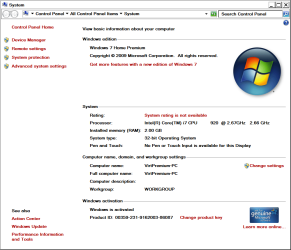
64 bit or x84

nithig

New member
Member
VIP
Local time
8:18 PM
Messages
281
The old desktop is 32 bit
the new laptop is 64 bit
So why is it that I read x84?
 

My Computer

Computer type
PC/Desktop
Computer Manufacturer/Model Number
Toshiba Satellite L500
OS
Windows 7 Pro 64bit SP1
CPU
Intel Core Duo CPU 2.20 GHz
Motherboard
Model KSWAA (U2E1) Version PSLS3A-01301D
Memory
4 GB RAM
Sound Card
AMD High Definition Audio Device Realtek High Definition Aud
Monitor(s) Displays
Generic PnP Monitor on ATI Mobility Radeon HD 4600 Series
I'm not sure I fully understand your question but it appears you are referring to x86 and not x84, correct?

x86 is the name for the basic instruction set architecture of the processor and encompasses 16 bit, 32 bit and 64 bit systems.
 

My Computer

Computer Manufacturer/Model Number
Toshiba L355D
OS
Windows 7 Ultimate x64 SP1
CPU
Core2 Duo
Motherboard
Intel
Memory
4 GB
Graphics Card(s)
GM965 on-board
Sound Card
RealTek on-board
Monitor(s) Displays
19"+17"(laptop)
Screen Resolution
1440x900 (x 2)
Hard Drives
500GB Ext. 200GB Internal
PSU
N/A
Case
N/A
Cooling
N/A
While your new laptop may be 64bit capable, it sounds like you have the 32bit version of Windows installed... ;)
 

My Computer

Computer type
PC/Desktop
Computer Manufacturer/Model Number
LENOVO K450 @3.0GHZ
OS
64-bit Windows 8.1 Pro
CPU
Core(TM) i5 CPU 4330 Haswell @ 3.20GHz
Motherboard
LENOVO
Memory
12.00 GB
Graphics Card(s)
Intel(R) HD Graphics
Sound Card
Intel HD integtrated
Monitor(s) Displays
HP 25' ISP Monitor
Screen Resolution
1900/1020
Hard Drives
(1) ST1000DM003-1CH162 (2) Generic STORAGE DEVICE USB Device (3) Generic STORAGE DEVICE USB Device
Internet Speed
100mb down/10mb up
Thanks Miked ... you did understand the question :D
It's just me (and no doubt lots of others like me) who are slow with
the jargon. It's just a fact of modern, electronic life that new things
are rarely explained ...one has to find out for oneself.
Now there's one more bit that I do understand.

No Tews, Win 7 is istalled as 64-bit
 

My Computer

Computer type
PC/Desktop
Computer Manufacturer/Model Number
Toshiba Satellite L500
OS
Windows 7 Pro 64bit SP1
CPU
Intel Core Duo CPU 2.20 GHz
Motherboard
Model KSWAA (U2E1) Version PSLS3A-01301D
Memory
4 GB RAM
Sound Card
AMD High Definition Audio Device Realtek High Definition Aud
Monitor(s) Displays
Generic PnP Monitor on ATI Mobility Radeon HD 4600 Series
x86 refers also mostly to the PC 80x86 processor based stuff, which includes 8 bit, 16 bit and 32 bit processing. Basically, the PC started as a 8086 Processor, and then became the 80286, 80386, 80486, then morphed into Pentium (80586) processor name. Since around Pentium 4 or so, the PC processor started being able to do 64 bit processing (Well, more so when the Xeon and then Itanium class Processor was brought in). When the 64-bit processors started coming, the need for 64 bit operating systems for this class of processor was necessary for Windows to take actual advantage of the hardware and also the new boundaries it can branch out to.

Remember, we did have 'transitional' bounds with certain OSes. Like With Win95/98, we had drive space boundaries and it was mostly flipping from different drive formating (Like FAT32 to NTFS) and the ever growing ability of memory. 32 bit bit processing had a limitation with memory addressing which 64 bit processing now exceeds.

Microsoft still had to support prior processing needs, namely the 32 and 16 bit programs, but also wanted to separate out the 64 bit programs from installing over the 32 bit processing needs, hence the (x86) designation in the installers when they look at 64 bit Windows OS.
 

My Computer

Computer Manufacturer/Model Number
Alienware Area 51 Desktop and Dell Inspirion 17R (N7010)
OS
Windows 7 Ultimate x64 and Home Premium x64
CPU
Intel i7 960 (3.2 GHz Quad Core)
Motherboard
Alienware Intel based X58
Memory
12 Gigs (Triple Channel)
Graphics Card(s)
Alienware OEM nVidia GTX 560 Ti (1.25 Gig)
Sound Card
Creative Labs X-Fi Titanium
Monitor(s) Displays
Samsung PX2370 LED 23" Monitor
Screen Resolution
1920x1080
Hard Drives
2 320 Gig SATA in Raid 1 Configuration (System/App)
1 1 Tera SATA (Games)
1 1 Tera SATA (Data/Music/Videos)
PSU
750 Watt Power Supply
Case
Alienware Area 51 Desktop
Cooling
Liquid Cooled
Keyboard
Logitech G510
Mouse
Microsoft Trackball Explorer
Internet Speed
Cable
I wouldn't call it new jargon. Microsoft has been using the x86 and x64 terms for quite some time now, probably close to a decade. The problem is, two many people insist on typing out 32 bit or 64 bit, instead of sticking with the standard, simpler terms.
 

My Computer

OS
Windows 7 Ultimate x64 SP1
CPU
Intel Core i7-2600
Motherboard
Gigabyte GA-P67A-UD3P-B3
Memory
12 GB Patriot Extreme DDR3-1333
Graphics Card(s)
Nvidia GTX 470
Monitor(s) Displays
Dell UltraSharp 2209WA
Hard Drives
OCZ Agility3 240 GB, WD5001AALS, WD7501AALS
PSU
OCZ ModStream 700W
Case
CoolerMaster HAF 912 Advanced
Cooling
CoolerMaster Hyper 212 Plus

My Computer

Computer Manufacturer/Model Number
* BFK Customs *
OS
W 7 64-bit Ultimate
CPU
Intel Q9550 Yorkfield
Motherboard
ASUS P5Q Pro
Memory
8GB Dominator 8500C5D
Graphics Card(s)
ATI : XFX 5870
Sound Card
Realtek HD Audio 7-1
Monitor(s) Displays
1x 47" LCD HDMI & 3x 26" LCD HDMI
Screen Resolution
1920x1080P & 1920x1200
Hard Drives
1x 80GB Intel X25-M G2 SSD : 1x 500GB & 1x 640GB WD Caviar Black(s)
PSU
Corsair 620HX
Case
Cooler Master RC-690
Cooling
Tuniq Tower 120, 2x 140mm and 3x 120mm case fans
Keyboard
Microsoft 500
Mouse
Razer Diamondback 3G
Internet Speed
14 Mb/s
Other Info
1x Koutech 3Gb/s SATA HDD Hot Swap Rack
I believe the x86 came from the fact that Intel numbered thier line of processors 8086, 80186, 80286, 386, 486, 586 (pentium) etc, so it ended up being referred to as the x86 instruction set. The early chips are 16 bit and the 386 and up are 32 bit. At some point people just dropped the 80 and would say I have a 386 or 486 etc.
 

My Computer

Computer type
PC/Desktop
Computer Manufacturer/Model Number
Home Built
OS
Windows 10 Education 64 bit
CPU
AMD Phenom II X4 980 Black Edition Deneb 3.7GHz
Motherboard
Asus M4N68T-M V2 µATX Motherboard
Memory
8GB 4GBx2 Kingston PC10600 DDR3 1333 Memory
Graphics Card(s)
Zotac NVIDIA Geforce GT640 2 Gig DDR3 PCIe
Sound Card
VIA VT1708s High Definition Audio 8-channel Onboard
Monitor(s) Displays
22" LG E2242 1080p and 2 19" I-INC AG191D
Screen Resolution
1280x1024 - 1920x1080 - 1280x1024
Hard Drives
Crucial M100 256 GB SSD and 500 GB WD Blue SATA
PSU
Thermaltake TR 620
Case
Power Up Black ATX Mid-Tower Case
Cooling
Stock heatsink and fan
Keyboard
Logitech Wireless K350 Wave
Mouse
Logitech Wireless M570 Trackman Wheel
Internet Speed
80 Mbps Down 30 Mbps Up
Antivirus
Windows Defender
Browser
Internet Explorer 11
Other Info
HP DVD1040e Lightscribe - External USB2
You have a 64-bit processor running a 32-bit operating system. No harm. You always can purchase a 64-bit operating system later on. Note - you cannot upgrade from 32-bit to 64-bit operating system. It has to be a new full install.
 

My Computer

Computer Manufacturer/Model Number
Dell and Custom
OS
Systems 1 and 2: Windows 7 Enterprise x64, Win 8 Developer
CPU
System 1: i7 [email protected], System 2: AMD FX-4100 Zambezi 3.6G
Motherboard
System 1:Dell 06NWYK System 2: ASUS M5A97 AM3+
Memory
System 1: 8GB System 2: 8GB
Graphics Card(s)
System 1: ATI FirePro V4800 System 2: Radeon HD 6850
Sound Card
System 1: onboard System 2: onboard
Monitor(s) Displays
System1: Viewsonic HDMI 24"
Screen Resolution
System 1: 1920x1080 System 2: 1920x1080
Hard Drives
System 1: Mirrored .5B drives System 2: Seagate Barracuda ST1000DM003 1TB 7200 RPM 64MB Cache SATA 6.0Gb/s
Case
System 1: Dell System 2: Cooler Master
Internet Speed
10 MBPS
You have a 64-bit processor running a 32-bit operating system. No harm. You always can purchase a 64-bit operating system later on. Note - you cannot upgrade from 32-bit to 64-bit operating system. It has to be a new full install.

This reminds me of the following joke:

Windows 95: n. 32 bit extensions and a graphical shell for a 16 bit patch to an 8 bit operating system originally coded for a 4 bit microprocessor, written by a 2 bit company, that can't stand 1 bit of competition.
 

My Computer

Computer Manufacturer/Model Number
Alienware Area 51 Desktop and Dell Inspirion 17R (N7010)
OS
Windows 7 Ultimate x64 and Home Premium x64
CPU
Intel i7 960 (3.2 GHz Quad Core)
Motherboard
Alienware Intel based X58
Memory
12 Gigs (Triple Channel)
Graphics Card(s)
Alienware OEM nVidia GTX 560 Ti (1.25 Gig)
Sound Card
Creative Labs X-Fi Titanium
Monitor(s) Displays
Samsung PX2370 LED 23" Monitor
Screen Resolution
1920x1080
Hard Drives
2 320 Gig SATA in Raid 1 Configuration (System/App)
1 1 Tera SATA (Games)
1 1 Tera SATA (Data/Music/Videos)
PSU
750 Watt Power Supply
Case
Alienware Area 51 Desktop
Cooling
Liquid Cooled
Keyboard
Logitech G510
Mouse
Microsoft Trackball Explorer
Internet Speed
Cable
Someone mentioned the correct way it should be written ...


x86-(32-bit)
x86-(64-bit)


There's actually no such thing as x64 though even MS refers to/writes it incorrectly.
 

My Computer

Computer Manufacturer/Model Number
* BFK Customs *
OS
W 7 64-bit Ultimate
CPU
Intel Q9550 Yorkfield
Motherboard
ASUS P5Q Pro
Memory
8GB Dominator 8500C5D
Graphics Card(s)
ATI : XFX 5870
Sound Card
Realtek HD Audio 7-1
Monitor(s) Displays
1x 47" LCD HDMI & 3x 26" LCD HDMI
Screen Resolution
1920x1080P & 1920x1200
Hard Drives
1x 80GB Intel X25-M G2 SSD : 1x 500GB & 1x 640GB WD Caviar Black(s)
PSU
Corsair 620HX
Case
Cooler Master RC-690
Cooling
Tuniq Tower 120, 2x 140mm and 3x 120mm case fans
Keyboard
Microsoft 500
Mouse
Razer Diamondback 3G
Internet Speed
14 Mb/s
Other Info
1x Koutech 3Gb/s SATA HDD Hot Swap Rack
I don't remember the 80186, but do remember the 286, 386, 486. Then we changed to Pentium because hey, that mean five. LOL. I would have preferred 586. Now we have Nano, Atom and Sandy Bridge. Too bad!

X86-64 is a good term for 64-bit architecture. But the industry I guess prefers X64. What's in a name... and a number? Other than accuracy...
 

My Computer

Computer Manufacturer/Model Number
Dell and Custom
OS
Systems 1 and 2: Windows 7 Enterprise x64, Win 8 Developer
CPU
System 1: i7 [email protected], System 2: AMD FX-4100 Zambezi 3.6G
Motherboard
System 1:Dell 06NWYK System 2: ASUS M5A97 AM3+
Memory
System 1: 8GB System 2: 8GB
Graphics Card(s)
System 1: ATI FirePro V4800 System 2: Radeon HD 6850
Sound Card
System 1: onboard System 2: onboard
Monitor(s) Displays
System1: Viewsonic HDMI 24"
Screen Resolution
System 1: 1920x1080 System 2: 1920x1080
Hard Drives
System 1: Mirrored .5B drives System 2: Seagate Barracuda ST1000DM003 1TB 7200 RPM 64MB Cache SATA 6.0Gb/s
Case
System 1: Dell System 2: Cooler Master
Internet Speed
10 MBPS
x86-(32-bit)
x86-(64-bit)

There's actually no such thing as x64 though even MS refers to/writes it incorrectly.
You are correct, but the x64 naming convention was created by Microsoft as a shorter, simple way of differentiating between the two. IA64 isn't really all that common anymore (dying a slow death, it seems) and was never known or common the general, non IT audience.
 

My Computer

OS
Windows 7 Ultimate x64 SP1
CPU
Intel Core i7-2600
Motherboard
Gigabyte GA-P67A-UD3P-B3
Memory
12 GB Patriot Extreme DDR3-1333
Graphics Card(s)
Nvidia GTX 470
Monitor(s) Displays
Dell UltraSharp 2209WA
Hard Drives
OCZ Agility3 240 GB, WD5001AALS, WD7501AALS
PSU
OCZ ModStream 700W
Case
CoolerMaster HAF 912 Advanced
Cooling
CoolerMaster Hyper 212 Plus
You have a 64-bit processor running a 32-bit operating system. No harm. You always can purchase a 64-bit operating system later on. Note - you cannot upgrade from 32-bit to 64-bit operating system. It has to be a new full install.

If its windows 7 you can use the same product code to install the 32 bit or 64 bit version, so all you need to switch is the install media. If you buy retail you get both DVDs. If you go OEM you only get one, 32 bit or 64 bit. You can still switch from 32 to 64 or vice versa you just need to hunt up the other DVD some where. Assuming you have a 64 bit processor. ;)
 

My Computer

Computer type
PC/Desktop
Computer Manufacturer/Model Number
Home Built
OS
Windows 10 Education 64 bit
CPU
AMD Phenom II X4 980 Black Edition Deneb 3.7GHz
Motherboard
Asus M4N68T-M V2 µATX Motherboard
Memory
8GB 4GBx2 Kingston PC10600 DDR3 1333 Memory
Graphics Card(s)
Zotac NVIDIA Geforce GT640 2 Gig DDR3 PCIe
Sound Card
VIA VT1708s High Definition Audio 8-channel Onboard
Monitor(s) Displays
22" LG E2242 1080p and 2 19" I-INC AG191D
Screen Resolution
1280x1024 - 1920x1080 - 1280x1024
Hard Drives
Crucial M100 256 GB SSD and 500 GB WD Blue SATA
PSU
Thermaltake TR 620
Case
Power Up Black ATX Mid-Tower Case
Cooling
Stock heatsink and fan
Keyboard
Logitech Wireless K350 Wave
Mouse
Logitech Wireless M570 Trackman Wheel
Internet Speed
80 Mbps Down 30 Mbps Up
Antivirus
Windows Defender
Browser
Internet Explorer 11
Other Info
HP DVD1040e Lightscribe - External USB2
Thanks Miked ... you did understand the question :D
It's just me (and no doubt lots of others like me) who are slow with
the jargon. It's just a fact of modern, electronic life that new things
are rarely explained ...one has to find out for oneself.
Now there's one more bit that I do understand.

No Tews, Win 7 is istalled as 64-bit

I think it's 64 bit guys.
 

My Computer

Computer type
PC/Desktop
Computer Manufacturer/Model Number
Self Built
OS
Win 10 Pro x64
CPU
Intel I5-2500K @3.3GHz
Motherboard
Asrock P67 Extreme4
Memory
16GB G.Skill Ripjaws X (4x4GB)
Graphics Card(s)
EVGA GeForce 750 Ti SC 2GB
Sound Card
ASUS Xonar DG 5.1 Channels 24-bit 96KHz PCI Interface Sound
Monitor(s) Displays
auria eq2367
Screen Resolution
1920 x 1080
Hard Drives
250GB Samsung 850 EVO SSD
1TB WD Blue
1TB Hitachi
PSU
SeaSonic X 650W 80 Plus Gold
Case
Corsair Obsidian 750D
Cooling
Corsair H60, Three 140mm case fans
Keyboard
Logitech Wireless Keyboard K520
Mouse
Logitech Wireless Mouse M310
Internet Speed
Wave Broadband ~ 100 dn 5 up
Antivirus
Windows Defender, Malwarebytes Premium
Browser
Edge, IE11, Chrome
Other Info
Laptop specs: HP g7-1365dx /
CPU: AMD A6-3420M APU with Radeon(tm) HD Graphics /
RAM: Crucial 8Gb (2x4Gb) /
SSD: Crucial M4-CT128M4SSD2 ATA Device/ FW 000F /
GFX: AMD Radeon HD 6520G /
OS: Windows 10 Pro x64
You have a 64-bit processor running a 32-bit operating system. No harm. You always can purchase a 64-bit operating system later on. Note - you cannot upgrade from 32-bit to 64-bit operating system. It has to be a new full install.

If its windows 7 you can use the same product code to install the 32 bit or 64 bit version, so all you need to switch is the install media. If you buy retail you get both DVDs. If you go OEM you only get one, 32 bit or 64 bit. You can still switch from 32 to 64 or vice versa you just need to hunt up the other DVD some where. Assuming you have a 64 bit processor. ;)

You also get both disks x86/x64(x86-64) easier to type x64, a lazy typist I am - Care I do not.
 

My Computer

Computer Manufacturer/Model Number
Systemax N2000 Gaming PC
OS
Windows 7 Ultimate x64
CPU
Q6600 @2.4ghz (G0 stepping)
Motherboard
XFX nforce 680i LT
Memory
8 gb OCZ vista essential sli PC-6400
Graphics Card(s)
Dual 9800gt in SLI mode
Sound Card
Integrated 8.1 High Definition Audio
Monitor(s) Displays
Dual Sceptre x246w 24 inch monitors
Screen Resolution
1920 x 1200 each monitor
Hard Drives
500 GB SATA II / 7500 rpm
PSU
Cooler Master Real Power Pro 1250W
Case
N2000 server tower
Cooling
Thermaltake Bigwater 760 is
Keyboard
MS Intelitype 6000 v2.0
Mouse
MS Intelipoint 6000
Internet Speed
Wi-power 1.5GB up / 512k down
Other Info
Windows 7 Ultimate x64, Windows 7 Pro x64, Windows Home Premium X86, Windows XP pro, Windows Home Server x86, Ubuntu 10.4 x86 and x64, Ubuntu server 10.4, SQL Server 2005, MySQL 5.0
It has to be a new full install.
It was a total,new install and 64 bit ws selected.
Programs like IE have x64 and the updates are x64
so I guess it's a 64 bit system
___________________

Thanks barefootkid for the tutorial - really enjoying the tutorial herein.

Also thanks to Keiichi25 and Deacon Frost 7 alphanumeric ...
DF you are clearly a technical minded person so I kindly point out to you
that to us bogons it is jargon and it is rarely explained untill we ask and
get help from friends as has happened in this case.
 

My Computer

Computer type
PC/Desktop
Computer Manufacturer/Model Number
Toshiba Satellite L500
OS
Windows 7 Pro 64bit SP1
CPU
Intel Core Duo CPU 2.20 GHz
Motherboard
Model KSWAA (U2E1) Version PSLS3A-01301D
Memory
4 GB RAM
Sound Card
AMD High Definition Audio Device Realtek High Definition Aud
Monitor(s) Displays
Generic PnP Monitor on ATI Mobility Radeon HD 4600 Series
It has to be a new full install.
It was a total,new install and 64 bit ws selected.
Programs like IE have x64 and the updates are x64
so I guess it's a 64 bit system
___________________

Thanks barefootkid for the tutorial - really enjoying the tutorial herein.

Also thanks to Keiichi25 and Deacon Frost 7 alphanumeric ...
DF you are clearly a technical minded person so I kindly point out to you
that to us bogons it is jargon and it is rarely explained untill we ask and
get help from friends as has happened in this case.

Best way to find out is to ask, now you know. ;)
 

My Computer

Computer type
PC/Desktop
Computer Manufacturer/Model Number
Self Built
OS
Win 10 Pro x64
CPU
Intel I5-2500K @3.3GHz
Motherboard
Asrock P67 Extreme4
Memory
16GB G.Skill Ripjaws X (4x4GB)
Graphics Card(s)
EVGA GeForce 750 Ti SC 2GB
Sound Card
ASUS Xonar DG 5.1 Channels 24-bit 96KHz PCI Interface Sound
Monitor(s) Displays
auria eq2367
Screen Resolution
1920 x 1080
Hard Drives
250GB Samsung 850 EVO SSD
1TB WD Blue
1TB Hitachi
PSU
SeaSonic X 650W 80 Plus Gold
Case
Corsair Obsidian 750D
Cooling
Corsair H60, Three 140mm case fans
Keyboard
Logitech Wireless Keyboard K520
Mouse
Logitech Wireless Mouse M310
Internet Speed
Wave Broadband ~ 100 dn 5 up
Antivirus
Windows Defender, Malwarebytes Premium
Browser
Edge, IE11, Chrome
Other Info
Laptop specs: HP g7-1365dx /
CPU: AMD A6-3420M APU with Radeon(tm) HD Graphics /
RAM: Crucial 8Gb (2x4Gb) /
SSD: Crucial M4-CT128M4SSD2 ATA Device/ FW 000F /
GFX: AMD Radeon HD 6520G /
OS: Windows 10 Pro x64
It has to be a new full install.
It was a total,new install and 64 bit ws selected.
Programs like IE have x64 and the updates are x64
so I guess it's a 64 bit system
___________________

There are two very quick and simple ways to determine if you have either x86 (32) or x64 installed:

A) WIN+Pause/Break to open the system properties.

If the system type: shows 64-bit Operating System - you have x64 installed. If it shows 32-bit Operating system - you have x86 (32) installed.

x86 (32-bit)
x86.PNG
x64
x64.JPG

B) If you have a C:\Program Files (x86) folder, you have x64 installed.

If you don't have that folder, you only have the 32-bit version installed.
 

My Computer

Computer type
PC/Desktop
Computer Manufacturer/Model Number
Systems by SmartEyeball
OS
8 Pro x64
CPU
i7 3770K 4.6GHz
Motherboard
ASUS P8Z77 WS
Memory
16GB G.Skill Trident X 2666mhz
Graphics Card(s)
x2 EVGA 780 Ti Superclocked SLI
Sound Card
SB X-FI Surround 5.1 PRO USB / ATH-AD900 Headphones
Monitor(s) Displays
x3 Dell U2410 / 58" Samsung
Screen Resolution
5760*1200/ 1920*1200
Hard Drives
2x Intel 520 240GB (RAID 0) * 2x WD Caviar Blacks 2TB (RAID 0) * 2TB WD Caviar Black * Sony Optirac DVD
PSU
Silverstone Strider Evolution 1200W
Case
Thermaltake Level 10 GT Snow Edition
Cooling
Noctua NH-D14
Keyboard
Topre Realforce // Ducky Shine MX Black // Filco Ninja TKL
Mouse
Thermaltake Theron (Highly Recommended) + Razer Imperator
Antivirus
MSE
Browser
IE, FF, WaterFox
Other Info
GT Extreme V2 Sim Racing Cockpit + 40" LCD and K/B Mouse stand ▼
Fanatec CSR Elite Wheel + Clubsport V1 Pedals + CSR shifter/7G-H ▼Saitek X52 Pro ▼ TrackIR 5 Pro
Buttkicker v2 Seat Rumbler with Dedicated 5.1 and Sub Woofer attached to frame ▼
=
Bloody Big Grin
I believe the x86 came from the fact that Intel numbered thier line of processors 8086, 80186, 80286, 386, 486, 586 (pentium) etc, so it ended up being referred to as the x86 instruction set. The early chips are 16 bit and the 386 and up are 32 bit. At some point people just dropped the 80 and would say I have a 386 or 486 etc.
Bingo you get a cookie! :drool: Mmmm Cookie arrrggammdihfg.
It was more than a numbering system though. The term x86 refers to a family of instruction sets.
 

My Computer

Computer type
PC/Desktop
Computer Manufacturer/Model Number
Acer M5641
OS
Windows 7 Home Premium 64bit
CPU
Q6600
Motherboard
Nvidia MCP73PV
Memory
4GB.
Graphics Card(s)
Sapphire Vapor-X 5750
Sound Card
XFI Extreem music
Monitor(s) Displays
Acer X223W
Screen Resolution
1680x1050
Hard Drives
WD10 02FAEX
WD64 00AAKS
PSU
stock 450w
Case
acer
Cooling
stock
Keyboard
Microsoft Digital Media Pro.
Mouse
Logitech MX620
Internet Speed
49.51Mbs down 4.98Mbs up 17.6ms ping
Antivirus
MSE
Browser
Waterfox
Other Info
Shaw Cable
Netgear R6200
Back
Top