6GB of Memory Used... No Idea Where it Went!

avery

New member
Local time
3:28 AM
Messages
23
So, I have the strangest problem I've ever run into. When downloading certain types of files that are of a certain size (I've found .ISOs bigger than 4GB to be the problem), my computer completely locks up. It runs out of memory. Task manager shows 99% memory used, but when I look at processes, and add up all the memory being used, it's barely a GB of mem. This doesn't happen with big movies, only ISOs. This happens no matter what browser I use to download, and even happens when I do a basic WGET in cygwin.

Any suggestions/ideas? Any way to see what's sappin' my memory?
 

My Computer My Computer

At a glance

Windows 7 Home Premium 64-bit
OS
Windows 7 Home Premium 64-bit
What antivirus or security software are you running?
 

My Computer My Computer

At a glance

Windows 10 Pro (x64)Intel Core i7-3930K (3.2GHz - 4.5GHz)4x Samsung 4GB PC3-12800 DDR3 (16GB 1600MHz)Nvidia Geforce GTX 690
Computer type
PC/Desktop
Computer Manufacturer/Model Number
Alienware Aurora ALX R4
OS
Windows 10 Pro (x64)
CPU
Intel Core i7-3930K (3.2GHz - 4.5GHz)
Motherboard
Alienware Aurora-R4 x79
Memory
4x Samsung 4GB PC3-12800 DDR3 (16GB 1600MHz)
Graphics Card(s)
Nvidia Geforce GTX 690
Sound Card
SteelSeries Siberia Elite
Monitor(s) Displays
Dell UltraSharp U3011
Screen Resolution
2560x1600
Hard Drives
Samsung 850 Pro 256 GB, Seagate 1TB Desktop Hybrid HDD, 2x Western Digital 4TB Green HDD
PSU
875W Some Dell PSU <.<
Case
Alienware Aurora ALX
Cooling
Custom Liquid Cooling (EK CPU & GPU blocks) dual EK 480RAD
Keyboard
Logitech G710+ Mechanical
Mouse
Logitech G700s
Internet Speed
Verizon Fios (50 mbps average)
Other Info
Server: Intel NUC D54250WYK: i5-4250U, 16GB, 256 GB mSATA, Windows Server 2012 R2
An incompatible one sounds like. Good call Logic.
 

My Computer My Computer

At a glance

7600.20510 x86P4 550 3.4 GHz HT running at 3.5 GHzOCZ 2 GB(2x1GB) DDR400mHz running @ 414 mHzHIS Radeon HD 3850 IceQ 3 Turbo HDMI Dual DL-...
Computer Manufacturer/Model Number
self built
OS
7600.20510 x86
CPU
P4 550 3.4 GHz HT running at 3.5 GHz
Motherboard
MSI PM8M3-V (MS-7211 v1.x) Micro-ATX mainboard
Memory
OCZ 2 GB(2x1GB) DDR400mHz running @ 414 mHz
Graphics Card(s)
HIS Radeon HD 3850 IceQ 3 Turbo HDMI Dual DL-DVI AGP
Sound Card
MOTU Traveler firewire studio interface 192 kHz 24 bit
Monitor(s) Displays
22" widescreen Acer X223W LCD, 17" Compaq P75 CRT
Screen Resolution
1680x1050 and 1280x1024
Hard Drives
SATA I x2 WD, 400 GB and 120 GB, SATA 2 WD Caviar Black 1 TB
PSU
350W generic
Case
Cybertronpc, it glows blue
Cooling
stock cpu fan, Ice-Q 3 gpu and system, many case fans
Keyboard
Logitch Classical Keyboard 200
Mouse
Logitech Mediaplay cordless
Internet Speed
1792/448 kbits/sec
Other Info
SATA II PCI fake RAID adapter, 1 GB Readyboost, original ATI Remote Wonder (even works with WMC perfectly), Logitech Rumblepad 2 game controller x2
An incompatible one sounds like. Good call Logic.

Incomptabile with what? With ISOs? With files over a certain size? With memory?
 

My Computer My Computer

At a glance

Windows 7 Home Premium 64-bit
OS
Windows 7 Home Premium 64-bit
What I am going have to assume what is happening is NOD32 is loading the ISO into memory while it is expanding and scanning it. Might see if disabling archival opening for the resident scanner solves the problem. I do not have NOD32 so I really do not know what it offers in terms of features and settings.
 

My Computer My Computer

At a glance

Windows 10 Pro (x64)Intel Core i7-3930K (3.2GHz - 4.5GHz)4x Samsung 4GB PC3-12800 DDR3 (16GB 1600MHz)Nvidia Geforce GTX 690
Computer type
PC/Desktop
Computer Manufacturer/Model Number
Alienware Aurora ALX R4
OS
Windows 10 Pro (x64)
CPU
Intel Core i7-3930K (3.2GHz - 4.5GHz)
Motherboard
Alienware Aurora-R4 x79
Memory
4x Samsung 4GB PC3-12800 DDR3 (16GB 1600MHz)
Graphics Card(s)
Nvidia Geforce GTX 690
Sound Card
SteelSeries Siberia Elite
Monitor(s) Displays
Dell UltraSharp U3011
Screen Resolution
2560x1600
Hard Drives
Samsung 850 Pro 256 GB, Seagate 1TB Desktop Hybrid HDD, 2x Western Digital 4TB Green HDD
PSU
875W Some Dell PSU <.<
Case
Alienware Aurora ALX
Cooling
Custom Liquid Cooling (EK CPU & GPU blocks) dual EK 480RAD
Keyboard
Logitech G710+ Mechanical
Mouse
Logitech G700s
Internet Speed
Verizon Fios (50 mbps average)
Other Info
Server: Intel NUC D54250WYK: i5-4250U, 16GB, 256 GB mSATA, Windows Server 2012 R2
What I am going have to assume what is happening is NOD32 is loading the ISO into memory while it is expanding and scanning it...

Or it's just leaking the memory away.

@Avery: in addition to logicearth's excellent advice, check what the "paged" and "non-paged" counters on the Task Manager's "performance" tab are telling you at the point where memory utilisation goes nuts.

You may find that one of them is rising linearly while the ISO is being downloaded.
 

My Computer My Computer

At a glance

Win7x64
Computer Manufacturer/Model Number
Multiple machines in various stages of decomposition.
OS
Win7x64
I smell snake oil! :D
 

My Computer My Computer

At a glance

Windows 7 x64 Ultimate SP1Core i7-2630QM6 GB DDR3Nvidia GT 540M / Intel HD 3000 - Optimus swit...
Computer Manufacturer/Model Number
Asus N73SV
OS
Windows 7 x64 Ultimate SP1
CPU
Core i7-2630QM
Motherboard
Intel HM 65
Memory
6 GB DDR3
Graphics Card(s)
Nvidia GT 540M / Intel HD 3000 - Optimus switching
Sound Card
HD Audio (Intel Azalia/Realtek) ALC269
Monitor(s) Displays
LED flat panel
Screen Resolution
1920 x 1080
Hard Drives
2x Seagate Momentus 640 GB - 1,28 TB in total
Internet Speed
4 MB/256 kbps
Other Info
External HDs

WD Elements 1,5 TB
WD MyBook 500 GB
I smell snake oil! :D

I can't believe you just said that Teerex!

Let's let the nice man explain how his excellent app manages all those feats. I had a look at the website. It's even more impressive than he lets on.
 

My Computer My Computer

At a glance

Win7x64
Computer Manufacturer/Model Number
Multiple machines in various stages of decomposition.
OS
Win7x64
Oh, I think it unloads previously loaded dlls! Whoa, that's a completely novel approach, never seen before! :geek:

Free up your RAM, make your disk do the work! Why not, compared to RAM, your disk is BLISTERING fast..! :party:
 

My Computer My Computer

At a glance

Windows 7 x64 Ultimate SP1Core i7-2630QM6 GB DDR3Nvidia GT 540M / Intel HD 3000 - Optimus swit...
Computer Manufacturer/Model Number
Asus N73SV
OS
Windows 7 x64 Ultimate SP1
CPU
Core i7-2630QM
Motherboard
Intel HM 65
Memory
6 GB DDR3
Graphics Card(s)
Nvidia GT 540M / Intel HD 3000 - Optimus switching
Sound Card
HD Audio (Intel Azalia/Realtek) ALC269
Monitor(s) Displays
LED flat panel
Screen Resolution
1920 x 1080
Hard Drives
2x Seagate Momentus 640 GB - 1,28 TB in total
Internet Speed
4 MB/256 kbps
Other Info
External HDs

WD Elements 1,5 TB
WD MyBook 500 GB
Hi H2SO4,
I dont know if any memory optimizer in the market use a proper way to clean-up RAM.

But me and my team tried to implement the memory optimization in a good way.

Thank you for taking the time to respond. I'm quite interested in your team's design solutions to these vexing problems.

...The app scans for all scannable processes in the system and attempt to empty as many pages as possible from the working set.

So what effect does reducing the working set of a process have on the performance of that process? Is there likely to be any downside?

WIndows manages the memory itself by default but it doesnt automatically change the min and max working set which is located by applications.

So your application steps in and sets a minimum and maximum working set size for each process? What mechanism does it use to try to reduce the working set of a process once it gets close to its set maximum?

And this can lead to memory leak in the system.

I'm not sure I follow - does the lack of control by the OS (as you described it) lead to a memory leak? If not, please help me to understand.

However Windows has a reason to do so, you can read more about this on MSDN.

A reason to do what exactly? Thank you for your kind explanation!
 

My Computer My Computer

At a glance

Win7x64
Computer Manufacturer/Model Number
Multiple machines in various stages of decomposition.
OS
Win7x64
Well.. You did a good job of packing all those mostly unnecessary free tweaks / tutorials floating around, into one well designed shareware app.

Your pricing is not to steep.. Well, I wish you all the luck in the world. Someone might think it worth 10/15 bucks, and that'll be good 4 u. I don't, but that's because I, like, know stuff.
 

My Computer My Computer

At a glance

Windows 7 x64 Ultimate SP1Core i7-2630QM6 GB DDR3Nvidia GT 540M / Intel HD 3000 - Optimus swit...
Computer Manufacturer/Model Number
Asus N73SV
OS
Windows 7 x64 Ultimate SP1
CPU
Core i7-2630QM
Motherboard
Intel HM 65
Memory
6 GB DDR3
Graphics Card(s)
Nvidia GT 540M / Intel HD 3000 - Optimus switching
Sound Card
HD Audio (Intel Azalia/Realtek) ALC269
Monitor(s) Displays
LED flat panel
Screen Resolution
1920 x 1080
Hard Drives
2x Seagate Momentus 640 GB - 1,28 TB in total
Internet Speed
4 MB/256 kbps
Other Info
External HDs

WD Elements 1,5 TB
WD MyBook 500 GB
...It scans, find freeable working set and tell the memory management to free the memory.

How does your app "tell the memory management to free the memory"? Can you elaborate on that mechanism?
 

My Computer My Computer

At a glance

Win7x64
Computer Manufacturer/Model Number
Multiple machines in various stages of decomposition.
OS
Win7x64
H2SO4, I cant tell you that :) it is a complex story and mechanism.

Awww :)

Being thus forced to rely on my own inadequate understanding if I was going to learn more about this "memory optimisation" business, I took the liberty of downloading the trial version of Win7Zilla and having a little look.

After kicking off a Perfmon log, I attached a lil old utility called a "debugger" (I read about it in MSDN) to the Win7zilla process. On a hunch, I set a breakpoint on kernel32!VirtualAlloc before invoking Win7zilla's "extreme optimisation" routine:

Code:
Breakpoint 0 hit
KERNEL32!VirtualAlloc:
76fa1553 8bff            mov     edi,edi
0:005:x86> kv
*** ERROR: Module load completed but symbols could not be loaded for C:\Win7Zilla\install\bin\Win7Zilla.exe
ChildEBP RetAddr  Args to Child              
WARNING: Stack unwind information not available. Following frames may be wrong.
0344febc 00503401 00000000 00400000 00003000 KERNEL32!VirtualAlloc
0344ff60 005082e5 00000032 4ab64696 00000000 Win7Zilla+0x103401
0344ff88 76fa3f39 02cc2158 0344ffd4 77920409 Win7Zilla+0x1082e5
*** ERROR: Symbol file could not be found.  Defaulted to export symbols for ntdll.dll - 
0344ff94 77920409 02cc2158 3770f085 00000000 KERNEL32!BaseThreadInitThunk+0x12
0344ffd4 779203dc 00508250 02cc2158 00000000 ntdll_778d0000!RtlInitializeExceptionChain+0x63
0344ffec 00000000 00508250 02cc2158 00000000 ntdll_778d0000!RtlInitializeExceptionChain+0x36
0:005:x86> ? 400000
Evaluate expression: 4194304 = 00400000
0:005:x86> ? 3000
Evaluate expression: 12288 = 00003000
0:005:x86> * first arg = 0 = don't care where in memory 
0:005:x86> * second arg = 4MB chunk = requested alloc size
0:005:x86> * third arg = 0x3000 = MEM_RESERVE | MEM_COMMIT

So Win7zilla's "extreme optimiser" had just requested 4MB of MEM_RESERVE|MEM_COMMIT memory anywhere inside it's own VM space. Fascinating :)

By now, I was suspecting it may do that a few more times, so I set up a pseudo-register to keep track of the Win7zilla VirtualAlloc running total:

Code:
breakpoint 0 redefined
0:005:x86> bu KERNEL32!VirtualAlloc ".echo ====== Another VirtualAlloc() call =========; kb5; r$t1 = $t1 + (esp+8); g"
breakpoint 0 redefined

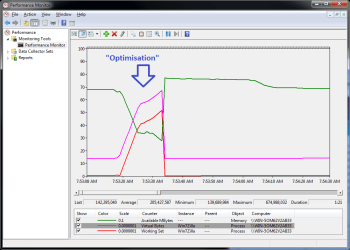
Amazingly, Win7zilla then called VirtualAlloc >120 times more! The total amount requested by the time the "optimisation" fest was over topped 500MB.

The attached perfmon log clearly shows the Win7zilla process swelling up in memory, only to immediately release it all again. The only effect is to make the OS trim the working sets of all other (real) processes to make room for the Win7zilla "puffer fish" act. Of course, that just slows down the real apps because their memory has been pushed out to disk to make room for Win7zilla. It's the garden variety cheap 'n' nasty "memory optimiser" reporting trick. It looks like there's more memory available when the "optimiser" is finished, but that's because it has forced out the real apps to make an empty hole.

Over time, the OS will read back into RAM the real app stuff you caused to be paged out to disk, but until then the hapless user of your "optimiser" will suffer somewhat degraded performance.

Do you have anything to say to put a positive spin on all this?

 

Attachments

  • PerfmonCounters.png
    PerfmonCounters.png
    25.4 KB · Views: 28
Last edited:

My Computer My Computer

At a glance

Win7x64
Computer Manufacturer/Model Number
Multiple machines in various stages of decomposition.
OS
Win7x64
On a hunch, I set a breakpoint on kernel32!VirtualAlloc before invoking Win7zilla's "extreme optimisation" routine:

That's some hunch just having read about it on MSDN and all lol. Can you please give me your best guess at tonight's lottery drawing numbers?
 

My Computer My Computer

At a glance

7600.20510 x86P4 550 3.4 GHz HT running at 3.5 GHzOCZ 2 GB(2x1GB) DDR400mHz running @ 414 mHzHIS Radeon HD 3850 IceQ 3 Turbo HDMI Dual DL-...
Computer Manufacturer/Model Number
self built
OS
7600.20510 x86
CPU
P4 550 3.4 GHz HT running at 3.5 GHz
Motherboard
MSI PM8M3-V (MS-7211 v1.x) Micro-ATX mainboard
Memory
OCZ 2 GB(2x1GB) DDR400mHz running @ 414 mHz
Graphics Card(s)
HIS Radeon HD 3850 IceQ 3 Turbo HDMI Dual DL-DVI AGP
Sound Card
MOTU Traveler firewire studio interface 192 kHz 24 bit
Monitor(s) Displays
22" widescreen Acer X223W LCD, 17" Compaq P75 CRT
Screen Resolution
1680x1050 and 1280x1024
Hard Drives
SATA I x2 WD, 400 GB and 120 GB, SATA 2 WD Caviar Black 1 TB
PSU
350W generic
Case
Cybertronpc, it glows blue
Cooling
stock cpu fan, Ice-Q 3 gpu and system, many case fans
Keyboard
Logitch Classical Keyboard 200
Mouse
Logitech Mediaplay cordless
Internet Speed
1792/448 kbits/sec
Other Info
SATA II PCI fake RAID adapter, 1 GB Readyboost, original ATI Remote Wonder (even works with WMC perfectly), Logitech Rumblepad 2 game controller x2
Geeze, I thought it was only about unloading dlls, but it's waaaaaaaaaay cooler. Thanx a bunch for reveealing da cool, H2SO4. :cool:
 

My Computer My Computer

At a glance

Windows 7 x64 Ultimate SP1Core i7-2630QM6 GB DDR3Nvidia GT 540M / Intel HD 3000 - Optimus swit...
Computer Manufacturer/Model Number
Asus N73SV
OS
Windows 7 x64 Ultimate SP1
CPU
Core i7-2630QM
Motherboard
Intel HM 65
Memory
6 GB DDR3
Graphics Card(s)
Nvidia GT 540M / Intel HD 3000 - Optimus switching
Sound Card
HD Audio (Intel Azalia/Realtek) ALC269
Monitor(s) Displays
LED flat panel
Screen Resolution
1920 x 1080
Hard Drives
2x Seagate Momentus 640 GB - 1,28 TB in total
Internet Speed
4 MB/256 kbps
Other Info
External HDs

WD Elements 1,5 TB
WD MyBook 500 GB

My Computer My Computer

At a glance

Windows 7 x64 Ultimate SP1Core i7-2630QM6 GB DDR3Nvidia GT 540M / Intel HD 3000 - Optimus swit...
Computer Manufacturer/Model Number
Asus N73SV
OS
Windows 7 x64 Ultimate SP1
CPU
Core i7-2630QM
Motherboard
Intel HM 65
Memory
6 GB DDR3
Graphics Card(s)
Nvidia GT 540M / Intel HD 3000 - Optimus switching
Sound Card
HD Audio (Intel Azalia/Realtek) ALC269
Monitor(s) Displays
LED flat panel
Screen Resolution
1920 x 1080
Hard Drives
2x Seagate Momentus 640 GB - 1,28 TB in total
Internet Speed
4 MB/256 kbps
Other Info
External HDs

WD Elements 1,5 TB
WD MyBook 500 GB
So, I have the strangest problem I've ever run into. When downloading certain types of files that are of a certain size (I've found .ISOs bigger than 4GB to be the problem), my computer completely locks up. It runs out of memory. Task manager shows 99% memory used, but when I look at processes, and add up all the memory being used, it's barely a GB of mem. This doesn't happen with big movies, only ISOs. This happens no matter what browser I use to download, and even happens when I do a basic WGET in cygwin.

Any suggestions/ideas? Any way to see what's sappin' my memory?

I didn't see anyone actually answer your question So i'm just making sure you did.

If not what program are you using for the iso's
 

My Computer My Computer

At a glance

Windows 7 x64 buildCore i7 920 @2.67GHz OC'd to 3.8GHz4GB 1066MHzATI Radeon 4850
Computer Manufacturer/Model Number
Custom
OS
Windows 7 x64 build
CPU
Core i7 920 @2.67GHz OC'd to 3.8GHz
Motherboard
ASUS P6T Delux
Memory
4GB 1066MHz
Graphics Card(s)
ATI Radeon 4850
Monitor(s) Displays
Acer 24"
Screen Resolution
1920x1200
Hard Drives
Hitachi 500GB 16MB Cache 7200 RPM
PSU
Rosewill 600W
Cooling
Thermaltake V1 AX
Keyboard
Logitech G15
Mouse
Logitech mx1000
Internet Speed
8Mb down
thx for valuable input H2S04, I appreciate the look into such things and very valuable. thanks for making me aware to think about such claims/programs (I wasn't interested in itin this case as I tend to rather trust tested programs I notice a certain 'community' I will trust in is using it a lot or giving it the green flag. Simply because of things like you investigated. cheers again mate. :)

solar
 

My Computer My Computer

At a glance

Vista U32 , now Win7 64
Computer Manufacturer/Model Number
laptop
OS
Vista U32 , now Win7 64
H2SO4 you are really a strong acid. You are right at some points. Can you debug Quick Optimize? I appreciate your comment and time.

Sincerely, I'm not sure whether I understand that statement. Either:

a) You already knew perfectly well that Win7zilla's "extreme optimisation" is a con which would only slow things down (and not a particularly original con either) and now you're bluffing and pretending that "quick optimize" is somehow substantially better in the hope that it'll be sufficiently complex to prevent me from revealing what it does quite so easily.

OR

b) You're a Win7zilla employee, perhaps not one of the developers, and the info I posted about the extremely negative operation of the "extreme optimise" button came as a genuine and unwelcome surprise to you.

If it's (a), no thanks. Without false modesty, I'd be able to discover how any aspect of your app functions under the hood, given time. Since one of the "memory optimisation" modes has been proven to be a con, I don't see what purpose it would serve for me to spend time analysing the mechanism(s) of the other mode.

On the other hand, if the reason for your current request is closer to (b), then I'll do it, but not now - real life intervenes, plus I cringe at some of the stuff I did in that log last night while I was dog tired.

As Teerex said, Win7zilla is a decent-looking utility for controlling registry values which are documented and exposed anyway, and you've got a perfect right to try to earn money by selling "tweaking" software. Where it gets reprehensible is when your non-free product becomes a confidence trick. I resent that type of "tax on the gullible", and I especially resent it when offered up on my fav forum as part of a supposed solution to the OP's problem.

And now, I hope the OP comes back to continue troubleshooting :)
 

My Computer My Computer

At a glance

Win7x64
Computer Manufacturer/Model Number
Multiple machines in various stages of decomposition.
OS
Win7x64
Back
Top