Multipule Explorer.exe using a lot of memory.

StevenMax

New member
Member
Local time
6:53 AM
Messages
34
Hello everyone,

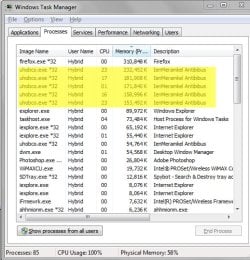
I'm running into an issue with my system. I've attached an image of my System Processes. It's showing multipule explorer.exe processes running at over 100,000k and iexplore.exe at over 100,000k.

It's a gradual increase and does so even if I let my system just sit there after boot up. The memory increases until my system can't take it and crashed. (this happened once and I was awarded with a fantastic BSOD). I now find myself keeping the task manager open on a 2nd display and I keep ending the process when it gets fairly high.

Let me explain, my laptop worked 100% fine and never had an issue before Feb 6th in the evening. I updated my Macromedia flash and it was all down from there. A few hours later I noticed my laptop running extremely slow, checked task manager and saw the issue. I tried to do a system restore and I have no 'saved points'. I uninstalled flash and re-installed it, still have the issue.

I've checked for malware and ran Malwarebytes' Anti-Malware, Spybot - Search and Destroy, Ad-Aware from lavasoft - the problem still exists.

Can anyone please offer some advice? I'm stuck on this and greatly depend on my laptop for work.

Here are the my basic specs; (let me know if you need anything else)
https://www.asus.com/Notebooks_Ultrabooks/U56E/
Processor: Intel® Core™ i5 2520M/2450M/2430M/2410M
Operating System: Windows 7 Home Premium
Installed memory: 6gb

Thanks a lot in advance,

- Steve
 

Attachments

  • taskmanager.jpg
    taskmanager.jpg
    115 KB · Views: 4

My Computer My Computer

At a glance

Windows 7 Home Premium 64-bit OSIntel(R) Core(TM)i5-2410M CPU @ 2.30GHz6.00 GB
Computer type
Laptop
Computer Manufacturer/Model Number
Asus - U56E Series
OS
Windows 7 Home Premium 64-bit OS
CPU
Intel(R) Core(TM)i5-2410M CPU @ 2.30GHz
Memory
6.00 GB
Note; What is this being run? I attached another image All a sudden showed up on my task manager. I've asked my son if there was anything installed within the last week as he also uses the laptop but nothing out of the ordinary has been adjusted. Thanks again if anyone has advice.
 

Attachments

  • task2.jpg
    task2.jpg
    78.5 KB · Views: 59

My Computer My Computer

At a glance

Windows 7 Home Premium 64-bit OSIntel(R) Core(TM)i5-2410M CPU @ 2.30GHz6.00 GB
Computer type
Laptop
Computer Manufacturer/Model Number
Asus - U56E Series
OS
Windows 7 Home Premium 64-bit OS
CPU
Intel(R) Core(TM)i5-2410M CPU @ 2.30GHz
Memory
6.00 GB
Welcome to the Seven Forums.

I looks like you are using Internet Explorer 10 or 11 (iexplorer.exe). IE10 or IE11 will start a 64bit instance that does not create a window. That 64bit parent process (which uses very little RAM) then launches at least one 32bit child process. The child process creates the windows that you see. The children do the work of surfing. [Microsoft ignores child labor laws :-]

If you "exit" IE, the window can close, but IE can still hang on it way out of RAM. The 64bit parent and the 32bit child will not exit RAM on their own. If you start another instance of IE, you get a new parent/child pair. It looks like you have 3 parent/child pairs running. A hung IE session is the most common way to have multiple IE parent processes showing in Task Manager.

I bore you with all of the above ramblings so that I can suggest the first change to your system should be to turn on "64bit children" or "64bit tabs". See the two videos in this post and then scroll up to the tutorial: http://www.sevenforums.com/tutorial...-bit-64-bit-ie10-windows-7-a.html#post2312336

After you enable the option and after you restart your computer, IE10/11 might tell you that one or more add-on is not compatible with the Enhanced Protected Mode (EPM) - but this is a good thing - since a lot of malware is not compatible with EPM either.

You can turn off EPM later - after your computer is clean. But I would leave it turned on if possible.


Now on to Explorer [the Windows (file) Explorer]:
If are any of those instances are communicating with the internet, then you might have a rootkit.
Click on Start
type in Resource Monitor
Once that app starts, look at the Network tab.
Expand the area for TCP Connections and look for Explorer.exe
If you see explorer.exe making connections...
...then you should stop that traffic with a firewall rule.
 

My Computer My Computer

At a glance

W7 Pro SP1 64biti78GBIntel HD Graphics
Computer type
Laptop
Computer Manufacturer/Model Number
Employer provided Dell Latitude
OS
W7 Pro SP1 64bit
CPU
i7
Memory
8GB
Graphics Card(s)
Intel HD Graphics
Hard Drives
crappy SSD
Antivirus
Employer mandated Symantec Endpoint Protection
Browser
Pale Moon 64bit, IE11 64bit & Chrome 64bit

My Computer My Computer

At a glance

W7 Pro SP1 64biti78GBIntel HD Graphics
Computer type
Laptop
Computer Manufacturer/Model Number
Employer provided Dell Latitude
OS
W7 Pro SP1 64bit
CPU
i7
Memory
8GB
Graphics Card(s)
Intel HD Graphics
Hard Drives
crappy SSD
Antivirus
Employer mandated Symantec Endpoint Protection
Browser
Pale Moon 64bit, IE11 64bit & Chrome 64bit
An offline scanner might be a place to start, but if it finds a rootkit, do not let it try to fix it.
What is Windows Defender Offline?

We will need to wait for a forum member that works with infected computers to help you clean yours.
 

My Computer My Computer

At a glance

W7 Pro SP1 64biti78GBIntel HD Graphics
Computer type
Laptop
Computer Manufacturer/Model Number
Employer provided Dell Latitude
OS
W7 Pro SP1 64bit
CPU
i7
Memory
8GB
Graphics Card(s)
Intel HD Graphics
Hard Drives
crappy SSD
Antivirus
Employer mandated Symantec Endpoint Protection
Browser
Pale Moon 64bit, IE11 64bit & Chrome 64bit
Hello,
Thanks for the reply

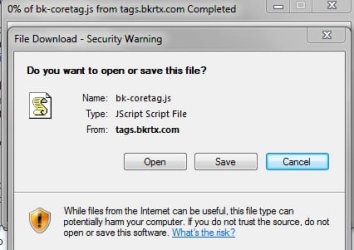
I have enabled EPM which did push an alert to me when opening IE after a reboot. It did state that a javascript was not compatible. Unfortunatley I didn't grab the entire script name because IE had closed out. I have attached a screen shot of a new pop up which now appears asking me to install.

When looking at resource manager I do not fully understand how to tell if it's 'making a connection'. I do however see multipule explorer.exe and uhobco.exe listed along with wine225.exe.

What would be the best course of action to take right now?

Thanks
-Steve
 

Attachments

  • task3.jpg
    task3.jpg
    35.1 KB · Views: 60

My Computer My Computer

At a glance

Windows 7 Home Premium 64-bit OSIntel(R) Core(TM)i5-2410M CPU @ 2.30GHz6.00 GB
Computer type
Laptop
Computer Manufacturer/Model Number
Asus - U56E Series
OS
Windows 7 Home Premium 64-bit OS
CPU
Intel(R) Core(TM)i5-2410M CPU @ 2.30GHz
Memory
6.00 GB
I would go ahead and do the offline scan with WDO.

What antivirus app are you using? I see LiveUpdate as a process. That is usually a Symantec/Norton app.
 

My Computer My Computer

At a glance

W7 Pro SP1 64biti78GBIntel HD Graphics
Computer type
Laptop
Computer Manufacturer/Model Number
Employer provided Dell Latitude
OS
W7 Pro SP1 64bit
CPU
i7
Memory
8GB
Graphics Card(s)
Intel HD Graphics
Hard Drives
crappy SSD
Antivirus
Employer mandated Symantec Endpoint Protection
Browser
Pale Moon 64bit, IE11 64bit & Chrome 64bit
Trying to get WDO to work. Having troubles booting via CD - will keep you posted.

Thank you so much for your advice and support.
-Steve.
 

My Computer My Computer

At a glance

Windows 7 Home Premium 64-bit OSIntel(R) Core(TM)i5-2410M CPU @ 2.30GHz6.00 GB
Computer type
Laptop
Computer Manufacturer/Model Number
Asus - U56E Series
OS
Windows 7 Home Premium 64-bit OS
CPU
Intel(R) Core(TM)i5-2410M CPU @ 2.30GHz
Memory
6.00 GB
Hello all and thank you UsernameIssues for your advice.

Ok update; I ran WDO and did a full scan along with a quick scan afterwards to ensure everything was picked up. It did find Virus OS/Rovinx.V along with a list of errors that came up with "java/sun". I did in fact update my java the same time I updated my macromedia flash. I'm fairly sure this was the reason for my laptop starting to flip out.

Although WDO has been run and found things. These have been cleaned and/or removed. I booted back up and I still have explorer.exe having memory problems.

Also - the pop up for me to download bk-coretag.js has stopped.

Any thoughts?

Thanks
-Steve
 
Last edited:

My Computer My Computer

At a glance

Windows 7 Home Premium 64-bit OSIntel(R) Core(TM)i5-2410M CPU @ 2.30GHz6.00 GB
Computer type
Laptop
Computer Manufacturer/Model Number
Asus - U56E Series
OS
Windows 7 Home Premium 64-bit OS
CPU
Intel(R) Core(TM)i5-2410M CPU @ 2.30GHz
Memory
6.00 GB
If you need java, then keep it (and keep it updated).

If you don't need java, uninstall it. If you don't know if you need java, uninstall it and see if you miss having it.

Please post a screenshot of the Network tab of Resource Monitor.
(Expand the Network Activity area and/or the TCP Connections area.)


Questions:
1) What antivirus app are you using? I see LiveUpdate as a process. That is usually a Symantec/Norton app

2) Does IE still hang when you close all visible IE windows? (It can take a minute or two for IE to leave RAM after all IE windows are closed.)
 

My Computer My Computer

At a glance

W7 Pro SP1 64biti78GBIntel HD Graphics
Computer type
Laptop
Computer Manufacturer/Model Number
Employer provided Dell Latitude
OS
W7 Pro SP1 64bit
CPU
i7
Memory
8GB
Graphics Card(s)
Intel HD Graphics
Hard Drives
crappy SSD
Antivirus
Employer mandated Symantec Endpoint Protection
Browser
Pale Moon 64bit, IE11 64bit & Chrome 64bit
Hi again UsernameIssues,

1) I have been using TrendMicro but it has expired. I used to have Norton in the past but TrendMicro made me uninstall it.

2) As long as I keep MSIE closed, it seems explorer.exe sits at about 90-110k. It's strange for the last 20 minutes it has not really increased yet this morning it was going up and down. It is not 'all the time' now.

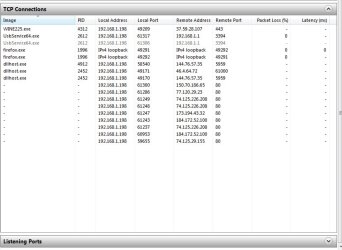
I have attached what I think is what you are looking to view. Is it?
- Edit, the amount of items listed on the attachment has been drastically reduced maybe by 100 after running WDO.

Thanks a lot,
- Steve
 

Attachments

  • task5.jpg
    task5.jpg
    65.4 KB · Views: 0

My Computer My Computer

At a glance

Windows 7 Home Premium 64-bit OSIntel(R) Core(TM)i5-2410M CPU @ 2.30GHz6.00 GB
Computer type
Laptop
Computer Manufacturer/Model Number
Asus - U56E Series
OS
Windows 7 Home Premium 64-bit OS
CPU
Intel(R) Core(TM)i5-2410M CPU @ 2.30GHz
Memory
6.00 GB
Go ahead and uninstall Symantec's/Norton's LiveUpdate. It runs all of the time and it is not doing you any good.

Also uninstall TrendMicro and install the free MSE for now. Look around MSE's settings and see if you can find the setting where you can tell MSE to only use a certain percentage of the CPU during scans. Change that setting to 10%. Also set MSE to do a quick scan everyday. Let me know if you cannot find these settings.

Have MSE do a full scan.


While MSE is doing a full scan, run Process Explorer that I linked to earlier. Let's see what we can find out about wine255.exe and why it is connecting to an ISP in France. WHOIS Search, Domain Name, Website, and IP Tools - Who.is

Please set Process Explorer to send file hashes to VirusTotal.
 

My Computer My Computer

At a glance

W7 Pro SP1 64biti78GBIntel HD Graphics
Computer type
Laptop
Computer Manufacturer/Model Number
Employer provided Dell Latitude
OS
W7 Pro SP1 64bit
CPU
i7
Memory
8GB
Graphics Card(s)
Intel HD Graphics
Hard Drives
crappy SSD
Antivirus
Employer mandated Symantec Endpoint Protection
Browser
Pale Moon 64bit, IE11 64bit & Chrome 64bit
Hello again,

I've completed the following;

>Uninstalled TrendMicro but could not find symantec's to uninstall.

>Downloaded and installed MSE. I set the CPU settings to 10% and have it scanning at the moment.

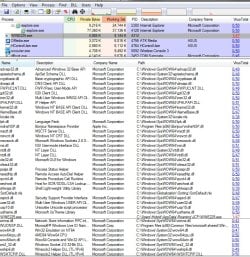
>I also did also run Process Explorer and I've attached my findings. I'm not sure what exactly your looking. I found the WINE255.exe and was able to show the DLLS in the bottom tab. I also looked up the file name on virustool.com here is the results;
https://www.virustotal.com/en/file/...c7182ce24aaa70cd40ab7b8e5f9efbc7117/analysis/

Should I go into the path where I can see wine255.exe and simply just delete it?

Thanks,
-Steve
 

Attachments

  • task9.jpg
    task9.jpg
    196.5 KB · Views: 0

My Computer My Computer

At a glance

Windows 7 Home Premium 64-bit OSIntel(R) Core(TM)i5-2410M CPU @ 2.30GHz6.00 GB
Computer type
Laptop
Computer Manufacturer/Model Number
Asus - U56E Series
OS
Windows 7 Home Premium 64-bit OS
CPU
Intel(R) Core(TM)i5-2410M CPU @ 2.30GHz
Memory
6.00 GB
Deleting a program (even a bad one) is not always the best thing to do for reasons that I'll not bore you with.

Since Malwarebytes found the app to be malicious, let's see if Malwarebytes can get rid of it for you. Install Malwarebytes from here: Download Malwarebytes Anti-Malware 1.75 - FileHippo.com

m1.png


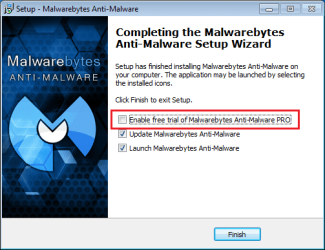
After the install is almost complete - you should see this:

m2.png

Uncheck that offer and let Malwarebytes update.

Wait for MSE to complete its scan before running Malearebyte's quick scan.

We do want to start with the quick scan to get rid of things that might hamper a full scan.


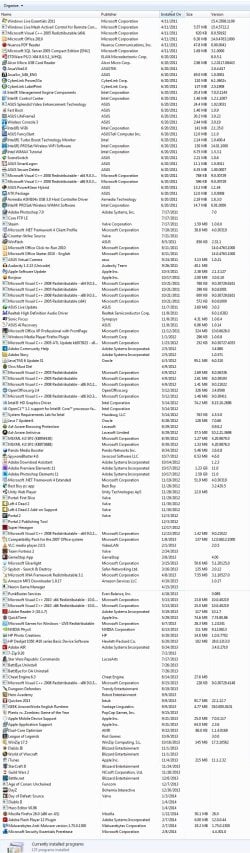
Go to Programs and Features and make several screenshots to show every program that is installed. You can omit showing any program that you don't want shown to the public.
 

My Computer My Computer

At a glance

W7 Pro SP1 64biti78GBIntel HD Graphics
Computer type
Laptop
Computer Manufacturer/Model Number
Employer provided Dell Latitude
OS
W7 Pro SP1 64bit
CPU
i7
Memory
8GB
Graphics Card(s)
Intel HD Graphics
Hard Drives
crappy SSD
Antivirus
Employer mandated Symantec Endpoint Protection
Browser
Pale Moon 64bit, IE11 64bit & Chrome 64bit
So, I have malwarebytes downloaded but I'm still waiting on MSE to complete the scan. It's been a little over two and a half hour and still going. Is this normal?
 

Attachments

  • task12.jpg
    task12.jpg
    30.8 KB · Views: 0

My Computer My Computer

At a glance

Windows 7 Home Premium 64-bit OSIntel(R) Core(TM)i5-2410M CPU @ 2.30GHz6.00 GB
Computer type
Laptop
Computer Manufacturer/Model Number
Asus - U56E Series
OS
Windows 7 Home Premium 64-bit OS
CPU
Intel(R) Core(TM)i5-2410M CPU @ 2.30GHz
Memory
6.00 GB
The speed of the scan for MSE is determined by the speed of the hard drive, how much stuff that there is to scan and how many other things that you are doing the on the computer at the same time. I had you set MSE to only use 10% so that you could do other things on the computer (if need be). If you want, you can set that percentage to 100% or to the default of 50%... but the CPU might not be the limiting factor - hard drive speed is probably what will determine the scan time. You can just leave it overnight.

Normally, I would not have had you download/install Malwarebytes while another scan is in progress, but I was going to be away from the forums for a few hours and I wanted you to be ready to move on to the next step in case the MSE scan went quickly. If your laptop had an SSD, the scan might have completed by now.

Another thing that slows scans down:
MSE's default settings will scan inside of compressed files (like zip and cab files). This requires CPU time to unpack those files and check them. (At least I think that is what happens.) And then there are temporary files. I've cleaned up computes that have more than 6GB of temp files. Most of them compressed files left over from past software installations. While it would be quicker if we removed the temp files first, sometimes these temp files offer us insight about malware on the computer.
 

My Computer My Computer

At a glance

W7 Pro SP1 64biti78GBIntel HD Graphics
Computer type
Laptop
Computer Manufacturer/Model Number
Employer provided Dell Latitude
OS
W7 Pro SP1 64bit
CPU
i7
Memory
8GB
Graphics Card(s)
Intel HD Graphics
Hard Drives
crappy SSD
Antivirus
Employer mandated Symantec Endpoint Protection
Browser
Pale Moon 64bit, IE11 64bit & Chrome 64bit
Understood, I'm letting it go through the process and then will run maleware bytes. Thanks for the explanation.

In the meantime, attached is a list of the installed programs.

Thanks,
-Steve
 

Attachments

  • task15.jpg
    task15.jpg
    397.3 KB · Views: 5

My Computer My Computer

At a glance

Windows 7 Home Premium 64-bit OSIntel(R) Core(TM)i5-2410M CPU @ 2.30GHz6.00 GB
Computer type
Laptop
Computer Manufacturer/Model Number
Asus - U56E Series
OS
Windows 7 Home Premium 64-bit OS
CPU
Intel(R) Core(TM)i5-2410M CPU @ 2.30GHz
Memory
6.00 GB
Thanks for the list of apps.

I would uninstall Core FTP LE - unless you use it.
If you do use it, then consider updating it.

I see that you have SpywareBlaster 4.6 installed. If you are going to use an app like this, then you need to keep it up to date. SpywareBlaster 5.0 has been out for a while now. You will need to manually check for updates a few times each week or buy the software to get automatic updates.

Pando Media Booster is questionable. If you know that you have to have it for a game, them keep it (for now).


Uninstall:
Java 6 Update 31 - if you must have Java, update to the latest.
Ad-Aware Antivirus (it is best to only have one antivirus app installed)
Ad-Aware Browsing Protection
Best Buy PC app
Adobe Reader 10 (install version 11)
Adobe Air (you can put it back if some other app complains that it is gone)

If you have a lot of plugins added to Firefox, the just update Firefox to version 27. If you don't use Firefox much, then consider moving to a 64bit version of Firefox for better security. I use Pale Moon, but there are other good ones too. Or, just uninstall Firefox all together.

I like IE and its security features, but it is very important to keep things like Java and Flash up to date. You might want to consider using Chrome as your default browser because it should update itself and Flash automatically.

I also suggest the people keep two browsers in case one gets hosed:
IE, Firefox, Chrome (pick two :-)
 

My Computer My Computer

At a glance

W7 Pro SP1 64biti78GBIntel HD Graphics
Computer type
Laptop
Computer Manufacturer/Model Number
Employer provided Dell Latitude
OS
W7 Pro SP1 64bit
CPU
i7
Memory
8GB
Graphics Card(s)
Intel HD Graphics
Hard Drives
crappy SSD
Antivirus
Employer mandated Symantec Endpoint Protection
Browser
Pale Moon 64bit, IE11 64bit & Chrome 64bit
Hi again,

Pando Media and Spyware Blaster have been removed along with not only the list you provided but a handful of programs I have not used within the last 6 months. Core FTP is updated to latest version and I must keep that as I use it on a daily basis.

I don't have many plugins for Frefox but i am downloading Chrome in just a bit and will switch over and try that out.

Thoughts on opera? I use it on another laptop and I like it.

Still waiting for MSE to finish :)

Thanks again,
-Steve
 

My Computer My Computer

At a glance

Windows 7 Home Premium 64-bit OSIntel(R) Core(TM)i5-2410M CPU @ 2.30GHz6.00 GB
Computer type
Laptop
Computer Manufacturer/Model Number
Asus - U56E Series
OS
Windows 7 Home Premium 64-bit OS
CPU
Intel(R) Core(TM)i5-2410M CPU @ 2.30GHz
Memory
6.00 GB
Hi again,

So I ran MSE all night to wake up and have my laptop shut off. I attempted to reboot it but it's just going to the main "asus" screen and before it goes into the windows loading screen. It just auto-resets it self. I've tried to boot it into safe mode but I am unsuccessful with doing that.

I'm trying to get it started, as of now this event has taken a turn for the worse.

Thanks,
- Steve
 

My Computer My Computer

At a glance

Windows 7 Home Premium 64-bit OSIntel(R) Core(TM)i5-2410M CPU @ 2.30GHz6.00 GB
Computer type
Laptop
Computer Manufacturer/Model Number
Asus - U56E Series
OS
Windows 7 Home Premium 64-bit OS
CPU
Intel(R) Core(TM)i5-2410M CPU @ 2.30GHz
Memory
6.00 GB
Back
Top